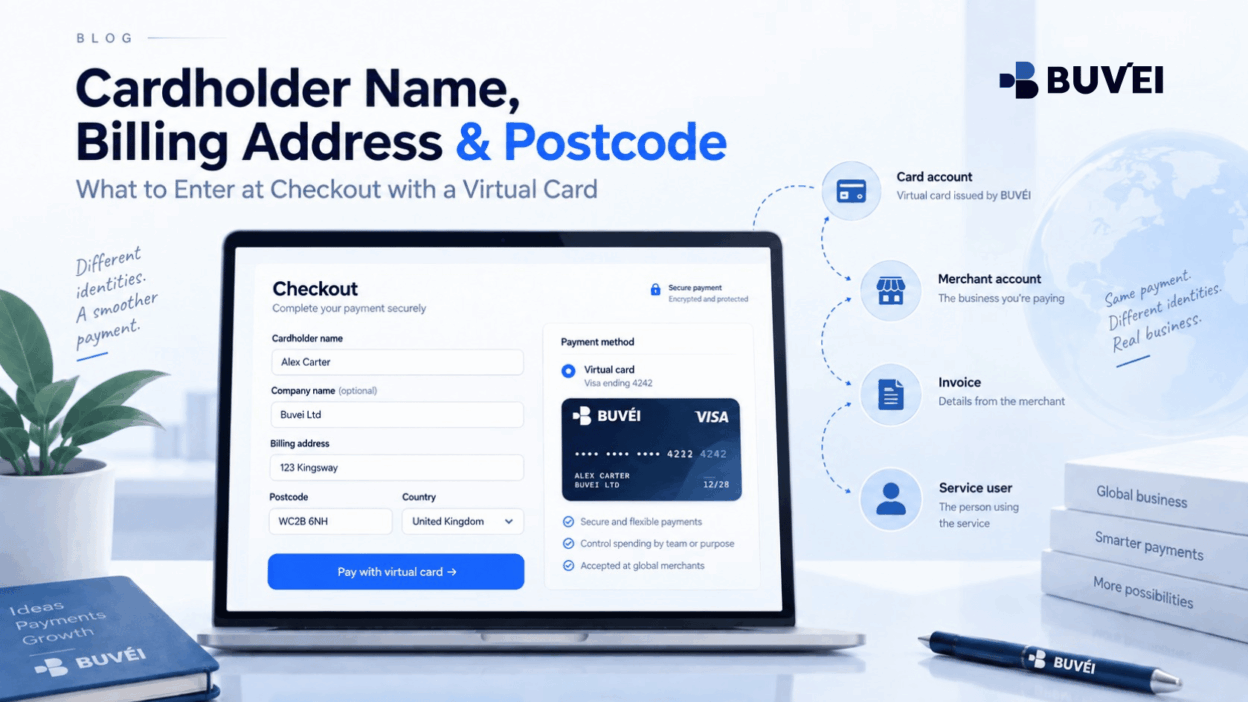
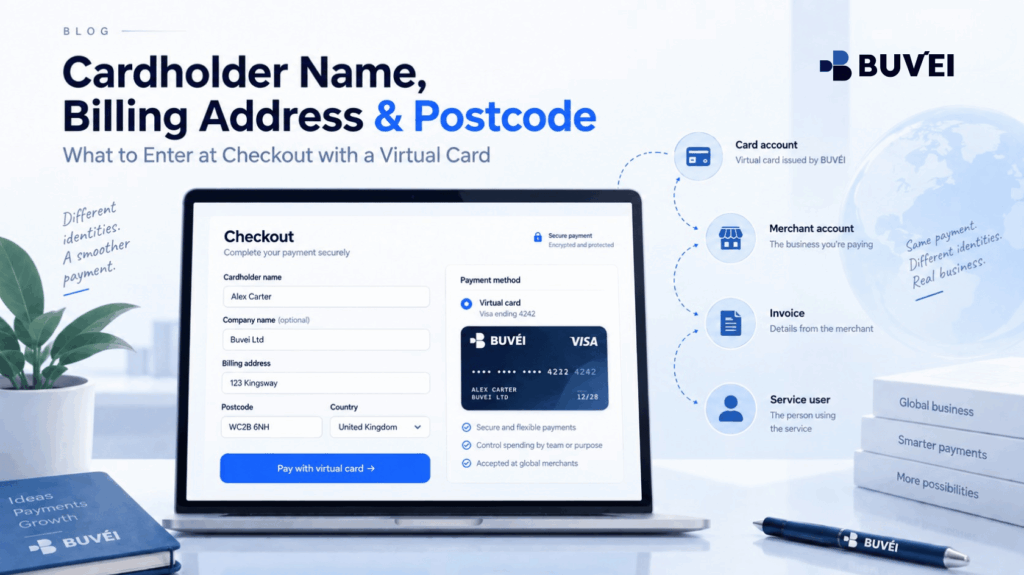
A virtual card can be active, funded, and ready for online payments, yet the checkout process can still feel unexpectedly confusing.
The page may ask for a cardholder name, billing address, postcode, company name, country, email address, and sometimes even a tax number.
These fields do not always describe the same person or entity.
Entering the same information everywhere is not necessarily correct, and inventing details simply to get a checkout form to accept them can create more problems than the original payment issue.
The practical rule is simple:
Each field should describe the information the merchant is actually requesting.
Card details should come from the card account. Customer and company information should reflect the real purchaser and merchant profile. Delivery details should describe where a physical item should be sent. Tax information should belong to the person or legal entity receiving the invoice.
These records may be related, but they are not automatically identical.
A successful checkout should rely on consistent and accurate information, not invented names, addresses, postcodes, or regions.
Why Checkout Fields Are More Complicated Than Card Details
Online checkout forms often need to serve several systems at once.
The merchant may need information to:
- Create an order
- Calculate applicable taxes
- Issue a receipt or invoice
- Deliver the service or product
- Assess payment risk
- Submit the card authorisation through its payment processor
Because of this, a field that looks like ordinary contact information may serve more than one purpose.
The payment card itself usually provides:
- Card number
- Expiry date
- Security code
- Account-associated name or label
The merchant may then request additional information that is not stored in the card number itself.
For example, a billing country may affect:
- Which merchant entity sells the service
- Which currency is displayed
- Which tax rules apply
- Which regional terms are shown
A postcode may be used for payment verification, invoicing, or simply because the checkout form was originally designed around a physical address.
This is why there is no responsible universal answer such as:
“Always enter your company name.”
or:
“The address only needs to look local.”
The correct information depends on the card configuration, account type, merchant profile, country, and the exact purpose of the field.
The safest approach is to use accurate information and confirm with the card provider or merchant whenever a field is unclear.
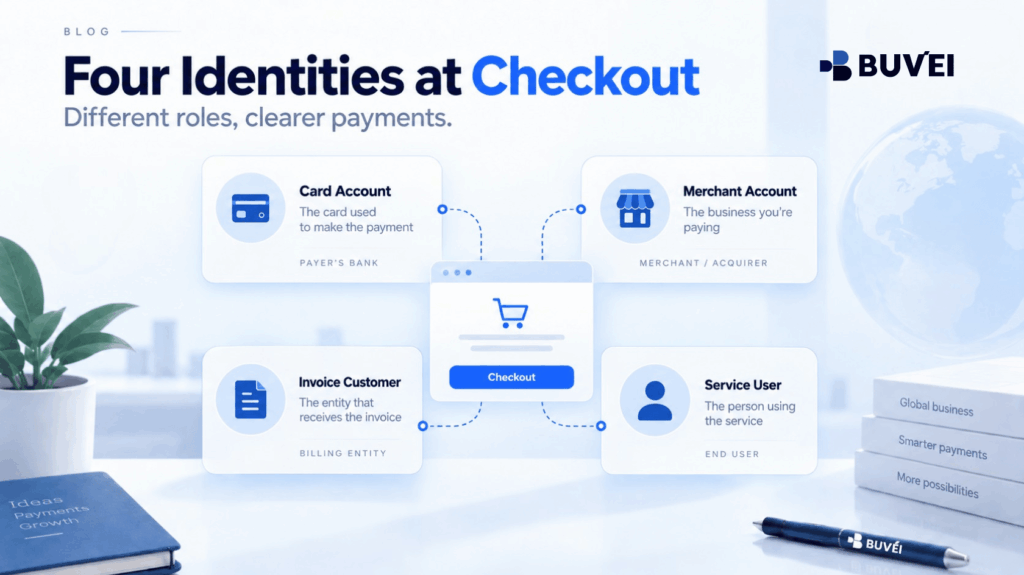
Separate the Four Identities at an Online Checkout
Most confusion disappears when the purchaser separates four different identities before entering payment details.
They may belong to the same person, but business payments often involve different owners.
The Card Account
This is the card or account configuration from which the payment is authorised.
It provides:
- Card number
- Expiry date
- Security code
- Supported billing information
- Any cardholder name the provider expects to be used
The Merchant Account
This is the customer profile on the website or application.
It may belong to:
- An employee
- A shared company email
- A client project
- The legal company purchasing the service
The Invoice Customer
This is the person or legal entity that should appear on the commercial invoice.
A business invoice may require:
- Legal company name
- Registered address
- Tax details
These details may be different from an employee's personal contact information.
The Service User or Recipient
This is the person or team receiving:
- Software access
- Digital products
- Bookings
- Physical deliveries
The recipient is not necessarily the cardholder or invoice customer.
For example, if a Hungarian design company purchases software for an employee:
- The employee may be the service user
- The company may be the invoice customer
- A shared finance email may own the merchant account
- The virtual card may have provider-confirmed billing information
Keeping these roles separate makes both payment management and month-end reconciliation easier.
What “Cardholder Name” Usually Means
The cardholder name field normally appears beside the card number.
It should generally be completed using the name associated with the card or card account, following the provider's instructions.
It is not automatically:
- The person sitting at the computer
- The company name on the invoice
- The employee who requested the purchase
- An internal card label
Some virtual cards are associated with an individual account holder.
Others are business products where cards may be issued under:
- A company account
- Employee profile
- Project
- Internal card label
For example:
Client A Ads
may be useful internally for identifying a card.
However, that does not necessarily mean Client A Ads belongs in the cardholder-name field.
Internal card labels and payment identity are different things.
Use Latin characters when required by the merchant or card provider, but do not create a different identity simply because the checkout page is in English.
If a name is normally written in another script, transliteration may be appropriate as long as it remains consistent with the account information.
If the card provider displays a specific cardholder name, follow that information rather than guessing.
Personal Purchase
For a personal merchant account and a virtual card issued to an individual, the cardholder name will often be the individual's account-associated name.
In that case, the customer name and billing name may be the same.
However, billing information should still be distinguished from a delivery address when physical goods are involved.
Company Purchase
For a company purchase, the legal company name may belong in the company or invoice field, while the cardholder-name field should follow the card provider's information.
If an employee is an authorised card user, the merchant may separately request that person's contact name.
All of these details can be legitimate without being identical.
Agency or Client Payment
An agency paying for a client's service should not simply replace every checkout field with the client's name.
The following need to reflect the actual commercial relationship:
- Merchant account owner
- Contractual purchaser
- Invoice recipient
- Card account
- Service user
If the client owns the merchant account but the agency is authorised to pay, that authorisation and invoice arrangement should be clear before checkout.
Billing Address Is Not the Same as Delivery Address
A billing address is generally associated with the payment account or invoice customer, depending on how the merchant has designed the checkout form.
A delivery address tells the merchant where a physical item or on-site service should be delivered.
For digital purchases, there may be no delivery address at all.
However, the checkout may still request a billing address for purposes such as:
- Creating an invoice
- Determining regional eligibility
- Supporting payment validation
Users should rely on the billing information confirmed by the virtual-card provider for the relevant card configuration.
If the merchant separately asks for the company's registered address for invoicing, enter the company's real legal information.
A provider-supported billing address does not change the company's legal residence or tax position.
It is payment information, not evidence of where a company is legally established.
Likewise, do not enter a random local address simply to imitate the merchant's preferred country.
Invented details may conflict with:
- Merchant account information
- Tax records
- Identity verification
- Refund requests
- Account reviews
- Future support cases
Even when a checkout initially accepts incorrect information, the inconsistency may become a problem later during renewal or account verification.
How to Handle Postcode, City, State, and Country Fields
Postcode forms are often designed around one country's address format.
For example, a European customer may encounter:
- A mandatory “State” field even though their country does not normally use states
- A five-digit postcode requirement that does not match their country's postal format
The first step should be to confirm that the correct billing country is selected.
Many checkout forms only update their address validation rules after the country field has been changed.
If the page still requires an impossible format, do not change the country or invent a fictional postcode simply to continue.
Instead:
- Check the merchant's help centre
- Contact billing support
- Ask whether an international checkout is available
- Ask whether there is a business billing form
The meaning of the country field also needs to be interpreted carefully.
It may refer to:
- Card billing country
- Customer residence
- Company registration
- Service region
- Delivery country
- Tax location
Read the field label and surrounding instructions.
If the merchant asks:
“Where is your business registered?”
the answer should come from the business registration—not from the card.
If it asks for the card billing country, use the information provided for the card configuration.
Company Name and Tax Fields Belong to the Invoice Profile
Business checkout forms often include an optional company-name field and VAT or tax-number field.
These fields should describe the actual business purchasing the service and receiving the invoice.
A virtual card does not create a company relationship by itself.
Likewise, paying with a company-controlled card does not automatically correct an invoice issued to an employee's personal merchant profile.
Before paying, review the merchant's billing profile and confirm:
- Legal company name
- Address
- Tax information
If a field is optional and the purchase is genuinely personal, leaving it blank may be appropriate.
If the business needs a company invoice, complete the merchant billing profile accurately before payment instead of trying to correct the invoice afterwards.
Tax treatment varies by jurisdiction and transaction type.
The card provider does not determine:
- Whether a VAT number is valid
- Which tax should apply
- How the merchant should invoice the service
If the merchant rejects valid business information or the tax treatment appears incorrect, contact the merchant or a qualified accountant.
Do not manipulate the card billing country simply to produce a preferred tax result.
A Field-by-Field Decision Table
| Checkout field | What it normally describes | Where to verify it |
|---|---|---|
| Card number, expiry, security code | The virtual card being used | Secure card view in the provider account |
| Cardholder name | Name associated with the card or authorised card user | Provider instructions or displayed card details |
| Billing address and postcode | Payment or invoice billing information depending on the form | Card provider and merchant field description |
| Company legal name | Business purchasing the service | Company registration and merchant billing profile |
| VAT or tax number | Registered identifier of the invoice customer | Official company records or accountant |
| Delivery address | Where goods or on-site services should be delivered | Actual recipient |
| Email and phone | Order, account, verification, or support contact | Merchant account owner and internal company policy |
The phrase “normally describes” is important.
Checkout forms are not perfectly standardised.
One merchant may reuse a single address block for both payment and invoicing, while another may separate them.
Treat each checkout field as a factual question rather than assuming there is one universal combination.
How Autofill Creates Silent Mistakes
Browser and password-manager autofill can create problems without the user noticing.
It may automatically insert:
- An old personal address
- A previous company name
- A delivery postcode
- An outdated billing country
This is particularly common when the same browser profile is used for both personal and business purchases.
Before confirming a business payment, review the entire order summary.
Check:
- Customer name
- Company
- Country
- Postcode
- Currency
- Tax
- Total
- Renewal terms
If autofill has overwritten provider-confirmed billing information, correct it before submitting the payment.
Avoid storing sensitive card information in ordinary shared browser profiles.
Teams should use approved payment-provider controls and secure access-management processes.
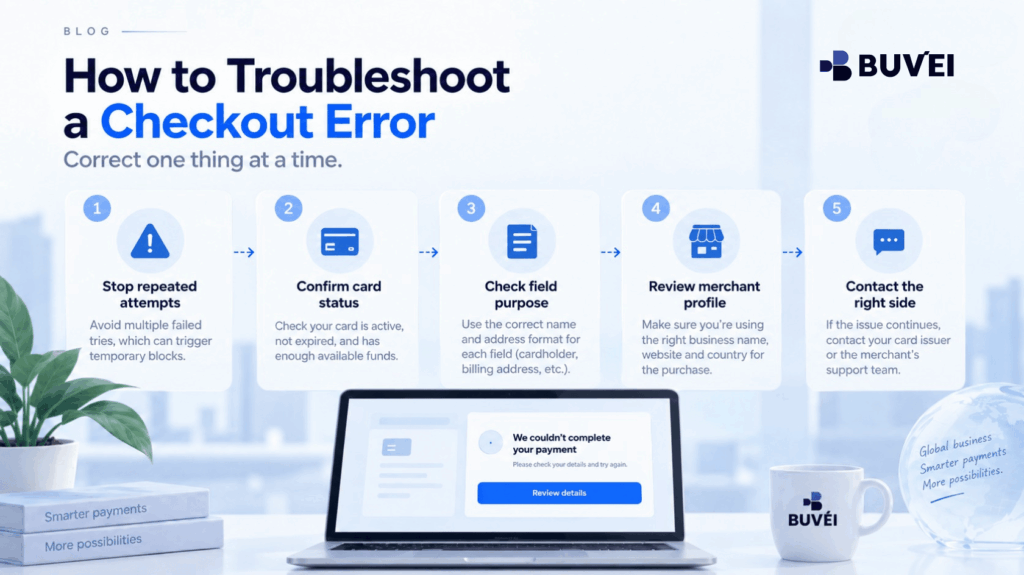
A Controlled Way to Troubleshoot an Address or Name Error
When a checkout rejects cardholder or billing information, avoid repeatedly changing random fields.
Use a controlled process:
- Stop repeated attempts. Record the exact error message and time.
- Confirm card status. Make sure the card is active, sufficiently funded, and appropriate for the transaction.
- Read each field carefully. Separate card billing information from customer, company, tax, and delivery information.
- Review the merchant profile. Confirm that the account country and company information reflect the real purchaser.
- Remove incorrect autofill. Re-enter confirmed information.
- Make one controlled attempt. Keep the device, account, currency, and amount consistent.
- Contact the appropriate party. Ask the card provider about card-associated billing information and the merchant about its customer or invoice fields.
A generic decline does not automatically mean the billing address is wrong.
Other possible causes include:
- Authentication
- Merchant card acceptance
- Account region
- Card configuration
- Risk controls
- Merchant payment policies
Do not keep changing identity information simply because the merchant does not provide a detailed decline reason.
Three Practical European Examples
A Hungarian Freelancer Buying a German Design Tool
The freelancer's merchant account is personal but used for self-employed work.
The cardholder-name field follows the virtual-card account information.
The invoice profile uses the freelancer's real business and tax information where applicable.
The service user is the same person, so most identities align.
The freelancer keeps the original invoice and card transaction record for accounting purposes without assuming that the card's billing information determines VAT treatment.
A Portuguese Company Buying Software for a Remote Employee
The employee requests access to the software, while finance manages the merchant billing profile and virtual card.
The employee's business email receives the software invitation.
The company's legal name and address appear on the invoice.
The cardholder and billing fields follow the virtual-card provider's instructions.
The company records the employee as the service user—not as the owner of the payment relationship.
An Agency Paying Inside a Client-Owned Platform
The client owns the advertising or software account, while the agency has written authority to manage the project and payment.
Before adding a card, both parties agree on:
- Who receives the supplier invoice
- How the expense is billed to the client
- Who controls the merchant account
The agency does not replace its own card-account details with the client's identity.
It keeps the client authorisation, merchant receipt, and internal project reference together.
Where Buvei Fits
Buvei provides virtual-card information and card-level visibility for supported online-payment scenarios.
Users should follow the billing information and cardholder guidance displayed for the relevant Buvei account and card configuration.
Available cards, regions, limits, and merchant suitability may vary.
When asking support for assistance, it is better to ask a specific question such as:
“Which billing details should I use for this card configuration and this legitimate merchant account?”
Buvei does not control the merchant's:
- Customer profile
- Company fields
- Delivery information
- Tax information
Nor can Buvei guarantee that a merchant will accept a particular card or account configuration.
The division of responsibility is straightforward:
Use Buvei to confirm card-side information and transaction status. Use the merchant to confirm account, invoice, and service requirements.
Common Mistakes to Avoid
- Entering an internal card label as the cardholder name without checking provider guidance
- Using a random address or postcode to imitate another country
- Putting an employee's name on a company invoice simply because they requested the purchase
- Assuming the card billing country determines company residence or VAT treatment
- Allowing browser autofill to insert old personal information
- Changing multiple fields after every decline
- Sending full card numbers, CVVs, passwords, or one-time codes to support
When Payment and Invoice Addresses Are Both Requested
Some business checkout forms request:
- Payment address
- Invoice address
- Shipping address
- Company address
- Service address
Do not automatically duplicate the same address into every field.
The payment or billing address should follow the appropriate card-side information where the provider supplies one.
The invoice address should identify the customer receiving the commercial invoice.
The delivery or service address should describe where the goods or service will actually be delivered.
If the merchant provides only one address field, check its label and help documentation.
Do not create a hybrid address by combining details from different records.
Build a Reusable Checkout Profile Without Storing Secrets
For frequently used suppliers, businesses can maintain a record of the successful non-sensitive checkout configuration.
For example:
- Merchant account name
- Legal customer name
- Invoice address
- Billing-address source
- Cardholder-name convention
- Country
- Date last verified
Store this information in an approved finance or procurement system.
Do not store:
- Full card number
- CVV
- Password
- OTP
- Recovery codes
Review the configuration whenever there is:
- An office move
- Legal-entity change
- Account migration
- Card replacement
- Regional billing change
A checkout configuration that worked previously may no longer match current business or merchant information.
Escalate With Evidence, Not Card Secrets
When a checkout rejects an address or postcode, provide support with useful non-sensitive information.
For example:
- Merchant name
- Checkout country
- Field labels
- Date and time
- Amount and currency
- Exact error message
- Whether authentication occurred
- Which approved billing-information source was used
Screenshots can be helpful as long as sensitive card and personal information is hidden.
Ask the merchant what format its field expects.
Ask the card provider which billing information applies to the specific card configuration.
Make one controlled correction at a time.
Changing the name, street, country, postcode, card, browser, and merchant account simultaneously makes troubleshooting much harder and may trigger additional reviews.
Finally, remember that accurate address information does not guarantee merchant acceptance.
Other factors may still affect the transaction, including account eligibility, authentication, merchant policy, and risk controls.
Final Takeaway
A checkout form is not repeatedly asking the same identity question.
It is collecting several types of information:
- Card information
- Customer information
- Invoice information
- Contact details
- Delivery information
Treat each field according to its actual purpose.
Use provider-confirmed information for the virtual card, real legal information for the invoice customer, and accurate account information for the merchant service.
If the checkout form cannot accurately represent those details, stop and ask for clarification.
A clean and consistent payment profile is much easier to support, renew, refund, reconcile, and explain than a checkout that only succeeded because several fields were invented.