Subscribing to OpenAI’s ChatGPT Plus or other paid services is convenient for accessing advanced AI features. However, many users face payment failures when using virtual cards—especially those issued by providers that are not optimized for subscription platforms. Understanding why these failures occur and how to prevent them can save both time and frustration.
This guide explains how OpenAI processes subscription payments, common reasons for virtual card declines, and provides a step-by-step virtual card fix checklist using Buvei to ensure uninterrupted ChatGPT access.
How OpenAI Handles ChatGPT Subscription Payments
OpenAI uses a recurring billing system for ChatGPT subscriptions:
-
Initial card authorization to confirm validity
-
Monthly recurring charges based on the subscription plan
-
Periodic reauthorization if card details or transaction patterns change
-
Fraud and risk checks based on BIN region, card type, and transaction history
Because these subscriptions are recurring, the platform prefers stable and consistent payment methods.
Why Virtual Card Payments Fail on ChatGPT
Virtual cards are generally supported, but failures are common due to configuration or compatibility issues:
-
Insufficient balance at the time of subscription renewal
-
BIN mismatch, especially non-US BINs, which may trigger verification flags
-
Short-lived or disposable cards that lack a long-term billing history
-
Transaction restrictions, such as single-use limits or merchant-specific blocks
These issues can result in declines even if the card works for one-time purchases.
The Most Common ChatGPT Payment Failure Scenarios
Some typical scenarios where virtual card payments fail include:
-
Renewal attempts fail even though the card initially worked
-
The card is declined during the first subscription setup due to regional verification
-
Payment succeeds but subscription status shows pending or failed
-
Frequent card replacement interrupts the automatic billing cycle
Understanding these scenarios helps in preemptively configuring your virtual card for long-term reliability.

Virtual Card Fix Checklist for ChatGPT Subscriptions
To prevent subscription interruptions, follow this checklist:
-
Use a dedicated virtual card exclusively for ChatGPT payments
-
Maintain a buffer above the subscription amount in case of taxes or exchange fees
-
Select a stable BIN region, preferably US BIN, for higher compatibility
-
Avoid frequent card replacements to keep the recurring billing stable
-
Monitor expiration dates and renew cards in advance
This approach ensures your ChatGPT subscription remains active and uninterrupted.
How to Set Up a Reliable Virtual Card with Buvei for ChatGPT
Buvei provides an easy, secure way to issue virtual cards compatible with subscription platforms like ChatGPT.
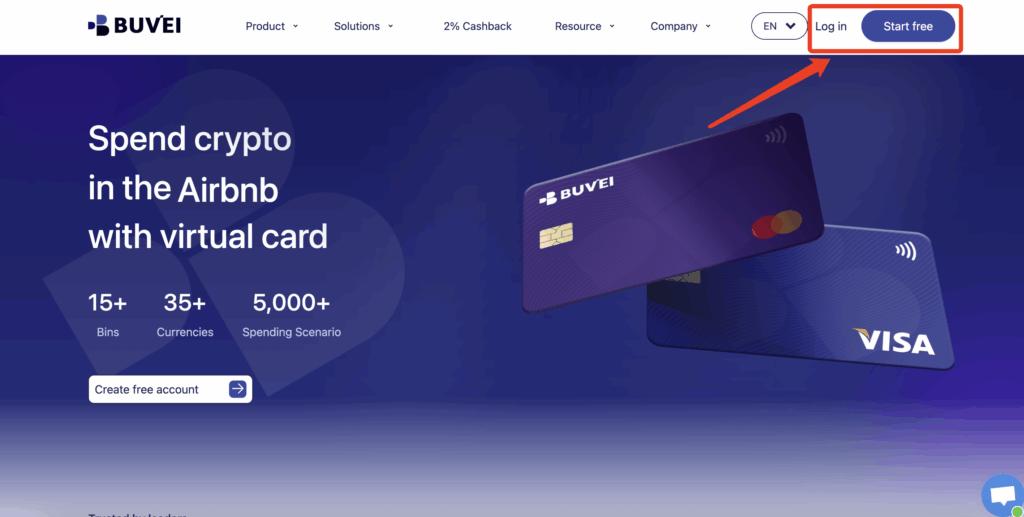
Step 1: Register a Buvei Account
-
Visit https://buvei.com and create a free account
-
Complete email verification
-
Log in to access the Buvei dashboard, where wallets and virtual cards are managed
Step 2: Fund Your Buvei Wallet
-
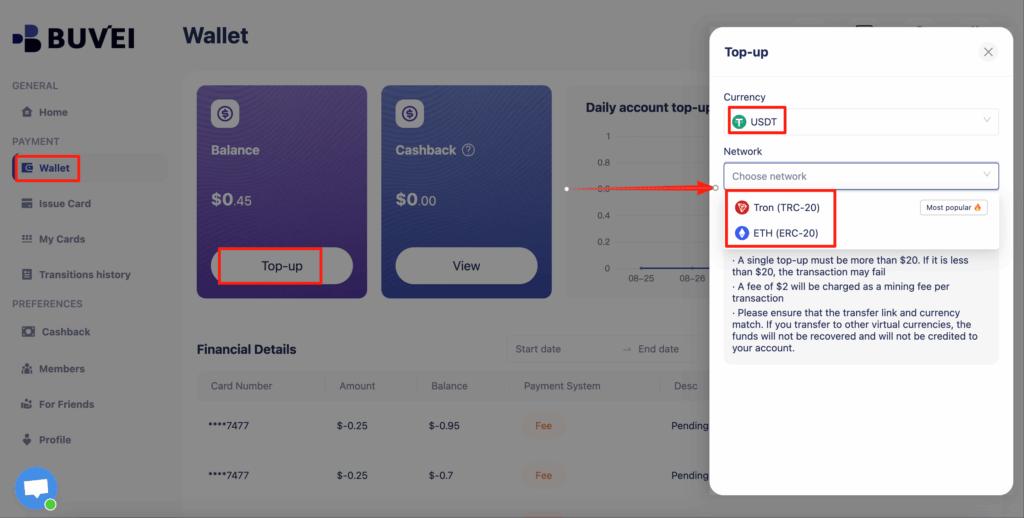
Go to the Wallet tab
-
Select USDT (TRC20 or ERC20) as your funding method
-
Buvei will generate a dedicated deposit address
-
Copy the address and send your funds; once confirmed on-chain, your balance becomes available immediately
Step 3: Create Your Virtual Card
-
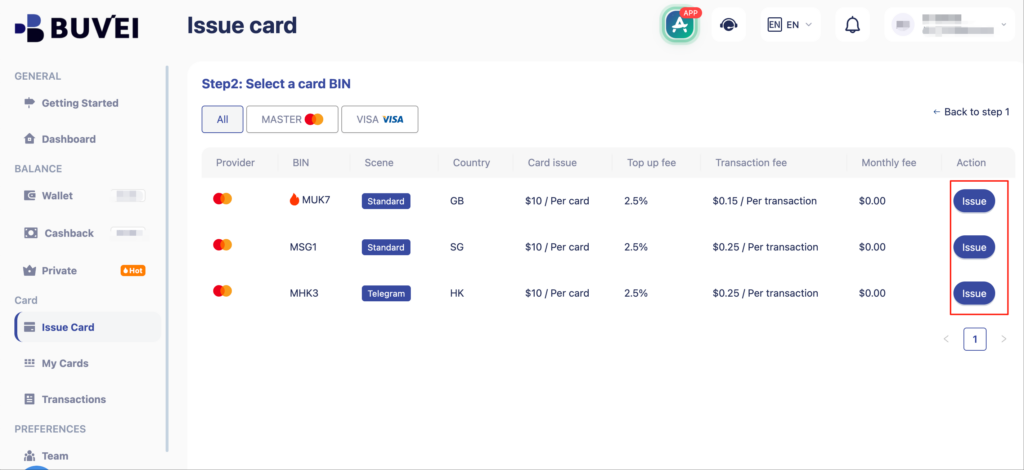
Navigate to the Cards section and click Create Card

-
Configure the card:
-
Select BIN (recommended for ChatGPT)
-
Choose your card type
-
Enter card name, funding amount, and number of cards
-
-
Click Issue Card to complete issuance

Step 4: Use the Virtual Card for ChatGPT
-
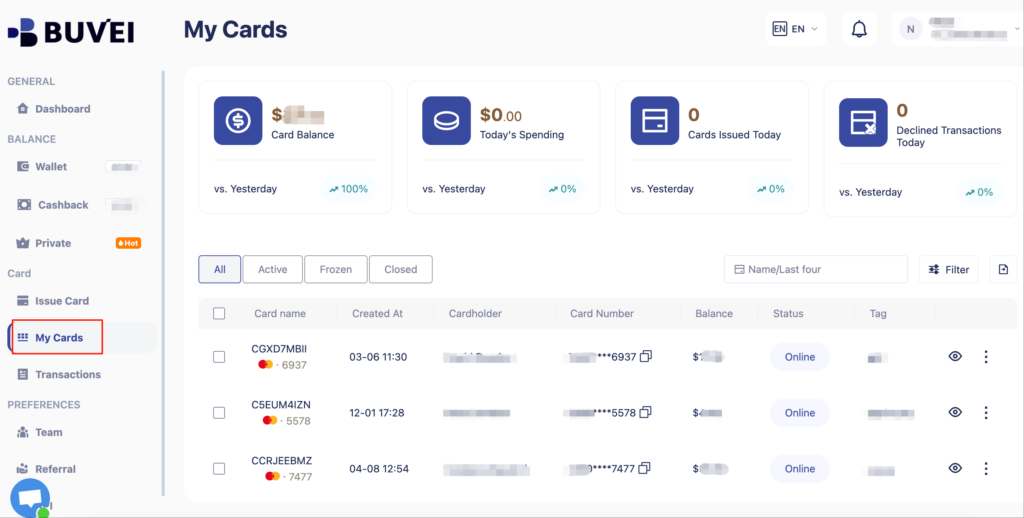
Go to My Cards to view your card number, expiration date, and CVV
-
Add these details to your OpenAI / ChatGPT billing settings
-
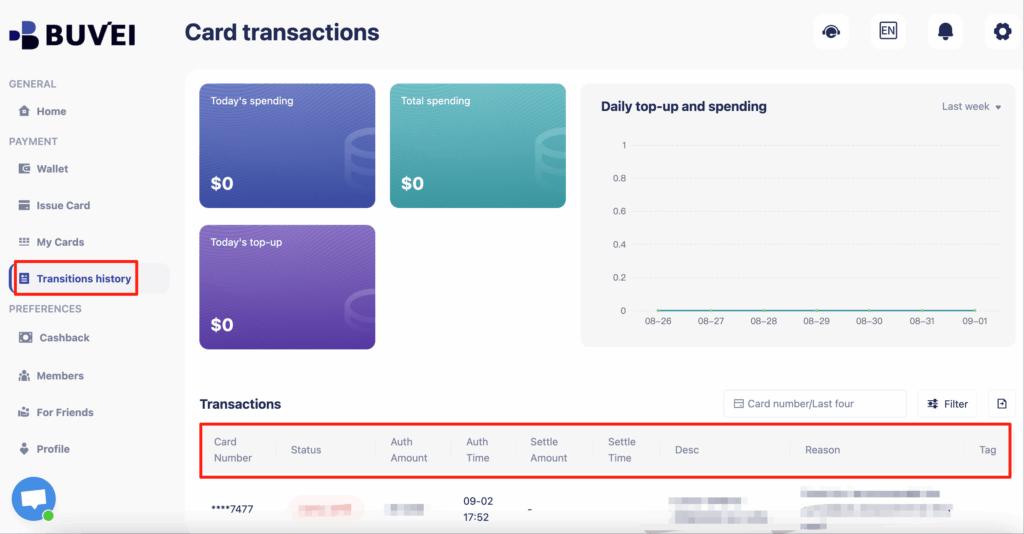
From the same page, you can monitor balances, top-ups, and all transaction activity for long-term subscription management
Final Thoughts
Virtual cards offer a secure and flexible solution for managing OpenAI / ChatGPT subscriptions without exposing your primary bank card.
With Buvei, you can issue US BIN virtual cards, fund them using stablecoins, and manage all subscription payments from a single dashboard. For users who value control, privacy, and uninterrupted access to AI tools, virtual cards are the smartest way to maintain reliable ChatGPT subscriptions.