Etsy sellers rely on uninterrupted billing to keep listings active and ads running.
However, many sellers run into payment issues when trying to use virtual cards for Etsy fees.
Declined payments can pause ads, limit shop visibility, or even put accounts at risk. The good news is that Etsy does allow virtual cards—but only if they behave like a stable, traditional payment method.
This guide explains how Etsy charges seller fees, why virtual cards often fail, and how to set up a reliable virtual card solution using Buvei.

How Etsy Charges Seller Fees and Ads
Before choosing a payment method, it’s important to understand Etsy’s billing model.
Etsy Uses Recurring and Accumulated Charges
Etsy does not charge sellers per transaction in real time. Instead, it:
-
Accumulates seller fees
-
Runs automatic charges once a threshold is reached
-
Bills monthly for outstanding balances
These charges can vary depending on:
-
Listing fees
-
Transaction fees
-
Etsy Ads spend
-
Currency conversion
This variability is what causes many virtual cards to fail.
Billing Happens Automatically
Etsy charges the saved payment method without manual approval.
If the charge fails:
-
Ads may stop
-
Listings may be limited
-
Etsy may request an updated payment method
Reliability matters more than flexibility here.
Why Virtual Cards Get Declined on Etsy
Virtual cards fail on Etsy for a few predictable reasons.
Authorization Holds Are Not Supported
Etsy sometimes uses authorization checks before final billing.
Some virtual cards:
-
Decline temporary holds
-
Only allow fixed-amount transactions
When this happens, Etsy marks the card as unreliable.
Spending Limits Are Too Restrictive
Another common issue is overly tight limits.
For example:
-
Card limit matches last month’s fees
-
No buffer exists for ads or currency changes
Even a small difference can trigger a decline.
BIN Stability Matters
Etsy evaluates:
-
Card network reputation
-
Issuer consistency
-
Past approval behavior
Low-quality or unstable BINs are more likely to fail recurring charges.

Using Buvei Virtual Cards for Etsy Seller Payments
Sellers who need predictable billing behavior often use Buvei virtual cards.
Why Buvei Works for Etsy Sellers
Buvei virtual cards are designed for recurring platform charges.
Key advantages include:
-
Stable Visa and Mastercard BINs
-
Support for authorization holds
-
Adjustable balances and limits
-
Multiple cards under one account
This makes them suitable for Etsy’s automated billing system.
Step-by-Step: How to Set Up a Buvei Card for Etsy
Below is a practical workflow sellers follow to avoid billing interruptions.
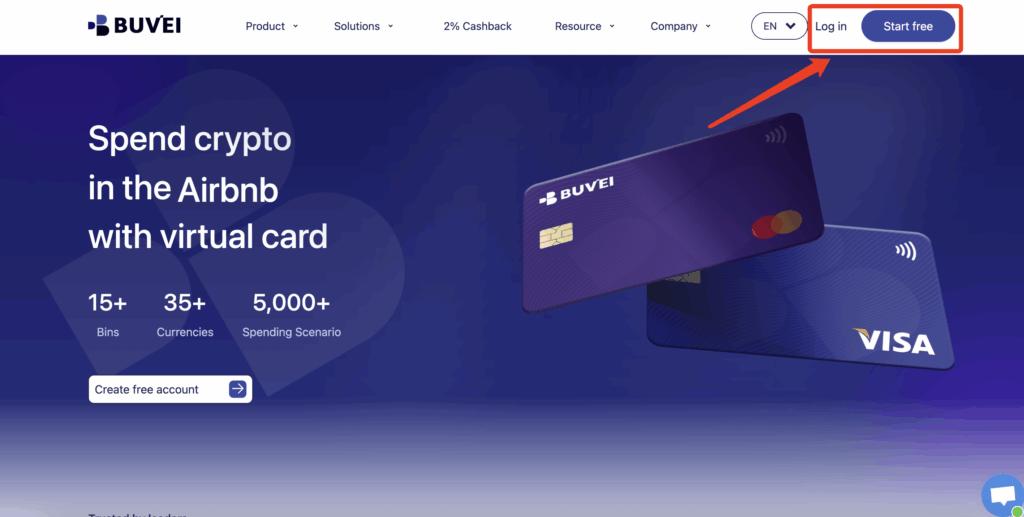
Step 1: Register a Buvei Account
-
Visit https://buvei.com
-
Create a free account
-
Verify your email address
-
Log in to the Buvei dashboard
The process is quick and beginner-friendly.
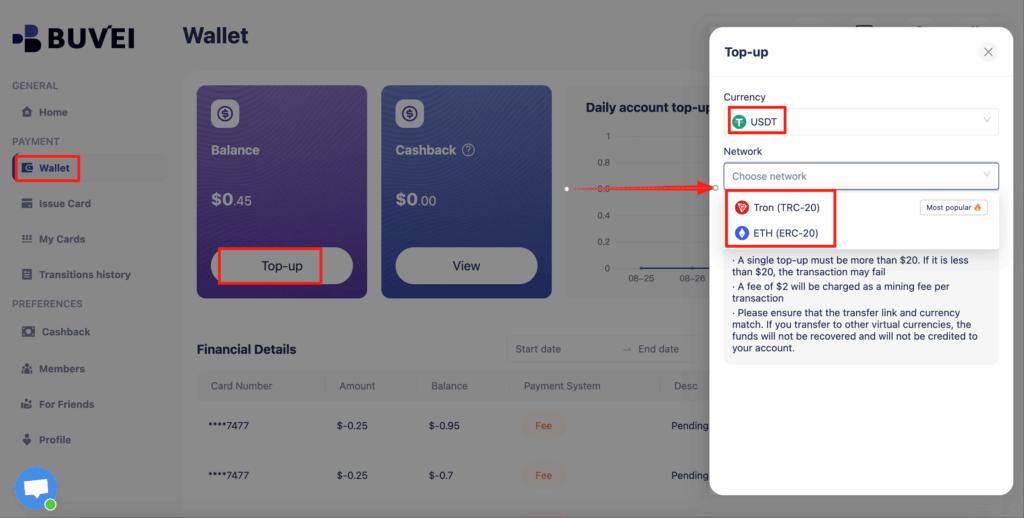
Step 2: Fund Your Account With USDT
-
Go to the Wallet tab
-
Select USDT (TRC20 or ERC20)
-
Copy your dedicated deposit address
-
Transfer USDT from your crypto wallet
After confirmation, the balance is available immediately.
Step 3: Create a Virtual Card for Etsy
-
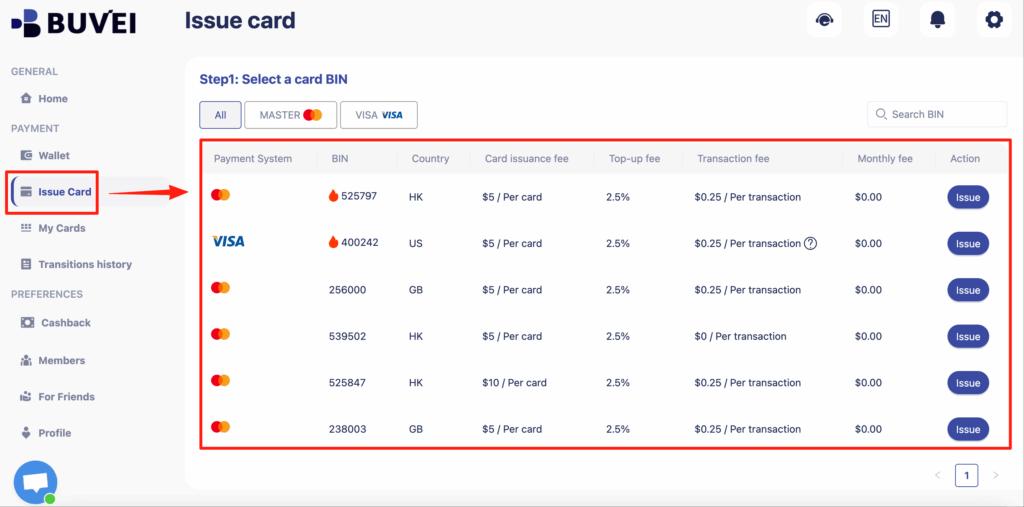
Open the Cards tab
-
Select a BIN region
-
US BINs are generally recommended for Etsy
-
-
Choose the card type
-
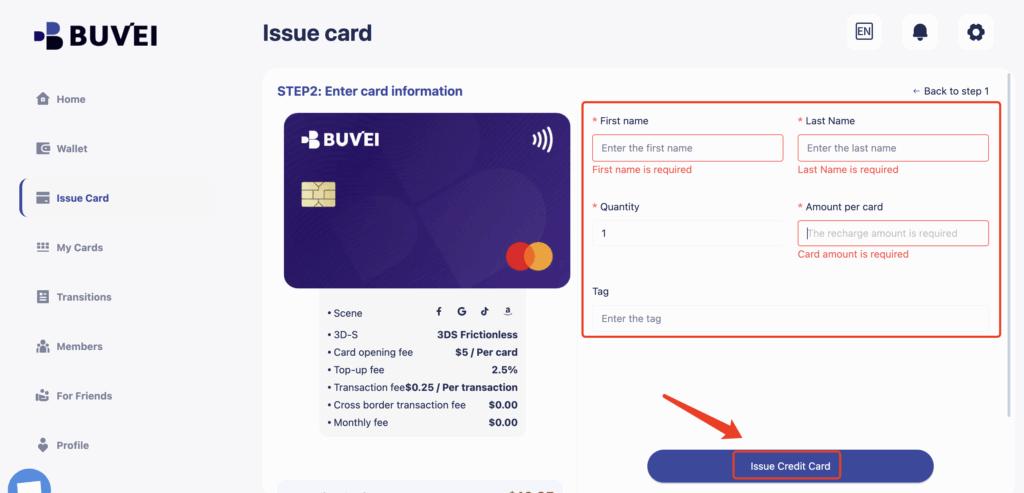
Click Issue Card
-
Enter:
-
Card name (for example, “Etsy Fees”)
-
Initial amount
-
Card quantity
-
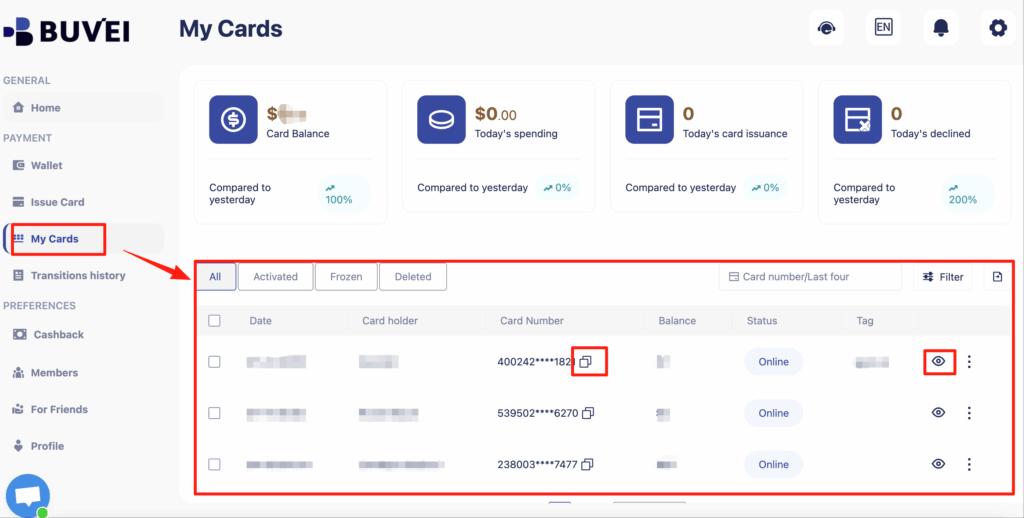
Once issued, go to My Cards to view:
-
Card number
-
Expiration date
-
CVV
Step 4: Add the Card to Etsy
-
Log in to your Etsy Seller account
-
Go to Shop Manager → Finances → Payment settings
-
Add a new credit card
-
Enter your Buvei virtual card details
-
Save and confirm
Etsy may perform a small verification charge.
Best Practices for Recurring Etsy Charges
A few habits can prevent most billing problems.
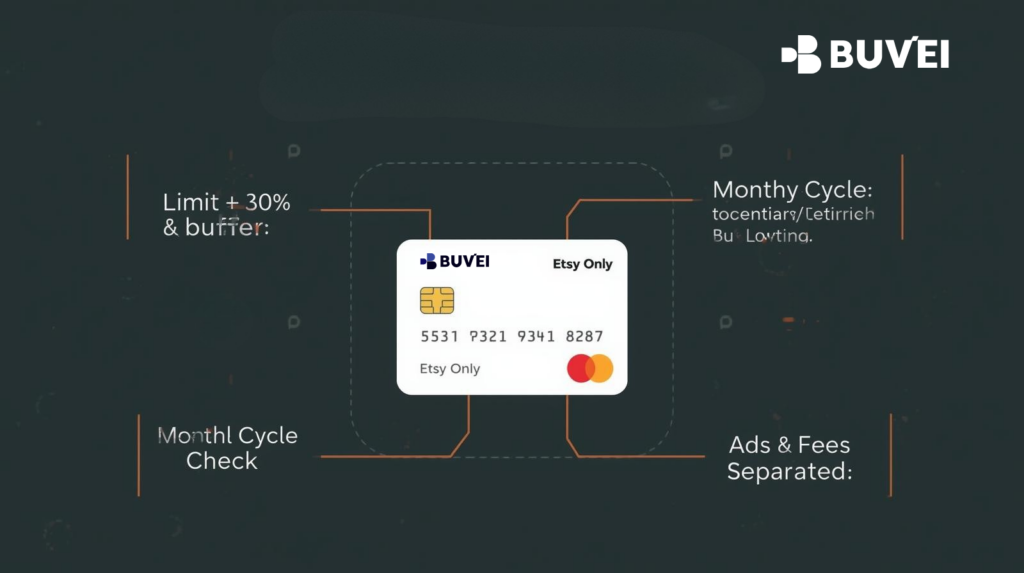
Leave a Safety Buffer
Set card limits:
-
At least 20–30% above expected monthly fees
This covers ads spend and currency fluctuations.
Use One Card Only for Etsy
Avoid sharing the same card with:
-
Ads platforms
-
SaaS subscriptions
-
Other marketplaces
Dedicated usage improves approval stability.
Monitor Monthly Billing Cycles
Check billing activity:
-
Before month-end
-
After ads campaigns scale
Early adjustments prevent declined charges.
What to Do If Etsy Fees Fail to Process
If a payment fails, act quickly.
Immediate Steps
-
Add a new card
-
Increase limits
-
Retry after a short delay
Avoid repeated rapid retries, which can trigger risk checks.
Long-Term Fixes
-
Switch to a more stable BIN
-
Separate ads spend onto its own card
-
Maintain consistent balances
Final Thoughts
Etsy does allow virtual cards—but not all virtual cards behave the same.
To reliably pay Etsy seller fees, a card must:
-
Support recurring and variable charges
-
Handle authorization holds
-
Remain stable across billing cycles
When configured properly, Buvei virtual cards give Etsy sellers more control without sacrificing payment reliability.
For sellers running ads or scaling multiple shops, that reliability is essential.