


Introduction
Managing Meta Ads payments gets more complicated when agencies handle multiple clients or advertising accounts. Charges can accumulate across campaigns, and using one card for everything makes expenses harder to separate.
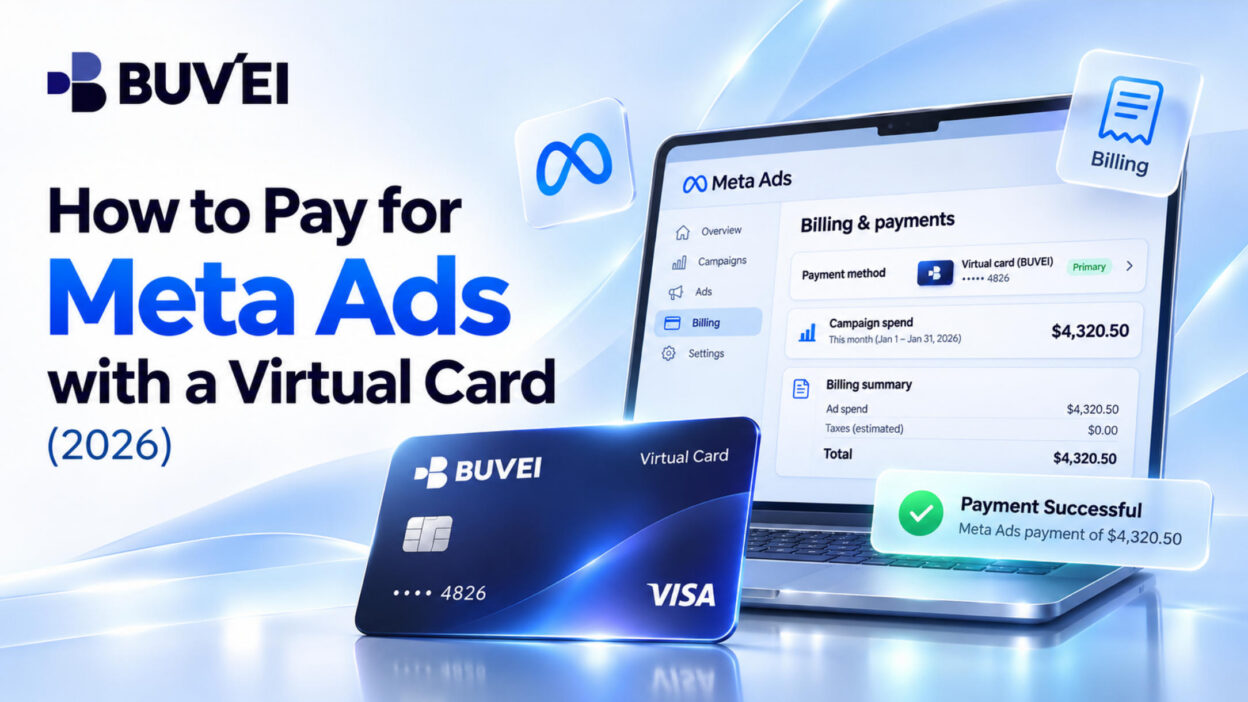
A virtual card for Meta ads offers a practical way to organize these payments. Advertisers can assign different cards to separate ad accounts, making spending easier to track and manage.
This guide explains how to prepare a BUVEI virtual card, add it to Meta Ads Manager, understand Meta's billing process, and troubleshoot common payment issues.
Can You Pay for Meta Ads with a Virtual Card?
Meta accepts Visa and Mastercard credit and debit cards in supported markets. Eligible virtual cards using these networks may also work for Facebook and Instagram advertising.
However, having a Visa or Mastercard number does not guarantee acceptance. The result depends on the card issuer, advertising account region, currency, and payment configuration.
Before adding a virtual card, check the following:
- Card Network: Make sure the card uses a network supported by your advertising account.
- Payment Support: Confirm that online purchases and charges made through a saved payment method are supported.
- Available Balance and Spending Limit: Make sure the card can cover the expected advertising charges.
- Billing Information: Use accurate details associated with the card.
- Account Region and Currency: Confirm that the card is suitable for your advertising account's payment configuration.
A card may be accepted during setup but declined when Meta attempts to collect an advertising payment, so these details are worth checking beforehand.
How to Prepare a BUVEI Virtual Card
Before adding a card to Meta Ads Manager, you'll need an active BUVEI virtual card with sufficient funds.
Step 1: Register a BUVEI Account
Visit BUVEI and create a free account using your email address.
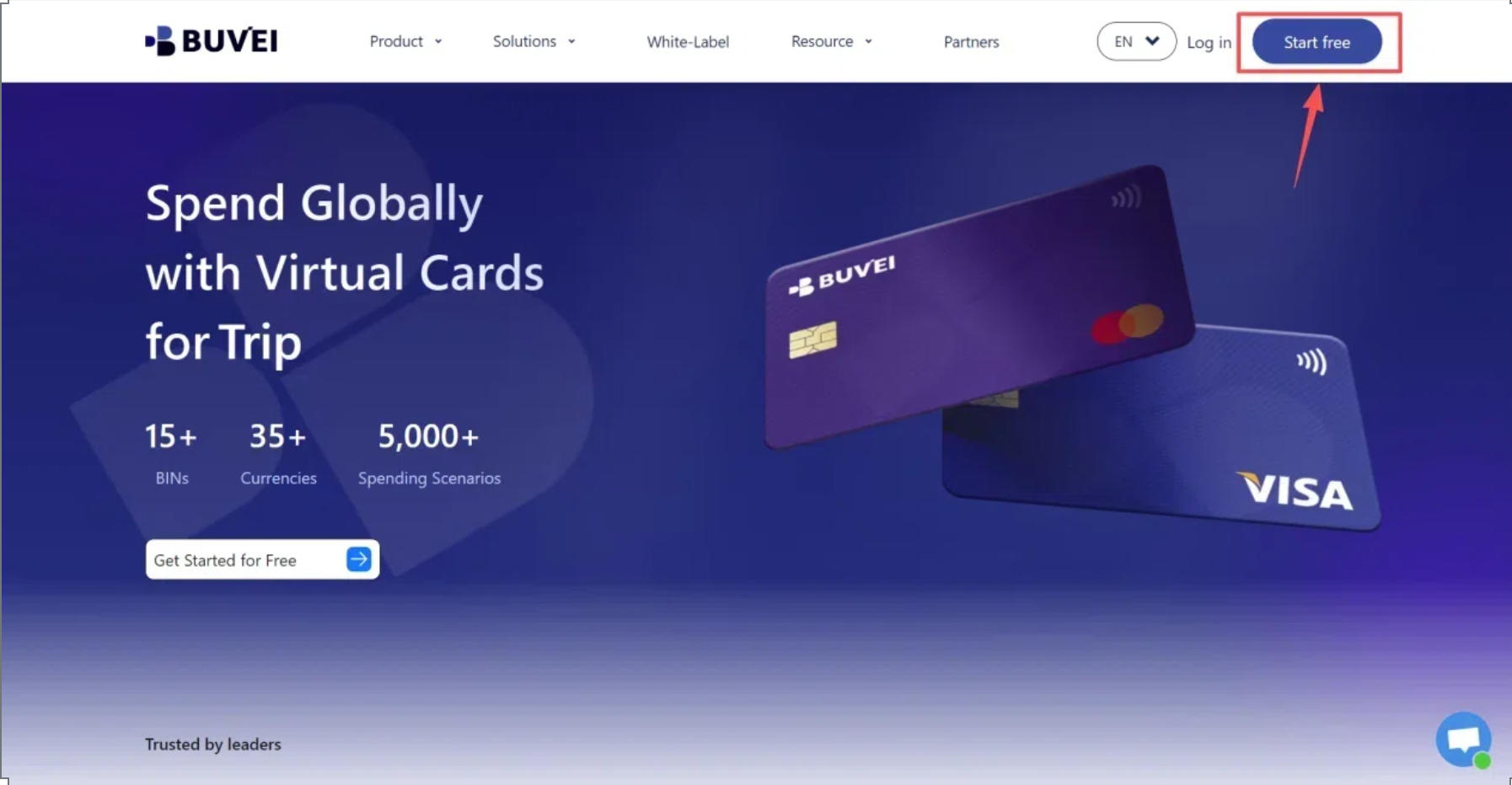
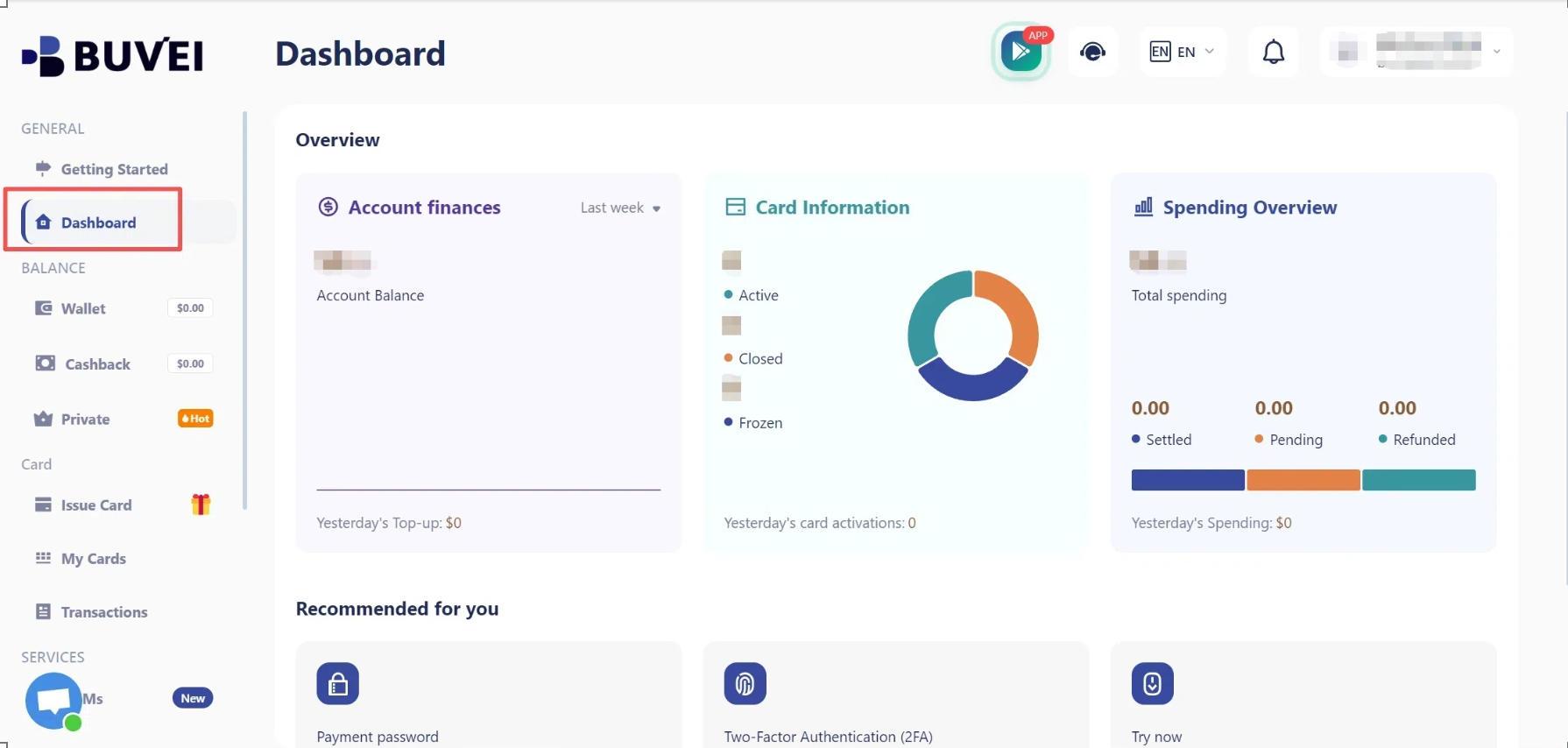
Complete email verification and sign in to access your dashboard, where you can manage your wallet and virtual cards.
Step 2: Top Up Your BUVEI Wallet
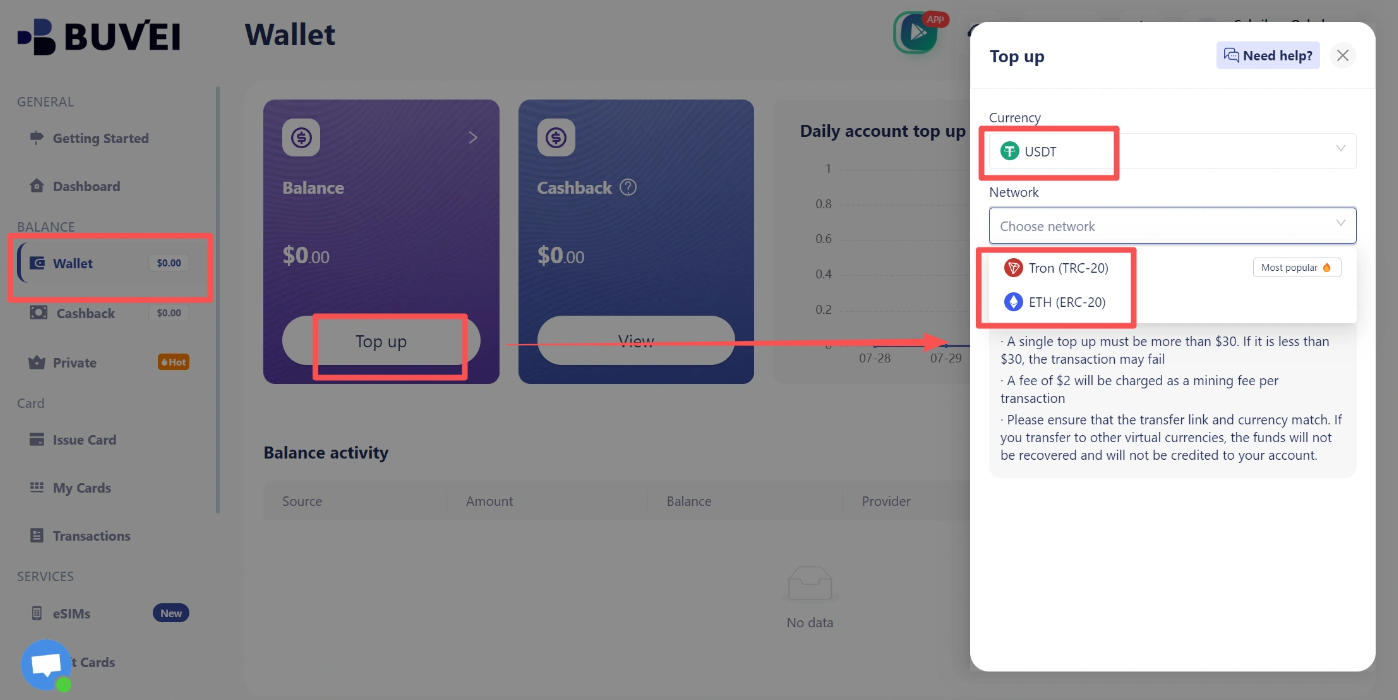
Open Wallet, select USDT, and choose an available network, such as TRC20 or ERC20.
Copy the corresponding deposit address and transfer your USDT using the same network. Once the transaction is confirmed, check your wallet balance.
Make sure the deposit network matches the one selected in BUVEI. TRC20 and ERC20 are different networks, and an incompatible transfer may result in lost funds.
Step 3: Issue a BUVEI Virtual Card
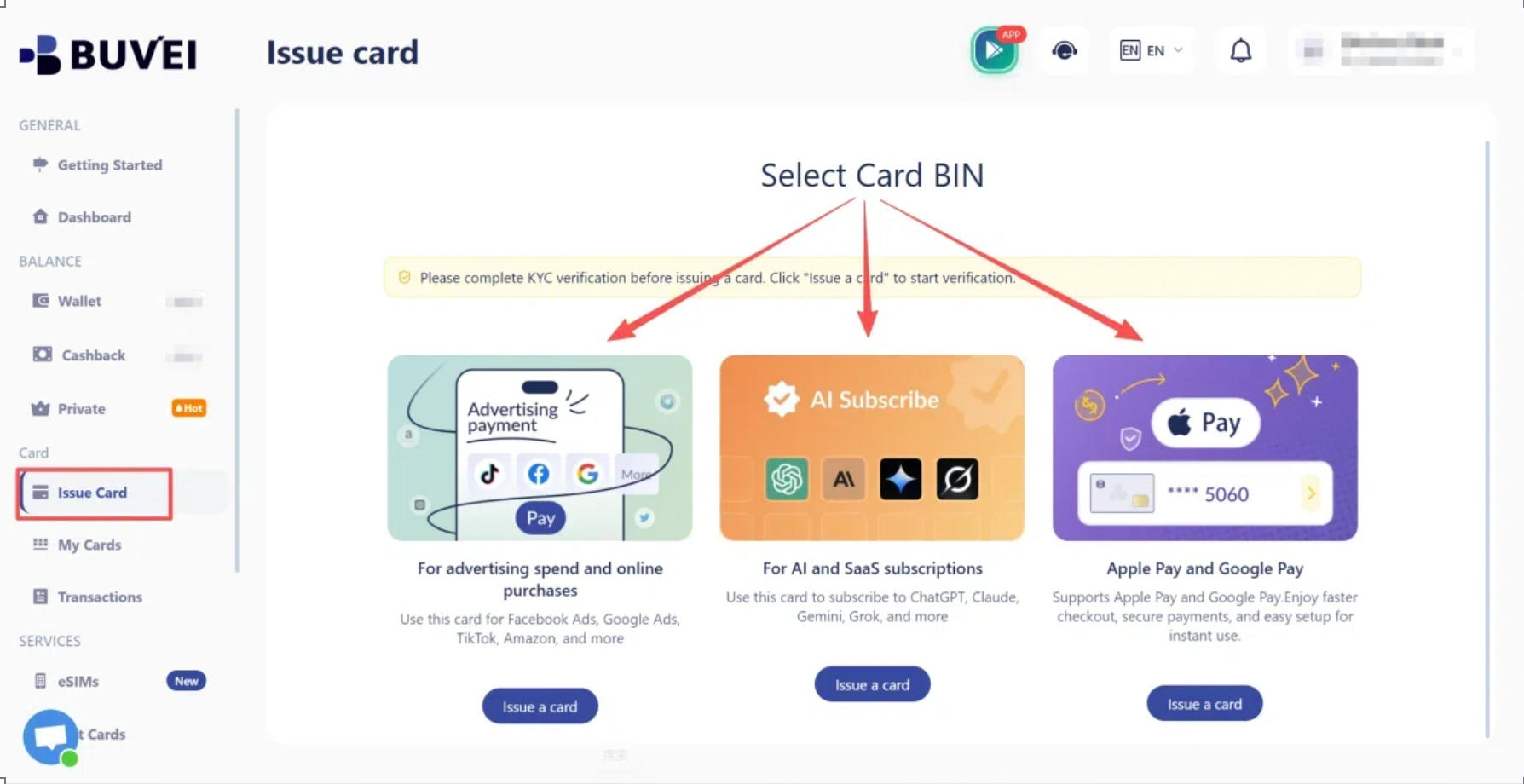
Go to Cards and select an available BIN region and card type.
BUVEI offers virtual Visa and Mastercard cards with multiple BIN options. Choose an available card based on your intended payment requirements.
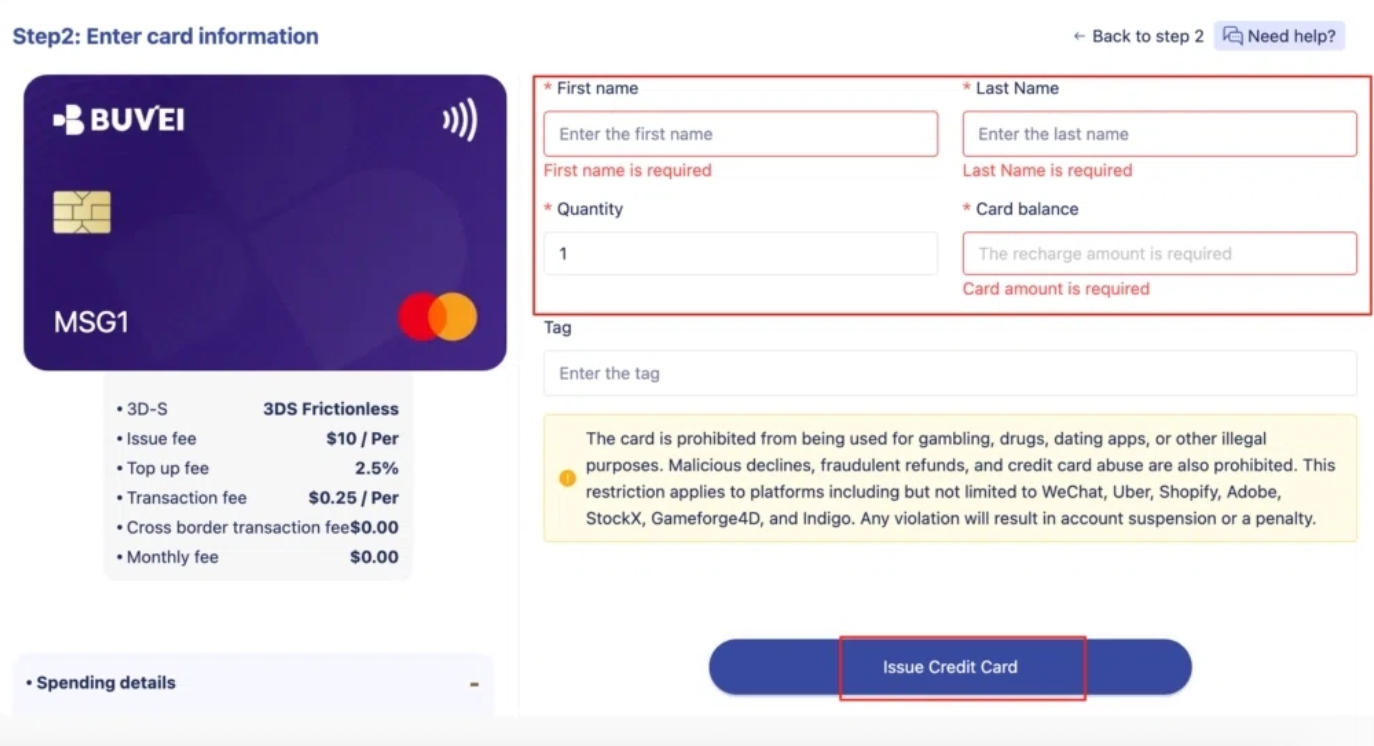
Enter the card name, amount, and number of cards you want to issue, then click Issue Card.
Once the card is created, open My Cards to view its number, expiration date, and CVV.
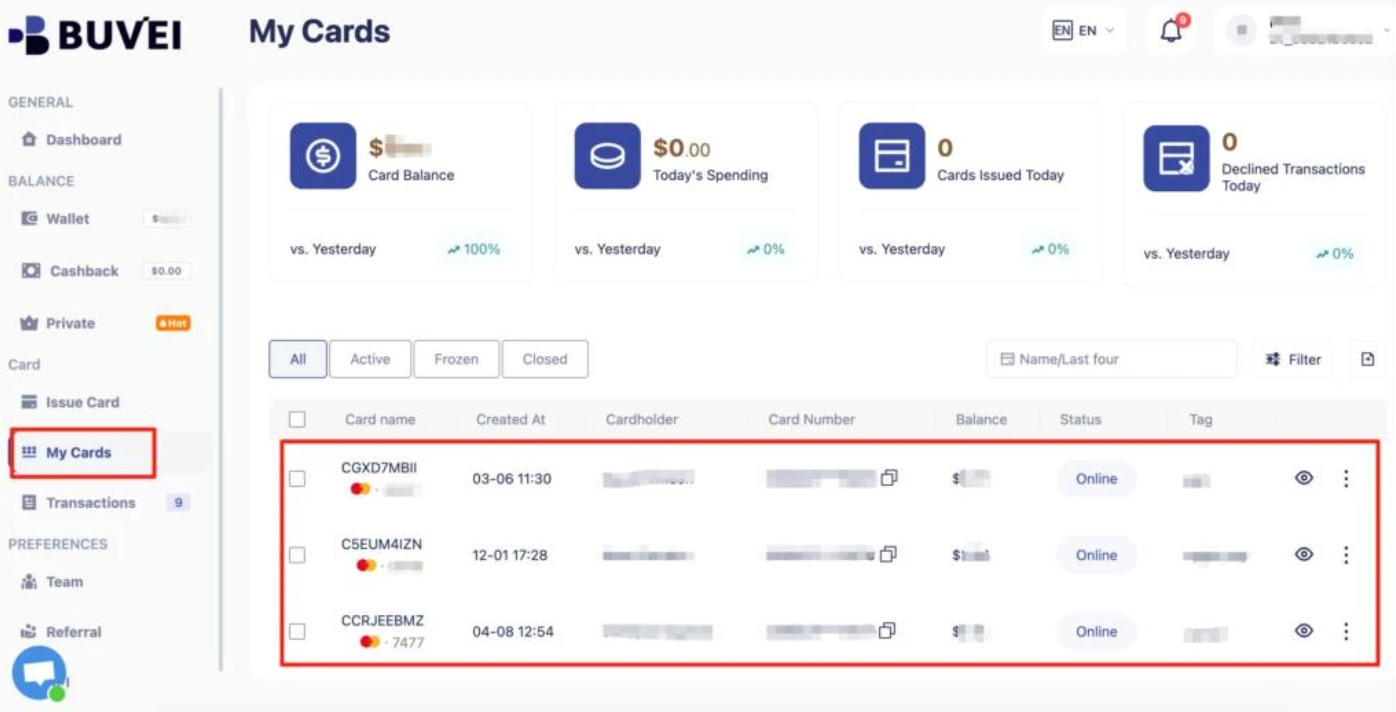
For agencies managing several clients, separate cards can make payment records easier to organize. Different cards can be assigned to different advertising accounts to help track expenses independently.
How to Add a Virtual Card to Meta Ads Manager
Once your card is ready, you can add it to the advertising account you want to use.
Step 4: Open Your Meta Ads Payment Settings
Sign in to Meta Ads Manager and select the advertising account that needs a payment method.
Open Billing & payments, navigate to Payment settings or the corresponding payment management section, and look for Add payment method.
If you manage multiple accounts, double-check the account selector before adding the card. This helps prevent payment methods from being assigned to the wrong advertising account.
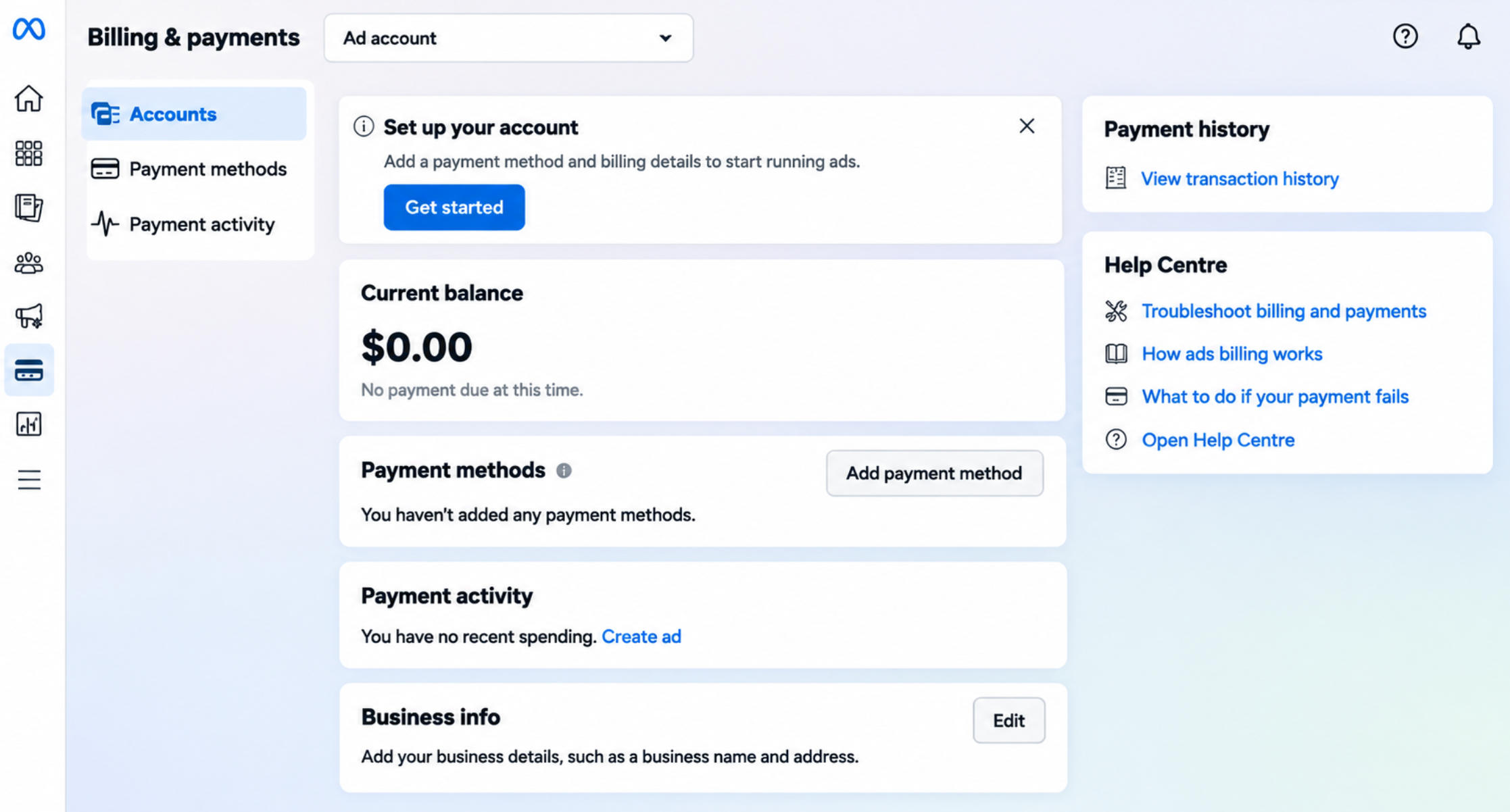
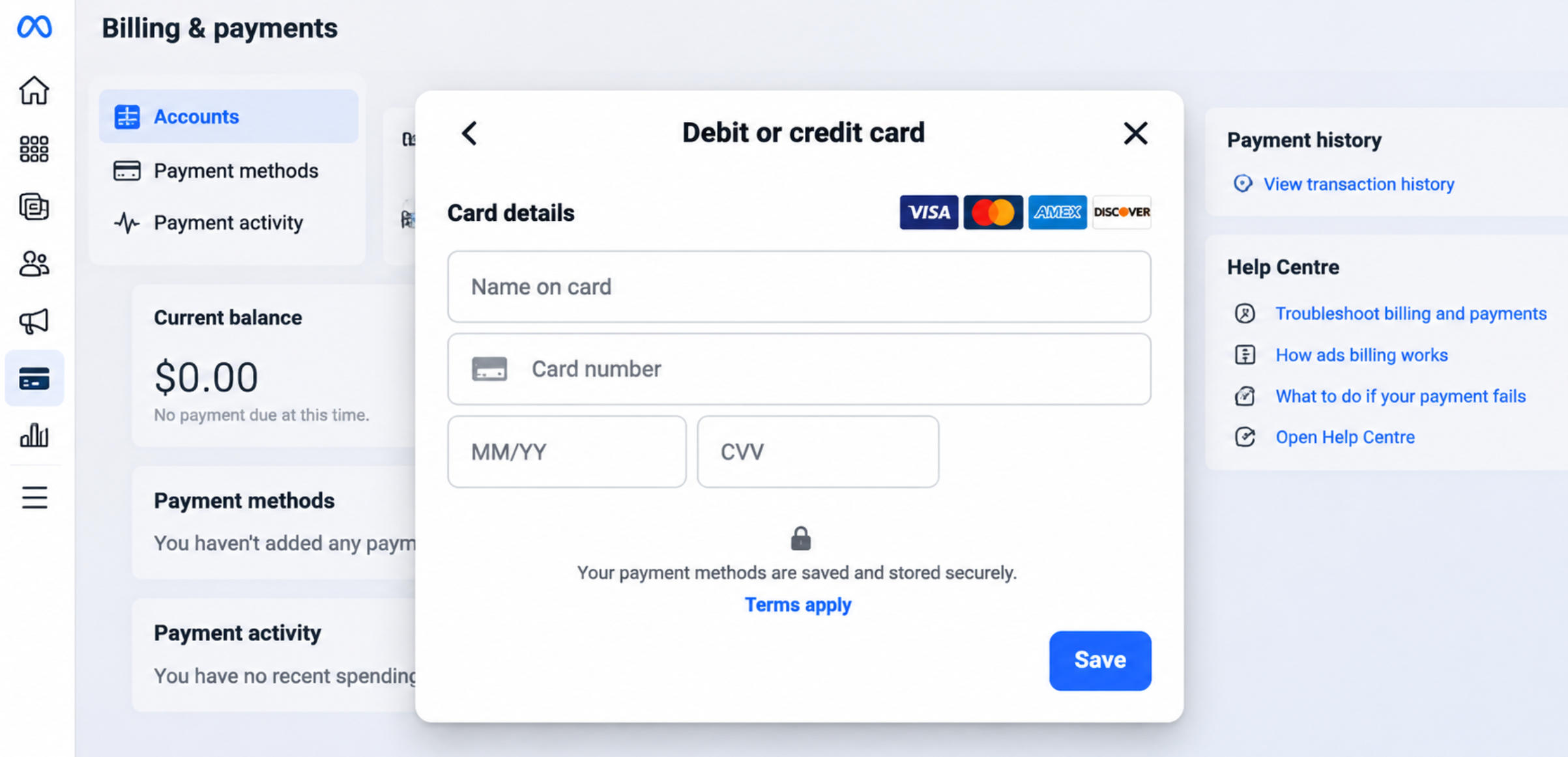
Step 5: Enter Your Virtual Card Details
Select the credit or debit card option if it is available for your account.
Enter your BUVEI card information:
- Card Number: Enter the virtual card number.
- Expiration Date: Enter the month and year.
- Security Code: Enter the CVV.
- Billing Information: Provide the associated details if requested.
Review the information before submitting. Incorrect card details or billing information can cause Meta to reject the payment method.
If Meta or the card issuer requests additional verification, such as a one-time password or 3-D Secure confirmation, complete the process.
Once accepted, the card should appear in your advertising account's payment settings.
Step 6: Confirm Your Payment Method and Billing Settings
Return to the payment settings and make sure the new card appears in the payment method list.
If multiple payment methods are available, check which one is selected for automatic billing. You may also be able to designate a primary payment method.
Before launching campaigns, confirm that the card is active, has sufficient funds, and can accommodate the expected charges. Also check for any outstanding balance.
For agencies managing several clients, assigning different cards to separate advertising accounts can simplify expense tracking. For example, Client A and Client B can each have a dedicated BUVEI card.
Meta payment methods are generally managed at the advertising account level, not separately for each campaign.
How Meta Ads Billing Works
Meta does not necessarily charge your card every time an individual campaign spends money. The advertising account's billing arrangement determines when payments are collected.
Automatic Payments and Payment Thresholds
With automatic payments, Meta generally charges the saved payment method when accumulated advertising costs reach the account's payment threshold or when the monthly bill date arrives.
For example, suppose an account has a $200 payment threshold and runs three campaigns:
| Campaign | Advertising Spend |
|---|---|
| Campaign A | $80 |
| Campaign B | $60 |
| Campaign C | $60 |
| Total | $200 |
The combined spending may trigger a payment. Meta generally calculates accumulated costs at the advertising account level rather than assigning a separate payment threshold to each campaign.
This matters when setting a virtual card's spending limit. If several campaigns share one account, the card needs enough capacity to cover the resulting account-level charge.
Payment thresholds vary between accounts, so refer to the amount displayed in your own billing settings.
Manual Payments and Available Funds
Some advertising accounts allow advertisers to add money to their Meta balance before running campaigns.
Meta deducts advertising costs from those available funds as ads are delivered. For example, if you add $500 and spend $120, the remaining balance is $380.
This is separate from topping up a BUVEI wallet. Funds in your BUVEI wallet or virtual card are not automatically transferred to your Meta advertising account.
Available billing options depend on the account's country, currency, and payment configuration.
Payment Threshold vs. Account Spending Limit
These three settings control different parts of the payment process:
| Setting | What It Controls |
|---|---|
| Payment Threshold | When Meta attempts to collect advertising costs |
| Account Spending Limit | The maximum cumulative spending allowed on an advertising account |
| Card Spending Limit | The spending limit applied to an individual virtual card |
For example, an advertising account may have a $1,000 spending limit while its assigned virtual card has a $500 spending limit.
The account may still have room to spend, but a charge exceeding the card's available balance or spending capacity can be declined.
When setting a card limit, consider the size of expected Meta billing charges rather than looking only at an individual campaign's daily budget.
What to Do If Your Meta Ads Payment Fails
When a payment fails, first determine whether the problem comes from the card or the advertising account. Repeatedly replacing cards without identifying the cause can make the situation harder to manage.
Card Declined or Merchant-Initiated Payment Rejected
Start with the BUVEI transaction history to see whether Meta attempted a charge.
Common reasons include:
- The card issuer declined the transaction.
- Online or international payments are restricted.
- The card is inactive or expired.
- The issuer does not support charges made using a saved card.
- Additional verification is required.
If ordinary online purchases work but Meta's advertising charges fail, check whether the issuer supports merchant-initiated transactions. Contact the issuer if the transaction details do not explain the decline.
Insufficient Card Balance or Spending Limit
Compare the available card balance with the amount Meta is attempting to collect.
Remember that Meta may combine spending from several campaigns under the same advertising account before charging the card.
If the balance or spending limit is insufficient, top up your wallet, fund another card, or adjust the applicable limit.
Billing Information or Currency Mismatch
Make sure the billing information entered in Meta matches the details associated with your card.
Also review the advertising account's country and currency. Your card issuer may apply currency conversion when processing a charge, so confirm that the card supports the relevant transaction.
Avoid using inaccurate billing details to get around a verification failure.
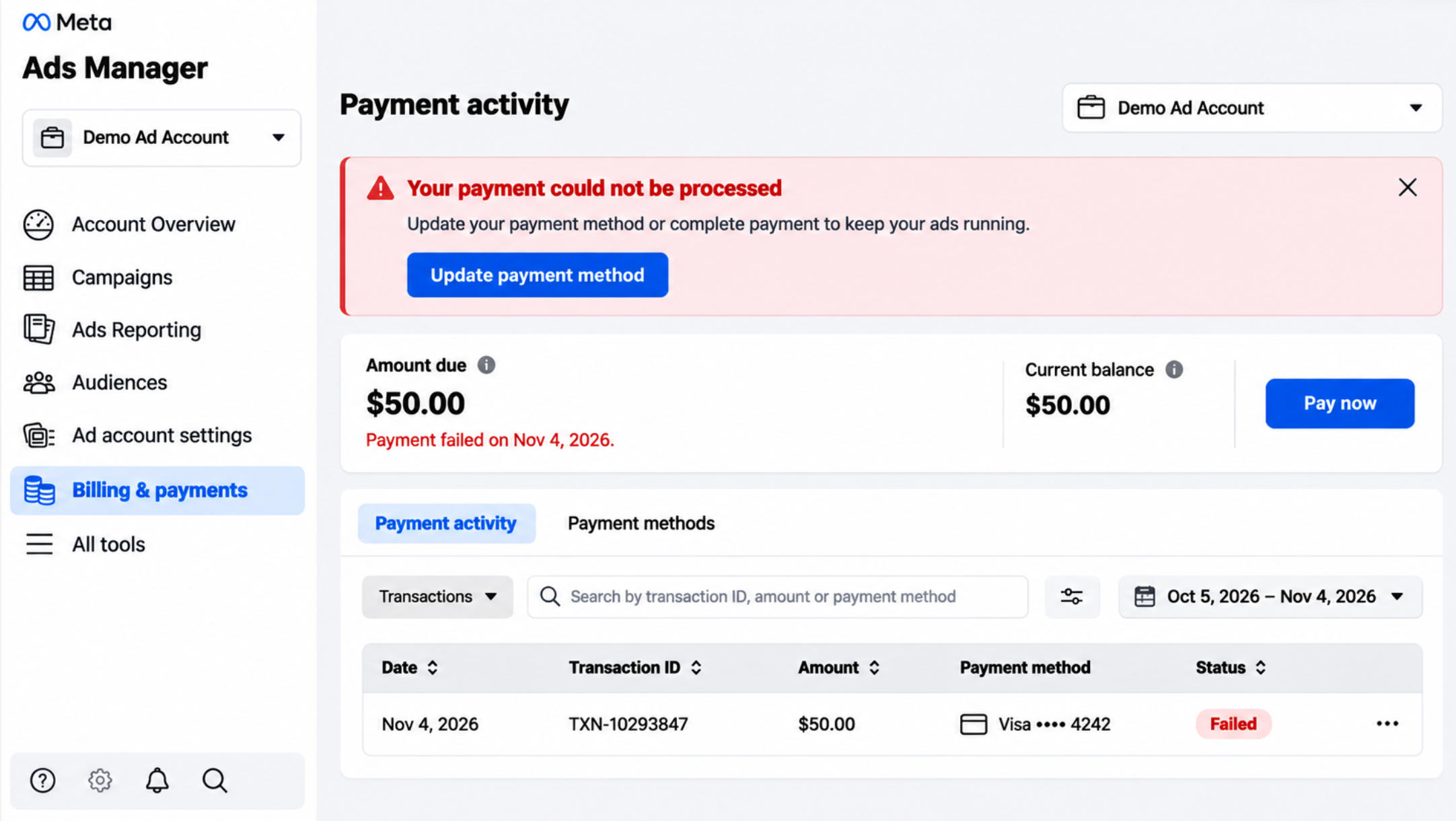
Outstanding Balance and Pay Now
If Meta cannot collect an advertising payment, the account may show an outstanding balance.
Open Billing & payments, select the affected advertising account, and look for a Pay Now option in the outstanding balance or payment activity section.
If available, select it, choose an accepted payment method, and follow the instructions to settle the amount.
After payment, check the account balance and campaign delivery status. If the balance is cleared but ads remain paused, look for other account or delivery restrictions.
Meta Payment Restrictions
Not every payment problem comes from the card.
Meta may restrict payment activity because of unusual transactions, account security concerns, or other advertising account issues.
If the card is active but Meta still prevents payments, review your account notifications and Business Support Home for any required verification or review.
Replacing the card repeatedly will not necessarily resolve an account-level restriction. Address the issue identified by Meta before trying another payment method.
Frequently Asked Questions
Can I Use a Separate Virtual Card for Each Meta Ads Campaign?
Meta payment methods are generally managed at the advertising account level, not separately for individual campaigns.
If you manage several advertising accounts, you can organize their payment methods independently where the account settings allow it. This is particularly useful for agencies handling different clients.
Why Was My Virtual Card Declined After Being Added Successfully?
Adding a card only confirms that Meta accepted the payment method during setup. It does not guarantee that every future charge will be approved.
A later transaction may be declined because of insufficient funds, card spending limits, issuer restrictions, or unsupported merchant-initiated payments.
Check the transaction history and available balance first. If the reason is unclear, contact the card issuer.
Conclusion
Managing Meta Ads payments is easier when expenses are separated by account and each payment method has enough capacity to handle the charges.
BUVEI offers virtual Visa and Mastercard cards, multiple BIN options, USDT top-ups, and card management features. For media buyers and agencies managing multiple clients, separate cards and spending controls can help keep advertising expenses organized and easier to monitor.