Claude, developed by Anthropic, has quickly become a popular AI assistant for professionals and teams.
However, many international users run into the same issue: their subscription payment gets declined, even when using a funded virtual card.
In most cases, the problem isn’t the card balance. Instead, it comes down to one key factor — the BIN behind the virtual card.
In this guide, we’ll break down how Claude handles payments, why BINs matter so much, and how you can choose and test virtual card BINs that actually work, step by step.

How Claude (Anthropic) Handles Subscription Payments
First, it helps to understand how Claude processes payments.
Claude subscriptions are classified as recurring SaaS transactions. That means every payment goes through additional checks, including:
-
Card network risk screening
-
Issuer reputation review
-
Cross-border payment verification
-
Recurring billing capability checks
As a result, Claude tends to be stricter than many consumer platforms.
Even valid cards may be rejected if they don’t match Claude’s expected payment profile.
Understanding BINs and Why They Matter for Virtual Cards
A BIN (Bank Identification Number) is the first six digits of any card number.
It tells the payment system important details such as:
-
Issuing country
-
Card network (Visa or Mastercard)
-
Card type (debit, prepaid, or credit)
-
Historical risk level
For Claude, BINs are especially important because they help decide how trustworthy a card looks for long-term AI subscriptions.
Simply put, two virtual cards from the same provider can behave very differently on Claude — just because their BINs are different.
What Virtual Card BINs Tend to Work Best on Claude
Based on real-world payment behavior, some BIN types perform noticeably better.
U.S. BINs (Highest Approval Rates)
Virtual cards issued with U.S. BINs tend to work best because:
-
Anthropic is a U.S.-based company
-
Billing expectations align with domestic SaaS norms
-
Fewer cross-border risk flags are triggered
For most users, starting with a U.S. BIN offers the highest chance of success.
Stable International BINs
Some non-U.S. BINs can also work if they:
-
Come from established issuers
-
Support recurring payments
-
Have a clean transaction history
That said, success rates are generally lower than U.S. BINs.
BINs That Often Fail
BINs more likely to be declined include:
-
Newly issued BINs with little history
-
Prepaid-only BINs without recurring support
-
BINs from high-risk or heavily restricted regions
Because Claude tracks failed attempts, repeated BIN mismatches can reduce future approval chances.
How to Test and Choose a Successful Virtual Card BIN
Instead of trial and error, follow a controlled testing process.
Step 1: Use One Card at a Time
Avoid testing multiple cards in a short period.
Too many failed attempts can temporarily lock payments on your account.
Step 2: Make a Single Clean Attempt
Before testing:
-
Ensure enough balance
-
Enter correct billing details
-
Keep IP and location consistent
If the payment fails, stop immediately.
Step 3: Change the BIN, Not Everything Else
When testing again:
-
Keep the same provider
-
Switch only the BIN region
-
Avoid changing account details
This helps you identify whether the BIN is the real issue.
Step 4: Stick With What Works
Once a BIN succeeds:
-
Reuse the same card
-
Maintain sufficient balance
-
Avoid unnecessary card changes
Consistency significantly improves renewal success.
How to Create and Use Virtual Cards (Including Buvei) for Claude Payments
Below is a practical setup that many users follow successfully.
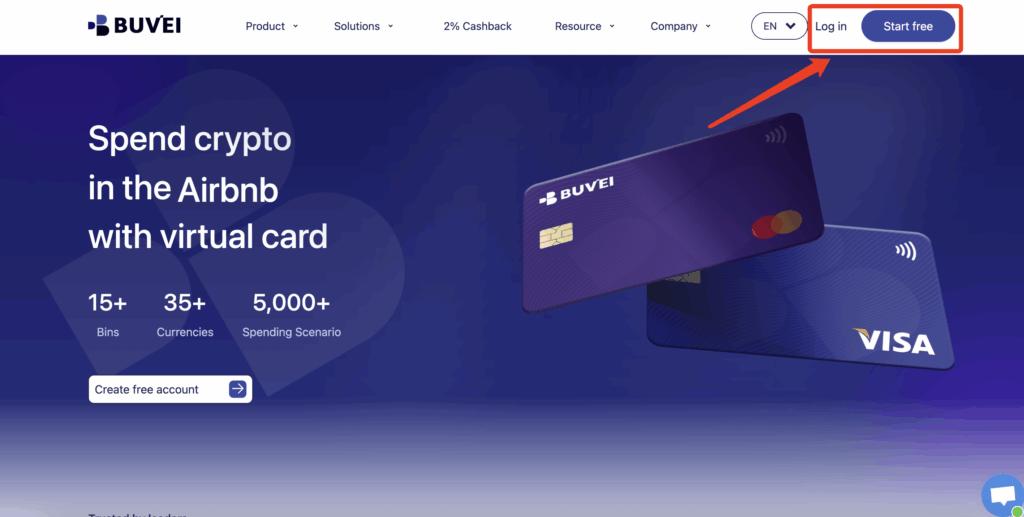
Step 1: Register a Buvei Account
-
Visit https://buvei.com
-
Create a free account
-
Verify your email and log in
You’ll gain access to the Buvei dashboard instantly.
Step 2: Top Up Your Wallet
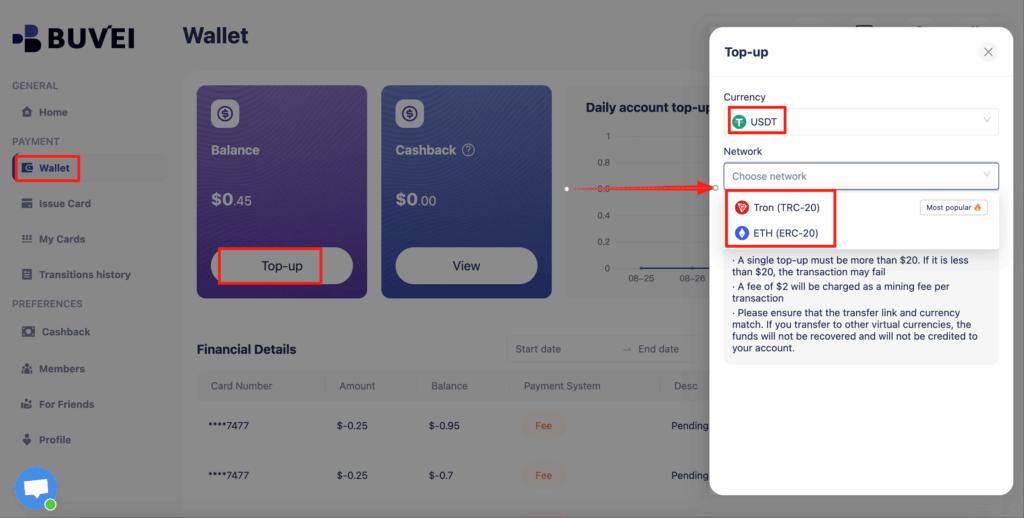
-
Go to the Wallet section
-
Choose USDT (TRC20 or ERC20)
-
Send funds to your assigned address
Once confirmed, your balance is ready to use.
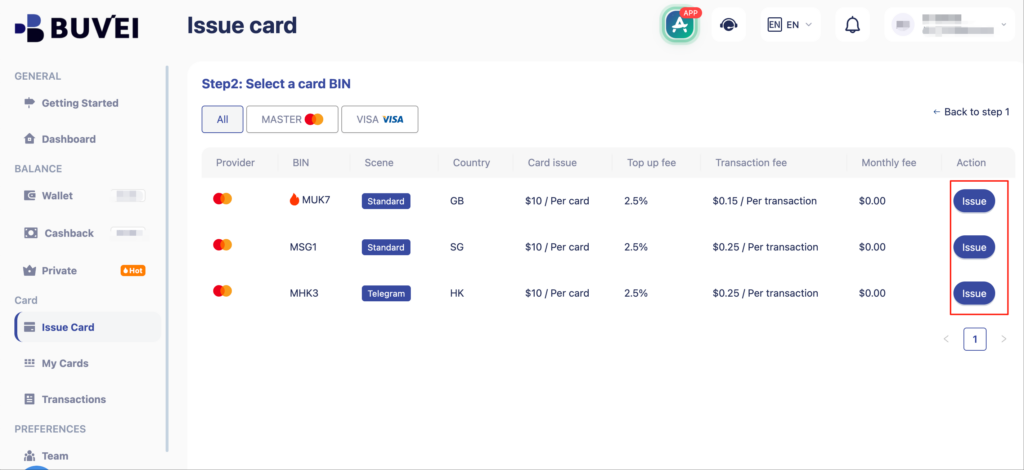
Step 3: Issue a Virtual Card
-
Navigate to Cards
-
Choose a U.S. BIN region
-
Select card type
-
Set card name, amount, and quantity
-
Click Create Card

-
Enter:
-
Card name (e.g., “Zoom Pro Subscription”)
-
Funding amount
-
Number of cards
-
-
Click “Issue Card”

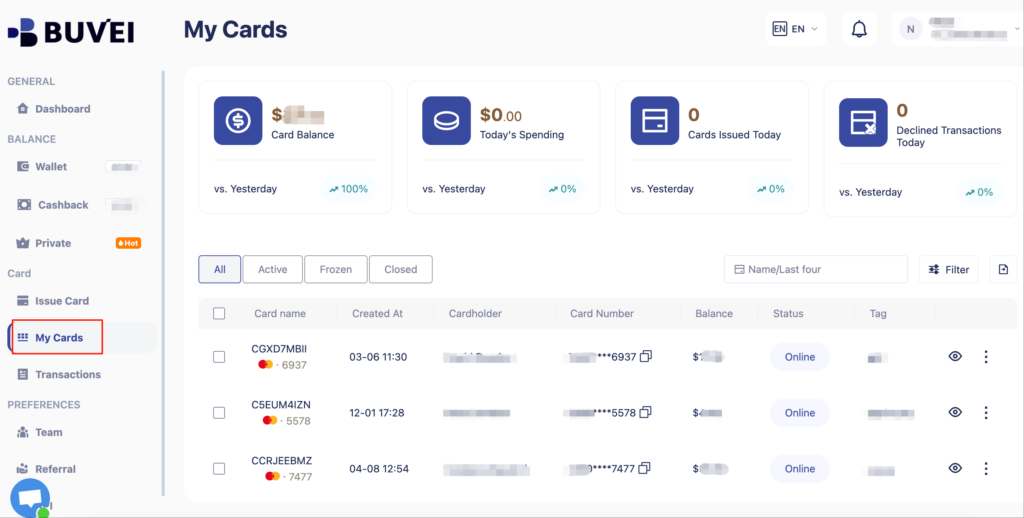
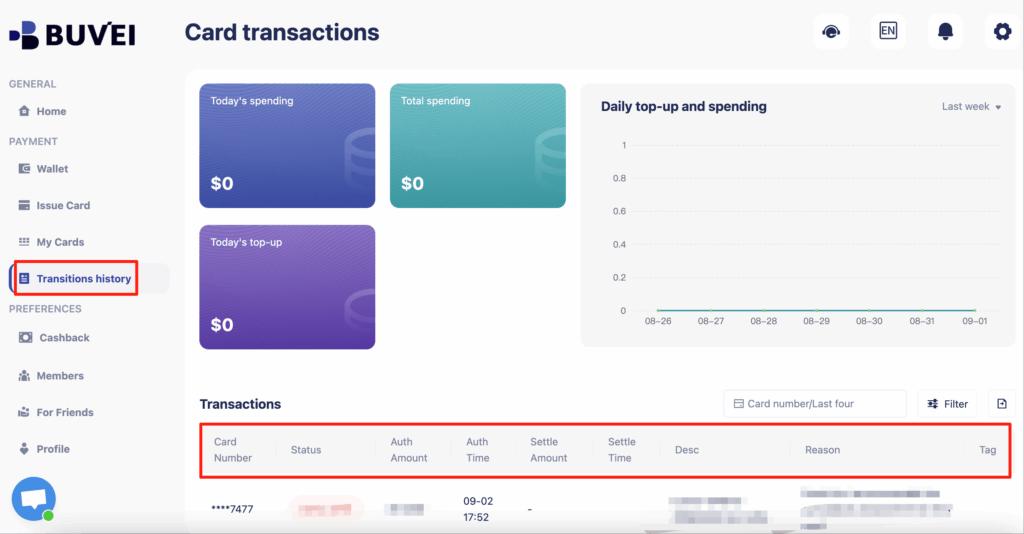
You can view:
-
Card number
-
Expiry date
-
CVV
-
Transaction history
Step 4: Pay for Claude Subscription
-
Log in to your Claude account
-
Choose card payment
-
Enter your Buvei virtual card details
-
Confirm the subscription
If approved, avoid switching cards frequently.
Step 5: Manage Renewals and Control Spending
With Buvei, you can:
-
Adjust card limits anytime
-
Freeze or cancel cards instantly
-
Track every transaction in real time
This makes it easy to control AI subscription costs without risking unexpected charges.

Final Thoughts
When Claude subscription payments fail, the BIN is often the real issue — not the virtual card itself.
By understanding how Claude evaluates payments, choosing the right BIN, and testing carefully, you can greatly reduce declines and enjoy stable renewals.
Virtual cards with strong U.S. BINs, recurring billing support, and consistent usage patterns work best.
Platforms like Buvei simplify this process by offering flexible BIN selection, USDT top-ups, and full card control.
If you want smoother Claude payments, start with the BIN — not the balance.