
Domain registration and hosting payments can become harder to manage when a business operates multiple websites or online services. These expenses may involve different billing cycles, renewal dates, and payment amounts, making them difficult to track when everything is charged to the same business card.
A dedicated virtual card can separate these expenses from other business payments and make recurring charges easier to monitor. This guide explains how to manage domain and hosting expenses with virtual cards, from creating a dedicated card and completing the initial payment to checking transactions and preparing for future renewals.
Why Use Virtual Cards for Domain and Hosting Expenses?
Domain and hosting providers commonly charge businesses monthly or annually. When several websites are involved, these payments can quickly become difficult to organize.
A dedicated virtual card can help keep website-related expenses separate from other business spending. It can also make recurring charges easier to identify and review through transaction records.
For example, a business could use one virtual card for a specific website’s domain and hosting expenses instead of using its primary business card for every online service.
However, payment methods and virtual card acceptance vary by provider and region. Always check the domain or hosting provider’s payment requirements before making a purchase.
How to Manage Domain and Hosting Expenses with a Virtual Card
The process can be organized into four simple steps: Create a dedicated virtual card → Check the card details → Pay at checkout → Verify the transaction
Step 1 — Create a Dedicated Virtual Card
First, decide which website expenses you want to manage with the card. If you manage one business website, you could create a card specifically for its domain and hosting payments. If you manage multiple websites or projects, separate cards can make it easier to identify expenses by website or project.
In BUVEI, you can create a virtual card through the card management interface.
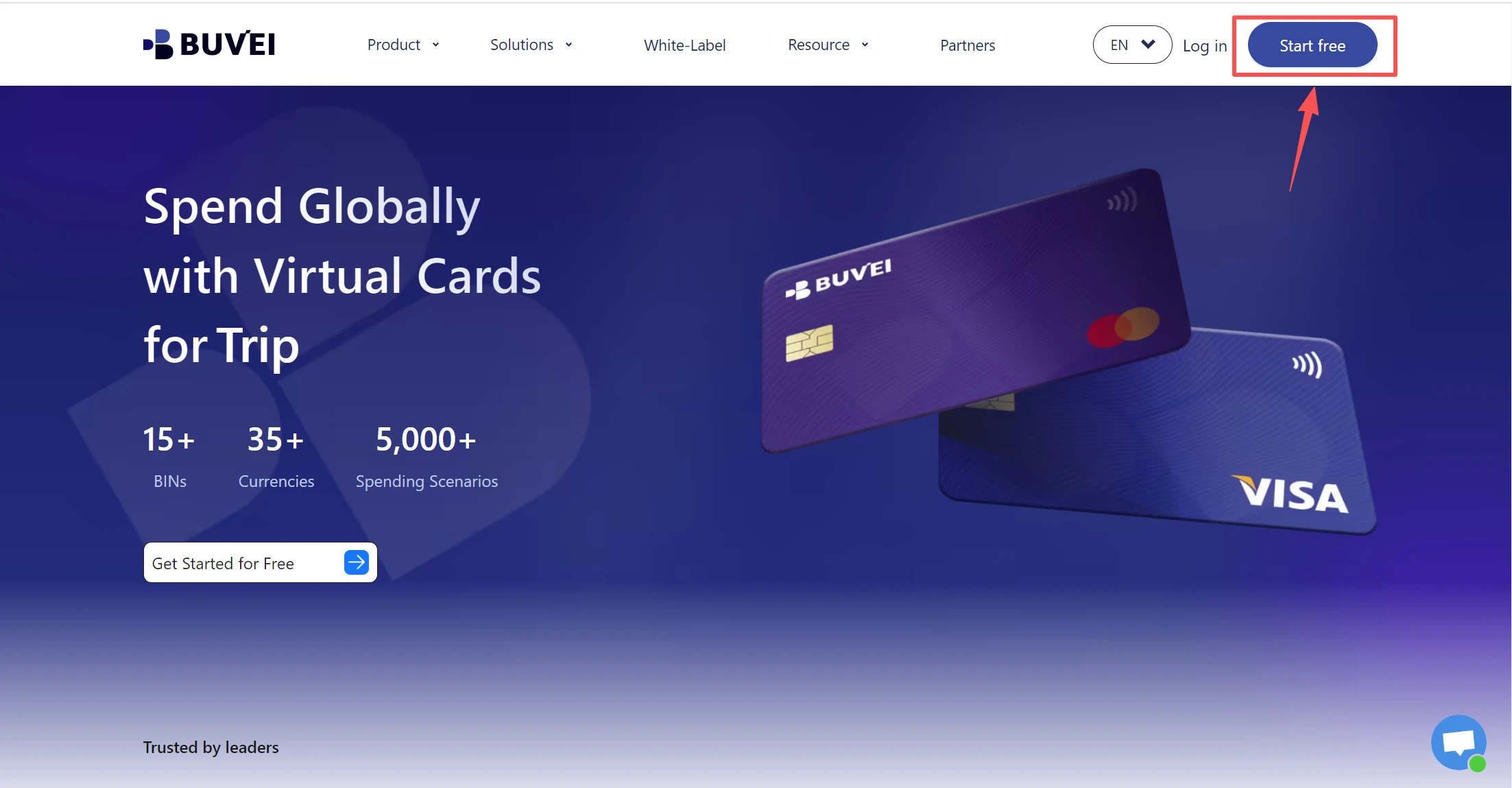
- visit https://buvei.com and create a free account.
- After email verification, log in to access the Buvei dashboard.
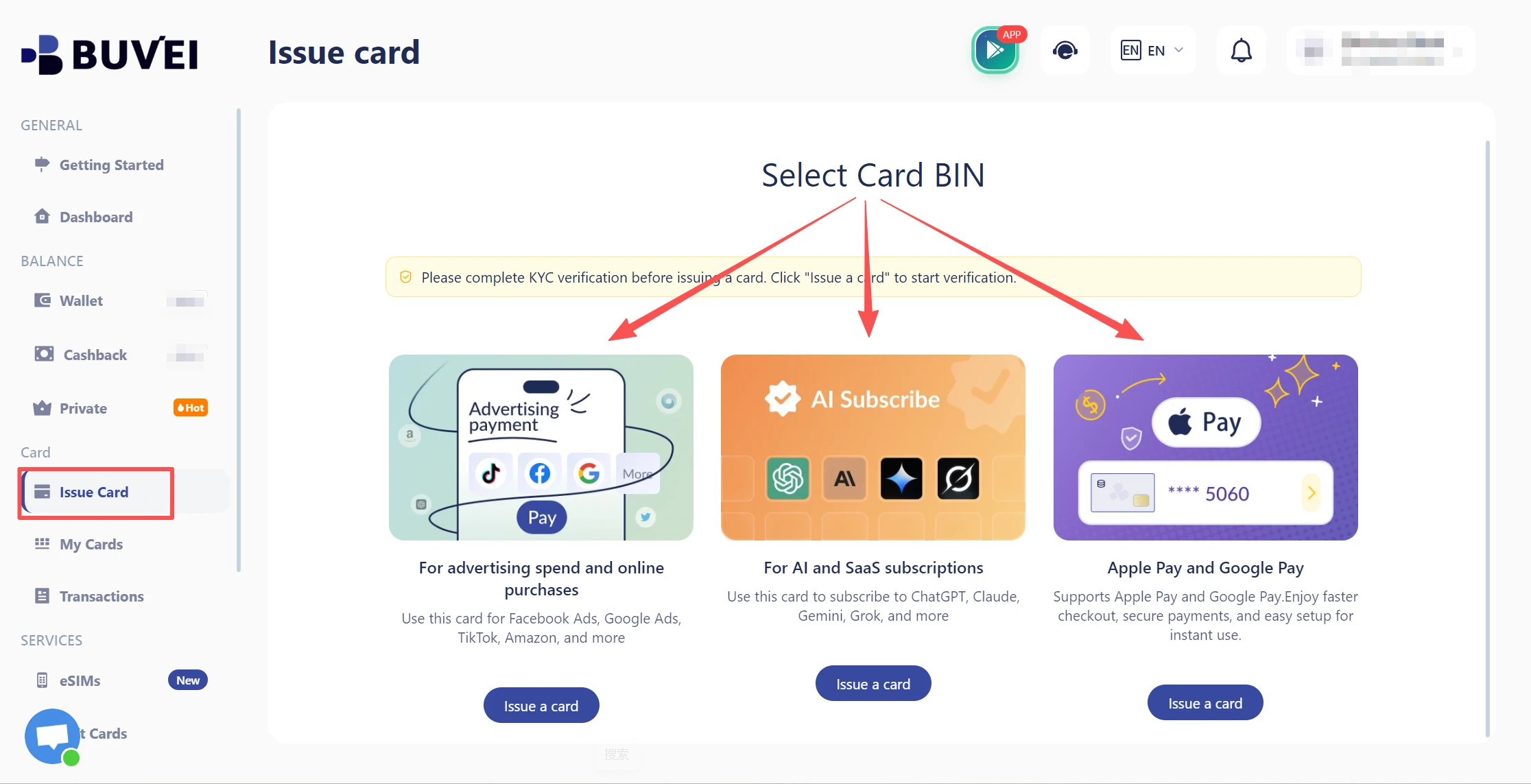
- Create a Virtual Card
- Go to the Card tab
- Choose your preferred BIN region, (recommends using US BIN)
- Select your card type
- Click Issue
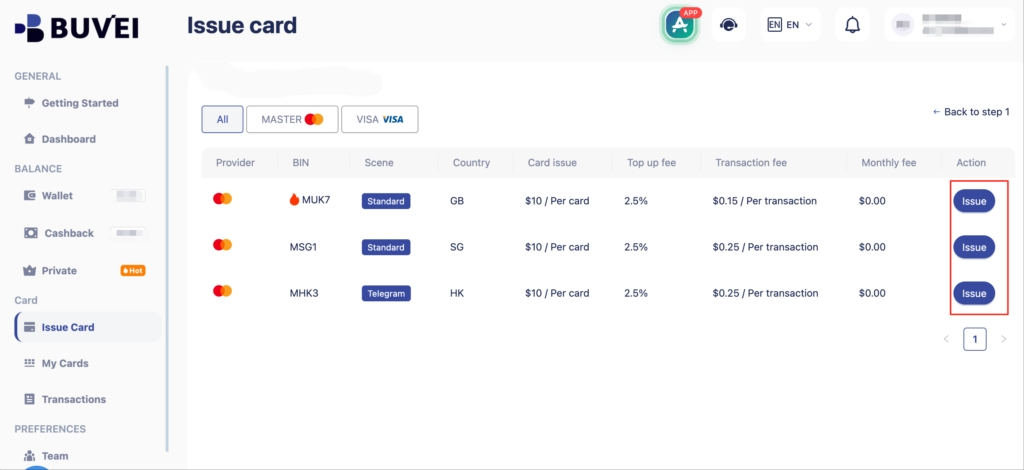
- Fill in the virtual card details, including name, amount, and number of cards.
- Click Issue Card
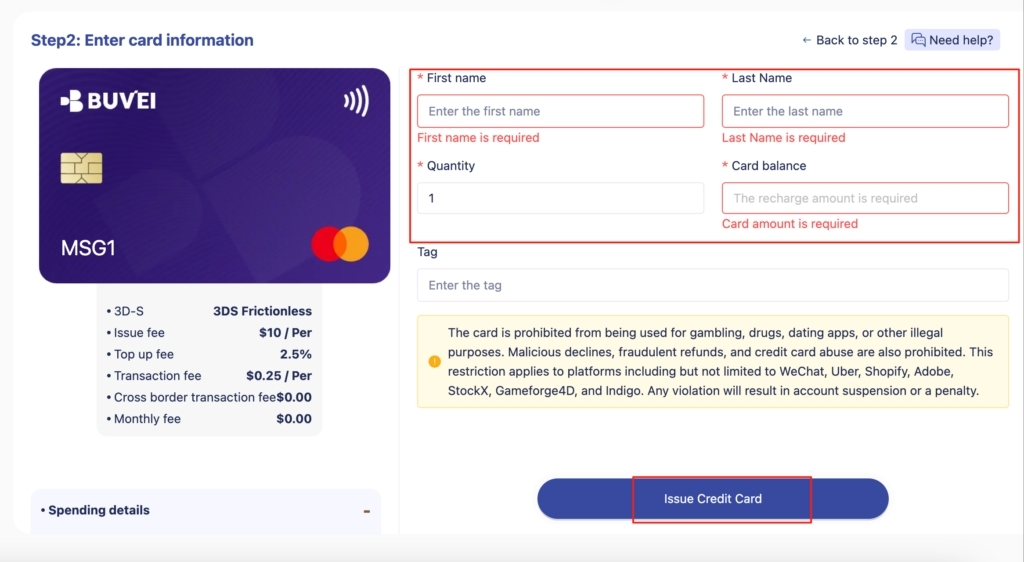
When creating the card, use a clear name such as Website Hosting, Company Domain, or Project Website. Clear naming makes it easier to identify the purpose of each card when reviewing transactions later.
A dedicated card can also help separate website expenses from other online business payments.
Step 2 — Check Your Card Details
After creating the virtual card, open the card details to access the information required by the domain or hosting provider.
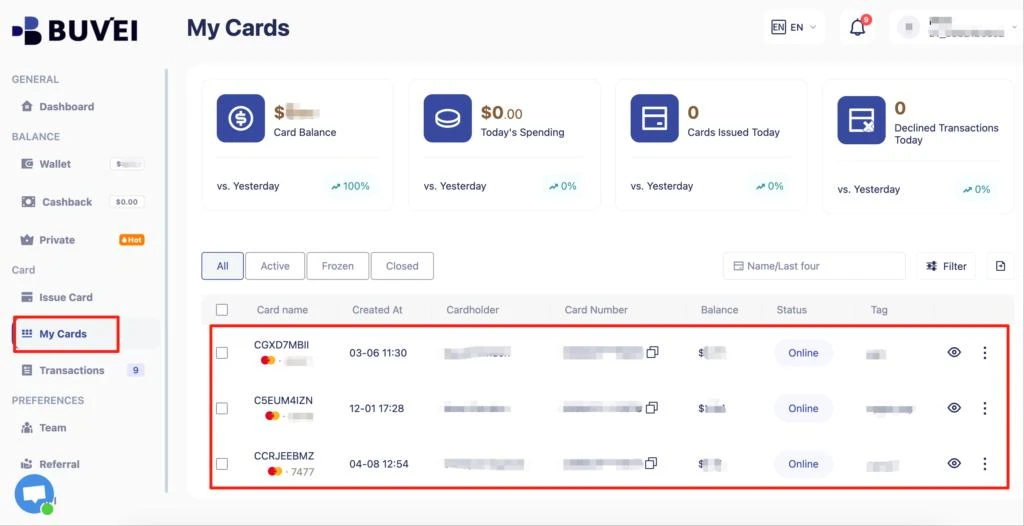
Depending on the provider’s checkout page, you may need to enter:
- Card number
- Expiration date
- CVV
- Billing information
Before using the card, check whether the provider accepts virtual cards and review the payment currency, total amount, and billing terms.
Some merchants may also request a billing address. If billing information is required, follow the provider’s instructions and use the appropriate information associated with your payment account.
Step 3 — Add the Virtual Card at Checkout
Once the virtual card is ready, go to the domain or hosting provider’s checkout page. The typical payment process is:
Select a domain or hosting plan → Enter account information → Choose a payment method → Enter virtual card details → Review the order → Complete payment
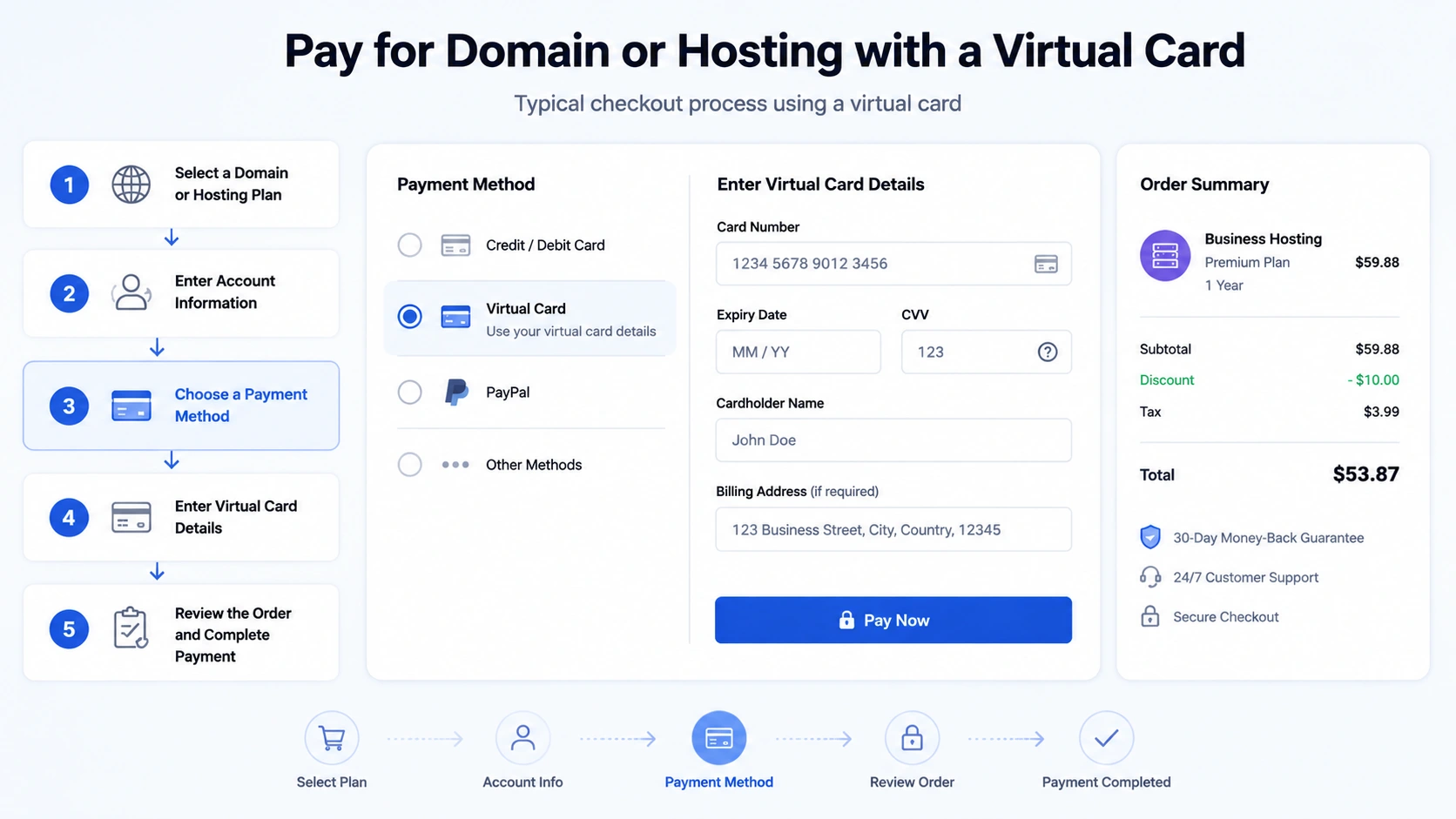
For a domain purchase, check the registration period and whether automatic renewal is enabled.
For hosting, review the billing cycle and pricing before confirming the order. Some providers may offer promotional pricing for the initial purchase, while future renewals may be charged at a different rate.
This is especially important when using a virtual card for recurring expenses. The amount charged during a future renewal may not be the same as the original payment.
Note: Not every domain or hosting provider accepts every type of virtual card. Check the provider’s supported payment methods and billing requirements before completing the purchase.
Step 4 — Verify the Payment Transaction
After completing the payment, check the transaction history associated with your virtual card.
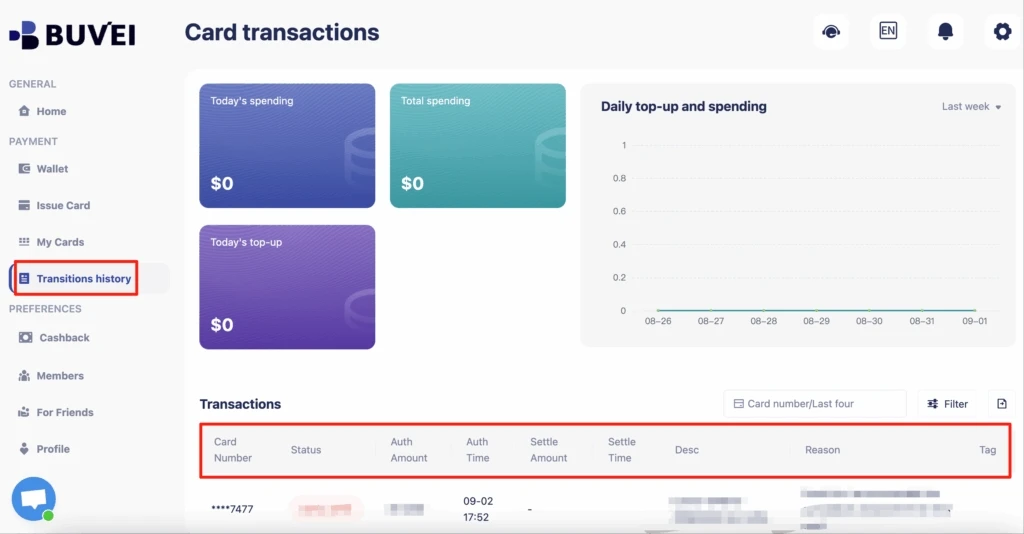
Review the transaction details to confirm the payment amount, merchant, date, and status. This can be particularly useful when managing multiple websites. Instead of searching through a general business card statement, you can use the dedicated virtual card’s transaction history to identify website-related payments more easily.
If a payment fails, check the card balance, card status, billing information, and the merchant’s virtual card acceptance policy before trying again.
How to Manage Domain and Hosting Renewals
The initial purchase is only one part of managing domain and hosting expenses. Renewals are often more important because they happen repeatedly. Domains are commonly renewed annually, while hosting plans may renew monthly or annually depending on the provider and subscription. Before a renewal, review four key items.
Renewal date: Know when the provider is expected to charge the card.
Renewal price: Check whether the current renewal price differs from the original purchase price.
Available balance: Make sure sufficient funds are available for the expected charge.
Payment status: After the renewal, verify that the payment was processed successfully.
It is also important to review renewal pricing rather than assuming that the original price will continue. Promotional rates may apply only to the initial purchase, while future renewals can be charged at the provider’s standard rate.
For businesses managing several websites, a simple renewal workflow can help:
Upcoming renewal → Review price → Check available balance → Renewal payment → Verify transaction
Regular reviews can also help identify unused domains, outdated hosting plans, or other website-related services that are no longer necessary.
Best Practices for Managing Domain and Hosting Expenses
Use a dedicated virtual card.
Assigning a card specifically to domain and hosting expenses makes these payments easier to identify and manage.
Monitor recurring charges.
Review website-related transactions regularly so you know which services are renewing and how much they cost.
Keep enough balance for renewals.
If a provider uses automatic billing, make sure sufficient funds are available before the scheduled renewal date.
You can also review your domain and hosting expenses periodically to identify services that are no longer being used. This helps prevent unnecessary recurring charges from continuing unnoticed.

How BUVEI Helps Manage Domain and Hosting Expenses
For businesses that manage multiple websites or digital services, BUVEI provides a centralized environment for virtual card management.
Instead of using one primary payment card for every online expense, businesses can create dedicated virtual cards for different websites, projects, or payment purposes. This creates a more organized payment structure for recurring digital expenses.
For example, a business managing three websites could create separate virtual cards for Website A, Website B, and Website C. Each card could then be used for eligible domain, hosting, or related online payments, making the resulting transactions easier to identify by purpose.
BUVEI also supports spending management and transaction visibility. Businesses can use these capabilities to monitor online payments and maintain better visibility into how virtual cards are being used.
This approach can be particularly useful as the number of websites and digital services grows. Rather than treating every online payment as part of one general expense pool, dedicated virtual cards can provide a more structured way to organize recurring payments.
Payment acceptance ultimately depends on the merchant, so businesses should always confirm that their domain or hosting provider supports the relevant virtual card before making a payment.
Frequently Asked Questions
Can I use a virtual card to pay for domain registration?
Yes, a virtual card can be used for domain registration when the domain provider accepts that payment method. Check the provider’s supported payment methods before completing the purchase.
Can I use a virtual card for web hosting?
Potentially, yes. Many hosting providers accept card payments, but virtual card acceptance can vary by provider, region, and account. Check the provider’s payment requirements before using a virtual card.
Can I use a virtual card for domain and hosting renewals?
A virtual card may be used for renewal payments when the provider supports recurring charges on that card. Before the renewal date, make sure the card remains active and has sufficient available funds.
Conclusion
Domain and hosting expenses are often recurring online payments, making them a practical use case for virtual cards. A dedicated virtual card can help separate website-related spending, monitor transactions, and organize future renewal payments.
For businesses managing multiple websites or digital services, BUVEI provides a centralized way to create and manage virtual cards for eligible online payments. Combining dedicated cards with spending management and transaction visibility can make recurring domain and hosting expenses easier to organize and monitor.