Managing online business expenses can become more difficult as a small business adds software, advertising, vendors, and other digital services. A virtual card spending workflow for small businesses provides a structured way to organize these payments, monitor transactions, and maintain better visibility over business spending.
Instead of creating virtual cards without a clear purpose, businesses can follow a repeatable process: define expense categories, prepare funds, create cards, review card details, make payments, and monitor transactions. This guide explains how to build a practical virtual card spending workflow step by step.
What Is a Virtual Card Spending Workflow?
A virtual card spending workflow is a repeatable process for creating, using, and monitoring virtual cards for business payments. The basic workflow is:
Define expenses → Prepare funds → Create a card → Review details → Make payments → Track transactions
The goal is not to create a separate virtual card for every expense. Instead, businesses can use virtual cards strategically when separating payments makes spending easier to organize, monitor, or control. For example, a small business may separate certain advertising, software, vendor, or online service payments depending on its spending structure and management needs.
Before You Start
Before setting up your workflow, prepare a few basic items:
- A list of your main business expense categories
- A suitable funding source
- An estimate of expected spending
- A virtual card provider that supports your intended use case
Having these details ready makes the setup process more structured and helps you avoid unnecessary changes later.
Step 1: Define Your Business Spending Categories
Start by identifying the types of expenses your business needs to manage. Common categories may include advertising, software, online services, vendor payments, and other digital business expenses.
You do not necessarily need a separate virtual card for every category. Instead, consider where separating spending would provide a practical benefit. For example, if advertising represents a significant part of your online spending, you may want to keep those payments separate from software or vendor expenses. Smaller or less frequent expenses may not require their own card.
The goal is to create a structure that makes spending easier to understand without making card management unnecessarily complicated.
Step 2: Prepare Your Funding Source
Once your spending categories are clear, prepare the funding source you will use for virtual card activity.
Before making payments, consider your expected expenses, recurring charges, and available funds. Keeping the funding side of the workflow organized can help reduce payment interruptions caused by insufficient funds.
If your virtual card platform uses a wallet or similar funding system, review the available balance before creating or using a card.
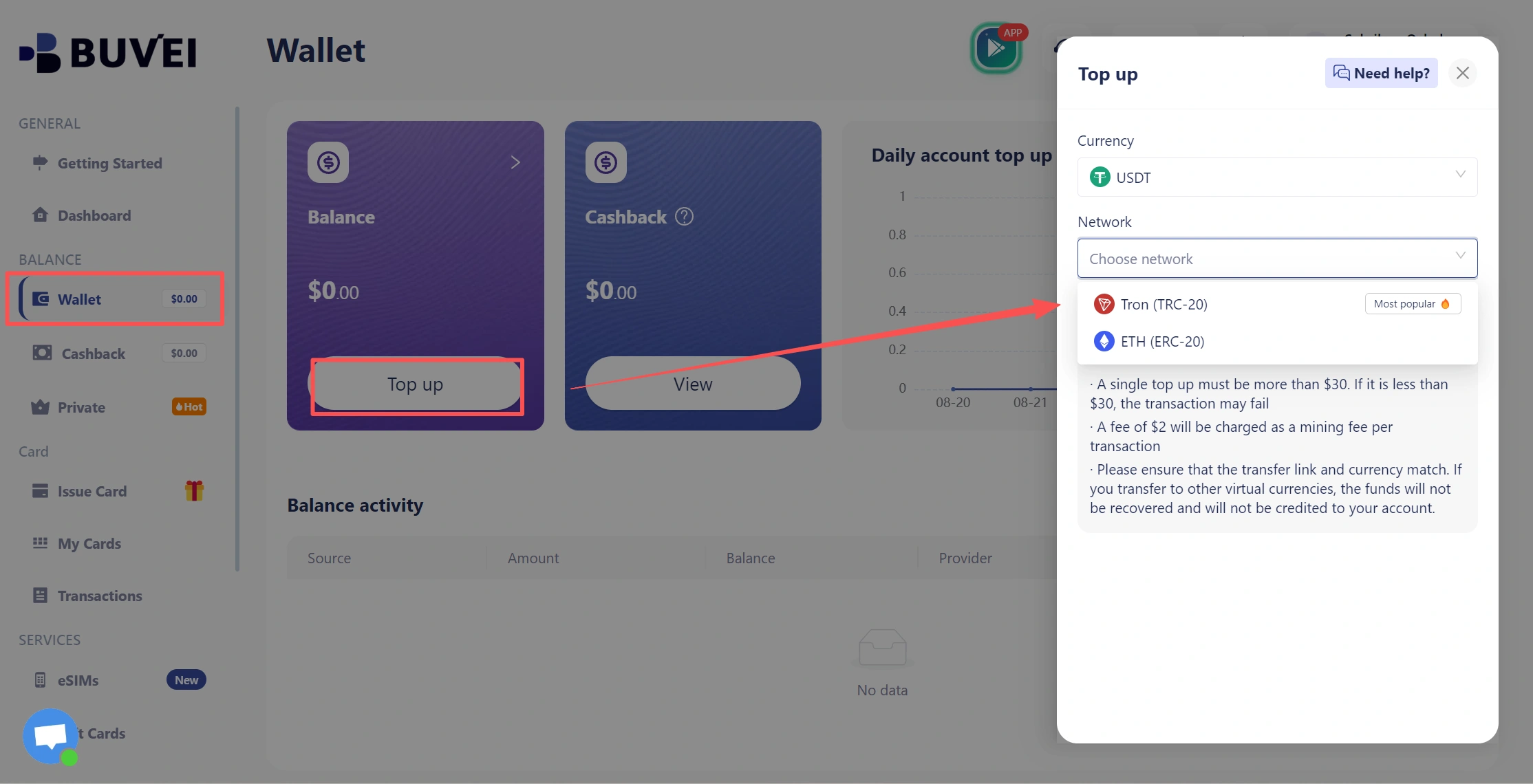
Check your available balance before using a virtual card for planned business expenses.
This does not mean that a business needs to maintain a large unused balance. The appropriate amount depends on expected payment activity and the requirements of the card program. The important point is to make funding checks part of the normal workflow.
Step 3: Create a Virtual Card
After defining the spending purpose and preparing your funding, create a virtual card.
The exact process varies by provider, but the workflow generally involves opening the card creation section, selecting the appropriate configuration, entering the required information, and creating the card.
In BUVEI, you can create a virtual card through the card management interface.
- visit https://buvei.com and create a free account.
- After email verification, log in to access the Buvei dashboard.
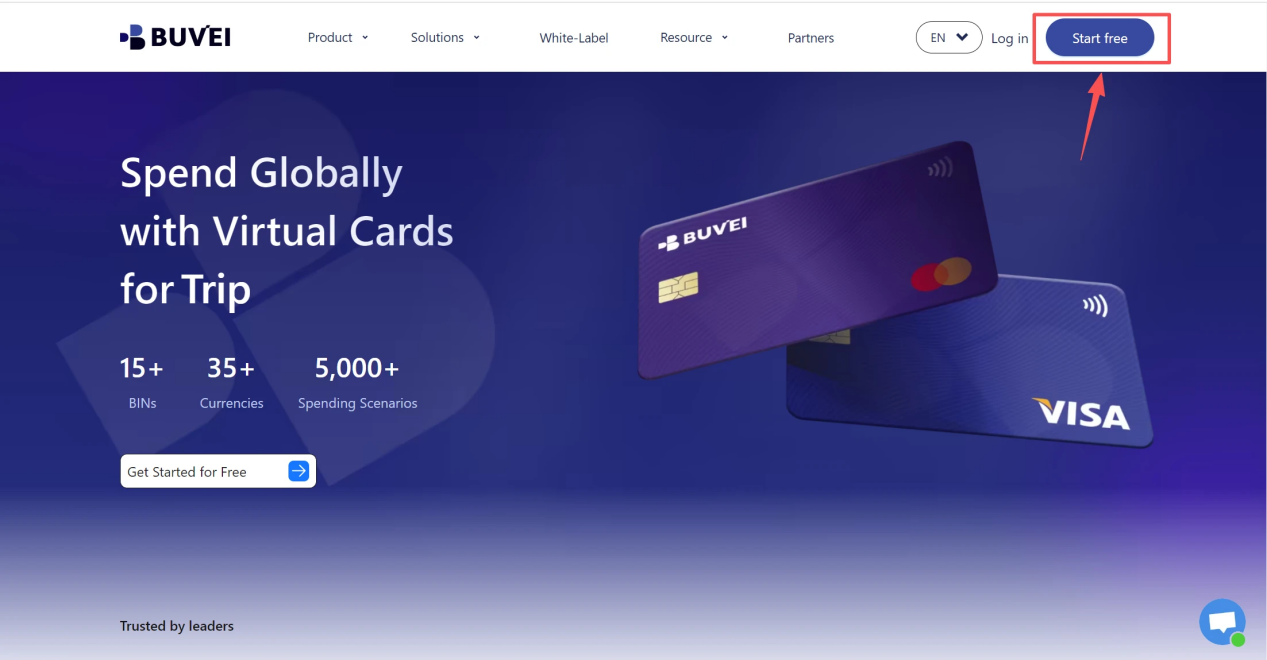
- Create a Virtual Card
- Go to the Card tab
- Choose your preferred BIN region, (recommends using US BIN)
- Select your card type
- Click Issue
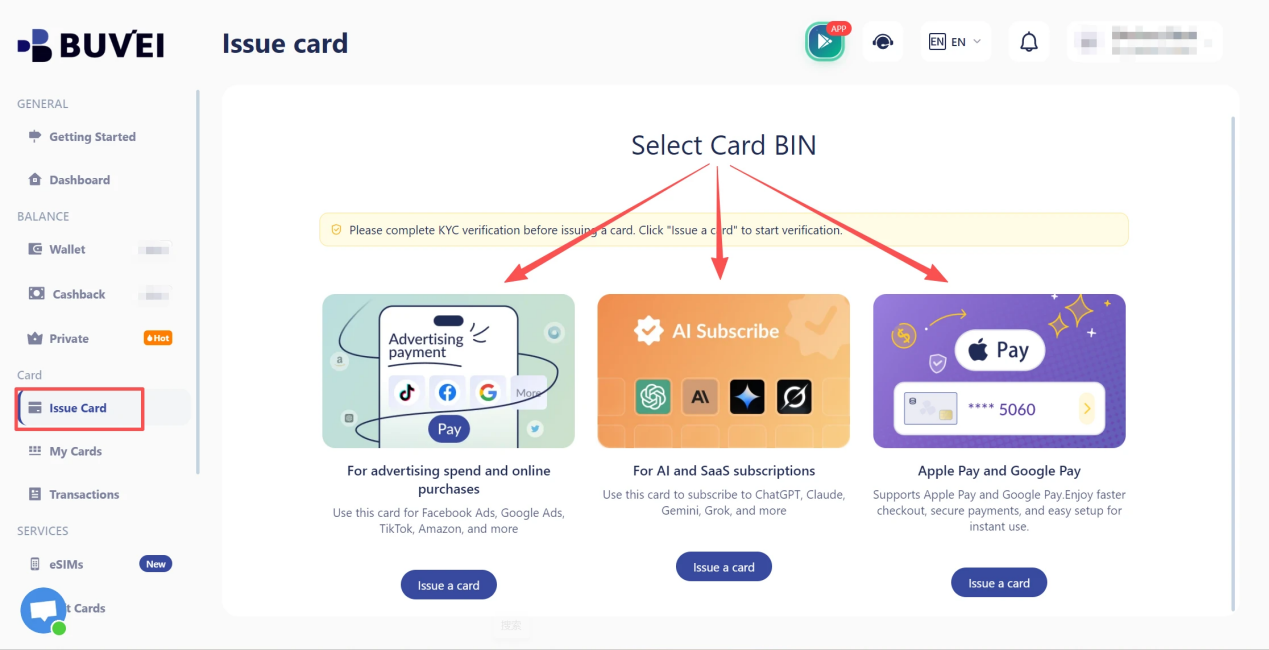
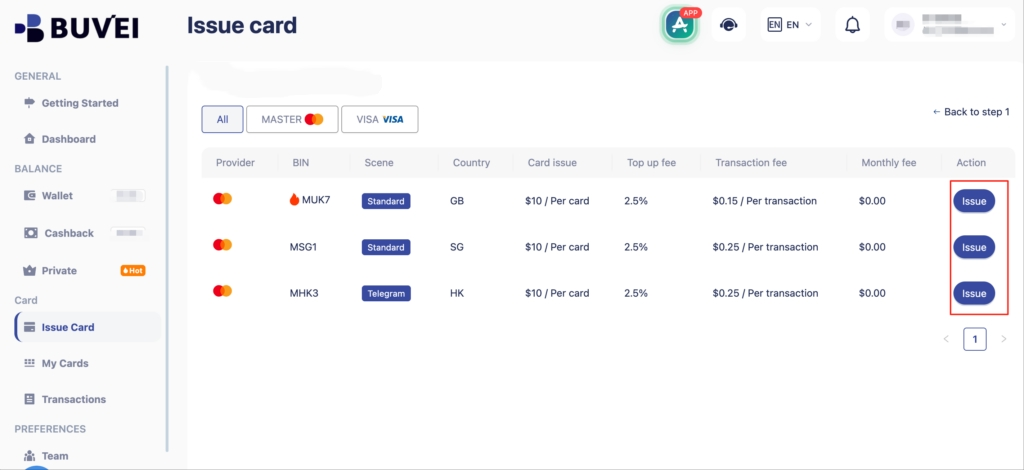
- Fill in the virtual card details, including name, amount, and number of cards.
- Click Issue Card
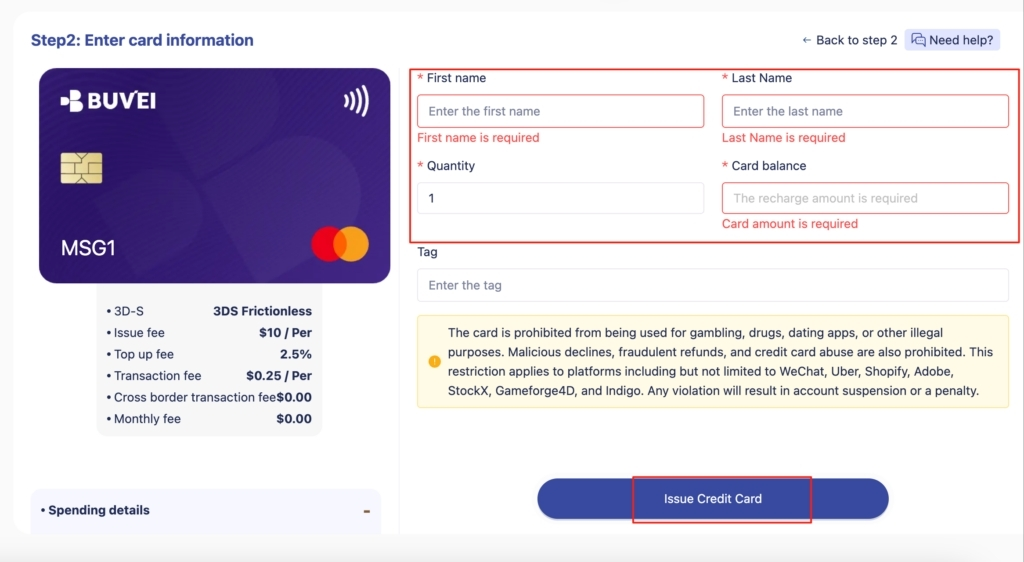
Create a virtual card based on the intended business spending purpose.
Before completing the setup, check that the card configuration matches the intended use. Depending on the provider, relevant considerations may include card type, spending requirements, and available controls.
For a small business, keeping the purpose of each card clear can make transaction reviews easier later. For example, a card created for a particular business expense category can remain associated with that purpose instead of being used across unrelated payments.
Step 4: Review Your Virtual Card Details
After creating the card, review the available card information before using it. Depending on the provider, this may include the card status, card number, expiration date, and other payment details.
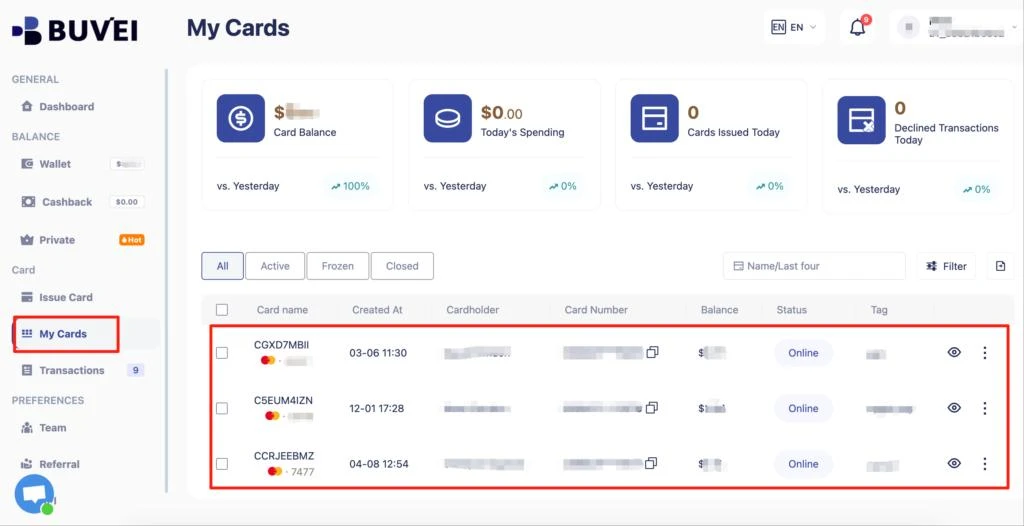
Review the virtual card details before using it for business payments.
This is also a good point to confirm that the card is ready for the intended payment activity. If you use card screenshots in a published article, hide sensitive information such as the full card number, CVV, or other security credentials. A quick review at this stage can help prevent avoidable errors when the card is used for the first time.
Step 5: Use the Card for Business Payments
Once the virtual card is ready, use it for the business expense it was intended to support. Before submitting a payment, check the card status, available funds, billing information, and whether the merchant accepts the card type. A simple payment workflow is:
Select the appropriate card → Enter payment details → Confirm the payment → Review the resulting transaction
Keeping the card's purpose consistent can make later expense reviews easier. For example, a business may reserve a virtual card for a specific category of online business payments rather than using the same card across unrelated expenses.
However, virtual card acceptance can vary depending on the merchant, card configuration, billing location, and other payment requirements. Businesses should confirm compatibility before relying on a virtual card for an important payment.
Step 6: Track Your Virtual Card Transactions
Making a payment is not the end of the workflow. Transaction monitoring completes the process.
After payments are made, review the available transaction records to understand how the card is being used.
Depending on the platform, useful information may include the merchant, transaction amount, date, payment status, and transaction history.
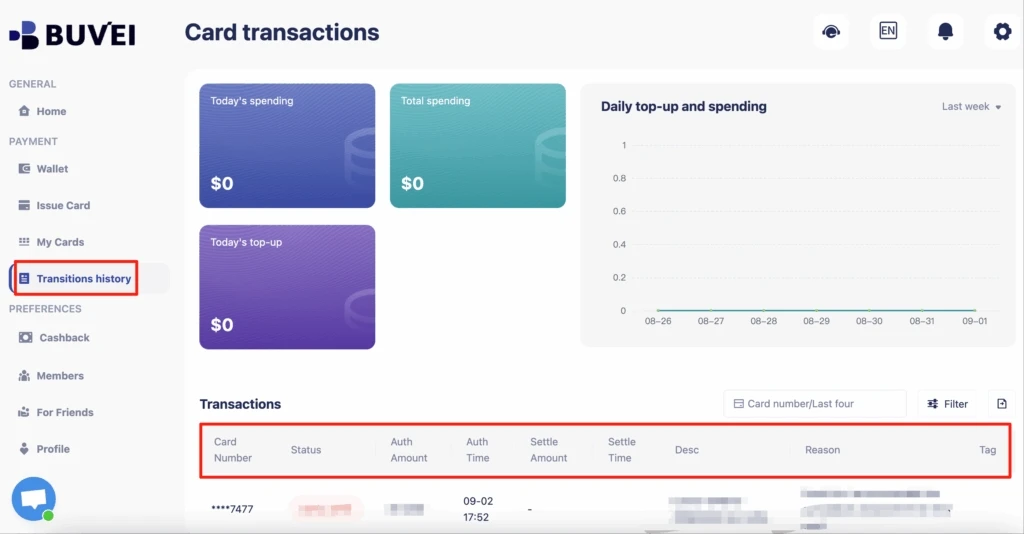
Review virtual card transactions to maintain visibility over business spending.
Regular reviews can also help identify unexpected, duplicate, or recurring charges that may require further attention. A simple review cycle can look like this: Plan → Create → Pay → Monitor → Review
For small businesses, making transaction review part of the normal payment process can be more practical than trying to reconstruct spending at the end of a billing period.
How to Keep Your Virtual Card Workflow Organized
A virtual card workflow works best when the process remains consistent.
Keep Card Purposes Clear
Each card should have a practical purpose. Avoid creating cards simply because additional cards are available. When a card has a clear purpose, it becomes easier to understand why a transaction was made and where the expense belongs.
Review Transactions Regularly
Choose a review schedule that fits your business. The appropriate frequency depends on transaction volume and payment frequency. Regular reviews can make it easier to spot unusual activity and keep expense records up to date.
Monitor Recurring Charges
Recurring payments can continue automatically, so review them periodically to make sure they are still necessary. This is particularly useful for digital services and other online payments that renew automatically.
Adjust the Workflow as Your Business Grows
Your payment structure may change as your business adds new services, vendors, or spending categories. A workflow that works for a small number of transactions may need additional organization as payment activity increases. Adjust the structure when the existing process becomes difficult to manage. The goal is not to create the most complicated card structure. It is to create a process that remains easy to understand as spending grows.
How BUVEI Supports a Virtual Card Spending Workflow
BUVEI can support businesses that want to build a structured virtual card spending workflow around their online payments. Rather than treating virtual cards as individual payment tools, businesses can incorporate card issuing, management, spending controls, and transaction monitoring into a broader payment process.
|
Workflow Stage |
Business Need | BUVEI Capability |
| Create | Issue virtual cards | Virtual card issuing |
| Manage | Organize card activity | Card management |
| Control | Manage spending | Spending controls |
| Monitor | Review payment activity | Transaction management |
| Scale | Support multiple cards |
Multi-card programs |
This approach allows a business to start with a relatively simple process and expand it as payment requirements become more complex.
For businesses managing multiple cards or higher transaction volumes, centralized card management and transaction visibility can make the workflow easier to maintain.
BUVEI also provides virtual card infrastructure for businesses that need to build more structured payment programs rather than relying only on individual cards.

Common Mistakes to Avoid
Creating Cards Without a Defined Purpose
A larger number of virtual cards does not automatically create better expense management. Each card should serve a practical purpose.
Forgetting Recurring Charges
Automatic payments can continue even when a service is no longer needed. Periodic transaction reviews can help identify these charges.
Failing to Review Transaction Activity
Creating a virtual card is only one part of the workflow. Reviewing transaction activity provides the visibility needed to keep the process organized.
Frequently Asked Questions
Can Small Businesses Use Virtual Cards to Manage Expenses?
Yes. Virtual cards can be used for various online business expenses, depending on the card provider, merchant, and payment requirements. Businesses can structure cards around specific spending purposes when doing so improves organization or visibility.
Should Every Business Expense Have a Separate Virtual Card?
No. A separate card is most useful when it provides a practical benefit, such as clearer expense separation or better spending control. Businesses should choose a card structure based on their transaction volume, spending categories, and management requirements.
How Many Virtual Cards Should a Small Business Use?
There is no universal number. The appropriate setup depends on the number of expense categories, payment frequency, spending requirements, and the level of separation the business needs. A small business can start with a simple structure and introduce additional cards when its payment activity becomes more complex.
How Can I Track Spending Made With a Virtual Card?
Use the transaction history provided by your card platform to review payments, merchants, amounts, dates, and payment status. Regular reviews can help businesses maintain spending visibility and identify unexpected or recurring charges.
Can Virtual Cards Be Used for Recurring Business Payments?
Virtual cards may be suitable for recurring payments depending on the card provider, merchant, and card configuration. Businesses should confirm compatibility before using a virtual card for an important recurring charge.
Conclusion
Setting up a virtual card spending workflow does not need to be complicated. For small businesses, the process can start with a few clear steps: define spending categories, prepare funds, create cards for appropriate expenses, review card details, make payments, and track transactions.
The key is consistency. A structured workflow can make online payment activity easier to organize while giving businesses better visibility into how virtual cards are being used.
As spending requirements grow, businesses can expand their workflow with additional card management and spending controls.
With virtual card issuing, spending controls, transaction management, and multi-card capabilities, BUVEI can support businesses building a more structured approach to virtual card payments.