
Many users want access to ChatGPT Plus but run into the same issue: they don’t have a supported credit card, or their payment keeps failing. Fortunately, it is possible to pay for ChatGPT without a credit card by using a virtual card instead.
This guide explains why ChatGPT requires payment methods, why traditional cards often fail, and shows you step by step how to subscribe using a virtual card such as Buvei.
Why ChatGPT Requires a Payment Method
ChatGPT Plus is a paid subscription that provides:
-
Faster response speeds
-
Priority access during peak times
-
Access to advanced models and features
-
More stable performance for professional use
Because of this, OpenAI requires a valid payment method for billing. Most users attempt to use their local debit or credit cards, but this often leads to declines depending on region, bank, or card issuer.
Common Issues with Traditional Credit Cards
Many users experience problems such as:
-
Card not supported by OpenAI
-
Payment declined by bank
-
International payments blocked
-
3D Secure verification failing
-
Repeated payment errors
-
Account temporarily restricted due to billing attempts
These issues are especially common for users outside the US, Europe, or with newer digital banks.
How Virtual Cards Work for ChatGPT Payments
A virtual card works like a regular Visa or Mastercard but is designed for online use. It includes:
-
A valid card number
-
Expiration date
-
CVV security code
The advantage is control. You decide:
-
How much balance sits on the card
-
Which services use the card
-
Whether to create separate cards for different platforms
For ChatGPT subscriptions, a virtual card often works more reliably than local bank cards, especially when using a US BIN.
Step-by-Step: Paying for ChatGPT Without a Credit Card
Here is the practical flow most users follow:
Step 1: Get a virtual card that supports international online payments
Choose a platform that allows you to issue cards suitable for SaaS subscriptions.
Step 2: Add balance to the virtual card
Make sure the card contains enough funds to cover the monthly subscription.
Step 3: Use the virtual card as your payment method on ChatGPT
Enter the card details just like a normal credit card.
Step 4: Monitor renewals and control spending
Keep enough balance for renewal or adjust based on usage.
This approach avoids many of the limitations tied to traditional bank-issued cards.
Using a Buvei Virtual Card for ChatGPT Subscriptions
Buvei is well-suited for ChatGPT subscriptions because it allows flexible card creation, US BIN selection, and transparent card management.
Below is the exact setup process.
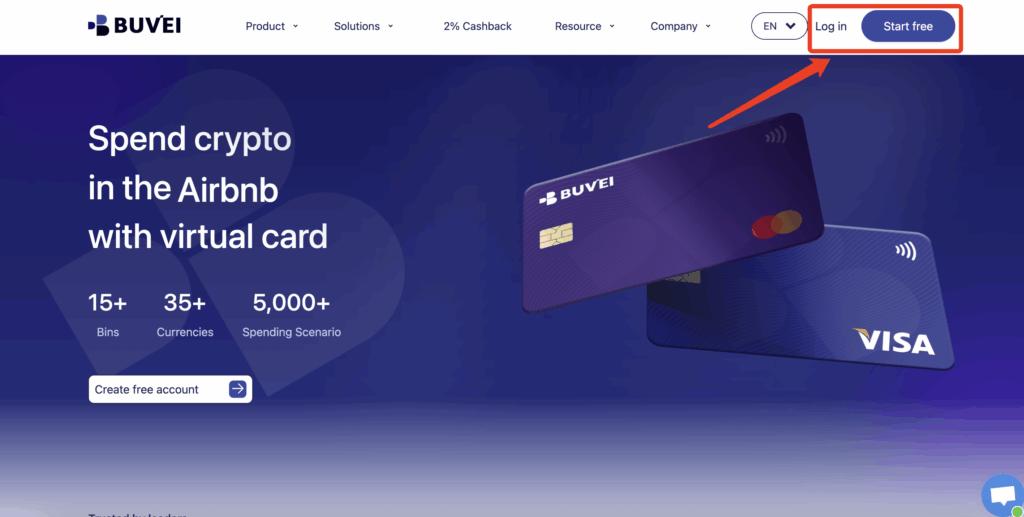
Step 1: Register a Buvei Account
Visit https://buvei.com and create a free account.
After completing email verification, log in to your Buvei dashboard.
Step 2: Fund Your Account
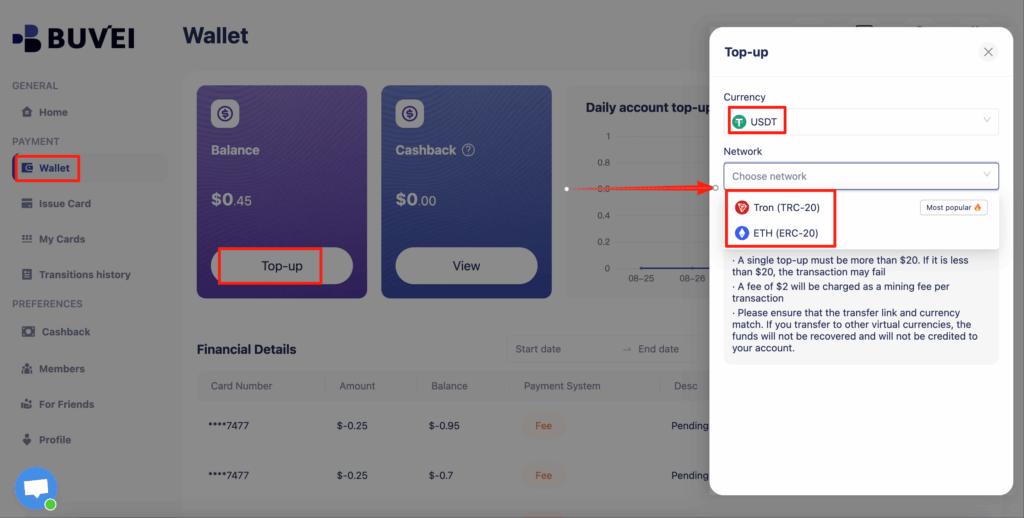
Go to the Wallet tab.
Top up using USDT (TRC20 or ERC20).
You will receive a unique deposit address.
Send your funds to this address.
After confirmation, your balance will appear in your wallet and be available immediately.
Step 3: Create a Virtual Card
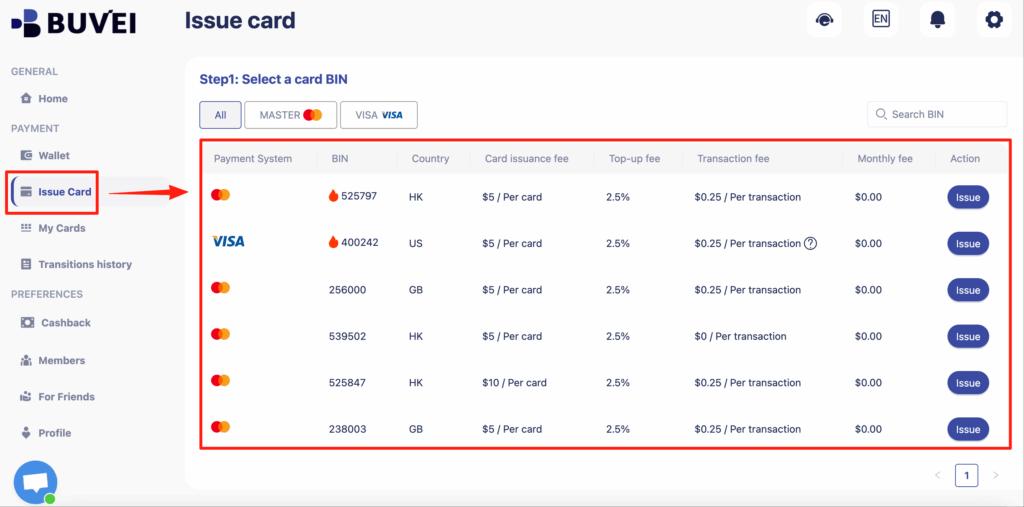
Go to the Cards tab.
Choose your preferred BIN region (US BIN is recommended for higher approval rates on platforms like ChatGPT).
Select your card type.
Click Create.
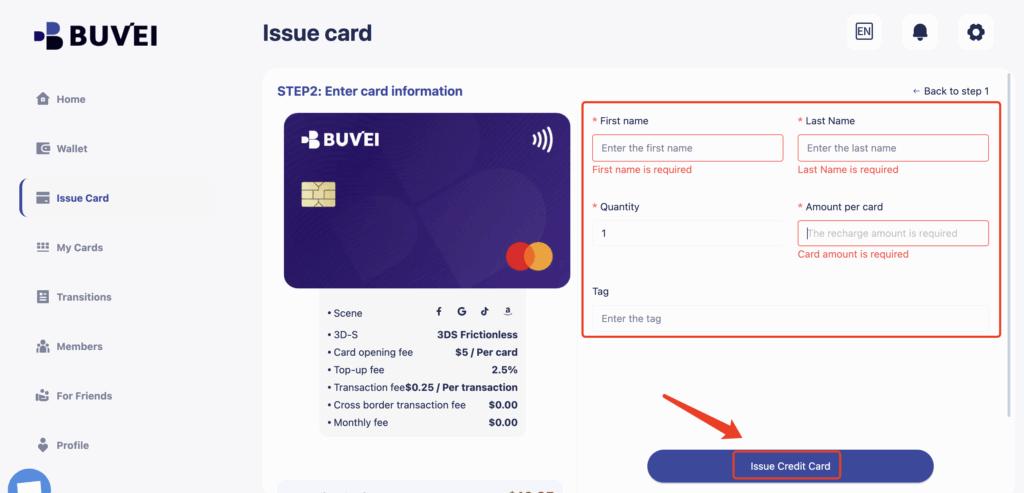
Fill in the card details, including card name, amount, and number of cards.
Click Issue Card.
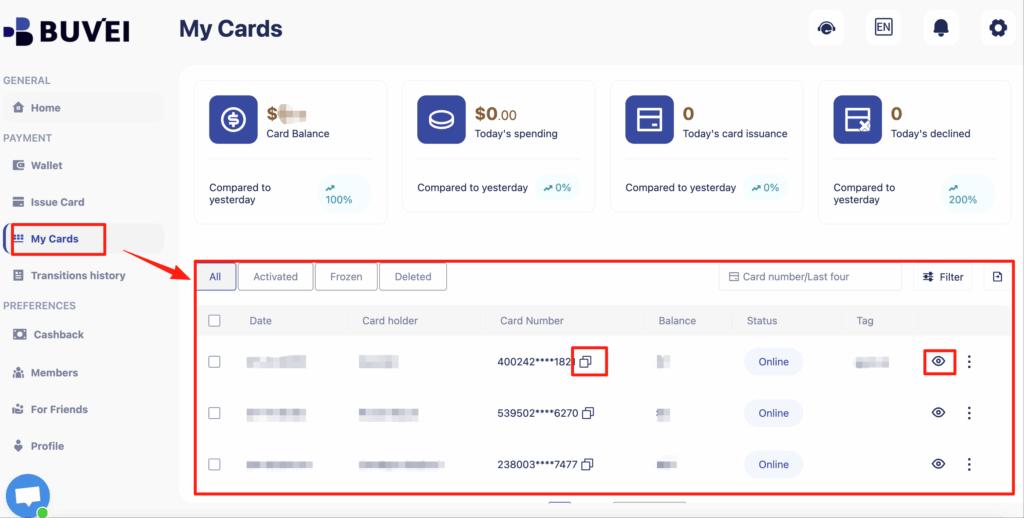
After creation, go to My Cards to view:
-
Card number
-
Expiry date
-
CVV
-
Card balance
-
Transaction history
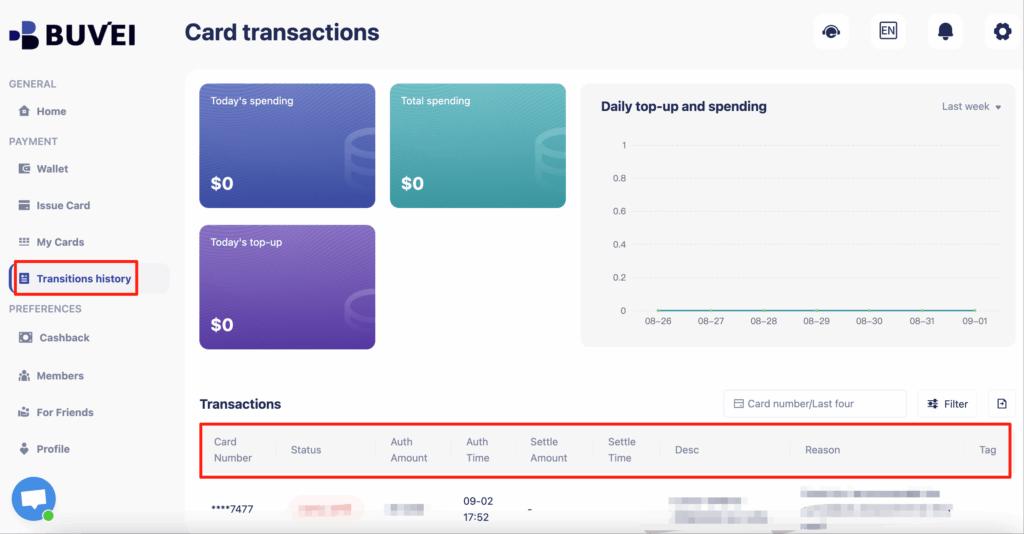
You can now use these card details directly on the ChatGPT billing page.
Tips to Avoid Payment Failures
To keep your ChatGPT subscription stable, follow these best practices:
-
Use a US BIN virtual card for higher approval success
-
Ensure your card always has enough balance before renewal
-
Avoid using the same card across too many unrelated platforms
-
Create a dedicated card only for ChatGPT billing
-
Monitor transactions in your dashboard regularly
-
Replace the card if you experience repeated declines
These habits significantly reduce the risk of sudden subscription interruptions.
Final Thoughts
If you’ve struggled with billing issues, learning how to pay for ChatGPT without a credit card can save time and frustration. Virtual cards provide a flexible alternative, especially for users whose local banks are unreliable for international subscriptions.
With platforms like Buvei, users can easily create, fund, and manage virtual cards designed for online services such as ChatGPT, giving you full control over your subscription and spending.