Ad account rotation is a common strategy used by media buyers, affiliates, and performance marketers to reduce the risk of sudden bans and account shutdowns. One of the most effective tools supporting this strategy is the use of virtual cards for ad account rotation.
This guide explains why rotation matters, how payment behavior triggers reviews, and how you can use virtual cards — including Buvei — to manage ad accounts more safely.

Why Ad Account Rotation Is Necessary
Advertising platforms like Facebook, Google, TikTok, and X continuously monitor account behavior. Even legitimate advertisers can face sudden restrictions due to:
-
Automated risk detection systems
-
High spending changes
-
New account activity
-
Aggressive scaling
-
Billing inconsistencies
-
Multiple accounts linked by payment methods
To reduce risk, professionals often distribute campaigns across multiple accounts instead of relying on a single one.
Payment Risks That Trigger Ad Account Reviews
One of the fastest ways to trigger a manual review or suspension is through billing behavior.
Common payment-related triggers include:
-
Using the same card across too many accounts
-
Frequent card declines
-
Sudden spending spikes
-
Unverified payment methods
-
Chargebacks or disputed transactions
-
Mismatched billing locations
Payment methods are one of the strongest signals platforms use to connect accounts.
How Virtual Cards Enable Safe Account Rotation
This is where virtual cards become extremely useful.
With virtual cards, you can:
-
Assign one card per ad account
-
Limit spending per account
-
Prevent financial linking between accounts
-
Isolate risk if one account is flagged
-
Replace cards quickly without disrupting other accounts
-
Maintain cleaner billing histories
Instead of using one corporate card everywhere, you distribute risk across controlled, independent payment methods.
How to Create and Rotate Virtual Cards Using Buvei
Buvei is designed for users who manage multiple cards and need fast, flexible control over payments.
Here is the exact setup process.
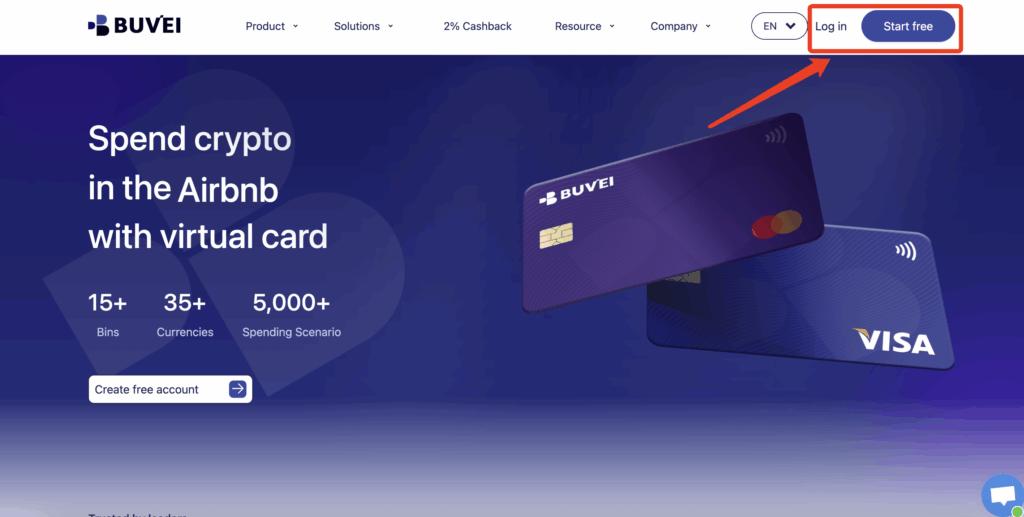
Step 1: Register a Buvei Account
Visit https://buvei.com and create a free account.
After completing email verification, log in to your Buvei dashboard.
Step 2: Fund Your Account
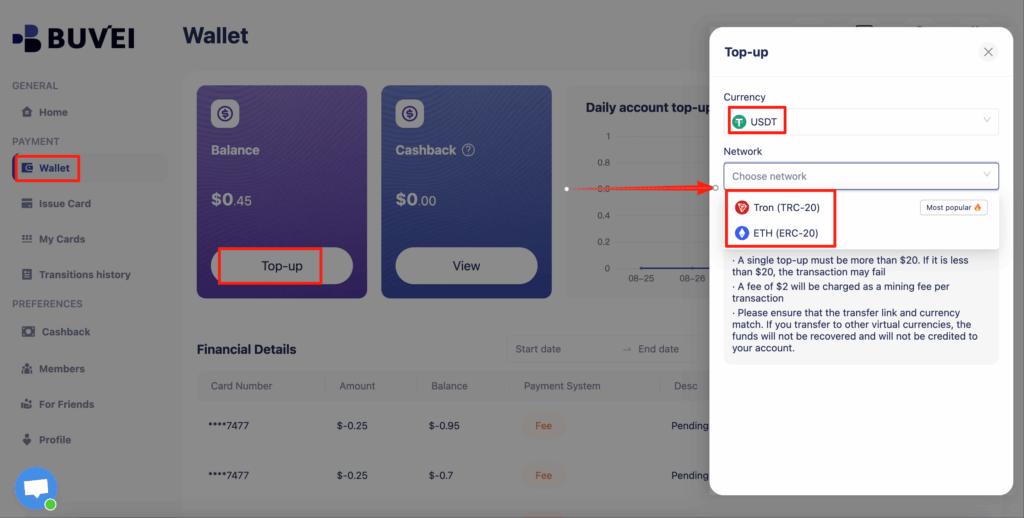
Go to the Wallet tab.
Top up using USDT (TRC20 or ERC20).
You will receive a unique deposit address.
Send your funds to this address.
After confirmation, your balance will appear in your wallet and be available immediately.
Step 3: Create Virtual Cards for Each Ad Account
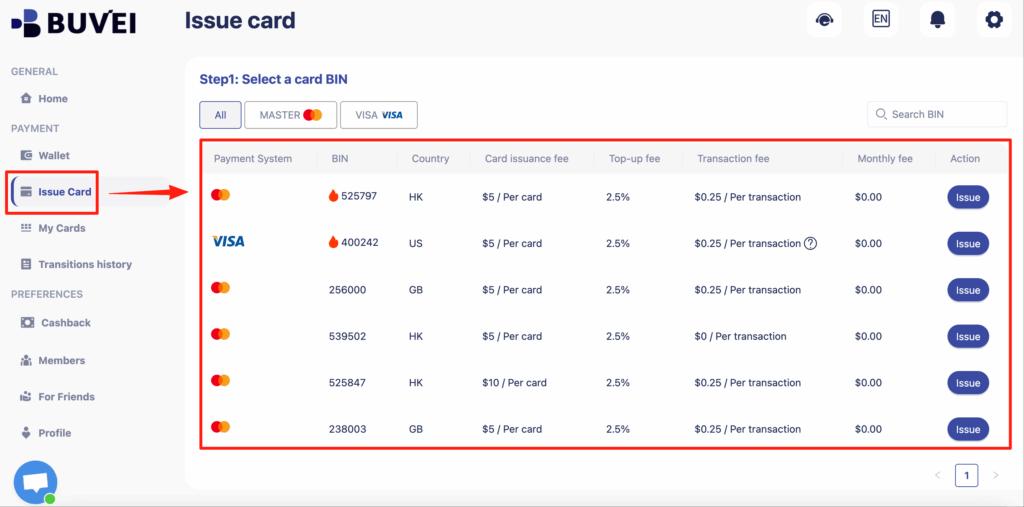
Go to the Cards tab.
Choose your preferred BIN region (US BIN is recommended for higher approval rates on ad platforms).
Select your card type.
Click Create.
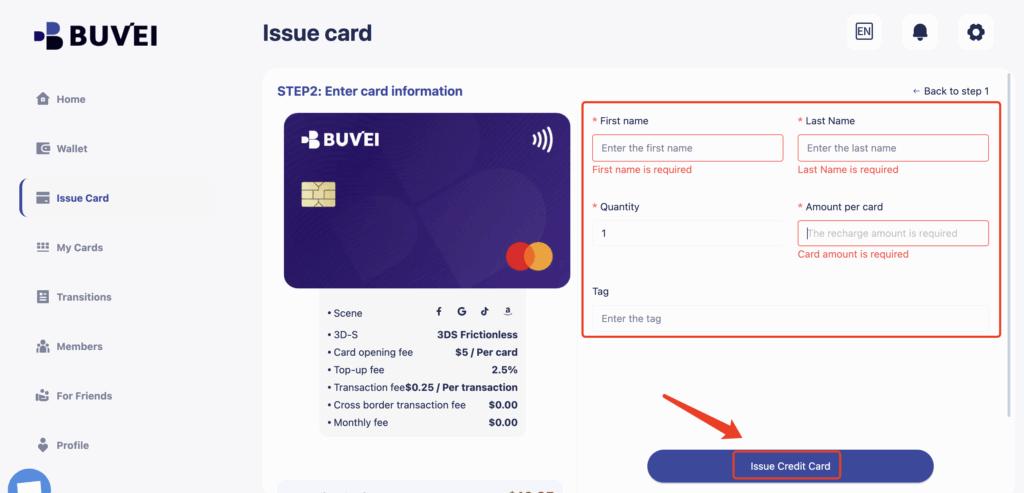
Fill in the card details, including card name, amount, and number of cards.
Click Issue Card.
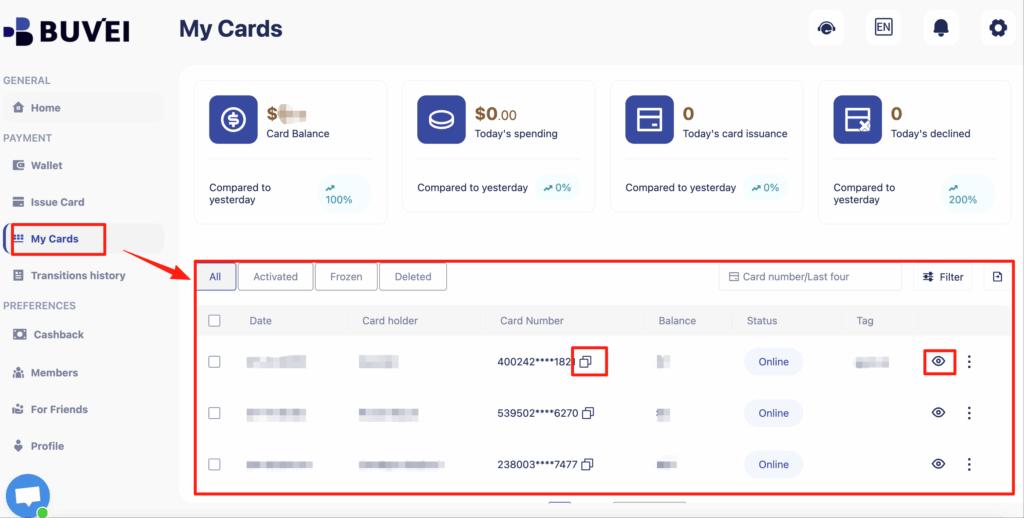
After creation, go to My Cards to view:
-
Card number
-
Expiry date
-
CVV
-
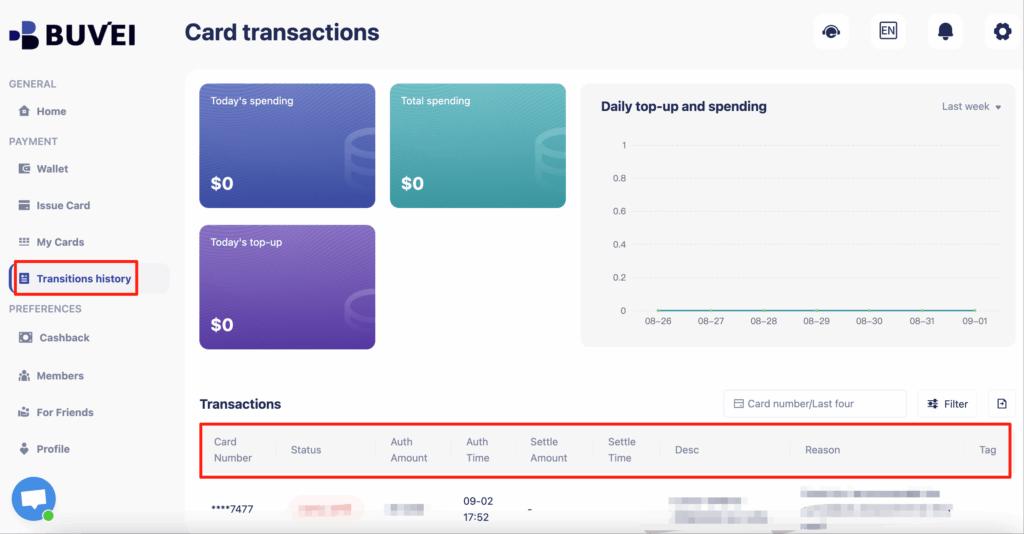
Card balance
-
Transaction history
You can name cards like:
-
FB Ads – Account 1
-
Google Ads – Client A
-
TikTok Ads – Testing
-
X Ads – Scaling
This keeps your billing organized and clean.
Best Practices for Reducing Ban Risks
Using virtual cards alone is not enough. You should also apply these best practices:
-
Use one card per ad account only
-
Avoid sudden large budget increases
-
Keep billing consistent across time
-
Avoid linking accounts through shared assets
-
Replace cards when an account is restricted
-
Keep balances appropriate to spend levels
-
Monitor transactions regularly
When combined with a structured virtual card system, this significantly improves account longevity.

Final Thoughts
Using virtual cards for ad account rotation is no longer an advanced tactic — it is becoming a standard practice among professional advertisers. Payment structure plays a critical role in how platforms assess risk, and clean separation between accounts can dramatically reduce unexpected disruptions.
With platforms like Buvei, advertisers gain the flexibility to issue, manage, and rotate multiple virtual cards easily, giving them stronger control over ad spend, account safety, and long-term scalability.