As online businesses grow, so do their payment needs. Media buyers, agencies, SaaS founders, affiliates, and e-commerce operators often process large volumes of transactions every day. For them, using a single payment card is no longer practical or safe.
This is where unlimited virtual cards for high spenders become essential.

Why High Spenders Need Multiple Virtual Cards
High spenders typically manage:
-
Multiple ad accounts across platforms
-
Several SaaS tools and subscriptions
-
Client billing for agencies
-
Testing budgets for campaigns
-
Separate teams and departments
-
Different regions and currencies
Using separate virtual cards for each use case provides much better structure and control.
Instead of one fragile payment method, they build a professional payment infrastructure.
Risks of Using a Single Card for Large Volumes
Relying on only one card creates serious risks:
-
One decline can pause all campaigns
-
One fraud issue can block every service
-
One platform ban can affect all linked accounts
-
Difficult to track spending by project
-
No isolation between clients or teams
-
Higher chance of triggering risk reviews
For high-volume operations, this structure simply does not scale.
How Unlimited Virtual Cards Work
Modern virtual card platforms allow users to:
-
Instantly generate new cards
-
Assign each card a specific purpose
-
Control funding per card
-
Monitor transactions individually
-
Replace compromised cards quickly
-
Create hundreds of cards if needed
This means your payment system becomes modular instead of centralized.
Each card acts like an independent tool instead of a single point of failure.
How Buvei Supports High-Volume Card Creation
Buvei is designed for users who need flexibility and scale when managing virtual cards.
Below is the complete process used by Buvei users.
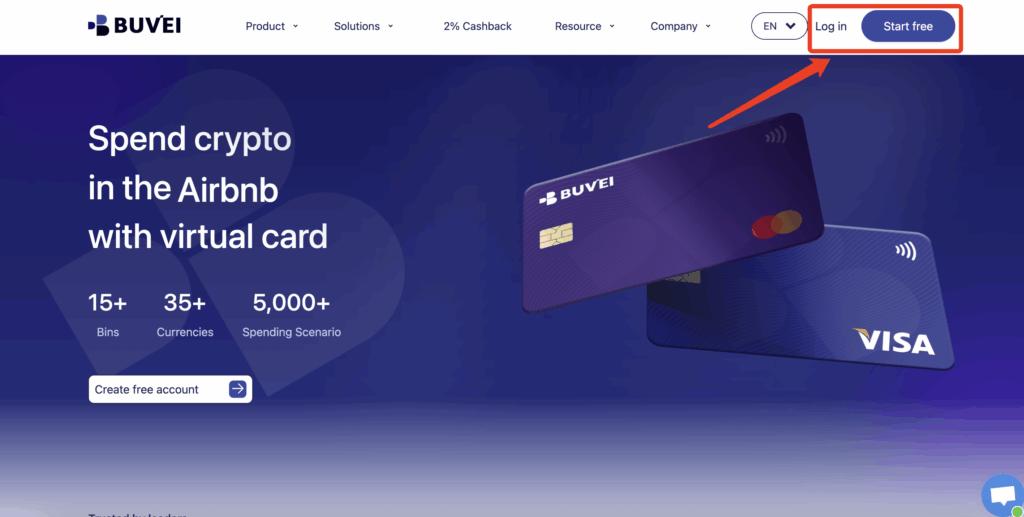
Step 1: Register a Buvei Account
Visit https://buvei.com and create a free account.
After completing email verification, log in to your Buvei dashboard.
Step 2: Fund Your Account
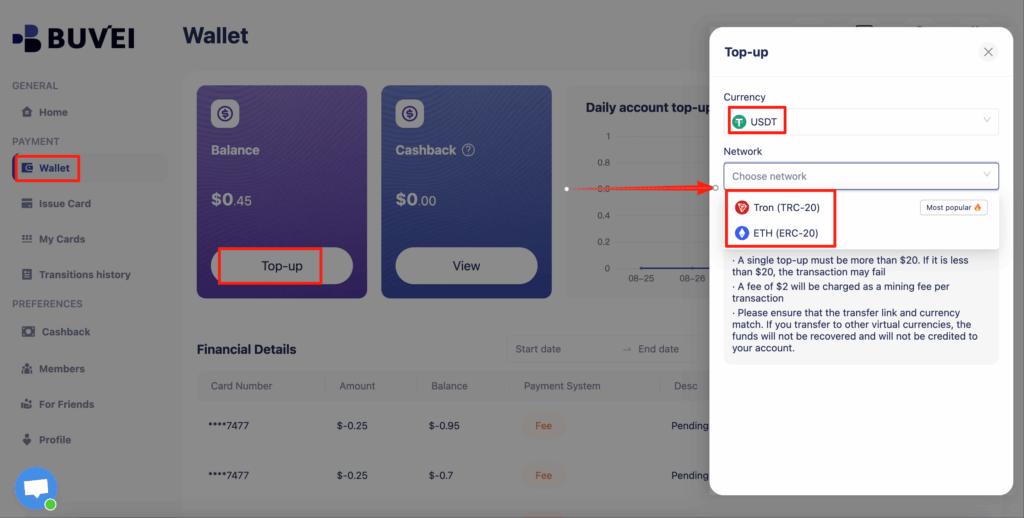
Go to the Wallet tab.
Top up using USDT (TRC20 or ERC20).
You will receive a unique deposit address.
Send your funds to this address.
After confirmation, your balance will appear in your wallet and be available immediately.
Step 3: Create Virtual Cards
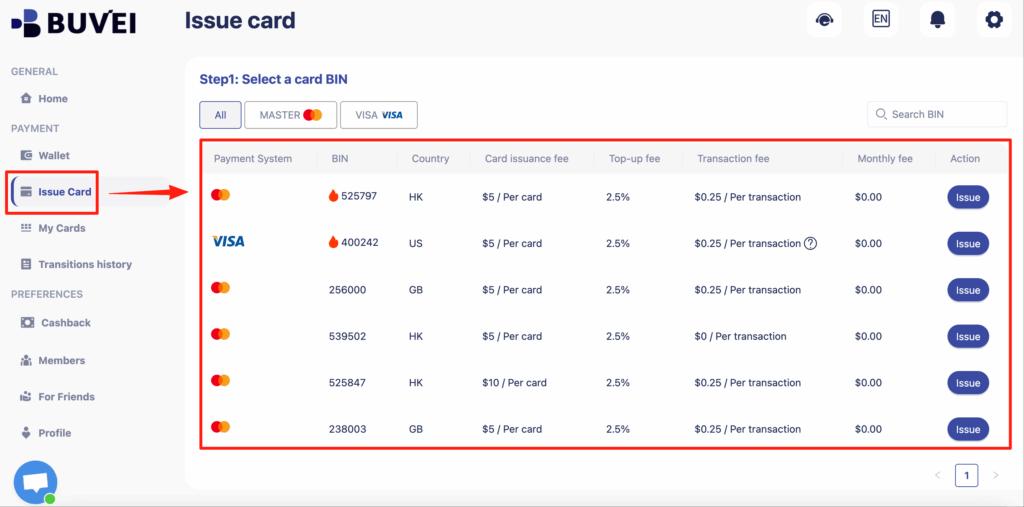
Go to the Cards tab.
Choose your preferred BIN region (US BIN is recommended for higher approval rates).
Select your card type.
Click Create.
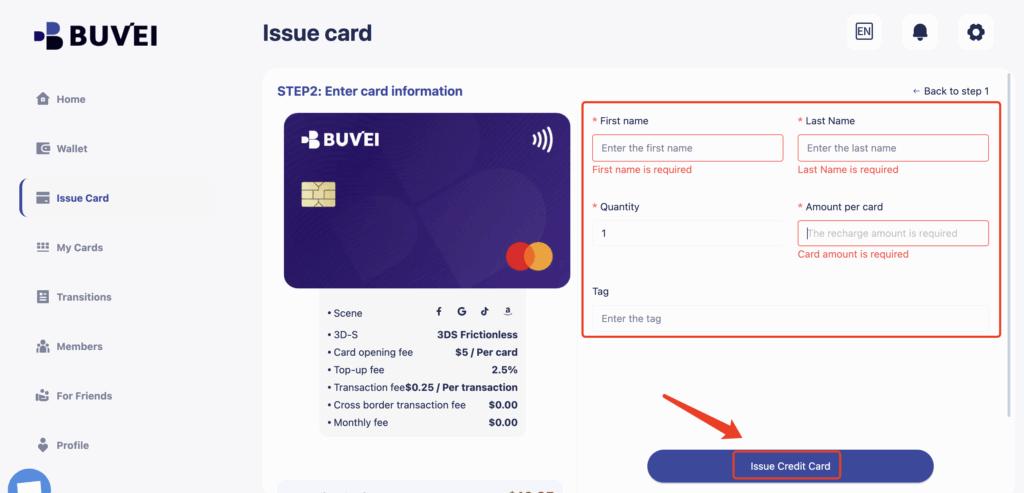
Fill in the card details, including card name, amount, and number of cards.
Click Issue Card.
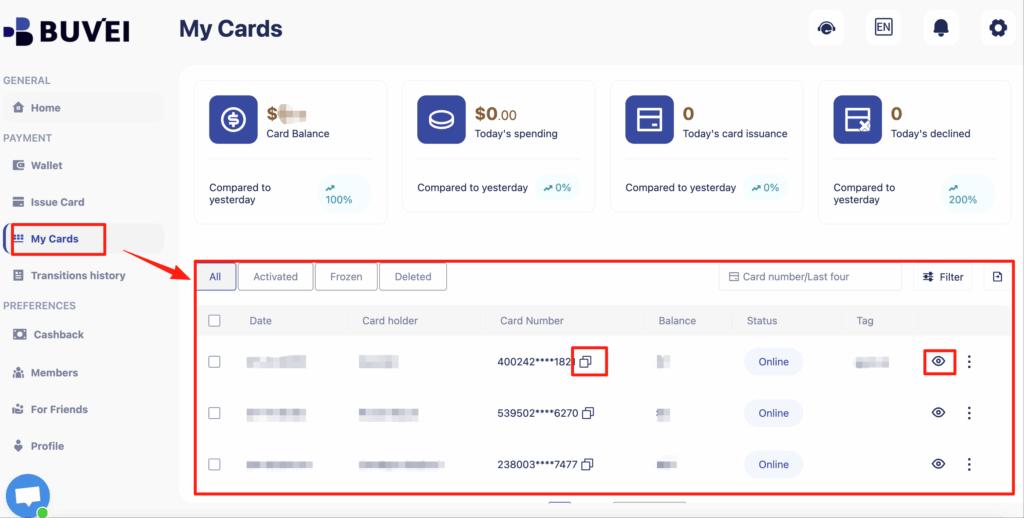
After creation, go to My Cards to view:
-
Card number
-
Expiry date
-
CVV
-
Card balance
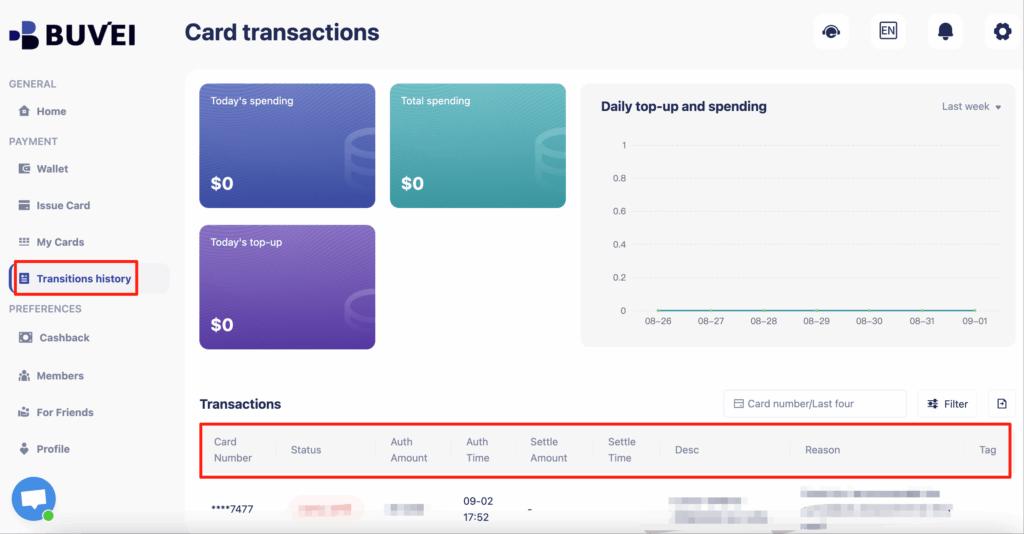
-
Transaction history
High spenders often organize cards like:
-
Meta Ads – Scaling
-
Meta Ads – Testing
-
Google Ads – Client A
-
TikTok Ads – Client B
-
SaaS Tools
-
Internal Software
-
Developer APIs
-
Subscriptions
This creates a clear, scalable financial structure.
Best Practices for Spend and Risk Control
To use unlimited virtual cards effectively, follow these best practices:
-
Always separate business use cases by card
-
Avoid overloading one card with too many platforms
-
Use lower balances for experimental campaigns
-
Keep clean records of which card serves which purpose
-
Rotate cards instead of forcing problematic ones
-
Monitor transactions regularly
-
Keep consistent funding behavior to reduce flags
When used properly, unlimited virtual cards become a strategic advantage, not just a convenience.

Final Thoughts
High spenders need more than just a payment method — they need a system.
By using unlimited virtual cards, professionals gain:
-
Stronger risk isolation
-
Better financial organization
-
Easier scaling across platforms
-
Greater protection against bans and fraud
-
Complete visibility into spending behavior
With platforms like Buvei, users can quickly create, manage, and scale their virtual card infrastructure while maintaining full control over budgets and risk.