Managing payments for Google Cloud Platform (GCP) can be challenging for startups and SaaS teams, especially when multiple projects, subscriptions, or recurring charges are involved. Traditional cards are vulnerable to unauthorized charges, accidental overspending, and potential fraud—issues that can impact budgets and disrupt cloud services.
To mitigate these risks, many teams are turning to virtual cards for Google Cloud payments. Virtual cards provide disposable card numbers, spending controls, and enhanced security, making cloud billing safer and easier to manage.

Why Virtual Cards Are Safer for Google Cloud Payments
Using virtual cards for Google Cloud offers several key advantages:
-
Project-specific cards: Assign a separate card to each project or subscription
-
Single-use or limited-use cards: Reduce exposure by limiting the card to a specific transaction or period
-
Spending controls: Set limits on each card to prevent overspending
-
Instant replacement: Quickly cancel compromised cards without affecting other accounts
These features ensure better cost control, minimize billing issues, and enhance security for cloud payments.
Do Google Cloud Billing Accounts Accept Virtual Cards?
Yes, GCP accepts virtual cards issued via Visa or Mastercard networks. Key points to consider:
-
Virtual cards work like standard credit cards and can be added to your Google Cloud billing account
-
They can be used for recurring payments such as monthly subscription fees or API usage
-
Choosing a card with the correct region (e.g., U.S. BIN for U.S.-based accounts) improves approval rates
By using virtual cards for GCP billing, SaaS teams gain better visibility and control over cloud expenditures.
Common Payment Risks on Google Cloud and How Virtual Cards Help
Even with secure cloud platforms, traditional cards are exposed to:
-
Failed payments due to expired or blocked cards
-
Accidental charges from auto-scaling or subscription renewals
-
Fraud or unauthorized access to card details
Virtual cards address these risks by isolating your main account, providing real-time monitoring, and allowing instant replacement if necessary.
Step-by-Step: Using a Virtual Card for Google Cloud Billing
Here’s how SaaS teams can use a Buvei virtual card for Google Cloud payments:
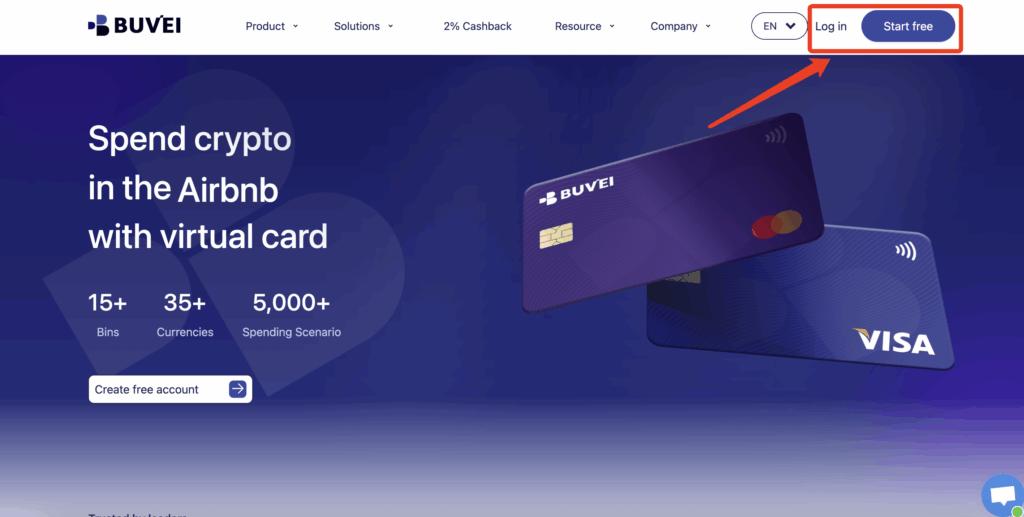
Step 1: Register a Buvei Account
-
Visit Buvei
-
Sign up for a free account and verify your email
-
Log in to access your dashboard
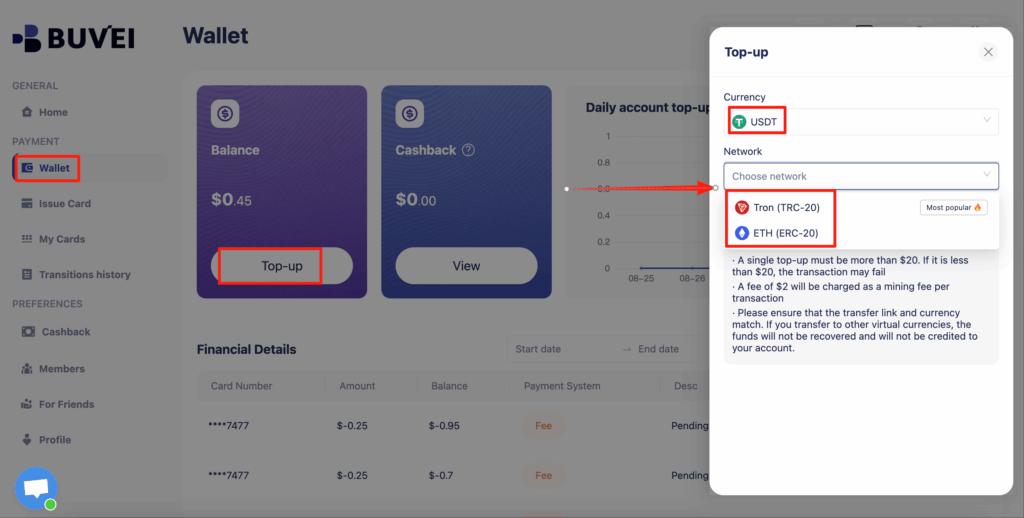
Step 2: Fund Your Wallet
-
Navigate to the Wallet tab
-
Select a top-up method (e.g., USDT TRC20/ERC20)
-
Copy the deposit address and send funds
-
Your balance will be available immediately for creating virtual cards
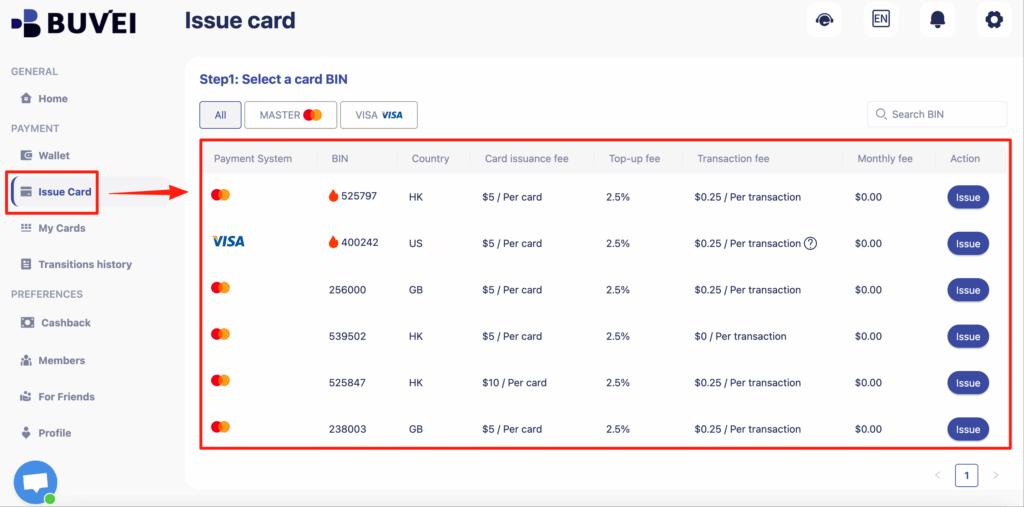
Step 3: Create a Virtual Card
-
Go to the Cards tab
-
Select a BIN region compatible with Google Cloud payments (U.S. recommended)
-
Choose card type and enter:
-
Card name (e.g., “GCP Billing – Production”)
-
Funding amount
-
Number of cards
-
-
Click Create Card
-
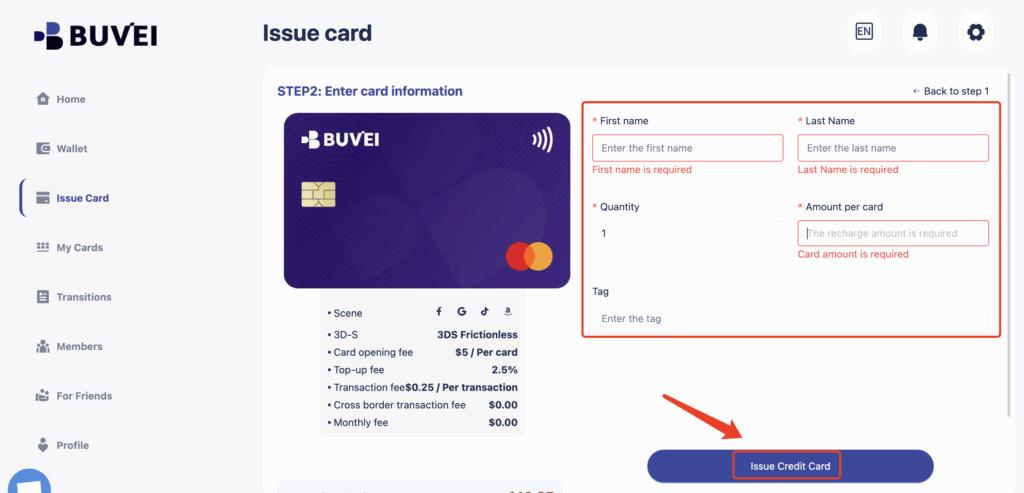
Enter the required details:
-
Card name (e.g., “GCP Billing – Production”)
-
Initial funding amount
-
Number of cards
-
-
Click “Issue Card”
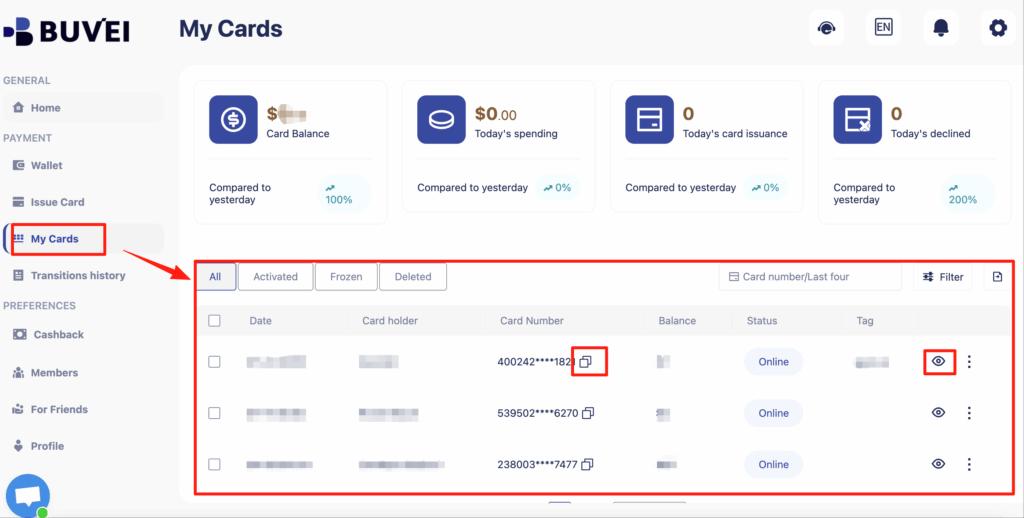
Check “My Cards” for card number, expiration, CVV, and transaction history.
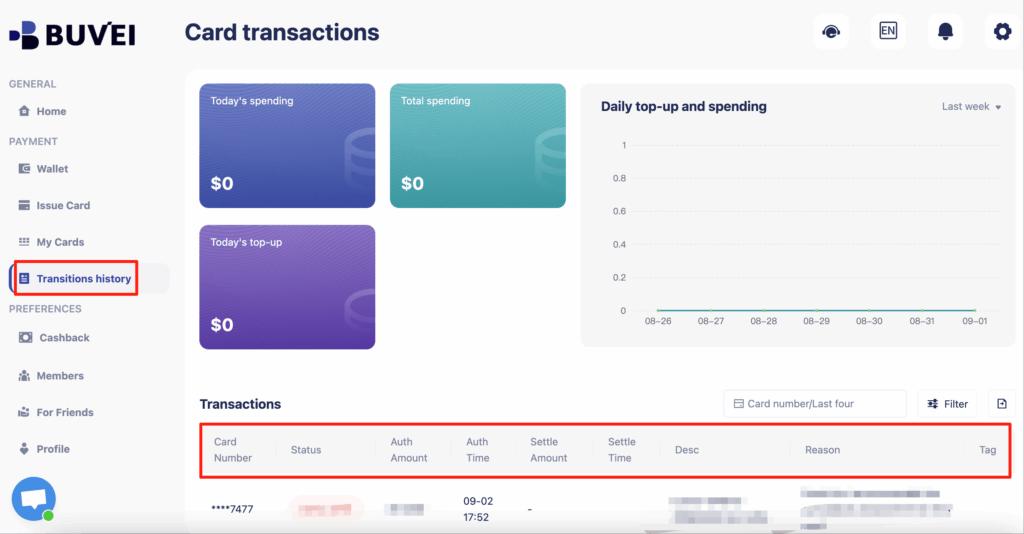
You can also track balances, top-ups, and all transaction activity from this page.
Step 4: Add the Virtual Card to Google Cloud Billing
-
Open your GCP Console and navigate to Billing
-
Click Manage payment methods and select Add payment method
-
Enter your virtual card details exactly as shown in Buvei
-
Set the virtual card as the default payment method for your project or subscription
This ensures your main bank account remains secure while paying for cloud services seamlessly.
Step 5: Monitor Usage
-
Track transactions and spending via the Buvei dashboard
-
Set monthly or per-project limits to prevent unexpected charges
-
Cancel or replace the card instantly if there are issues

Final Thoughts
For SaaS teams and developers, using a virtual card for Google Cloud billing provides peace of mind, enhanced security, and precise control over cloud costs. Platforms like Buvei allow teams to:
-
Quickly issue disposable cards
-
Allocate cards per project or subscription
-
Set spending limits and monitor transactions in real-time
By adopting virtual cards for Google Cloud payments, teams can simplify billing, reduce financial risks, and focus on scaling cloud workloads without worrying about unauthorized charges or payment failures.