
For SaaS teams running production workloads on Google Cloud Platform (GCP), billing stability is not a secondary concern. Payment failures can interrupt services, delay deployments, or trigger account reviews—issues that quickly compound as usage scales.
As a result, many teams are reassessing their Google Cloud payment method. Increasingly, virtual cards for Google Cloud are being adopted as a more controlled and reliable alternative to traditional corporate cards, particularly for recurring, usage-based cloud spending.
This guide explains why SaaS teams are making the switch, outlines key Google Cloud billing rules, and provides a step-by-step walkthrough for setting up virtual cards for GCP billing in a practical, production-ready way.

Why Google Cloud Billing Has Become a Challenge for SaaS Teams
SaaS cloud spending behaves differently from standard software subscriptions. Costs fluctuate based on traffic, compute usage, storage, and network activity, often changing month to month.
Virtual cards address several structural challenges that SaaS teams face:
-
Granular control: Cards can be assigned per project, environment, or billing account
-
Risk isolation: A single failed card does not affect unrelated services
-
Faster recovery: Declined cards can be replaced without changing bank accounts
-
Improved approval rates: Certain BIN regions perform more consistently with cloud providers
In practice, finance and DevOps teams report that separating cloud payments from general corporate cards reduces both operational risk and internal friction, particularly as billing complexity increases.
How Virtual Cards Fit into Google Cloud’s Payment Requirements
Before setting up any virtual cards for Google Cloud billing, it’s important to understand how Google evaluates payment methods.
Key billing characteristics include:
-
Google Cloud requires a continuously valid and chargeable payment method
-
Failed or reversed transactions may lead to:
-
Temporary billing suspension
-
Service interruptions
-
Requests for additional verification
-
-
Cards are assessed based on:
-
BIN region
-
Transaction consistency
-
Prior payment history
-
Notably, many SaaS teams observe that U.S.-issued virtual cards tend to show higher acceptance rates compared to cards issued from unsupported or higher-risk regions.
Understanding these rules upfront helps reduce avoidable billing disruptions.
Using Virtual Cards to Reduce Google Cloud Payment Failures
Google Cloud payment failures are not always caused by insufficient balance. In many cases, declines result from automated risk controls or inconsistent billing behavior.
Common causes include:
-
Shared cards across multiple platforms
-
BIN-region mismatches
-
Sudden usage spikes without sufficient buffer
-
Cards used simultaneously for unrelated services
Using virtual cards for Google Cloud helps mitigate these issues by design.
How virtual cards reduce failures:
-
Each GCP billing account can have a dedicated card
-
Spending limits can be aligned with expected monthly usage
-
Cards can be replaced instantly without interrupting other payments
-
Cloud expenses remain isolated from SaaS subscriptions and ad spend
For SaaS teams operating at scale, this structure significantly improves billing predictability.
What to Look for in a Virtual Card for Google Cloud Billing
Not all virtual cards are equally suitable for cloud billing. When evaluating options, SaaS teams typically prioritize the following features:
-
U.S. BIN availability for higher acceptance rates
-
Support for recurring and usage-based billing
-
Transparent, predictable fee structures
-
Multi-card management from a single dashboard
-
Flexible top-up methods for global teams
Platforms such as Buvei are often used in this context because they combine U.S. BIN virtual cards with USDT top-ups and centralized card management—features that align well with Google Cloud’s billing requirements.
Rather than acting as a general-purpose payment tool, these platforms are increasingly positioned as operational infrastructure for SaaS finance teams.
Step-by-Step: Setting Up Virtual Cards for Google Cloud Billing
Below is a hands-on, step-by-step tutorial showing how SaaS teams can set up virtual cards for Google Cloud billing, using Buvei as a practical example.
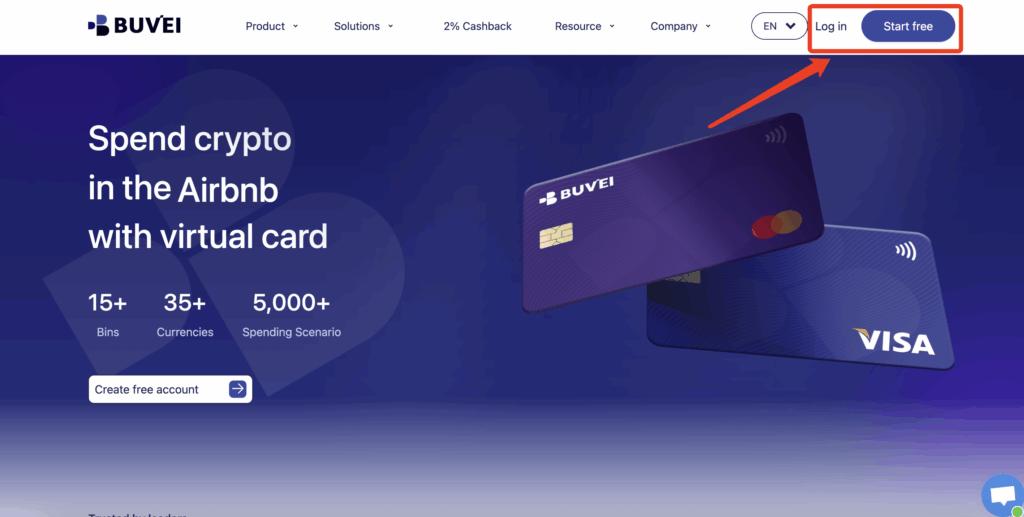
Step 1: Register a Buvei Account
-
Visit https://buvei.com
-
Create a free account
-
Complete the email verification process
-
Log in to access the Buvei dashboard
Registration is straightforward and can be completed within minutes.
Step 2: Top Up Your Account Balance
-
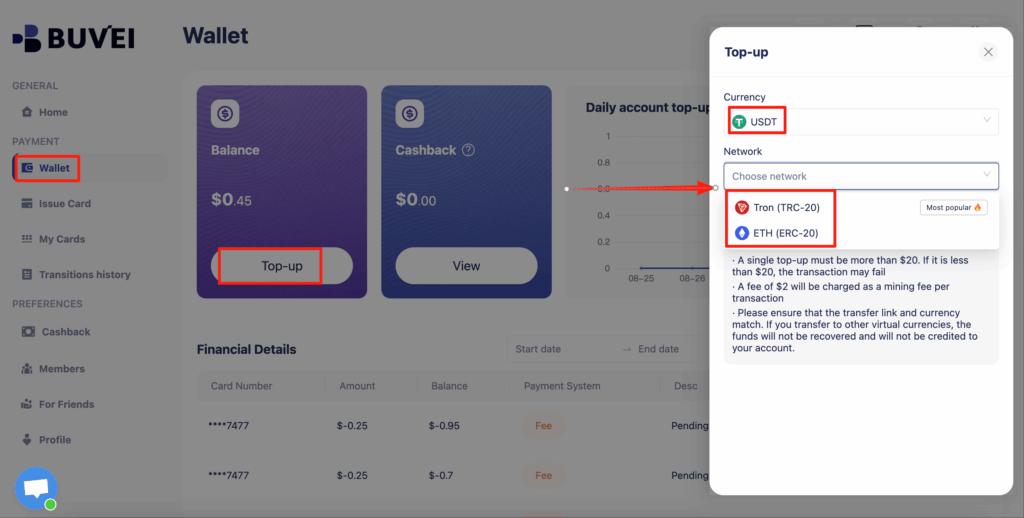
Go to the “Wallet” tab in the dashboard
-
Select USDT (TRC20 or ERC20) as your top-up method
-
Copy your dedicated deposit address
-
Send USDT to the provided address
Once the transaction is confirmed on-chain, the balance will appear in your wallet and is available for immediate use.
Step 3: Create a Virtual Card
-
Navigate to the “Cards” tab
-
Select your preferred BIN region
-
Recommendation: choose a U.S. BIN for Google Cloud billing
-
-
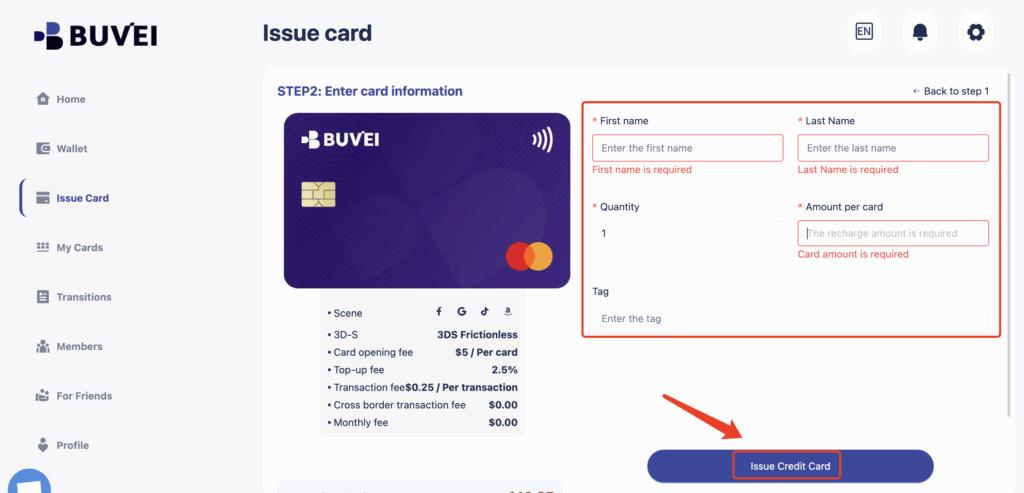
Choose the card type
-
Click “Create Card”

-
Enter the required details:
-
Card name (e.g., “GCP Billing – Production”)
-
Initial funding amount
-
Number of cards
-
-
Click “Issue Card”
After issuance, go to “My Cards” to view:
-
Card number
-
Expiration date
-
CVV
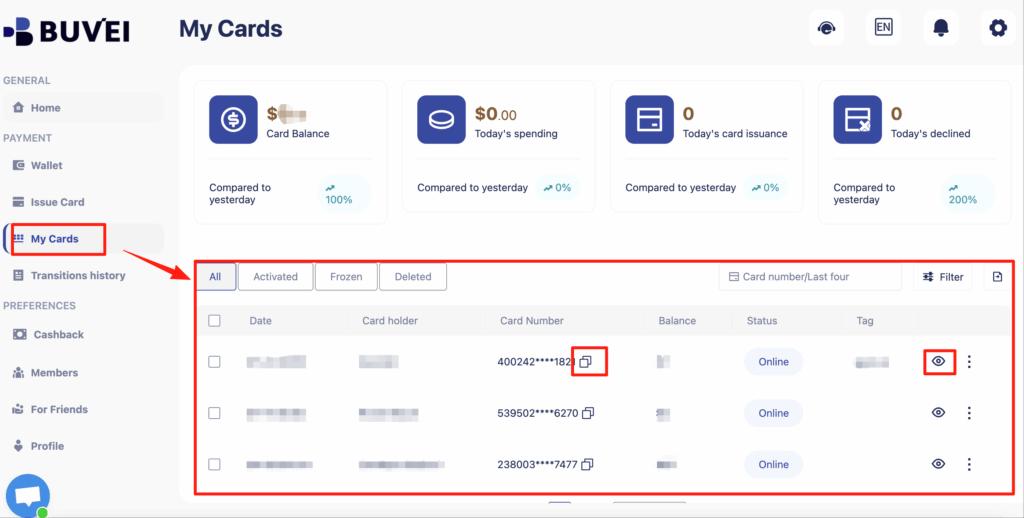
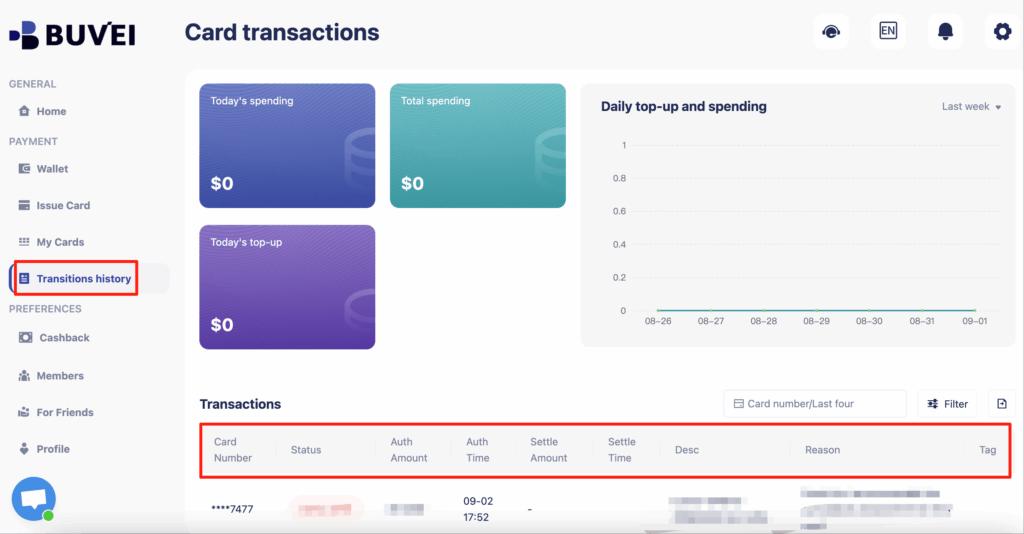
You can also track balances, top-ups, and all transaction activity from this page.
Step 4: Add the Virtual Card to Google Cloud Billing
-
Log in to the Google Cloud Console
-
Navigate to Billing → Payment settings
-
Select Add payment method
-
Enter the virtual card details:
-
Card number
-
Expiration date
-
CVV
-
-
Save the card and set it as the default payment method
Google Cloud will now automatically charge the virtual card based on your usage.
Best Practices for SaaS Teams Using Virtual Cards on Google Cloud
To maintain long-term billing stability:
-
Assign one virtual card per GCP billing account
-
Set spending limits slightly above expected monthly usage
-
Avoid reusing the same card across multiple cloud providers
-
Monitor usage after traffic or deployment spikes
-
Keep at least one backup virtual card ready
Many SaaS teams also issue separate cards for:
-
Production environments
-
Staging or testing workloads
-
Short-term experiments
This approach improves cost visibility and simplifies internal accounting.

Conclusion
As SaaS infrastructure grows more complex, billing reliability on Google Cloud becomes a foundational requirement. For many teams, virtual cards for Google Cloud have emerged as a practical and scalable Google Cloud payment method, offering greater control, faster recovery from failures, and clearer separation of expenses.
By combining U.S. BIN virtual cards, flexible funding options, and centralized management, platforms like Buvei provide SaaS teams with a billing setup designed for modern cloud operations—helping ensure that payment issues never become a bottleneck for growth.