Mobile games have evolved into a global, high-frequency digital economy. From in-game currency and battle passes to monthly subscriptions, players are making payments more often—and in smaller increments—than ever before.
At the same time, payment failures, card blocks, and fraud checks have become increasingly common, especially for international players. To reduce friction, many gamers are now using virtual cards for mobile games as a more flexible and secure payment method.
This guide explains why virtual cards are widely used for game top-ups, whether mobile games accept them, and how to top up mobile games step by step using a Buvei virtual card for gaming.
Why Gamers Prefer Virtual Cards for Mobile Game Top-Ups
Unlike one-time purchases, mobile game payments are often recurring, impulsive, and platform-dependent. Traditional debit or credit cards are not always well suited for this environment.
Gamers use virtual cards because they offer:
-
Better control over spending, especially for in-game purchases
-
Lower risk of card bans caused by repeated microtransactions
-
Faster recovery when a payment method is declined
-
Privacy protection by avoiding exposure of real bank details
For players managing multiple games or accounts, virtual cards also make it easier to separate gaming expenses from daily spending.
Do Mobile Games Accept Virtual Cards?
In most cases, yes.
The majority of mobile games accept virtual cards as long as they are issued by major card networks such as Visa or Mastercard. Virtual cards are processed the same way as physical cards at checkout.
Mobile games that typically support virtual cards include:
-
RPG and gacha games
-
Strategy and simulation games
-
Sports and casual games
-
Games with in-app subscriptions or season passes
That said, acceptance rates can vary depending on:
-
The BIN region of the card
-
The game publisher’s risk controls
-
Transaction frequency and behavior
Many players report higher success rates when using U.S. BIN virtual cards for mobile game top-ups.
Common Payment Issues in Mobile Game Top-Ups
Payment failures in mobile games are common and not always related to insufficient balance.
Typical issues include:
-
Card declines after multiple small transactions
-
Region or BIN mismatches
-
Fraud detection triggered by rapid top-ups
-
Shared cards used across multiple platforms
Once a card is flagged, repeated retries may worsen the situation. This is where virtual cards provide a practical advantage.
What to Look for in Virtual Cards for Mobile Game Payments
Not all virtual cards perform equally well for gaming-related payments. When choosing a card for mobile game top-ups, consider the following:
-
Support for U.S. BINs or stable global BIN regions
-
Compatibility with frequent, small-value transactions
-
Ability to issue and replace cards instantly
-
Transparent fees with no hidden charges
-
Simple balance and transaction tracking
Platforms like Buvei are commonly used by gamers because they are designed for high-frequency digital payments and offer flexible card management.
Step-by-Step: How to Top Up Mobile Games Using Virtual Cards
Below is a hands-on tutorial showing how to top up mobile games using a Buvei virtual card.
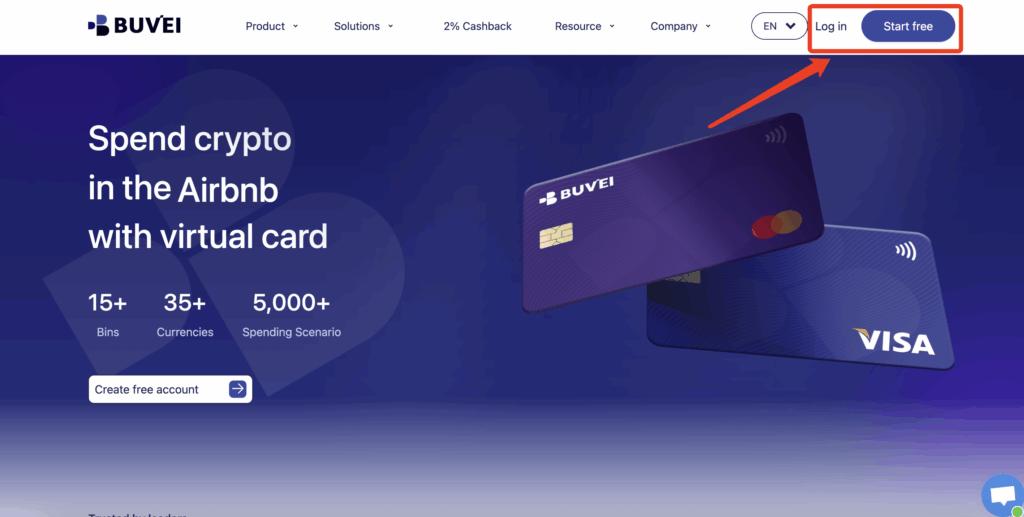
Step 1: Register a Buvei Account
-
Visit https://buvei.com
-
Create a free account
-
Complete email verification
-
Log in to access the Buvei dashboard
The registration process is fast and does not require complex verification steps.
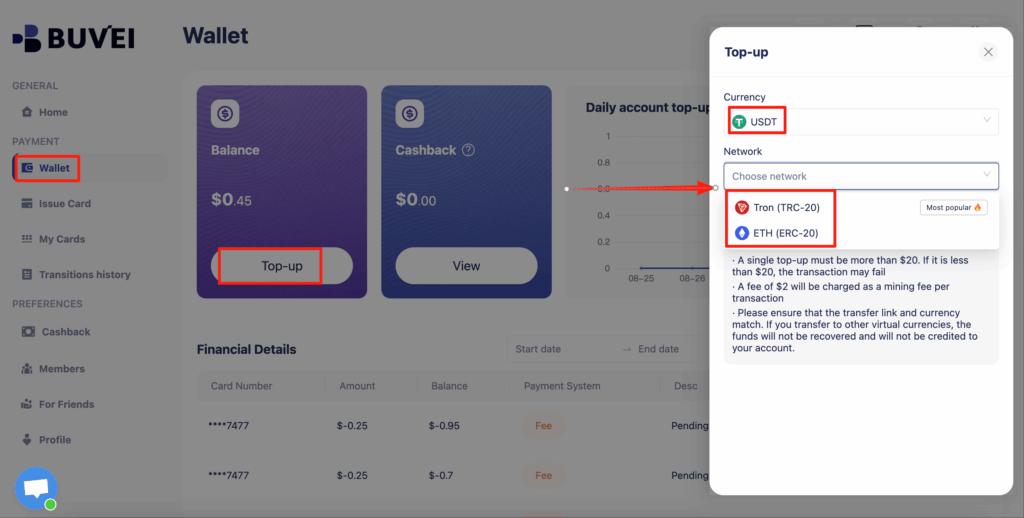
Step 2: Top Up Your Account Balance
-
Go to the “Wallet” tab
-
Choose USDT (TRC20 or ERC20) as the top-up method
-
Copy your dedicated deposit address
-
Send USDT to the address
Once confirmed, your balance will appear in the wallet and can be used immediately.
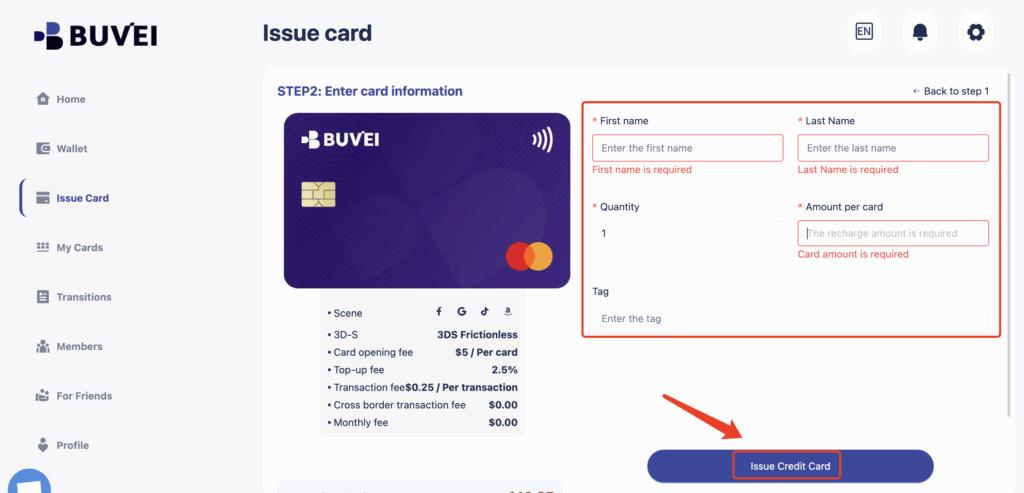
Step 3: Create a Virtual Card
-
Navigate to the “Cards” tab
-
Select your preferred BIN region
(U.S. BIN is generally recommended for gaming payments) -
Choose the card type
-
Click “Create Card”

-
Enter:
-
Card name (e.g., “Mobile Game Top-Ups”)
-
Funding amount
-
Number of cards
-
-
Click “Issue Card”
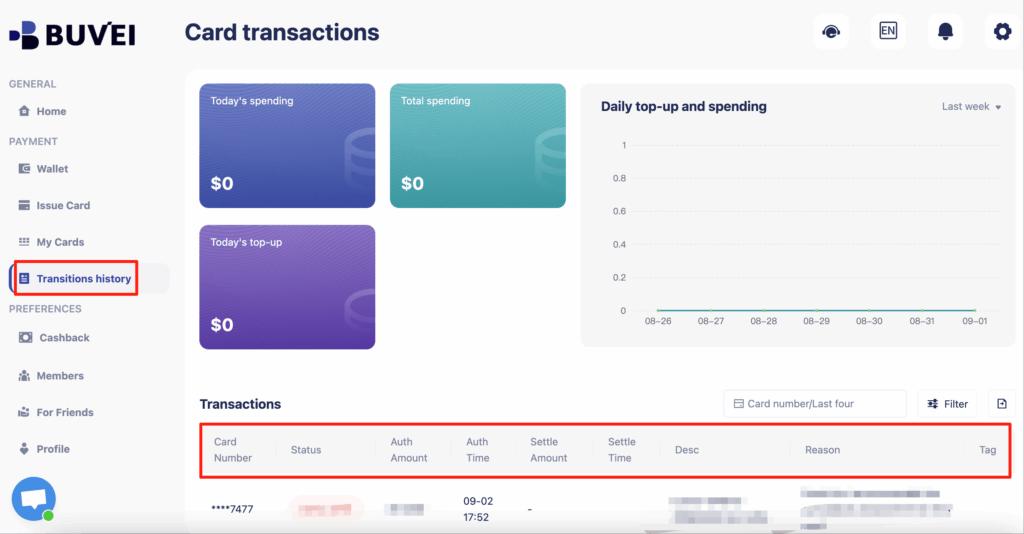
After creation, go to “My Cards” to view:
-
Card number
-
Expiration date
-
CVV
-
Transaction and spending history
You can also track balances, top-ups, and all transaction activity from this page.
Step 4: Use the Virtual Card for Game Top-Ups
-
Open your mobile game or app store
-
Select the in-game item or currency you want to purchase
-
Choose credit/debit card as the payment method
-
Enter the virtual card details
-
Complete the payment
You can monitor the transaction in real time from the Buvei dashboard.
Why Buvei Virtual Cards Work Well for Game Top-Ups
For gaming-specific use cases, a Buvei virtual card for gaming offers several practical advantages:
-
Multiple BIN options to improve payment success rates
-
Support for frequent microtransactions
-
Easy card replacement if a card is blocked
-
Clear fee visibility and spending control
-
Ability to manage multiple cards under one account
These features make Buvei particularly suitable for players who regularly top up games or manage multiple gaming accounts.
Final Thoughts
As mobile gaming continues to grow, payment flexibility and reliability have become just as important as gameplay itself. For many players, virtual cards for mobile games provide a safer and more controllable way to handle in-game purchases.
By using a Buvei virtual card for gaming, players can reduce payment failures, protect their financial information, and top up mobile games smoothly—without risking their primary bank cards.