




Introduction
Businesses need a reliable way to manage SaaS subscriptions as their software needs grow. Marketing teams rely on advertising platforms, developers use cloud services, and other departments depend on tools for design, communication, and project management.
A growing company might pay for ChatGPT, Claude, Canva, Adobe, Notion, Slack, AWS, and many other platforms. When these subscriptions are spread across different teams and accounts, keeping track of renewal dates and total software costs becomes increasingly difficult.
Without proper oversight, businesses can end up paying for unused licenses, overlapping tools, or services that no longer meet their needs.
Why Managing Multiple SaaS Subscriptions Gets Complicated
Scattered Payment Methods
Employees often purchase software using different company cards or payment accounts. Marketing, development, and operations teams may all have separate payment arrangements.
This makes it difficult for finance teams to:
- Match transactions with specific software services.
- Identify which department is responsible for each expense.
- Calculate total software spending across the company.
Automatic Renewals and Free Trials
Many SaaS providers automatically renew subscriptions or convert free trials into paid plans. Businesses can overlook upcoming charges, particularly when employees forget to cancel services or leave the company.
Price increases and changes to subscription plans can also go unnoticed if nobody checks the billing details before renewal.
Unused and Overlapping Subscriptions
Different departments may purchase tools with similar capabilities. Meanwhile, paid licenses can remain active after employees stop using them.
For example, a company might maintain several design tools when one platform already covers most of its team's needs. Reviewing actual usage helps identify licenses to reassign, plans to downgrade, and subscriptions to cancel.
How to Manage SaaS Subscriptions and Control Costs
Build a Centralized Subscription List
Create a shared spreadsheet or use an expense management system to document active subscriptions.
Record the following information:
- Software name and subscription price
- Billing cycle and renewal date
- Department or project
- Account owner and payment method
Assign a responsible person to each subscription so there is someone who understands why the service is needed and whether it should be renewed.
Review Software Usage
Check whether paid licenses reflect actual employee usage.
Pay particular attention to:
- Inactive accounts and unused seats
- Licenses assigned to former employees
- Tools that duplicate existing software
- Premium features that employees rarely use
Reassign available seats where possible. If a service is no longer necessary, cancel it through the provider's account settings.
Monitor Renewals and Billing Changes
Set calendar reminders several days before subscription renewals.
Before each renewal, check the current price, active users, and plan requirements. After payment, compare the charge with the provider's invoice to identify unexpected fees or billing discrepancies.
Establish Department Budgets and Purchase Rules
Set a software budget for each department or project based on its operational needs.
Require approval for new software purchases and ask employees to check existing tools before requesting additional subscriptions. Review actual expenses against allocated budgets to identify departments that consistently exceed their spending allowances.

Simplify SaaS Payment Management with BUVEI
Once a business has organized its subscriptions and established departmental budgets, it also needs a practical way to manage the payments.
BUVEI offers Visa and Mastercard virtual cards with multiple BIN options across different regions. Businesses can quickly issue cards for SaaS subscriptions, advertising platforms, cloud services, and other online expenses.
Assign Separate Cards to Different Expenses
Instead of using one company card for every software purchase, businesses can create separate cards for different payment purposes.
For example:
- AI subscriptions such as ChatGPT and Claude
- Design software such as Canva and Adobe
- Cloud services such as AWS
- Individual departments or projects
BUVEI supports multiple virtual cards and batch issuance. Cards can be named according to their intended use, making it easier to distinguish payment responsibilities.
Set Individual Spending Limits and Manage Cards
Department budgets determine how much a team can spend, while individual card limits help control the amount charged to each payment method.
With BUVEI, users can set separate spending limits for individual virtual cards. Businesses can adjust these limits according to expected subscription costs and allocated budgets.
Users can also:
- Freeze a card when it should temporarily stop being used.
- Unfreeze it when payment access is needed again.
- Close a card that is no longer required.
For example, when a project ends, the business can close its assigned card without affecting other payment methods.
Closing a card does not automatically cancel its associated software subscription. Unwanted services must still be canceled through the provider.
Review Transactions by Card
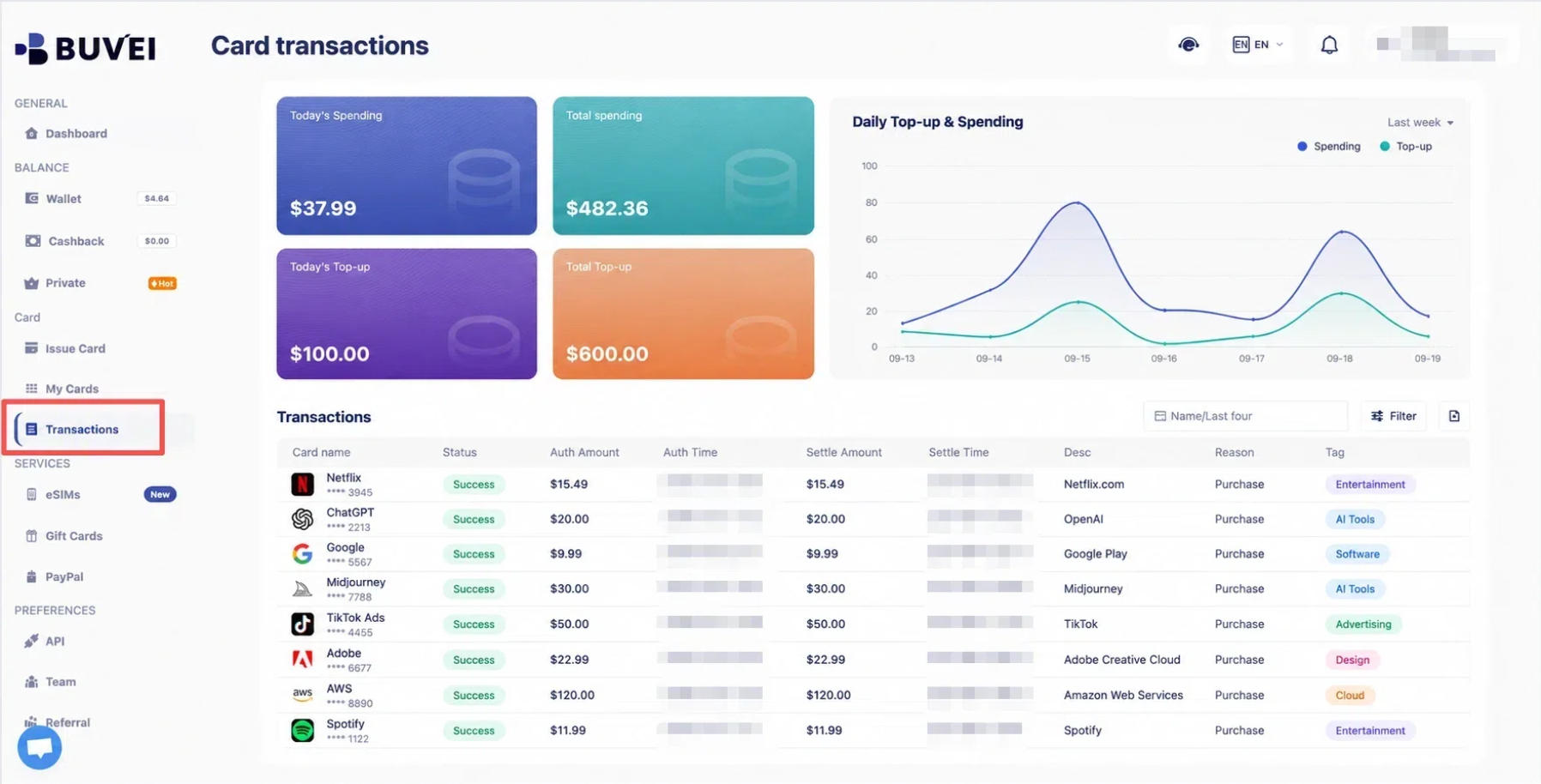
BUVEI's Transactions feature displays payment amounts, times, and statuses for individual virtual cards.
Finance teams can use these records alongside provider invoices to identify unfamiliar payments and check which card was used for a particular expense.
How to Use BUVEI Virtual Cards for SaaS Payments
Step 1: Create a BUVEI Account
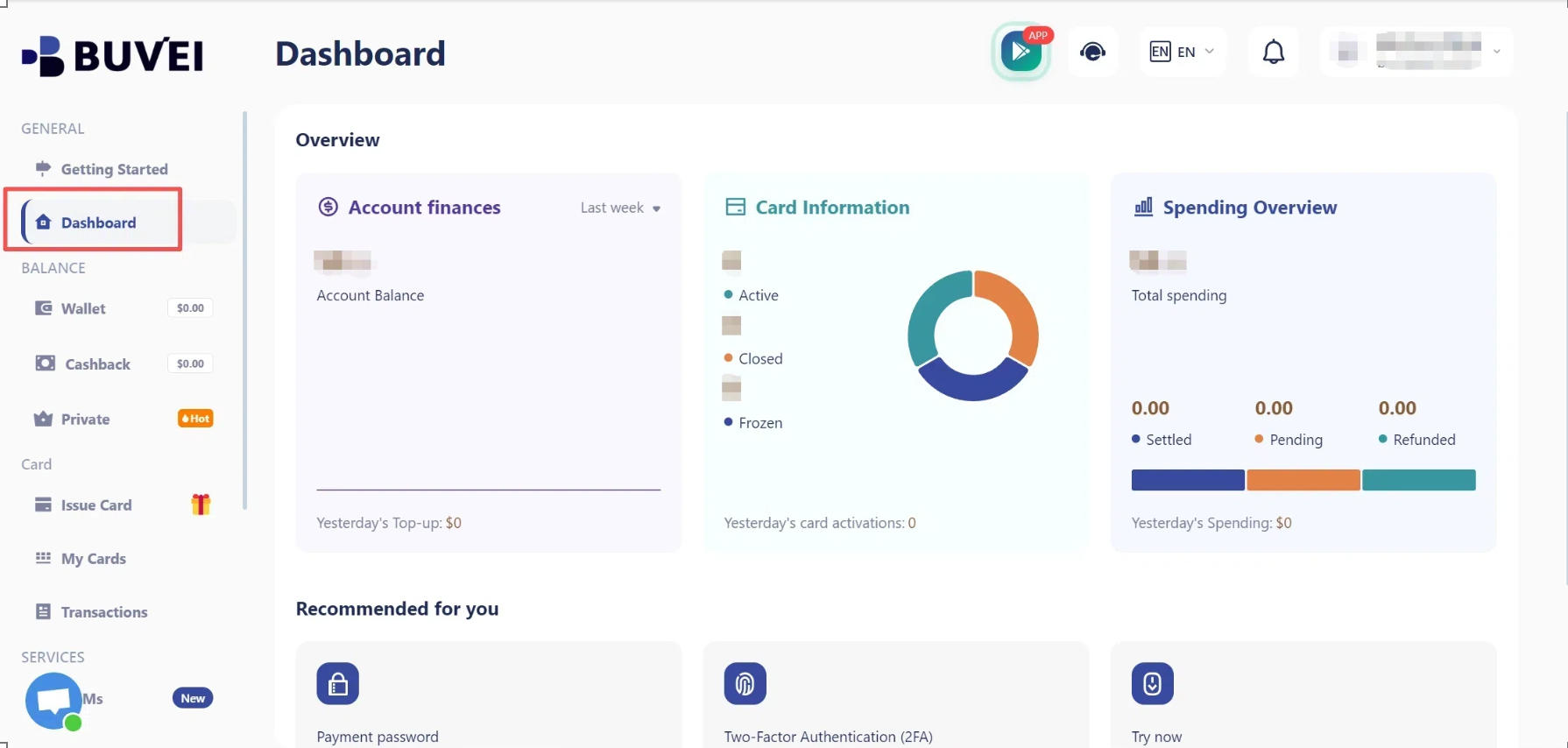
Visit BUVEI and create a free account. Complete email verification, then log in to access your dashboard.
Step 2: Fund Your Wallet
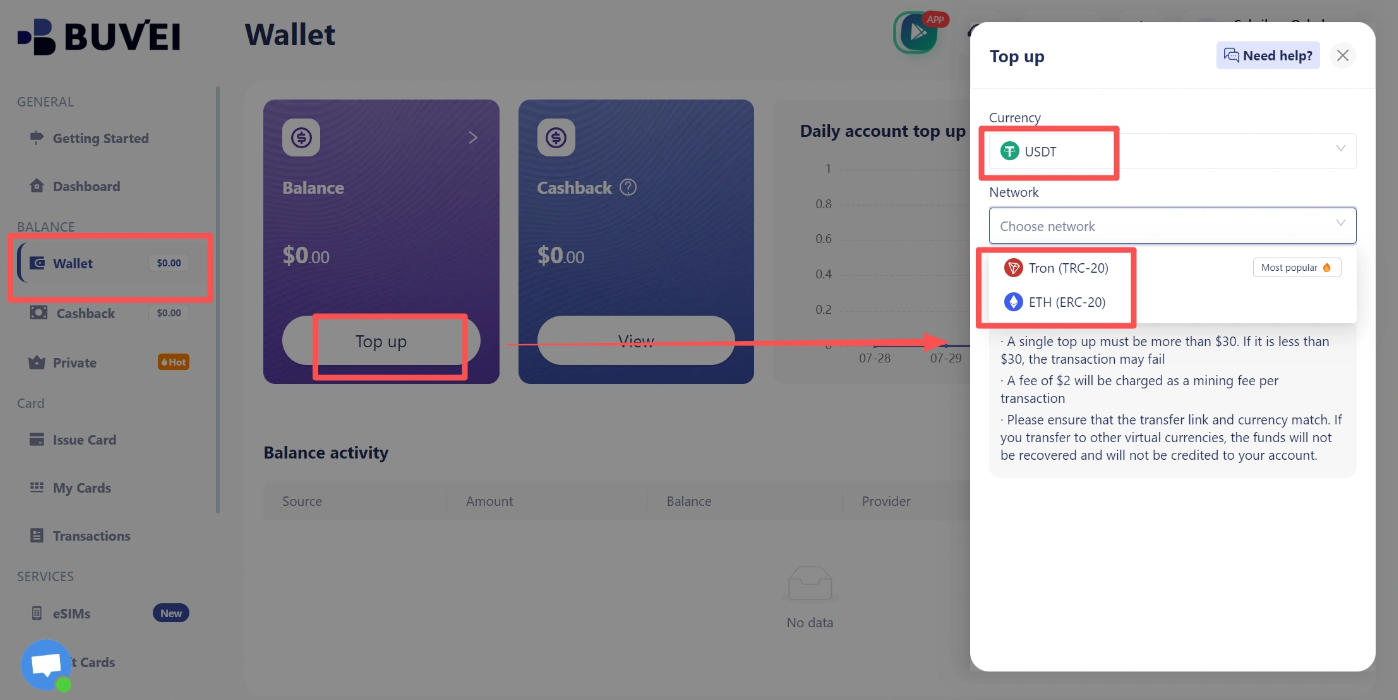
BUVEI supports USDT deposits through TRC20 and ERC20 networks.
- Open the Wallet section.
- Select a supported deposit network.
- Copy the corresponding deposit address.
- Transfer USDT using the same network.
- Once the deposit is confirmed, check your Wallet balance.
Always make sure the transfer network matches your deposit instructions.
Step 3: Issue Virtual Cards
Once your Wallet is funded:
- Go to Cards.
- Select an available BIN region (a US BIN is recommended) and card type.
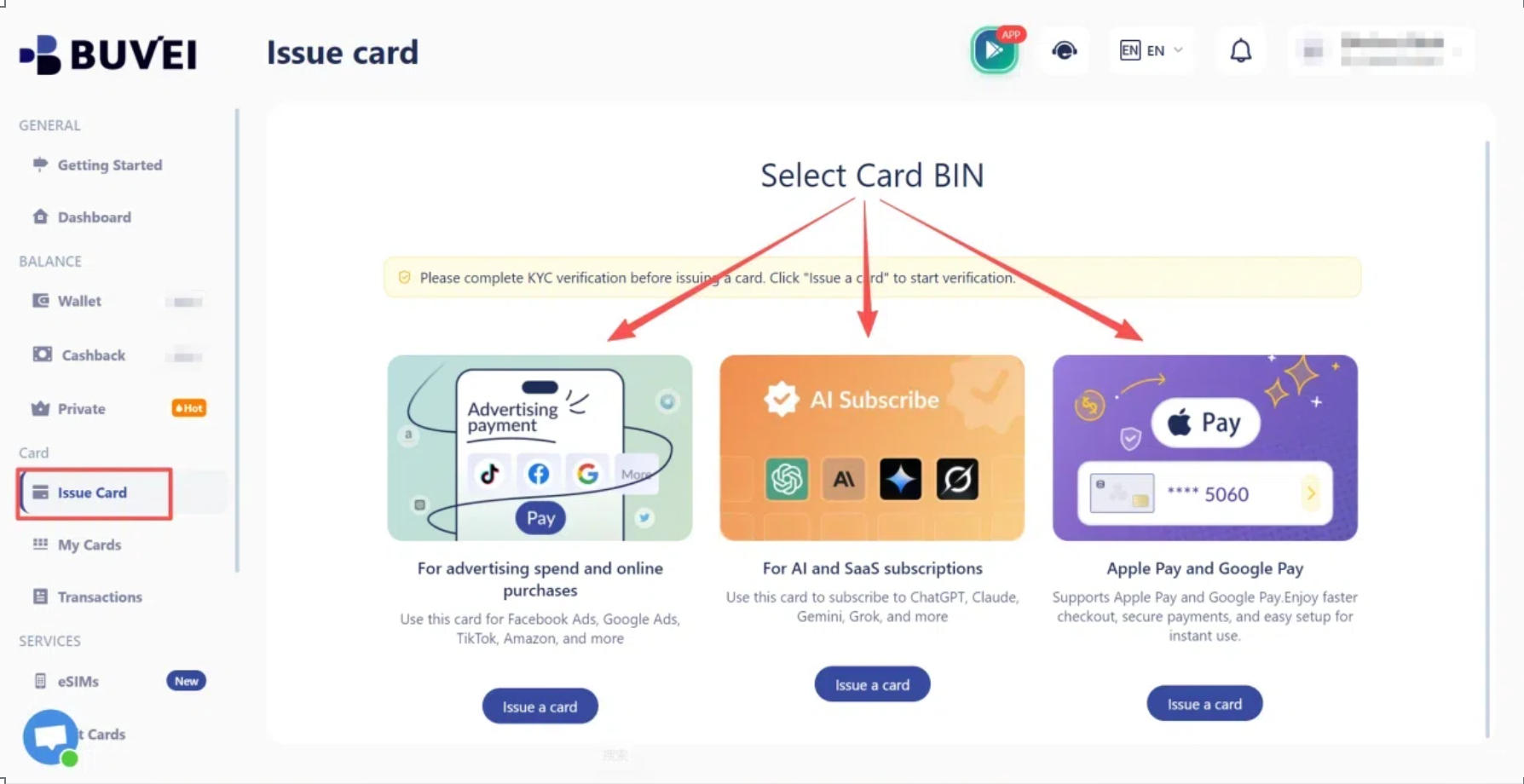
- Enter the card name, amount, and number of cards.
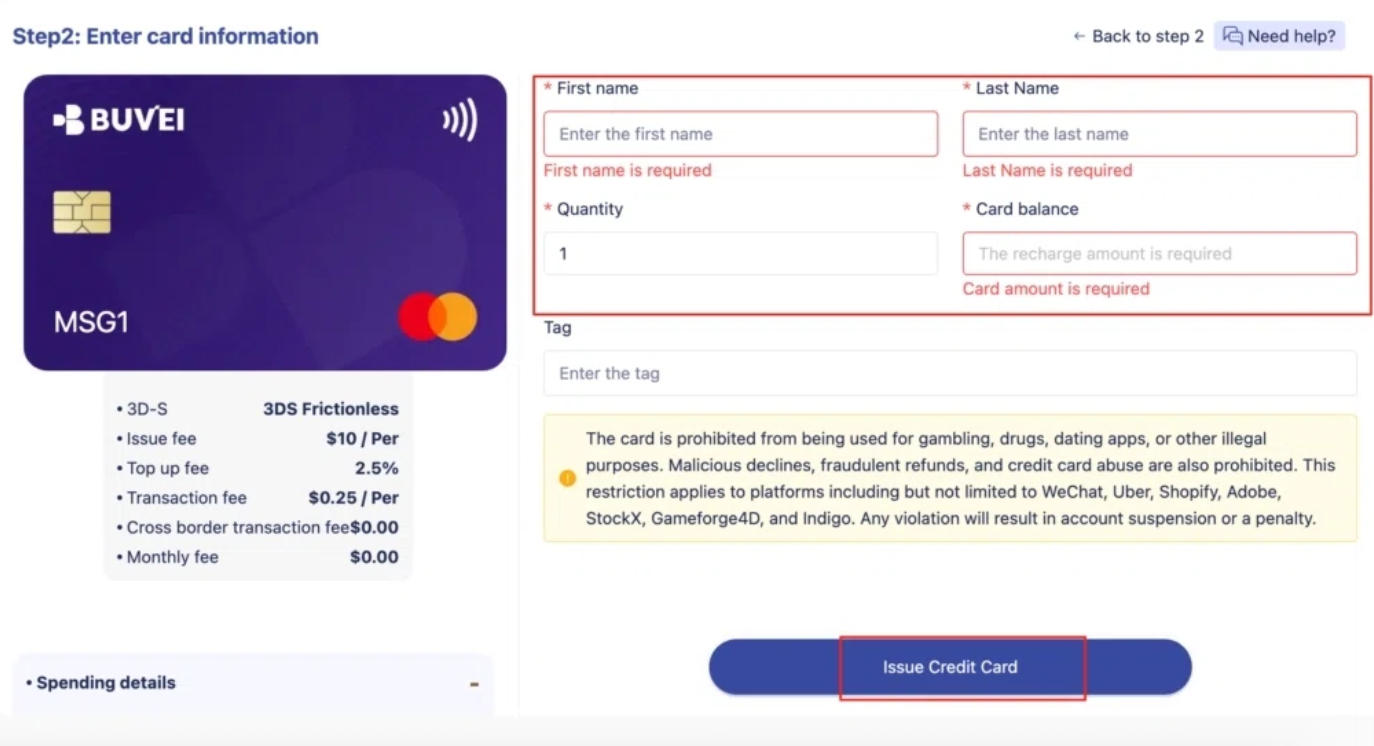
- Submit your issuance request.
After issuance, open My Cards to view the card number, expiration date, and CVV.
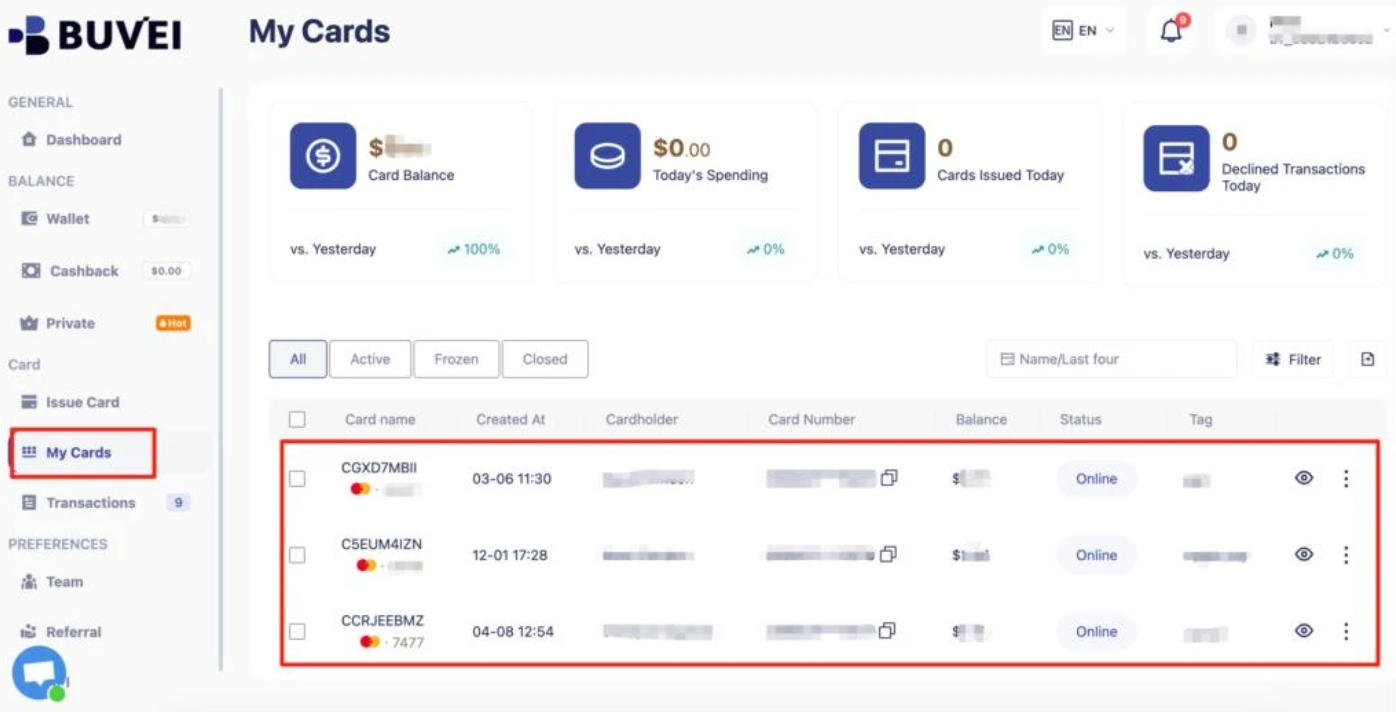
BUVEI offers multiple BIN options across Visa and Mastercard. Before using a card for a subscription, check whether the provider accepts the selected card type and issuing region.
Conclusion
As businesses add more SaaS tools, keeping software expenses under control requires more than reviewing subscription lists. Companies need to understand which services are worth paying for, allocate budgets appropriately, and keep track of recurring payments across different teams. Regular reviews can help prevent unused licenses and unnecessary subscriptions from becoming ongoing expenses.
Managing the payment side is equally important. BUVEI helps businesses organize SaaS payments through virtual cards assigned to different software services, departments, or projects. Individual spending limits and transaction records give finance teams a clearer way to monitor expenses and review payments. With a more structured payment setup, businesses can manage their growing software expenses without relying on a single card for every subscription.