For many freelancers in Tunisia, getting paid is only half the battle.
The real challenge starts when trying to pay for tools, subscriptions, and international services.
Local bank cards are often restricted, declined, or blocked for cross-border payments. As a result, more Tunisian freelancers are turning to virtual cards to stay operational in 2026.
This guide explains why virtual cards are essential, what usually goes wrong, and how to choose a solution that actually works.

Why Tunisian Freelancers Need Virtual Cards
Freelancers rely heavily on global platforms. However, Tunisia’s payment environment creates friction.
Global Tools Require International Cards
Most freelancers need to pay for:
-
Freelance platforms (Upwork, Fiverr, Freelancer)
-
SaaS tools (Notion, Canva, Adobe, GitHub)
-
Cloud services and AI tools
These platforms expect internationally accepted cards, which local options often fail to provide.
Local Cards Come With Limits
Common issues include:
-
International transactions disabled by default
-
Low monthly FX limits
-
Frequent fraud checks
Virtual cards help bypass these structural limits.
Common Payment Challenges for Tunisian Freelancers
Even with virtual cards, not all solutions perform equally well.
Frequent Declines on Subscriptions
Many freelancers experience:
-
Failed renewals
-
Subscription cancellations
-
Unexpected account pauses
This usually happens when the card lacks consistency or proper authorization handling.

Platform Risk Controls
Payment platforms look at:
-
Card BIN country
-
Transaction history
-
Retry behavior
Cards that look “temporary” are more likely to be blocked.
Refund and Hold Issues
Some services place:
-
Pre-authorization holds
-
Delayed refunds
Weak virtual cards often cannot handle these flows.
Choosing a Virtual Card That Actually Works (Buvei Example)
To reduce declines, freelancers need stable, reusable virtual cards with proper international support.
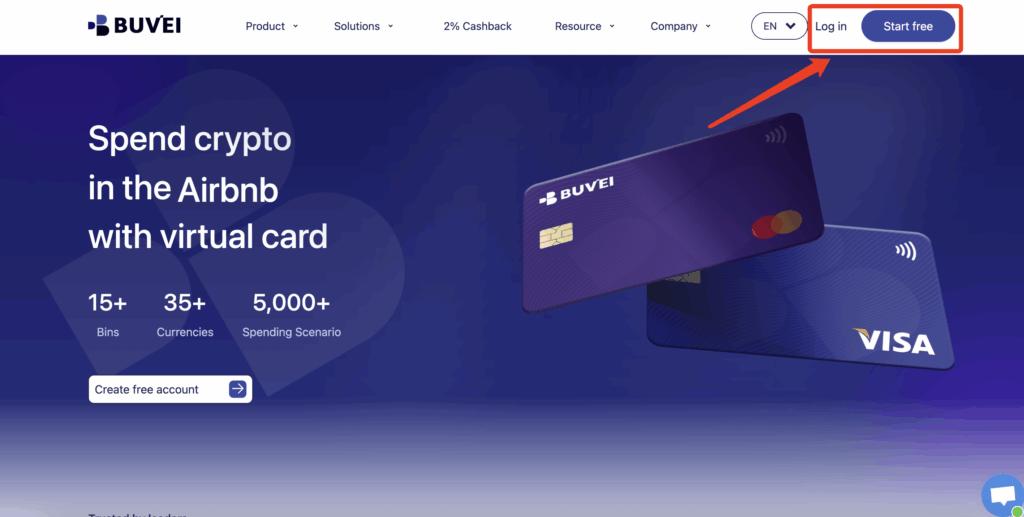
Step 1: Register a Buvei Account
-
Visit https://buvei.com
-
Create a free account
-
Verify your email and log in
Step 2: Fund Your Wallet
-
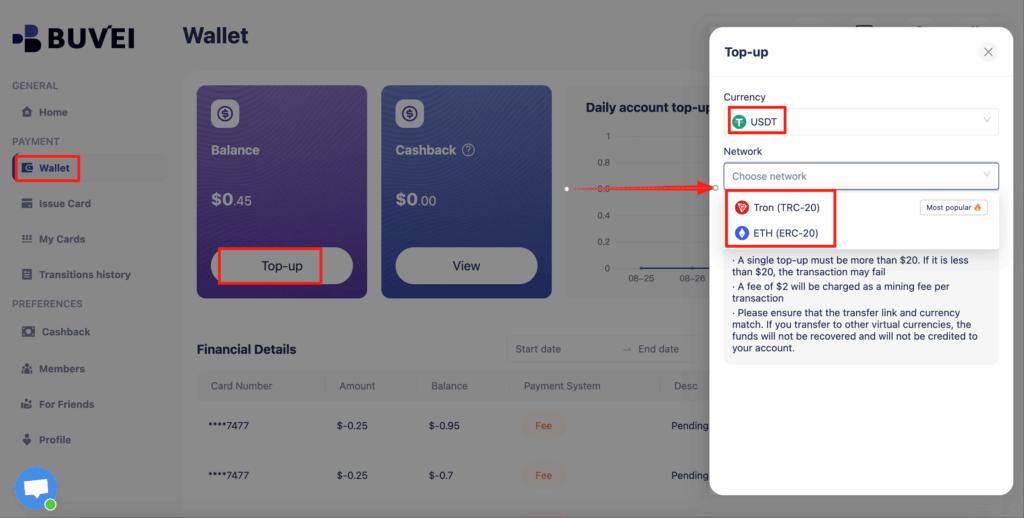
Go to the Wallet section
-
Deposit USDT (TRC20 or ERC20)
-
Wait for on-chain confirmation
Once confirmed, your balance is available immediately.
Step 3: Create a Virtual Card
-
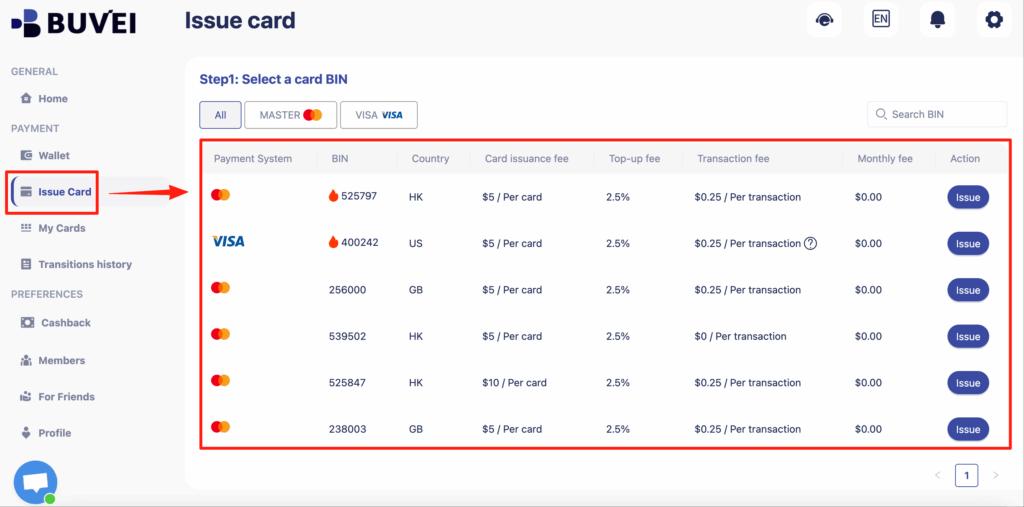
Open the Cards tab
-
Select a BIN region (U.S. BIN is recommended)
-
Choose card type
-
Enter card name, balance, and quantity
-
Click Issue Card
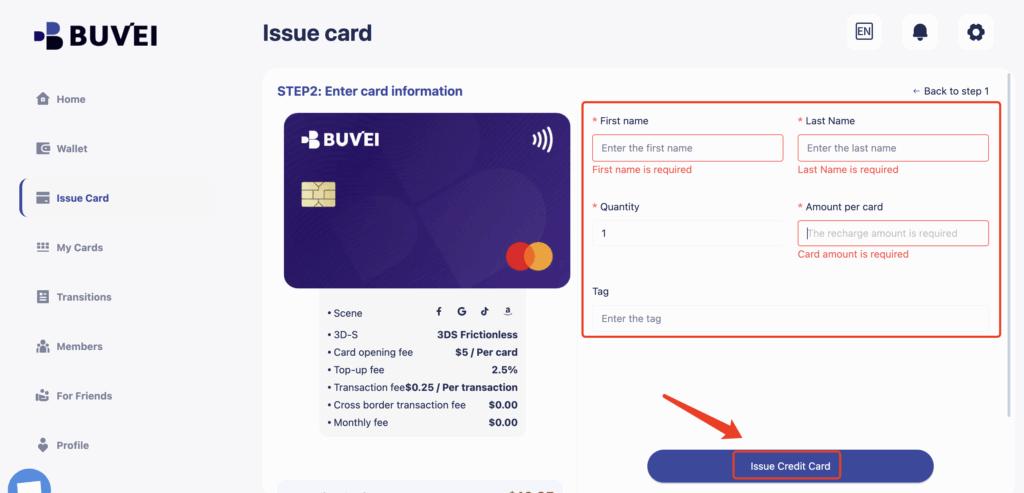
You’ll instantly receive:
-
Card number
-
Expiry date
-
CVV
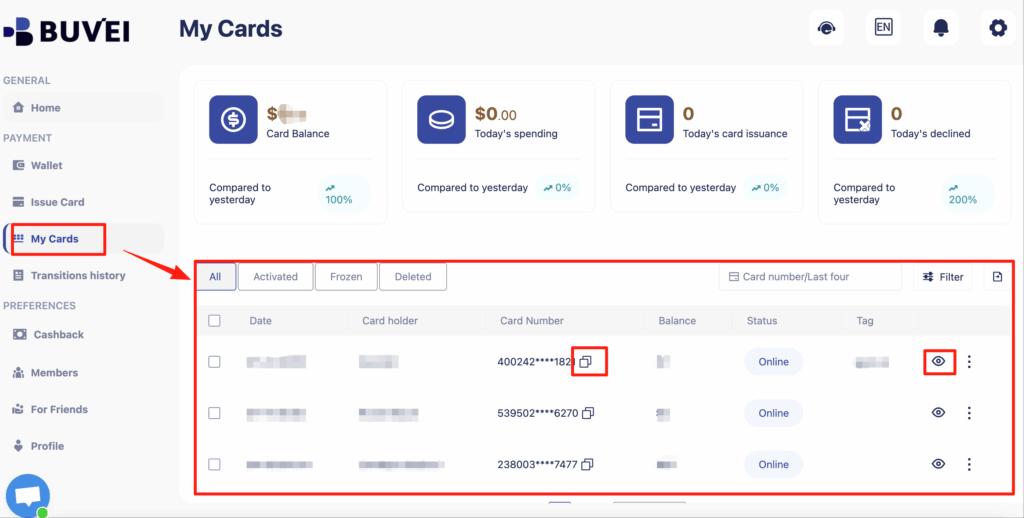
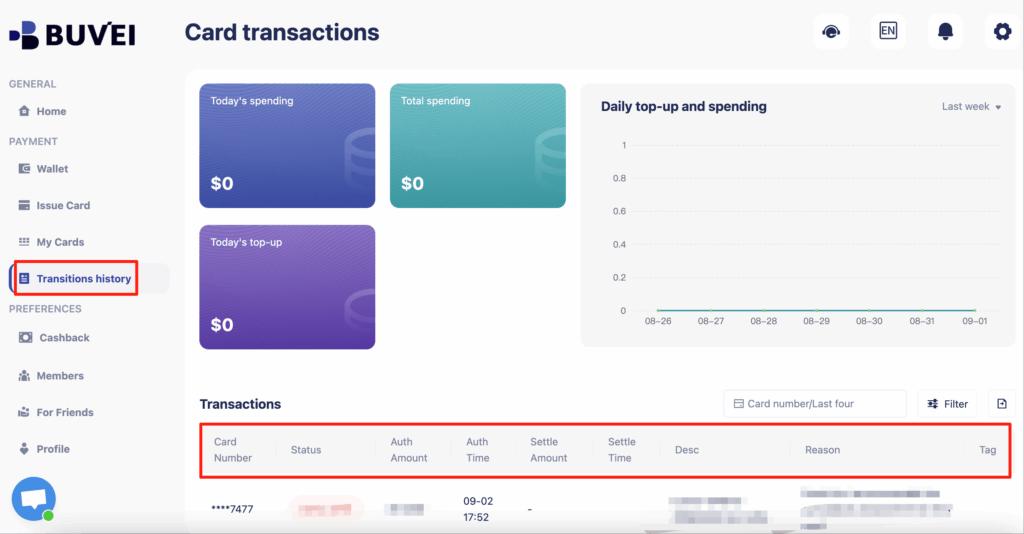
All transactions and balances are visible in your dashboard.
Why This Works Better
Buvei virtual cards are:
-
Reusable for subscriptions
-
Accepted on major global platforms
-
Better suited for recurring billing
This significantly lowers decline rates.
Best Practices for Paying Subscriptions and Services
Even with the right card, usage habits matter.
Use One Card Per Platform
Assigning one card to one service:
-
Builds transaction history
-
Reduces fraud flags
-
Simplifies tracking
Keep a Balance Buffer
Always leave extra balance to cover:
-
Currency fluctuations
-
Authorization holds
-
Retry charges
Avoid Frequent Card Switching
Changing cards too often:
-
Raises risk signals
-
Triggers payment reviews
Consistency improves approval rates.

Solutions When Payments Keep Getting Declined
If declines persist, don’t panic.
Step-by-Step Fix
-
Check available balance
-
Confirm card is reusable
-
Verify billing address consistency
-
Retry after 24 hours
When to Issue a New Card
Create a new card if:
-
The platform permanently blocks the old one
-
Multiple retries fail
-
The card was used on high-risk sites
Final Thoughts
For Tunisian freelancers, virtual cards are no longer optional—they’re essential infrastructure.
In 2026, success comes down to:
-
Using stable, reusable virtual cards
-
Matching card behavior to platform expectations
-
Avoiding short-term, disposable card setups
With the right approach, freelancers in Tunisia can pay globally, keep subscriptions active, and focus on growing their income—not fighting payment declines.