
As more businesses and developers rely on OpenAI tools, stable subscription payments have become increasingly important. Whether you’re using API services or ChatGPT-based plans, billing interruptions can disrupt workflows.
Understanding how virtual cards for OpenAI billing work can help prevent payment failures and subscription pauses.
This guide explains how OpenAI billing functions, why some cards are declined, and how to set up a compatible virtual card step by step.

How OpenAI Subscription Billing Works
OpenAI typically processes payments through standard card networks such as Visa and Mastercard. Billing may occur in two common ways:
-
Monthly recurring subscriptions
-
Usage-based API billing
Payments are automatically charged to the card on file. If authorization fails, access to services may be restricted until the issue is resolved.
Because billing systems rely on automated authorization, payment stability is critical.
Why Some Cards Get Declined by OpenAI
Card declines can occur for several reasons:
-
Insufficient balance
-
Bank-side fraud controls
-
Cross-border transaction restrictions
-
Region mismatch
-
Expired or inactive cards
-
Prepaid card limitations
In some cases, traditional bank cards may block international SaaS transactions.
Using a properly configured virtual card can reduce these risks.
Requirements for OpenAI-Compatible Virtual Cards
A virtual card that works with OpenAI billing should support:
-
International online payments
-
Visa or Mastercard processing
-
Recurring transaction authorization
-
Sufficient available balance
-
Transparent transaction tracking
Stable authorization behavior is often more important than the card type itself.
Common OpenAI Payment Errors and How to Fix Them
Here are several frequent issues and potential solutions.
Error: Card Declined
-
Confirm sufficient balance
-
Check spending limits
-
Verify card is enabled for online transactions
Error: Payment Authorization Failed
-
Ensure recurring billing is supported
-
Confirm BIN region compatibility
-
Avoid frequent card switching
Error: Subscription Paused
-
Add backup payment method
-
Update card details
-
Confirm no transaction blocks
Maintaining consistent billing behavior helps prevent repeated authorization failures.

Step-by-Step: Paying OpenAI with a Virtual Card
Follow this structured process.
Step 1: Choose a Virtual Card Platform
Look for a provider that offers:
-
Global Visa/Mastercard coverage
-
Recurring billing support
-
Clear backend transaction logs
-
Flexible spending limits
-
Instant card issuance
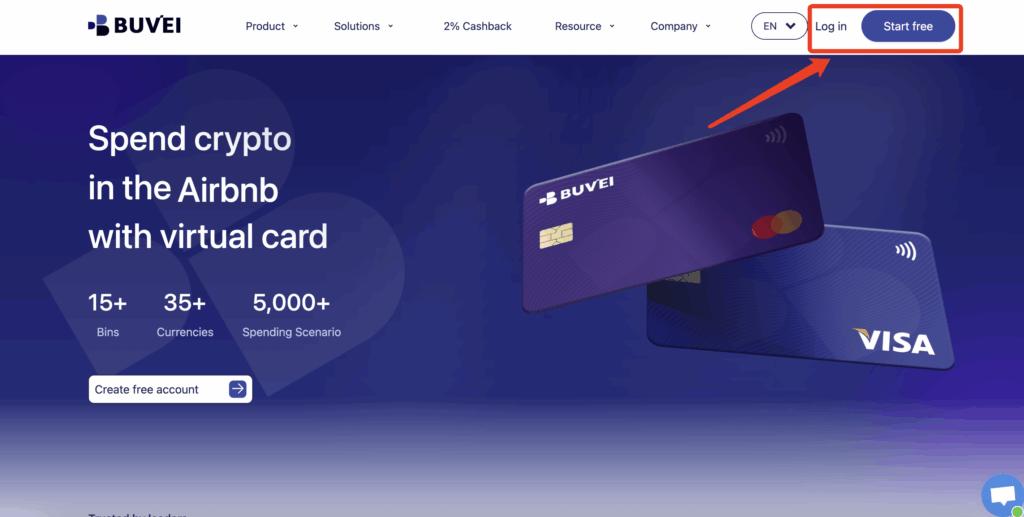
Step 2: Register a Buvei Account
To create a compatible virtual card:
-
Visit https://buvei.com
-
Register for a free account
-
Verify your email
-
Log into the dashboard
You will gain access to Wallet and Card management tools.
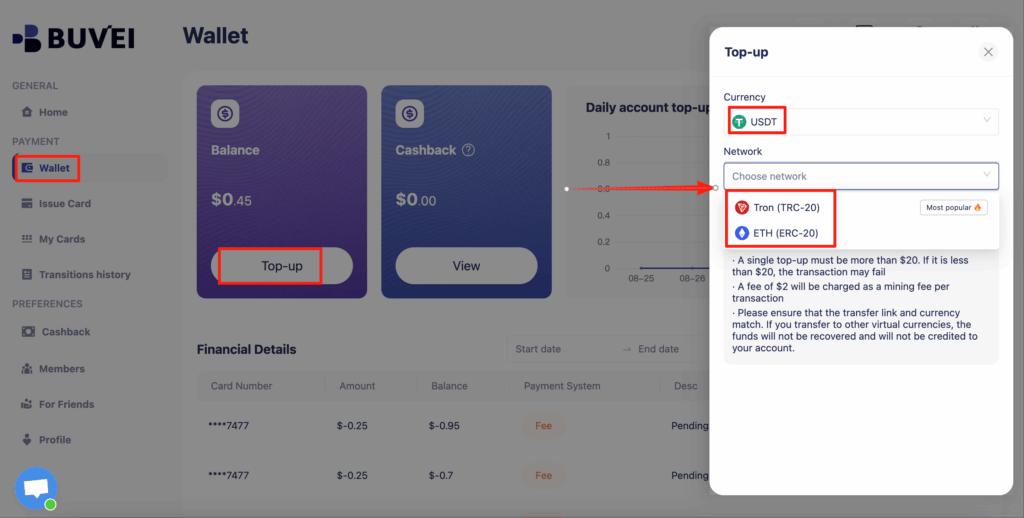
Step 3: Fund Your Account with USDT
Inside the dashboard:
-
Go to the Wallet section
-
Select USDT (TRC20 or ERC20)
-
Copy your unique deposit address
-
Transfer funds from your crypto wallet
-
Wait for confirmation
After confirmation, your balance will be available for card creation.
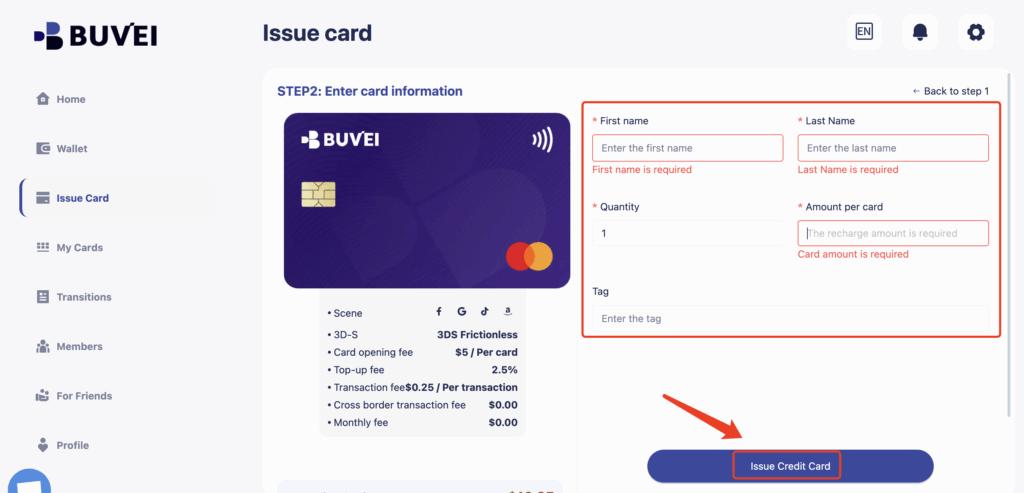
Step 4: Create a Virtual Card
Now generate your payment card:
Navigate to the Cards tab
Select preferred BIN region
Choose card type

Set spending limit
Click Issue Card
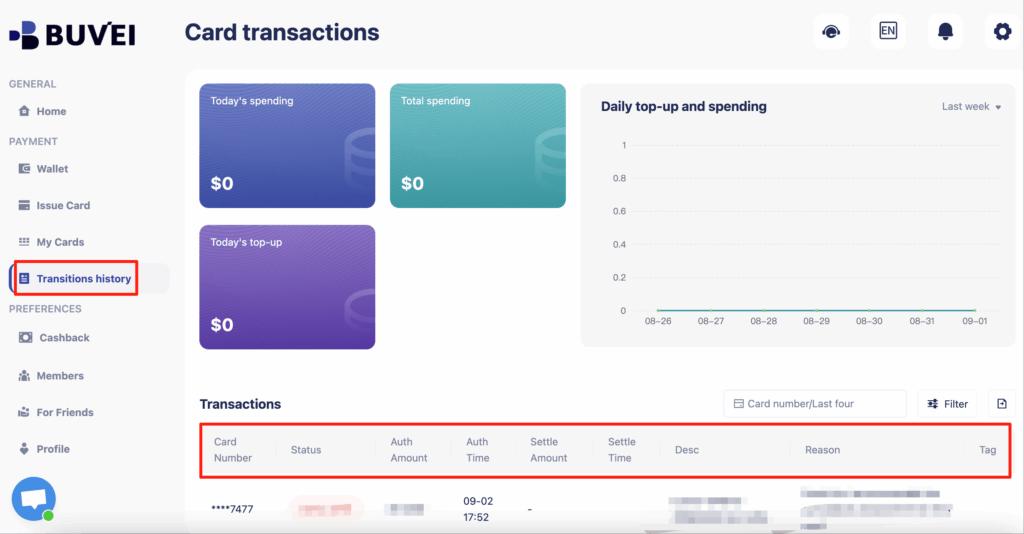
After creation, visit My Cards to review:
-
Card number
-
Expiration date
-
CVV
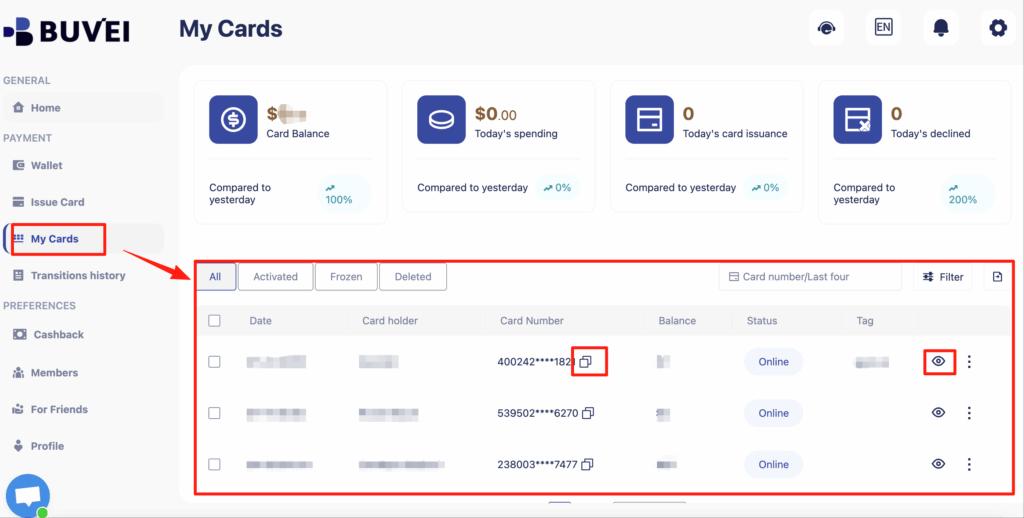
-
Transaction history
Step 5: Add the Card to OpenAI Billing
Inside your OpenAI account:
-
Go to Billing Settings
-
Select Add Payment Method
-
Enter your virtual card details
-
Save and confirm
Your subscription will now charge the virtual card automatically.
Managing OpenAI Subscription Stability
To reduce interruptions:
-
Keep sufficient balance
-
Avoid frequent payment method changes
-
Set appropriate spending limits
-
Monitor transaction history
-
Maintain a backup card if necessary
Using structured card management improves billing consistency.

Conclusion
Virtual cards for OpenAI billing provide a practical solution for users who experience card declines or need better subscription control.
By using a USDT-funded virtual card with recurring billing support and transparent tracking, users can:
-
Reduce payment failures
-
Maintain uninterrupted access
-
Manage SaaS expenses more effectively
Platforms like Buvei offer multi-card management and instant issuance, supporting structured and reliable OpenAI billing workflows.