Many Grab users across Southeast Asia frequently face payment failures when using traditional debit or credit cards. These issues often arise due to bank-level security rules, cross-border restrictions, or temporary fraud checks. As everyday services like Grab transport, GrabFood, and GrabExpress rely on smooth digital payments, failed transactions can quickly interrupt your plans.
A practical solution is to use a virtual card—a secure, app-based payment method that offers higher approval rates, real-time controls, and privacy. This article explains why virtual cards work reliably for Grab, how to set them up, common error messages and fixes, and why options like Buvei virtual cards perform especially well for frequent riders.
Why Traditional Bank Cards Struggle With Grab Payments
Although Grab supports a wide range of bank cards, many users still experience unsuccessful payments. Several factors contribute to these failures:
1. Cross-border transaction blocking
If your physical card is issued outside the country where you are using Grab, the bank may automatically decline the transaction due to overseas usage risk. This is common for travelers and expatriates.
2. Fraud-prevention filters
Banks implement strict anti-fraud rules. Small, repeated transactions—such as Grab ride charges or temporary pre-authorizations—can trigger these filters, resulting in payment reversals or blocks.
3. 3D Secure or OTP issues
Some cards require OTP verification to authorize online charges. Grab’s system often processes payments instantly without an OTP prompt, causing automatic payment rejection if the bank demands additional verification.
4. Expired, low-balance, or auto-blocked cards
Cards with insufficient funds or restricted online payments will fail. Even minor balance mismatches can cause Grab’s system to mark the card as invalid.
These recurring issues make traditional cards inconsistent for daily Grab usage.
Why Virtual Cards Offer a More Reliable Payment Experience
Virtual cards solve most of the issues above by providing more flexibility and control. Here is why virtual cards tend to perform better for Grab users:
1. Higher acceptance for online transactions
Most virtual cards are specifically designed for online payments, meaning they are less likely to trigger bank-side blocks that affect physical cards.
2. Real-time spending controls
Users can control spending limits, freeze or unfreeze the card instantly, and manage subscriptions. This significantly reduces failed transactions caused by insufficient balance.
3. Enhanced privacy and security
Because virtual cards generate digital card numbers, your real bank card information is never exposed. If compromised, you can simply replace the virtual card without affecting your actual bank account.
4. Better cross-border compatibility
Many virtual card providers support multiple currencies or international payments, making them ideal for travelers using Grab across different countries.
5. Consistent performance with apps like Grab
Virtual cards tend to avoid OTP verification delays and work smoothly with apps that require instant payment authorization.
How to Add a Virtual Card to Grab: Step-by-Step
Setting up a virtual card on your Grab account is straightforward. Follow this guide to ensure a successful binding:
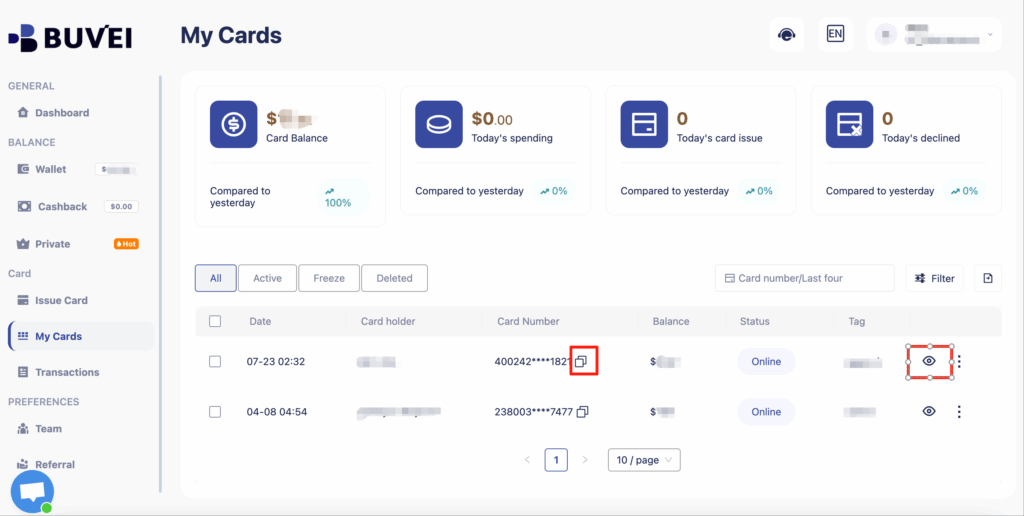
Step 1: Activate your virtual card
Open your virtual card app (for example, Buvei or any other provider) and verify that:
-
The card is active
-
Online payments are enabled
-
Balance or top-up funding is available
Step 2: Open the Grab app
Go to: Profile → Payments → Cards & Wallets → Add Card
Step 3: Enter your virtual card details
Input:
-
Card number
-
Expiry date
-
CVV
Ensure all entries match exactly as shown in your virtual card app.
Step 4: Complete the verification
Grab may place a small authorization hold to confirm the card. This is normal and will be refunded.
Step 5: Set the virtual card as your default payment method
Select the card and mark it as the primary payment option for rides and deliveries.
Once added, your virtual card should process payments instantly without recurring verification issues.
Common Grab Payment Errors and How to Fix Them
Even with virtual cards, you may encounter occasional alerts. Below are common errors and proven solutions.
Error: “Your card was declined”
Fix:
-
Check your virtual card balance
-
Ensure online payments are enabled
-
Verify that your provider supports the country where you are using Grab
Error: “Payment method invalid”
Fix:
-
Re-enter card details
-
Replace card if the number has changed
-
Ensure the card has not expired
Error: “Transaction not allowed”
Fix:
-
Enable international payments
-
Ensure your virtual card supports merchant category codes used by ride-hailing services
Error: “Unable to process payment”
Fix:
-
Restart Grab
-
Update the Grab app
-
Ensure your virtual card is not temporarily frozen
If issues continue, switching to a new virtual card often resolves persistent failures.
Why Buvei Virtual Cards Perform Strongly for Grab Users
While several virtual card providers work with Grab, many users report that Buvei virtual cards offer especially strong compatibility. Their advantages include:
1. Stable approval rates
Buvei is optimized for online and app-based payments, reducing decline rates associated with bank restrictions.
2. Fast top-ups and instant spending
Balance updates reflect immediately, ensuring payments for Grab rides and GrabFood process without delays.
3. Strong cross-platform compatibility
Buvei cards work with major subscription services, ride-hailing apps, digital wallets, and delivery platforms across multiple countries.
4. Privacy-focused design
Users can generate virtual card numbers without exposing personal banking details, enhancing security during frequent transactions.
5. Simple card management
Freeze, unfreeze, limit controls, and spending tracking help prevent common errors like insufficient funds or blocked transactions.
These features make Buvei a reliable alternative when traditional banks fail to support Grab payments smoothly.
Conclusion
Payment failures on Grab often result from bank restrictions, cross-border limitations, or online verification issues. Virtual cards offer a practical and highly reliable solution by providing stronger payment approval rates, greater flexibility, and enhanced security. By setting up a virtual card correctly and understanding how to troubleshoot common errors, users can ensure seamless payments for Grab rides, GrabFood orders, and other delivery services.
For frequent travelers or users who face recurring payment problems, options like Buvei virtual cards provide an efficient and dependable way to keep Grab transactions running without interruption.