Using a virtual card for Google Ads is becoming one of the most reliable ways to manage ad budgets, avoid billing problems, and reduce the risk of account suspension. Many advertisers today struggle with Google Ads billing issues, especially when traditional bank cards fail.
The good news is that with the right setup and best practices, virtual cards can significantly improve your approval rate and payment stability.
This guide walks you through everything step by step.

Common Google Ads Billing Problems
Google Ads is extremely sensitive when it comes to payments. Some of the most common billing issues include:
-
Payment method keeps getting declined
-
Account suspended for “suspicious payment activity”
-
Card verification failures
-
Frequent authorization holds
-
Billing profile inconsistencies
-
One card used across too many accounts
-
Region mismatch between account and card
Even legitimate advertisers often lose accounts simply due to payment structure problems.
Why Traditional Cards Fail Google Ads Payments
Many traditional bank cards are not optimized for advertising platforms.
Common reasons they fail include:
-
Bank anti-fraud systems blocking repeated ad charges
-
Local debit cards not supporting recurring international billing
-
Low authorization success rates
-
Card-sharing across multiple ad accounts
-
Limited control over spending
-
Chargeback risk triggering Google’s internal reviews
From Google’s perspective, unstable payment behavior = higher risk.
That’s exactly why many professional marketers switch to virtual cards for Google Ads billing.
Benefits of Using Virtual Cards for Google Ads
A properly configured Google Ads virtual card offers several clear advantages:
-
Higher approval rates when using stable BINs (US BIN recommended)
-
One card per ad account (clean structure)
-
Better control over ad spend
-
Reduced risk of mass account suspensions
-
Easier budget isolation by campaign or client
-
Faster card replacement if something goes wrong
-
Improved payment consistency over time
This structure looks far more “trustworthy” to Google’s risk systems.
Step-by-Step: Setting Up Google Ads Billing with Virtual Cards
If you want reliable results, follow this exact structure:
Step 1: Create a clean billing profile
Use real business information that matches your account region.
Step 2: Use one virtual card per ad account
Avoid using the same card across multiple unrelated accounts.
Step 3: Start with smaller budgets
Warm up the card by spending consistently before scaling aggressively.
Step 4: Avoid frequent card switching
Too many card changes look suspicious to Google.
Step 5: Match region whenever possible
US ad accounts tend to perform best with US BIN virtual cards.
This approach dramatically improves billing stability.
How to Open and Use a Buvei Virtual Card for Google Ads
Buvei is designed specifically for scenarios like advertising, subscriptions, and platform billing.
Here is the exact setup process.
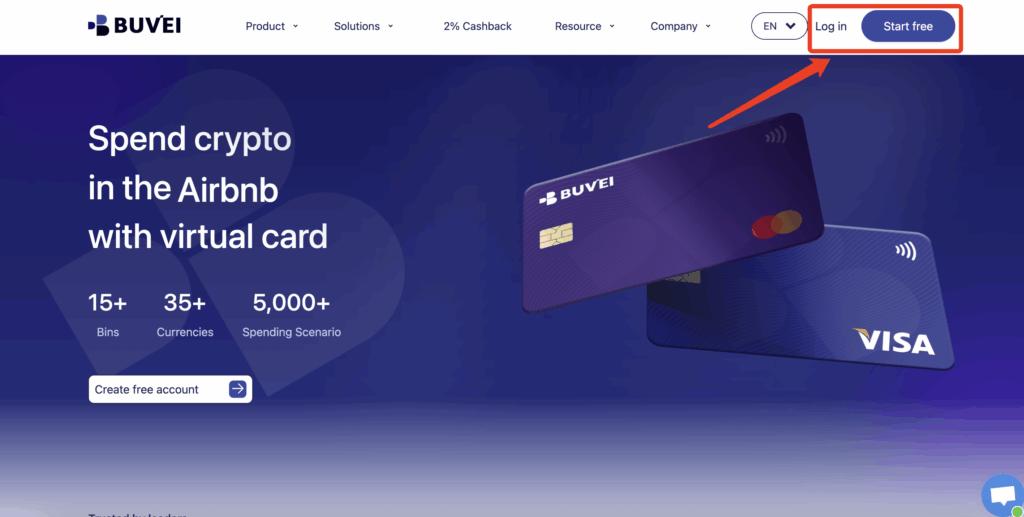
Step 1: Register a Buvei Account
Visit https://buvei.com and create a free account.
After email verification, log in to your Buvei dashboard.
Step 2: Fund Your Account
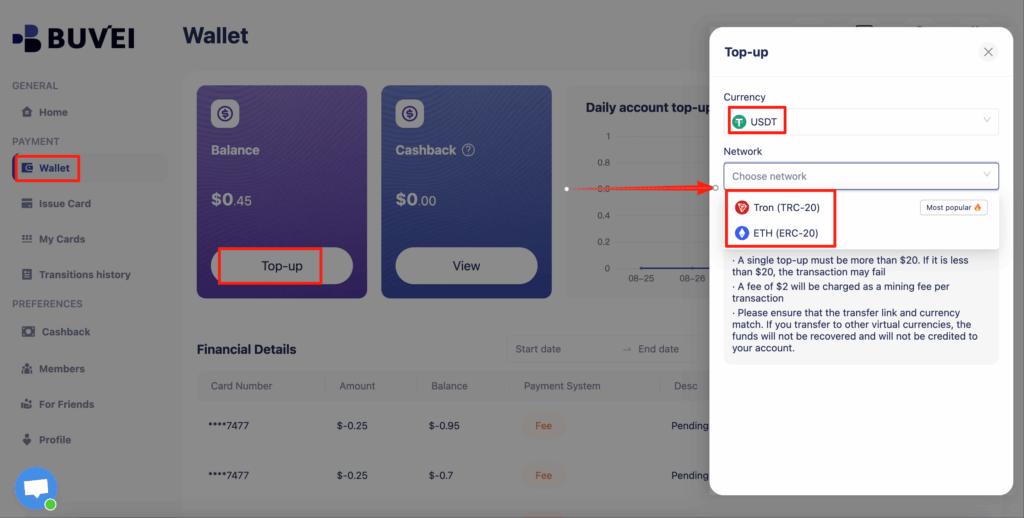
Go to the Wallet tab.
Top up using USDT (TRC20 or ERC20).
You will receive a unique deposit address.
Send funds, and once confirmed, your balance appears immediately.
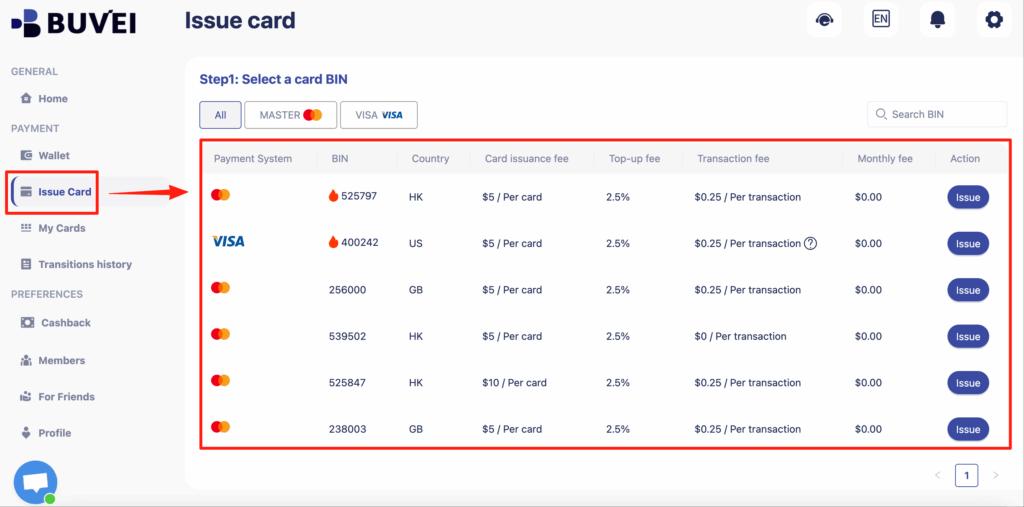
Step 3: Create a Virtual Card for Google Ads
Go to the Cards tab
Select your preferred BIN region (US BIN is strongly recommended for Google Ads)
Choose your card type
Click create
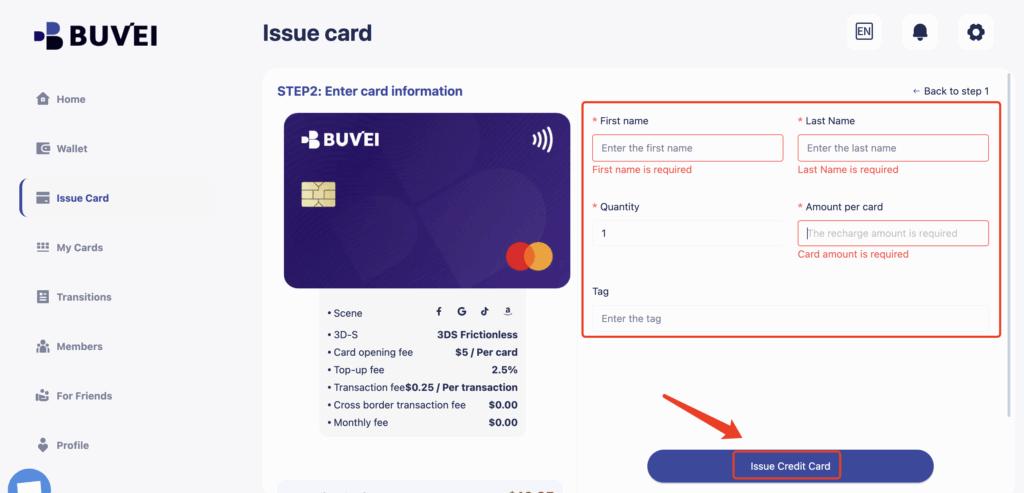
Fill in card details:
-
Card name (e.g., “Google Ads – Client A”)
-
Amount (this becomes your spending limit)
-
Number of cards
Click issue card
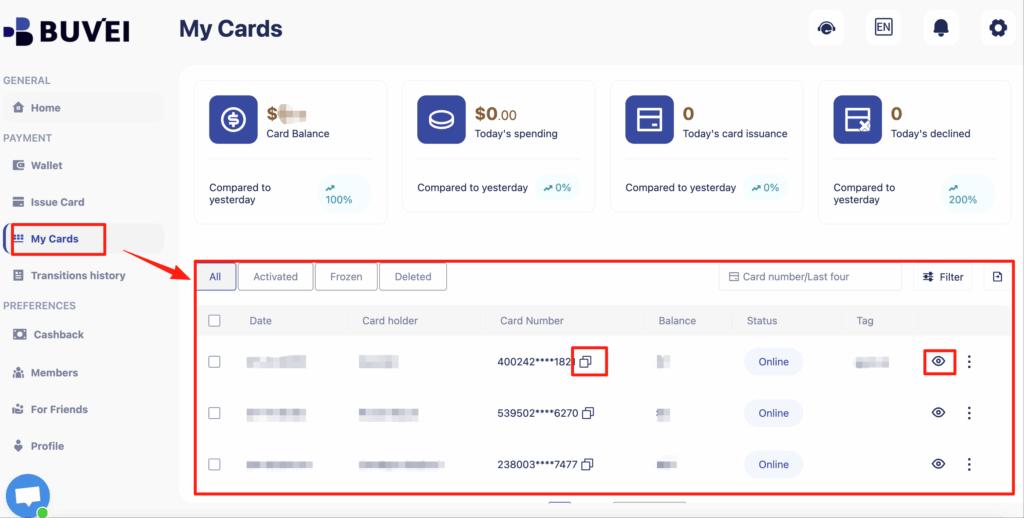
Then go to My Cards to view:
-
Card number
-
Expiry date
-
CVV
-
Remaining balance
-
Transaction history
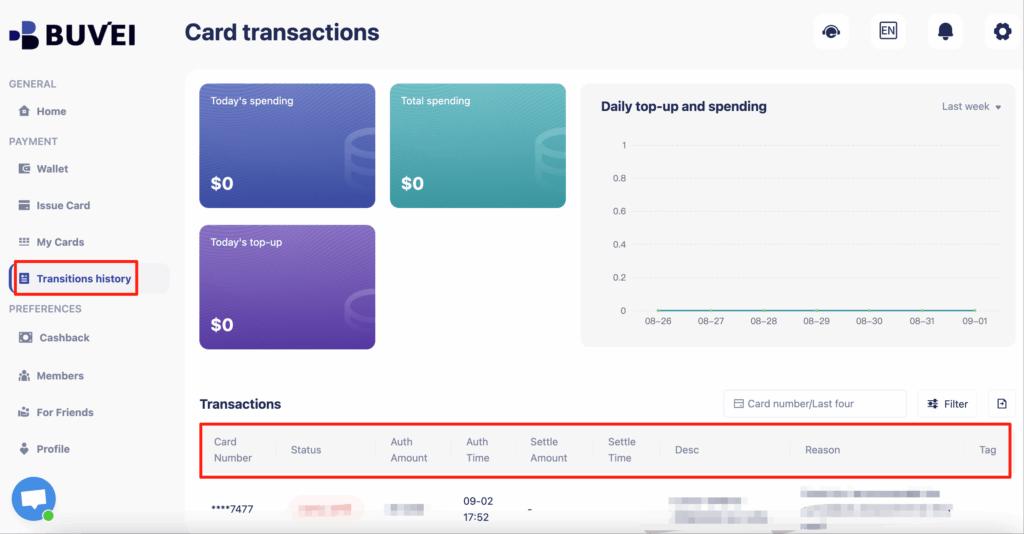
You can now add this card directly to Google Ads billing like a normal Visa/Mastercard.

Best Practices to Avoid Billing Suspensions
Even with a strong virtual card, behavior still matters. Follow these best practices:
-
Use one card per ad account
-
Avoid logging into many accounts from one device
-
Don’t change payment methods too frequently
-
Keep billing profile consistent
-
Avoid sudden budget spikes
-
Maintain stable spending patterns
-
Use cards with enough balance for authorization checks
-
Monitor transactions regularly
Many experienced advertisers prefer Buvei because it supports multi-card management, flexible balances, and fast issuance — making it easier to follow these structures long term.
Final Thoughts
If you're serious about scaling with Google Ads, payment stability is not optional.
Using a properly configured virtual card for Google Ads gives you:
-
More control
-
Better approval rates
-
Lower suspension risk
-
Cleaner account structures
-
Safer scaling
That’s exactly why more media buyers, agencies, and affiliate teams are switching to platforms like Buvei to manage their advertising payments professionally.