Few things are more frustrating than seeing a “Facebook Ads payment failed” error right when your campaign is performing well. One failed charge can pause your ads, disrupt delivery, and even trigger account reviews.
The good news is that most Facebook Ads billing errors are fixable — especially when you use the right payment setup. This guide walks you through the causes, solutions, and a reliable structure using virtual cards.
Why Facebook Ads Payments Fail
Facebook’s billing system is heavily automated and risk-sensitive. Payments often fail not because you did anything “wrong,” but because the system flags something as risky.
Common reasons include:
-
Card issuer blocking international ad transactions
-
Repeated small authorization charges triggering fraud systems
-
Mismatch between account country and card region
-
Using the same card across too many ad accounts
-
Insufficient balance during authorization checks
-
Sudden increases in spend
-
Too many failed attempts in a short time
-
Previous chargebacks linked to the card
Once Facebook loses trust in your payment method, failures become more frequent.
Common Payment Error Messages Explained
Here are some of the most common Facebook Ads billing messages and what they really mean:
“Payment failed”
Usually triggered by bank declines, authorization failures, or card instability.
“We couldn’t process your payment”
Often caused by issuer blocks, low balance, or suspicious activity.
“Your ad account has been disabled for suspicious activity”
Sometimes connected to payment behavior, not just account behavior.
“Prepaid balance is low”
Authorization check failed because the card didn’t have enough available balance.
“Charge was declined by your bank”
Very common with local debit cards or cards not optimized for ad platforms.
Understanding these messages helps you fix the structure, not just retry the payment.
How Virtual Cards Help Prevent Payment Failures
Using a properly configured virtual card for Facebook Ads can significantly reduce these issues.
Benefits include:
-
More stable BINs (US BIN recommended for Facebook)
-
Higher approval rates on recurring ad charges
-
One card per ad account (clean separation)
-
Controlled balances reduce risk exposure
-
Easier replacement if a card becomes “burned”
-
Better trust signals for Facebook’s risk systems
Instead of fighting your bank every week, you build a payment structure that actually works with the platform.
How to Create and Use a Buvei Virtual Card for Facebook Ads
Buvei is built for scenarios like advertising, subscriptions, and platform billing, which makes it a practical option for Facebook Ads.
Here is the exact setup process.
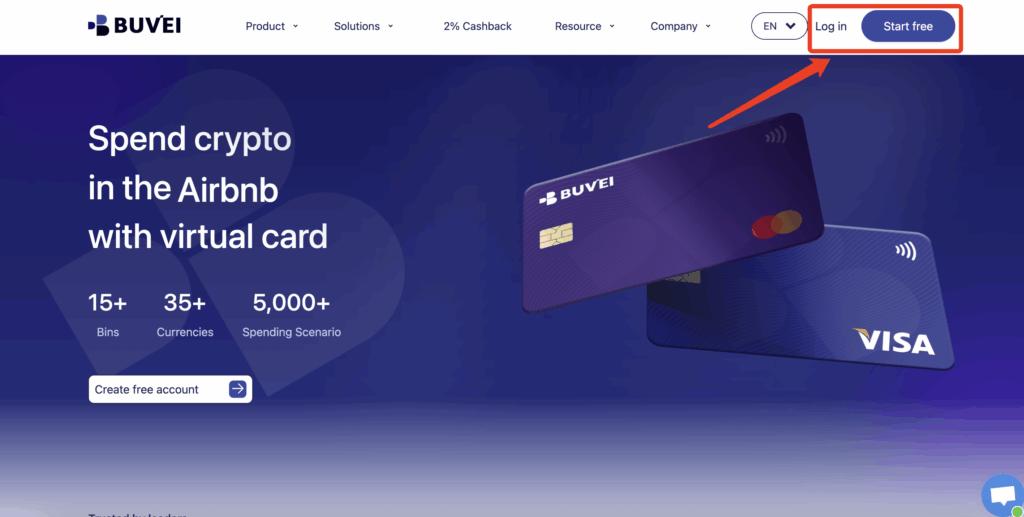
Step 1: Register a Buvei Account
Visit https://buvei.com and create a free account.
Verify your email and log in to the Buvei dashboard.
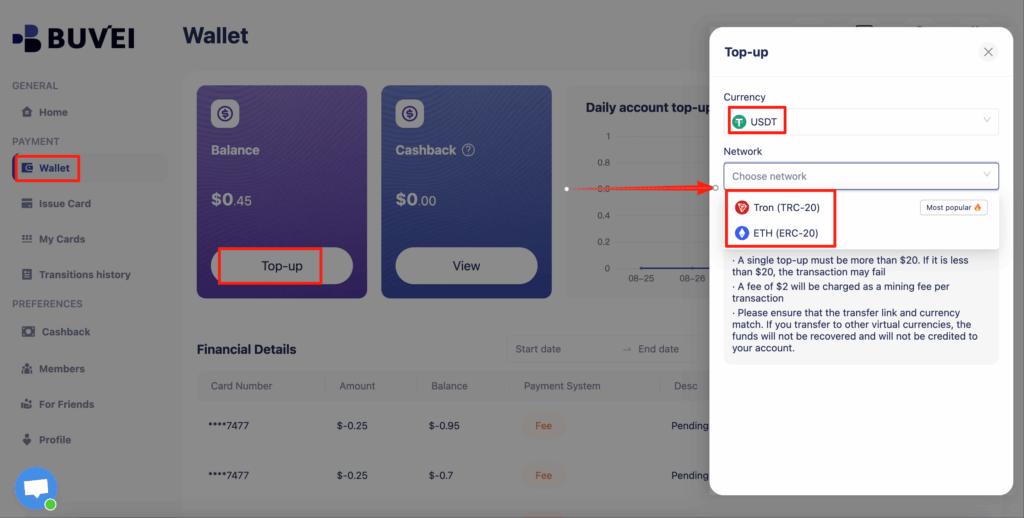
Step 2: Fund Your Wallet
Go to the Wallet tab.
Top up using USDT (TRC20 or ERC20).
You will receive a unique deposit address.
Send funds, and after confirmation, your balance becomes available.
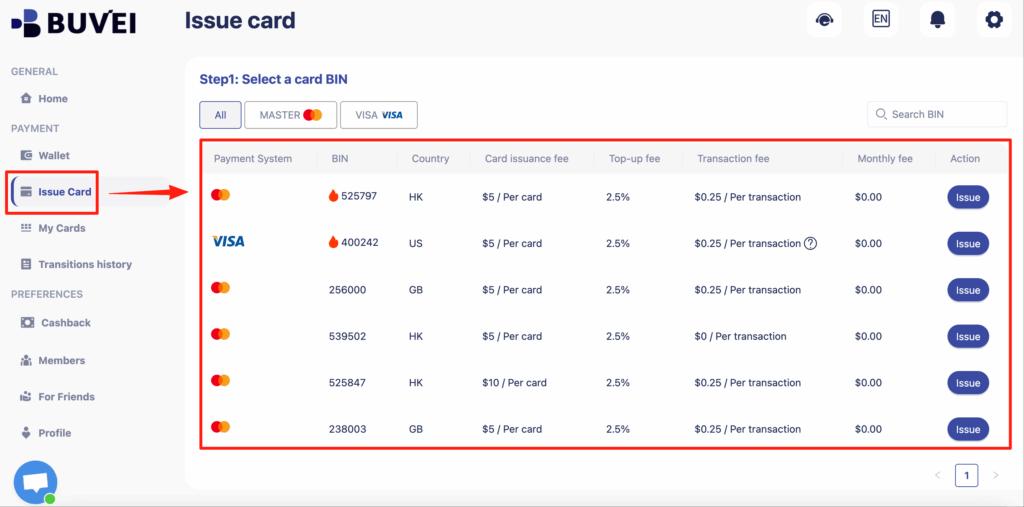
Step 3: Create a Virtual Card for Facebook Ads
Go to the Cards tab
Choose your BIN region (US BIN is recommended for Facebook Ads)
Select your card type
Click create
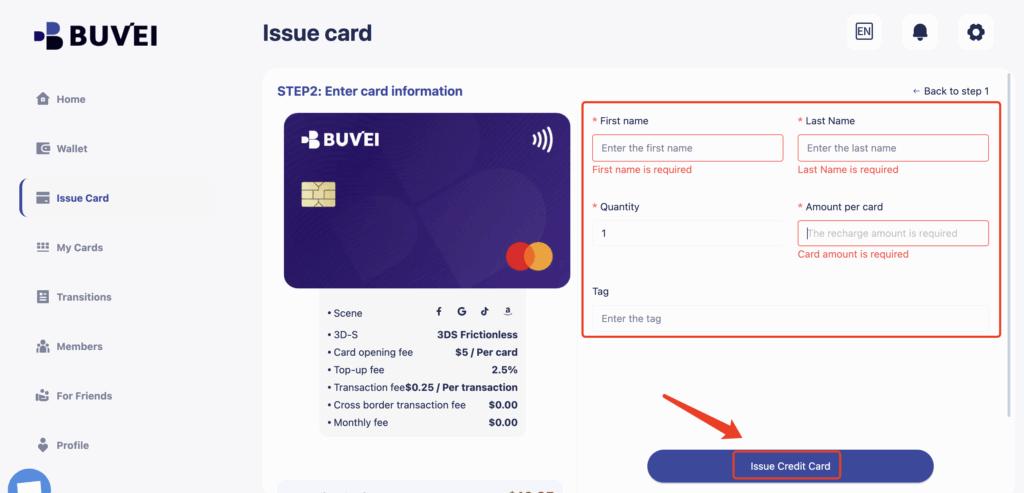
Fill in:
-
Card name (e.g., “FB Ads – Main Account”)
-
Amount (this becomes your spending limit)
-
Quantity of cards
Click issue card
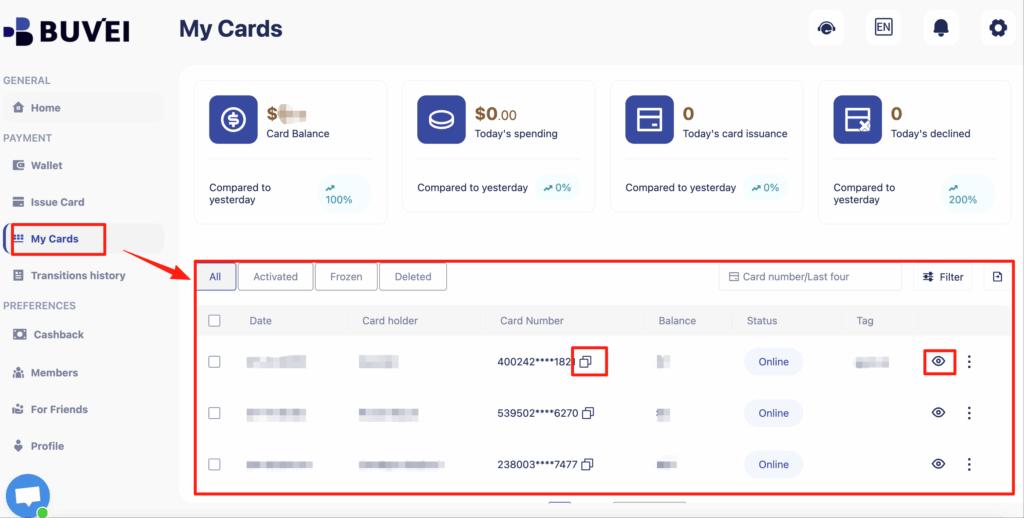
Then open My Cards to view:
-
Card number
-
Expiry date
-
CVV
-
Balance
-
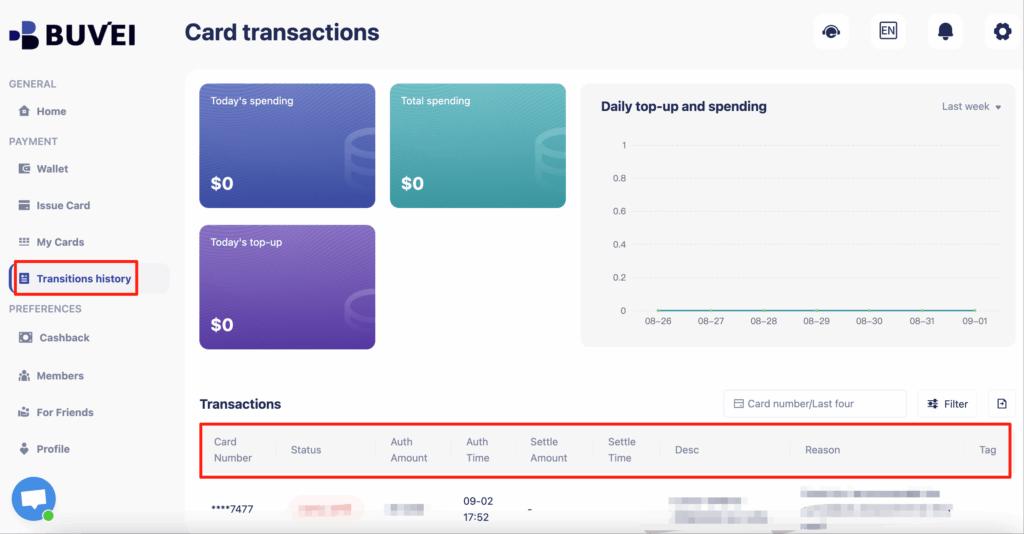
Full transaction history
Add this card to your Facebook Ads billing just like a normal Visa or Mastercard.
Practices to Avoid Future Payment Issues
Once your payments are working again, use these habits to stay stable long term:
-
Use one card per ad account
-
Keep consistent billing behavior
-
Avoid frequent card changes
-
Maintain enough balance for authorizations
-
Scale budgets gradually
-
Monitor billing activity weekly
-
Do not share one card across unrelated assets
-
Keep backup cards ready for rotation
Many experienced advertisers structure their entire billing around tools like Buvei because it makes these best practices easy to implement.
Final Thoughts
A Facebook Ads payment failed error doesn’t mean your advertising is over — but it does mean your payment structure needs improvement.
By using a reliable virtual card for Facebook Ads, separating accounts properly, and following clean billing practices, you can:
-
Reduce declines
-
Avoid unnecessary suspensions
-
Improve account trust
-
Protect your budget
-
Scale more confidently
That’s exactly why more serious advertisers are moving toward structured systems like Buvei instead of relying on fragile traditional bank cards.