Zoom Pro is widely used by remote teams, freelancers, and businesses for video meetings, webinars, and online collaboration. While Zoom supports major credit and debit cards, many users still encounter payment issues—especially when using international or local bank cards.
This is why virtual cards for Zoom Pro have become a popular alternative. In this guide, we’ll explain whether Zoom accepts virtual cards, why they work well for subscriptions, and how to pay for Zoom Pro step by step using a Buvei virtual card.

Why Use Virtual Cards for Zoom Pro?
Zoom Pro is a recurring subscription, which means your payment method must support automatic monthly billing. Traditional bank cards may fail due to:
-
Cross-border transaction restrictions
-
Security checks from issuing banks
-
Insufficient control over recurring charges
Virtual cards solve these problems by offering:
-
Higher subscription payment success rates
-
Better security for online billing
-
Dedicated cards for each SaaS subscription
-
Spending limits for cost control
For professionals who rely on uninterrupted Zoom access, virtual cards are a reliable payment solution.
Does Zoom Accept Virtual Cards?
Yes. Zoom accepts virtual cards as long as they are issued on major networks such as Visa or Mastercard.
Important notes:
-
Zoom treats virtual cards the same as physical cards
-
Virtual cards work for Zoom Pro, Business, and other paid plans
-
Cards with globally accepted BINs (such as U.S. BINs) typically perform best
As long as the virtual card supports online and recurring payments, Zoom will process it normally.

Benefits of Using Virtual Cards for Zoom Subscriptions
Using a virtual card for Zoom Pro offers several advantages:
-
Improved payment stability for monthly renewals
-
Reduced fraud risk, since your real bank card is never exposed
-
Easy card replacement if a payment fails
-
Clear subscription tracking for accounting and budgeting
These benefits make virtual cards ideal for SaaS tools like Zoom.
How to Pay for Zoom Pro with a Virtual Card
Here’s how the payment process works in practice:
-
Log in to your Zoom account
-
Go to Billing → Current Plans
-
Select Upgrade to Zoom Pro (or manage your existing plan)
-
Choose Credit/Debit Card as the payment method
-
Enter your virtual card details:
-
Card number
-
Expiration date
-
CVV
-
-
Confirm the payment
Once added, Zoom will automatically charge the card for future billing cycles.
Step-by-Step: How to Create and Use a Virtual Card with Buvei
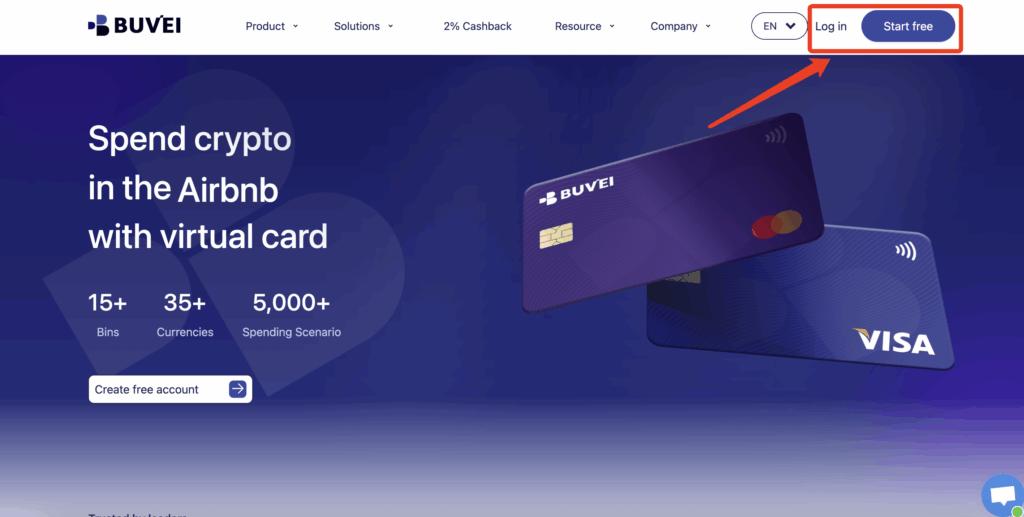
Step 1: Register a Buvei Account
-
Visit https://buvei.com
-
Create a free account
-
Complete email verification
-
Log in to the Buvei dashboard
Step 2: Fund Your Buvei Wallet
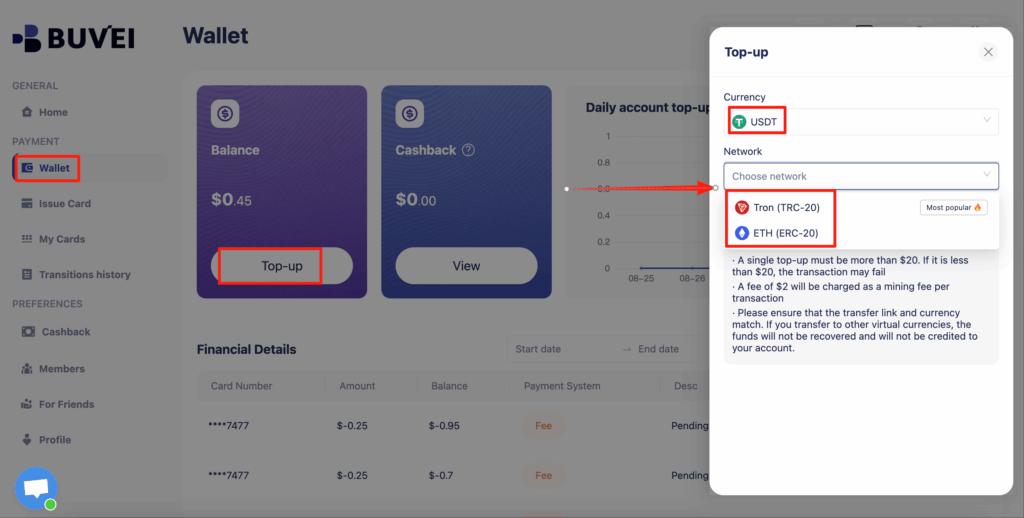
-
Go to the “Wallet” tab
-
Choose USDT (TRC20 or ERC20) as your top-up method
-
Copy your dedicated deposit address
-
Send USDT to that address
Once confirmed, your balance will be available immediately.
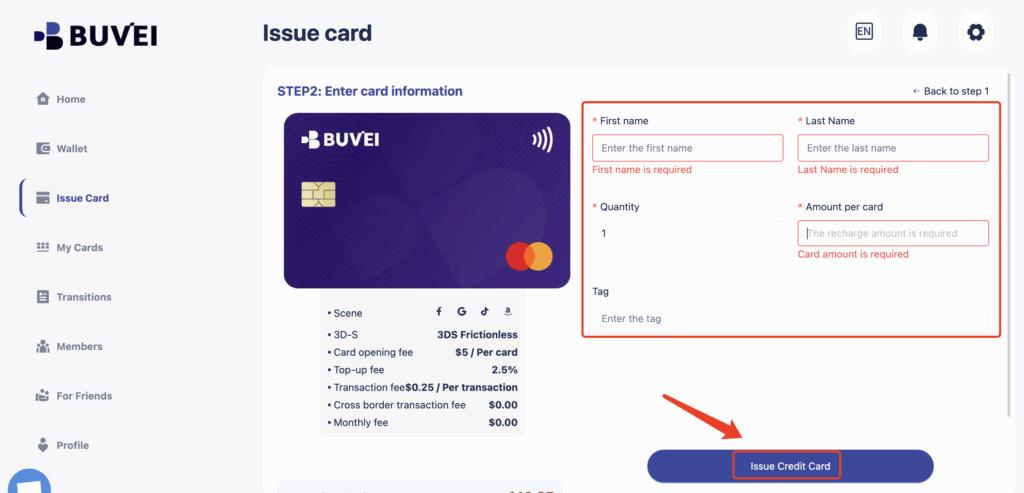
Step 3: Issue a Virtual Card for Zoom
-
Navigate to the “Cards” tab
-
Select your preferred BIN region
(U.S. BINs are commonly recommended for SaaS subscriptions) -
Choose the card type
-
Click “Create Card”

-
Enter:
-
Card name (e.g., “Zoom Pro Subscription”)
-
Funding amount
-
Number of cards
-
-
Click “Issue Card”
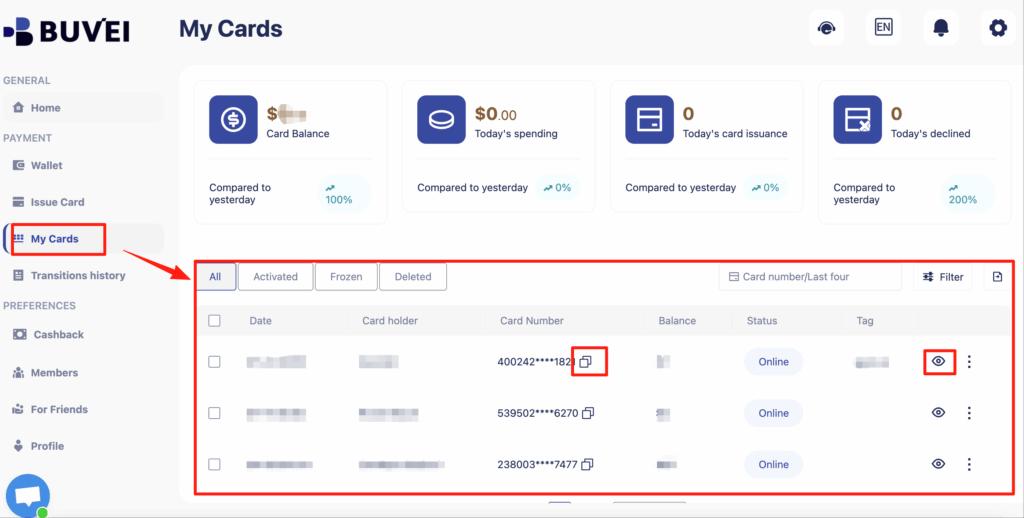
In “My Cards,” you can view:
-
Card number
-
Expiration date
-
CVV
-
Transaction and subscription history
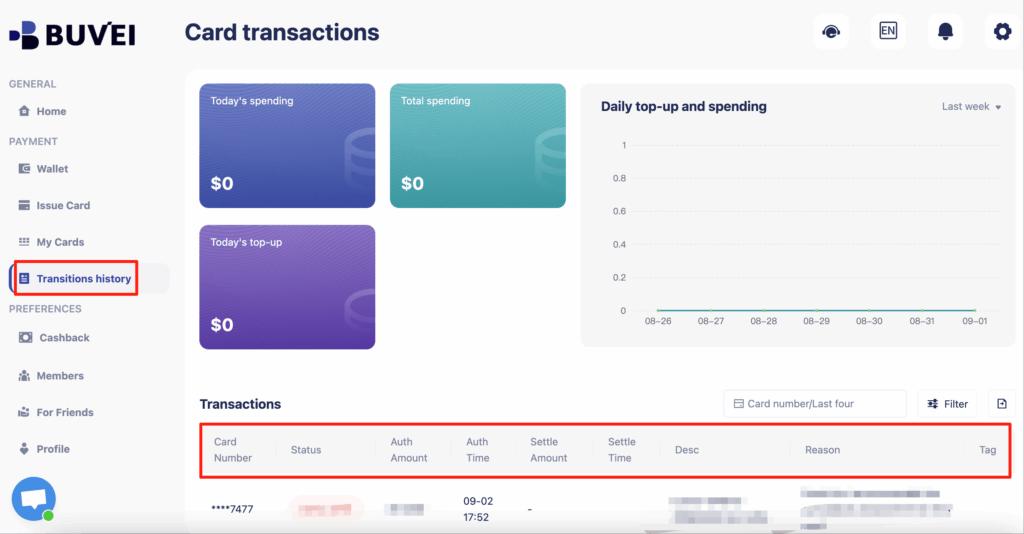
You can also track balances, top-ups, and all transaction activity from this page.
Best Practices to Avoid Zoom Payment Failures
To keep your Zoom Pro subscription running smoothly:
-
Use one virtual card dedicated to Zoom
-
Ensure sufficient balance before renewal dates
-
Avoid sharing the same card across many subscriptions
-
Replace the card if repeated declines occur
-
Monitor billing activity regularly
These steps significantly reduce the risk of interrupted service.
Final Thoughts
So, can you pay for Zoom Pro with virtual cards? Yes—and for many users, it’s actually the better option. Virtual cards provide improved security, higher success rates for recurring payments, and better control over SaaS subscriptions.
With Buvei virtual cards, you can pay for Zoom Pro confidently, avoid common payment issues, and manage your online subscriptions more efficiently.