




Introduction
For freelancers, developers, and remote workers who rely on several AI tools, knowing how to manage multiple AI subscriptions is becoming increasingly important. ChatGPT might be used for research and everyday tasks, Claude for writing and document analysis, and Cursor for coding. Although each tool serves a different purpose, some of their features may overlap.
Paying for several AI services also means keeping track of different subscription costs, renewal dates, and payment methods. Without a clear overview, it's easy to lose track of recurring expenses or keep paying for tools you rarely use.
A few simple changes to how you track subscriptions and manage payments can help keep these costs under control without giving up the AI tools you rely on.
Why Is Managing Multiple AI Subscriptions Difficult?
Three common issues make it harder to keep AI subscription costs under control:
- Different billing cycles: Each service has its own renewal date, making it easy to overlook upcoming charges, especially when monthly and annual plans are mixed.
- Overlapping features: Tools such as ChatGPT and Claude can handle some similar tasks. Paying for both may be worthwhile, but it's important to understand what each subscription adds to your workflow.
- Scattered payment records: When subscriptions are charged to different cards or payment accounts, reviewing total AI spending and identifying individual charges takes more effort.
There is also the problem of unused subscriptions. A tool purchased for a particular project may continue renewing even after that project has ended.

How to Manage Multiple AI Subscriptions Effectively
Create an AI Subscription Tracker
Keep a simple record of your active AI subscriptions, including each service's subscription plan, cost, renewal date, and payment method. This makes it easier to review recurring expenses and identify subscriptions you may no longer need.
For annual plans, record the full payment amount and renewal date separately so you can prepare for larger upcoming charges.
Review Usage and Subscription Plans
Check whether each paid subscription still justifies its cost. Consider how frequently you use the tool, whether its features overlap with another service, and whether a lower-tier plan would meet your needs.
You don't necessarily need to cancel subscriptions that offer similar features. If ChatGPT and Claude both play important roles in your work, keeping both may make sense. The goal is to avoid paying for plans that provide little practical value.
Keep Track of Renewal Dates
Add upcoming renewal dates to your calendar and set reminders before payments are due. Review your subscription list regularly, paying particular attention to annual renewals and services you haven't used recently.
This makes it easier to review upcoming expenses and cancel subscriptions you no longer need before the next billing cycle.
How BUVEI Helps Manage AI Subscription Payments
Once you've decided which subscriptions to keep, organizing their payment methods can make recurring expenses easier to track.
BUVEI offers Visa and Mastercard virtual cards for online payments, including software subscriptions. Its card issuance and management features give users more flexibility when handling payments across multiple AI services.
Issue Separate Cards for Different AI Services
BUVEI supports quick and batch virtual card issuance, along with multiple BIN options. Users can create separate cards for different subscriptions, accounts, or projects.
For example, someone using ChatGPT, Claude, and Cursor can assign a dedicated BUVEI card to each service. This makes individual subscription charges easier to identify without sorting through payments from several services on one card.
Available BIN options provide additional flexibility when choosing a card for a particular payment requirement. Actual acceptance depends on the AI provider's payment policies and the selected card program.
Manage Card Spending Independently
Each BUVEI virtual card can be managed separately. Users can set individual spending limits, freeze or unfreeze cards, and close cards when they are no longer needed.
For AI subscriptions, individual limits help keep each payment method within a planned budget. When setting a limit, leave enough room to cover the full subscription charge.
Freezing or closing a virtual card does not cancel the associated subscription. To stop future renewals, you must cancel the subscription through the AI provider's account or billing settings.
Review Subscription Payments Through Transaction Records
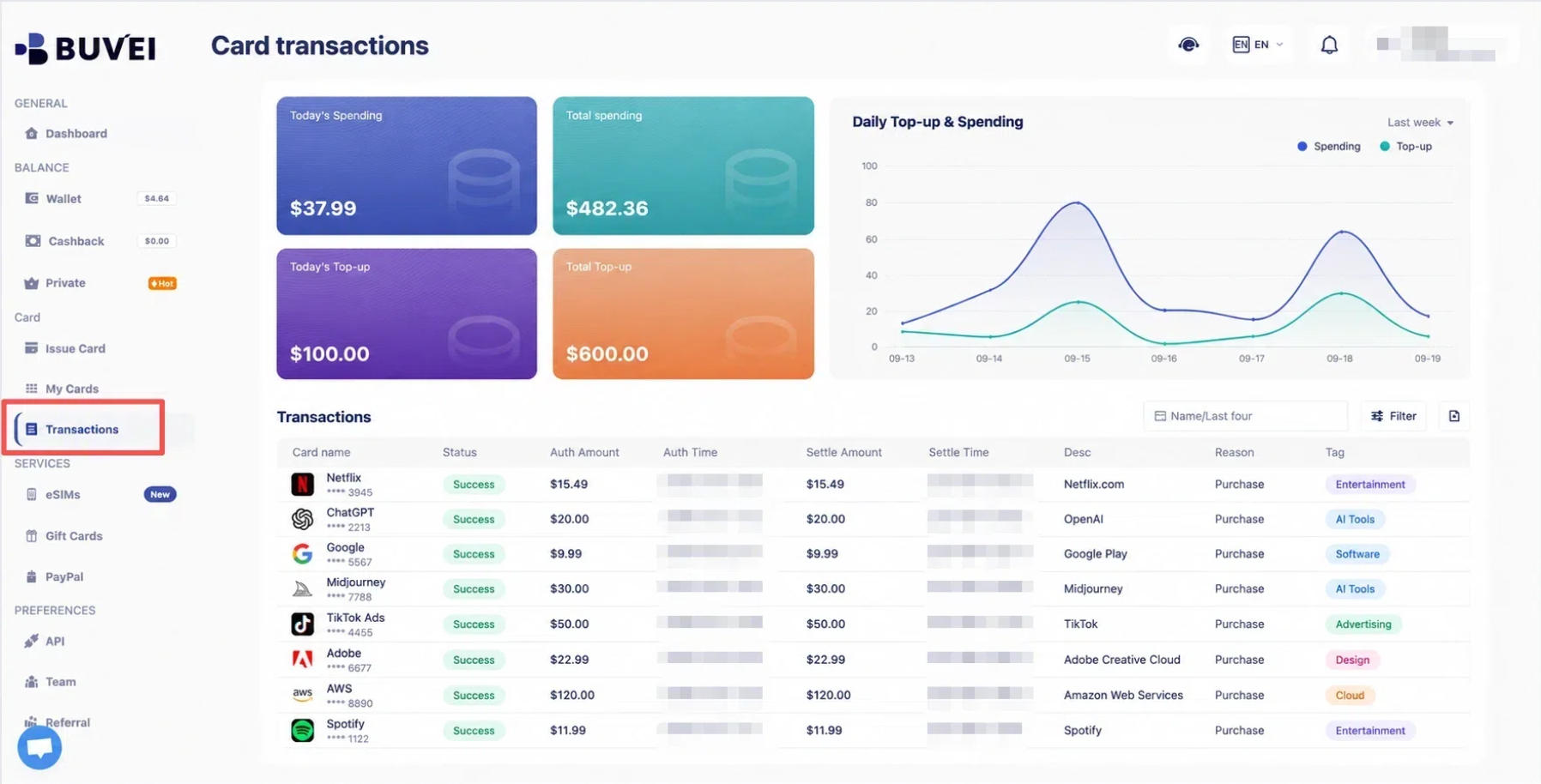
BUVEI provides card-level transaction records showing payment amounts, dates, and statuses.
When each AI service has its own assigned card, users can review the corresponding transactions and compare them with their subscription records. This makes it easier to identify recurring charges and check whether expected payments have been processed.
How to Set Up BUVEI Virtual Cards for AI Subscription Payments
Step 1: Register a BUVEI Account
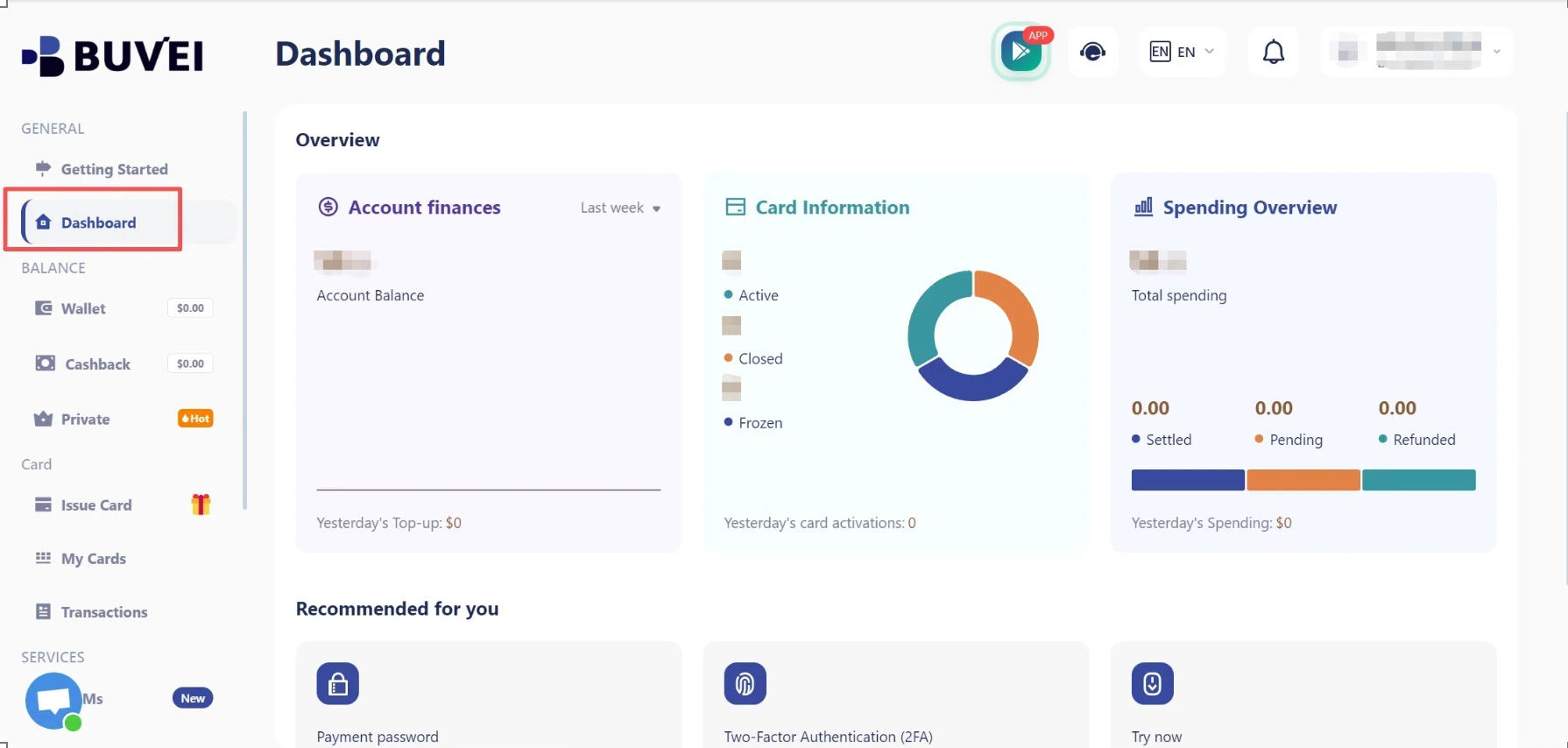
Visit BUVEI, create a free account, complete email verification, and log in to your dashboard.
Step 2: Top Up Your Wallet
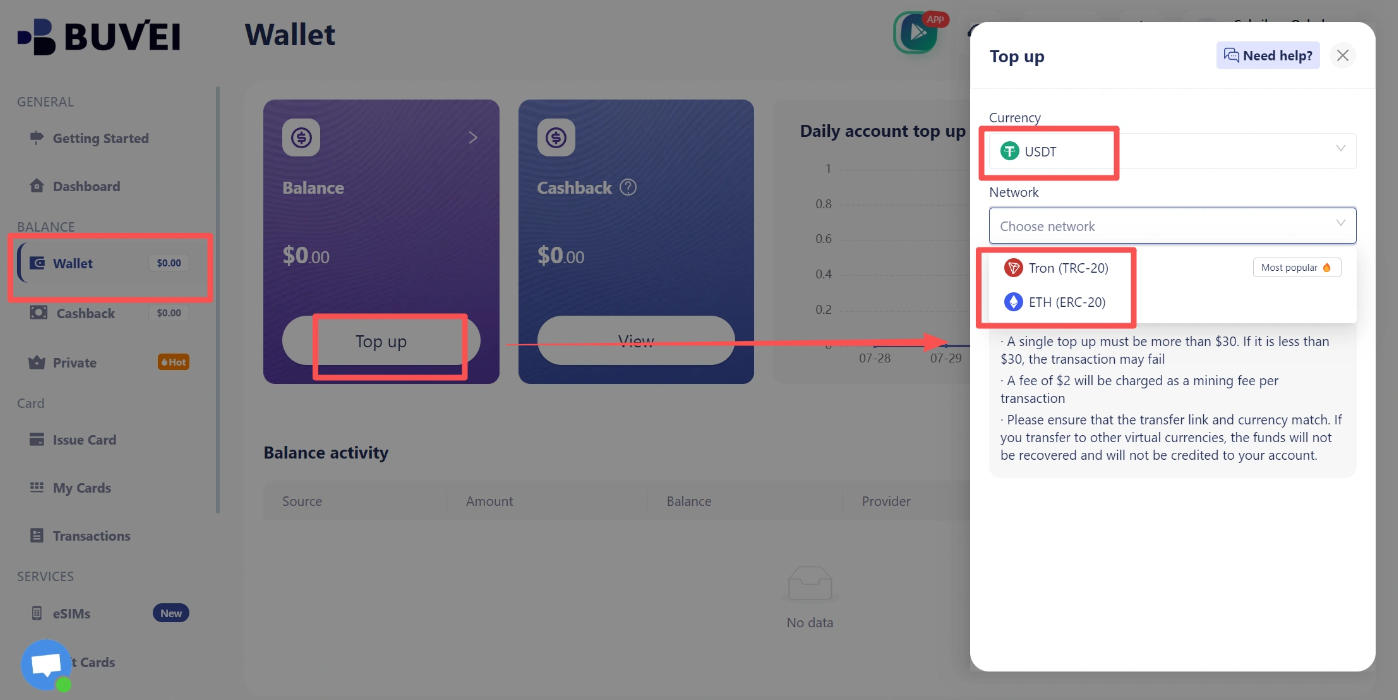
Go to Wallet and select USDT TRC20 or ERC20. Copy your deposit address and transfer USDT using the same network you selected.
Once the transaction is confirmed, the funds will appear in your BUVEI wallet balance.
Step 3: Issue Virtual Cards
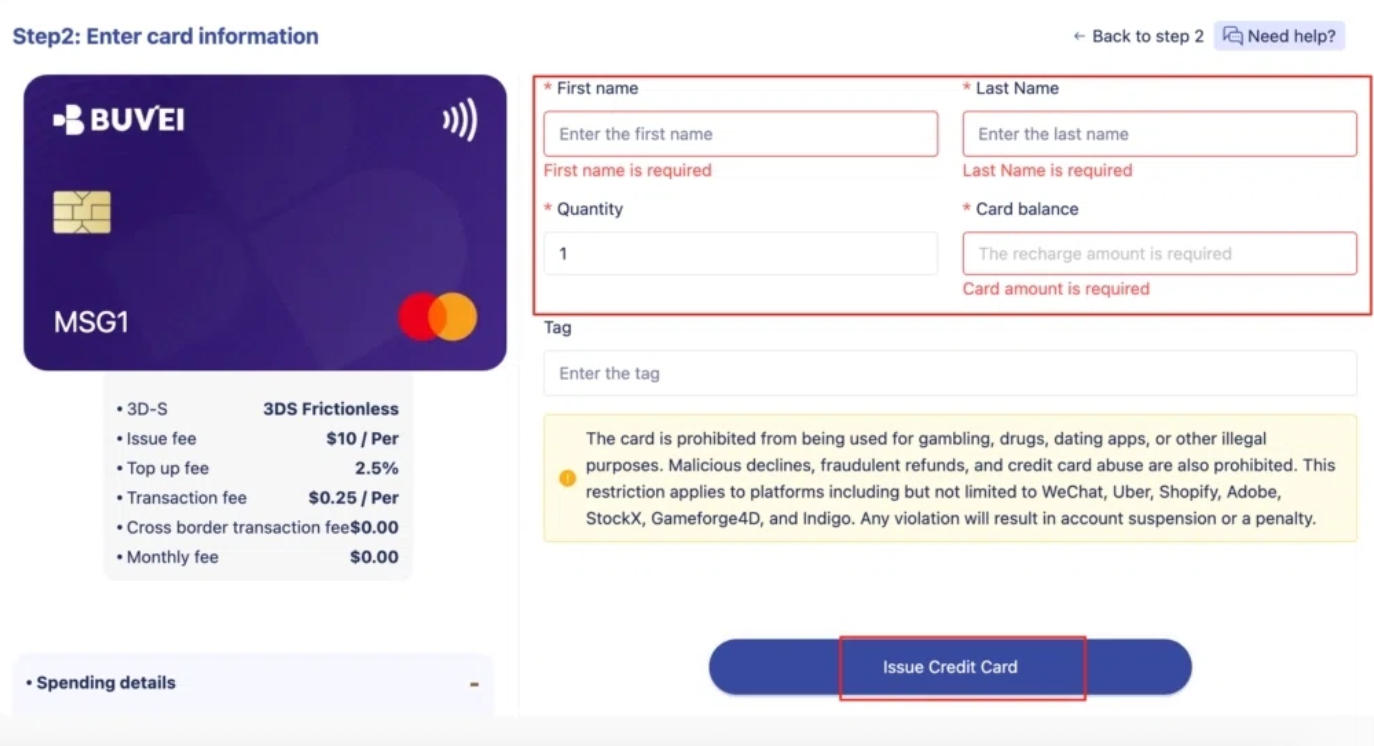
Go to Cards, choose an available BIN region and card type, and enter the card name, amount, and issuance quantity. Click Issue to create your cards.
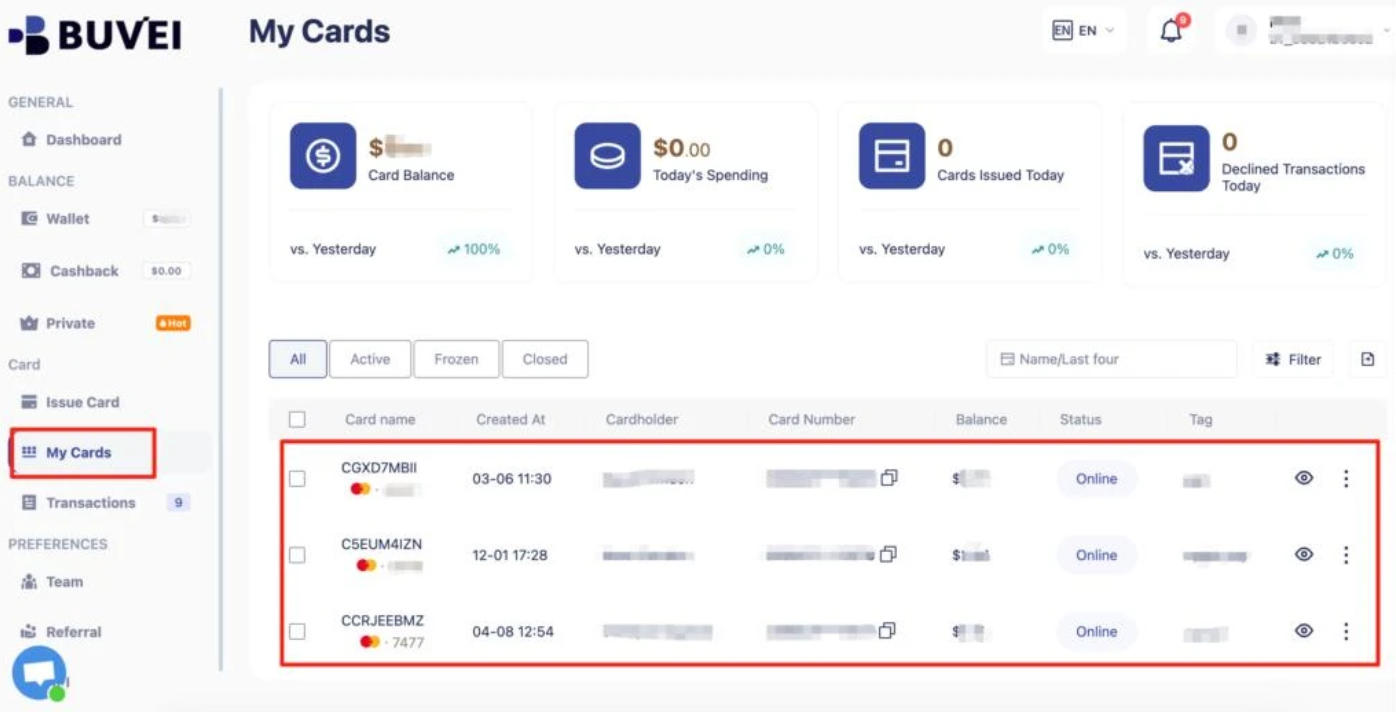
You can then open My Cards to view the card numbers, expiration dates, and CVV details, and assign individual cards to your AI subscriptions.
Conclusion
As you add more AI tools to your workflow, keeping track of their subscription costs and renewal dates becomes increasingly important. Regularly reviewing your plans helps you avoid paying for services you no longer use and keeps recurring expenses under control.
BUVEI makes it easier to organize the payment side with separate virtual cards for different AI services, individual spending limits, and card-level transaction records. These features help keep AI subscription payments easier to track as your needs change.