A business adds €500 to a software platform, purchases €120 of services, and sees no new €120 charge on the card.
Later, a refund appears as platform credit instead of returning to the card.
Nothing is necessarily missing.
The merchant may be using an internal account balance rather than charging the card separately for every purchase.
This distinction matters for budgeting, refunds, employee access, expense tracking, and bookkeeping.
A card transaction records value moving to or from the card account. A merchant balance records value held and used inside the supplier’s system.
They are connected, but they are not the same ledger.
A single top-up can fund many later purchases without creating another card charge each time.
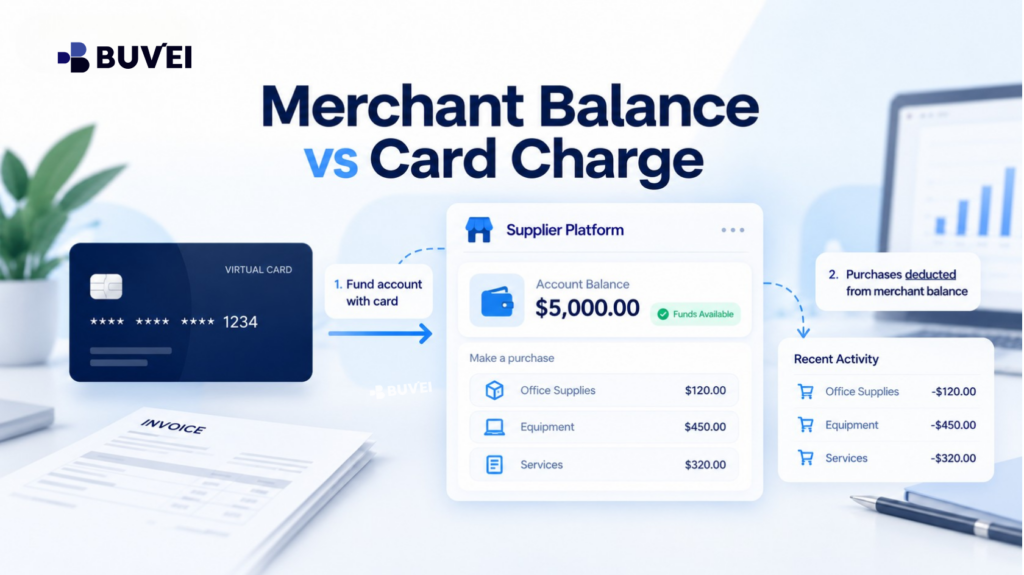
Two Payment Models
Direct Card Charge
In a direct-charge model, the merchant submits a card transaction for a specific order, invoice, booking, or subscription renewal.
The card transaction and commercial record can usually be connected through:
- Amount
- Currency
- Date
- Transaction or invoice reference
Authorisation and final capture may occur at different times, but the card payment still relates to a particular commercial event.
Merchant Account Balance
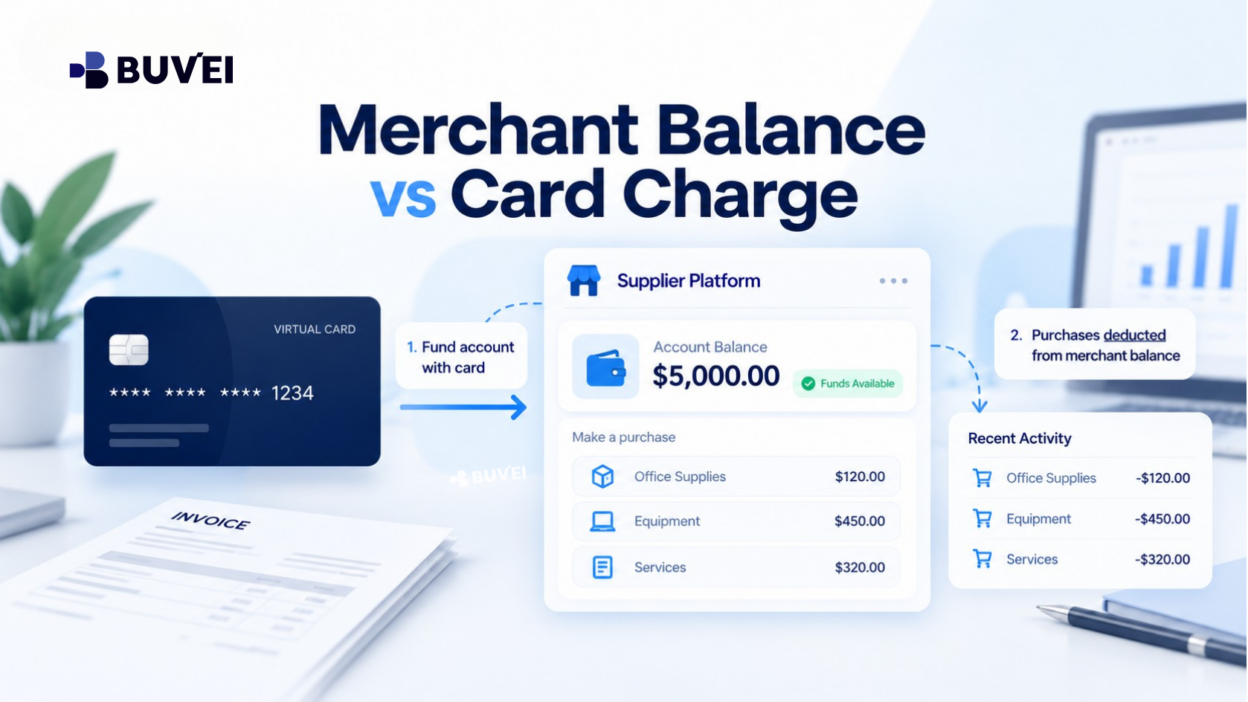
In a balance-based model, the customer first adds funds, purchases credits, redeems a voucher, or receives a refund into an internal wallet.
Later orders are deducted from that stored value.
The individual order may not create a new card transaction because the card was already charged when the merchant balance was funded.
Some platforms use a hybrid model. They may consume available credit first and charge the card only for the remaining amount.
Others keep different balance types, such as:
- Refundable cash balance
- Purchased service credits
- Promotional credits
- Bonus credits
Do not assume that every figure labelled “balance” represents the same type of value.
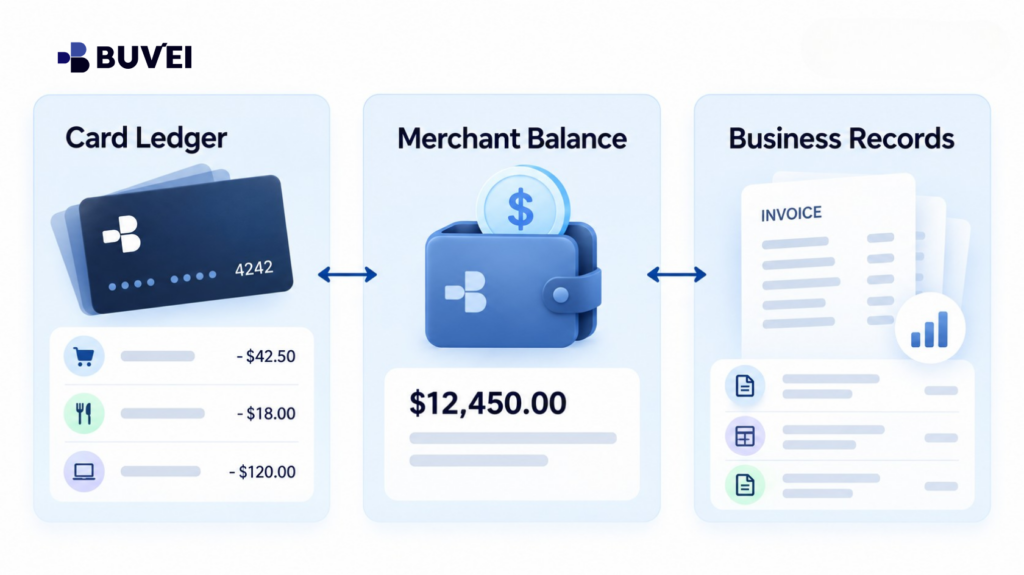
Follow the Money Through Three Ledgers
Understanding the payment flow becomes much easier when the records are separated into three layers.
Card Ledger
The card ledger may show:
- Authorisations
- Completed charges
- Reversals
- Refunds
- Card-side currency information
It tells you what happened to the card.
However, it may not explain which later purchase consumed money that had already been transferred into a merchant wallet.
Merchant Balance Ledger
The merchant ledger may show:
- Top-ups
- Purchased credits
- Bonuses
- Order deductions
- Fees
- Adjustments
- Expirations
- Internal refunds
It explains how value moves inside the supplier’s platform.
Commercial and Accounting Records
These include:
- Invoices
- Receipts
- Tax documents
- Order records
- Expense categories
- Project allocations
These records explain what the business actually purchased and how the expense should be recorded.
The three records should be reconciled together rather than forced into a one-to-one pattern.
For example:
One €500 card charge may fund ten later orders.
Or:One €120 order may use €100 of merchant balance and create only a €20 card charge.
How to Recognise an Internal Balance
Common signs include:
- The platform uses terms such as wallet, credits, prepaid funds, cash balance, or account balance.
- Users must “add funds” before purchasing.
- Orders reduce the displayed balance immediately but create no matching card transaction.
- Refund terms say that value returns to the platform account.
- The merchant offers automatic top-up when the balance falls below a threshold.
- Credits may expire or be restricted to certain products or regions.
Be careful with terminology.
A platform may also use the phrase balance due, which means money the customer owes rather than money available to spend.
Check what the number actually represents.
A Top-Up Is Not the Same as a Purchase
When a business tops up a merchant account, it transfers value before all goods or services have necessarily been purchased.
That means:
Funding event ≠ Purchase event
For example, the card may be charged in March, while the merchant balance is gradually consumed between March and June.
If finance assigns the entire March top-up to one project, later project costs may be distorted.
Keep both:
- Proof of the original funding transaction
- Order-level invoices or receipts
The merchant may issue different document types, such as a funding receipt, payment confirmation, credit-purchase invoice, or individual order invoice.
Which documents are required for accounting depends on the merchant and applicable accounting rules.
A Worked Reconciliation Example
Assume a design team adds €600 to a platform using a dedicated virtual card.
The platform also provides €30 in promotional credit.
Three employees then purchase services costing:
- €180
- €220
- €90
Total purchases: €490
Later, one €20 purchase is refunded to the platform balance.
| Event | Card Ledger | Merchant Ledger | Business Record |
|---|---|---|---|
| Top-up | €600 charge | +€600 | Funding receipt |
| Promotion | No card entry | +€30 | Promotion terms |
| Three purchases | No new charge | −€490 | Order records / invoices |
| Refund | No card refund | +€20 | Refund record / credit note |
| Closing position | €600 top-up remains posted | €160 remaining | Reconciliation record |
The remaining €160 may contain both refundable funds and restricted promotional credit.
It should not automatically be treated as €160 of cash unless the merchant confirms the full balance is refundable or withdrawable.
Refund to Card vs Refund to Merchant Balance
A card refund returns value through the card-payment route and should eventually appear in the card ledger.
A merchant-balance refund restores value inside the merchant account.
That balance may only be usable with the same supplier.
Before cancelling a service or requesting a refund, confirm:
- Where the refund will be credited
- Whether it can be withdrawn
- Whether it expires
- Whether it remains available after account closure
- Which balance type receives the refund
Do not mark an invoice as card-refunded just because the merchant dashboard shows an internal credit.
Until the card ledger displays the refund, the value remains on the merchant side.
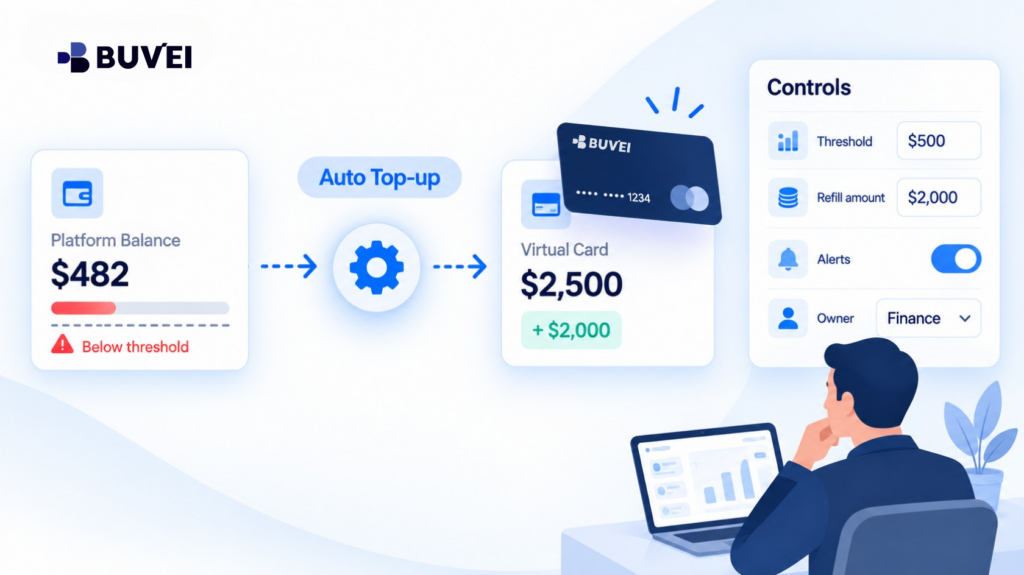
Automatic Top-Ups Can Hide the Real Payment Trigger
Some platforms automatically charge the card when:
- The balance falls below a threshold
- A scheduled refill date arrives
- An order exceeds the available balance
This can make a user think that the card was charged for a specific order when the real trigger was simply an auto-replenishment rule.
For each merchant account, record:
- Top-up threshold
- Refill amount
- Funding card
- Maximum frequency, where applicable
- Responsible owner
If an unexpected card charge appears, review the merchant ledger before assuming the transaction is incorrect.
A legitimate auto top-up may correspond to a low-balance event.
Virtual Card Controls Should Match the Merchant Model
Card controls work best when they reflect how the merchant actually charges.
A card limited to exactly €120 may not work if the merchant requires a minimum €500 wallet top-up.
Likewise, a one-time card may not suit a merchant that uses:
- Automatic replenishment
- Recurring billing
- Future instalments
- Refunds linked to the original card
Before setting limits, understand whether the merchant charges:
- Per order
- Per billing cycle
- At a balance threshold
- Manually
Then review card suitability, available balance, supported currency, merchant requirements, and any applicable limits.
Employee Access and Account Ownership
A merchant balance is only practically controlled by the business if the business controls the merchant account.
A wallet created using an employee’s personal email can become difficult to access after that employee leaves.
Business accounts should ideally use:
- Company-controlled credentials
- Appropriate MFA
- Documented administrators
- Shared recovery procedures
Also separate permissions.
A person who can place orders does not necessarily need authority to:
- Change payment methods
- Request refunds
- Withdraw funds
- Enable auto top-up
- Add administrators
Removing a virtual card does not remove an employee’s ability to spend money already stored inside the merchant account.
Expiry and Stranded Balance Risk
Stored merchant value may not always behave like cash.
Credits may be:
- Non-refundable
- Non-transferable
- Product-specific
- Region-specific
- Subject to expiry
Before transferring a large amount to a merchant wallet, check what happens if:
- The account is suspended
- The business changes region
- The legal entity changes
- The company stops using the supplier
A card limit can control how much money enters the merchant account.
It cannot automatically recover value that has already been transferred.
For material balances, avoid keeping significantly more value than the business realistically expects to use in the near term.
Currency Layers Inside a Merchant Wallet
A card may fund a merchant account in one currency while services are priced in another.
Some platforms convert:
- At top-up
- At purchase
- At refund
- At more than one stage
Record:
- Top-up currency
- Wallet currency
- Purchase currency
- Conversion method
- Fees or margins
For refunds, confirm whether the merchant returns the original currency, converts the value into the wallet currency, or refunds the card directly.
Do not infer supplier location or tax treatment from the wallet currency alone.
Month-End Reconciliation
A practical month-end process can be:
- Record the opening merchant balance.
- List card-funded top-ups.
- Match each top-up to the corresponding card transaction.
- List purchases, fees, credits, expirations, and refunds.
- Collect order-level invoices or receipts.
- Assign purchases to the correct project or owner.
- Calculate the expected closing balance.
- Compare it with the merchant dashboard.
- Investigate any difference.
A useful formula is:
Opening Balance + Top-Ups + Credits − Purchases − Fees − Expirations − Withdrawals = Expected Closing Balance
Keep restricted promotional credits separate if they cannot be treated like ordinary funds.
Common Mistakes
Avoid:
- Searching for a new card charge for every order when the platform uses prepaid balance.
- Recording both the top-up and every later order as full expenses.
- Treating promotional credit as refundable cash.
- Closing the merchant account before resolving remaining balances and refunds.
- Forgetting that auto top-up may still be active.
- Allowing one employee to control the login, payment method, refunds, and recovery process.
- Assuming an internal merchant credit has already returned to the card.
Where Buvei Fits
For supported payment scenarios, a Buvei virtual card can provide a separate funding source for a merchant account and make card-side top-ups easier to identify.
Before funding a merchant balance, review the relevant:
- Card configuration
- Available balance
- Spending controls
- Currency
- Transaction status
Suitability and availability may vary depending on the account and payment context.
Buvei provides visibility into the card side of the payment.
The merchant remains responsible for explaining:
- Internal account balance
- Credit restrictions
- Order deductions
- Refund rules
- Auto top-up settings
When contacting Buvei support about a top-up, provide non-sensitive information such as:
- Merchant name
- Date
- Amount
- Currency
- Transaction status
- Transaction reference
Never share passwords, OTPs, CVVs, or full card numbers.
A useful way to think about the responsibility split is:
Buvei shows what happened to the card. The merchant explains what happened to the balance inside its platform.
Questions to Ask Before Adding Funds
Before placing a significant balance into a merchant account, ask:
- Is the balance refundable cash, purchased service credit, or promotional value?
- What is the minimum top-up?
- Which currency is used?
- When is an invoice issued?
- Who can spend the balance?
- Does the platform automatically replenish the balance?
- Does it retain the card for future charges?
- Where do refunds go?
- Do credits expire?
- What happens when the account is closed?
- Can the company export the transaction ledger?
If the merchant cannot clearly answer important questions, keep the initial exposure limited until the terms are understood.
Final Takeaway
A merchant account balance is value held and tracked inside the supplier’s platform.
A direct card charge is a transaction submitted to the card for a specific payment or funding event.
When a platform uses a prepaid or hybrid model:
One card transaction may fund many later purchases.
And:
A refund may remain inside the merchant account instead of returning to the card.
Reconcile the card ledger, merchant ledger, and commercial records as three connected sources.
Once the payment model is clear, card limits, refunds, employee permissions, budgeting, and accounting become much easier to manage.