
Paying for professional certifications and online exams usually involves a web-based checkout process. For users looking for virtual cards for exam fees, a virtual card can be a practical payment option when the certification provider accepts online card payments and the card supports the required transaction.
Virtual cards can also help separate exam-related spending from everyday purchases and make online payment management more organized. This guide explains when you can use virtual cards for certification and exam fees, what to check before paying, how the payment process works, and how to handle common payment issues.
Can You Use a Virtual Card for Certification and Exam Fees?
In many cases, yes. If an exam or certification provider accepts online card payments, a compatible virtual card may work, depending on the provider’s payment rules, payment processor, and card issuer.
However, acceptance is not guaranteed. Some certification programs may restrict certain card types or require specific payment methods. Always check the payment requirements for the specific exam before submitting a transaction.
When Virtual Cards Can Work
A virtual card is generally suitable when the payment page accepts the card network your card uses and does not specifically restrict virtual, prepaid, or other card types.
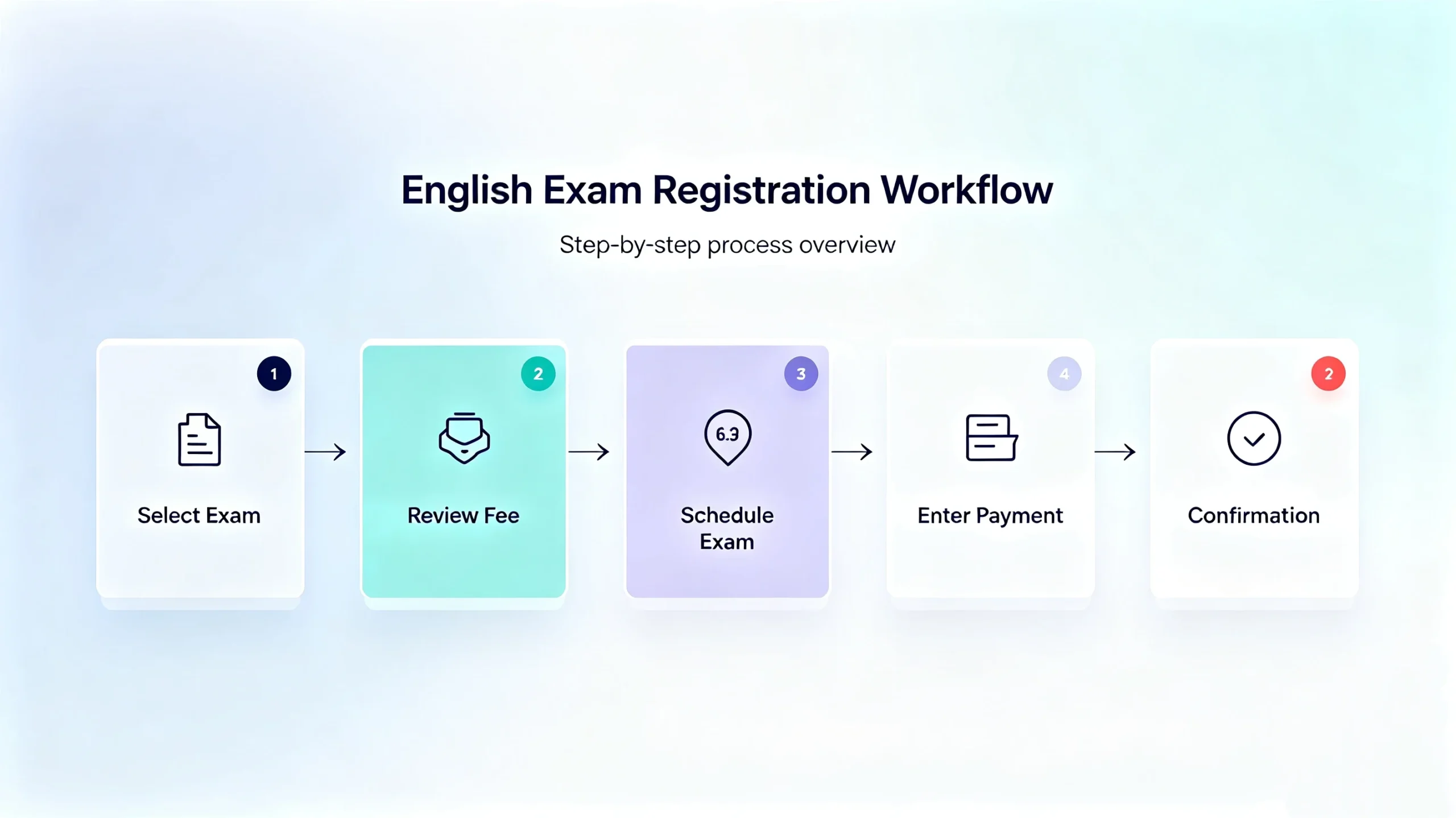
For example, Pearson VUE exam programs may require candidates to select an exam, review the applicable fee, schedule the exam, and complete checkout. Payment methods can vary by exam program, so users should check the requirements for their specific certification before paying.
When a Virtual Card May Be Declined
A virtual card can still be declined even when the checkout page accepts online card payments. Common reasons include insufficient funds, incorrect billing information, international transaction restrictions, merchant restrictions, or additional authentication requirements.
Checking these requirements before payment can reduce avoidable payment failures.
What to Check Before Paying Exam Fees
Before entering your card details, review the payment page and the certification provider’s instructions.
| What to Check | Why It Matters |
| Accepted card types | Confirms whether your card network is supported |
| Currency | Helps you understand the amount that will be charged |
| Billing information | Prevents address or verification mismatches |
| International payments | Important when the provider or processor is overseas |
| Authentication | Some transactions may require additional verification |
The most important point is to confirm the specific exam program’s payment requirements. A provider may support major card networks while still applying different rules to individual exams.
If the exam is billed internationally, also check the supported currency and whether your virtual card allows international online transactions. Currency conversion can affect the final amount charged.
Finally, enter the requested billing information accurately. Some payment processors may require additional authentication, such as 3D Secure, which must also be supported by the card and issuer.
How to Pay Certification and Exam Fees with a Virtual Card
The payment process is usually straightforward. Most of the preparation can be completed before you submit the final transaction.
Step 1: Select Your Certification or Exam
Visit the official registration website for the certification or exam you want to take.
Select the appropriate exam, certification level, testing method, or other required options. Continue until you reach the registration or scheduling process.
For exams delivered through Pearson VUE, candidates typically select their exam before proceeding to scheduling and payment.
Step 2: Review the Exam Fee and Payment Requirements
Before preparing your card, confirm the exam fee, billing currency, accepted payment methods, and any restrictions. If the provider only accepts specific payment methods or requires a voucher, a virtual card may not be appropriate.
Checking these details first helps you avoid preparing a card that cannot be used for the transaction.
Step 3: Prepare Your Virtual Card
Next, prepare the virtual card you intend to use. Check that the card is active, has sufficient available funds, and supports the transaction type and currency required by the certification provider.
With BUVEI, users can create and manage virtual cards for supported online payment needs. The relevant card information can then be accessed before completing an online checkout.
A simple workflow is: Create the card → Check available funds → Review card details → Complete checkout
- visithttps://buvei.com and create a free account.
- After email verification, log in to access the Buvei dashboard.

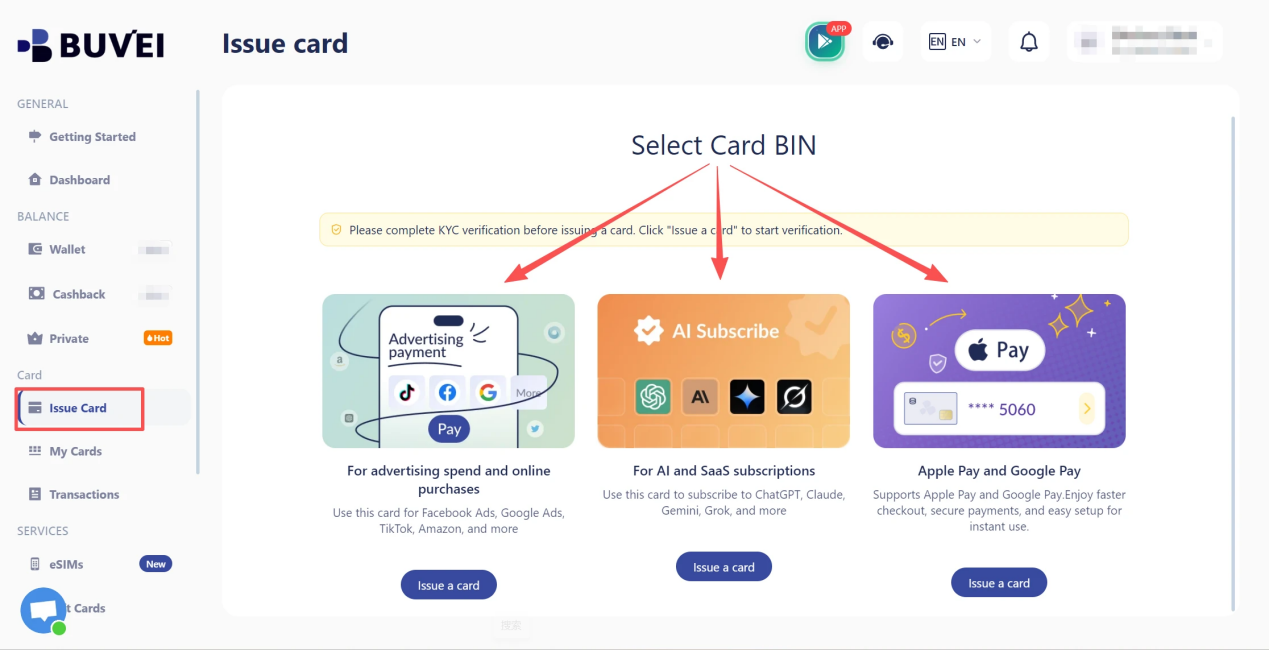
- Create a Virtual Card
- Go to the Card tab
- Choose your preferred BIN region, (recommends using US BIN)
- Select your card type
- Click Issue
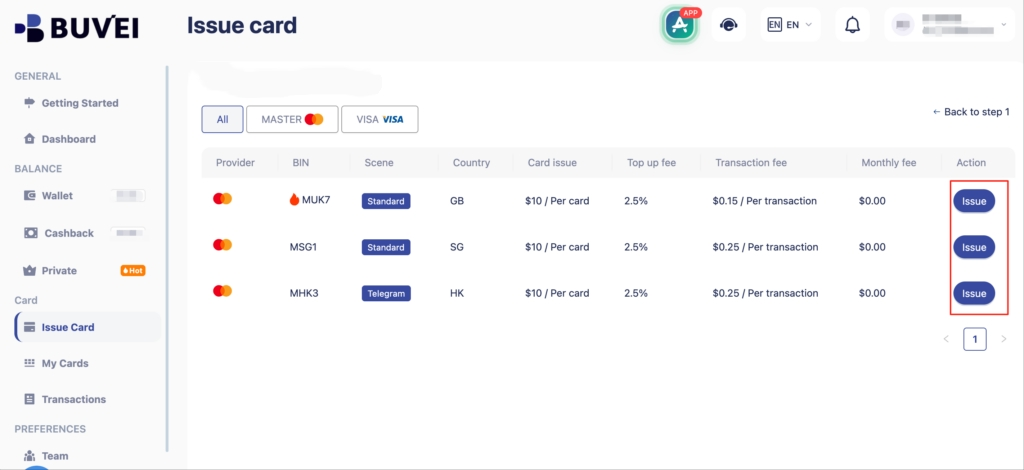
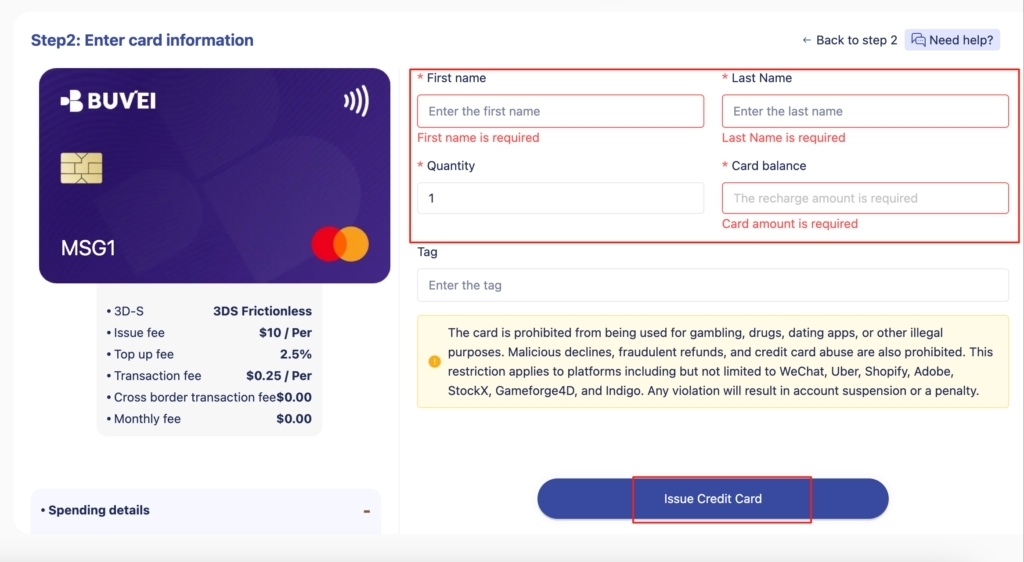
- Fill in the virtual card details, including name, amount, and number of cards.
- Click Issue Card
Step 4: Enter Your Card Details
Return to the exam provider’s checkout page and enter the required payment information. This may include the card number, expiration date, security code, cardholder name, and billing address. Make sure the information matches the requirements of the payment processor. Even a small mismatch in billing details can result in a declined transaction.
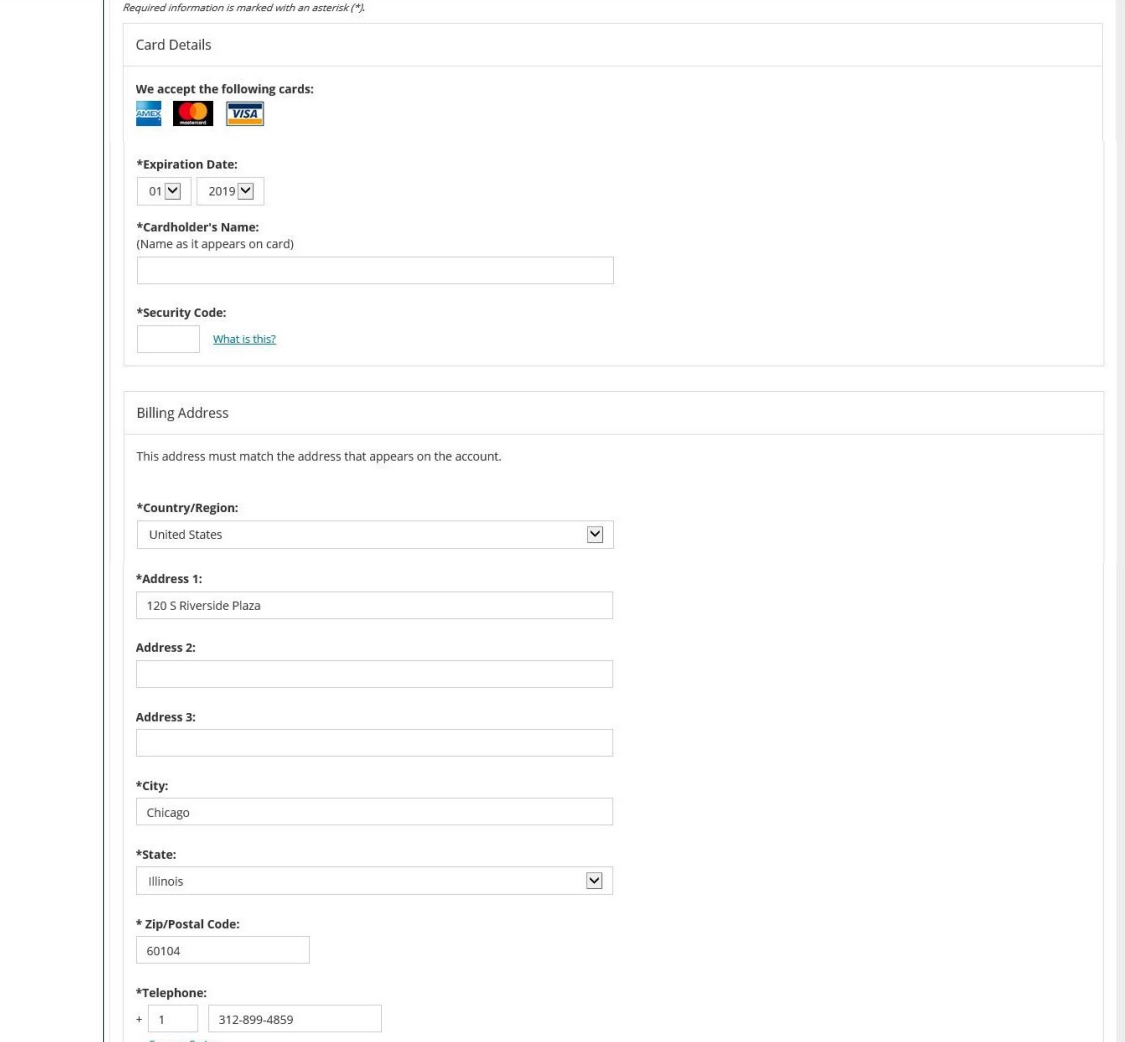
You can then use the corresponding information from your virtual card where the payment page requests it.
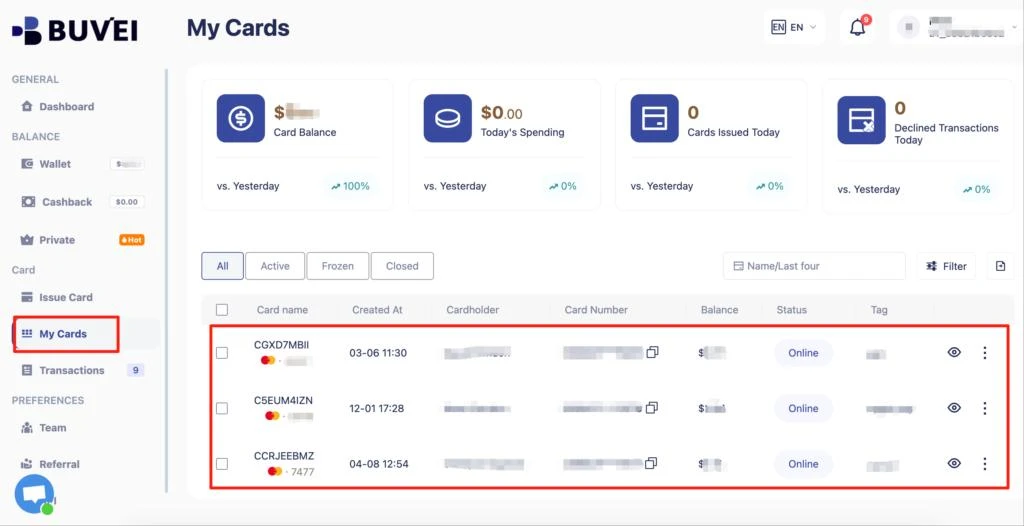
Step 5: Complete the Payment
Review the amount and payment information before submitting the transaction. If the provider requires additional authentication, complete the verification process. Avoid refreshing the page or closing the checkout window while the transaction is processing.
Once the payment is successfully completed, the provider should display an order, registration, or payment confirmation.
Step 6: Save the Confirmation and Track the Transaction
Save the payment confirmation, receipt, or email associated with the exam registration. Keeping these records is useful if you manage multiple certifications, professional exams, or education-related expenses.
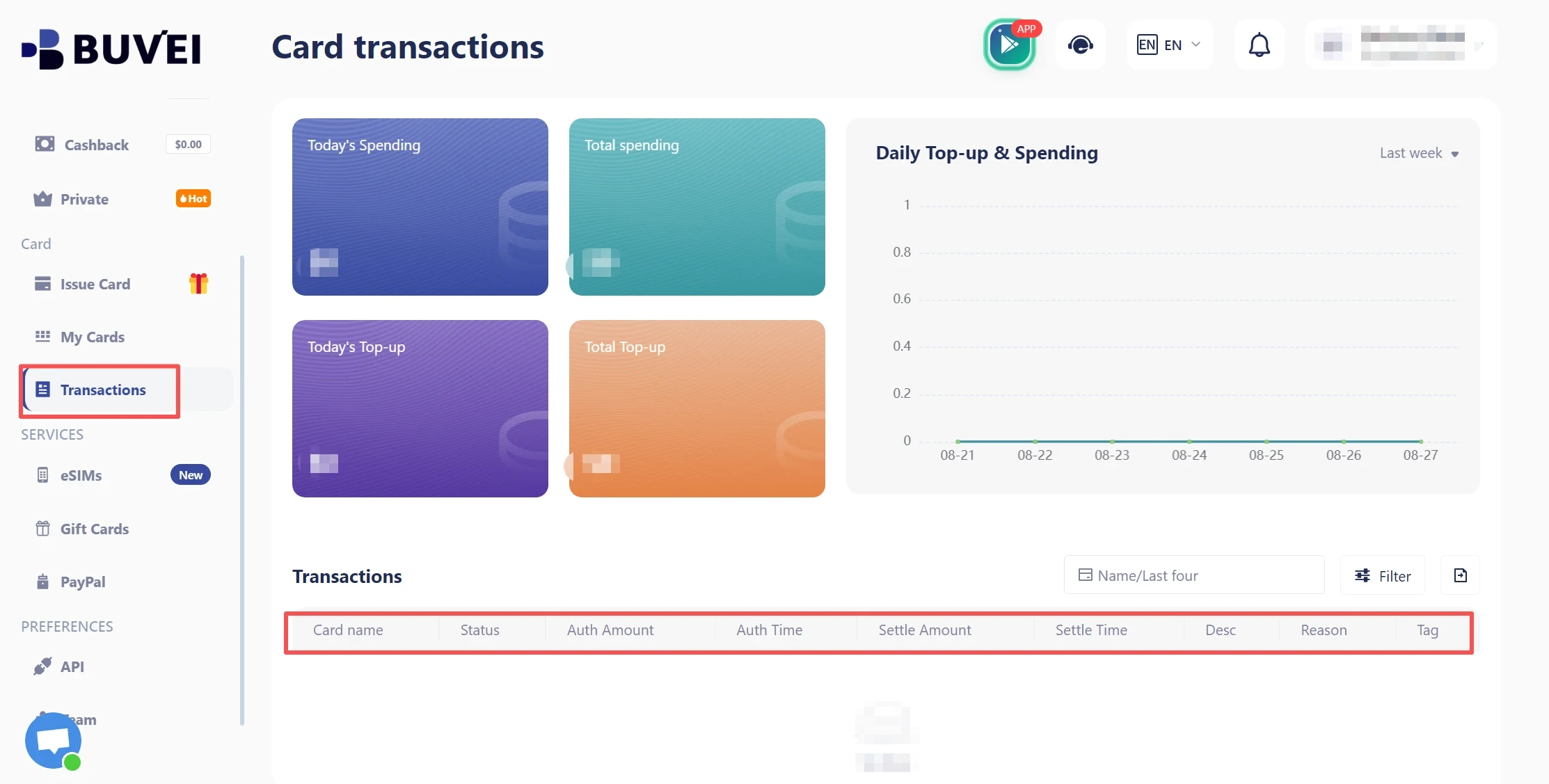
For supported online payments made with BUVEI, transaction records can provide another way to review completed card activity and keep payment information organized.
Why Use Virtual Cards for Exam and Certification Payments?
Certification fees are often one-time or occasional online expenses. A virtual card can help separate these payments from everyday spending and make exam-related expenses easier to organize.
For professionals managing multiple certifications, training programs, or online services, separate virtual card credentials can also make it easier to identify different types of online spending.
Depending on the provider, virtual cards may offer additional spending controls and reduce the need to expose your primary card details across multiple online services.
This can be useful for freelancers, remote professionals, and businesses that pay certification or exam fees for employees.
However, these benefits do not guarantee payment acceptance. The certification provider’s rules, payment processor, card network, and card issuer all influence whether a particular virtual card can be used.
Common Problems When Paying Exam Fees with a Virtual Card
If your virtual card is declined during exam registration, check the following possibilities before trying another payment method.
| Problem | Possible Cause | What to Check |
| Payment declined immediately | Card type or merchant restriction | Check whether the payment method is supported |
| Insufficient funds | Available balance is too low | Confirm the card balance and required amount |
| Billing error | Information does not match | Recheck billing name and address |
| International payment failure | Cross-border transactions restricted | Check international payment support |
| Authentication failure | Additional verification required | Check whether the card supports the required authentication |
| Unexpected amount | Currency conversion or fees | Review the billing currency and final amount |
If the card is declined, avoid repeatedly submitting the same transaction without identifying the cause. First confirm the card status, available balance, billing information, currency, and payment requirements.
If everything appears correct, contact the card issuer or certification provider for clarification.

How BUVEI Can Help Manage Certification and Exam Payments
For users who regularly make online payments, a virtual card can become part of a broader expense-management workflow rather than being treated as a one-time payment tool.
BUVEI allows users to create and manage virtual cards for supported online payment needs. This can help separate different online expenses instead of relying on one primary card for every transaction.
For certification and exam expenses, the workflow can be organized around four stages: Create → Control → Pay → Track
First, create a virtual card for the intended online payment and review its details before checkout. Make sure sufficient funds are available and that the payment requirements are compatible with the card.
Next, use the card for the certification provider’s supported online checkout. Always verify that the provider accepts the relevant payment method before submitting the transaction.
After payment, transaction records can help you review completed activity and keep certification-related expenses easier to identify.
This approach can be useful for freelancers, professionals pursuing multiple certifications, and businesses that reimburse employees for exam fees. Instead of mixing certification expenses with everyday purchases, a dedicated virtual-card workflow can provide clearer payment organization.
The key limitation remains the same: no virtual card provider can guarantee acceptance by every certification provider. Always check the merchant’s payment requirements before proceeding.
Frequently Asked Questions
Can I use a virtual card to pay exam fees?
In many cases, yes, if the certification provider accepts online card payments and the virtual card supports the required transaction. However, acceptance depends on the provider, payment processor, and card issuer.
Do all certification providers accept virtual cards?
No. Payment policies vary by certification provider and exam program. Some may accept standard credit or debit cards, while others may restrict payment methods or require vouchers.
Can I use a virtual card for international exam payments?
Potentially. The virtual card must support the required currency and international transaction type, and the certification provider must accept the relevant payment method.
What should I do if my virtual card is declined?
First check the available balance, card status, billing information, currency, and international payment settings. If the problem continues, check the certification provider’s payment requirements or contact the card issuer.
Conclusion
Virtual cards for exam fees can be a useful option for certification candidates, freelancers, and businesses that need to manage online exam-related expenses. They can help separate certification payments from everyday spending while providing a more organized way to manage online card transactions.
The most important step is to confirm compatibility before paying. Check the certification provider’s accepted payment methods, currency, billing requirements, and authentication rules. Then prepare your virtual card, complete the checkout process, and save the payment confirmation.
For users who want a more structured way to manage supported online payments, BUVEI can fit into this workflow by providing virtual card creation, card management, and transaction tracking in one place.