A game subscription payment failed message can be frustrating, especially when the same payment method worked for the initial purchase. Recurring gaming services may require additional authorization when a subscription renews, so a previously successful card can still be declined later.
Common causes include insufficient balance, spending limits, expired cards, incorrect billing information, regional restrictions, and recurring payment limitations. This guide explains how to identify the cause, fix a failed gaming subscription payment, and use virtual cards to manage recurring digital expenses better.
Why Do Game Subscription Payments Fail?
Game subscriptions differ from one-time purchases because the payment method is saved for future recurring charges. When the renewal date arrives, the merchant may process another authorization rather than simply repeating the original transaction.
As a result, a payment method that worked when a subscription was first purchased may not necessarily work at renewal.
Recurring Billing
Subscription services automatically charge the saved payment method on a scheduled date. A renewal can fail if the card has expired, been replaced, reached its spending limit, or does not support the required recurring transaction.
The amount charged may also change because of taxes, currency conversion, price adjustments, or changes to the subscription plan.
Card and Billing Verification
Payment processors may verify whether the card and billing information are valid and consistent with the account. An incorrect billing address, postal code, card status, or other payment detail can cause a transaction to be rejected even when the card has sufficient funds.
Region and Merchant Restrictions
Gaming platforms can apply country, region, or payment-method restrictions. A mismatch between an account’s region and the card’s issuing region may trigger additional verification or prevent a payment method from being accepted.
These rules vary between merchants and payment providers, so a virtual card should not be considered a guaranteed solution for every gaming subscription.
Common Reasons a Game Subscription Payment Fails
Insufficient Balance or Spending Limit
One of the most common reasons for a failed renewal is insufficient available funds. The renewal amount may be higher than expected because of taxes, currency conversion, or a price change. A card can also have a spending limit below the amount required for the renewal. Before retrying, check both the available balance and any spending limits associated with the payment method.
Expired, Replaced, or Inactive Card
A saved payment method can stop working if the card expires, is replaced, frozen, or becomes inactive. This is particularly relevant to subscriptions because the gaming platform may continue attempting to charge the payment method saved when the subscription was created. If a subscription suddenly stops renewing after working normally for several months, check the card’s expiration date and current status.
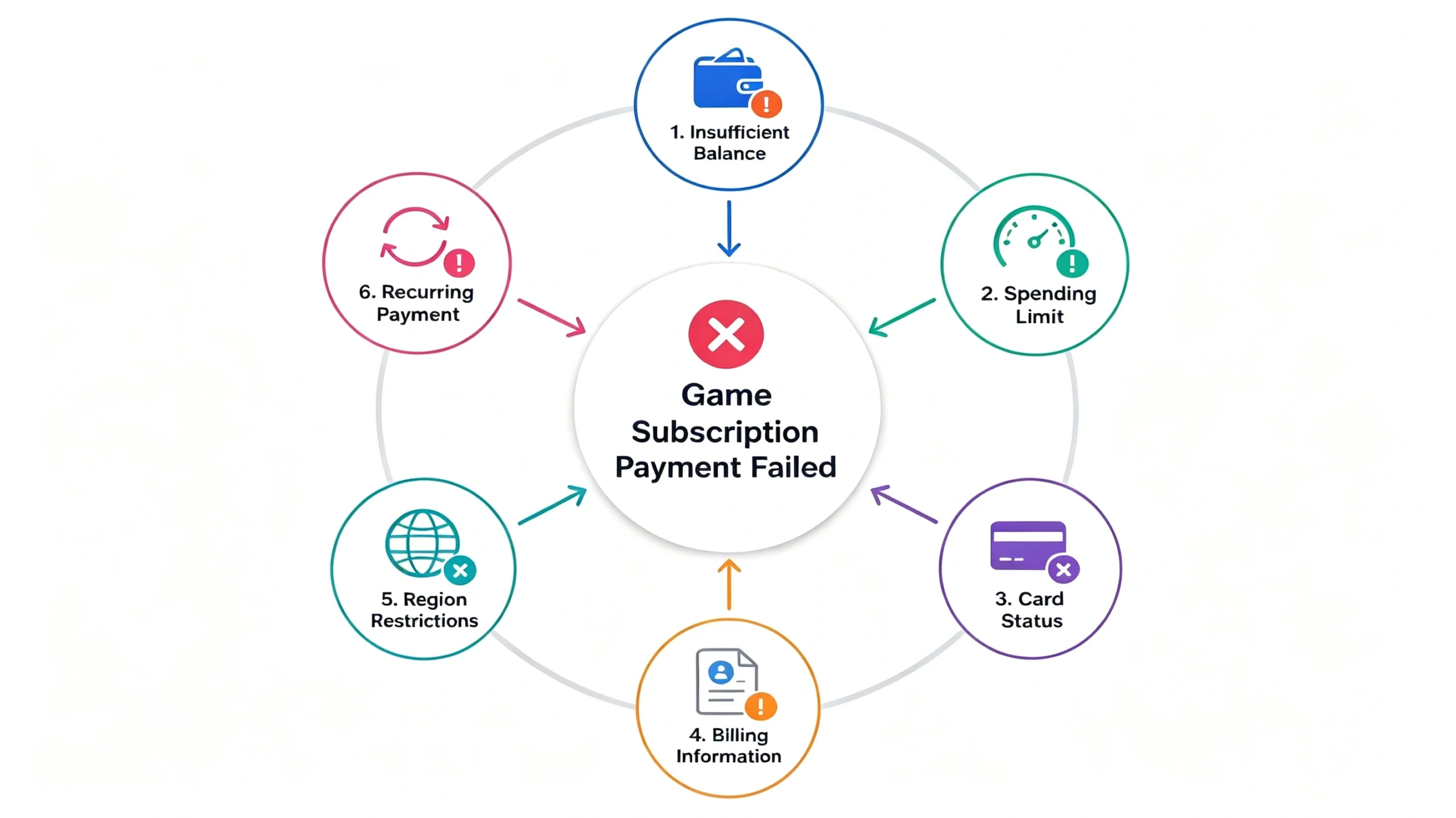
Billing Information Does Not Match
Some payment transactions require billing information to match the details associated with the payment method. Check the gaming account’s billing address, postal or ZIP code, country or region, and other required cardholder information. If you recently changed account information or replaced a payment method, outdated billing details may contribute to a failed payment.
Region or Card-Issuer Mismatch
Gaming services operate across different markets, and payment requirements can vary between regions.
A gaming account registered in one country may have different payment requirements from an account registered in another. A card issued in a different region may therefore receive additional checks or may not be supported for a particular transaction.
Regional differences do not automatically mean that a card will fail, but they should be considered when troubleshooting a declined subscription payment.
Recurring Payment Not Supported
A payment method may work for a one-time purchase without being suitable for recurring billing. This can happen when the payment method has restrictions around recurring transactions, merchant-initiated charges, or subscription billing. If the initial gaming subscription payment succeeds but the first renewal fails, recurring payment support should be one of the first things to investigate.
Merchant or Fraud Prevention Checks
A payment can also be declined because of merchant or payment-processor risk controls. Unusual transaction patterns, repeated failed attempts, changes in location, or other verification signals may trigger additional authorization checks. A decline therefore does not necessarily indicate a problem with the account balance. If the payment method appears valid, check the exact error message provided by the gaming platform or contact the relevant payment provider.
What to Check When a Game Subscription Payment Fails
Once a game subscription payment fails, avoid repeatedly submitting the same transaction without identifying the cause. A systematic check can help determine whether the problem comes from the subscription, card, billing information, or payment restrictions.
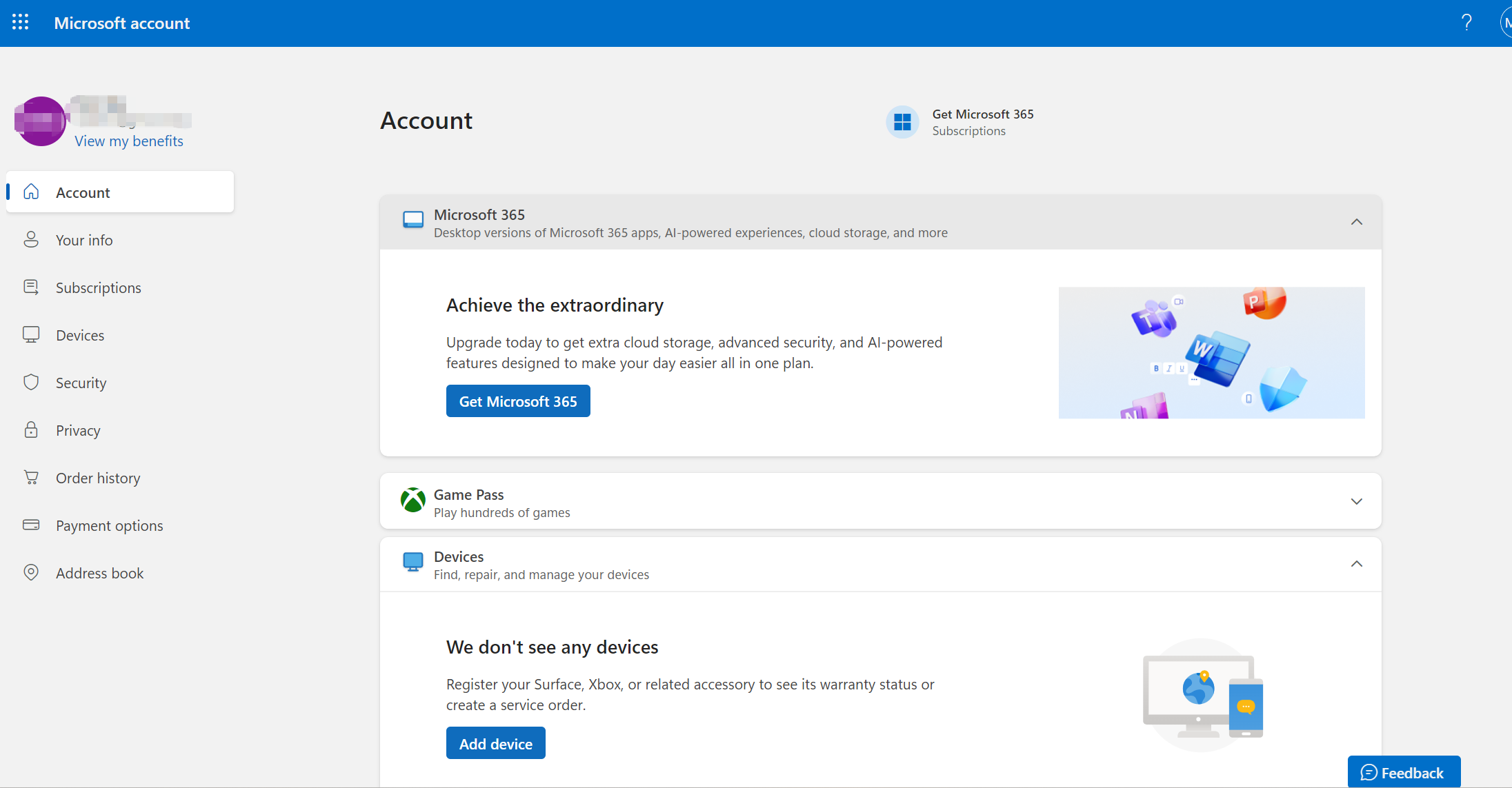
Step 1: Check Your Subscription Status
Open the gaming platform’s subscription management page and confirm that the subscription is still active. Check whether automatic renewal is enabled, a previous payment has failed, or the subscription has already been suspended or canceled.
If the subscription has expired, you may need to restart it rather than simply retry the renewal payment.
Step 2: Check Card Status and Available Balance
Verify that the payment method is active and has enough available balance.
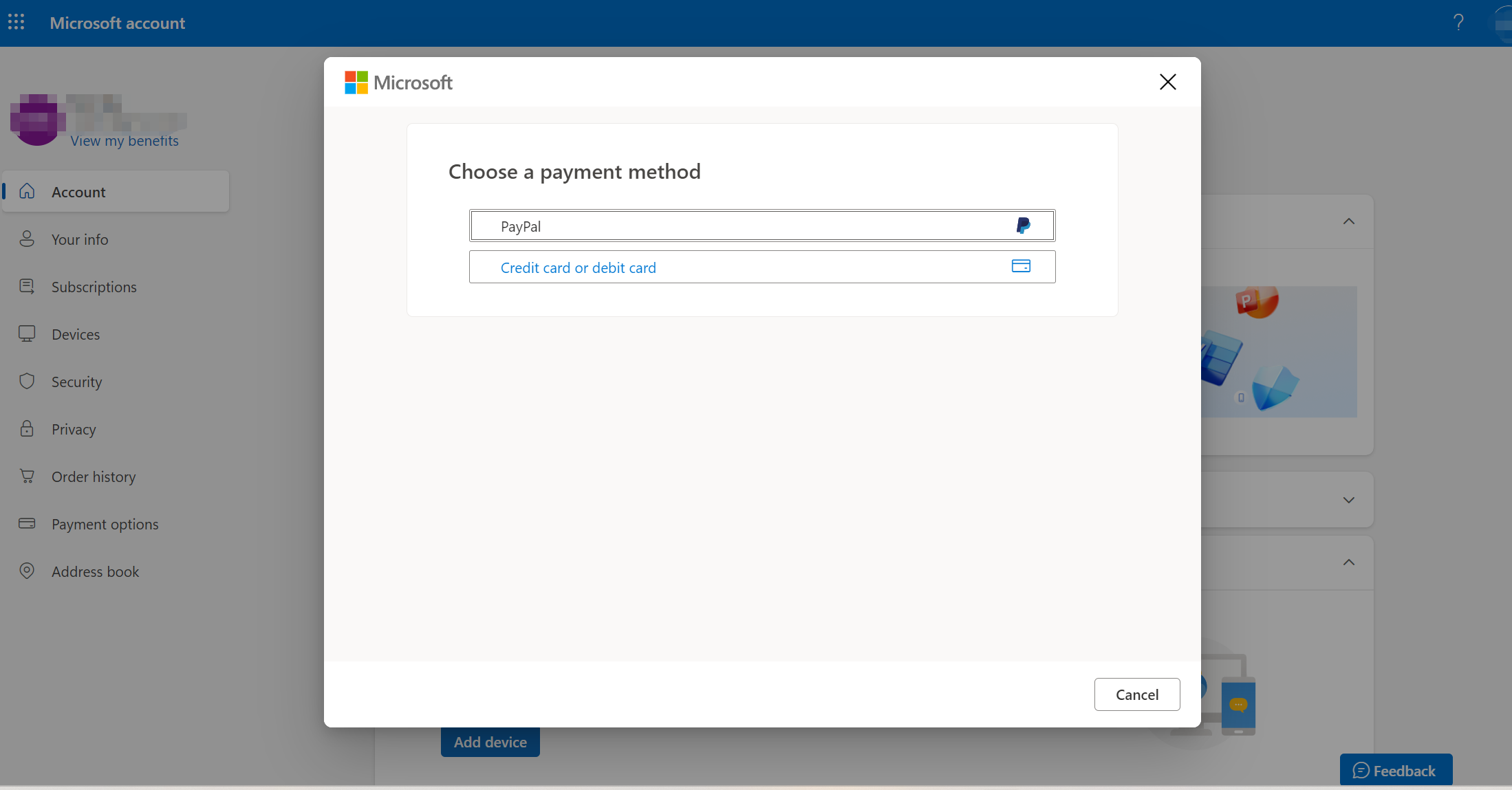
Check the card’s:
- Current status
- Available balance
- Spending limit
- Expiration date
Remember that the amount required for renewal may differ from the amount charged when the subscription was originally created.
Step 3: Verify Billing Information
Review the billing information stored with the gaming account. Make sure the billing address, postal code, country, and other required information are accurate and consistent with the payment method.
If you recently changed account information or replaced your payment method, outdated billing information can become a potential source of failure.
Step 4: Check Recurring Payment Support
If the first subscription payment worked but the renewal failed, confirm that the payment method supports recurring subscription charges.
This is particularly important when using virtual or prepaid-style payment methods because merchant rules can differ between one-time and recurring transactions.
Step 5: Retry After Fixing the Issue
After identifying and correcting the likely cause, retry the payment. If the transaction continues to fail, check the exact error message rather than repeatedly attempting the same payment. Depending on where the decline occurs, you may need to contact the gaming platform, card issuer, or payment provider.
Why Can a Subscription Work Once but Fail at Renewal?
This is one of the most confusing gaming payment problems.
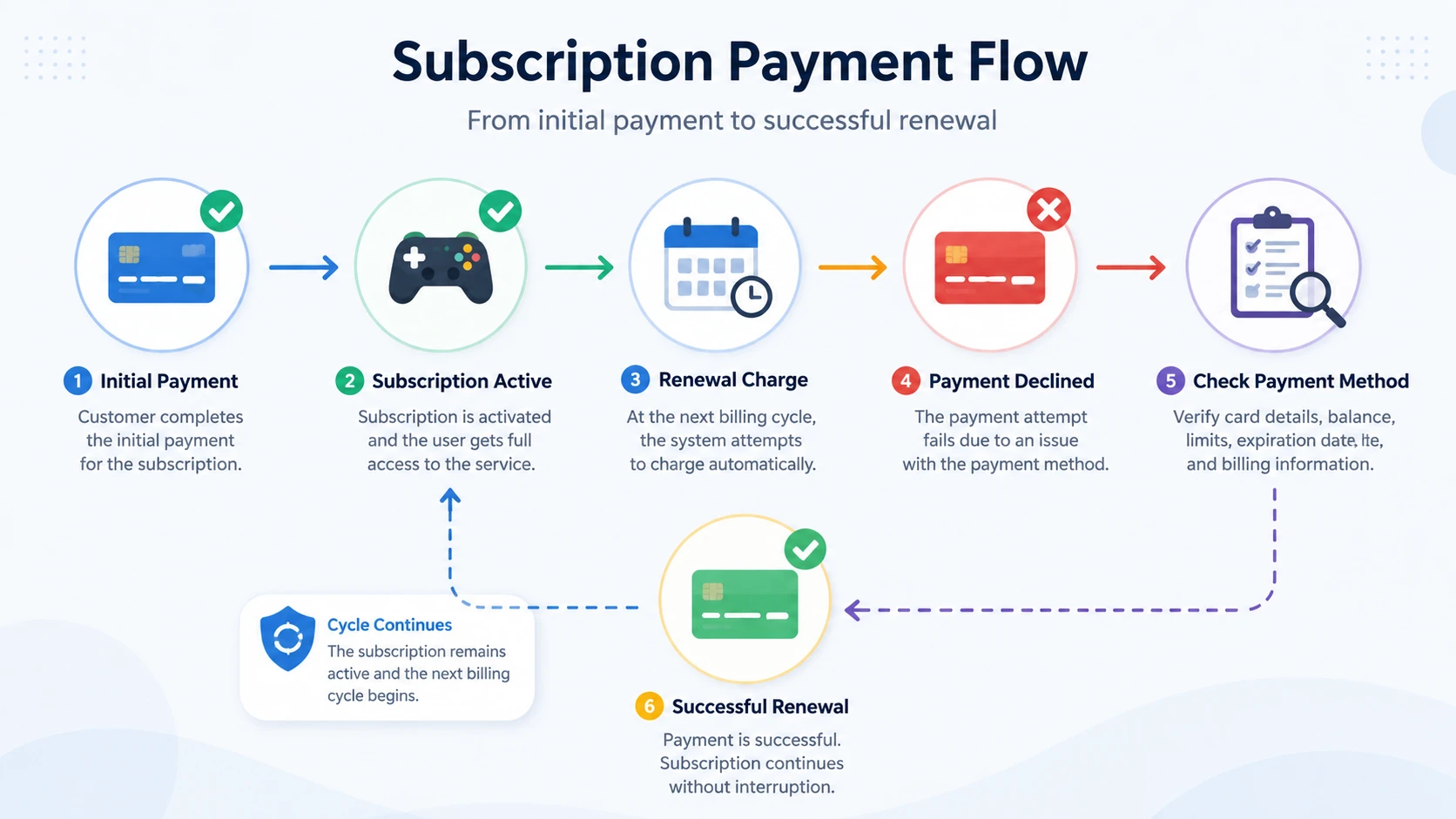
A user may successfully purchase a subscription and assume that the same payment method will continue working indefinitely. However, the initial transaction and later renewal transactions are not necessarily processed in exactly the same way.
The initial payment may primarily verify the card and authorize the first charge. A renewal can involve additional factors such as recurring transaction authorization, updated subscription pricing, taxes or currency conversion, card expiration, spending limits, and merchant risk checks.
For example, suppose a gaming subscription costs $9.99 when it is first purchased. Several months later, the renewal amount may change because of taxes or a pricing adjustment. If the payment method has a spending limit below the new amount, the renewal can fail even though the original transaction succeeded.
This is why subscription payment management matters just as much as the initial card transaction.
Can a Virtual Card Help Prevent Game Subscription Payment Failures?
A virtual card can make recurring gaming expenses easier to separate and manage, but it cannot guarantee that every subscription payment will be approved.
A dedicated virtual card can be assigned to a specific subscription instead of sharing one payment method across multiple services. This can make gaming expenses easier to identify and separate from other digital purchases.
Virtual cards can also provide spending controls and transaction visibility. Depending on the provider, businesses may be able to establish per-card spending limits, monitor transactions, and manage individual cards separately.
For example, BUVEI provides virtual cards with per-card spending limits and real-time transaction monitoring, which can help businesses organize and monitor recurring digital expenses.
However, a virtual card does not automatically overcome merchant-side restrictions. If a gaming platform does not support a particular card type, region, or recurring payment method, switching to a virtual card may not resolve the underlying issue.
The goal should therefore be better payment management and appropriate card compatibility, rather than assuming that virtual cards eliminate payment declines.
How to Choose a Virtual Card for Gaming Subscriptions
If you plan to use a virtual card for recurring gaming expenses, look beyond whether the provider simply offers virtual cards.
Recurring Payment Support
Confirm that the card is suitable for recurring subscription transactions. This is particularly important if the card will remain attached to the gaming account for future renewals.
Regional Compatibility
Check whether the card’s issuing region and other relevant payment details are compatible with the gaming platform and account.
No provider can guarantee acceptance by every merchant, so merchant-specific compatibility still matters.
Spending Controls
Spending controls can help keep recurring gaming subscriptions within a defined budget. At the same time, a limit that is too low can itself cause a renewal to fail. Set limits with the expected subscription amount and possible price changes in mind.
Balance Management
Recurring payments require available funds when the renewal occurs. Make sure the payment method can maintain sufficient available balance for scheduled charges.
Transaction Visibility
Transaction monitoring can make it easier to identify when a renewal was attempted and whether it was approved or declined.
For businesses managing multiple digital subscriptions, this visibility can help distinguish individual card issues from broader merchant or payment-provider problems.
How BUVEI Can Help Manage Game Subscription Payments
For businesses managing recurring digital expenses, BUVEI provides virtual card and digital payment management capabilities that can support more structured payment workflows.
A business can use dedicated virtual cards to separate different categories of online spending. For example, gaming-related subscriptions can be separated from SaaS subscriptions, advertising expenses, cloud services, or vendor payments.
This approach can make individual expenses easier to monitor while reducing reliance on a single shared payment method.
BUVEI’s virtual card platform supports per-card spending limits, card controls, and real-time transaction monitoring, giving businesses more visibility into individual card activity.
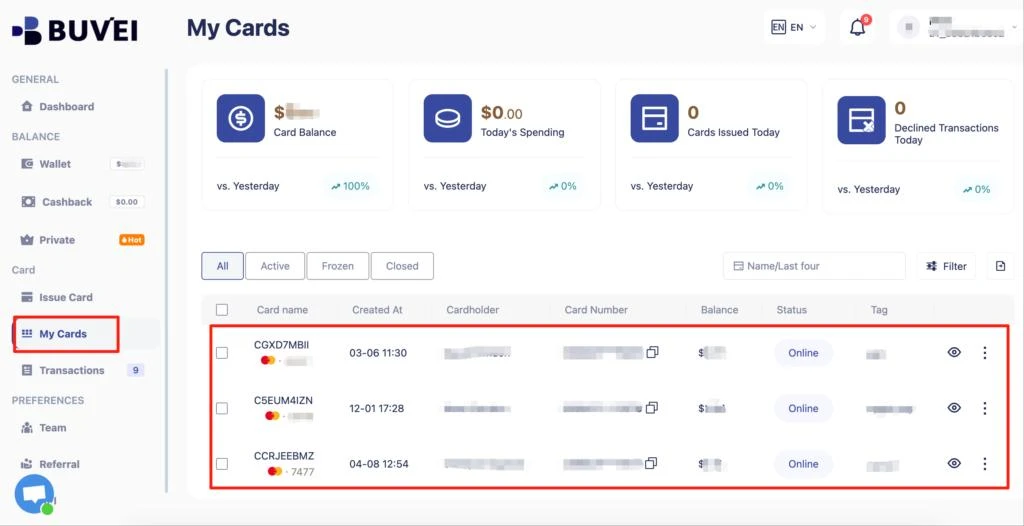
Transaction monitoring can also be useful when managing recurring payments. When a subscription renewal is attempted, transaction information can help identify whether the charge was processed or declined.
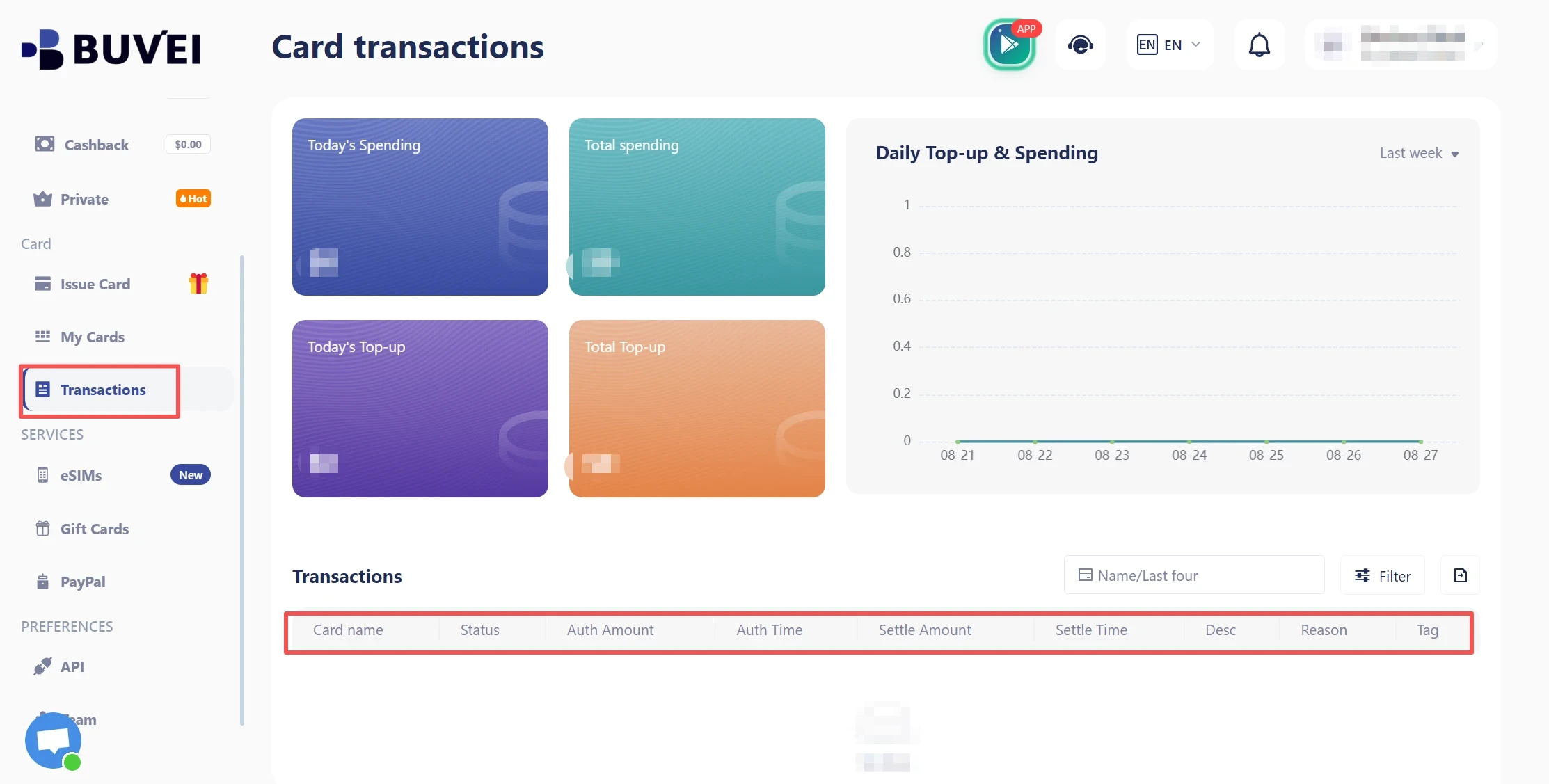
For businesses with larger card issuing requirements, BUVEI also provides white-label virtual card infrastructure, API integration, and multi-BIN capabilities. These capabilities are designed for organizations that want to build or manage their own virtual card programs rather than simply use a single card for one subscription.
This makes BUVEI relevant beyond individual gaming subscriptions, particularly for businesses managing multiple digital payment use cases or building a scalable card program.
However, BUVEI does not guarantee that a gaming merchant will approve every transaction. Merchant acceptance, account region, card type, recurring payment rules, and authorization decisions can still affect the outcome.
The value of using BUVEI in this context is therefore better card organization, spending control, transaction visibility, and scalable virtual card management rather than a promise of guaranteed payment approval.
Frequently Asked Questions
Why did my game subscription payment fail even though my card worked before?
A subscription payment can fail even when the card worked previously because the renewal may involve a different authorization process. Expiration, insufficient balance, spending limits, billing information, regional restrictions, and recurring payment rules can all affect the renewal transaction.
Why did my first game subscription payment work but the renewal fail?
The initial payment and renewal may be processed differently. A renewal can be affected by recurring transaction rules, changes in subscription price, card expiration, updated billing information, or additional merchant verification.
Can a virtual card be used for game subscriptions?
A virtual card can be used for some game subscriptions when the gaming platform supports that card type and recurring payment method. Acceptance varies by merchant, region, card issuer, and account configuration.
Can a virtual card prevent game subscription payment failures?
A virtual card can help with spending separation, card management, and transaction monitoring, but it cannot guarantee successful payments. Merchant restrictions, regional rules, recurring billing requirements, and authorization decisions can still cause a transaction to fail.
Conclusion
A game subscription payment failed message can result from insufficient balance, expired cards, billing mismatches, regional restrictions, recurring payment limitations, or merchant authorization checks.
Checking the subscription status, card details, billing information, and recurring payment support can help identify the problem before retrying. For businesses managing recurring digital expenses, a properly configured virtual card can also provide better spending control and transaction visibility.