You add a card to an app, advertising account, subscription service, marketplace, or booking platform. Before you actually buy anything, you notice a very small charge — or your available card balance suddenly changes.
Why?
In many cases, the merchant is performing a card verification hold.
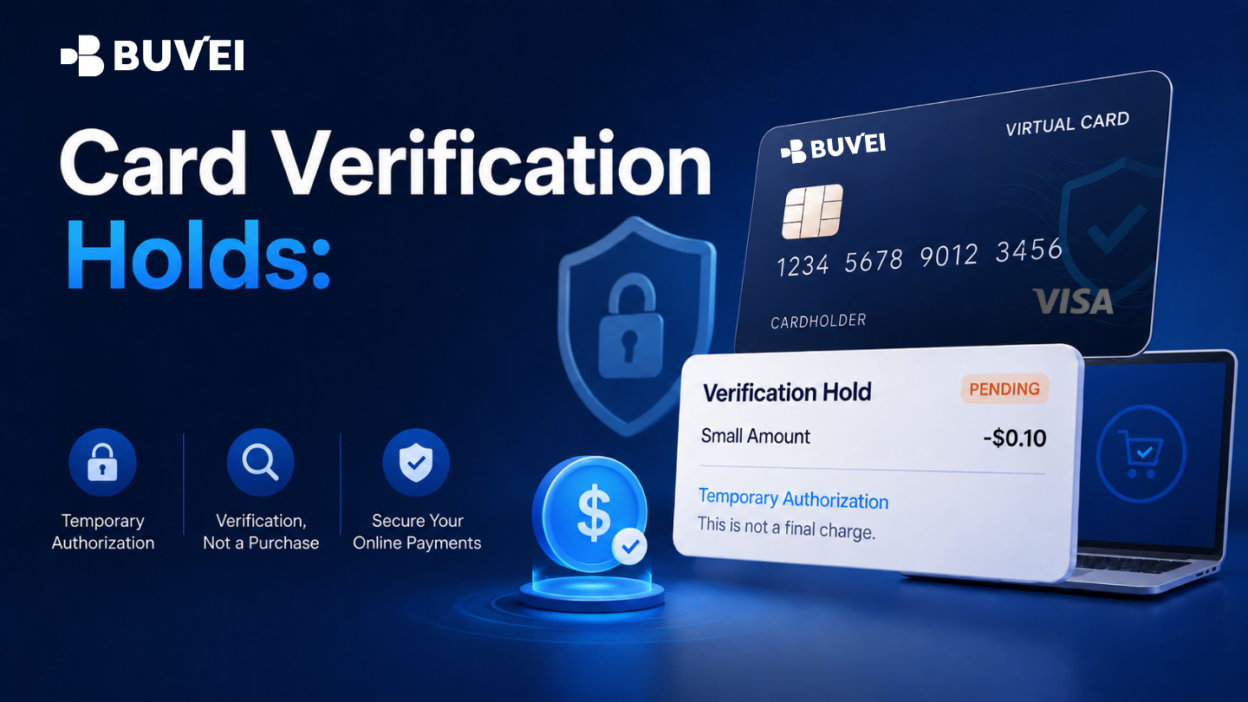
A card verification hold is a temporary authorization used to check whether a payment card is valid and can be used for a future transaction. Depending on the merchant and payment flow, it may appear as a small pending amount, a zero-value authorization, or a transaction that later reverses or disappears.
However, not every small charge is simply a temporary verification.
Understanding the difference between a verification hold, pending authorization, completed charge, reversal, and refund can help you determine what actually happened and what you should do next.
What Is a Card Verification Hold?
A card verification hold is a temporary authorization request initiated by a merchant to verify a payment method.
It commonly happens when you:
-
Add a new card to an online account;
-
Save a card for future purchases;
-
Start a free trial;
-
Connect a card to a recurring subscription;
-
Create an advertising or cloud service account;
-
Make a travel booking;
-
Add a backup payment method.
The merchant may be checking whether:
-
The card details can be processed;
-
The card is active;
-
The payment route can return an authorization response;
-
The card can be stored for future billing;
-
Additional authentication is required;
-
A later payment can be attempted through the selected payment method.
The important word here is hold.
A temporary authorization may reduce your available balance without becoming a completed purchase.
If the merchant does not complete the authorization, the amount may later be released or reversed according to the relevant processing rules.
Verification Hold vs. Completed Charge: What Is the Difference?
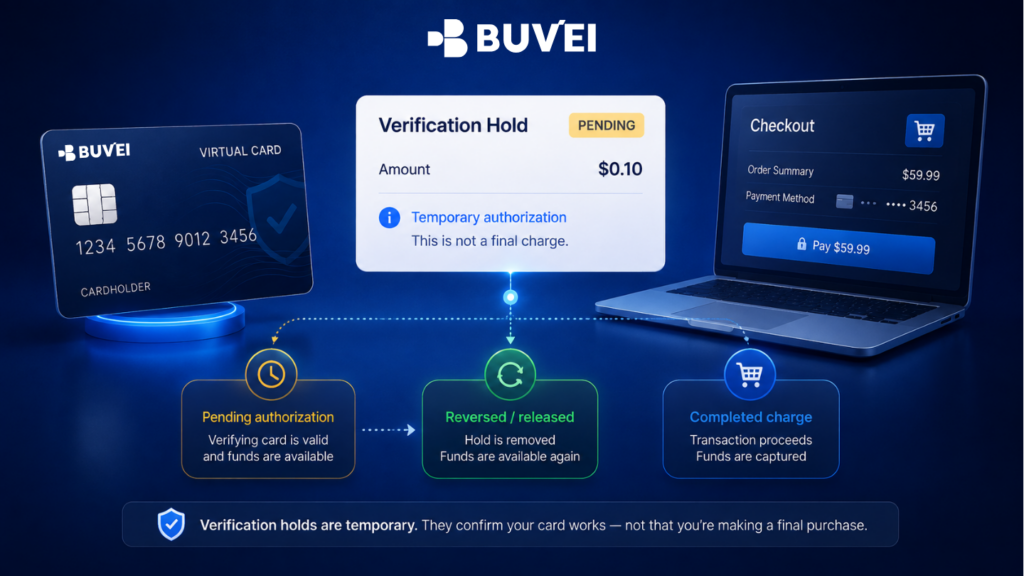
A small amount alone does not tell you what happened.
The most important thing to check is the transaction status.
| Status | What It Usually Means |
| Pending | The authorization has been requested but has not been finalized |
| Completed | The merchant has completed the transaction |
| Reversed | The authorization was released or cancelled |
| Refunded | A completed payment was later returned |
| Declined | The transaction was not approved |
For example, a $0.10 pending transaction may simply be a temporary verification.
But a $0.10 completed transaction could be a real merchant charge.
Likewise, a larger amount can still be a temporary authorization, especially in industries such as hotels, vehicle rentals, or travel bookings.
Always check the status before assuming that a small amount will automatically disappear.
Why Do Online Services Verify Your Card?
Many online businesses need to confirm that a payment method can be used before relying on it for future billing.
This is particularly common for:
-
SaaS subscriptions;
-
Cloud platforms;
-
Advertising services;
-
Free trials;
-
Marketplaces;
-
Travel bookings;
-
Usage-based services.
The merchant may not know the final amount when the card is first added.
For example, advertising spend can change over time, cloud platforms may charge according to usage, and hotels may not determine the final bill until checkout.
A verification authorization allows the merchant to test the payment method before the actual charge occurs.
However, a successful verification does not guarantee that every future payment will be approved.
A later transaction may involve a different amount, currency, merchant entity, authentication requirement, spending limit, or risk assessment.
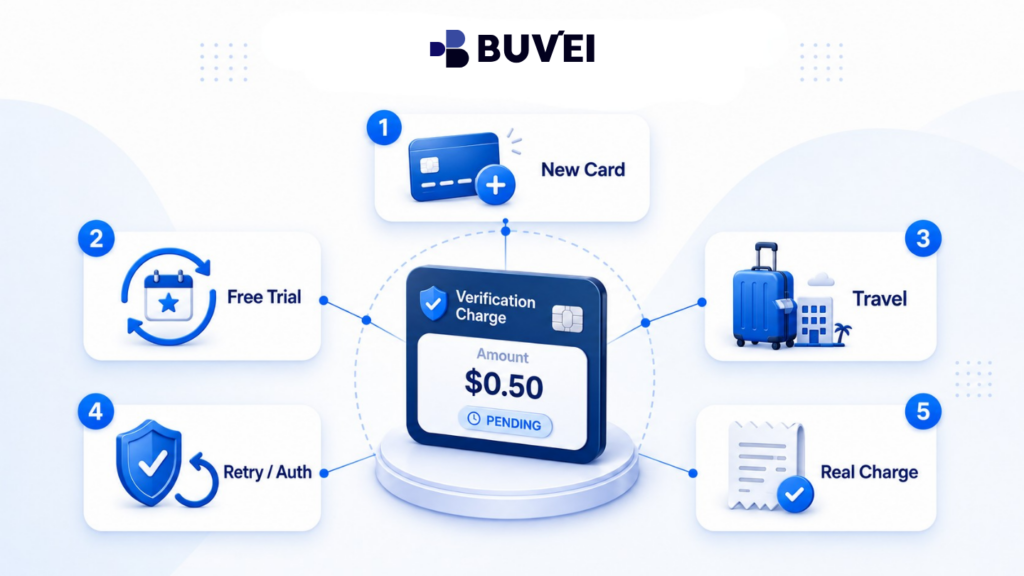
5 Common Reasons You May See a Small Verification Charge
-
You Added or Saved a New Card
One of the most common reasons for a verification hold is simply adding a new card to an online account.
A merchant may perform:
-
A small authorization;
-
A zero-value verification;
-
Another card validation request.
This can happen even if you do not make a purchase immediately.
After adding your card, compare the time of the transaction with the time you added the payment method.
If they closely match and the merchant confirms that the card was successfully saved, the activity may be related to verification.
However, still check whether the transaction remains pending or becomes completed.
Avoid repeated attempts
If the card was not added successfully, avoid trying again many times without first checking your transaction activity.
Each attempt may create another authorization request.
-
You Started a Free Trial or Recurring Subscription
A free trial may cost nothing today while still requiring a valid payment card.
Why?
Because the merchant may plan to charge you when the trial ends.
The platform may therefore verify the card when the trial begins.
A small temporary authorization does not necessarily mean that the free trial has already become a paid subscription.
But you should still record:
-
Trial start date;
-
Trial end date;
-
Future subscription price;
-
Billing currency;
-
Cancellation deadline;
-
Cancellation method;
-
Which card is connected to the service.
Remember: freezing or closing a card does not automatically cancel your agreement with a merchant.
If you no longer want the subscription, cancel it directly with the service provider and keep the confirmation.
Recurring services may also perform another verification when:
-
You upgrade a subscription;
-
Your billing cycle changes;
-
Usage increases;
-
You replace the card;
-
Your account is reactivated;
-
The merchant changes payment providers;
-
A previous payment fails.
That means a verification request can appear even months after you originally created the account.
-
A Travel Merchant Uses a Pre-Authorization
Hotels, airlines, vehicle rental companies, and booking platforms commonly use pre-authorizations.
These may be larger than the small verification charges seen on SaaS or subscription platforms.
A travel authorization may represent:
-
Card verification;
-
A reservation guarantee;
-
A security deposit;
-
An estimated charge;
-
A partial prepayment;
-
A final transaction.
Do not assume every travel-related authorization will disappear immediately after checkout or vehicle return.
The merchant may first need to complete, adjust, or release the authorization before the card-side record changes.
If you are unsure, contact the merchant and ask exactly what the amount represents.
Keep your booking or reservation number available when contacting support.
-
Authentication or Repeated Verification Created Multiple Attempts
Some online payment flows include additional cardholder authentication.
Authentication and authorization are related, but they are not the same thing.
Authentication confirms who is approving the transaction.
Authorization determines whether the transaction can proceed on the card side.
You may successfully complete an authentication step without seeing a completed payment.
For example, the merchant may only be saving the card for future use.
If a verification or authentication attempt fails, repeating the process several times can create multiple transaction records.
Several similar pending amounts do not automatically mean that you were charged several times.
Check:
-
The exact transaction time;
-
The status of each attempt;
-
Whether the card was successfully saved;
-
Whether the merchant account was created;
-
Whether authentication was completed;
-
How many times you attempted the action.
Avoid repeated retries until you understand what happened with the previous attempt.
-
The Small Amount Is Actually a Real Charge
This is the most important exception.
Not every small transaction is a verification hold.
A small completed transaction could represent:
-
A trial fee;
-
An account fee;
-
A digital add-on;
-
A low-cost purchase;
-
A tax adjustment;
-
A donation;
-
Another merchant charge.
If the transaction shows as completed, check the merchant account and look for a receipt.
Some merchants may also complete a small verification transaction and later issue a separate credit or refund.
In that situation, the original line may remain visible while a second transaction returns the money.
If you do not recognize the merchant or never added your card to that service, treat the transaction as potentially unauthorized.
Secure the card and contact your card provider through an official support channel.
How Long Does a Card Verification Hold Last?
There is no universal timeframe that applies to every verification authorization.
Release timing may depend on:
-
The merchant;
-
Payment provider;
-
Card provider;
-
Transaction type;
-
Currency;
-
Region;
-
Weekends and public holidays;
-
Cross-border processing;
-
Card configuration.
Some authorizations disappear relatively quickly, while others may remain pending for several business days.
Travel and booking-related authorizations may follow different timelines from a simple card verification.
If the merchant confirms that it has already released the authorization, ask for:
-
The release date;
-
Transaction reference, if available;
-
Written confirmation.
If the transaction remains unresolved beyond the relevant timeframe, contact your card provider and provide the exact transaction status.
Avoid describing a pending authorization as a completed charge, because these are different transaction states.
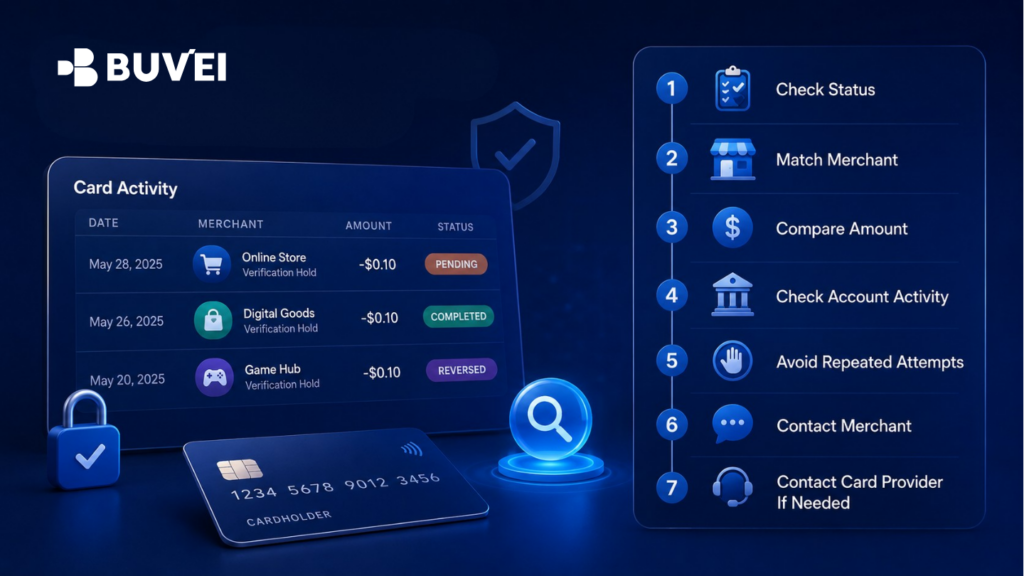
How to Review a Small Card Charge: 7-Step Checklist
If you notice an unexpected small charge, use the following process before taking action.
Step 1: Think About What You Just Did
Did you recently:
-
Add a card?
-
Start a free trial?
-
Change a subscription?
-
Create an advertising account?
-
Make a booking?
-
Attempt the same payment several times?
Compare the transaction time with your recent activity.
Step 2: Check the Transaction Status
Determine whether the transaction is:
-
Pending;
-
Completed;
-
Reversed;
-
Refunded;
-
Declined.
The status is usually more useful than the amount itself.
Step 3: Check the Merchant Name
Compare the transaction descriptor with:
-
The service you used;
-
The merchant's legal entity;
-
Its payment processor;
-
An app store or marketplace.
Sometimes the name shown in card activity differs from the brand you recognize.
Step 4: Compare the Amount and Currency
Check whether the merchant mentioned that a small verification amount might appear.
Do not assume every merchant uses the same verification amount.
Step 5: Check Your Merchant Account
Confirm whether:
-
The card was successfully added;
-
The subscription started;
-
The booking exists;
-
The trial is active;
-
The payment method was updated.
Step 6: Stop Repeated Attempts
Avoid repeatedly adding the card or submitting the same payment until you understand the existing transaction records.
Multiple attempts can create multiple pending authorizations.
Step 7: Contact the Right Team
Contact the merchant when you need to understand why it requested the authorization.
Contact your card provider when you need clarification about the card-side transaction status.
If you do not recognize the activity at all, secure the card promptly.
Card Verification Holds and European Online Payments
Some European online payment flows may involve additional authentication requirements.
An authentication challenge does not automatically mean that a final payment has been completed.
When reviewing a European transaction, record:
-
Merchant country or regional entity;
-
Amount;
-
Currency;
-
Local transaction time;
-
Whether an authentication screen appeared;
-
Whether the displayed amount matched;
-
The final card-side status.
If an authentication screen displays an unexpected merchant or amount, stop and verify the information before approving the request.
Never send a one-time authentication code to customer support.
How Buvei Users Can Review Card Verification Holds
If you use Buvei, checking your card activity and transaction status can help you understand what happened during an online verification attempt.
Depending on your account and card configuration, transaction information can help you identify:
-
Which card received the verification request;
-
The merchant descriptor;
-
The transaction amount;
-
The currency;
-
Whether the transaction is pending, completed, reversed, or shown under another status;
-
Whether multiple attempts appeared.
Buvei does not control whether a third-party merchant chooses to perform a verification, the amount requested by that merchant, or how the merchant describes the transaction.
Merchant acceptance and future transaction approval also cannot be guaranteed.
If a merchant confirms that it has released an authorization but the transaction remains unclear, contact Buvei through an official support channel and provide the relevant transaction details.
What Information Should You Provide to Support?
When asking about a card verification transaction, useful information can include:
-
Merchant name or transaction descriptor;
-
Amount;
-
Currency;
-
Transaction date and time;
-
Transaction status;
-
Card label or last four digits;
-
Relevant screenshot with sensitive details removed;
-
Merchant confirmation, if available.
Providing these details makes it easier to investigate one specific transaction.
What Should You Never Send to Support?
Never share:
-
Your full card number;
-
Account password;
-
One-time password;
-
Authentication code;
-
Wallet private key;
-
Recovery phrase;
-
Screenshots showing sensitive payment credentials.
Official support teams generally do not need this information to begin reviewing a transaction.
Protect your payment credentials even when contacting customer service.
Frequently Asked Questions
Is a Card Verification Hold a Real Charge?
Not necessarily.
A verification hold is generally an authorization that has not yet become a completed payment.
Always check the transaction status.
Why Did My Available Balance Decrease?
A pending authorization may temporarily reserve part of your available balance.
That does not necessarily mean that the merchant has completed the transaction.
Will Every Verification Hold Automatically Disappear?
Not always.
Many unused authorizations are eventually released, but timing can vary.
A merchant may also complete a small transaction as a real charge or later issue a separate refund or credit.
Can I Cancel a Verification Hold Myself?
Usually, the merchant controls the authorization request.
The card provider can review the status on the card side, but may not be able to immediately remove a valid pending authorization.
Contact the merchant if you need to understand when it expects to release or complete the authorization.
Why Do I See Several Small Charges?
You or the merchant may have repeated the verification process.
Compare the transaction timestamps with the number of times you tried to add the card or complete the payment.
Then check whether each transaction is pending, completed, declined, or reversed.
Does Successful Card Verification Guarantee Future Payments?
No.
A future transaction may involve a different:
-
Amount;
-
Currency;
-
Merchant entity;
-
Authentication requirement;
-
Spending limit;
-
Card status;
-
Risk assessment.
A successful verification only reflects that specific verification attempt.
What If I Never Added My Card to That Merchant?
Treat the transaction as unrecognized activity.
Secure the card using the available card controls and contact your card provider promptly through an official support channel.
Final Thoughts: Check the Status Before Reacting
Card verification holds are a normal part of many online payment flows.
They can appear when adding a card, starting a subscription, opening an advertising account, creating a booking, or preparing a payment method for future billing.
But remember:
A small amount does not automatically mean the transaction is temporary.
Start by checking:
-
Transaction status;
-
Merchant;
-
Amount and currency;
-
Transaction time;
-
Recent account activity;
-
Number of attempts.
Avoid repeatedly retrying a payment while the existing transaction status is unclear.
If necessary, contact the merchant to understand why the authorization was requested, and contact your card provider when you need clarification about the card-side status.
With Buvei, businesses and users can monitor card activity and manage virtual cards across different online payment scenarios.
Learn more about Buvei virtual card and payment solutions at buvei.com.