Facebook Ads payment declines have become increasingly common in 2026, especially for advertisers using virtual cards, cross-border accounts, or crypto-funded payment methods. Even accounts with healthy ad performance can suddenly face billing failures, spending limits, or full payment blocks.
This guide explains how Facebook Ads processes card payments in 2026, why virtual cards often trigger declines, and how advertisers can use Buvei virtual cards to stabilize billing and reduce payment risk.

How Facebook Ads Processes Card Payments in 2026
Facebook Ads (Meta Ads) now relies on a multi-layer risk and billing system, combining:
-
Card network checks (Visa/Mastercard)
-
BIN and issuing-region analysis
-
Account behavior and spend velocity
-
Payment history and retry patterns
-
IP, device, and business consistency
In 2026, Meta places more weight on payment reliability than ever before. Repeated failed charges—even small ones—can quickly lead to:
-
Spending limits
-
“Payment method rejected” errors
-
Forced account reviews
-
Temporary or permanent ad account suspension
Payment stability is no longer optional; it directly impacts account trust.
Why Virtual Cards Trigger Ad Account Declines
Virtual cards themselves are not banned, but many fail Meta’s internal risk checks due to poor configuration.
Low-Quality or Unsupported BINs
Some virtual cards use BINs that Meta considers:
-
High-risk
-
Overused
-
Linked to past abuse
These BINs are often declined instantly.
Billing and Behavior Mismatches
Common red flags include:
-
Card country ≠ ad account region
-
Card region ≠ IP location
-
Frequent card replacement
-
Multiple failed retries in short time
Exact-Balance Payments
Facebook often performs:
-
Small authorization tests
-
Delayed captures
If your card balance is exact, the charge may fail even if funds appear sufficient.
Using Buvei Virtual Cards for Facebook Ads
Buvei virtual cards are designed for ad platforms with strict billing controls, including Facebook Ads.
Key advantages include:
-
Multi-BIN support (U.S. BINs recommended for Meta Ads)
-
Stable Visa/Mastercard compatibility
-
Crypto-friendly funding via USDT
-
Instant card issuance (no complex KYC delays)
-
Clear transaction logs and balance visibility
When configured properly, Buvei cards significantly reduce Facebook Ads payment declines compared to generic prepaid or low-quality virtual cards.
Step-by-Step: Setting Up Buvei Virtual Cards for Facebook Ads
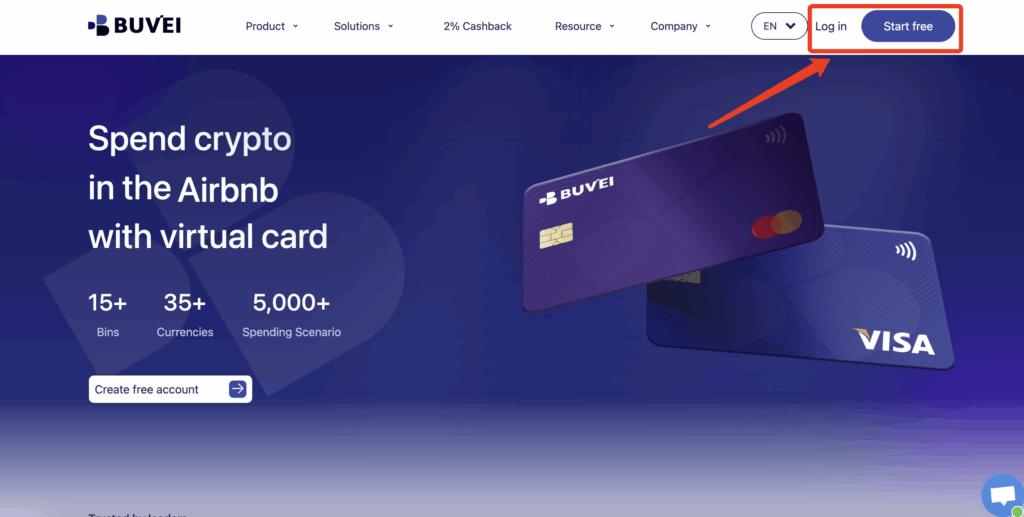
Step 1: Register a Buvei Account
-
Visit https://buvei.com
-
Create a free account
-
Complete email verification
-
Log in to the Buvei dashboard
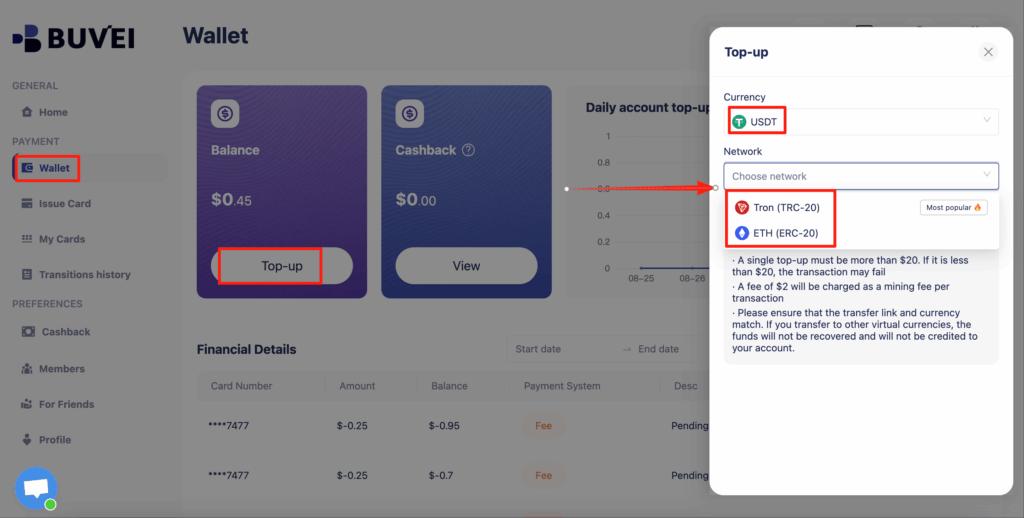
Step 2: Fund Your Account
-
Go to the Wallet tab
-
Choose USDT (TRC20 or ERC20)
-
Copy your dedicated deposit address
-
Send USDT to the address
-
Once confirmed, your balance is available immediately
Step 3: Create a Virtual Card
-
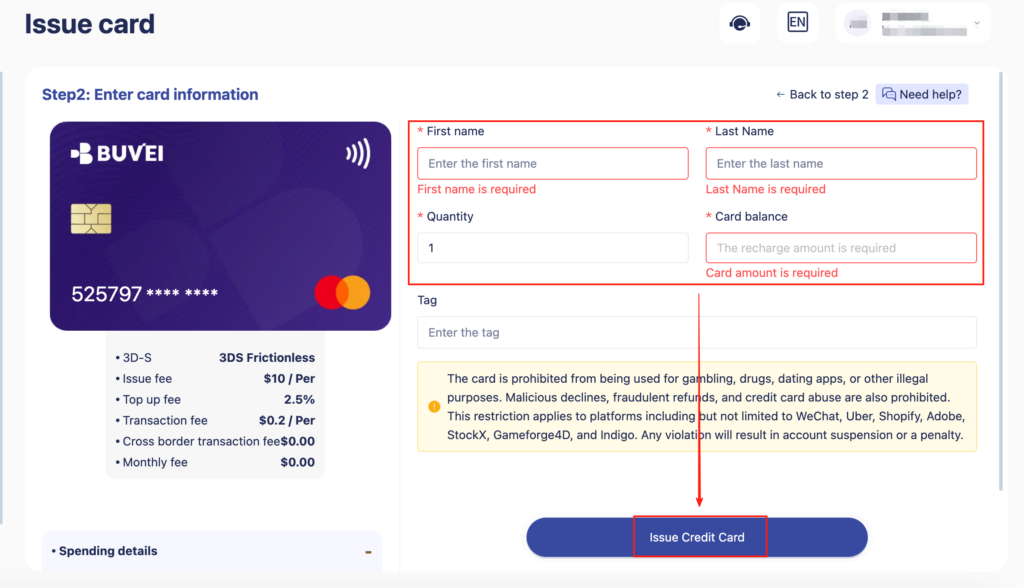
Navigate to the Cards tab
-
Select your preferred BIN region (U.S. BIN strongly recommended)
-
Choose card type
-
Click create

-
Enter:
-
Card name
-
Card amount (add 10–20% buffer)
-
Card quantity
-
-
Click Issue Card
Step 4: Access Card Details
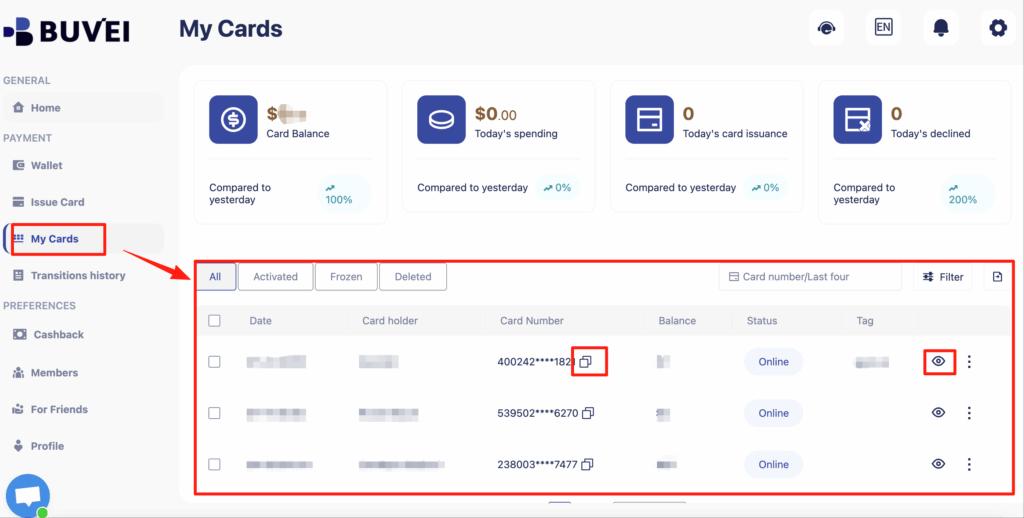
Under My Cards, you can view:
-
Card number
-
Expiration date
-
CVV
-
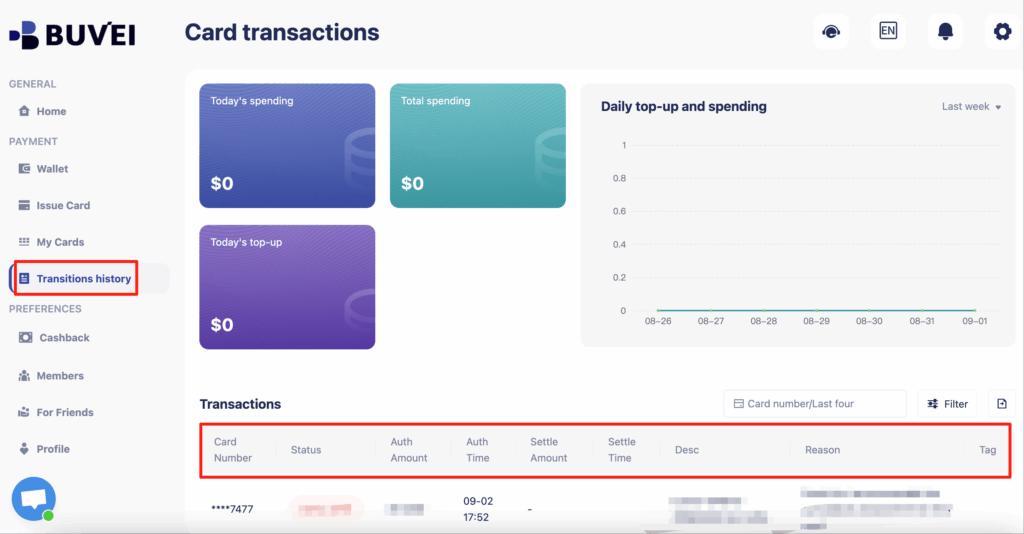
Recharge and spending overview
-
Full transaction history
Step 5: Add the Card to Facebook Ads
-
Go to Meta Ads Manager → Billing & Payments
-
Add a new payment method
-
Enter your Buvei virtual card details
-
Save and set it as primary
-
Avoid triggering immediate high spend on day one
Settings That Reduce Payment Risk
To keep your ad account stable:
-
Use one card per ad account
-
Keep billing country consistent with BIN
-
Maintain a balance buffer at all times
-
Avoid repeated failed retries
-
Increase spend gradually after adding a new card
These steps help Meta’s system build trust in your payment method.
What to Do If Your Ad Account Gets Flagged
If Facebook flags your account due to payment issues:
-
Stop all payment retries immediately
-
Review failed transactions in Buvei
-
Issue a new virtual card
-
Update billing details once
-
Resume spending slowly
Avoid rotating cards aggressively—this often worsens the issue.

Conclusion
Facebook Ads payment declines in 2026 are largely driven by stricter risk controls and billing behavior analysis. Virtual cards can still work—but only when they’re issued from reliable BINs and managed correctly.
By using Buvei virtual cards, funding them via USDT, and following disciplined billing practices, advertisers can significantly reduce payment failures and protect their ad accounts from suspension.
For marketers running Facebook Ads at scale, Buvei offers a practical, secure, and flexible solution to modern ad billing challenges.