Virtual cards are widely used for online payments, but many travelers experience sudden failures when booking flights or hotels on Expedia or Skyscanner. Even with sufficient balance, transactions may be declined, placed on hold, or reversed after authorization.
This article explains how Expedia and Skyscanner process card payments, the most common reasons virtual cards get declined, and how to successfully complete travel bookings using Buvei virtual cards.
How Expedia and Skyscanner Handle Card Payments
Although Expedia and Skyscanner appear similar on the surface, their payment flows are more complex than typical e-commerce platforms.
Expedia
-
Acts as a merchant of record for many bookings
-
Uses pre-authorization for hotels and car rentals
-
May delay final capture until check-in or departure
-
Applies enhanced fraud screening for cross-border cards
Skyscanner
-
Often redirects users to airlines or travel agencies
-
Payment processing depends on the final merchant
-
Authorization rules vary by airline, hotel, or region
Both platforms rely heavily on:
-
BIN trust scoring
-
Authorization buffer availability
-
Refund and chargeback risk assessment
This makes them especially sensitive to virtual and prepaid cards.
Common Reasons Virtual Cards Get Declined
Most Expedia and Skyscanner declines happen for predictable reasons.
Pre-Authorization Holds
Hotels and airlines often place:
-
Temporary authorization holds
-
Multiple partial charges
-
Delayed captures
If your virtual card balance is exact, the authorization may fail.
Unsupported or Low-Trust BINs
Some virtual cards use BINs that:
-
Are flagged as prepaid
-
Have limited travel merchant acceptance
-
Are associated with higher refund risk
Refund Timing Conflicts
Travel refunds may take:
-
7–30 days to process
-
Longer for prepaid or virtual cards
If a card expires or is deleted too early, refunds may fail.
Region and IP Mismatch
-
Card issuing country ≠ booking location
-
IP country ≠ billing details
These inconsistencies raise fraud alerts.
Using Buvei Virtual Cards for Travel Bookings
Buvei virtual cards are better suited for travel payments because they are issued with stable BINs and designed to handle real-world authorization behavior.
Key advantages include:
-
Visa/Mastercard compatibility
-
Access to U.S. BIN regions (recommended for Expedia)
-
Instant card issuance
-
Clear balance and transaction tracking
-
Crypto-friendly funding via USDT
When configured correctly, Buvei cards perform reliably on Expedia and many Skyscanner partner merchants.
Step-by-Step: Booking Travel with Buvei Virtual Cards
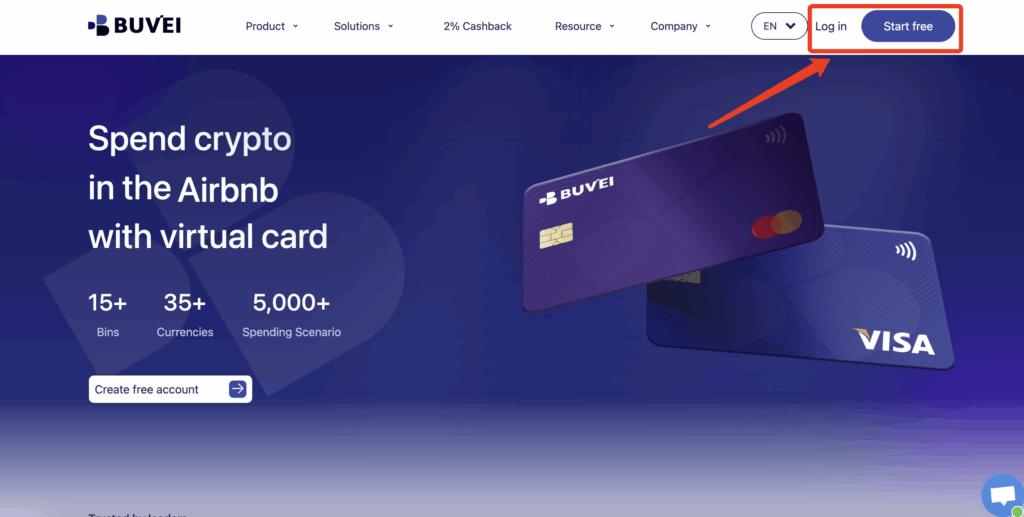
Step 1: Register a Buvei Account
-
Visit https://buvei.com
-
Create a free account
-
Complete email verification
-
Log in to the Buvei dashboard
Step 2: Fund Your Wallet
-
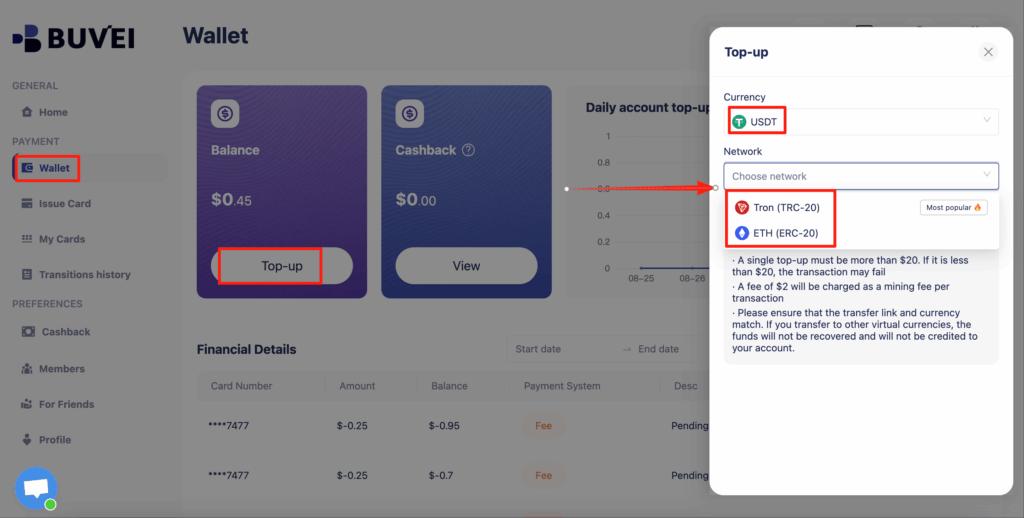
Go to the Wallet tab
-
Select USDT (TRC20 or ERC20)
-
Copy your exclusive deposit address
-
Send USDT
-
Balance becomes available after confirmation
Step 3: Create a Virtual Card
-
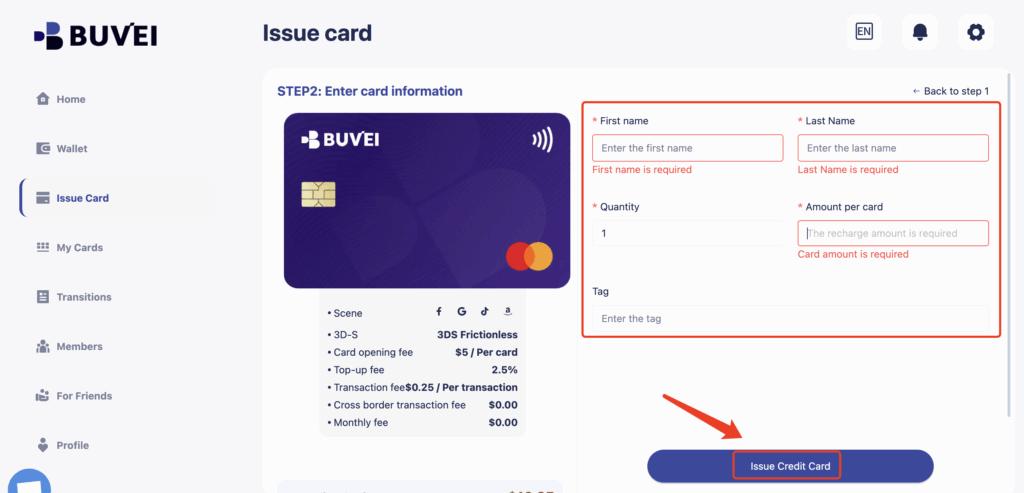
Navigate to the Cards tab
-
Select a U.S. BIN region (recommended for travel)
-
Choose card type
-
Click create

-
Enter:
-
Card name
-
Card amount (add 20–30% buffer)
-
Card quantity
-
-
Click Issue Card
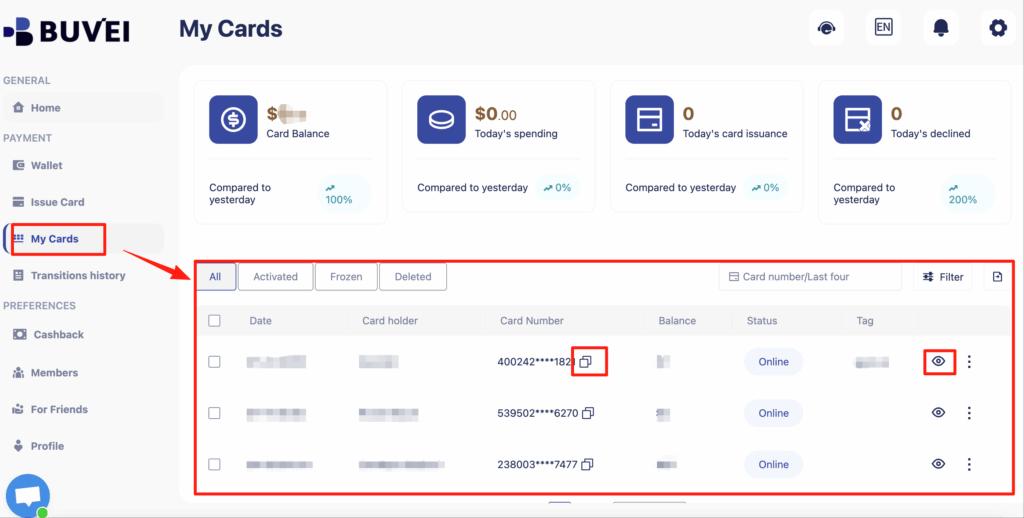
Step 4: Access Card Details
Under My Cards, view:
-
Card number
-
Expiration date
-
CVV
-
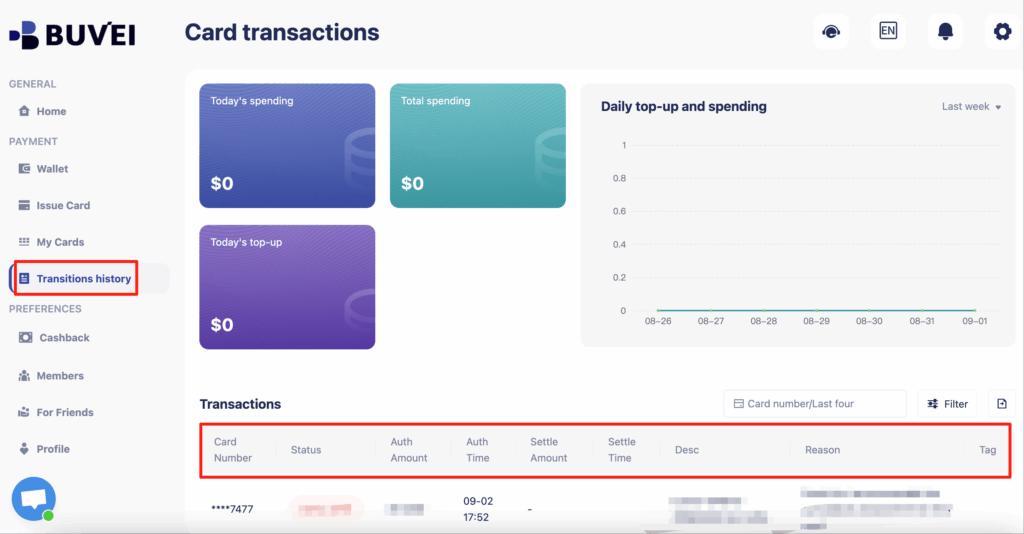
Authorization and transaction history
Step 5: Complete Booking
-
Enter your Buvei card details at checkout
-
Use consistent billing information
-
Avoid refreshing or retrying repeatedly
-
Wait for confirmation before closing the page
Pre-Authorization and Refund Timing
When using virtual cards for travel:
-
Do not delete the card immediately after booking
-
Keep the card active until:
-
Stay is completed
-
Refund window has passed
-
Expedia and hotels may:
-
Re-authorize at check-in
-
Adjust final amounts for taxes or fees
Buvei allows you to monitor and manage these transactions clearly from your dashboard.
Backup Options If a Booking Fails
If a booking fails:
-
Do not retry immediately
-
Issue a new virtual card
-
Increase balance buffer
-
Switch from hotel pay-at-property to pay-now (if available)
-
Complete booking directly with the airline or hotel
Virtual cards are replaceable by design—use this flexibility strategically.
Conclusion
Expedia and Skyscanner declines are rarely random. They result from pre-authorization behavior, BIN trust scoring, refund risk, and regional inconsistencies.
By using Buvei virtual cards, maintaining sufficient balance buffers, and understanding how travel merchants process payments, travelers can dramatically improve booking success rates.
For frequent travelers, digital nomads, and crypto users, Buvei offers a practical and secure way to pay for global travel without exposing personal banking details.