Running Facebook Ads at scale requires a reliable payment method. For advertisers managing multiple ad accounts, regions, or currencies, traditional bank cards often fall short due to spending limits, payment failures, or security risks. That’s why more media buyers and marketers are switching to virtual cards for Facebook Ads payments.
In this guide, we explain how virtual cards work with Facebook Ads, what makes a virtual card suitable for ad payments, and how to create and use a Buvei virtual card to improve payment success in 2026. 
Virtual Cards Are Useful for Facebook Ads Payments
Virtual cards function like standard debit or credit cards but are issued digitally and offer greater control. For Facebook Ads, this flexibility is especially valuable.
Key advantages include:
-
Better control over ad budgets with fixed balances
-
Reduced risk of account suspension due to compromised cards
-
Faster card replacement if a payment fails
-
Easier separation of spending across ad accounts or clients
-
Improved visibility when managing multiple campaigns
Many advertisers create one virtual card per ad account or per campaign, making reconciliation and spend tracking far more efficient.
Facebook Ads Payment Requirements and Common Issues
Facebook (Meta) generally accepts virtual cards as long as they are issued under supported networks such as Visa or Mastercard. However, payment failures can still occur if certain conditions are not met.
Common Facebook Ads billing issues include:
-
Insufficient balance at the time of charge
-
Cards with unsupported BIN regions
-
Repeated declines triggering automatic payment reviews
-
Daily or monthly transaction limits set too low
To reduce these risks, advertisers often prefer US BIN virtual cards, which tend to have higher compatibility with Meta’s billing system.
What Makes a Virtual Card Good for Facebook Ads
Not all virtual cards perform equally well for advertising payments. A high-quality virtual card for Facebook Ads should offer:
-
Strong compatibility with Meta Ads billing
-
The ability to set custom spending limits
-
Instant card issuance and cancellation
-
Support for recurring and high-frequency transactions
-
Clear transaction records and real-time balance tracking
Cards that allow easy funding, quick replacement, and granular spend control are best suited for long-term ad scaling.
Best Virtual Cards for Facebook Ads Payments in 2026
Among the available options, advertisers increasingly choose platforms that combine flexibility, security, and ease of use. Buvei is one such solution, offering virtual cards designed for online payments, including digital advertising.
Buvei virtual cards are commonly used for:
-
Facebook and Instagram Ads
-
Google Ads and other media platforms
-
SaaS tools and subscription services
-
International ad campaigns funded with stablecoins
By using dedicated virtual cards, advertisers can reduce payment disruptions and maintain stable campaign delivery.
How to Improve Facebook Ads Payment Success with Virtual Cards
To keep Facebook Ads running smoothly, consider the following best practices:
-
Use a dedicated virtual card for each ad account
-
Maintain a balance buffer above your daily spend
-
Choose US BIN cards for higher approval rates
-
Avoid frequently changing cards on the same ad account
-
Monitor spending and transaction history regularly
If a card does fail, issuing a new virtual card is often faster and safer than reusing an existing one.
How to Create and Use a Virtual Card with Buvei for Facebook Ads
Buvei provides a simple, crypto-friendly process for issuing virtual cards suitable for Facebook Ads payments.
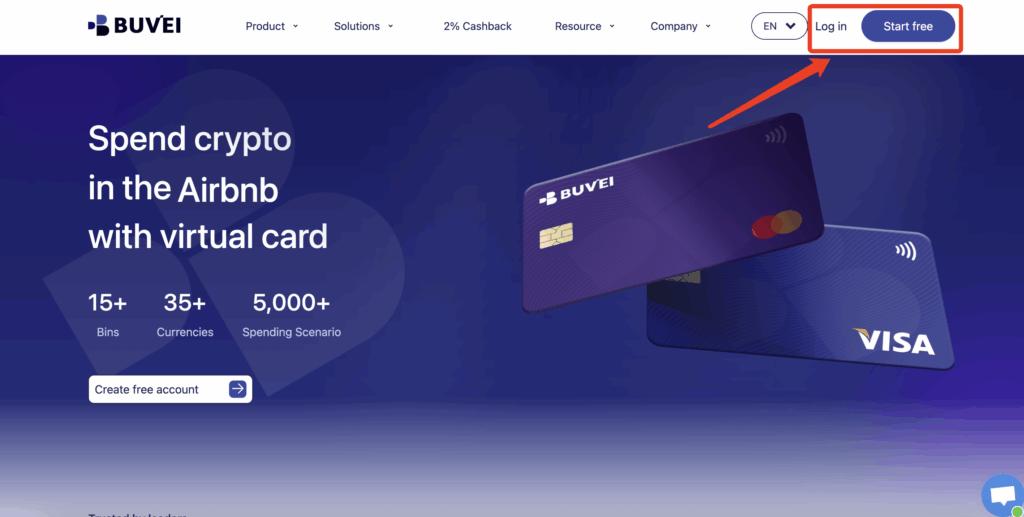
Step 1: Register a Buvei Account
Visit https://buvei.com and create a free Buvei account.
After completing email verification, you can log in to the Buvei dashboard, where all wallets and virtual cards are managed centrally.
Step 2: Fund Your Buvei Wallet
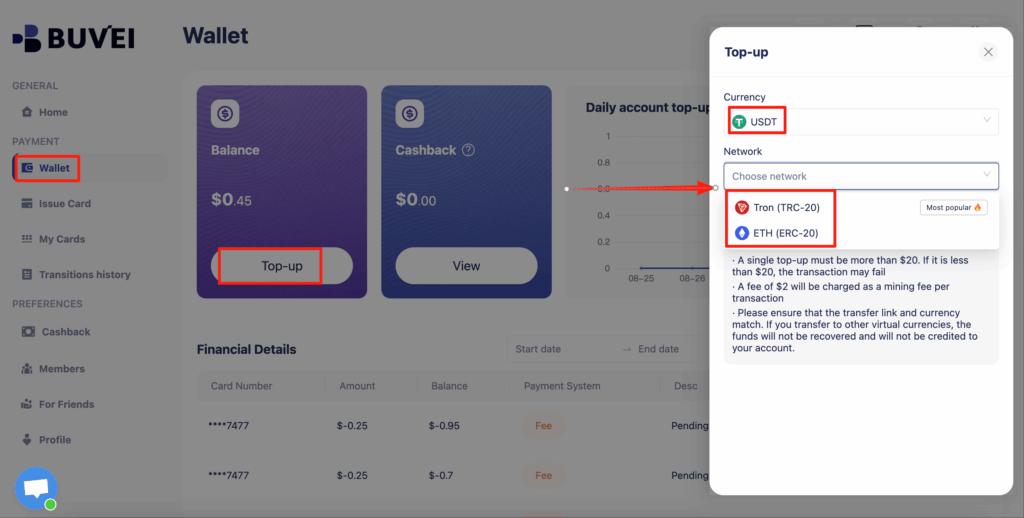
Before issuing a virtual card, you need to add funds to your account.
Go to the Wallet section and select a supported stablecoin such as USDT (TRC20 or ERC20). Buvei will generate a unique deposit address for your account. Copy this address and transfer your funds.
Once the blockchain confirmation is complete, your balance will appear in your wallet and be available for immediate use.
Step 3: Create Your Virtual Card
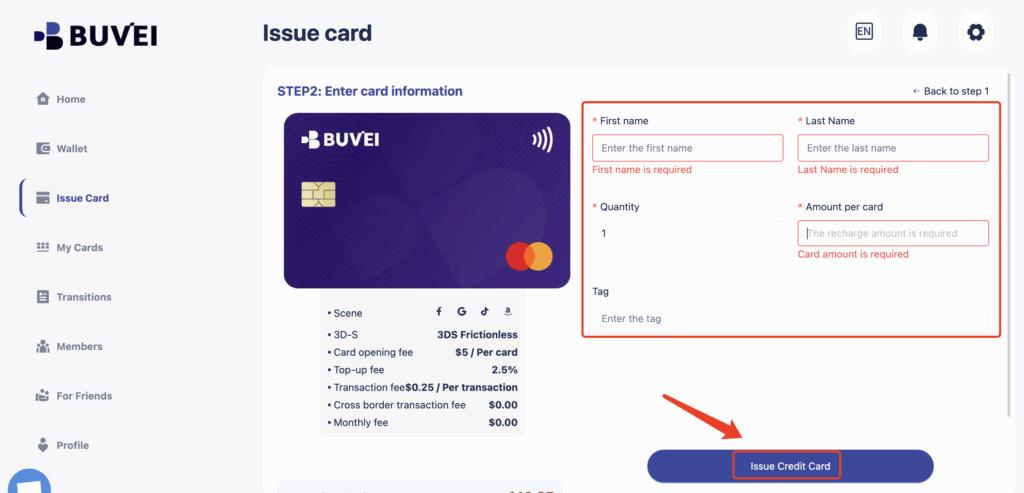
With funds available, navigate to the Cards section to issue a new virtual card.
-
Select your preferred BIN region (US BIN is recommended for Facebook Ads)
-
Choose your card type
-
Navigate to Cards
-
Select Create Card

-
Enter the card details, including card name, funding amount, and number of cards
-
Click Issue Card to complete the process
Step 4: Create Your Virtual Card
After the card is created, go to My Cards to view the card number, expiration date, CVV, and current balance.
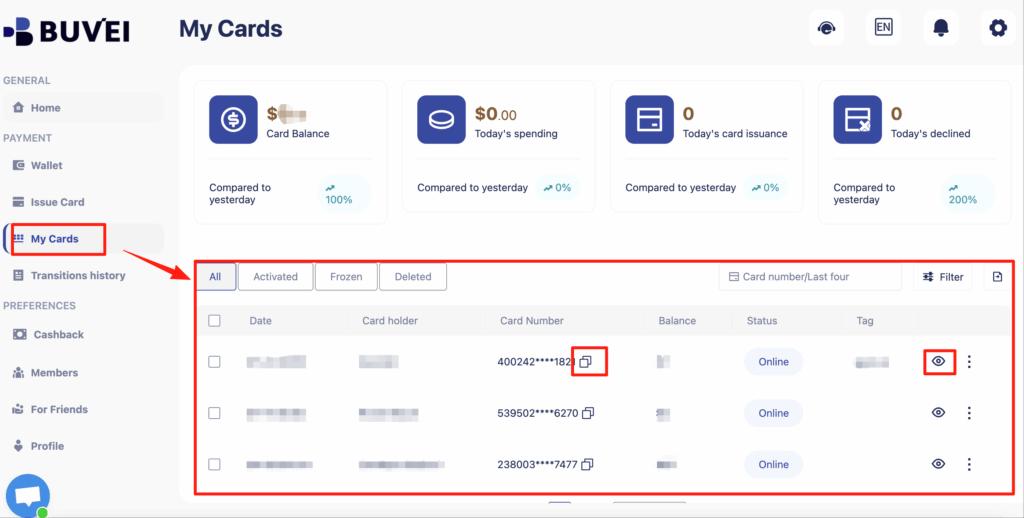
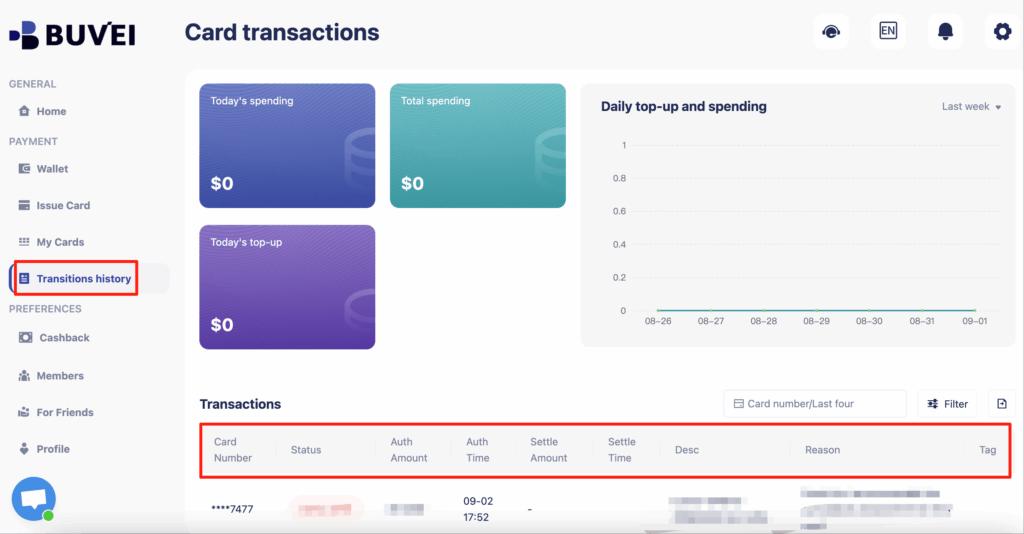
From this page, you can also track balances, top-ups, spending summaries, and full transaction history.
Final Thoughts
Virtual cards have become an essential tool for Facebook Ads payments, especially for advertisers managing multiple campaigns or operating across regions. They offer better control, improved security, and faster issue times compared to traditional bank cards.
With Buvei, advertisers can quickly create US BIN virtual cards, fund them using stablecoins, and manage all ad payments from one dashboard. For anyone looking to scale Facebook Ads in 2026 with fewer payment interruptions, virtual cards are a smart and practical solution.