
Shopify is widely used by ecommerce businesses for subscriptions, apps, advertising, analytics, and other operating expenses. But if you’re considering Shopify virtual card payments in 2026, there’s an important distinction to understand: Shopify currently does not accept prepaid or virtual credit cards for Shopify bills.
That doesn’t make virtual cards irrelevant to Shopify businesses. They can still be useful for advertising platforms, SaaS subscriptions, analytics tools, AI services, and other third-party expenses associated with running an online store.
This guide explains Shopify’s current billing rules, shows where to check your payment methods in Shopify Admin, and explains where virtual cards can still fit into a Shopify expense-management strategy.
2026 Update: Shopify currently states that prepaid and virtual credit cards aren’t accepted for Shopify bills. Available payment methods can vary by region and account, so check your own Shopify Admin for the options available to you.
Can You Pay Shopify Bills With a Virtual Card in 2026?
No. Shopify currently does not accept prepaid or virtual credit cards for Shopify bills.
Shopify supports eligible credit cards from major networks such as Visa, Mastercard, American Express, Diners Club, and Discover. However, the card must also meet Shopify’s requirements, including support for recurring payments when required.
This means that a virtual card being issued on the Visa or Mastercard network does not automatically make it acceptable for Shopify billing. Shopify specifically excludes virtual credit cards from its supported billing payment methods.
The distinction is important because there are two separate types of expenses involved in running a Shopify business.
The first is paying Shopify itself for your subscription and other charges that appear on your Shopify bill. The second is paying third-party services that you use alongside Shopify, such as advertising platforms, email marketing software, analytics tools, AI services, and customer support platforms.
Shopify’s restriction applies to its own billing system. Whether a virtual card works for a third-party service depends on that merchant’s payment policy.
How to Check Your Shopify Billing Payment Methods
If you’re unsure which payment methods Shopify currently supports for your store, check the billing section directly in Shopify Admin.
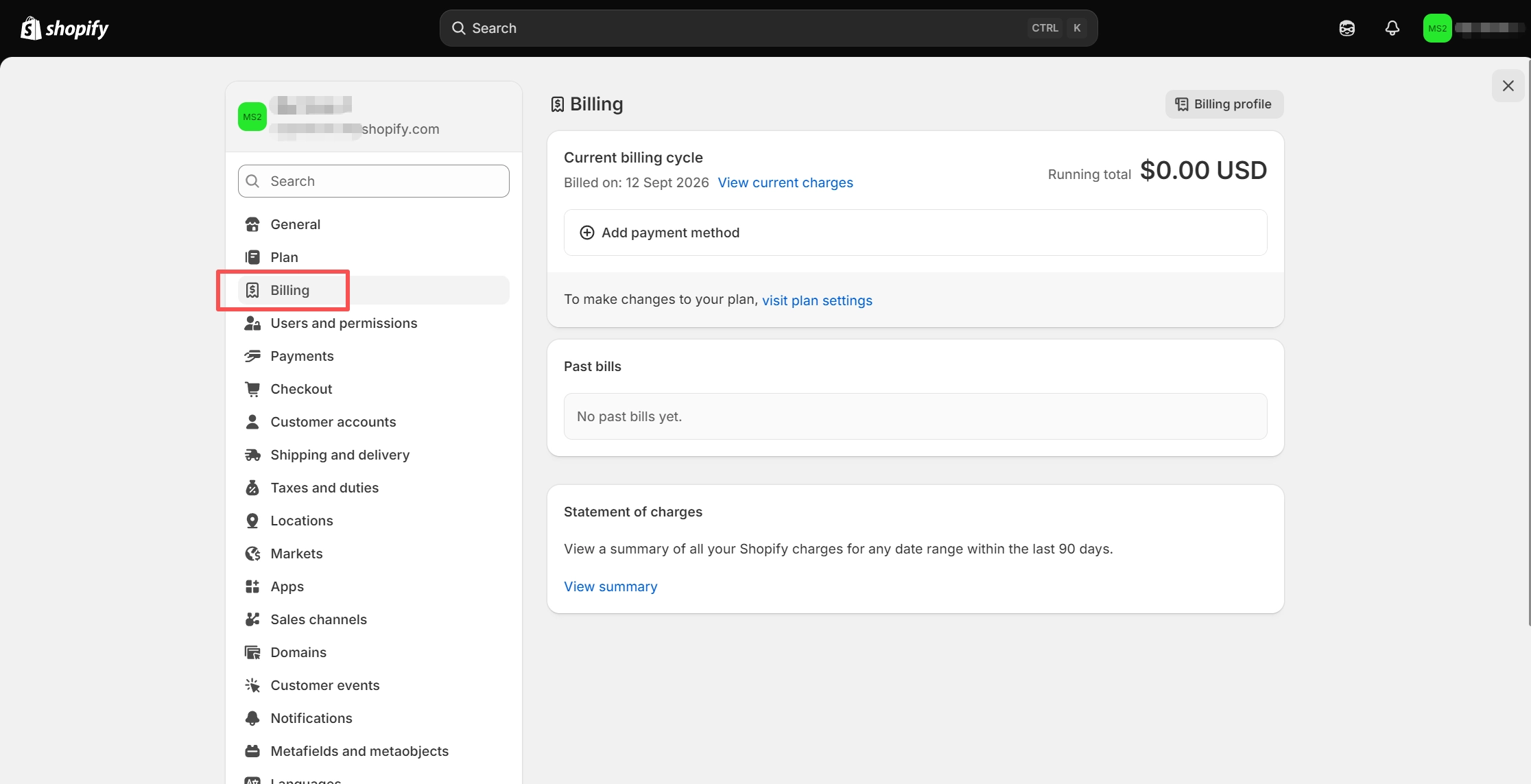
Step 1: Open Settings → Billing
From Shopify Admin, go to Settings and select Billing. Be careful not to confuse this with Settings → Payments. The Payments section is primarily about how your customers pay your store. For this article, you need Billing because you’re checking how you pay Shopify.
Step 2: Open Your Billing Profile
Inside the Billing section, open your Billing profile. This is where Shopify manages information associated with your billing setup, including payment methods and billing details.
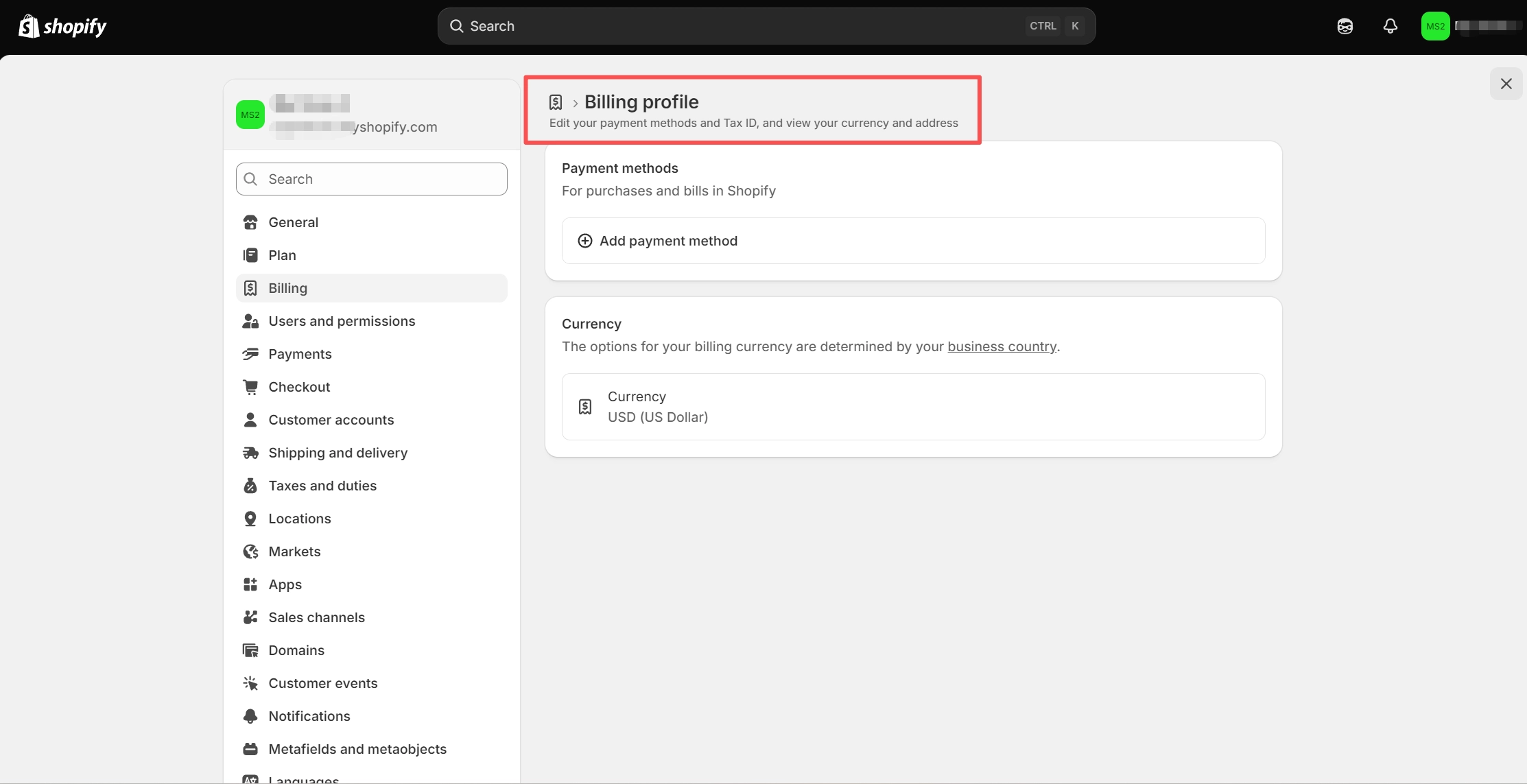
Step 3: Find Payment Methods
Look for the Payment methods section. If you already have a payment method connected, Shopify will display it here. Eligible accounts can also have multiple payment methods available for billing.
Step 4: Select Add Payment Method
Click Add payment method to see the options available for your store.
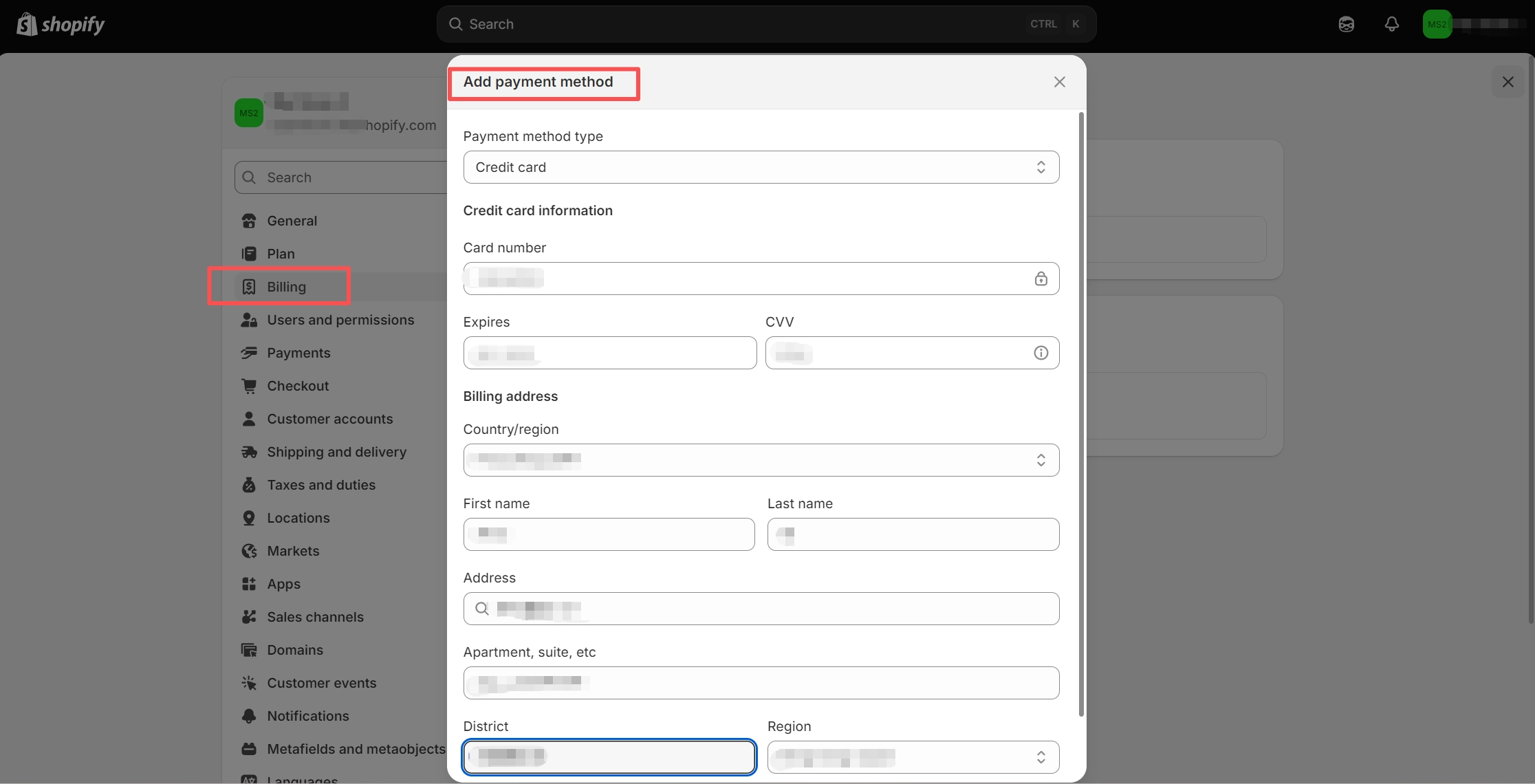
The available options depend on factors such as your store’s region and account eligibility. This makes the Add payment method screen more useful than relying on a generic list of payment methods.
Important: Don’t use a screenshot that suggests a virtual card was successfully added to Shopify unless Shopify actually supports that payment method for your account. Under the current policy, virtual credit cards aren’t accepted for Shopify bills.
What Payment Methods Does Shopify Accept?
Shopify’s billing payment methods vary by region.
For card payments, Shopify currently supports eligible credit cards from major networks including Visa, Mastercard, American Express, Diners Club, and Discover. The card must support recurring payments where required, and Shopify specifically excludes prepaid and virtual credit cards from its billing payment methods.
Some regions also have additional options, including certain bank-based payment methods and other locally supported methods. The exact options available to you may therefore differ from those available to another Shopify merchant.
The easiest way to confirm your options is to open Settings → Billing → Billing profile → Payment methods in your own Shopify Admin.
It’s also important to remember that Settings → Payments and Settings → Billing serve different purposes. A payment option available for your customers doesn’t necessarily mean you can use it to pay your Shopify subscription.
Why Shopify May Reject a Virtual Card
If Shopify rejects a virtual card, the first thing to check is whether the card type is supported at all.
Since Shopify currently doesn’t accept prepaid or virtual credit cards for its bills, switching to another virtual card generally won’t solve the problem.
For supported cards, payment failures can have other causes. Shopify bills may involve recurring charges, so a card that works for ordinary online purchases can still fail if recurring transactions are restricted.
Billing information is another common issue. If the billing address or postal code doesn’t match the information associated with the card, Shopify may be unable to verify the payment method.
International transaction restrictions can also cause problems when the card issuer and Shopify store operate in different regions. Insufficient available credit or funds is another possibility.
The practical approach is to identify whether the issue is caused by the card type or by the card’s transaction settings.
If the payment method itself isn’t supported by Shopify, repeatedly entering the same type of card isn’t likely to help. In that situation, use a billing method that Shopify supports for your store.
It’s also worth resolving failed Shopify bills quickly. Shopify retries failed subscription payments, and an unpaid subscription can eventually result in the store being frozen.
Can You Still Use Virtual Cards for a Shopify Business?
Yes. Shopify’s restriction on virtual cards applies to Shopify billing, not automatically to every expense associated with your store.
A typical Shopify business may have far more expenses than its Shopify subscription. Advertising, email marketing, analytics, customer support, AI tools, design software, and other SaaS services can all generate recurring or usage-based charges.
These services are separate merchants, and each one decides which payment methods it accepts. As a result, a virtual card may work for a third-party service even though Shopify itself doesn’t accept one for billing.
This is where virtual cards can become useful for ecommerce businesses.
Instead of using one physical card for every online expense, a business can assign separate virtual cards to different services or spending categories. This creates a cleaner separation between advertising, software subscriptions, and other operating expenses.
For example, a merchant could use one virtual card for advertising expenses and another for recurring SaaS subscriptions. If one service needs to be replaced or its payment credentials need to be updated, the change doesn’t necessarily affect every other subscription.
The important distinction is that virtual cards should be used as an expense-management tool around Shopify, not as a way to bypass Shopify’s billing restrictions.
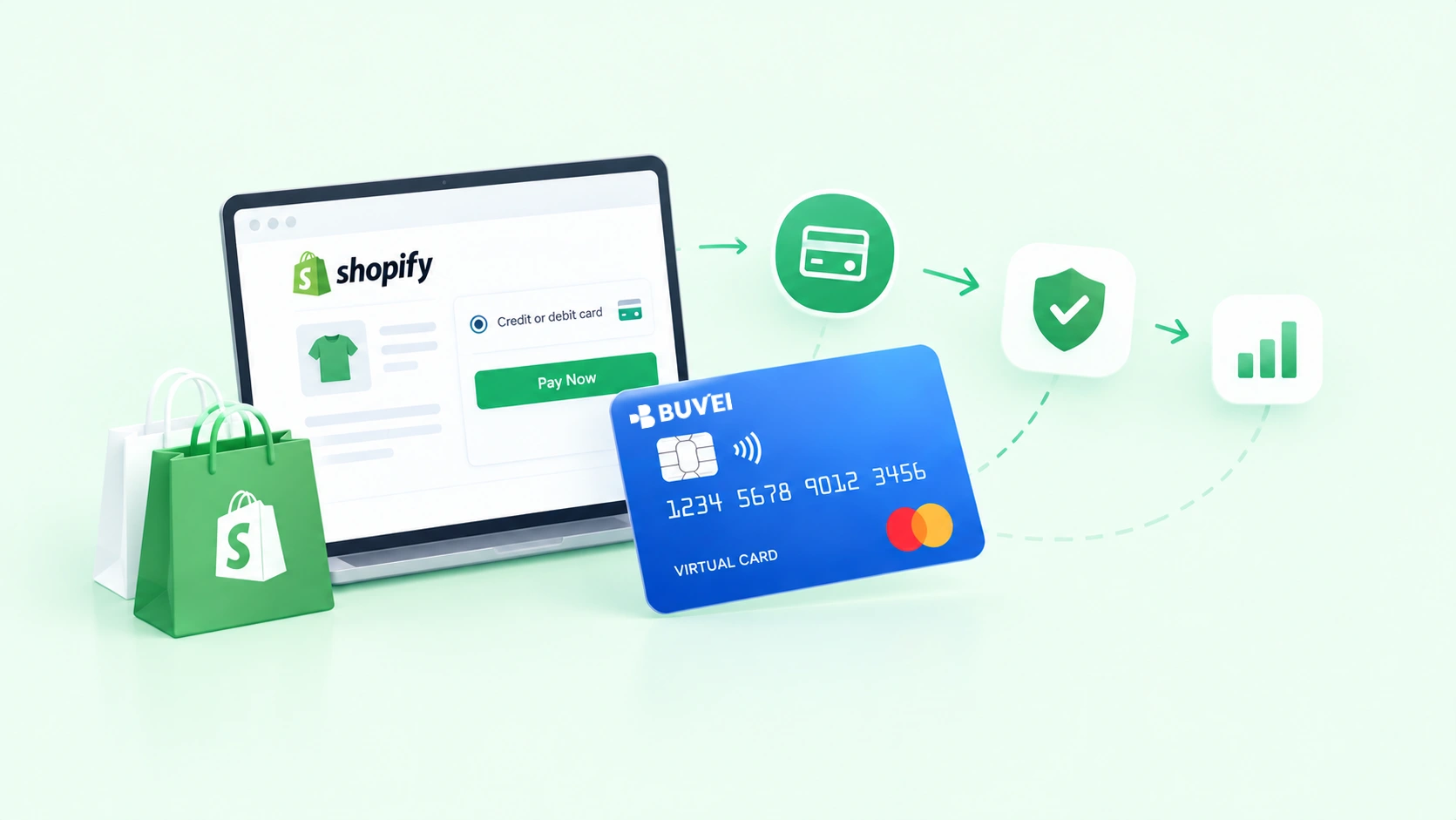
Using BUVEI Virtual Cards for Shopify-Related Expenses
Once a Shopify business starts managing multiple advertising accounts, SaaS subscriptions, and online services, keeping payment credentials organized becomes increasingly important.
This is where BUVEI virtual cards can fit into the broader payment workflow.
BUVEI supports Visa and Mastercard virtual cards and allows businesses to create multiple cards for different spending needs. Rather than connecting the same payment credential to every service, businesses can separate expenses across dedicated cards.
For a Shopify merchant, that could mean assigning different virtual cards to advertising platforms, SaaS subscriptions, analytics tools, AI services, or other online merchants that accept virtual cards.
Create Dedicated Cards for Different Expenses
Using multiple virtual cards can make recurring expenses easier to organize. For example, an ecommerce business running several advertising campaigns can separate advertising-related transactions from software subscriptions. This makes it easier to identify where payments are going without relying entirely on one general-purpose card.
The same approach can be useful when a business has multiple teams, stores, or online services that need separate payment credentials.
Add Spending Controls
Expense separation becomes more useful when combined with spending controls. BUVEI supports per-card spending limits, giving businesses another way to control how individual virtual cards can be used. For Shopify businesses, this can be particularly useful for expenses with variable monthly charges, such as advertising and usage-based software. A card-level spending limit can provide an additional control layer alongside the merchant’s own budget settings.
Monitor Transactions
As the number of subscriptions and online services grows, transaction visibility becomes just as important as payment access.
BUVEI provides transaction monitoring and real-time spending visibility, helping businesses review card activity and keep online expenses easier to reconcile.
This can be useful for Shopify merchants managing several recurring services or advertising accounts, especially when multiple virtual cards are being used at the same time.
However, BUVEI does not bypass Shopify’s restriction on virtual cards for Shopify billing.
If Shopify doesn’t accept a virtual credit card for your Shopify bill, you should use one of Shopify’s supported billing methods.
BUVEI is better suited to the third-party online expenses surrounding your Shopify business, where the individual merchant accepts virtual cards.
In other words, the payment workflow can remain straightforward: use a Shopify-supported payment method for Shopify’s own bills, and use virtual cards where third-party services allow them.
Haven’t Created a Buvei Virtual Card Yet? Follow These Steps:
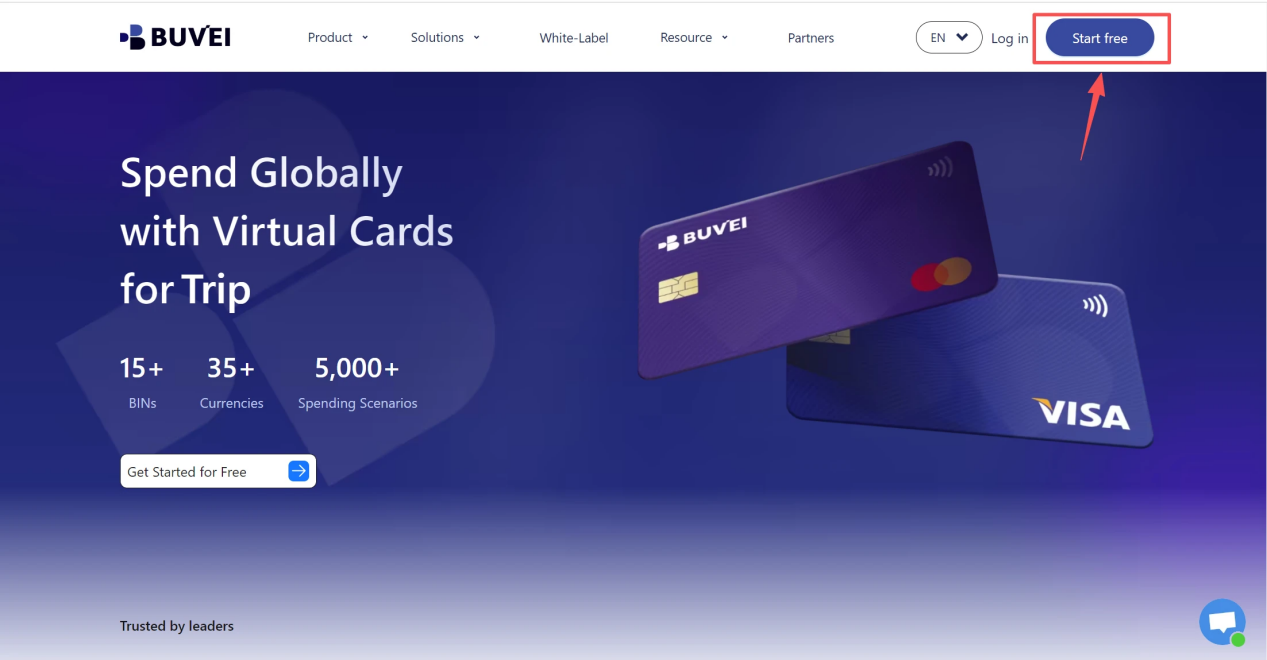
1.Sign up/Sign in at buvei.com
- If you haven’t signed up yet, simply click 'Start Free' to register quickly with your email.
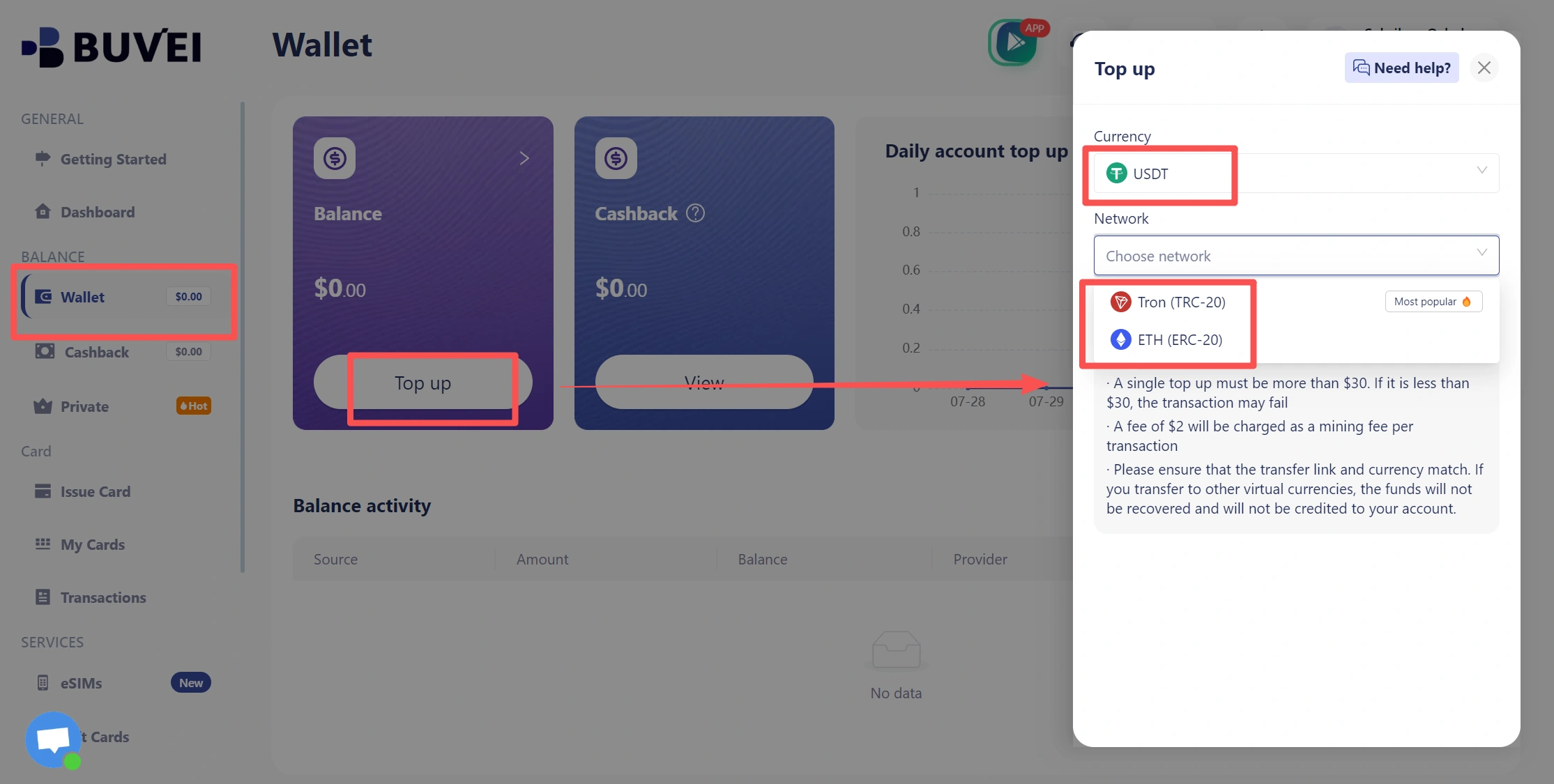
- Navigate to the Wallet tab and top up using supported stablecoins like USDT (TRC20/ERC20). You’ll receive a unique address—copy it and send your funds.
- Once confirmed, your balance will appear in the wallet for immediate use.
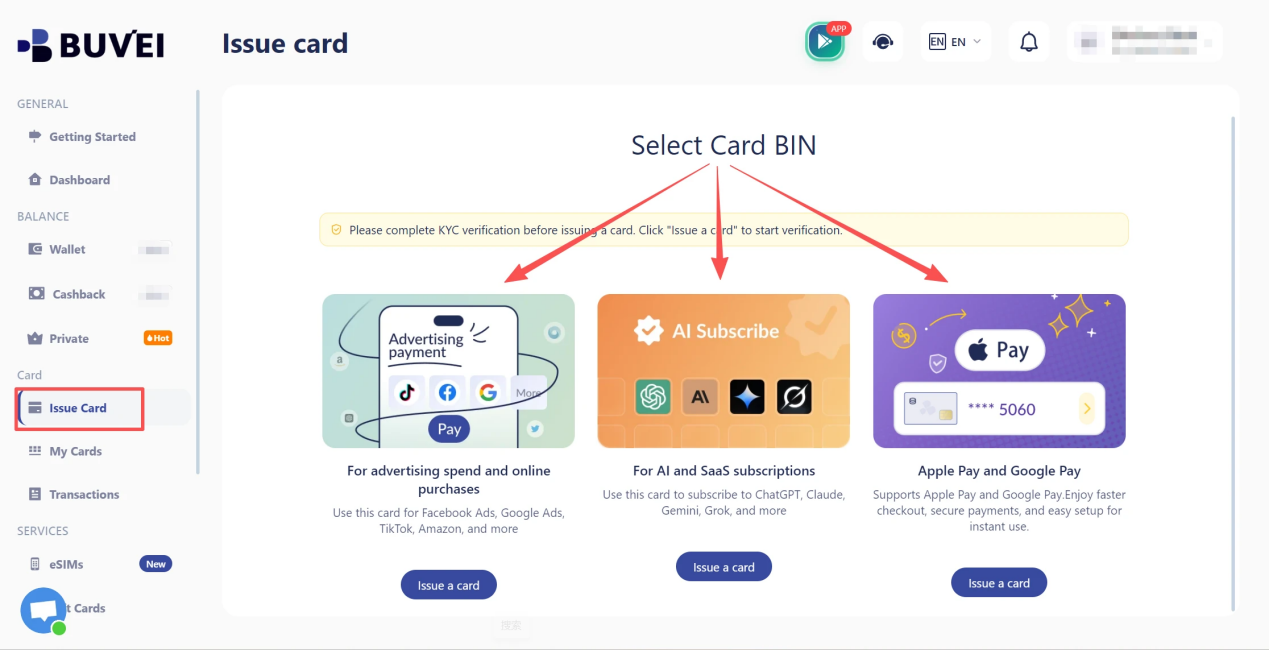
2.Create a Virtual Card
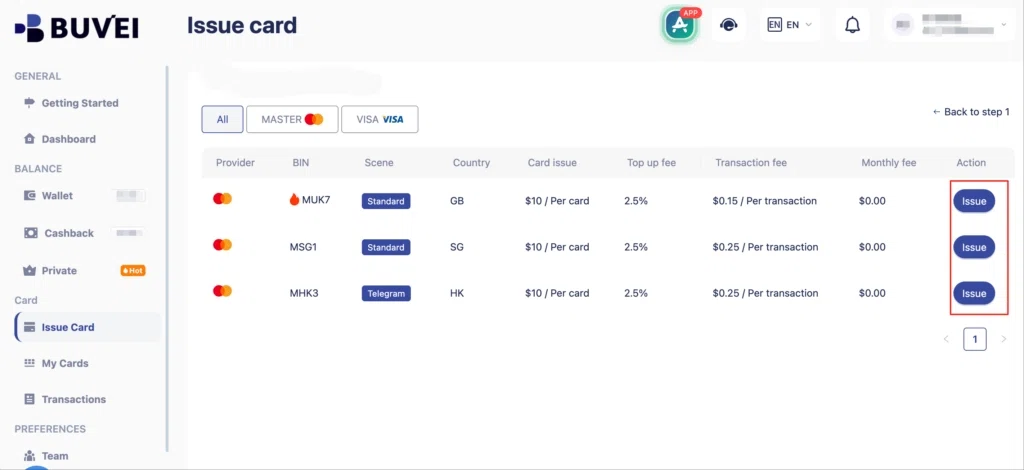
- Go to the Card tab
- Choose your preferred BIN region , (recommends using US BIN)
- Select your card type
- Click Issue
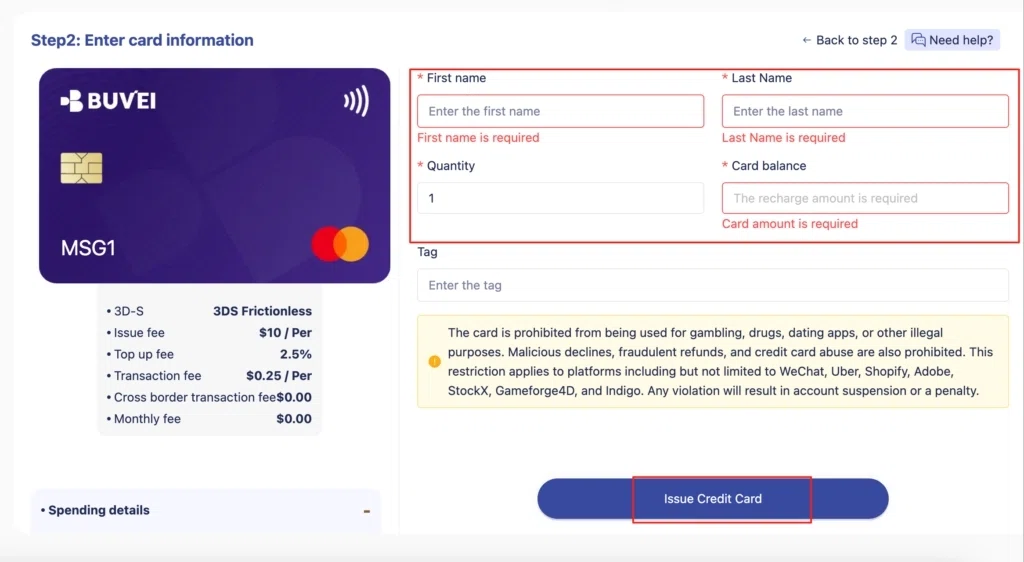
- Fill in the virtual card details, including name, amount, and number of cards.
- Click Issue Card
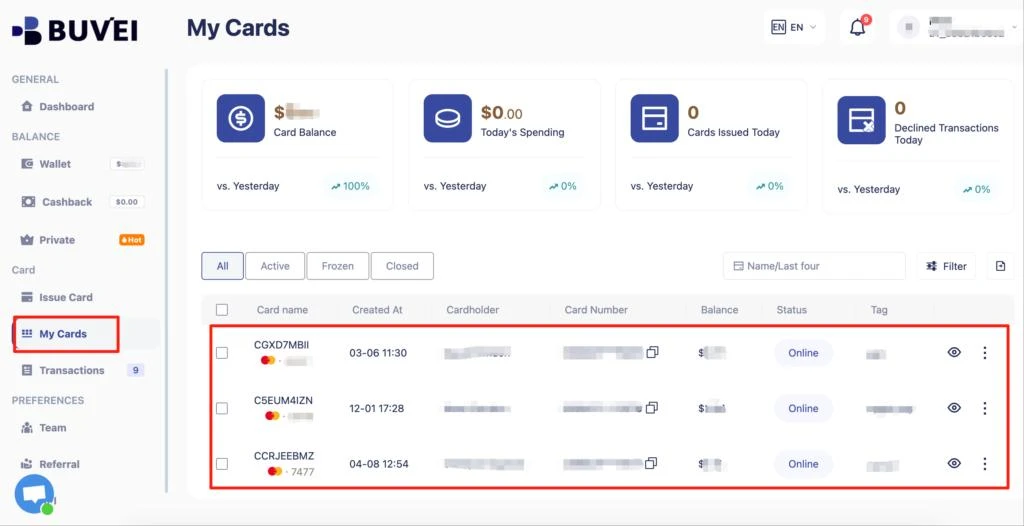
Once created, navigate to My Cards to access your card details:
- Card Number
- Expiration Date
- CVV
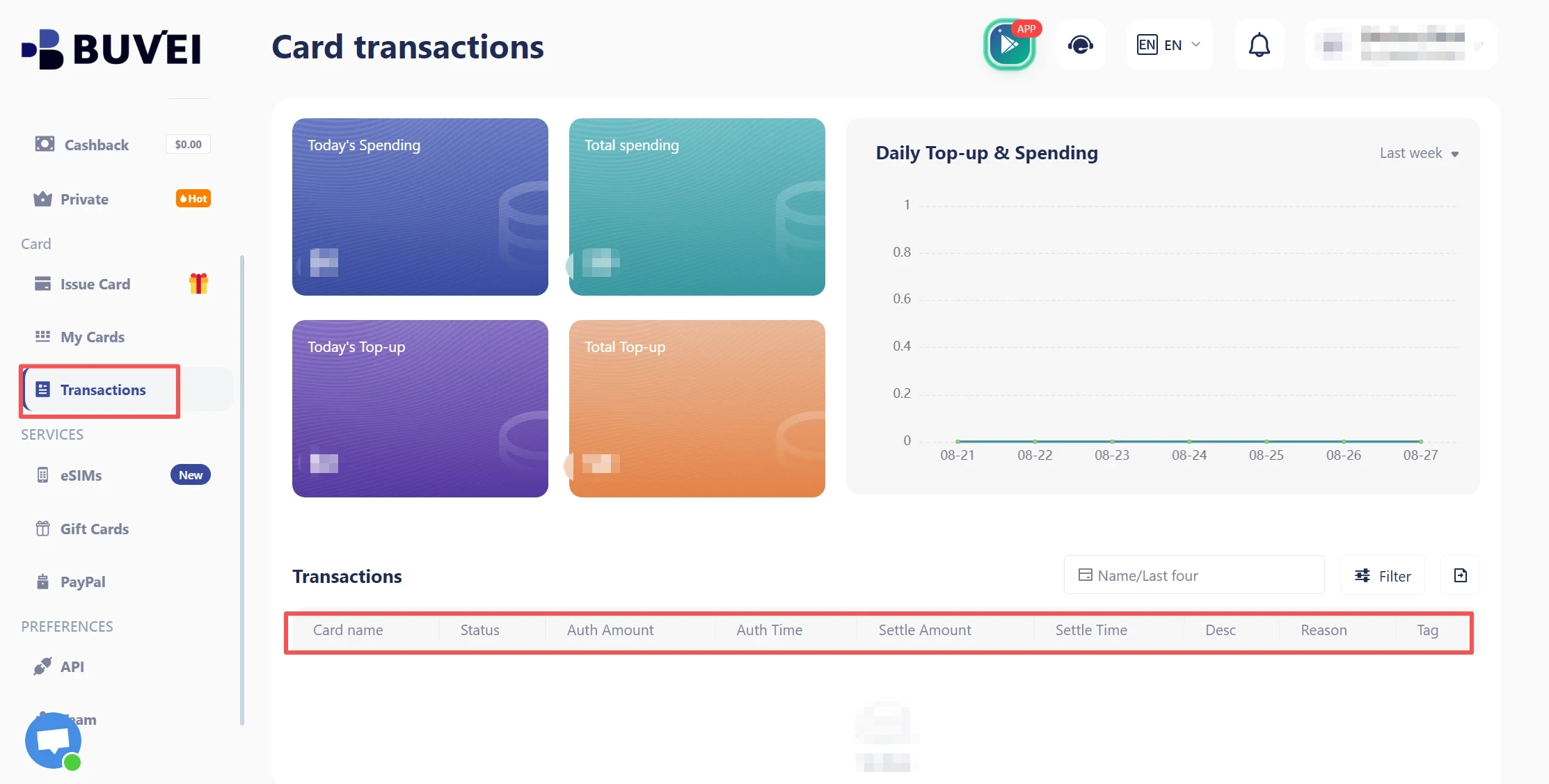
On this page, users can view an overview of their virtual card top-ups and spending, and check all transaction details.
Frequently Asked Questions
Can I pay Shopify with a virtual card?
Not for Shopify bills under Shopify’s current 2026 policy. Shopify states that prepaid and virtual credit cards aren’t accepted for Shopify bills.
Does Shopify accept Visa or Mastercard virtual cards?
Not simply because they use the Visa or Mastercard network. Shopify supports eligible Visa and Mastercard credit cards for billing, but virtual credit cards are excluded from its supported billing methods.
Why is my virtual card rejected by Shopify?
The most likely reason is that Shopify doesn’t accept virtual credit cards for its bills. For supported cards, other possible causes include recurring-payment restrictions, international transaction restrictions, billing information mismatches, or insufficient funds.
Can I use a virtual card for Shopify apps?
Potentially, yes. Shopify’s restriction on virtual cards for Shopify bills doesn’t automatically apply to every third-party app or service. Whether a virtual card works depends on the individual merchant’s payment policy.
Can I use virtual cards for Shopify advertising expenses?
Potentially, yes. Advertising platforms are separate merchants from Shopify and may accept virtual cards. Check the advertising platform’s current payment requirements before using one.
Conclusion
Shopify virtual card payments work differently depending on what you’re paying for.
As of 2026, Shopify does not accept prepaid or virtual credit cards for its own bills. Merchants should therefore use one of the billing payment methods supported for their store and region.
Virtual cards can still be valuable for the expenses surrounding a Shopify business. Advertising, SaaS subscriptions, analytics, AI tools, and other online services may accept virtual cards and can be managed separately from Shopify’s own billing system.
For businesses that want more control over these expenses, BUVEI provides multiple virtual cards, spending controls, and transaction monitoring to help organize online payments and separate different spending activities.
The goal isn’t to force a virtual card into a payment flow that doesn’t support it. It’s to use the right payment method for each type of business expense.