
Introduction
Receiving and withdrawing money through PayPal is usually simple in theory, but in practice, cross-border users often run into friction—verification checks, transfer delays, unclear fees, or small input mistakes that lead to failed transactions.
The real issue is not the transfer itself, but the hidden cost of cross-border currency conversion. PayPal users often only see the final amount received, without clearly understanding how much is lost in exchange rate spreads or conversion markups.
BUVEI reduces this friction by making PayPal-related payment flows more centralized, predictable, and transparent.
This guide explains how to use PayPal with BUVEI, what you need before starting, and what to do if something goes wrong.
What is BUVEI PayPal Feature?
BUVEI PayPal functionality is designed as a payment bridge between your BUVEI balance and PayPal.
Instead of treating PayPal as a separate workflow, BUVEI allows users to initiate and manage PayPal-linked transfers directly inside the platform.
In practical terms, it helps users:
- Send funds to PayPal accounts
- Withdraw BUVEI balance via PayPal
- Manage cross-border payouts in a more centralized way
It is not a replacement for PayPal, but a simplified layer that connects BUVEI funds with PayPal destinations.
What You Need Before You Start
Before making any transfer, make sure the following requirements are ready:
You need an active PayPal account that is fully accessible and verified.
Your BUVEI account should have sufficient balance or approved payment access.
The PayPal email address must be correct, as transfers are processed based on account identifiers.
It is also recommended to review applicable fees and exchange rates before initiating a transaction.
Having these details ready helps avoid unnecessary delays or failed transfers.

Fees, Exchange Rates & Processing Time
Fees and timing are often the most important considerations for users.
In PayPal’s native system, currency conversion costs are usually embedded in the exchange rate itself. In many cases, users face an effective 3%–4% FX markup, but this cost is not explicitly broken down, making it difficult to calculate the real transaction cost in advance.
BUVEI takes a more transparent approach.
BUVEI applies a $0.5 fixed fee plus a 3% currency conversion fee for PayPal-related transactions involving currency exchange.
This means users know exactly how fees are calculated before confirming a transaction, instead of relying on hidden exchange rate spreads that vary depending on currency pairs and processing routes.
💡 Cost Comparison: BUVEI vs PayPal
| Item | PayPal | BUVEI |
| Currency conversion fee | ~3%–4% (hidden in exchange rate) | 3% + $0.5 fixed fee |
| Pricing transparency | Low (embedded FX spread) | High (explicit breakdown) |
| Cost predictability | Medium (varies by rate) | High (known before confirmation) |
| Fee visibility | Not shown separately | Clearly displayed before transfer |
| Small transaction efficiency | Less efficient due to FX spread | More stable due to fixed fee structure |
If currency conversion is involved, exchange rates are applied at the time of processing, which may affect the final amount received depending on market conditions.
Processing time is usually fast, but in some cases—such as compliance checks, high-value transfers, or verification reviews—it may take longer than expected.
How to Process PayPal Payouts and Salary Distribution via BUVEI
To receive money through PayPal using BUVEI, the process is straightforward.
Start by logging into your BUVEI account and opening the PayPal payment section. Enter the recipient’s PayPal email address carefully, as this determines where the funds will be delivered.
Next, fill in the recipient’s first and last name, followed by the amount you want to send. You may also include a reference note if needed.
Once all details are correct, review the information and submit the transaction. The system will process the payment and deliver funds to the recipient’s PayPal account according to standard processing times. 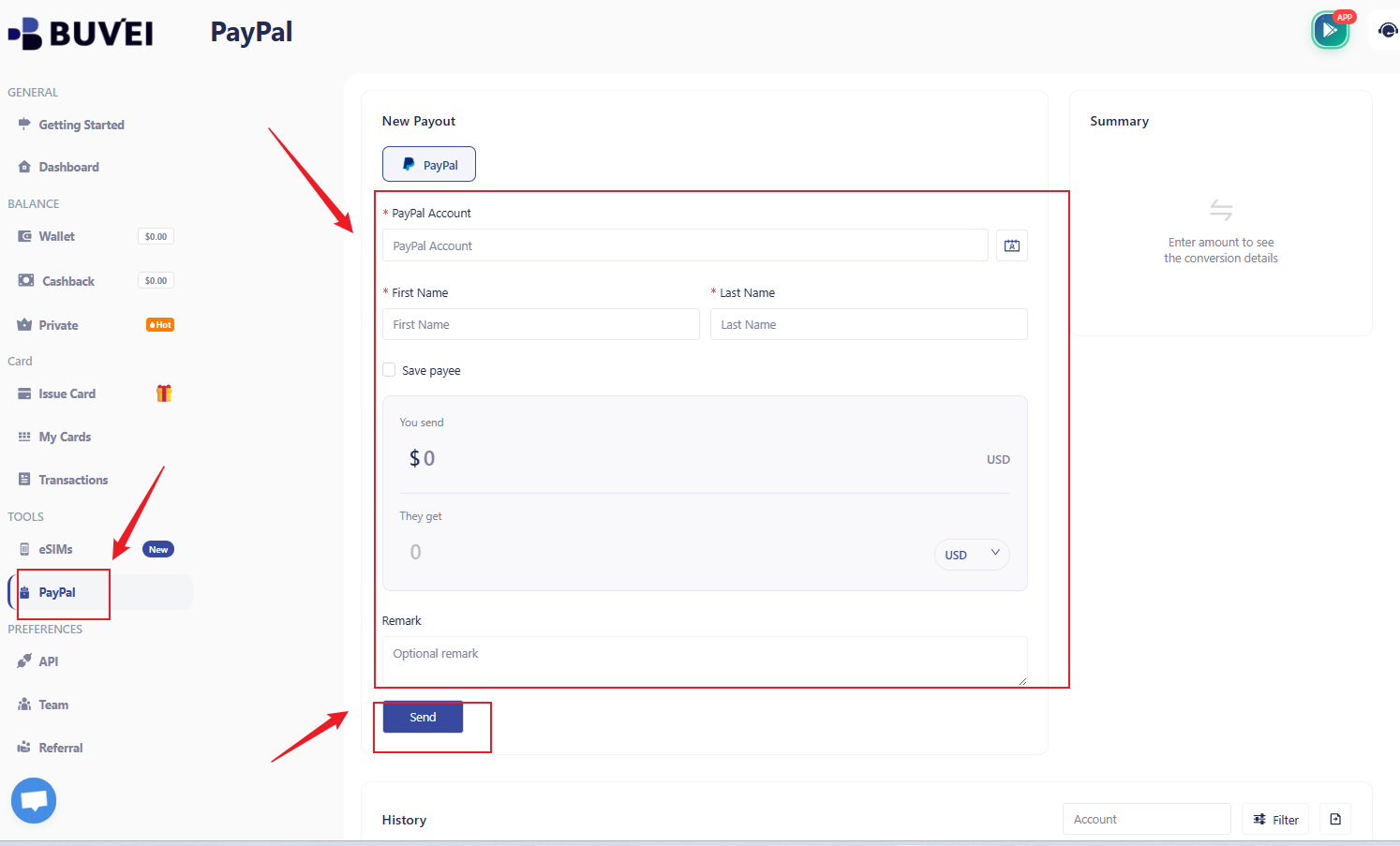
How to Withdraw Money from BUVEI to PayPal
Withdrawing funds from BUVEI to PayPal follows a similar flow.
Go to the withdrawal or payout section inside BUVEI and select PayPal as your destination method. Enter your PayPal account details and specify the amount you wish to withdraw.
After reviewing the information, confirm and submit the request. The system will handle the transfer and send funds to your linked PayPal account.
What If Something Goes Wrong?
Most issues during PayPal transfers are related to simple input or account status problems rather than system errors.
If a transaction fails, first check whether your PayPal email address is correct and matches your account. Even small mistakes can cause the transfer to be rejected.
If the payment remains pending for an extended period, it is often due to internal processing or compliance review. In most cases, it is better to wait rather than resubmit multiple times.
Name mismatches between BUVEI and PayPal accounts can also trigger errors, especially if spelling or formatting does not match exactly.
In cases involving verification issues, make sure both your BUVEI and PayPal accounts are fully verified and in good standing.
FAQ
How long does a BUVEI PayPal transfer take?
Most transfers are processed quickly, but timing may vary depending on verification or compliance checks.
Are BUVEI fees lower than PayPal?
BUVEI uses a transparent structure of $0.5 + 3% FX fee. PayPal typically embeds a 3%–4% FX markup in the exchange rate without clear breakdown. The difference is mainly transparency and predictability.
Can I use a business PayPal account?
Yes, both personal and business PayPal accounts are supported.
Conclusion
BUVEI’s PayPal feature simplifies cross-border money movement by reducing manual steps and making costs more transparent.
While PayPal’s native currency conversion often relies on hidden exchange rate spreads, BUVEI provides a clearer structure with a fixed $0.5 fee plus a 3% conversion rate.
This makes international PayPal transactions easier to understand, easier to calculate, and more predictable for frequent users.