
Managing Jira and Confluence subscriptions can sometimes be tricky, especially when it comes to making secure and seamless payments. If you’ve faced issues with failed payments or complicated billing processes, using virtual cards can simplify the entire experience. This guide will walk you through how to use virtual cards for Jira and Confluence subscriptions, why they’re a great choice, and how to set them up for seamless payments.

How Jira & Confluence Subscription Payments Work
Jira and Confluence are powerful tools developed by Atlassian, commonly used for project management and collaboration. These tools operate on a subscription-based model where users pay for access to different levels of services, including cloud hosting and additional features.
Payments for Jira and Confluence typically work via credit card or other forms of online payment. Subscriptions are generally billed on a monthly or annual basis, and the payment method linked to your Atlassian account is charged automatically.
However, issues like declined payments, failed billing, or incorrect payment processing are not uncommon.

Why Some Cards Fail for Jira & Confluence Payments
There are several reasons why cards may fail when attempting to pay for Jira or Confluence subscriptions:
-
International Payment Issues: Cards from certain countries or regions may be restricted for international payments, causing a failed transaction.
-
Payment Gateway Rejections: Some cards might not be supported by Atlassian’s payment gateway or have restrictions placed by the card issuer.
-
Billing Address Mismatches: The card's billing address might not match the address associated with your Atlassian account, causing the transaction to fail.
-
Insufficient Funds: If the card doesn't have enough balance to cover the subscription cost, the payment will be declined.
-
Expired or Blocked Cards: If the card has expired or been blocked for security reasons, it won’t process payments.
These issues can disrupt your access to services, but the solution lies in using virtual cards, which offer greater control over your payments.
Using Virtual Cards for Jira & Confluence Subscriptions
Virtual cards provide an added layer of security and flexibility when managing subscriptions like Jira and Confluence. Unlike physical credit cards, virtual cards allow you to set strict spending limits and can be easily disabled if necessary. This helps mitigate payment failure risks and offers more control over your subscription payments.
Why Virtual Cards Are Ideal for Jira & Confluence:
-
Increased Security: Virtual cards don’t expose your real credit card details, reducing the risk of fraud.
-
Spending Limits: You can set daily, monthly, or total spending limits, ensuring you never exceed your budget.
-
One-Time Use or Ongoing Payments: Virtual cards are ideal for both single transactions and recurring subscriptions.
-
Global Acceptance: Virtual cards are supported by most online payment platforms, including Jira and Confluence.
How to Set Up Virtual Cards for Subscription Payments
Setting up a virtual card for Jira and Confluence payments is simple and quick. Here’s a step-by-step guide on how to do it:
Step 1: Register a Buvei Account
Visit Buvei’s website and create a free account.
Complete email verification and log in to your dashboard.

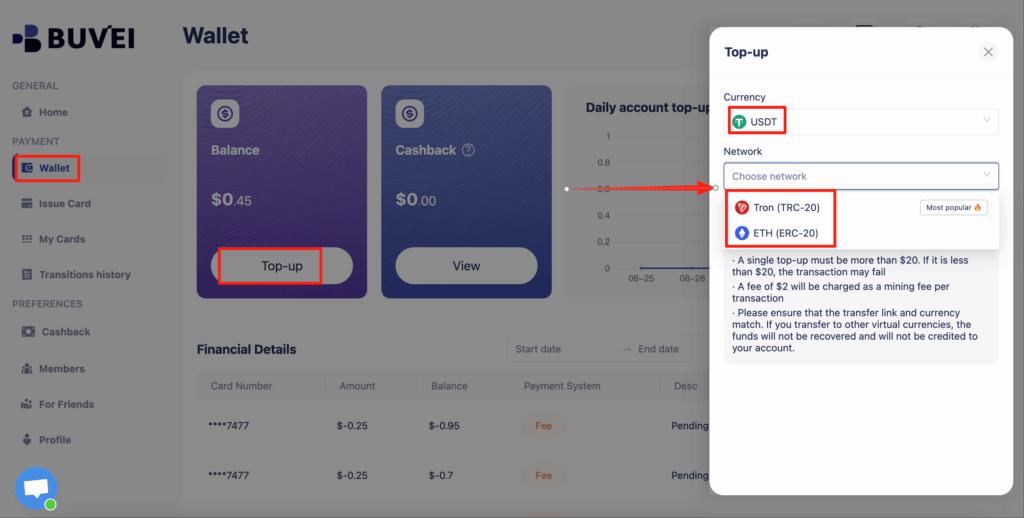
Step 2: Fund Your Wallet
Go to the Wallet tab and top up using supported stablecoins:
-
USDT (TRC20)
-
USDT (ERC20)
Buvei provides a dedicated deposit address. Once confirmed on-chain, your balance becomes available instantly.
Step 3: Create a Virtual Card
Navigate to the Cards tab:
-
Select your preferred BIN region (US BIN recommended for Atlassian services).
-
Choose the card type (credit or debit).
-
Click Issue Card.

Enter the card name, initial amount, and number of cards, then click Create Card.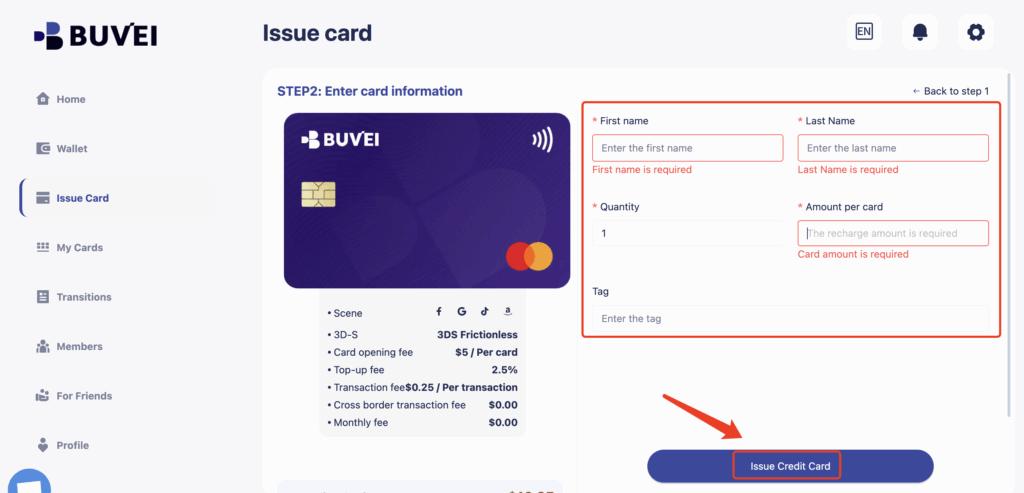
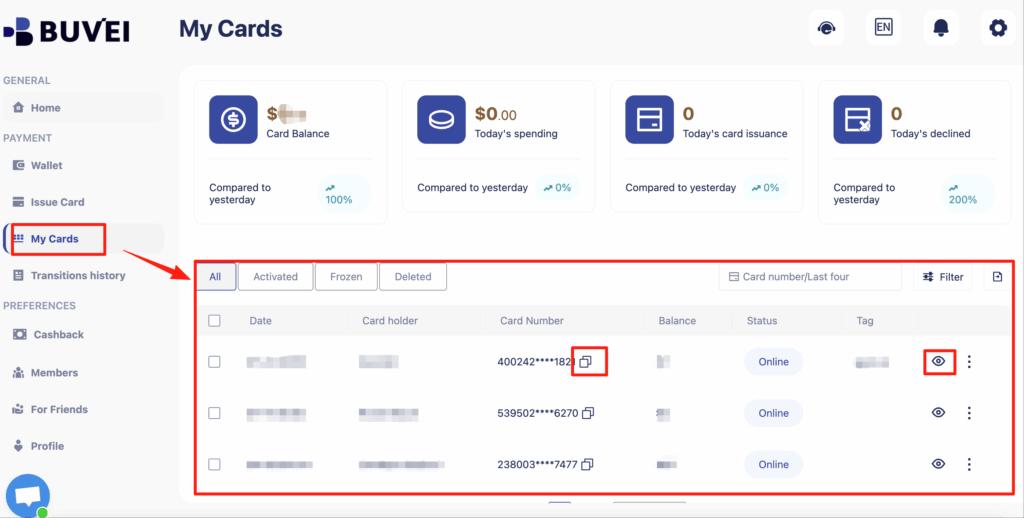
You’ll immediately receive:
-
Card number
-
Expiration date
-
CVV
-
Complete the payment setup and confirm.
Buvei currently have a promotion: new registered users get a $5 sign-up coupon. You can claim it simply by registering.

Long-term inactive users will receive a 40% discount coupon.

How Buvei Virtual Cards Help Simplify Payments for Jira & Confluence
Buvei virtual cards make managing Jira and Confluence subscriptions much easier, offering several advantages:
-
Multiple Cards for Multiple Accounts: Manage subscriptions for different teams or clients with separate virtual cards, making budget tracking simple.
-
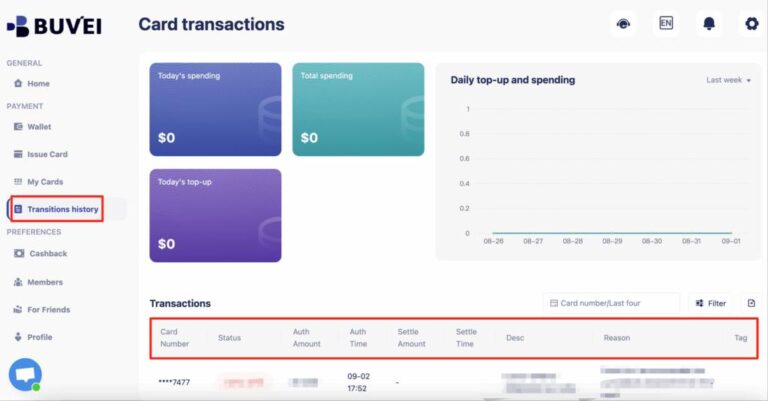
Real-Time Transaction Visibility: Monitor every transaction in real-time through your Buvei dashboard.
-
Flexible Funding: Top up your virtual cards as needed, avoiding overpaying for unused subscription time.
-
Instant Payments: Virtual cards are processed instantly, ensuring no delays in accessing your tools.
-
Better Control Over Spending: Set specific spending limits and control how much you want to spend on Jira and Confluence each month.
With Buvei’s virtual cards, you can ensure smooth payments and prevent disruptions in your subscription access.

Final Thoughts
Managing Jira and Confluence subscription payments can be hassle-free when you use virtual cards. By setting up Buvei virtual cards, you get the security, flexibility, and control you need to handle your subscriptions with ease. Avoid payment failures and keep your accounts active without worrying about payment issues.