Cross-border online shopping has become routine. From ordering electronics on Amazon to sourcing products on AliExpress or niche international marketplaces, consumers now buy globally with just a few clicks.
However, international e-commerce payments often come with challenges—unexpected card declines, currency conversion issues, and increased fraud checks. To reduce friction and protect sensitive financial data, many shoppers now rely on virtual cards for online shopping, especially for global purchases.
This guide explains common cross-border payment issues, how to set up a virtual card with Buvei, and how to use virtual cards safely on major international e-commerce platforms.

Common Payment Challenges in Global Online Shopping
International online purchases are treated differently by payment processors than domestic transactions. Even valid cards may be declined due to risk controls.
Common challenges include:
-
Card declines caused by cross-border fraud checks
-
Currency conversion fees and unclear exchange rates
-
Cards blocked after repeated international purchases
-
Limited spending control on shared or primary cards
These issues can disrupt purchases or expose your main bank card to unnecessary risk.
Why Virtual Cards Are Effective for Global Purchases
Virtual cards are designed for online payments and offer greater flexibility for international shopping.
Key advantages include:
-
Higher acceptance rates on global platforms
-
Better security, as real card details are not exposed
-
Spending limits to control international purchases
-
Easy replacement if a card is declined or compromised
For frequent international shoppers, virtual cards provide a safer and more predictable payment experience.
How to Open a Virtual Card with Buvei
Below is a step-by-step tutorial showing how to create a virtual card for online shopping using Buvei.
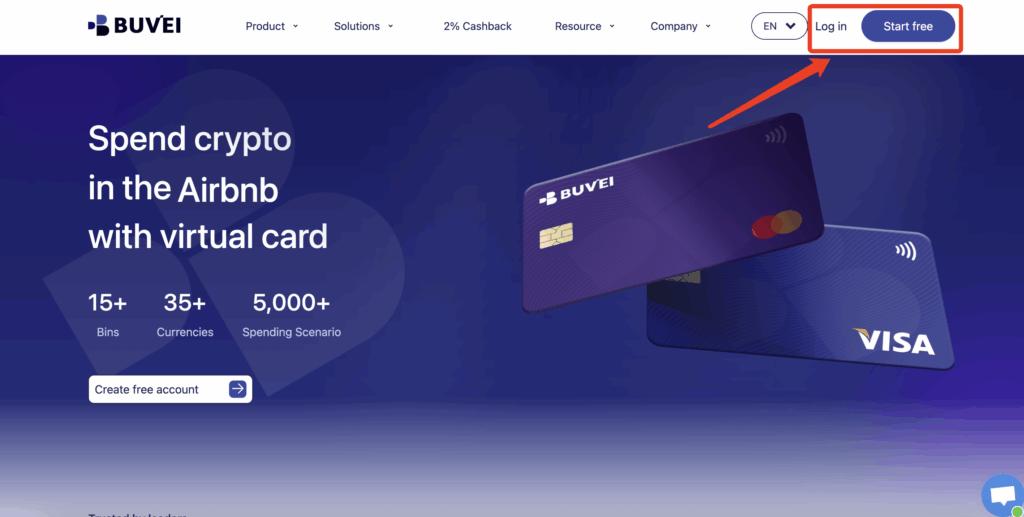
Step 1: Register a Buvei Account
-
Visit https://buvei.com
-
Create a free account
-
Complete email verification
-
Log in to access the Buvei dashboard
The registration process is fast and user-friendly.
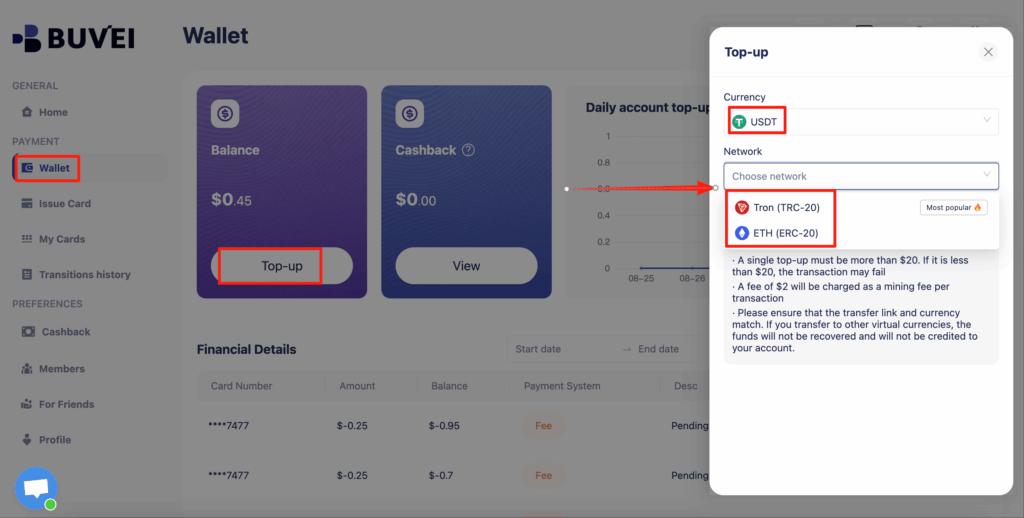
Step 2: Fund Your Buvei Wallet
-
Go to the “Wallet” tab
-
Select USDT (TRC20 or ERC20) as the top-up method
-
Copy your dedicated deposit address
-
Send USDT to that address
Once confirmed, your balance will be available immediately.
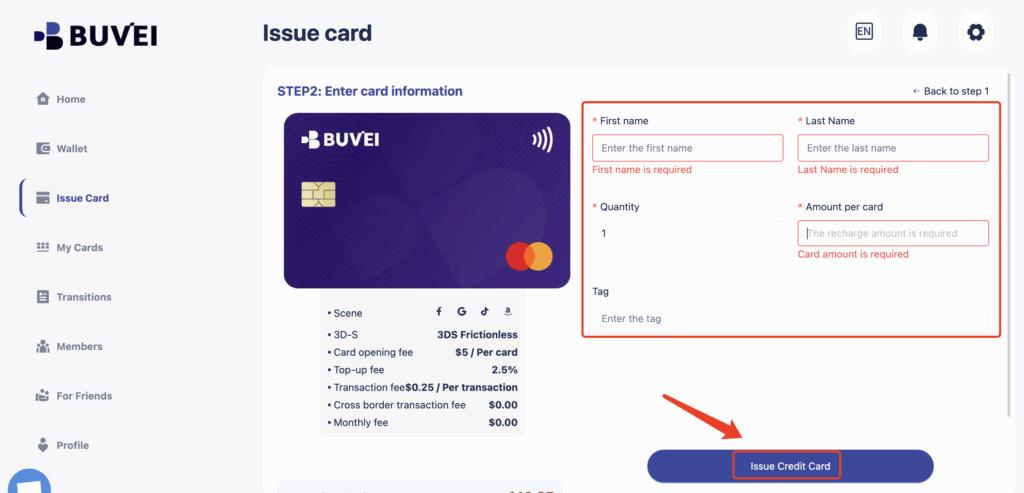
Step 3: Create a Virtual Card for Online Shopping
-
Navigate to the “Cards” tab
-
Choose a BIN region
(U.S. BINs are often recommended for international e-commerce) -
Select the card type
-
Click “Create Card”

-
Enter:
-
Card name (e.g., “Global Online Shopping”)
-
Card funding amount
-
Number of cards
-
-
Click “Issue Card”
After issuance, go to “My Cards” to view:
-
Card number
-
Expiration date
-
CVV
-
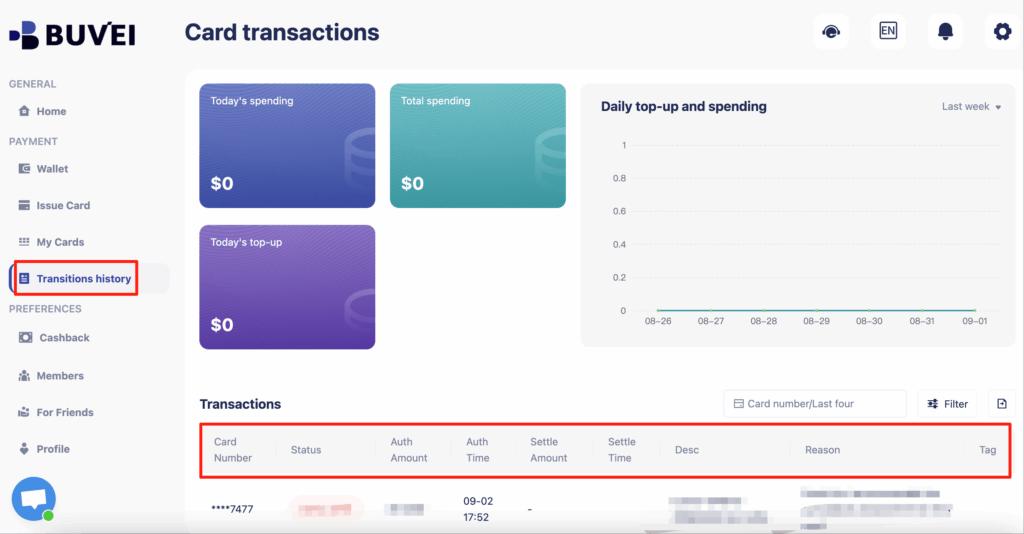
Transaction history
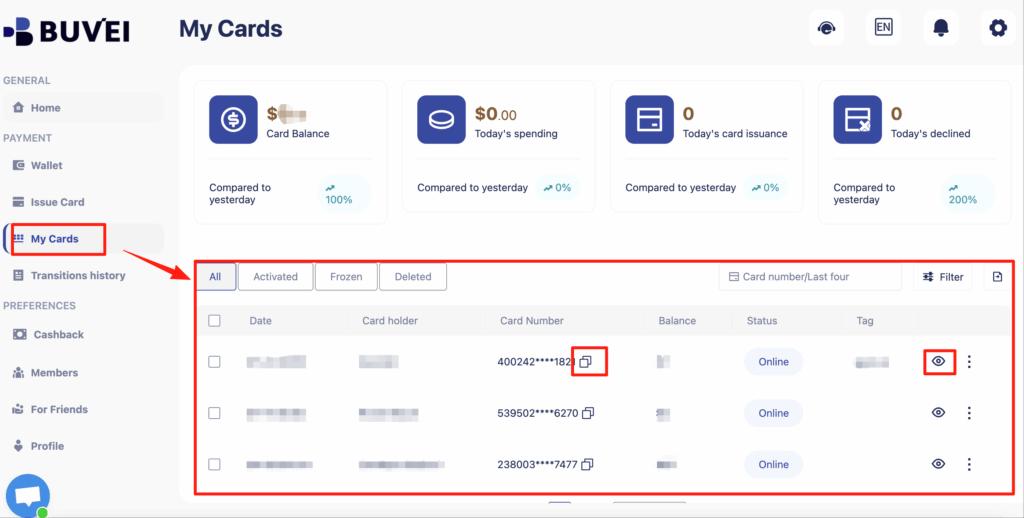
You can also track balances, top-ups, and all transaction activity from this page.
Using Virtual Cards on International E-commerce Platforms
Most international e-commerce platforms treat virtual cards the same as physical cards, provided they are issued by major networks like Visa or Mastercard.
Virtual cards work well on:
-
Global marketplaces
-
Brand websites shipping internationally
-
Cross-border dropshipping and retail platforms
To use a virtual card:
-
Go to the checkout page
-
Choose Credit/Debit Card
-
Enter the virtual card details
-
Complete payment
You can track the transaction in real time from the Buvei dashboard.
Paying on Amazon, AliExpress, and Global Marketplaces
Amazon (International Stores)
Amazon supports virtual cards across most regional stores. Best practices include:
-
Use a U.S. BIN virtual card
-
Ensure sufficient balance before checkout
-
Avoid frequent payment retries
AliExpress and Similar Platforms
AliExpress and other global marketplaces typically accept virtual cards without issues.
Tips for success:
-
Use a dedicated virtual card for international shopping
-
Set appropriate spending limits
-
Monitor transactions after checkout
Using separate virtual cards can reduce the risk of account flags or card blocks.
Currency Conversion and Cross-Border Payment Tips
To optimize international shopping payments:
-
Be aware of currency conversion rates applied at checkout
-
Avoid unnecessary repeated payment attempts
-
Keep a buffer balance to cover exchange rate fluctuations
-
Monitor fees in your card dashboard
Buvei’s transparent fee structure makes it easier to understand costs before completing a purchase.
Managing Spending Limits and Card Security
One of the biggest advantages of virtual cards is control.
With virtual cards, you can:
-
Set spending limits per card
-
Use separate cards for different platforms
-
Disable a card instantly if suspicious activity occurs
-
Avoid exposing your primary bank card online
This makes virtual cards ideal for frequent online shopping across multiple international platforms.
Final Thoughts
Global e-commerce offers convenience and access—but also introduces payment complexity. For many shoppers, virtual cards for online shopping provide a safer and more flexible way to manage international purchases.
By using Buvei virtual cards, you can shop on Amazon, AliExpress, and other global marketplaces with greater control, improved acceptance rates, and reduced risk—without relying on your primary bank card.