
Singapore is one of Asia’s most advanced digital payment markets. Apple Pay is widely accepted across retail, e-commerce, and app ecosystems.
For cross-border transactions—such as overseas travel, international subscriptions, and global SaaS platforms—many users prefer adding virtual cards to Apple Pay for added flexibility and spending control.

How Apple Pay Works for Cross-Border Transactions in Singapore
Apple Pay operates through tokenization. When a card is added:
-
The actual card number is replaced with a device-specific token
-
Payments are authorized using Face ID or Touch ID
-
Merchants do not receive the original card details
For cross-border payments, Apple Pay:
-
Processes transactions in foreign currencies
-
Relies on the underlying card network (Visa/Mastercard)
-
Applies exchange rates and possible foreign transaction fees
The international compatibility of the payment depends primarily on the card added to Apple Pay.
Why Apple Pay Users Prefer Virtual Cards for Global Payments
Singapore-based users frequently engage with:
-
US-based SaaS platforms
-
Global streaming services
-
International e-commerce stores
-
Overseas travel bookings
Virtual cards offer advantages for these use cases.
Controlled Spending
Users can allocate specific amounts for subscriptions or travel.
Transaction Isolation
Separate cards reduce exposure if a merchant is compromised.
Easier Replacement
If a card is declined or compromised, a new one can be issued quickly.
No Direct Link to Primary Bank Account
Prepaid virtual cards reduce direct exposure of core banking details.
For cross-border usage, this structure offers greater flexibility than relying solely on a primary debit or credit card.
How to Set Up Virtual Cards for Apple Pay Cross-Border Transactions
The setup typically involves:
Step 1: Obtain a Compatible Virtual Card
Ensure the card supports mobile wallet integration and international transactions.
Step 2: Add the Card to Apple Pay
Open the Wallet app and enter card details manually or scan the card information.
Step 3: Verify the Card
Complete any required authentication steps.
Step 4: Use for International Payments
The card can now be used for:
-
Overseas retail
-
Online subscriptions
-
Travel bookings
-
Cross-border e-commerce
Always verify foreign transaction fees and currency conversion terms before use.

Key Benefits of Using Virtual Cards for International Apple Pay Payments
Enhanced Security
Tokenization plus prepaid limits reduce fraud exposure.
Budget Management
Separate cards for travel, SaaS, or shopping.
Cross-Border Compatibility
Using a widely accepted BIN region (e.g., US) can improve international acceptance.
Faster Card Replacement
Instant re-issuance reduces downtime in case of payment issues.
These benefits make virtual cards attractive for Singapore residents frequently transacting internationally.
Using Buvei Virtual Cards for Secure Cross-Border Payments
Buvei provides virtual cards designed for international online payments and structured spending control.
Key features include:
-
USDT (TRC20/ERC20) funding
-
Instant virtual card issuance
-
US BIN option for broader global compatibility
-
Adjustable spending limits
-
Multi-card management
-
Real-time transaction monitoring
This setup is particularly useful for:
-
International subscriptions
-
SaaS platforms billed in USD
-
Travel expenses
-
Cross-border e-commerce
When combined with Apple Pay’s tokenization, virtual cards add an extra control layer for cross-border transactions.

How to Get a Buvei Virtual Card
Below is the standard process.
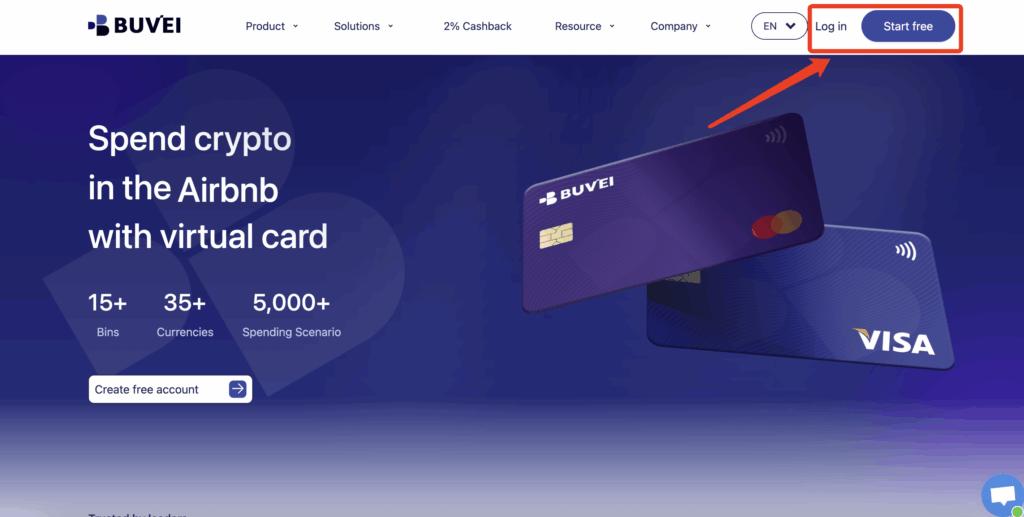
Step 1: Register a Buvei Account
-
Visit https://buvei.com
-
Create a free account
-
Complete email verification
-
Log in to access the Buvei dashboard
Step 2: Fund Your Account
-
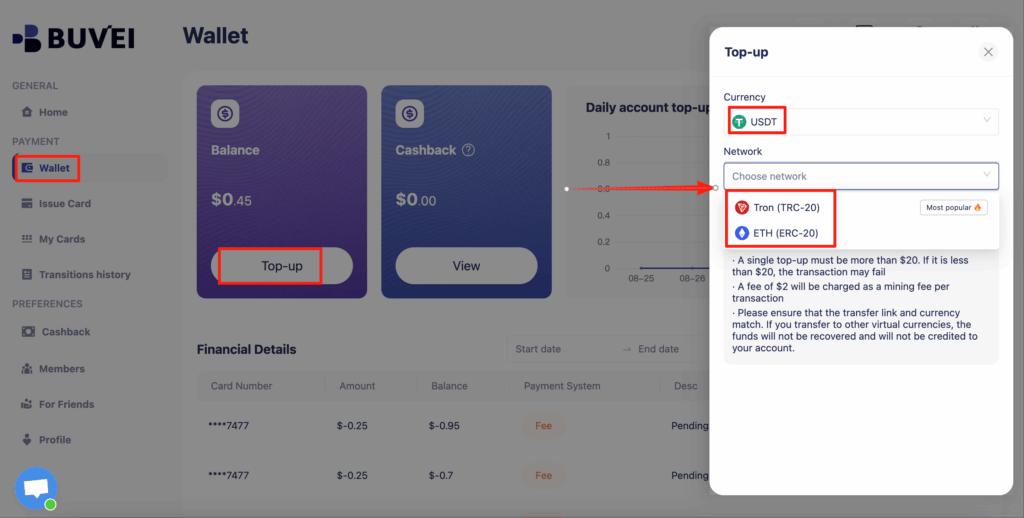
Go to the “Wallet” tab
-
Deposit using USDT (TRC20 or ERC20)
-
Copy your dedicated deposit address
-
Transfer funds
-
After confirmation, your balance will appear in your wallet
Funds are available for issuing virtual cards immediately after confirmation.
Step 3: Create a Virtual Card
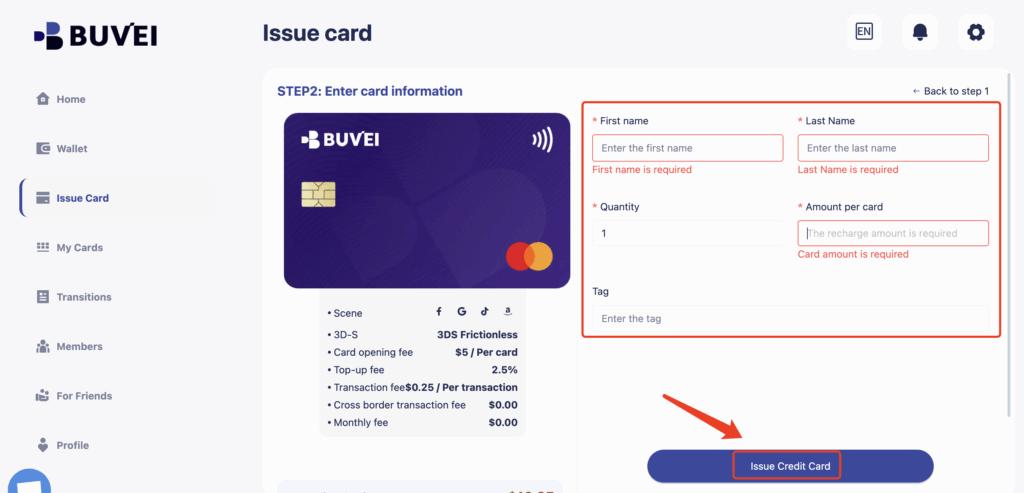
Go to the “Cards” tab
Select your preferred BIN region (US BIN recommended for cross-border compatibility)
Choose your card type

Click “Issue”
Enter:
-
-
Card name
-
Amount
-
Card quantity
-
Click “Issue Card”
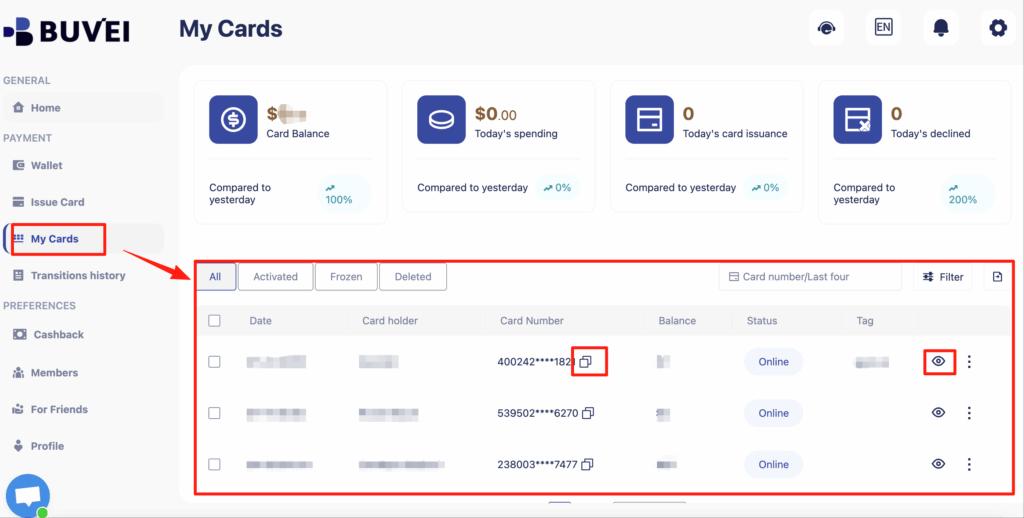
After creation, go to “My Cards” to view:
-
Card number
-
Expiry date
CVV
-
Recharge and spending overview
-
Complete transaction history
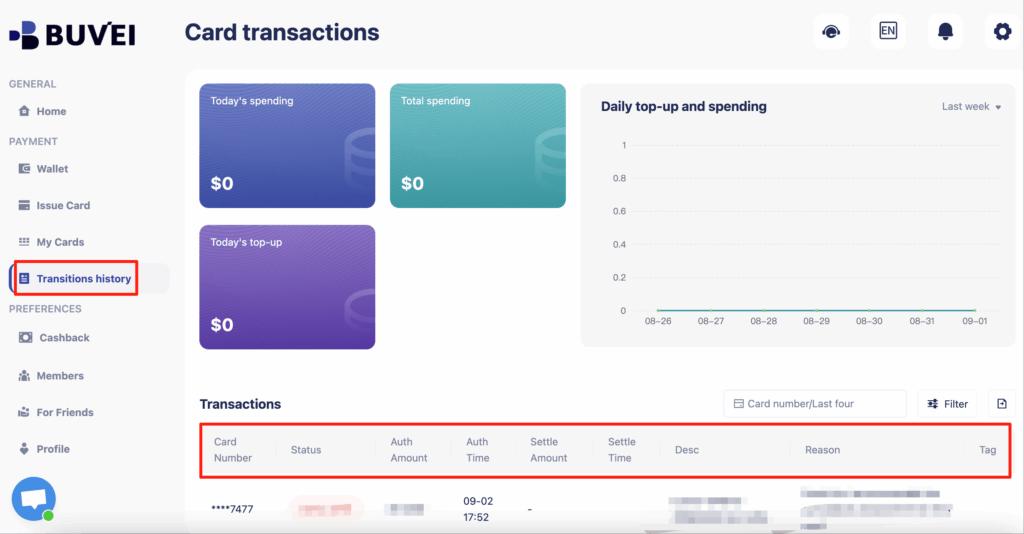
You can then add the card to Apple Pay (if supported) for international payments.
Conclusion
Apple Pay is widely used in Singapore and supports cross-border transactions through card network processing. The underlying card determines international compatibility, foreign exchange handling, and transaction security.
Virtual cards provide additional control, spending isolation, and easier management for global payments. For users engaging in frequent cross-border transactions, combining Apple Pay with structured virtual card solutions offers both flexibility and enhanced protection.