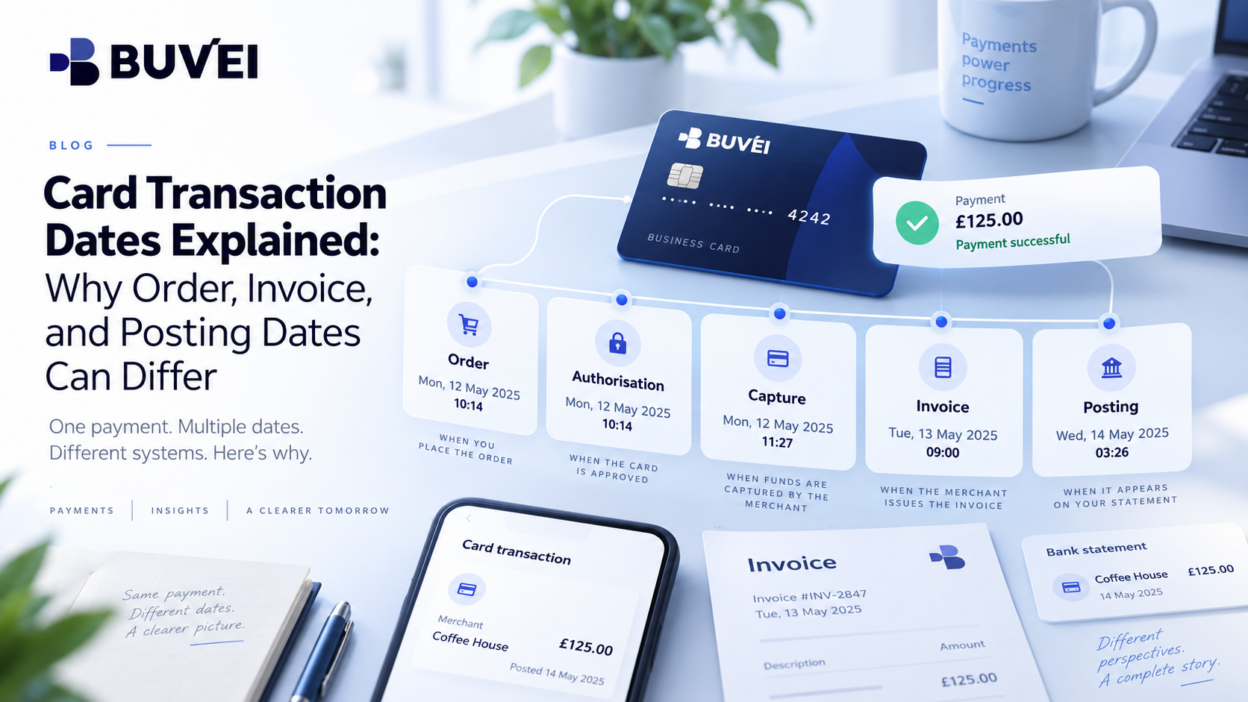
A card payment can involve several different dates — and they do not always fall on the same calendar day.
A team might place an order on Friday, receive an invoice on Saturday, and see the card transaction posted on Monday. None of those dates necessarily has to be wrong.
They may simply represent different stages of the same payment, recorded by different systems, in different time zones, and under different processing rules.
Understanding the difference between order date, authorisation date, invoice date, and posting date makes payment reconciliation much easier.
One Purchase Can Create Several Dates
A single purchase can generate multiple timestamps, including:
- order or checkout time,
- card authorisation,
- merchant capture,
- invoice creation,
- card posting, and
- settlement.
These events do not all happen at the same moment.
For example, an order may be placed at 23:58, authorised immediately, and captured after midnight. The order and final card transaction can therefore appear on different days even though they belong to the same purchase.
The key question is not simply:
“Which date is correct?”
It is:
“What event does this date represent?”
Order, Authorisation, and Posting Dates Explained
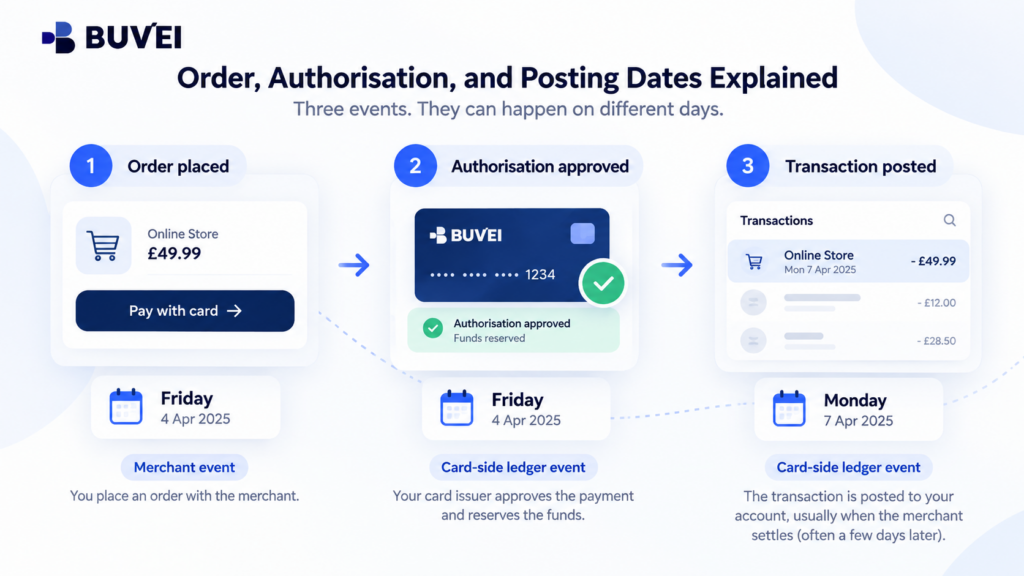
These three dates are often confused.
The order date usually reflects when the customer submitted the purchase.
The authorisation date reflects when the merchant first requested approval from the card system.
The posting date reflects when the transaction becomes a completed card-side ledger entry.
These dates can differ because merchants do not always capture payments immediately.
For example:
Friday: Order placed and card authorised
Monday: Merchant completes capture and the transaction posts
A Friday authorisation appearing as a Monday posted transaction can therefore be part of a normal payment flow.
How Time Zones Affect Transaction Dates
The merchant's system may not use the buyer's local time zone.
A global service may record transactions according to its:
- headquarters,
- billing entity,
- account region,
- system settings, or
- UTC.
That means the same event can appear on different calendar dates depending on where it is viewed.
For example, a buyer in Europe may see a payment dated one day differently from a US-based merchant portal.
Before treating two dates as inconsistent, check the time zone used by each system.
Why Invoice Dates Can Be Different
An invoice date follows the merchant's commercial or accounting process.
It may be created when:
- an order is accepted,
- a service period begins,
- goods are shipped, or
- a billing cycle closes.
Because of this, the invoice date does not have to match the card posting date.
For example, a subscription invoice may be dated on the final day of the billing period while the card charge is processed the following morning.
Both records can be correct because they describe different events.
Weekends, Holidays, and Processing Delays
Digital services can activate immediately even when the final card posting happens later.
For example:
Saturday: Subscription authorised and service activated
Monday: Transaction appears as completed
Weekends, holidays, merchant capture schedules, and processing cycles can all affect when a card transaction posts.
Daylight-saving changes can also shift the displayed local time even when the underlying UTC timestamp stays the same.
So a difference of several hours — or sometimes one or two days — does not automatically mean something went wrong.
Why Dates Matter for Month-End Reporting
Date differences become especially important around month-end.
A transaction authorised in one month may post in the next.
For example:
December 31: Authorisation
January 2: Posting
If one report uses authorisation date and another uses posting date, the same payment can appear in different reporting periods.
Teams should therefore define which date is used for:
- budgeting,
- accounting,
- expense reporting,
- and card reconciliation.
The important thing is consistency.
Dashboard and Export Dates May Also Differ
A dashboard and CSV export can show different-looking timestamps even when they refer to the same event.
For example:
Dashboard: 10:05 CET
CSV: 09:05Z
These can represent exactly the same moment.
Before comparing timestamps, check whether:
- the dashboard converts time automatically,
- the export uses UTC,
- and daylight saving is involved.
How Buvei Helps With Date Reconciliation
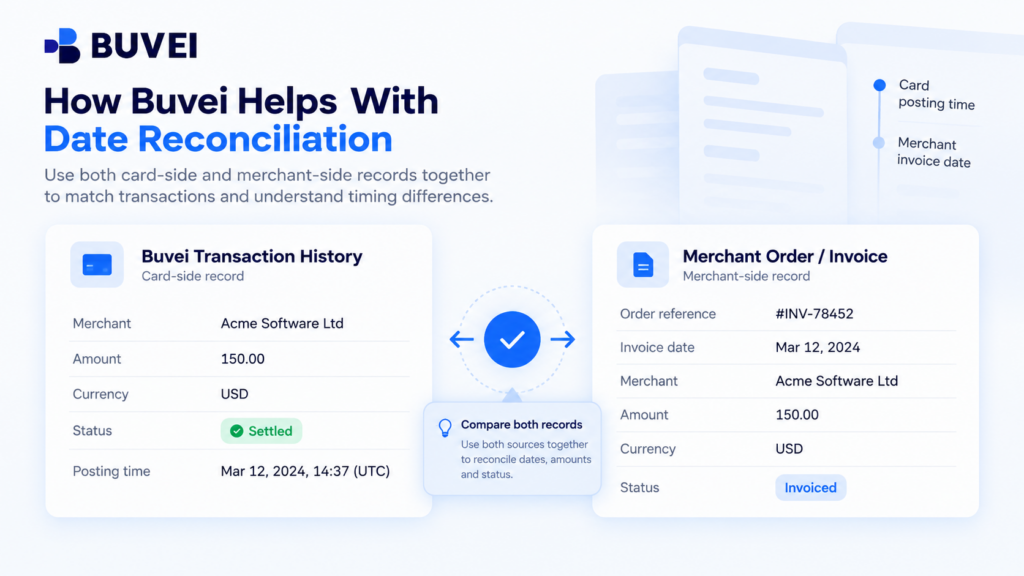
Where transaction history and exports are available for the relevant account, Buvei records can help provide the card-side timeline of a payment.
Merchant orders and invoices provide the commercial timeline.
These records should be used together.
For example, compare:
- merchant name,
- amount,
- currency,
- order or invoice reference,
- transaction status,
- and timestamps.
The merchant invoice explains when the commercial charge was created, while the Buvei transaction record helps confirm how and when the payment was processed on the card side.
Keeping both records linked makes future reconciliation easier without changing either source date.
How to Reconcile Different Payment Dates
When two payment dates do not match, use a simple review process:
- Identify the event — order, authorisation, capture, invoice, posting, or settlement.
- Check the time zone used by each system.
- Compare merchant and card records using amount, currency, and reference information.
- Review weekends, holidays, or delayed capture.
- Keep the original timestamps rather than editing them to match.
- Investigate only when the timing no longer fits the expected payment flow.
A useful timeline is:
Order → Authorisation → Capture → Invoice → Posting → Settlement
The goal is not to make every system show the same date.
It is to make the payment sequence clear enough that another person can understand and reproduce the reconciliation.
Final Takeaway
Card, invoice, and order dates do not always match because they represent different stages of a payment.
Time zones, merchant capture timing, billing cycles, weekends, and card processing can all shift when a transaction appears.
Instead of choosing one date as the only “correct” date, keep the original records and understand what each timestamp represents.
Once the timeline is clear, most date differences become much easier to explain.