Higgsfield AI has become a popular option for creators who want to generate and edit AI-powered videos and images. If you're looking for a Higgsfield AI virtual card to pay for a subscription, start by choosing a plan and completing the online checkout.
If you prefer to keep AI subscriptions separate from your primary bank card, a virtual card can be a convenient way to pay. However, paying for a subscription is slightly different from making a one-time online purchase. The card needs to cover the actual checkout amount, and future renewal charges may also depend on how the card and issuer handle recurring payments.
This guide walks through the Higgsfield AI payment process, from choosing a plan and preparing a virtual card to completing the checkout and checking the transaction afterward.
Can You Pay for Higgsfield AI With a Virtual Card?
Higgsfield accepts card payments through its online checkout, with available payment methods depending on your location.
Higgsfield uses Stripe Checkout for card payments. Virtual cards are not listed as a separate payment method, so acceptance depends on factors such as the card issuer, payment network, region, and transaction requirements.
If your virtual card is processed as a supported card payment, you can enter its details during the normal Higgsfield checkout.
How to Pay for Higgsfield AI With a Virtual Card
Once you have a Higgsfield account and a virtual card ready to use, you can complete the subscription payment through the regular checkout process.
Step 1: Choose a Higgsfield Plan
Sign in to your Higgsfield account and open the pricing page.
Choose the plan you want and select the available billing cycle. Higgsfield offers monthly and annual subscription options for individual plans.
Before continuing, check the plan price and the credits or features included with the subscription.
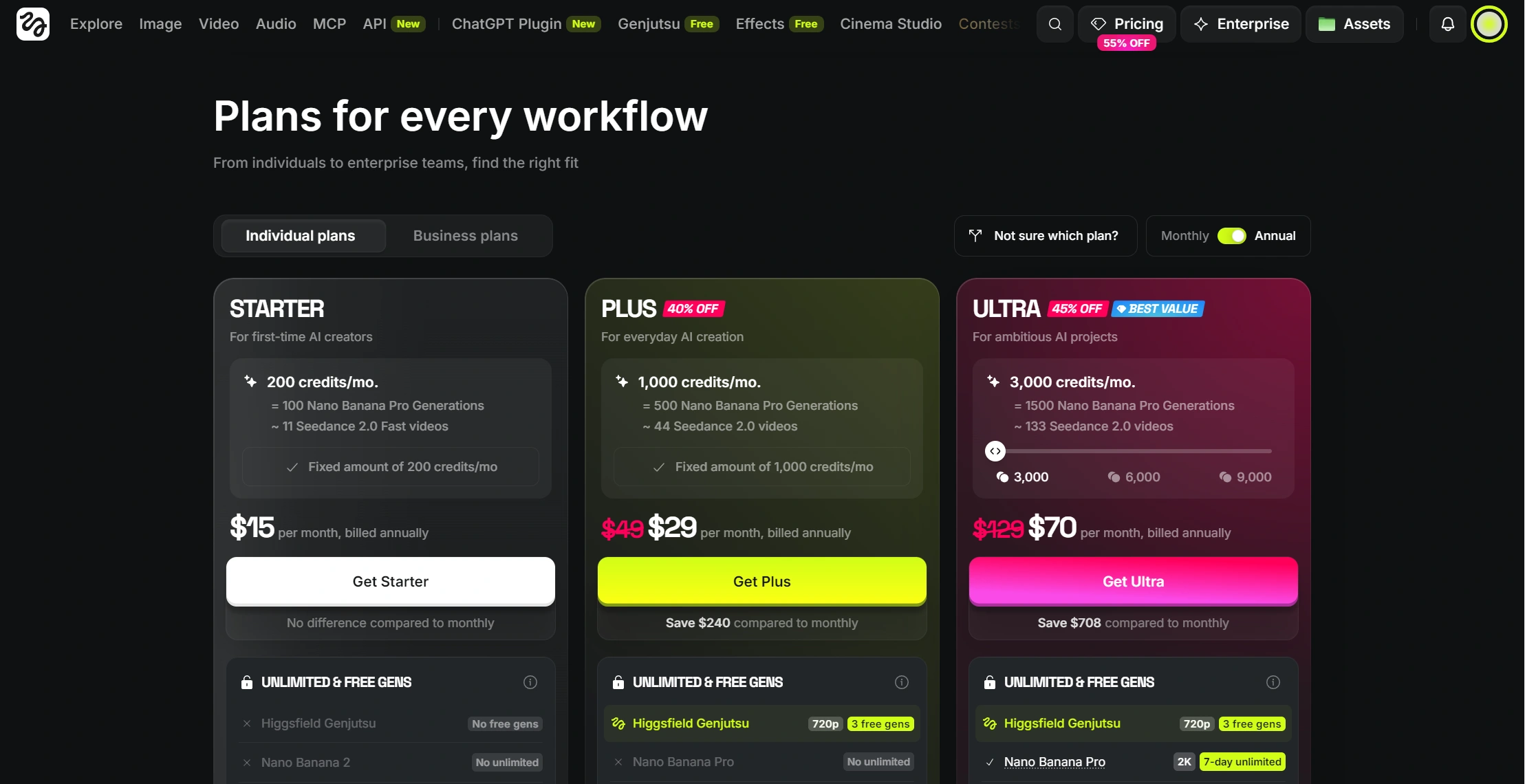
Select the plan and continue to checkout.
Step 2: Create or Prepare Your Virtual Card
If you already have a virtual card, check its status, expiration date, and available balance before continuing. You should also have the card number and CVV/CVC available.
If you need a virtual card, BUVEI lets you create one online before returning to the Higgsfield checkout. You can create and manage your cards through the BUVEI platform, while the BUVEI App provides a mobile way to access your virtual cards, balances, and payment activity.
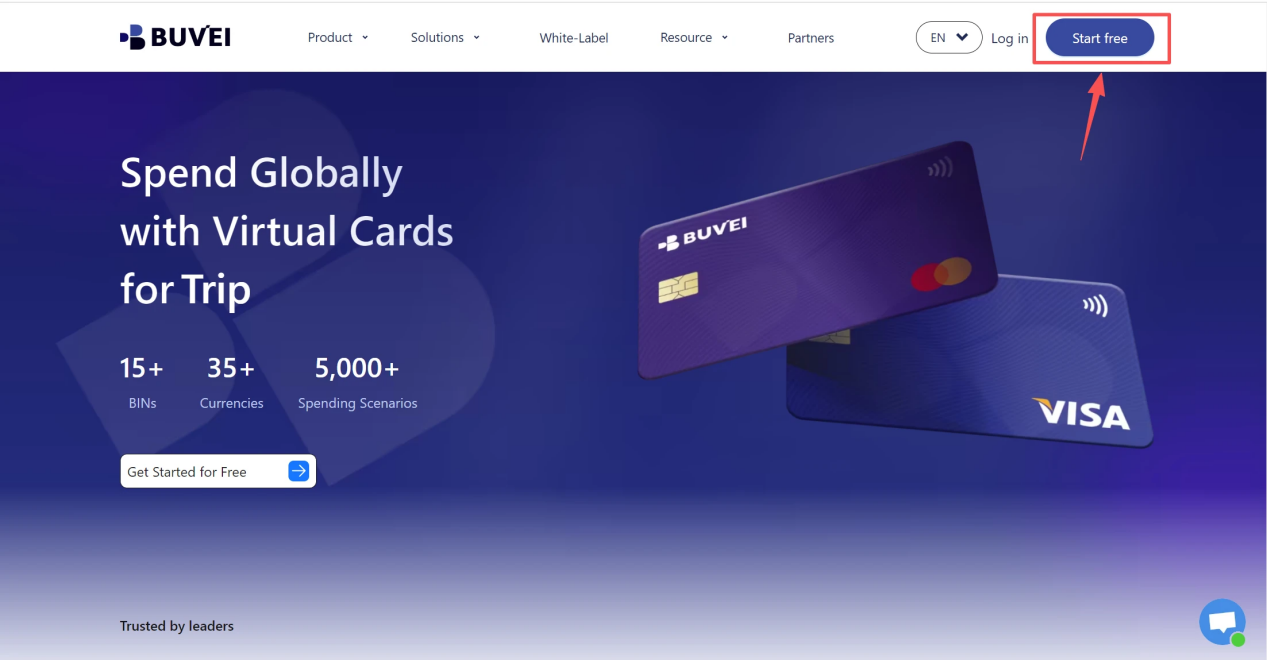
1.Sign up/Sign in at buvei.com
- If you haven’t signed up yet, simply click 'Start Free' to register quickly with your email.
2.Create a Virtual Card
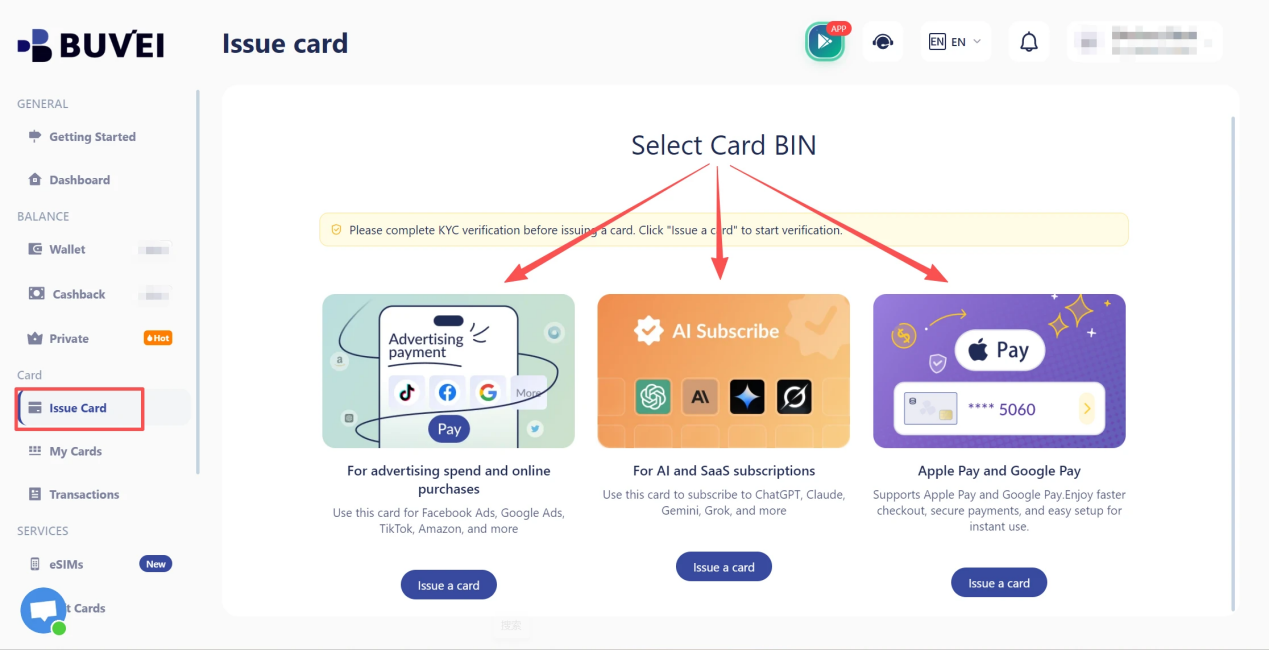
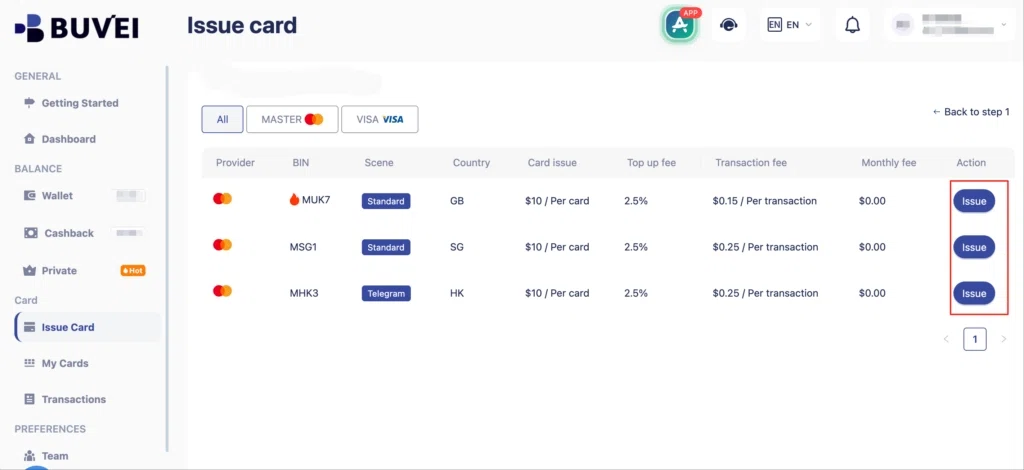
- Go to the Card tab
- Choose your preferred BIN region , (recommends using US BIN)
- Select your card type
- Click Issue
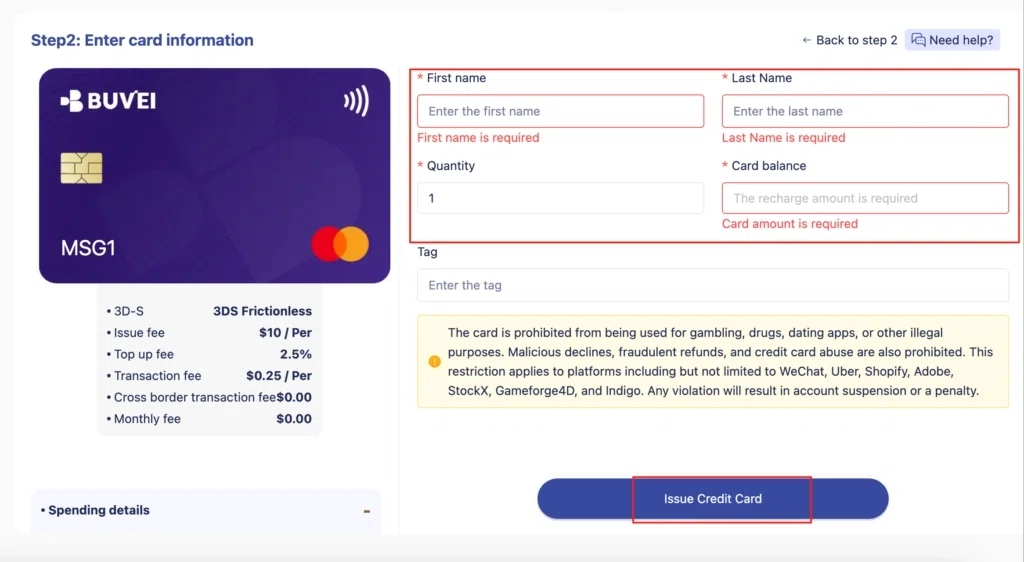
- Fill in the virtual card details, including name, amount, and number of cards.
- Click Issue Card
3.Check your balance
Check the available balance before returning to Higgsfield. It should be enough to cover the final amount shown at checkout, rather than only the base price displayed on the pricing page.
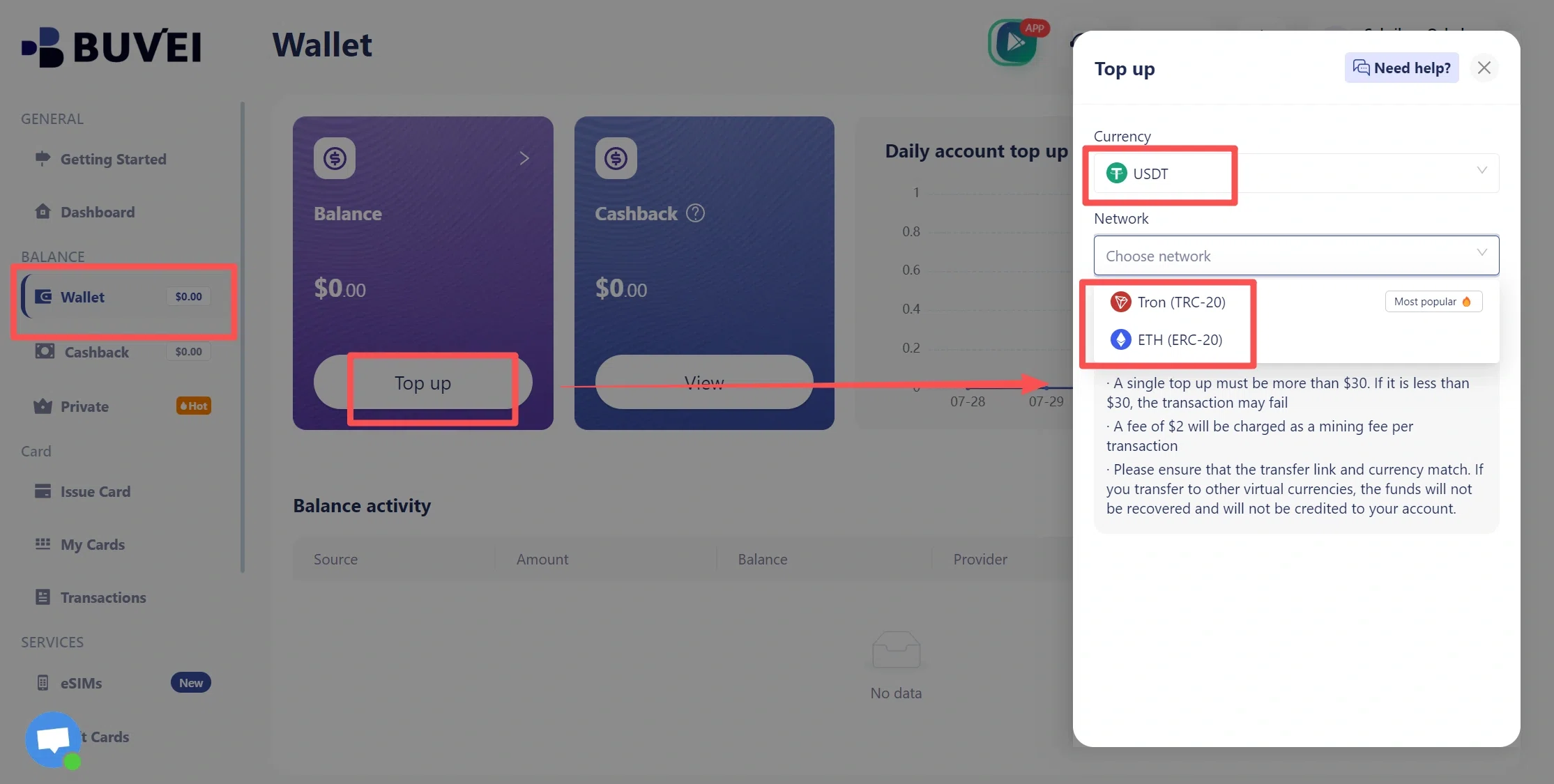
- Navigate to the Wallet tab and top up using supported stablecoins like USDT (TRC20/ERC20). You’ll receive a unique address—copy it and send your funds.
- Once confirmed, your balance will appear in the wallet for immediate use.
Step 3: Enter Your Virtual Card Details
Return to the Higgsfield checkout and select the card payment option.
Enter the card number, expiration date, and CVV/CVC shown on your virtual card. If the checkout requests billing information, enter the required details accurately.
Higgsfield uses Stripe Checkout, so the payment page may look different from the main Higgsfield interface.
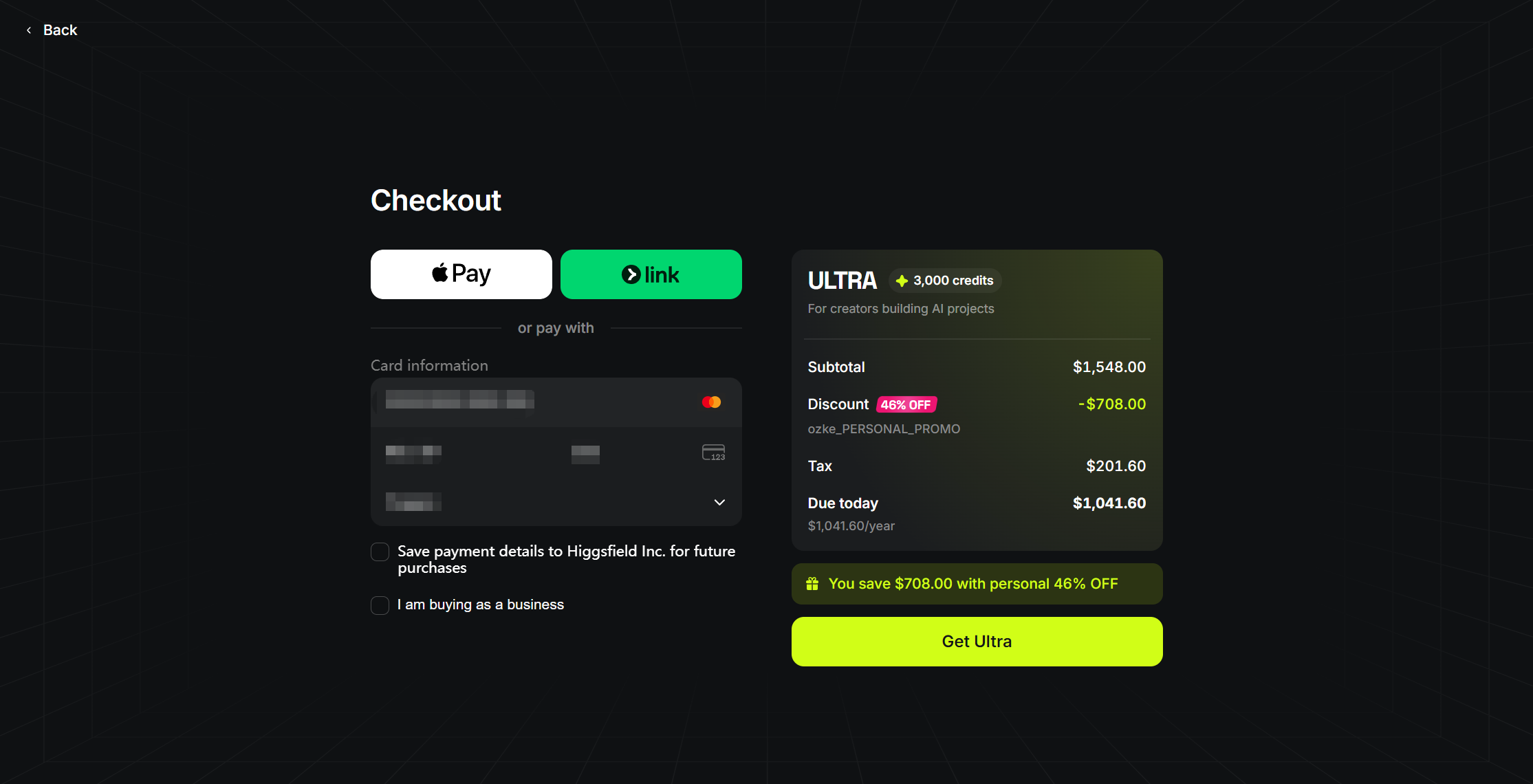
Review the information before submitting the payment. An incorrect card number, expiration date, or security code can cause the transaction to fail.
Step 4: Review the Final Checkout Amount
Before confirming the payment, check the final amount shown on the checkout page.
The price displayed on the pricing page is not necessarily the final amount you will pay. Depending on your billing location, applicable taxes may be added during checkout.
Check the plan, billing cycle, tax, and final total before paying. Your virtual card should have enough available balance to cover the amount actually shown at checkout.
Step 5: Complete the Payment
Once the card details and final amount look correct, submit the payment.
Depending on the transaction and card issuer, an additional authentication step such as 3D Secure may appear. If verification is required, complete it before leaving the checkout page.
Avoid refreshing the page or submitting the payment repeatedly while the first attempt is still processing.
If the checkout does not immediately show a final result, check the transaction status before trying again. Once the payment is confirmed, check your Higgsfield account to make sure the subscription is active.
How to Check Your Higgsfield Subscription Payment
After paying, check both sides of the transaction if you want to confirm that the payment was processed correctly.
Check Your Higgsfield Subscription and Invoice
Open the subscription or billing section of your Higgsfield account. You can review your current subscription, upcoming invoice, billing information, and previous invoices. This helps confirm the plan and amount associated with the subscription.
Check the Transaction in BUVEI
If you used a BUVEI virtual card, you can also review the payment from your BUVEI dashboard.
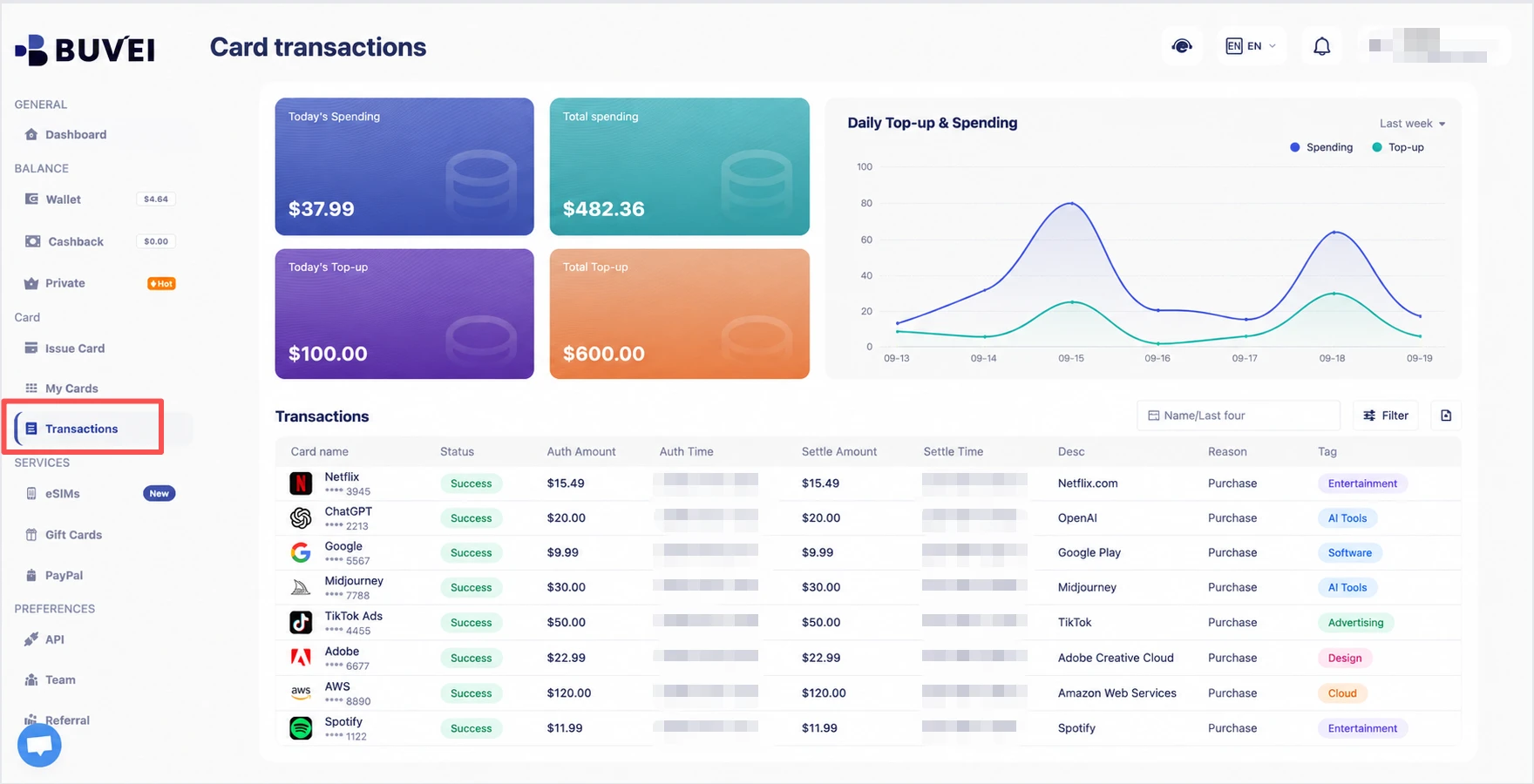
Compare the transaction amount, currency, merchant information, time, and status with the payment or invoice shown by Higgsfield.
This is especially useful if you made more than one payment attempt or need transaction details when checking a payment issue.
What to Do If Your Higgsfield AI Payment Is Declined
If Higgsfield declines the payment, check the original transaction before immediately trying again.
Check Your Card Details
Make sure the card number, expiration date, and CVV/CVC are correct. If billing information is required, check that as well.
Check Your Available Balance
Make sure the virtual card has enough available balance to cover the final checkout amount, including any applicable tax.
Complete Any Required Verification
If the payment page asks for additional authentication, complete the verification before submitting another payment. An incomplete 3D Secure step can prevent a card payment from being completed.
Check the First Payment Before Retrying
If you have already submitted the payment once, check the transaction status before trying again.
A transaction that is still pending should not automatically be treated as a failed payment. Submitting another payment too quickly can create another authorization and make it harder to determine which transaction was completed.
If Higgsfield confirms that the first attempt failed, review the card details and try again if appropriate.

Will Higgsfield Automatically Charge Your Virtual Card?
Higgsfield subscriptions renew automatically according to the selected billing cycle. This means the payment method associated with the subscription may be charged again when the next billing period begins.
For virtual card users, a successful first payment does not necessarily mean every future renewal will be processed in the same way. Recurring payment acceptance can depend on the specific card and issuer.
Monthly and Annual Renewals
Monthly subscriptions renew each month, while annual subscriptions renew each year unless the subscription is canceled. The renewal date depends on when the subscription started and the billing cycle selected.
What to Check Before Renewal
Before a renewal, check that the virtual card is still active, has enough available balance, and has not expired.
It is also worth confirming that the card supports the type of recurring transaction involved. Whether a particular virtual card can be charged successfully for a recurring renewal depends on the card issuer and its supported transaction types.
Keeping track of upcoming subscription charges can help avoid renewal problems caused by an expired card or insufficient balance.
Frequently Asked Questions
Can I pay for Higgsfield AI with a virtual card?
Higgsfield supports card payments through its checkout, but it does not list virtual cards as a separate payment method. Whether a particular virtual card is accepted depends on factors such as the card issuer, payment network, region, and transaction requirements.
Can I use a virtual card for Higgsfield’s monthly subscription?
Higgsfield supports automatic subscription renewals, but recurring payment acceptance can depend on the specific virtual card and its issuer. Make sure the card remains active and has sufficient available balance for future charges.
Why was my Higgsfield payment declined?
Check the card details, available balance, billing information, and any required payment authentication. If the first attempt is still pending, check its status before submitting another payment.
Will Higgsfield charge tax at checkout?
Applicable taxes may be added based on your billing location, so the final amount shown at checkout can be higher than the base subscription price.
Conclusion
Paying for Higgsfield AI with a virtual card follows the normal card checkout process when the card is accepted. The main things to check are the final checkout amount, any required verification, and the card’s ability to support future subscription renewals.
If you use BUVEI, you can create and manage your virtual card before checkout and review your payment activity afterward. You can also manage your cards and payment activity through the BUVEI App when you prefer to handle payments from your phone.