A Kling AI virtual card can be a practical option for users who pay for a subscription or purchase additional Credits as they use the platform more regularly. It allows you to keep Kling AI payments separate from your primary debit or credit card.
The payment process is similar to other online purchases, but there are a few details worth checking before you submit a transaction. The selected plan or Credits option, total amount, billing information, and card restrictions can all affect whether the payment goes through successfully.
This guide explains how to use a virtual card for Kling AI payments, from choosing what you want to purchase to completing checkout and dealing with common payment issues.
Choose What You Want to Buy on Kling AI
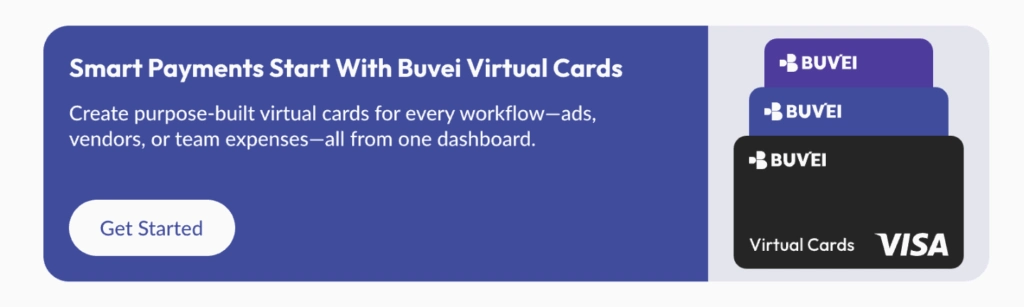
Kling AI offers more than one way to pay for access and generation resources. Before creating a card or heading to checkout, decide whether you need a recurring subscription or additional Credits.
Kling AI Subscription
A subscription is designed for users who regularly use Kling AI. The plans currently displayed on the platform include Standard, Pro, Premier, and Ultra, with monthly and yearly billing options available for certain plans.
Plan availability, pricing, and promotions can change, so check the options displayed in your Kling AI account before completing a purchase.
Kling AI Credits
Kling AI also allows users to purchase Credits separately. This provides another way to add generation capacity without necessarily changing a subscription.
Before purchasing, check the number of Credits included and the total amount shown at checkout.
Create a BUVEI Virtual Card for Kling AI
Already have a virtual card ready for online payments? You can skip to the checkout section.
If you need one, create a BUVEI virtual card before returning to Kling AI. Having the card ready beforehand makes the payment process easier because you can access the required card information when you reach checkout.
Sign In and Open the Card Creation Page
visit https://buvei.com, then click 'Start Free' to register quickly with your email.
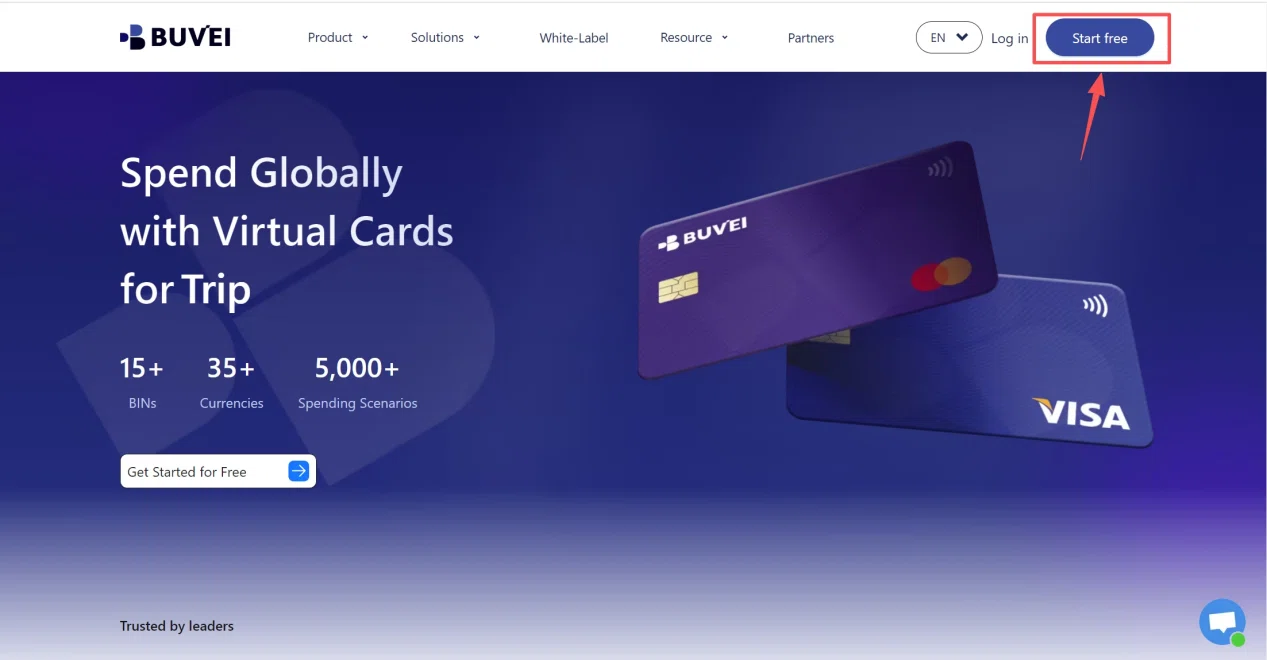
Sign in to your BUVEI account and open the dashboard. From there, go to the card section where you can create and manage your virtual cards.
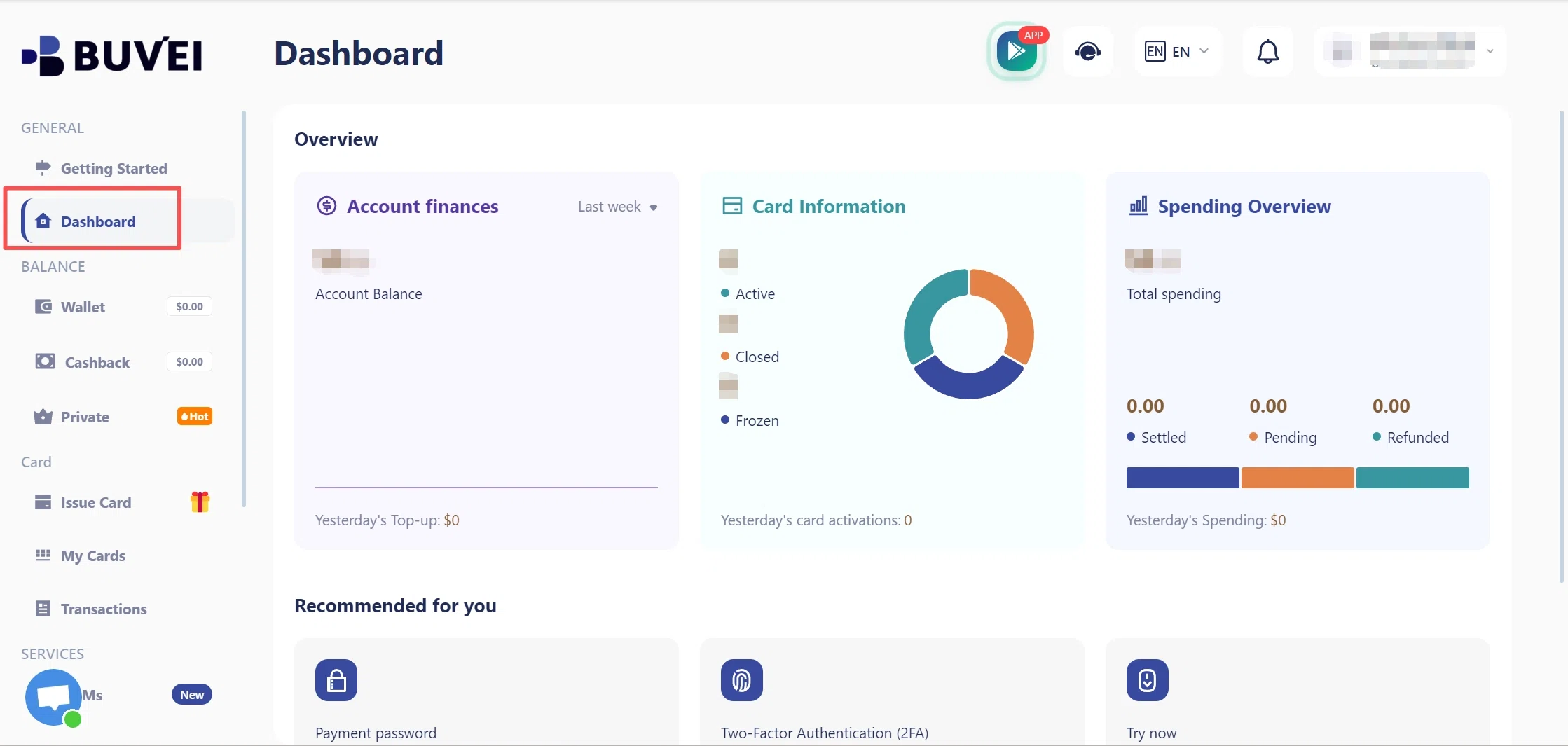
Set Up and Create Your Virtual Card
Go to the Card tab, choose your preferred BIN region (a US BIN is recommended), select your card type, and click Issue to create your virtual card.
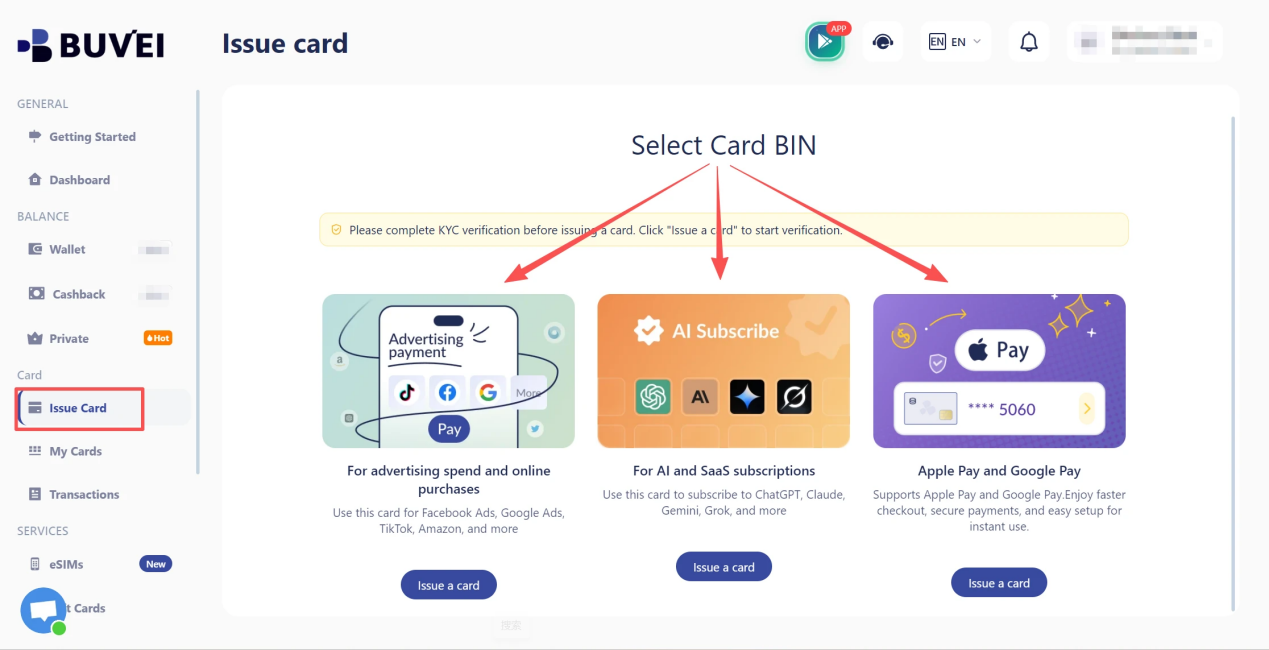
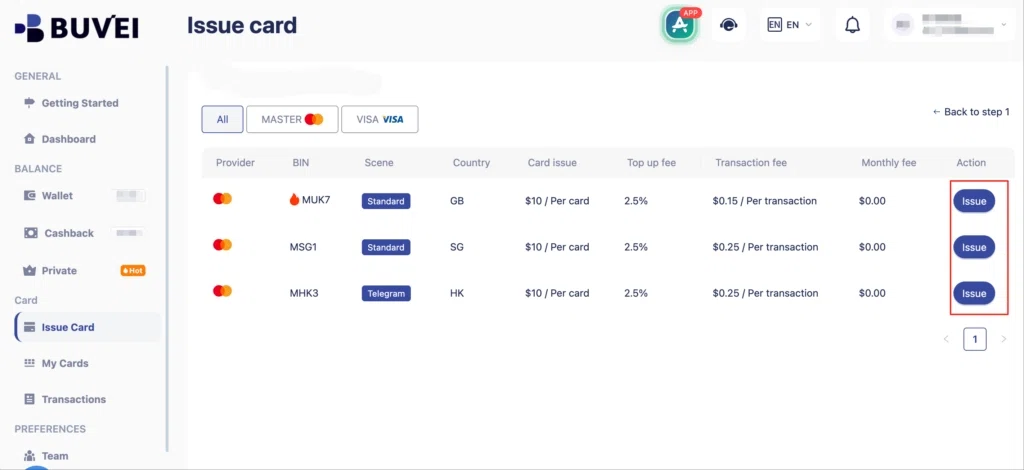
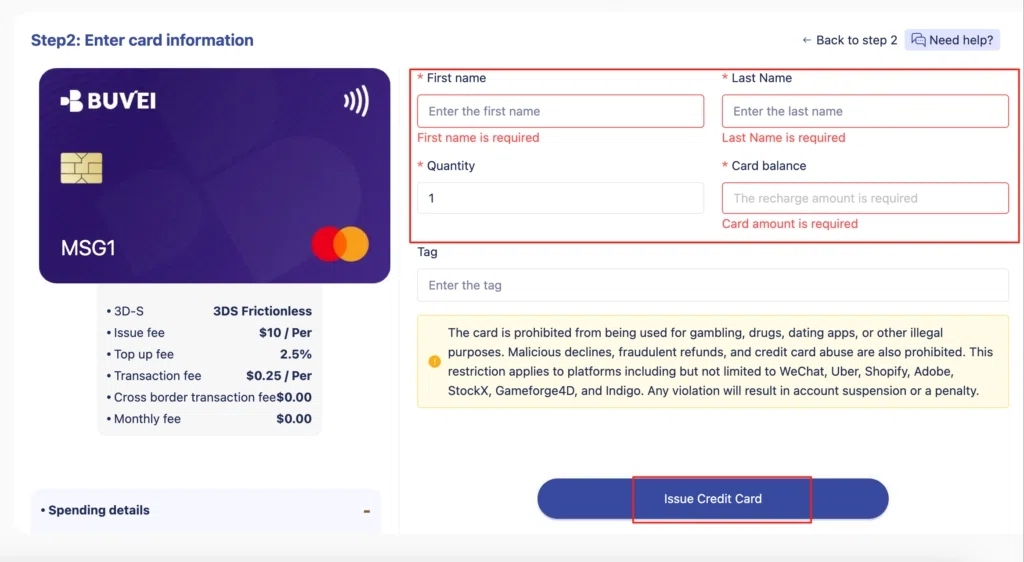
Fill in the virtual card details, including name, amount, and number of cards, then click Issue Card.
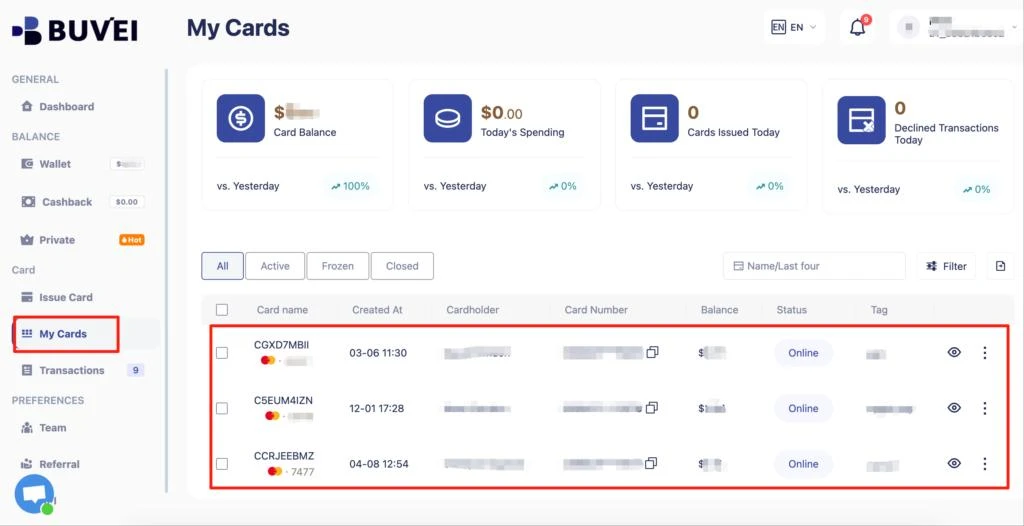
Once the card has been issued, open your card list and locate the new card. Before moving back to Kling AI, make sure the card is available for online transactions and has enough balance for the purchase.
View Your Virtual Card Details
Open the card details page before starting the Kling AI checkout. Depending on what the payment form requests, you may need:
- Card number
- Expiration date
- CVV
- Cardholder information
- Available balance
You’ll use the applicable information when completing the Kling AI payment form.
How to Pay for Kling AI with a Virtual Card
Once your BUVEI virtual card is ready, return to Kling AI and start the purchase.
Step 1: Open the Kling AI Payment Page
Sign in to your Kling AI account and navigate to the subscription or Credits purchase area. If you’re buying a subscription, select the plan you want. If you’re purchasing Credits, choose the applicable Credits package.
Step 2: Continue to Checkout
Continue from the plan or Credits selection to the payment page. For subscriptions, check the billing period shown during checkout. Monthly and yearly plans can have different prices and renewal schedules.
Step 3: Review the Checkout Details
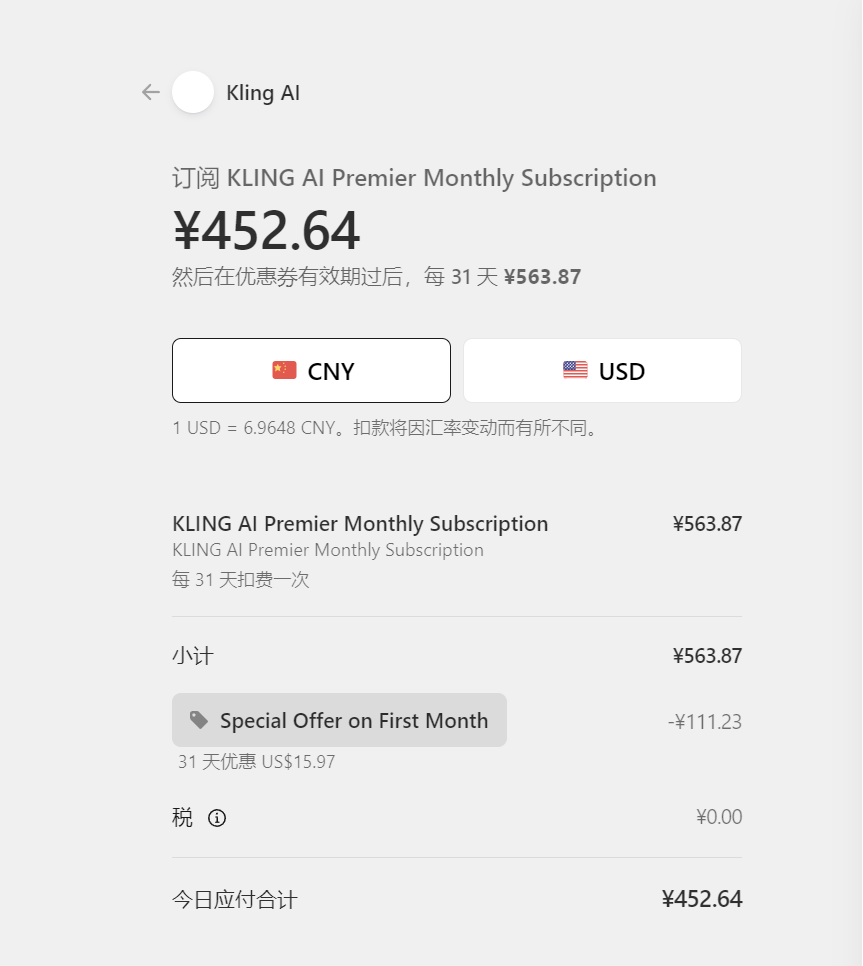
Before entering your card information, review the order displayed on the payment page. Check the:
- Selected plan or Credits package
- Total amount
- Currency
- Billing period, if applicable
- Additional charges, if any
Use the amount shown at checkout as the reference point rather than relying on an older price mentioned elsewhere. Pricing and promotions can change.
Step 4: Enter Your BUVEI Virtual Card Details
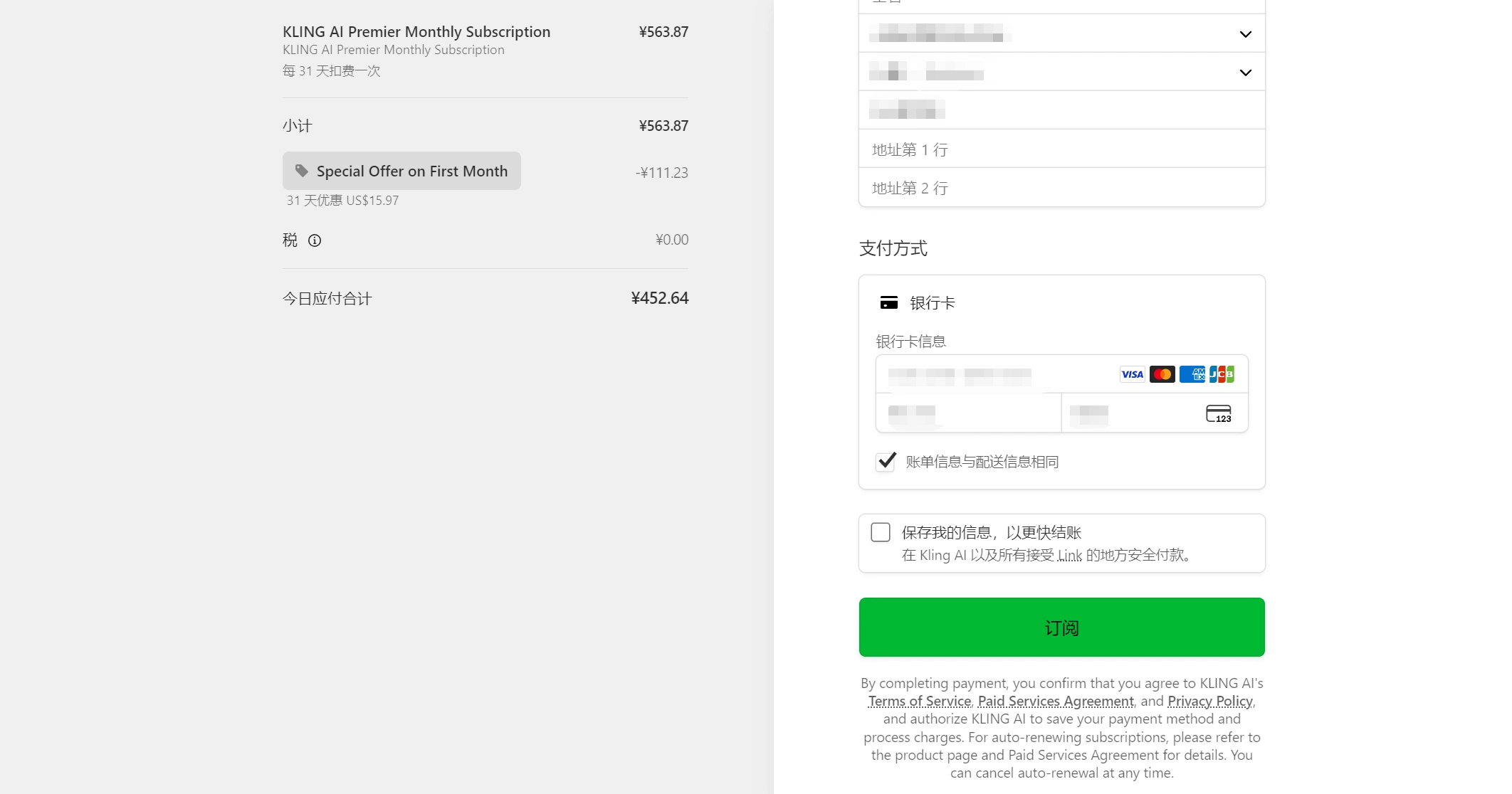
Use the information from your BUVEI virtual card to complete the applicable fields on the Kling AI payment form.
Depending on the checkout, this may include the card number, expiration date, CVV, and cardholder or billing information.
Before submitting the payment, compare the information you’ve entered with the details shown on your virtual card. An incorrect card number, expiration date, CVV, or billing detail can cause a valid payment to be declined.
Step 5: Submit the Payment
Once the order and payment information look correct, submit the transaction through the Kling AI checkout.
If the page takes a while to respond, avoid immediately submitting the same payment again. A delayed response does not necessarily mean the transaction failed.
Step 6: Confirm Your Subscription or Credits
After the payment has been processed, check your Kling AI account. For a subscription, look for the updated plan or subscription status. For a Credits purchase, check whether the purchased Credits have been added to your account.
If the account hasn’t updated immediately, give the transaction some time to process. If your payment method shows a completed charge but the purchase hasn’t appeared in Kling AI, keep the transaction information and contact support rather than submitting another payment.

What to Do If Your Kling AI Virtual Card Payment Fails
A declined payment can come from the card, billing information, or the payment processor. Before repeatedly trying the same transaction, check the most common causes.
Insufficient Balance
Compare your virtual card’s available balance with the full amount shown at checkout. Make sure the balance covers the final transaction amount rather than only the advertised subscription or Credits price. If the card balance is too low, add sufficient funds before trying the payment again.
Incorrect Card or Billing Information
Review the card number, expiration date, and CVV carefully. If Kling AI asks for a billing address or other billing information, check those fields as well. Even a small mismatch can cause a payment to fail.
Card Restrictions
Virtual cards can have restrictions depending on the card and transaction. These may relate to the merchant, transaction type, region, or other payment conditions. If the card has sufficient funds and the information is correct, review the applicable card restrictions before retrying the transaction.
Currency or International Payment Issues
Check the currency displayed by Kling AI and make sure your payment method can support the transaction. Cross-border payments can involve additional processing requirements, so a decline isn’t necessarily caused by an incorrect card number or insufficient balance.
Temporary Payment Processing Error
Sometimes a payment fails without an obvious problem on the checkout page.
If the card details, balance, and billing information are correct, wait a short time before trying again. Before resubmitting the payment, check whether the original transaction is still pending or has already been completed. This helps prevent duplicate charges.
Conclusion
Paying for Kling AI with a virtual card is a straightforward process: choose the subscription or Credits you need, prepare a virtual card, enter the required information at checkout, and confirm that the purchase has been added to your account.
If you need a virtual card before starting the purchase, BUVEI provides virtual Visa and Mastercard cards for eligible online payments. Creating the card in advance gives you the payment information you need when you reach the Kling AI checkout.