Want to use a SuperGrok virtual card? The web checkout is the simplest place to start.
To pay for SuperGrok with a virtual card, you need a Grok account and a card that supports online and recurring subscription charges. The process is straightforward: open the SuperGrok upgrade page, choose a plan, enter your virtual card details, and review the subscription before submitting the payment.
This guide walks through the current 2026 web checkout and covers what to check if a SuperGrok payment is declined or a later renewal fails.
SuperGrok Payment Options in 2026
Where you subscribe determines who handles the billing. Grok is available on the web as well as through iOS and Android apps. For subscriptions purchased directly through the Grok website, you can manage billing through the web. Subscriptions purchased through the Apple App Store or Google Play are managed through those platforms instead.
This guide focuses on the web checkout, because that’s where you can enter a virtual card directly.
| Where you subscribe | Who handles the billing |
| Grok website | xAI / Grok |
| iPhone or iPad app | Apple |
| Android app | Google Play |
For web subscriptions, xAI’s current documentation points users to Settings → Billing to manage an existing subscription or update its payment method.
What to Check Before Paying with a Virtual Card
Before entering your virtual card, check a few basic things.
Available balance. Make sure the card has enough available balance for the subscription charge. If taxes or other charges apply, leave some room rather than funding the card right up to the expected amount.
Online payments. The card needs to support online card transactions.
Recurring payments. SuperGrok is a subscription, so a card that only supports one-time transactions may not be suitable for ongoing billing.
Billing information. The checkout may ask for the cardholder name and country or region in addition to the card details. Enter the information requested by the payment form accurately.
There’s no need to create a complicated payment setup for one subscription. The main goal is to make sure the card can handle the type of transaction SuperGrok requires.
How to Pay for SuperGrok with a Virtual Card
The exact interface may change over time, but the current web flow is clear from the SuperGrok checkout.
Step 1: Open Your Grok Account Settings
Sign in to Grok on the web and open your account settings. Under Account, look for Get SuperGrok and select Upgrade. This opens the SuperGrok plan selection page.
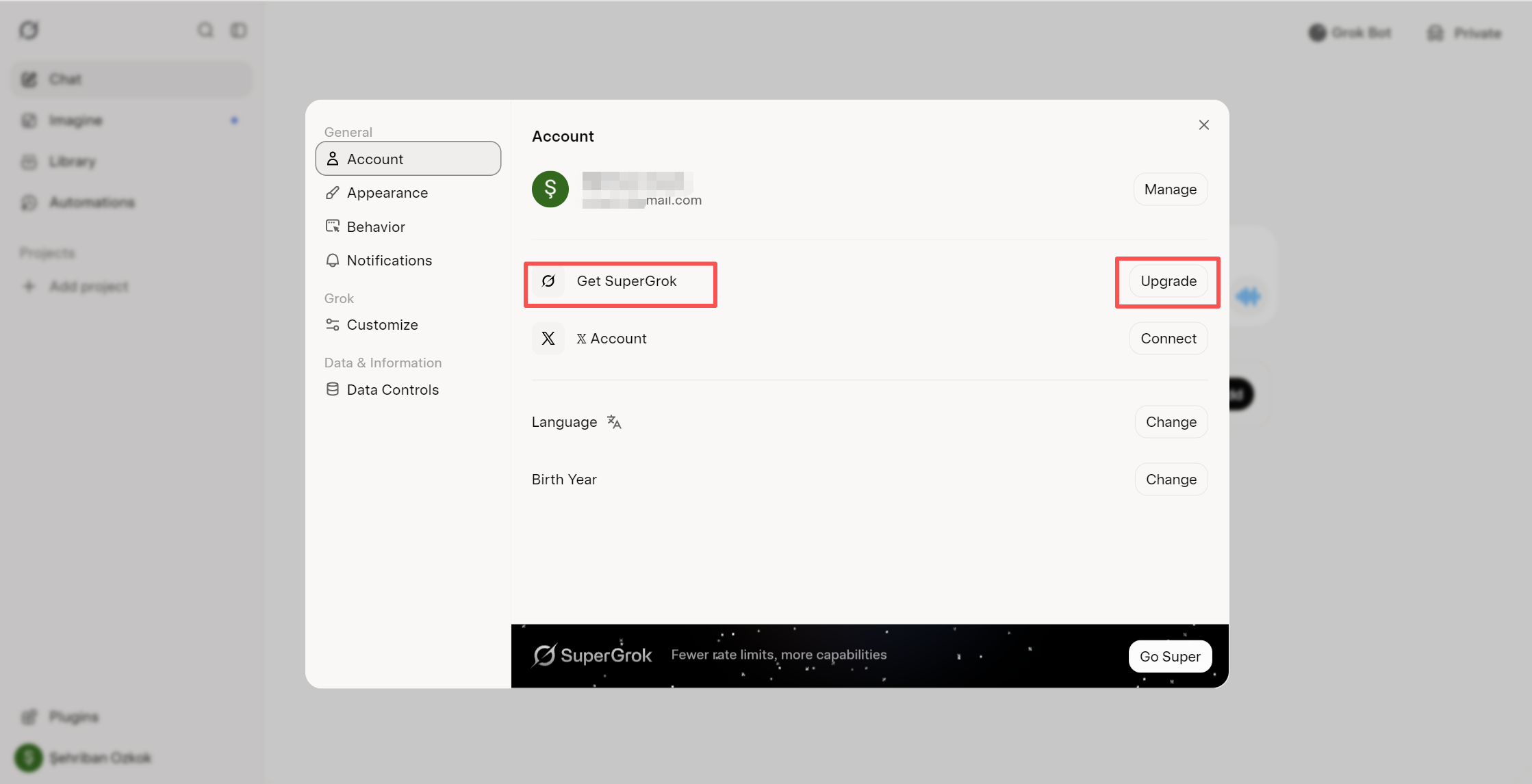
If you’re using a virtual card, stay with the web checkout rather than switching to an app-based subscription. Apple and Google handle payments differently when the subscription is purchased through their respective app stores.
Step 2: Choose a SuperGrok Plan
The current SuperGrok checkout shows several individual plans, including SuperGrok Lite, SuperGrok, SuperGrok Plus, and SuperGrok Heavy.
Select the plan that fits your usage and click the corresponding Upgrade button.
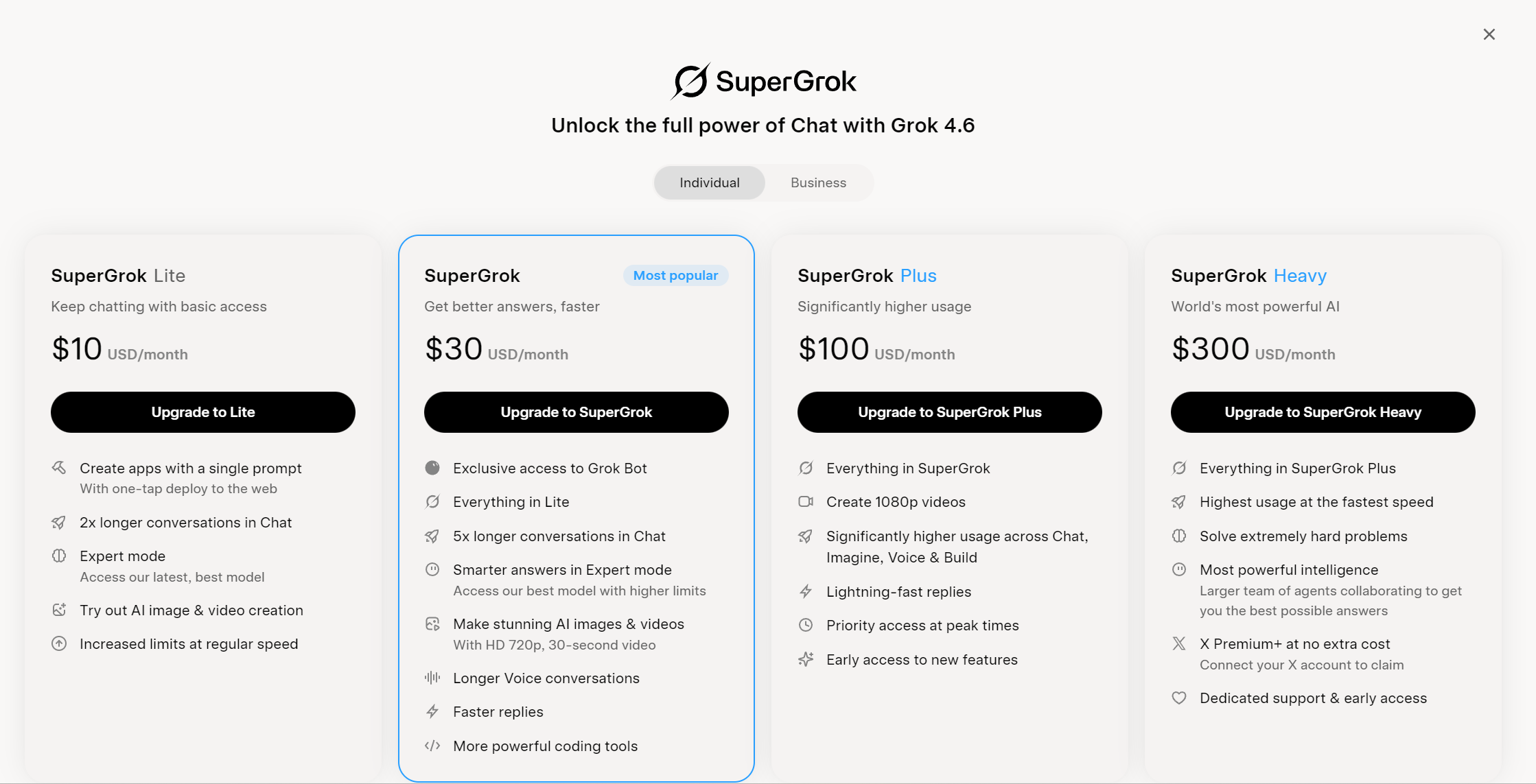
The plan page currently shows different monthly prices for the available tiers. However, don’t rely on an old article or screenshot for the final amount. Pricing, currency, and available plans can change.
Your own checkout page is the best place to confirm what you’ll actually be charged.
Step 3: Review the SuperGrok Checkout
After selecting a plan, Grok takes you to the subscription checkout page.
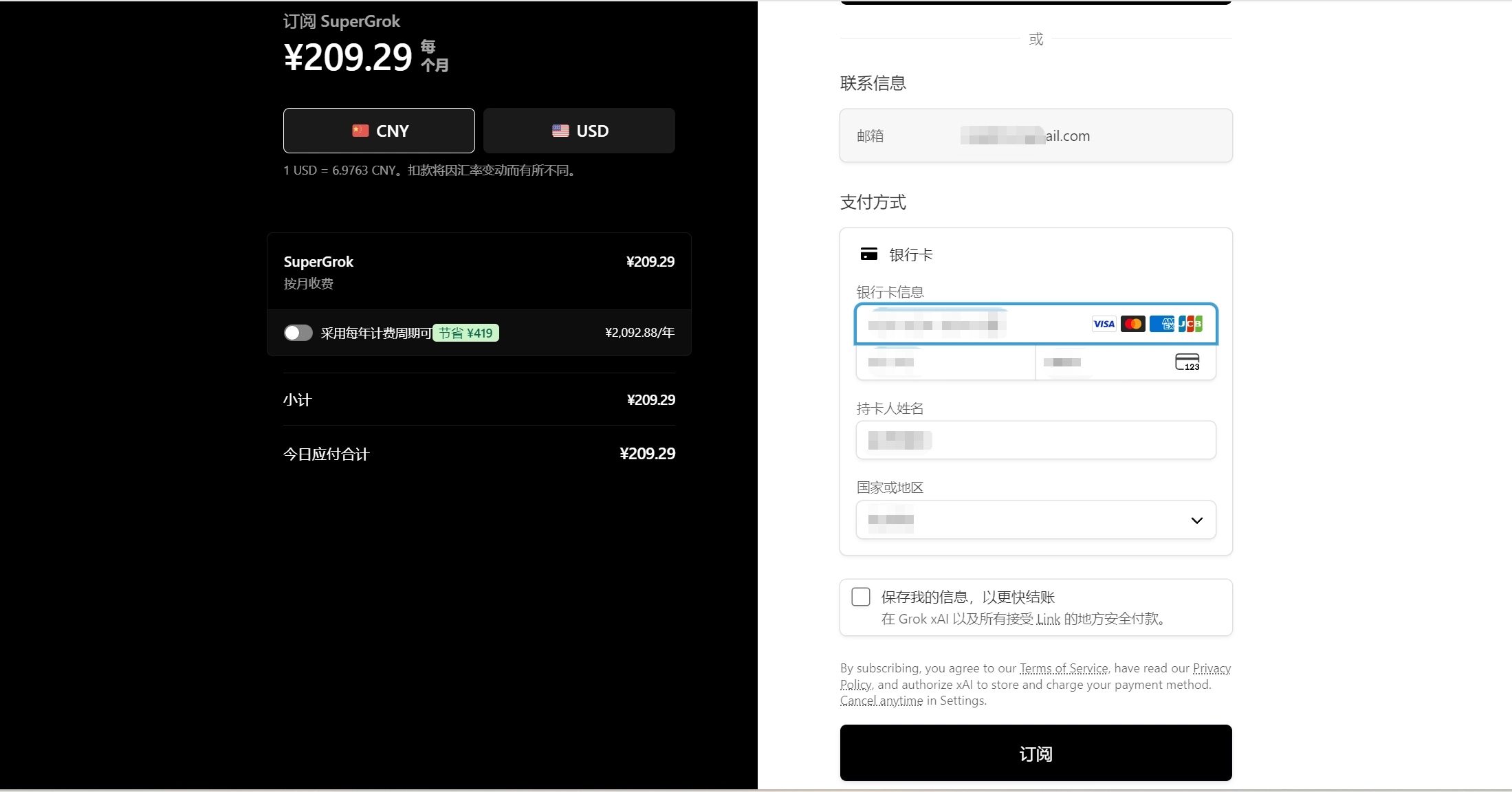
The current checkout shows the selected SuperGrok plan, the billing period, the amount due, and available payment methods. It also provides an option to switch between CNY and USD in the checkout shown in our example.
The checkout currently offers Apple Pay as well as a bank card payment option.
If you’re using a virtual card, select the bank card option and review the subscription amount before entering your payment details.
One important point: the currency and amount displayed at checkout may differ from the headline price shown on the plan selection page. In the example above, the checkout displays the charge in CNY. Always use the amount shown on your own checkout page as the final reference.
Step 4: Add Your Virtual Card
Under the bank card payment option, enter the information requested at checkout, including the card number, expiration date, CVC, cardholder name, and country or region.
If you’re using BUVEI, you can open the Card Details page in your dashboard while completing the form.
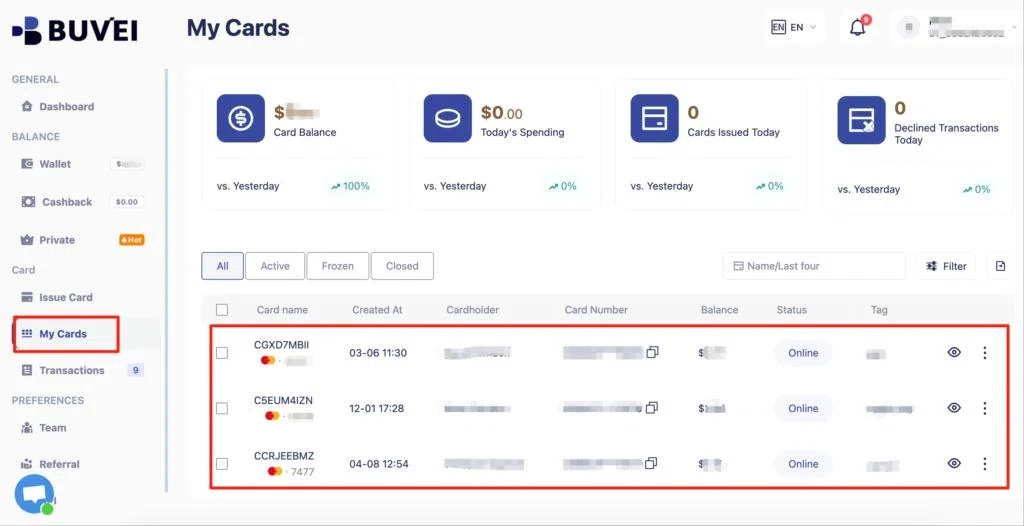
Before continuing, check the card number, expiration date, CVC, and cardholder information carefully. A simple mismatch can cause the payment to fail.
The checkout also shows an option to save payment information for faster checkout in the future. Whether you use that option is up to you; for a dedicated virtual card, keeping the payment method organized on the card-management side may be more useful than relying on saved checkout information.
Step 5: Review the Subscription Before Paying
Before clicking Subscribe, take a moment to review the plan, billing period, currency, and amount due. Make sure your card information and country or region are correct, then submit the payment if everything looks right.
If everything looks correct, you can submit the payment.
If you’re only checking whether a virtual card is compatible with the checkout, you don’t need to complete the purchase. You can leave the checkout page without submitting the payment.
After a successful payment, the subscription should become active on the Grok account associated with the purchase. For future management, xAI currently directs web subscribers to the billing area in Grok Settings.
SuperGrok Payment Failed: Common Reasons and Fixes
A declined SuperGrok payment doesn’t necessarily mean that virtual cards aren’t supported. Start with the card and checkout details before switching to another payment method.
Check the card details
Make sure the card number, expiration date, CVC, and cardholder information were entered correctly. This is especially worth checking if the payment fails immediately after submission.
Check the available balance
A card can be valid and still be declined if there isn’t enough available balance for the charge. Check the card’s current available balance rather than only the amount originally loaded onto it.
Check recurring-payment support
The first SuperGrok payment is only part of the subscription. If you plan to keep the plan active, the virtual card needs to support recurring subscription charges. A card that works for one-time online purchases may not necessarily work for recurring billing.
Check card restrictions
Virtual cards may have spending controls or transaction restrictions. If the card works with other online merchants but repeatedly fails with SuperGrok, check whether the card has restrictions related to merchant type, region, transaction amount, or recurring payments.
Check the payment status
If your card provider shows the transaction as declined, review the transaction details before trying again. Repeatedly submitting the same declined payment usually won’t solve a problem caused by an incorrect card detail, insufficient balance, or a card-level restriction.
Managing SuperGrok Payments with a Virtual Card
A dedicated virtual card can become more useful when SuperGrok is one of several recurring subscriptions you manage.
Instead of putting AI subscriptions, software tools, and everyday purchases on the same payment method, you can separate recurring services by purpose. This makes subscription charges easier to identify and gives you a clearer view of where the money is going.
For example, you could use one virtual card for AI subscriptions and another for SaaS tools. This is where BUVEI can fit into the workflow. BUVEI supports multiple virtual cards, card lifecycle management, spending controls, and transaction monitoring, making it easier to keep recurring online payments organized.
The goal isn’t to create a separate card for every single subscription. It’s to use dedicated payment methods where doing so gives you better control over recurring spending.
What About SuperGrok Subscription Renewals?
The first payment is only the beginning if you keep SuperGrok active. Before the next renewal, check that the virtual card is still active, has enough available balance, hasn’t expired, and can continue handling recurring subscription charges.
You don’t need to check the card before every renewal. Just make sure the payment method remains usable and funded when the next billing date approaches.
If a renewal fails, check the existing card first. Review its balance, status, spending controls, and recent transactions before creating a replacement card.
For web subscriptions, xAI currently provides billing management through the Grok website, including changing the payment method or managing the subscription.
Frequently Asked Questions
Can I use a virtual card for SuperGrok?
A virtual card can be used for SuperGrok when it is accepted by the applicable payment system and supports the required online subscription transaction. For a web subscription, enter the virtual card through the SuperGrok checkout’s bank card payment option.
Does SuperGrok support recurring payments with virtual cards?
It depends on the specific virtual card. Because SuperGrok is a recurring subscription, the card should support recurring subscription transactions rather than only one-time online purchases. Check your card provider’s rules before subscribing.
Why was my SuperGrok payment declined?
Start by checking the card number, expiration date, CVC, cardholder information, and available balance. If those are correct, check whether recurring payments are supported and whether the card has spending or merchant restrictions. The transaction details shown by your card provider can also help determine whether the problem originated with the card or the payment process.
Can I pay for SuperGrok through the web instead of an app?
Yes. Grok is available on the web, iOS, and Android. Web subscriptions are managed through Grok, while purchases made through Apple or Google Play are handled through those platforms. If you’re using a virtual card, the web checkout is the most direct flow to follow.
Conclusion
Paying for SuperGrok with a virtual card is a straightforward web checkout process. Open your Grok account, select a SuperGrok plan, review the checkout details, enter a supported virtual card, and check everything before submitting the subscription.
The more important part is what happens after the first payment. A virtual card used for SuperGrok should have enough available balance, remain active, and support recurring subscription charges.
If you’re managing several AI or SaaS subscriptions, using dedicated virtual cards can also make recurring payments easier to organize. BUVEI provides virtual card management, spending controls, and transaction monitoring for this type of payment workflow.