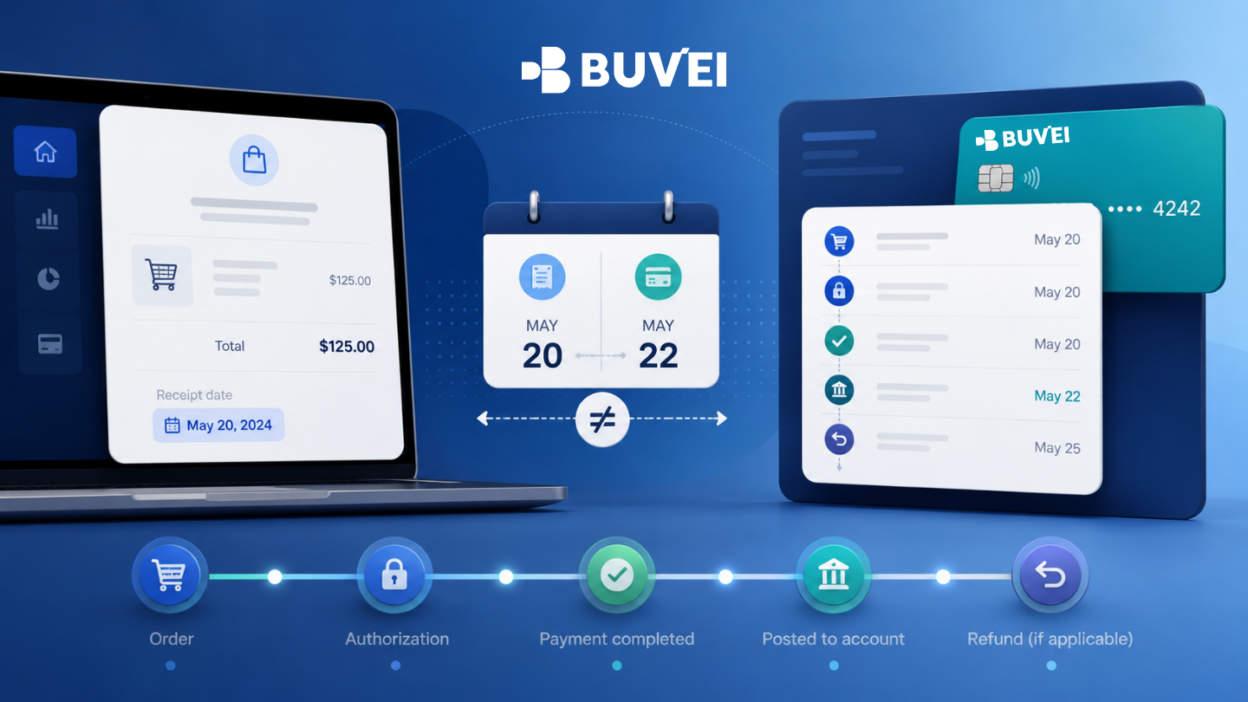
You place an order on Monday, receive a card notification on Tuesday, and see the completed transaction dated Wednesday.
But the merchant receipt still shows Monday.
Does that mean something is wrong?
Usually, no.
A single payment can have several different dates because an online transaction moves through multiple stages. The merchant, payment processor, card provider, and accounting system may each record the date that matters to their part of the payment process.
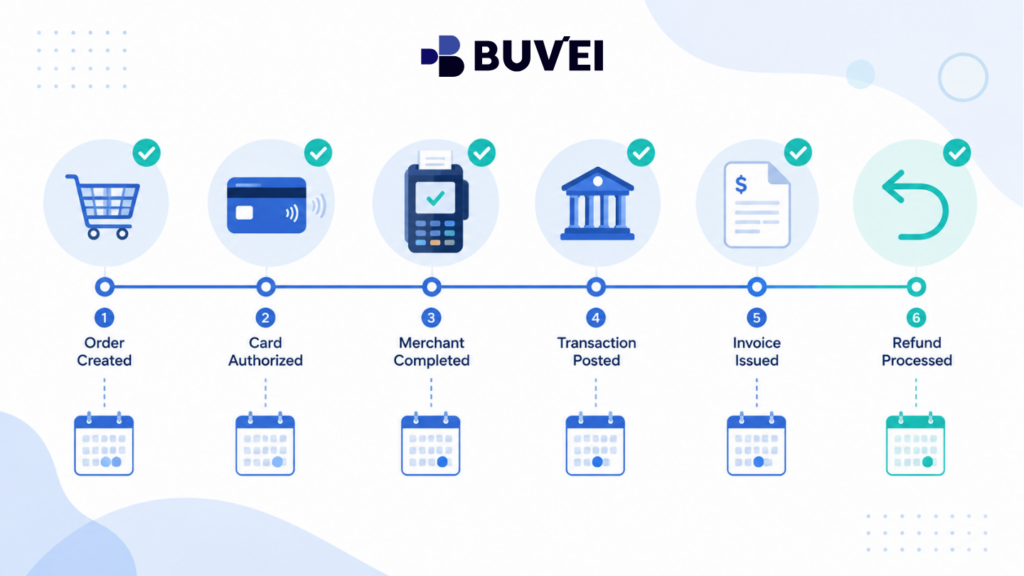
These dates can represent:
-
When the order was created;
-
When the card was authorized;
-
When the merchant completed the payment;
-
When the transaction was posted;
-
When an invoice was issued;
-
When a refund was initiated or posted.
The key is not to ask:
“Which date is correct?”
A better question is:
“What event does each date represent?”
Once you identify that, most apparent payment-date mismatches become much easier to understand.
Why Can One Payment Have Several Different Dates?
People often refer to “the transaction date” as though every payment has one universal timestamp.
In practice, one purchase can generate several valid dates.
| Payment Event | What It Means |
| Order Date | When the customer submitted or confirmed the order |
| Authorization Date | When the merchant requested card approval |
| Completion / Capture Date | When the merchant completed the payment |
| Posted Date | When the final transaction appeared in the card record |
| Invoice Date | The date used on the merchant’s billing document |
| Refund Initiation Date | When the merchant approved or sent the refund |
| Refund Posting Date | When the refund appeared in the card activity |
For a simple online purchase, several of these events may happen within seconds.
For travel, marketplaces, physical deliveries, advertising, subscriptions, or usage-based services, they may happen across several days.
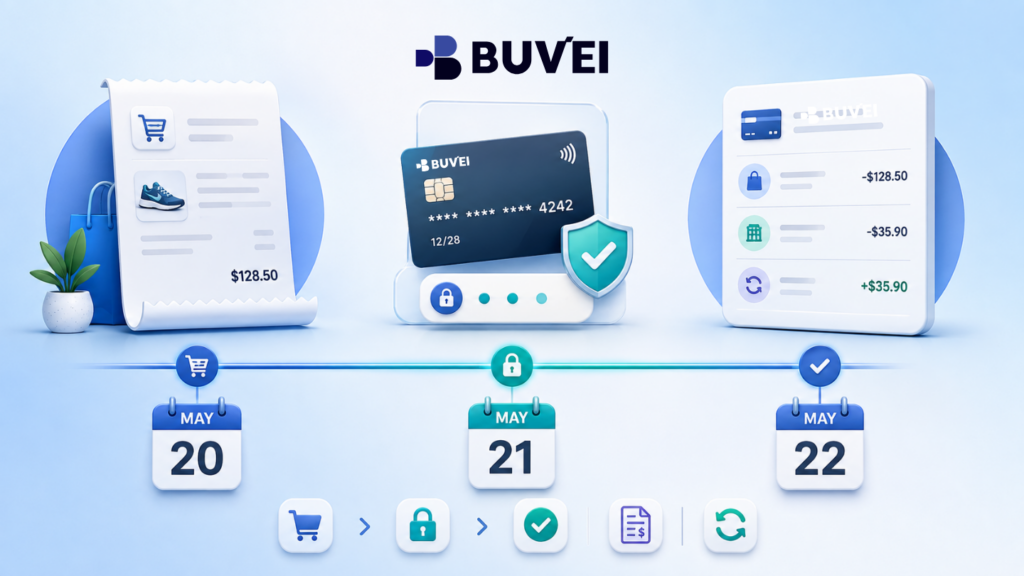
Order Date vs. Authorization Date vs. Posted Date
Understanding the difference between these dates is the fastest way to explain why your receipt and card activity may not match.
-
Order Date
The order date normally comes from the merchant’s system.
It records when you submitted the purchase or when the merchant created the order.
You may see it on:
-
Order confirmation emails;
-
Marketplace order histories;
-
Booking confirmations;
-
Subscription pages;
-
Merchant receipts;
-
Purchase records.
An order can exist before a card payment is completed.
For example, a merchant may create the order first and then request card authorization.
The reverse can also happen: a card authorization may appear even if the merchant later fails to create a usable order.
That is why the order date alone cannot tell you what happened on the card side.
If you are contacting a merchant about a product, delivery, cancellation, or booking, start with the order date and order number.
-
Authorization Date
The authorization date is when the merchant asks whether the card transaction can proceed.
If approved, some or all of the amount may be temporarily reserved against the card’s available balance.
An authorization can later be:
-
Completed;
-
Completed for a different amount;
-
Partially completed;
-
Released;
-
Reversed;
-
Allowed to expire;
-
Declined.
The authorization often appears as pending in card activity.
If the transaction later becomes completed, the provider may:
-
Keep the original authorization date;
-
Replace it with the completion date;
-
Display both dates.
This depends on the payment system and interface.
When asking about a pending transaction, provide the authorization date and exact time if available.
This is especially useful when several attempts were made for the same amount.
-
Completion or Capture Date
After authorization, the merchant may complete—or capture—the payment.
Some merchants do this immediately.
Others wait until:
-
An item ships;
-
A booking is confirmed;
-
A service begins;
-
A final amount is calculated;
-
An advertising threshold is reached;
-
A billing cycle closes;
-
A marketplace seller fulfils the order.
This means the completion date can be later than the original order date.
For example:
10 August: Order placed 10 August: Card authorized 12 August: Product ships 12 August: Merchant completes payment
The receipt may still show 10 August because that is when the order was created.
The card transaction may show 12 August because that is when the payment was completed.
Both dates can be correct.
-
Posted Date
The posted date is the date shown in the final card-side transaction record.
It may be the same as the merchant completion date, but not always.
Payment information passes through multiple systems, and the final display can be affected by:
-
Processing schedules;
-
Weekends;
-
Public holidays;
-
Currency;
-
Cross-border processing;
-
Time zones;
-
The card provider’s display rules.
A provider may display the date based on:
-
Local time;
-
UTC;
-
Merchant-provided information;
-
The date the completed record reached the provider;
-
A normalized date used by the application.
This is why the same payment can appear as 12 August in one system and 13 August in another.
For Buvei users, checking both the transaction date and transaction status can help distinguish a pending authorization from a completed or posted transaction.
-
Invoice Date
An invoice is a commercial or accounting document created by the merchant.
Its date does not necessarily match the card transaction date.
A merchant may issue an invoice when:
-
The order is accepted;
-
Goods are shipped;
-
A service period begins or ends;
-
The payment is completed;
-
A billing cycle closes;
-
The invoice document is generated.
When matching an invoice with a card transaction, compare more than the date.
Check:
-
Merchant;
-
Invoice number;
-
Amount;
-
Currency;
-
Service period;
-
Order reference.
A one-day difference does not automatically mean that the invoice and card transaction are unrelated.
For accounting or tax reporting, businesses should follow the rules and professional guidance applicable to their jurisdiction.
Why Do Payment Dates Differ? 5 Common Reasons
-
The Merchant Completes Payment Later
Many merchants do not complete payment at the exact moment the order is submitted.
Retailers may wait until the product ships.
Travel businesses may wait until a booking is confirmed.
Advertising or usage-based platforms may wait until a spending threshold or billing cycle is reached.
This creates a natural difference between the order date and completion date.
-
The Order Is Split or the Amount Changes
One order does not always create one final card transaction.
For example:
-
Products may ship from different warehouses;
-
Marketplace sellers may complete their parts separately;
-
An order may be partially fulfilled;
-
Taxes or tips may be added;
-
The final amount may change;
-
Usage-based charges may be calculated later.
A single order date can therefore result in several card records on different dates.
-
The Payment Crosses Midnight or Time Zones
Time zones are one of the most common explanations for a one-day date difference.
For example, a payment made at:
23:58 local time
may be recorded after midnight by another system.
A transaction completed at 00:30 in one European time zone may still be recorded as the previous calendar date in UTC.
The payment itself did not happen twice.
The systems are simply displaying the same event using different time references.
When timing matters, record:
-
Exact local date;
-
Exact time;
-
Time zone or UTC offset;
-
Merchant country;
-
Currency;
-
Transaction status.
-
Weekends and Holidays Affect Processing
The order may be created on a weekend or public holiday, while the final payment record appears later.
Not every part of the payment ecosystem necessarily updates on the same schedule.
Do not assume that a transaction dated Monday is unrelated to an order created on Sunday.
Compare the amount, merchant, reference, and status before concluding that the records are different.
-
The Merchant Retries or the Display Changes
A failed or incomplete payment may be retried later.
The merchant order can keep the original date while the successful payment attempt receives a later date.
Card interfaces may also display pending and completed transactions differently.
A pending authorization shown on 10 August could become a completed transaction shown on 12 August.
That does not necessarily mean two separate payments occurred.
Always compare:
-
Amount;
-
Merchant;
-
Status;
-
Exact time;
-
Transaction reference.
A Practical Payment Timeline Example
Consider a fictional EUR 240 office chair purchase.
10 August, 21:40 CEST
The customer submits the order.
10 August, 21:41 CEST
The merchant requests a EUR 240 card authorization.
11 August
The merchant confirms stock and prepares the item for shipment.
12 August
The chair ships and the merchant completes the EUR 240 payment.
13 August
The card activity displays the transaction as completed.
14 August
The merchant issues the final invoice using the shipment date.
20 August
The customer requests a return.
22 August
The merchant initiates the refund.
Later
The refund appears in the card activity.
None of these dates needs to be incorrect.
Each one describes a different event in the payment lifecycle.
Refund Date vs. Card Posting Date
Refunds often create another date mismatch.
The merchant may tell you:
“Your refund was issued on Monday.”
That usually means the merchant approved or submitted the refund on Monday.
It does not necessarily mean the refund must already appear in your card activity on Monday.
There are normally at least two relevant dates:
Refund Initiation Date
When the merchant sends or approves the refund.
Refund Posting Date
When the returned amount appears in the card-side record.
When following up on a refund, ask the merchant for:
-
Refund initiation date;
-
Amount;
-
Currency;
-
Original order number;
-
Refund reference, if available;
-
Expected processing timeframe.
If that timeframe has passed and the refund is still not visible, provide those details to your card provider.
Also remember:
A reversed pending authorization is not the same as a refund.
A reversal releases an authorization that may never have become a completed payment.
A refund returns value after a completed transaction.
Which Payment Date Should You Use?
The most useful date depends on what you are trying to investigate.
| Situation | Best Date to Use |
| Ask where an order is | Order date |
| Investigate a pending transaction | Authorization date |
| Match a shipped product to payment | Shipment / completion date |
| Reconcile the card record | Posted / completed date |
| Review a subscription period | Billing-cycle or invoice date |
| Trace a refund | Refund initiation and posting dates |
| Separate repeated attempts | Exact date, time, and time zone |
The important point is to match the date to the event you are discussing.
How to Investigate a Payment Date Mismatch
If two payment records show different dates, use this process.
Step 1: Identify the Two Records
Avoid saying:
The dates don’t match.
Instead say:
The order confirmation is dated 10 August, while the completed card transaction is dated 13 August.
This makes the problem much easier to investigate.
Step 2: Check the Transaction Status
Determine whether the card activity shows:
-
Pending;
-
Completed;
-
Reversed;
-
Refunded;
-
Declined.
A status difference often explains the date difference immediately.
Step 3: Check the Exact Time and Time Zone
This is especially important for:
-
Cross-border transactions;
-
Payments around midnight;
-
European payments;
-
Repeated payment attempts.
A date without a time zone can be misleading.
Step 4: Review Merchant Activity
Check whether anything happened between the order and the card transaction:
-
Shipment;
-
Booking confirmation;
-
Service activation;
-
Billing-cycle close;
-
Usage calculation;
-
Subscription renewal.
The merchant may have completed the payment at one of these points.
Step 5: Ask the Merchant for Its Timeline
Ask the merchant to confirm:
-
Order date;
-
Payment or authorization date;
-
Completion date;
-
Shipment date;
-
Refund date, if applicable.
The merchant controls its own order and fulfilment records.
Step 6: Compare the Card-Side Record
If the merchant timeline is clear but the card-side date still needs explanation, contact the card provider.
Provide:
-
Merchant name;
-
Amount;
-
Currency;
-
Order date;
-
Exact payment time;
-
Time zone;
-
Displayed transaction date;
-
Transaction status;
-
Safe card identifier such as the last four digits.

How Buvei Users Can Compare Payment Dates
For Buvei users, transaction activity can help distinguish between different stages of a payment.
Depending on the account and card configuration, users can compare the date and transaction status shown in Buvei with:
-
Merchant order confirmations;
-
Shipment records;
-
Invoices;
-
Booking confirmations;
-
Refund confirmations.
For example, if a receipt shows 10 August but the Buvei card activity shows the completed transaction on 12 August, check whether the merchant completed the payment after shipment or fulfilment.
Buvei does not control:
-
The date a merchant uses on an invoice;
-
When a merchant chooses to complete an authorization;
-
The merchant’s fulfilment timeline.
When contacting Buvei Support about a payment-date mismatch, provide:
-
Merchant name or descriptor;
-
Amount;
-
Currency;
-
Order date;
-
Exact transaction attempt time;
-
Time zone;
-
Card-side date;
-
Transaction status;
-
Card label or last four digits;
-
Relevant merchant confirmation.
Never send:
-
Full card number;
-
CVV;
-
Password;
-
One-time authentication code;
-
Private key;
-
Recovery phrase.
Common Mistakes When Comparing Payment Dates
Mistake 1: Looking Only at the Calendar Date
Without the exact time and time zone, a one-day difference may mean very little.
Mistake 2: Treating Authorization as Completion
A pending authorization and a completed transaction represent different stages.
Their dates do not need to match.
Mistake 3: Assuming the Order Date Applies to Everything
Shipping, capture, billing, and refund events can all happen later.
Mistake 4: Using the Notification Date as the Transaction Date
An email or app notification can arrive after the actual payment event.
Mistake 5: Ignoring the Merchant and Currency
Two similar amounts on nearby dates may still represent different transactions.
Always match more than the amount.
Frequently Asked Questions About Payment Dates
Why Is My Card Transaction Date Later Than the Receipt Date?
The receipt may use the order date, while your card record uses the completion or posting date.
Shipping, processing schedules, time zones, or billing practices can create the difference.
Which Date Shows When the Payment Was Completed?
The completed or posted card record is generally more relevant to the card-side completion than the original order date.
However, exact accounting treatment depends on the payment provider and applicable rules.
Can a Pending Transaction Change Its Date?
Yes.
A pending authorization can later appear as a completed transaction with a different displayed date.
Different card interfaces handle this differently.
Why Does a Refund Have Two Dates?
One date normally represents when the merchant initiated the refund.
Another represents when the refund appeared in the card record.
Both dates are useful when tracing the refund.
Does a Different Date Mean I Was Charged Twice?
Not necessarily.
A single purchase can have separate authorization, completion, shipment, and posting dates.
A duplicate charge requires evidence of more than one unexplained completed transaction.
Can Buvei Change a Merchant’s Invoice Date?
No.
The merchant controls its own invoice and order records.
Buvei can review the card-side transaction information available for the relevant payment.
Which Date Should Businesses Use for Accounting?
That depends on applicable accounting rules, tax requirements, and company policies.
Businesses should follow professional guidance for their jurisdiction rather than relying on a general payment guide.
Conclusion: Match the Event, Not Just the Date
Different payment dates do not automatically mean that something has gone wrong.
An order, authorization, merchant completion, card posting, invoice, and refund are separate events.
They may happen within seconds — or across several days.
When two records appear to conflict, start by identifying:
-
What event each date represents;
-
Transaction status;
-
Amount;
-
Currency;
-
Exact time;
-
Time zone;
-
Order or invoice reference.
Contact the merchant when you need information about the order, fulfilment, invoice, or refund timeline.
Contact the card provider when you need clarification about the card-side transaction status or posting date.
For Buvei users, transaction monitoring can help compare card-side payment activity with merchant records across different online and cross-border payment scenarios.
The best question is not:
“Why are these payment dates different?”
It is:
“Which event does each date represent?”
Once that is clear, most apparent mismatches become much easier to understand.