When an online payment goes wrong, the hardest question is often not “Why did it happen?” It is “Who can actually fix it?” Good online payment support starts by sending the right information to the party that controls the next action.
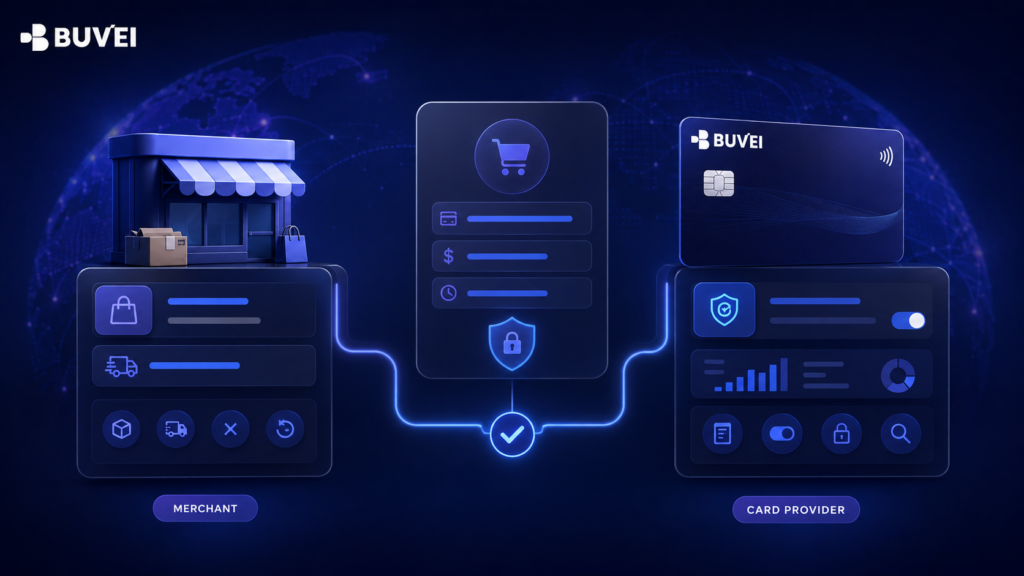
The merchant controls the order, delivery, cancellation, and the initiation of most refunds. The card provider can review card status, transaction records, spending controls, and card-side payment information. A card network is part of the payment route, but it is normally not the first support contact for an individual cardholder.
This guide gives beginners a practical six-step process. It helps you decide whether to contact the merchant or card provider first, prepare a safe support message, and escalate a case without exposing payment credentials or creating more confusion.
Why Does Online Payment Support Feel So Complicated?
One online checkout can involve several parties. There is the customer, the merchant, the merchant’s payment service provider, the acquiring side, the card network, and the card-issuing or card-providing side. Authentication services may also appear during checkout.
You do not need to identify every system to ask for help. You only need to identify where the visible problem sits and which party controls the next useful action.
Think of a payment as two connected records:
-
The merchant record explains the order, product, service, cancellation, delivery, and refund request.
-
The card record explains what appeared on the card side, such as an authorization, completed transaction, reversal, refund, or decline.
These records do not always update at the same time. A checkout page may show an error while a temporary authorization appears on the card. A merchant may approve a refund before the refund reaches the card record. A successful card authorization also does not prove that an order was created correctly.
This is why sending the same question to several support teams rarely produces a faster answer. Each team sees a different part of the process. A clear case starts with the team that owns the missing action.
The Short Answer: Should You Contact the Merchant or Card Provider?
Use this table as the first decision point.
| What you can see | Contact first | Why |
| No order confirmation, missing service, wrong item, or cancellation request | Merchant | The merchant controls the order and fulfilment |
| A refund has not yet been requested or approved | Merchant | The merchant normally needs to initiate it |
| An unfamiliar billing name but a possible known purchase | Merchant first | The merchant can explain its billing descriptor |
| Card appears inactive, paused, expired, or restricted | Card provider | This is card-side information |
| Available balance or spending limit appears inconsistent | Card provider | The provider can review the account and card configuration |
| The merchant confirms that no payment was accepted, but a card-side entry appears | Card provider | The card-side status needs to be identified |
| You do not recognize the activity at all | Card provider promptly | The card may need to be secured and the activity reviewed |
| The merchant confirms a refund was issued, but it still does not appear after the stated processing period | Card provider | The refund reference and card record can be compared |
If you are still unsure, do not guess. Compare the merchant order page or receipt with the card transaction record. The difference between those two records usually tells you which team to contact first.
Step 1: Identify the Exact Stage of the Payment
Before writing to support, place the payment at one of five stages. This prevents a general message such as “my card does not work,” which gives the support team very little to investigate.
Stage A: Before the Payment Was Submitted
The checkout page may reject a field, fail to load, or refuse the billing address before you press the final payment button. This is usually a merchant checkout issue because no payment request may have reached the card side.
Take note of the field or page that caused the problem. Do not send a screenshot if it contains a full card number, security code, password, one-time code, or other sensitive credentials.
Stage B: During Authentication or Authorization
The payment was submitted, but an authentication page did not appear, did not complete, or returned an error. Alternatively, the merchant may display a decline before creating an order.
At this stage, both sides may hold useful information. First check whether the merchant created an order and whether the card dashboard shows an attempt. If the merchant has no order but the card side shows a status, ask the card provider to explain that card-side record.
Stage C: After an Order Was Created
The merchant created an order, but the service was not delivered, the product is wrong, or the order needs to be cancelled. Contact the merchant because the card provider cannot edit an order, deliver a product, or apply the merchant’s return policy.
Keep the order number and the merchant’s written response. If the merchant later asks you to contact the card provider, that written information gives the card-side team useful context.
Stage D: While a Transaction Is Pending or Being Completed
A pending entry is not automatically a completed charge. It may represent an authorization that is still waiting for the merchant to complete, adjust, or release it.
Avoid assuming that every pending entry is an error. Ask the merchant whether the order was accepted and whether it expects to complete or cancel the payment. If the merchant confirms that no order exists, send that confirmation to the card provider for review.
Stage E: After a Refund Was Promised
A merchant saying “we approved your refund” is the beginning of the refund path, not proof that the amount has already reached the card. Ask for the refund date, amount, currency, and any available refund reference.
If the merchant’s stated processing period has passed, the card provider can compare that information with the card record. Without the merchant’s confirmation, the provider may not know whether a refund was ever initiated.
Step 2: Compare the Merchant Record with the Card Record
The fastest support cases are built around facts that can be compared. Open the merchant’s order page, receipt, or email in one window and the card transaction history in another.
Check the following fields:
-
Merchant name: Does the receipt name match the transaction description?
-
Date and time: Are you comparing the same attempt? Include the time zone if the payment was cross-border.
-
Amount and currency: Was the checkout shown in EUR, GBP, USD, or another currency?
-
Order status: Was an order created, cancelled, fulfilled, or refunded?
-
Card-side status: Is there no record, a decline, a pending entry, a completed transaction, a reversal, or a refund?
-
Reference numbers: Do you have an order ID, invoice number, case number, or refund reference?
Small differences matter. A person may make two attempts for the same amount within a few minutes. A merchant may use a legal company name in the transaction description. A hotel, advertising platform, or usage-based service may adjust the final amount after an initial authorization.
Do not rely only on memory or a single screenshot. Write down one line for each attempt so that the support team can distinguish them.
For example:
Attempt 1 — 14 August 2026, 10:42 CEST — EUR 89.00 — merchant displayed “payment unsuccessful” — no order ID — card record shows pending.
That sentence is more useful than “I tried several times and it failed.” It gives the team a specific event to inspect without revealing the card credentials.
Step 3: Contact the Merchant When the Merchant Owns the Action
The merchant should normally be your first contact when the problem concerns the purchase rather than the card itself. This includes the order, product, subscription, delivery, cancellation, and the merchant’s refund decision.
No Order or Confirmation Was Created
Ask whether the merchant received the payment attempt and whether an order exists under your email address or account. Provide the approximate time, amount, and currency, but do not send the full card number.
If the card shows a pending entry, ask the merchant whether it plans to complete or release the authorization. Save the answer before contacting the card provider.
The Product or Service Was Not Delivered
The card provider cannot deliver a product, activate a subscription, correct an address, or recreate a missing order. Send the merchant the order number and describe what was expected and what was actually received.
Ask for a clear resolution: delivery, correction, cancellation, or refund. A precise request is easier to answer than a general complaint.
You Want to Cancel an Order or Subscription
Cancellation rules belong to the merchant. Contact the merchant before the next billing date and keep evidence of the cancellation request.
Pausing or closing a card is not a substitute for cancelling a contract or subscription. It may stop some future attempts, but it does not remove any obligation that still exists between you and the merchant.
The Merchant Name Looks Unfamiliar
Transaction descriptions may use a payment processor, parent company, shortened name, or legal entity. Search your recent receipts and subscriptions, then ask the merchant to confirm the descriptor it uses.
If you still cannot connect the activity to a legitimate purchase, contact the card provider promptly. Treating every unfamiliar descriptor as fraud can waste time, but ignoring a truly unrecognized transaction can increase risk.
You Need a Refund
Ask the merchant to confirm whether a refund is available under its terms. If approved, request the amount, currency, issue date, and a refund reference if one is available.
The card provider usually cannot create a merchant refund on request. It can review what reaches the card side and explain available next steps based on the account and transaction.
Step 4: Contact the Card Provider When the Card Side Needs Review
Contact the card provider when the evidence points to card status, spending controls, a card-side transaction entry, authentication, or activity you do not recognize. The goal is not to ask the provider to control the merchant; it is to ask it to review the information on its side.
The Card Is Inactive, Paused, or Restricted
Check the card status before attempting the payment again. A card that is paused, expired, terminated, or subject to an account restriction may not be available for a new transaction.
If the status is unclear, ask support to confirm what the dashboard means. Do not assume that creating another card will solve an account-level or merchant-level issue.
The Spending Limit or Available Funds Look Wrong
Compare the purchase amount with the card’s configured limit and the available funds shown in the account. Remember that tax, tips, deposits, currency conversion, and merchant adjustments can make the requested authorization different from the displayed checkout amount.
Ask the provider to review the exact attempt rather than asking whether the card “should work everywhere.” Merchant acceptance depends on the merchant, card configuration, region, transaction type, and payment requirements. No card provider can promise universal acceptance.
A Card-Side Entry Appears Without a Merchant Order
Send the card provider the merchant’s confirmation that no order was created. Ask whether the entry is pending, completed, reversed, or otherwise recorded on the card side.
Do not immediately repeat the payment several times. Multiple attempts can create several temporary entries and make the original issue harder to follow.
Authentication Did Not Complete
Some online payments require an additional authentication step. The merchant checkout starts the payment flow, while the card-issuing side may participate in verifying the payer.
First record what happened: no authentication page appeared, the page would not load, a code did not arrive, or the authentication was completed but the merchant still showed an error. Those are different cases and may require different teams to investigate.
The Activity Is Not Recognized
Use any available card security control to prevent further use, if appropriate, and contact the card provider through an official channel. Report the merchant description, amount, currency, date, and card identifier such as the last four digits.
Do not wait for the merchant to respond before securing a card when you reasonably suspect unauthorized use. The provider can explain the review or dispute path that applies to the account, card, and transaction.
Step 5: Prepare a Safe and Useful Support Message
Support teams need enough information to identify the event, but they do not need your full payment credentials in an ordinary message. A useful request is specific, chronological, and safe.
Include:
-
Merchant name and website or app name;
-
Payment date and exact local time, with time zone;
-
Amount and currency;
-
Safe card identifier, such as the card label or last four digits;
-
Exact card-side status or checkout error;
-
Order, invoice, case, or refund reference;
-
What the merchant has already confirmed;
-
What you want the support team to check.
Never include:
-
Full card number;
-
Card security code or CVV;
-
Password;
-
One-time password or authentication code;
-
Wallet private key or recovery phrase;
-
More identity documents than the official process requests.
Screenshots can help, but crop or cover sensitive fields first. Use only the support channels listed by the provider, and be cautious if someone moves the conversation to an unofficial account or asks for credentials that should remain private.
A Message Template for the Merchant
Hello, I need help checking an online order. I attempted a payment of EUR 89.00 on 14 August 2026 at approximately 10:42 CEST. The checkout showed “payment unsuccessful,” and I did not receive an order number. Could you confirm whether an order or successful payment attempt exists under my account? I can provide a redacted screenshot if needed.
A Message Template for the Card Provider
Hello, I need help reviewing a card-side payment record. I attempted a payment to [merchant] for EUR 89.00 on 14 August 2026 at approximately 10:42 CEST. The merchant confirmed that no order was created, while my card activity shows [exact status]. The card label is [label] and the last four digits are [1234]. Could you confirm what this status means and the appropriate next step?
These templates do not demand a particular outcome. They ask the team to verify facts within its control, which makes the answer more reliable.
Step 6: Escalate with Evidence, Not Repeated Attempts
Escalation does not mean sending the same message to more people. It means adding evidence, identifying what remains unresolved, and asking for the next responsible team.
Use one support thread when possible. Keep the case number, note the date of each reply, and summarize any new information from the merchant or card provider.
A useful escalation looks like this:
The merchant confirmed on 15 August that order 4821 was cancelled and a refund of EUR 89.00 was issued. The merchant provided refund reference ABC123. The refund does not yet appear in the card activity after the merchant’s stated processing period. Please review the refund reference against the card record and advise the next step.
An unhelpful escalation says only, “This is urgent. Fix it now.” Urgency may be real, but the team still needs a transaction it can identify and an action it is authorized to take.
Avoid rapid retries while a status is unclear. If one attempt is pending, another attempt may create a second authorization. If a subscription page is slow, repeated clicks may create duplicate orders.
If new evidence changes the case, say so clearly. For example, “The merchant originally found no order, but it has now confirmed order 4821.” This prevents support from relying on outdated information.
Six Common Online Payment Support Scenarios
The following examples show how the same decision process works in everyday cases.
-
The Checkout Declined Before an Order Was Created
First, check whether the card activity shows the attempt and whether the card is active. Ask the merchant whether an order or accepted payment exists.
If no order exists and the card record contains a decline or other status, contact the card provider with the exact time, amount, currency, and merchant. Do not ask whether the card works at every merchant; ask about that specific attempt.
-
The Merchant Has No Order, but the Card Shows Pending
Ask the merchant to confirm in writing that it did not create or accept the order. Then ask the card provider to identify the pending entry and explain the next step.
Do not describe a pending authorization as a completed charge unless the card record shows it as completed. Precise status language matters.
-
The Card Was Charged, but the Service Is Missing
Contact the merchant first. The merchant controls delivery and can find the order using its own account, invoice, or payment records.
If the merchant cannot resolve the issue, save its final response and ask the card provider what review or dispute process may be available. The provider will need evidence, not only a statement that the purchase was disappointing.
-
Two Similar Charges Appear
Check whether there were two orders, two payment attempts, or one pending entry plus one completed transaction. Similar amounts do not always mean a duplicate completed charge.
Ask the merchant which attempts it accepted. Then send the merchant’s answer and both transaction times to the card provider if the card record still needs review.
-
The Merchant Promised a Refund, but It Is Missing
Ask the merchant for the refund date, amount, currency, and reference. Also ask what processing period it gave for the refund.
After that period has passed, contact the card provider with the evidence. A promise in a chat without an amount or reference may not be enough to trace the refund efficiently.
-
You Do Not Recognize the Transaction
Review recent receipts, subscriptions, family or team use, and unfamiliar billing descriptors without delaying card security. If you still do not recognize the activity, use available controls to secure the card and contact the provider promptly.
Do not publish transaction screenshots in public forums. Use the provider’s official support channel and follow the account-specific review process.
How Should European Users Route Online Payment Support?
For payments involving Europe, include the country, currency, local time, and time zone in your support request. A payment made at 23:55 in Budapest may appear under a different date in a system that records time in UTC.
European online payments may involve Strong Customer Authentication, often called SCA. Depending on the transaction and any applicable exemption, the customer may be asked to complete an additional verification step.
An authentication problem can cross system boundaries. The merchant controls the checkout experience, while the issuing or card-providing side may participate in authentication. Describe exactly where the flow stopped instead of saying only “3D Secure failed.”
Useful details include:
-
Did an authentication window appear?
-
Did it show the correct amount and merchant?
-
Was a code or approval request received?
-
Did authentication finish before the merchant showed an error?
-
Did the card activity show an attempt afterward?
Do not assume that the absence of a challenge proves that something failed. Some transactions may be handled differently depending on the payment flow, risk assessment, and applicable rules. Support should review the specific attempt.
For cross-border purchases, also keep the original checkout currency. The merchant receipt and final card record may not always display the same presentation, particularly when conversion or merchant adjustments are involved.
How Buvei Fits into Online Payment Support
Buvei’s official product information describes account tools for viewing card status, spending limits, and transaction activity. The exact controls and information available can depend on the account, card configuration, eligibility, and product setup.
That visibility can help a user prepare a clearer support case. Before contacting anyone, the user can check the relevant card label, current status, configured limit, and the transaction entry shown in the account.
Buvei also provides official support channels for product questions, technical support, and account inquiries, including email and online chat. Use those channels when a Buvei-side record or account setting needs to be reviewed.
However, Buvei support does not control a merchant’s inventory, order database, delivery, cancellation policy, or decision to issue a refund. If the problem is “the product never arrived” or “I want to cancel this subscription,” the merchant remains the first practical contact.
Buvei also cannot guarantee that every card will be accepted by every merchant. Acceptance can depend on the merchant, card type and configuration, region, transaction details, and payment requirements. A responsible support request focuses on one identifiable attempt.
The best way to use Buvei support is therefore specific:
-
Check the card and transaction information visible in the account.
-
Collect the merchant’s order or refund evidence where relevant.
-
Contact Buvei through an official support channel.
-
Ask what the Buvei-side status means and what action is available next.
This is a more useful question than asking for a universal promise. It gives the support team a real event to review and keeps the responsibility boundary clear.
What Does Good Support Communication Sound Like?
The difference between a slow case and a useful case is often the quality of the first message.
| Weak message | Better message |
| “My payment failed.” | “A EUR 89.00 attempt at 10:42 CEST showed unsuccessful at the merchant, and no order was created. The card activity shows pending.” |
| “The merchant stole my money.” | “The card record shows completed, but the merchant cannot find order 4821. I have attached its redacted written response.” |
| “Where is my refund?” | “The merchant issued a EUR 89.00 refund on 15 August and provided reference ABC123. Its stated processing period has passed.” |
| “Make my card work.” | “The card is active, but this EUR 89.00 attempt at [merchant] returned [exact error]. Please review the specific attempt.” |
| “Here are all my card details.” | “The card label is Project Tools and the last four digits are 1234. I have not included the full number or CVV.” |
Neutral language is not about being passive. It separates facts from assumptions and makes it easier for support to identify the responsible action.
Frequently Asked Questions About Online Payment Support
Should I Contact Visa or Mastercard First?
Usually, no. For an order or delivery problem, contact the merchant first. For card-side information or a transaction dispute path, contact the provider or financial institution responsible for the card.
The card network supports the payment system, but it normally does not hold the same customer account and transaction context as the card provider.
Can the Card Provider Cancel My Merchant Order?
No. Only the merchant can normally cancel its order, subscription, booking, or service under its terms.
Card controls may affect future payment attempts, but they do not replace a cancellation request to the merchant.
Should I Retry a Failed Payment Immediately?
First check whether an order or card-side entry already exists. Retrying too quickly can create duplicate orders or several pending authorizations.
If the first attempt is clearly absent on both sides and the issue has been corrected, a later retry may be reasonable. Follow the merchant’s and card provider’s instructions for the specific case.
Is a Pending Entry the Same as a Completed Charge?
No. A pending entry generally indicates that an authorization has not reached its final status. The merchant may later complete, adjust, or release it according to the payment flow.
Ask support to identify the status shown in your account. Do not label it a completed charge unless the record says it is completed.
Can I Send a Screenshot to Support?
Yes, if it helps and is sent through an official channel, but redact sensitive data first. Never expose the full card number, CVV, password, one-time code, private key, or recovery phrase.
Keep the merchant, amount, currency, time, status, and safe card identifier visible if those details are relevant.
What Should I Do About a Transaction I Do Not Recognize?
Secure the card with any available controls and contact the card provider promptly through an official channel. Give the merchant description, amount, currency, date, and safe card identifier.
The provider can explain the review process available for that account and transaction. Do not share the transaction publicly or send credentials to someone claiming to help through an unofficial channel.
Can Buvei Guarantee That My Payment Will Succeed?
No responsible provider can guarantee universal merchant acceptance. Payment outcomes can depend on the merchant, card and account configuration, region, transaction details, available funds, authentication, and other payment requirements.
Buvei support can review Buvei-side information for a specific case. The merchant must review the parts of the order and checkout that it controls.
Conclusion: Get Better Online Payment Support by Routing the Case Correctly
Effective online payment support begins with one simple question: who controls the next action?
Contact the merchant for orders, delivery, cancellation, billing descriptions, and refund initiation. Contact the card provider for card status, spending controls, card-side transaction records, authentication information, and activity you do not recognize.
Then make the case easy to review. Record the merchant, amount, currency, time and time zone, safe card identifier, exact status, and relevant order or refund reference. Never send full card credentials, passwords, one-time codes, private keys, or recovery phrases.
For Buvei users, the available card and transaction information can provide a useful starting point, subject to the account and card setup. When the Buvei side needs review, use an official Buvei support channel and ask about one specific payment attempt.
The goal is not to send more messages. It is to send one clear, safe, evidence-based request to the team that can move the case forward.