As digital payments continue to evolve, Latin America is emerging as a fast-growing market for mobile wallets and contactless transactions. Among the leading solutions, Apple Pay is gaining traction as more banks and merchants across the region begin to support mobile-based payments.
At the same time, virtual cards are becoming an essential tool for users who want flexible, secure, and globally compatible payment methods. Combining Apple Pay with virtual cards allows individuals and businesses in Latin America to manage both local and international payments more efficiently.
The Growth of Apple Pay in Latin America
The adoption of Apple Pay in Latin America has accelerated in recent years, driven by increasing smartphone usage and the expansion of digital commerce.
Countries such as Brazil, Mexico, Chile, and Argentina are seeing steady growth in mobile payments due to:
-
Expansion of contactless payment infrastructure
-
Growth of e-commerce platforms
-
Rising demand for secure digital payments
As more local banks integrate with Apple Pay, users can add their cards to Apple Wallet and complete transactions both online and in physical stores.

How Virtual Cards Work with Apple Pay
Virtual cards are digital payment cards that can be issued instantly and used for online or mobile transactions. Many providers now allow users to link virtual cards directly to Apple Pay.
Here’s how the process typically works:
-
A virtual card is created through a payment platform
-
The card is added to Apple Wallet
-
Apple Pay tokenizes the card information for security
-
The card can be used for contactless payments or online checkouts
Because virtual cards are fully digital, they integrate naturally with mobile wallets and are ideal for users who prioritize speed and flexibility.
Benefits of Using Virtual Cards for Local Payments
Using virtual cards together with Apple Pay offers several advantages for users in Latin America.
Faster Access to Payments
Virtual cards can be issued instantly, allowing users to start making payments without waiting for a physical card.
Better Expense Management
Users can create multiple cards for different purposes such as:
-
Subscriptions
-
Daily spending
-
Online purchases
This helps improve budgeting and financial tracking.
Cross-Border Compatibility
Many virtual cards support international transactions, making them useful for users who need to pay for global services or platforms.
Reduced Dependency on Local Banks
In regions where international payment support may be limited, virtual cards provide an alternative way to access global payment networks.
Security Advantages of Apple Pay and Virtual Cards
Security is a key factor behind the growing popularity of Apple Pay.
Apple Pay uses tokenization, which means actual card details are never shared with merchants. Instead, each transaction uses a unique encrypted token.
Additional security benefits include:
-
Biometric authentication (Face ID or Touch ID)
-
Encrypted transactions
When combined with virtual cards, users gain even more control:
-
Cards can be locked instantly
-
New cards can be issued quickly if needed
-
Spending limits can be applied to reduce risk
This layered approach significantly reduces exposure to fraud and unauthorized transactions.
 Using Buvei Virtual Cards with Apple Pay
Buvei provides virtual cards designed for global online payments, subscriptions, and digital services. These cards can support users who want flexible payment tools for both local and international transactions.
Key features include:
-
Instant virtual card issuance
-
Multiple cards per account
-
Flexible spending controls
-
Compatibility with global merchants
These capabilities make virtual cards useful for freelancers, businesses, and individuals managing digital payments across different platforms.
How to Create a Virtual Card on the Buvei Platform
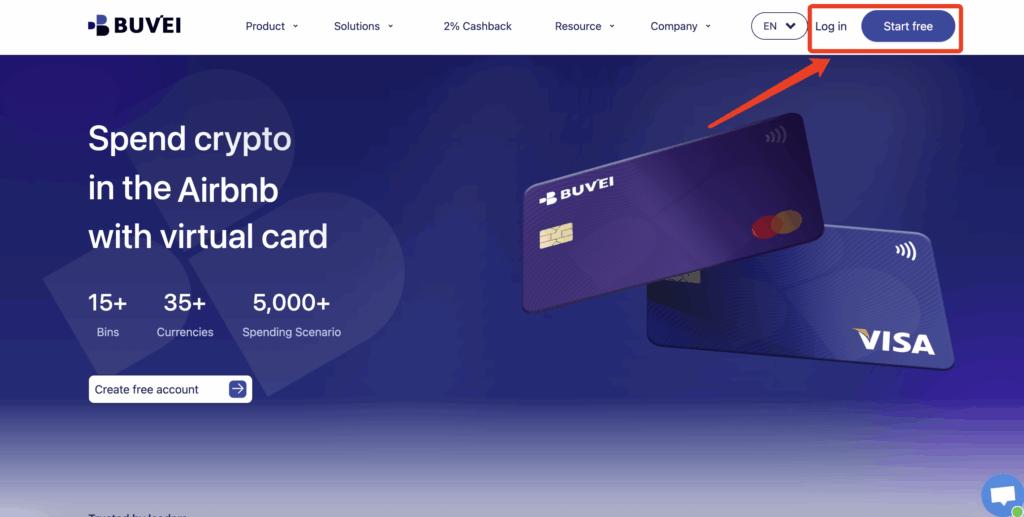
Step 1: Register an Account
Sign up on the Buvei platform using your email address and complete the verification process.
 Step 2: Deposit Funds
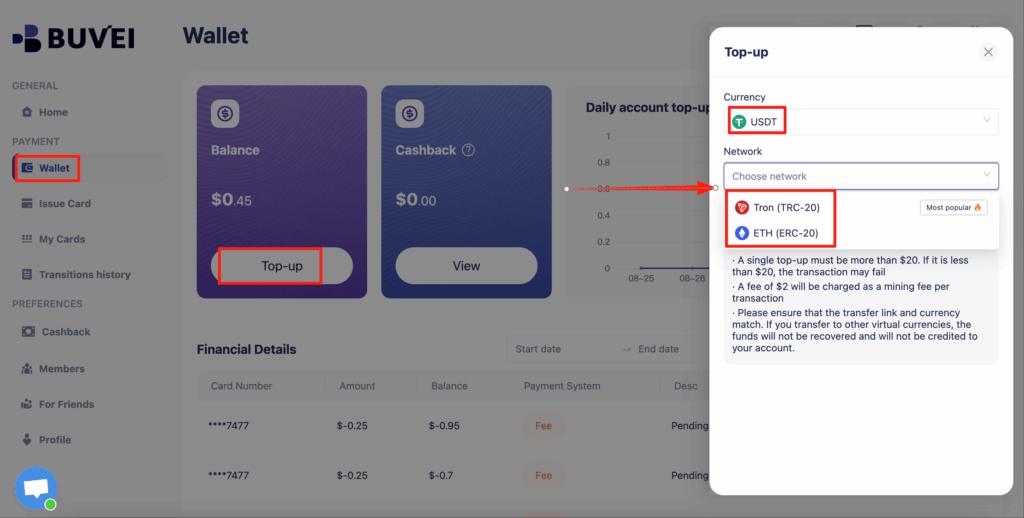
Go to the Wallet section and add funds using supported cryptocurrencies:
-
USDT (TRC20)
-
USDT (ERC20)
After the transaction is confirmed, your wallet balance will be updated.
 Step 3: Issue a Virtual Card
-
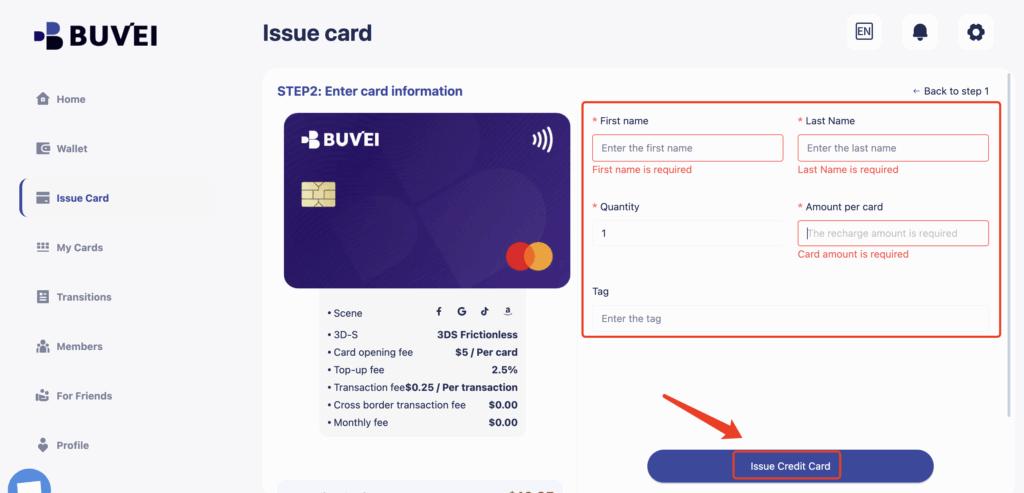
Open the Cards section
-
Select the preferred BIN region
-
Choose the card type
-
Enter the card name, balance, and quantity
-
Click Create Card
The virtual card will be generated instantly.

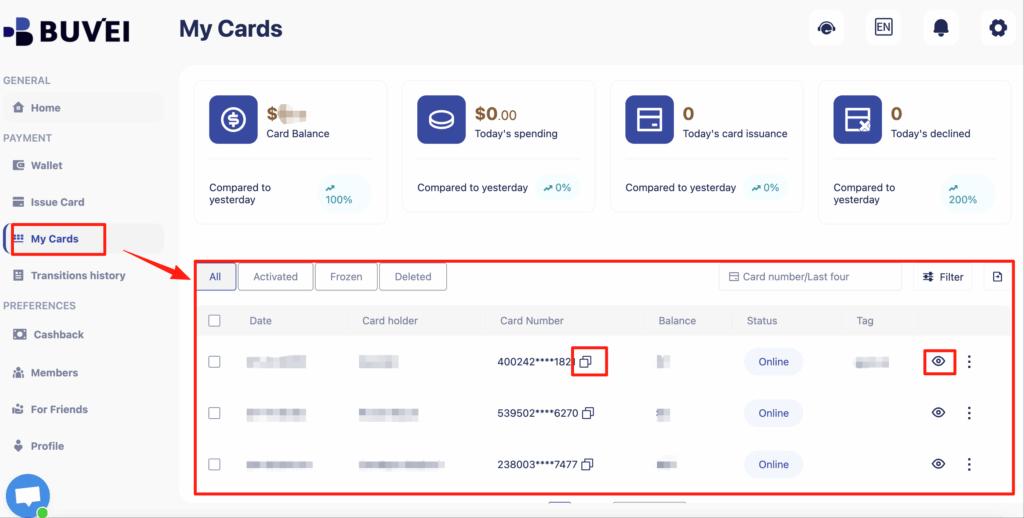
You will be able to view:
-
Card number
-
Expiration date
-
CVV
-
Card balance
-
Transaction history
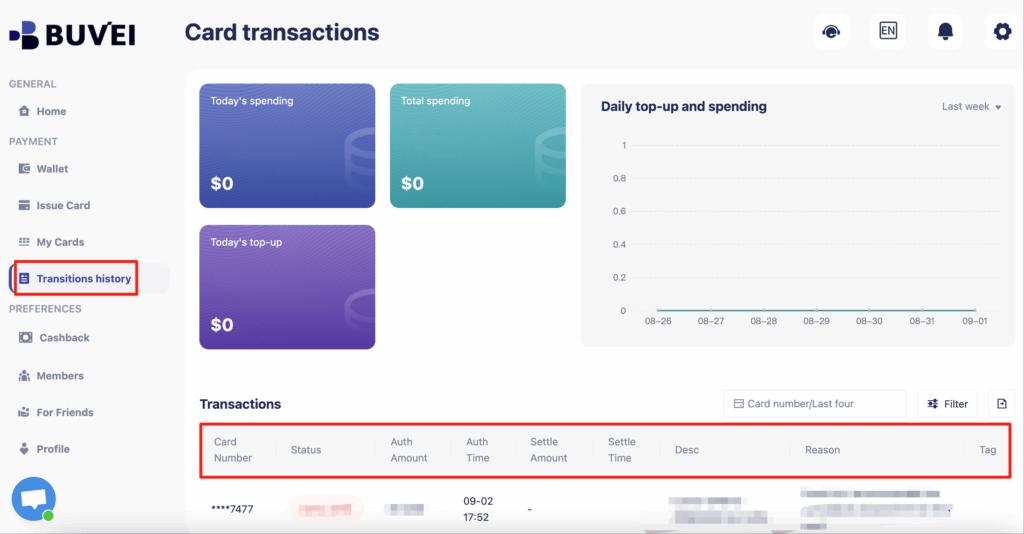
This process ensures that Buvei’s virtual cards are ideal for controlling your spending and managing online payments securely.
Conclusion
Latin America is rapidly embracing digital payments, with Apple Pay playing a growing role in both online and in-store transactions. At the same time, virtual cards are becoming an important tool for managing payments across borders.
By combining mobile wallets with virtual cards, users can benefit from improved security, better financial control, and easier access to global services. Platforms like buvei provide a practical solution for generating virtual cards and managing digital payments in a fast-changing financial landscape.