
Xsolla payments are notorious for high decline rates—even when users are using valid cards with sufficient balance. For game developers, publishers, and global players, Xsolla’s strict risk controls often turn payment processing into a frustrating bottleneck.
So why is Xsolla considered a high-risk merchant, and more importantly, how can you improve approval rates when using virtual cards?
This guide breaks down the real reasons behind Xsolla payment failures and shows you how to significantly increase success rates using Buvei virtual cards, with a clear step-by-step setup.

Why Xsolla Is Classified as a High-Risk Merchant
Xsolla operates in industries that payment networks classify as inherently high risk:
-
Online gaming and in-game purchases
-
Digital goods and instant delivery content
-
Cross-border transactions
-
High refund and chargeback exposure
-
Fraud-prone regions and traffic sources
From a card network’s perspective, Xsolla transactions are:
-
Frequently international
-
Often micro-transactions or high-frequency
-
Triggered from varied IPs and devices
As a result, Xsolla applies aggressive fraud detection, leading to:
-
Card verification failures
-
BIN-based filtering
-
Velocity and behavior-based declines
This affects virtual cards more than traditional bank cards—unless the card setup is optimized.
Common Reasons Virtual Cards Fail on Xsolla
Most Xsolla virtual card declines are not random. They usually happen for one of these reasons:
Unsupported or Low-Trust BINs
Xsolla screens card BIN regions aggressively.
-
Offshore or obscure BINs = instant decline
-
Some prepaid BINs are blocked entirely
Inconsistent Billing Signals
-
Card region ≠ IP location
-
Frequent retries after decline
-
Rapid card switching
Insufficient Transaction Buffer
Xsolla often performs:
-
Small authorization checks
-
Temporary holds
If your card balance is exact, transactions may fail.
Reused or Burned Cards
Cards previously flagged or reused across multiple platforms are more likely to be rejected.
Improving Approval Rates with Buvei Virtual Cards
Buvei virtual cards are designed to work with high-risk merchants like Xsolla when configured correctly.
Here’s why Buvei performs better:
-
Access to high-quality BIN regions (US BIN recommended)
-
Stable Visa/Mastercard issuance
-
Clean transaction history per card
-
Clear balance and authorization visibility
-
Ability to issue fresh cards instantly
When users follow best practices, Buvei cards show significantly higher approval rates on Xsolla compared to generic prepaid cards.
Payment Settings That Actually Help
Before retrying a Xsolla payment, apply these proven optimizations:
Use a Dedicated Card
-
One card = one platform
-
Do not reuse cards across unrelated services
Choose the Right BIN Region
-
U.S. BINs typically perform best
-
Avoid mismatched country settings
Leave a Balance Buffer
-
Keep 10–20% extra balance beyond purchase amount
-
Helps pass authorization and risk checks
Avoid Rapid Retries
-
Wait before retrying after a decline
-
Multiple rapid attempts increase risk flags

Step-by-Step: Using Buvei Virtual Cards for Xsolla Payments
Follow this exact process to minimize failures.
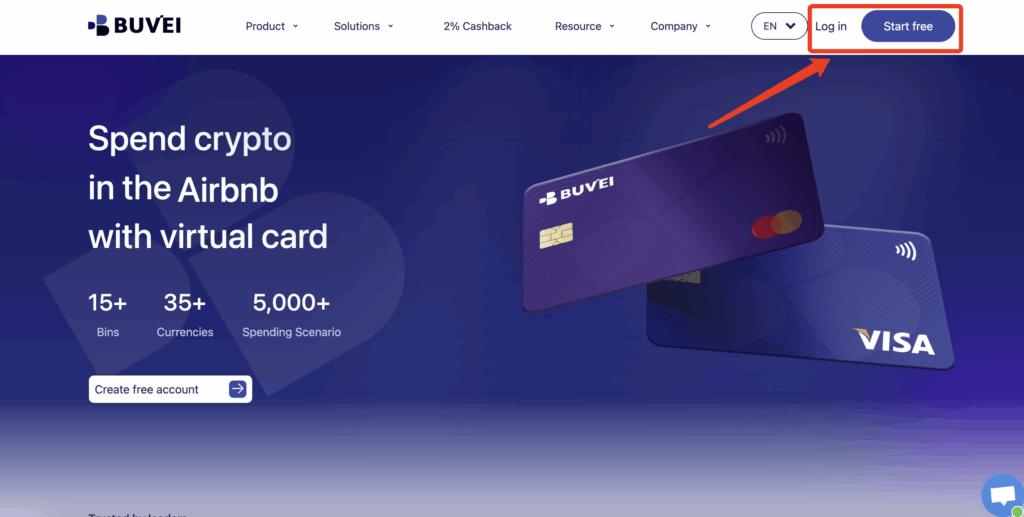
Step 1: Register a Buvei Account
-
Visit https://buvei.com
-
Create a free account
-
Complete email verification
-
Log in to access the Buvei dashboard
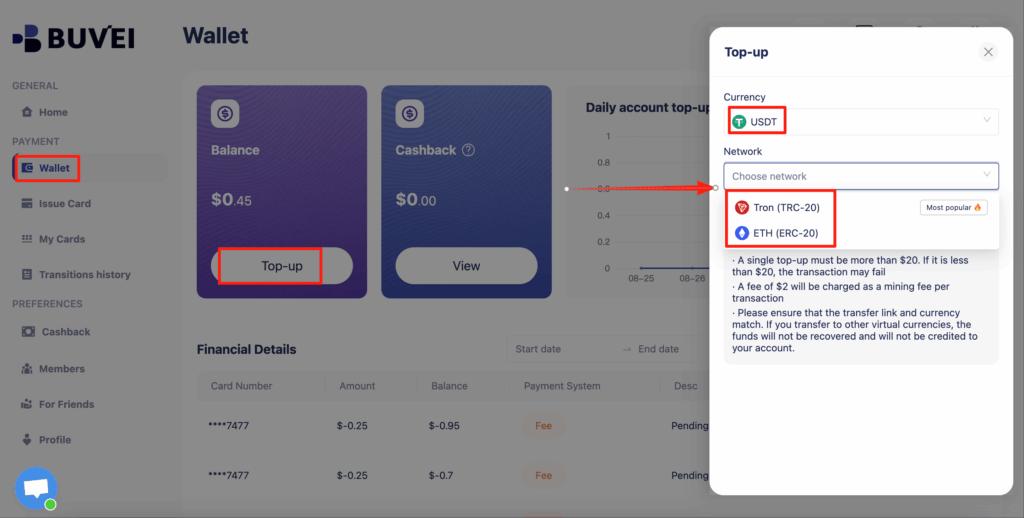
Step 2: Fund Your Wallet with USDT
-
Go to the Wallet tab
-
Select USDT (TRC20 or ERC20)
-
Copy your exclusive deposit address
-
Send USDT to the address
-
Once confirmed, your balance is available immediately
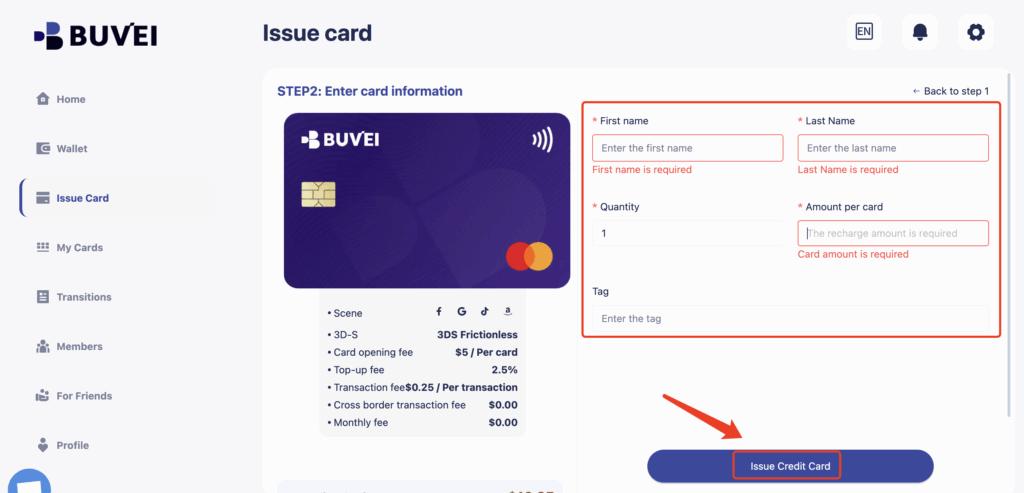
Step 3: Create a Virtual Card
-
Navigate to the Cards tab
-
Select U.S. BIN region (recommended)
-
Choose card type
-
Click create

-
Enter:
-
Card name
-
Card amount (with buffer)
-
Card quantity
-
-
Click Issue Card
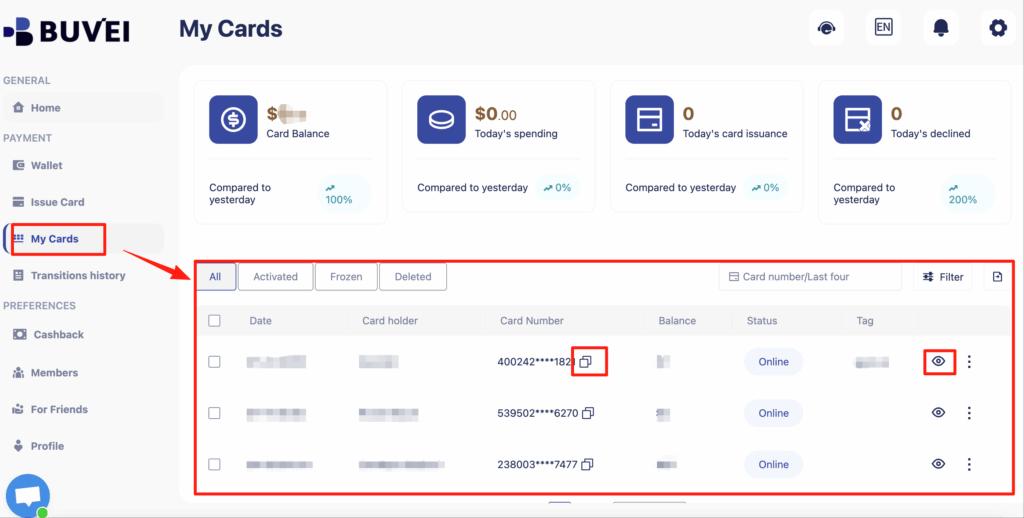
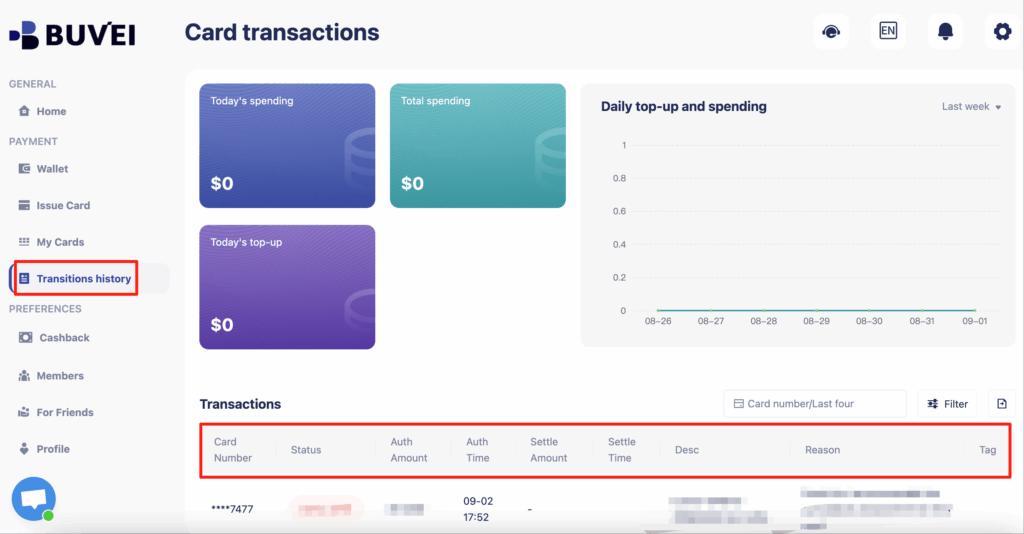
Step 4: View Card Details
Under My Cards, you’ll find:
-
Card number
-
Expiration date
-
CVV
-
Transaction overview
-
Recharge and spending history
Step 5: Complete Payment on Xsolla
-
Proceed to Xsolla checkout
-
Enter your Buvei virtual card details
-
Ensure billing details match card region
-
Complete payment
For Xsolla, this appears as a standard Visa/Mastercard transaction.
What to Do After a Failed or Flagged Transaction
If a payment fails:
-
Do not retry immediately
-
Check transaction logs in Buvei
-
Issue a fresh virtual card
-
Adjust balance and billing consistency
-
Retry once under stable conditions
If a card is flagged, discard it and move on—virtual cards are meant to be replaceable.

Conclusion
Xsolla payments are classified as high-risk due to the nature of digital goods and global gaming transactions. However, declines are not inevitable. With the right virtual card strategy, approval rates can improve dramatically.
By using Buvei virtual cards, selecting trusted BIN regions, managing balances properly, and following clean payment behavior, users can reliably process payments on Xsolla—even in high-risk scenarios.
For developers, studios, and global users dealing with Xsolla regularly, Buvei provides a flexible, crypto-friendly payment solution that aligns with modern digital commerce needs.