
As mobile wallets become part of daily life, more users are actively searching for virtual cards compatible with Google Pay. Unfortunately, many virtual cards fail during verification or get declined after being added. Choosing the right provider makes the difference between seamless payments and constant frustration.
This guide explains what Google Pay requires, why many cards fail, and how to reliably use a Google Pay compatible virtual card such as Buvei, with step-by-step instructions you can follow immediately.

Google Pay Virtual Card Requirements
Google Pay doesn’t accept every prepaid or virtual card. To work properly, cards must meet strict technical and compliance standards.
A virtual card that works with Google Pay typically requires:
-
Visa or Mastercard BINs supported by Google
-
3D Secure (3DS) authentication
-
Stable issuer reputation
-
Consistent billing location
-
Support for Google Pay tokenization
-
Low decline rate during authorization
Many low-cost providers use weak BINs or unstable processors, which causes instant rejection inside Google Pay.
Why Many Virtual Cards Fail with Google Pay
If you’ve ever seen:
-
“This card can’t be added”
-
“Your bank doesn’t support this card”
-
“Verification failed”
The issue usually comes from the card issuer, not you.
Common reasons include:
-
Unsupported BIN regions
-
Poor authorization success rate
-
Mismatch between IP, location, and card region
-
Weak processor reputation
-
No support for mobile wallet tokenization
This is why users searching for the best virtual card for Google Pay should prioritize infrastructure quality over price alone.
Key Features of Google Pay–Compatible Virtual Cards
A reliable virtual card for mobile wallet use should include:
-
Multi-region BIN support (US BINs typically perform best)
-
High approval rate on major platforms
-
PCI DSS–compliant security
-
Custom spending limits
-
Real-time transaction tracking
-
Transparent fee structure
-
Responsive customer support
Buvei virtual cards are designed with these features in mind, which is why they’re widely used for subscriptions, advertising platforms, SaaS tools, and mobile wallets.
How to Create a Virtual Card Using Buvei
Buvei makes it possible to issue a working virtual card within minutes, even for users who have struggled with other providers.
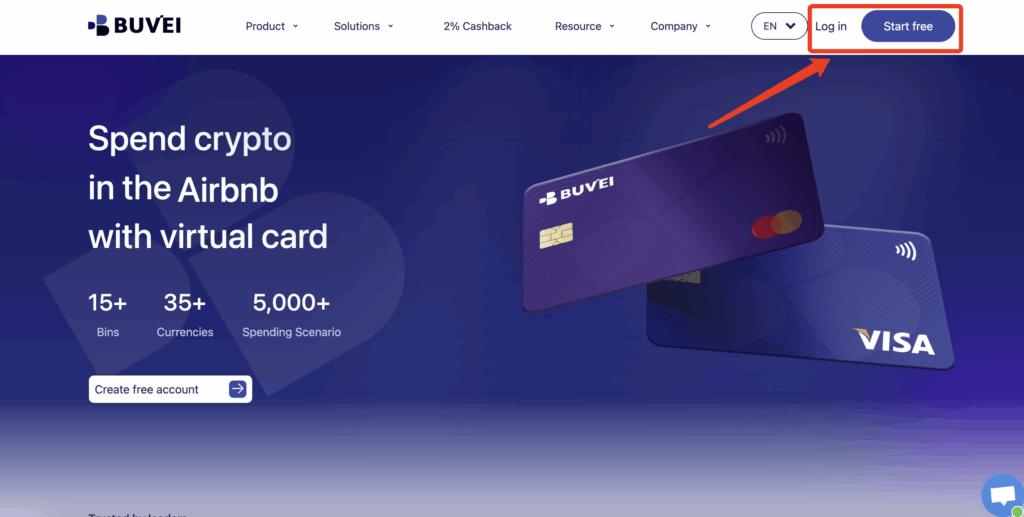
Step 1: Register a Buvei Account
Visit https://buvei.com and create a free account.
After email verification, log in to access your dashboard.
Step 2: Fund Your Account
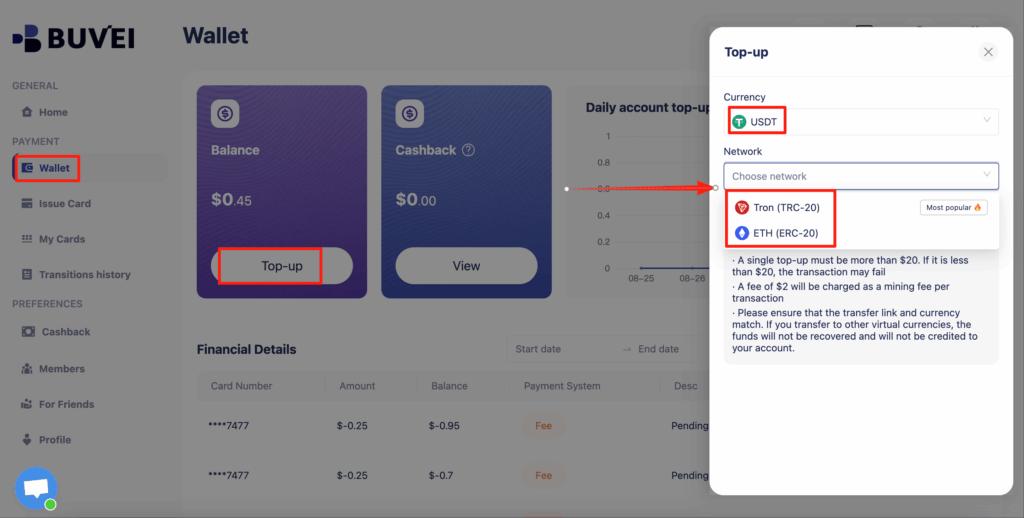
Go to the Wallet tab and top up using supported stablecoins such as:
-
USDT (TRC20)
-
USDT (ERC20)
You’ll receive a dedicated deposit address. Once the transaction is confirmed, your balance appears instantly and is ready for use.
Step 3: Create Your Virtual Card
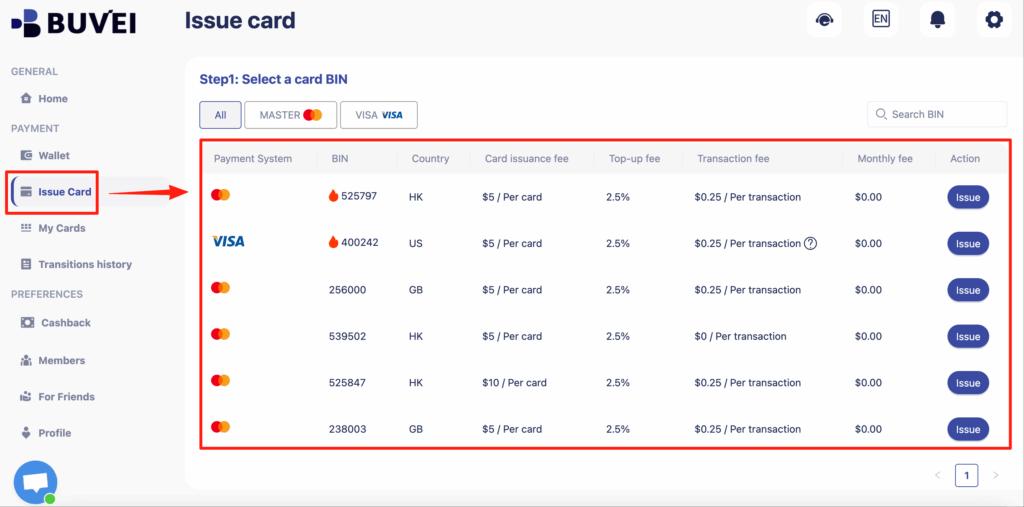
Navigate to the Cards tab and follow these steps:
-
Select your preferred BIN region (US BIN is recommended)
-
Choose your card type
-
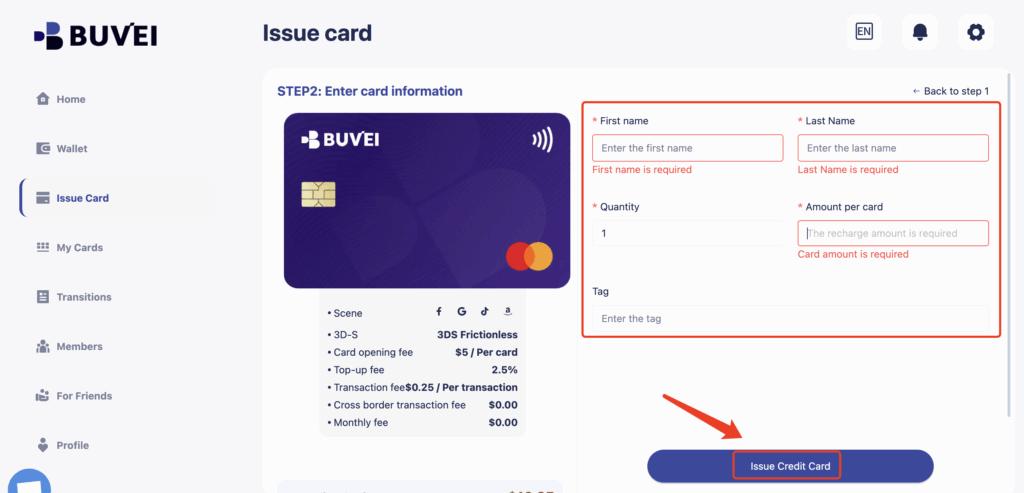
Click Issue Card
-
Enter card details (card name, amount, quantity)
-
Click Create Card
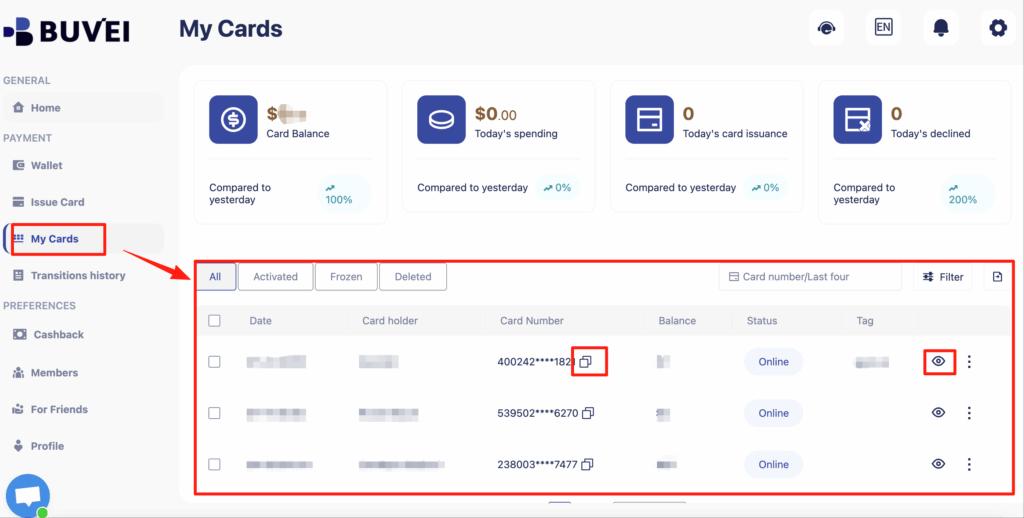
After creation, you can view:
-
Card number
-
Expiry date
-
CVV
-
Transaction history
-
Recharge records
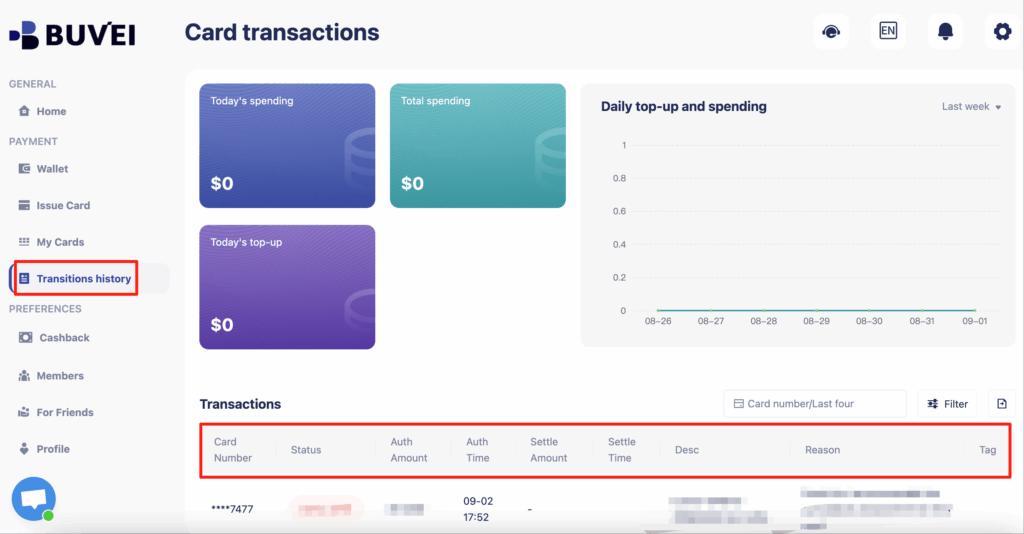
This setup provides strong control and transparency, which is essential when using a secure virtual card for online payments.
Step-by-Step: Add a Virtual Card to Google Pay
Once your Buvei card is ready, adding it to Google Pay is straightforward.
Step 1: Open Google Pay
Open the Google Pay app on your phone or visit pay.google.com.
Step 2: Add a Payment Method
Tap Add payment method → Credit or debit card.
Step 3: Enter Card Details
Input your Buvei virtual card number, expiration date, and CVV.
Step 4: Complete Verification
If prompted, complete verification via email or SMS.
With stable issuers like Buvei, the approval rate is significantly higher than generic prepaid providers.
Step 5: Start Using Google Pay
You can now use your card for:
-
App subscriptions
-
Online checkouts
-
Google services (YouTube Premium, Google One, etc.)
-
NFC in-store payments (on supported devices)
Common Errors and Fixes
Even with strong cards, occasional issues can occur. Here’s how to resolve them.
Card can’t be added
→ Use a US BIN card and ensure billing info is consistent.
Verification failed
→ Retry later or contact Buvei real-time customer support.
Payment declined after adding card
→ Check balance and merchant region compatibility.
Subscriptions fail during renewal
→ Ensure sufficient balance and avoid setting overly restrictive limits.
One major advantage of Buvei is real-time online customer service and optional dedicated managers, making troubleshooting significantly faster than with anonymous card providers.
Final Thoughts
Choosing the right virtual cards compatible with Google Pay is critical if you rely on mobile payments for subscriptions, digital tools, and daily spending. Many virtual cards fail because they lack proper infrastructure, supported BINs, or issuer credibility.
Buvei offers a practical solution by combining:
-
Multi-BIN flexibility
-
Stable platform compatibility
-
Fast USDT top-ups
-
Easy card management
-
Strong security standards
If you’re looking for a Google Pay compatible virtual card that actually works in real-world scenarios, following the steps above gives you a reliable path from registration to successful payments.