
Creating multiple virtual cards has become a practical strategy for advertisers, agencies, and online businesses that need better control over payments. Instead of relying on one card for everything, more users now choose to create virtual cards online to separate expenses, reduce risk, and manage operations more efficiently.
This guide walks through when multiple cards make sense, how they improve control, and how to set them up step by step using a professional platform like Buvei.

Why People Use Multiple Virtual Cards Today
A single card is often enough for personal use. But for business use, it quickly becomes limiting.
You may need multiple virtual cards if you:
-
Run ads across Google, Meta, TikTok, or Microsoft
-
Manage several client ad accounts
-
Pay for multiple SaaS tools like ChatGPT, Canva, or Notion
-
Want to separate budgets by project or department
-
Need stronger protection against account bans or payment issues
By assigning one card per purpose, users gain cleaner accounting and more predictable spending behavior.
What to Look for When You Create Virtual Cards Online
Not every provider is built for users who need scale. If your goal is to create multiple virtual cards online, the platform should support:
-
Issuing many cards from a single dashboard
-
Fast funding options such as USDT
-
Clear and transparent fees
-
Card-level spending limits
-
Real-time transaction tracking
-
Strong compatibility with ad platforms and SaaS tools
This is where business-oriented platforms stand apart from basic consumer virtual cards.
How Multiple Virtual Cards Improve Risk and Spend Control
Using several cards is not just about convenience. It is a control mechanism.
Professionals often structure cards like this:
-
One card per client
-
One card per ad account
-
One card per tool subscription
-
One card per campaign
This approach helps to:
-
Limit damage if a card is flagged or blocked
-
Avoid platform suspensions caused by payment problems
-
Track spending more accurately
-
Enforce strict budget limits per project
For agencies and serious advertisers, this is now considered operational best practice.
Step-by-Step: How to Create Multiple Virtual Cards Online
Below is a practical walkthrough using Buvei, a virtual card platform designed for advertisers, agencies, and global digital businesses.
Buvei supports multi-BIN issuance, USDT funding, and fast card creation, which makes it suitable for users who need to scale beyond a single card.
Step 1: Register a Buvei Account
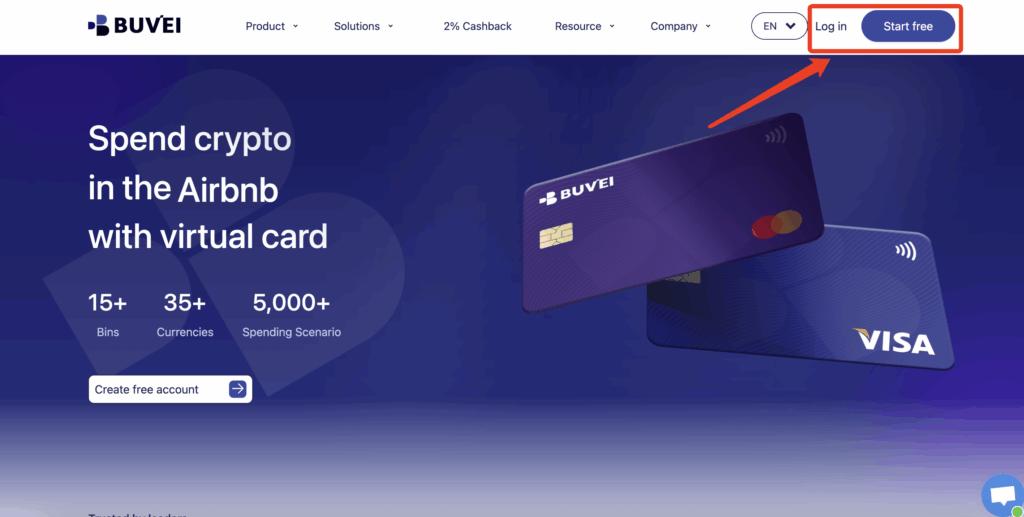
Start by creating an account:
-
Visit https://buvei.com
-
Sign up for a free account
-
Verify your email
-
Log in to access the Buvei dashboard
The onboarding process is simple and designed for fast setup.
Step 2: Fund Your Account with USDT
Before issuing cards, you need available balance.
Inside your dashboard:
-
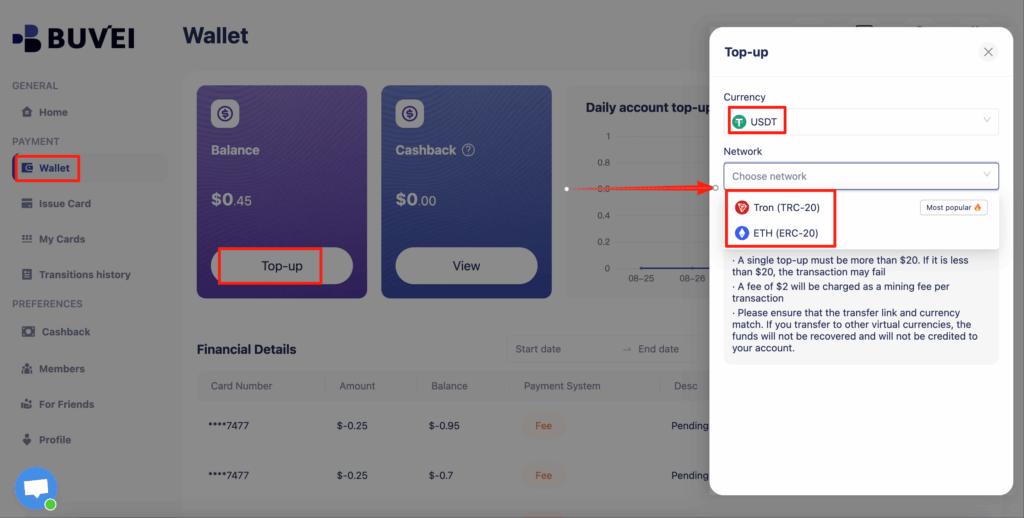
Go to the Wallet tab
-
Select USDT (TRC20 or ERC20)
-
A unique deposit address will be generated
-
Copy the address and send funds from your wallet
After blockchain confirmation, your balance will appear in the wallet and can be used immediately. Many international users prefer this method due to faster settlement and lower fees.
Step 3: Create Multiple Virtual Cards
Once funded, go to the Cards tab to begin issuing cards.
The process looks like this:
-
Select your preferred BIN region (US BIN is commonly used for higher success rates)
-
Choose your card type
-
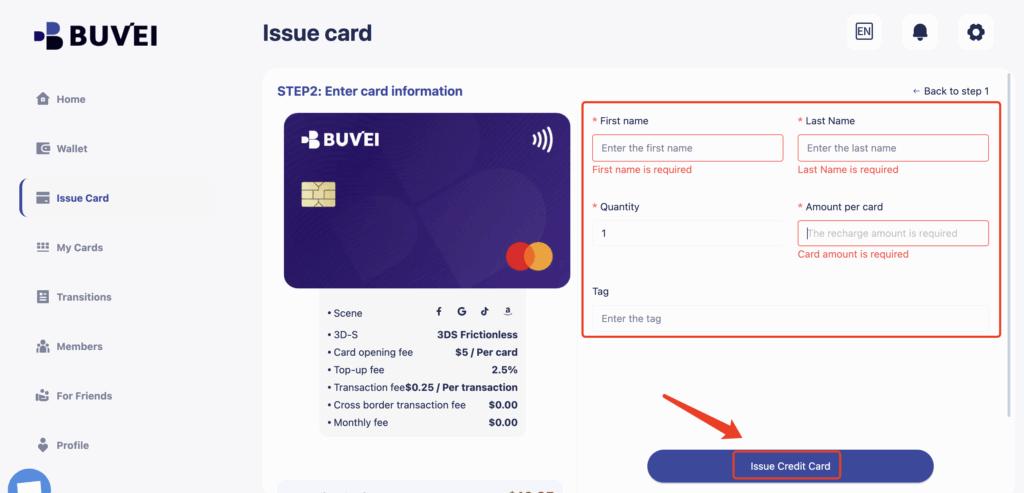
Click Issue Card
-
Enter the required details:
-
Card name (for example: Client A – Google Ads)
-
Amount
-
Number of cards to issue
-
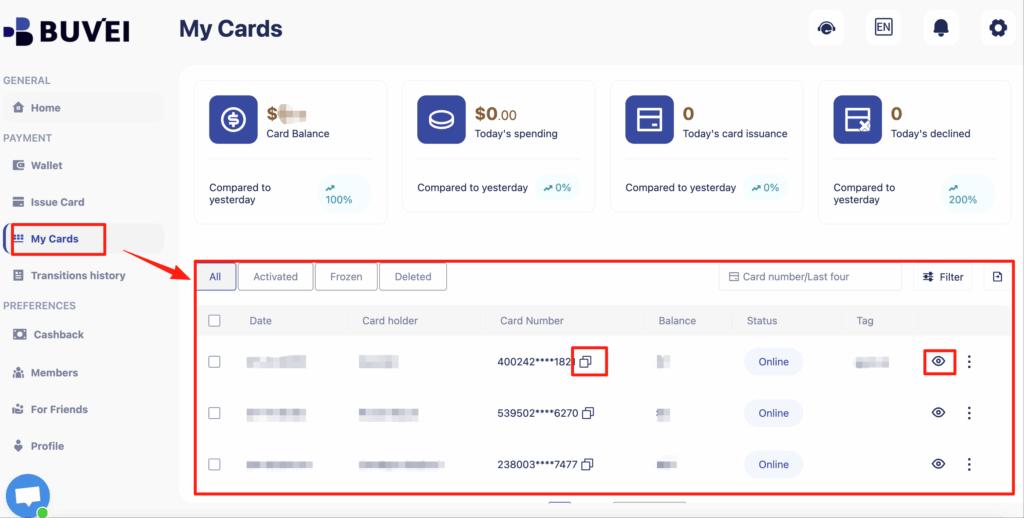
After creation, go to My Cards to view full card details:
-
Card number
-
Expiration date
-
CVV
-
Transaction history
-
Spending and top-up overview
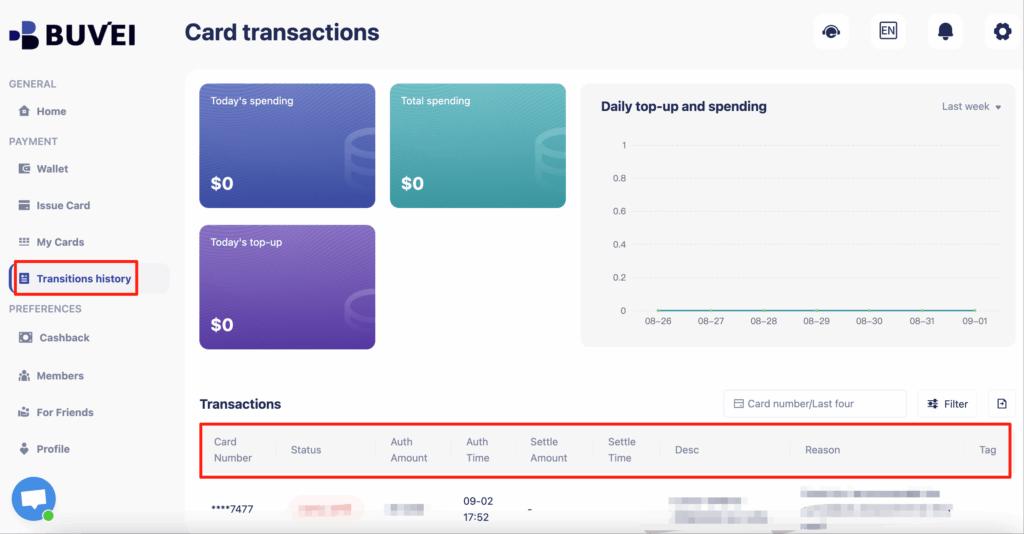
This allows users to create multiple virtual cards online within minutes and assign each card to a specific purpose.
How Agencies and Teams Structure Their Virtual Cards
In real workflows, users often organize cards like this:
-
Card 1 → Google Ads (Client A)
-
Card 2 → Meta Ads (Client A)
-
Card 3 → TikTok Ads (Client B)
-
Card 4 → SaaS subscriptions
-
Card 5 → Internal operations
This structure keeps financial activity clean and avoids confusion when managing multiple clients or platforms.

Managing Multiple Virtual Cards Efficiently
Issuing cards is only the beginning. Proper management is what creates long-term efficiency.
With platforms like Buvei, users can:
-
Monitor all transactions in real time
-
Set limits for each card
-
Freeze or replace cards when needed
-
Review detailed spending reports
-
Manage all cards from one dashboard
This centralized approach is especially valuable for agencies handling dozens of accounts.
Common Mistakes When Creating Multiple Virtual Cards
Some users reduce effectiveness by making avoidable mistakes:
-
Not naming cards clearly
-
Failing to set spending limits
-
Using random BIN regions
-
Mixing personal and business expenses
-
Choosing low-quality providers that lead to declines
A structured setup leads to far better long-term results.
Final Thoughts on Creating Multiple Virtual Cards Online
The shift toward creating multiple virtual cards online reflects how modern digital businesses now operate. It is no longer just a convenience, but a method for building stronger financial control.
With the right platform, users can issue cards quickly, manage spending precisely, reduce risk, and keep operations organized across tools, platforms, and teams. Buvei’s combination of fast issuance, USDT funding, multi-card management, and practical controls makes it a natural fit for users who need more than just a single virtual card.