
Paying for apps and subscriptions on Apple App Store and Google Play should be simple. However, many users experience repeated payment failures, card declines, or unexpected subscription cancellations.
Because of this, more users are now choosing to use virtual cards for App Store and Google Play payments. Virtual cards offer better control, higher approval rates, and stronger protection for long-term subscriptions.
This guide explains how it works and how to set everything up properly.

Common Payment Issues on App Store and Google Play
Users frequently report issues such as:
-
Payment method declined
-
Card verification failed
-
Subscription canceled automatically
-
“Your payment was unsuccessful” errors
-
Repeated authorization charges
-
Account temporarily restricted
-
Country or region mismatch problems
-
Cards not supported for digital purchases
These problems are especially common for users who manage multiple subscriptions, use international accounts, travel often, or rely on prepaid and debit cards.
Why Traditional Cards Often Fail for Digital Stores
Apple and Google use strict fraud prevention systems. Traditional bank cards often fail because:
-
Banks block international digital merchants
-
The card does not support recurring billing
-
Authorization checks are rejected
-
The card BIN triggers risk reviews
-
Too many small charges trigger fraud alerts
-
The balance is insufficient during renewals
Once a card or bank is flagged, future cards from the same bank may continue to fail.
Benefits of Using Virtual Cards for App Purchases
Using virtual cards for App Store and Google Play offers clear advantages:
-
Higher approval rates for online payments
-
One card per account or per subscription
-
Better budget control
-
Reduced risk of mass subscription failures
-
Easy replacement if a card stops working
-
More privacy than using your main bank card
-
Better compatibility for international subscriptions
For users managing many subscriptions, virtual cards become a critical payment management tool.
Step-by-Step: Paying with Virtual Cards on App Stores
For Apple App Store
-
Open Apple ID settings
-
Go to Payment & Shipping
-
Add a new payment method
-
Enter your virtual card details
-
Ensure your billing address matches your Apple region
-
Complete verification if required
For Google Play
-
Open Google Play
-
Go to Payments & subscriptions
-
Add a new payment method
-
Enter your virtual card details
-
Complete any authorization checks
For best stability, use one virtual card per account and ensure enough balance before renewal dates.
How to Use Buvei Virtual Cards for App Store & Google Play
Buvei allows users to easily create, manage, and control multiple virtual cards, which makes it suitable for app subscriptions and recurring billing.
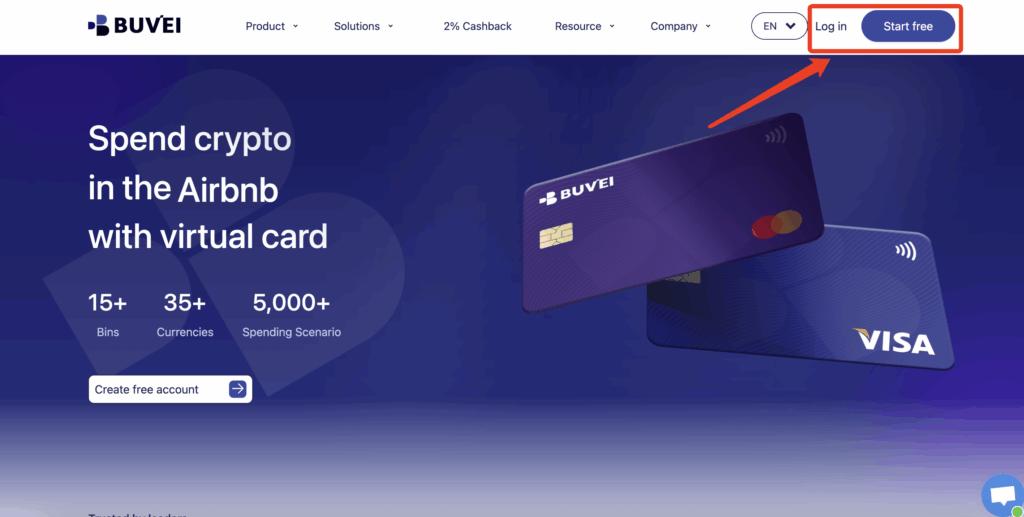
Step 1: Register a Buvei Account
Visit https://buvei.com and create a free account.
After completing email verification, log in to your Buvei dashboard.
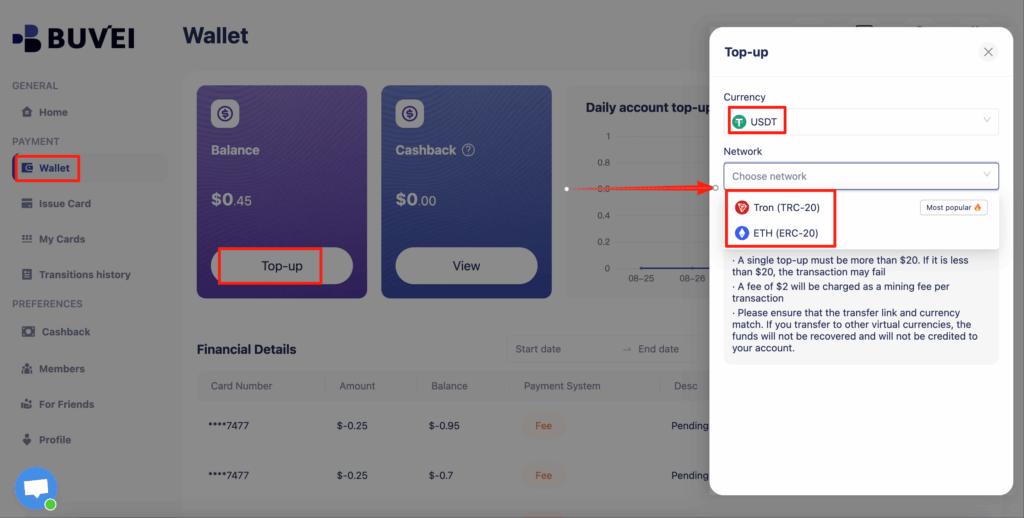
Step 2: Fund Your Account
Go to the Wallet tab.
Top up using USDT (TRC20 or ERC20).
You will receive a unique deposit address.
After confirmation, your balance will appear in your wallet and be available immediately.
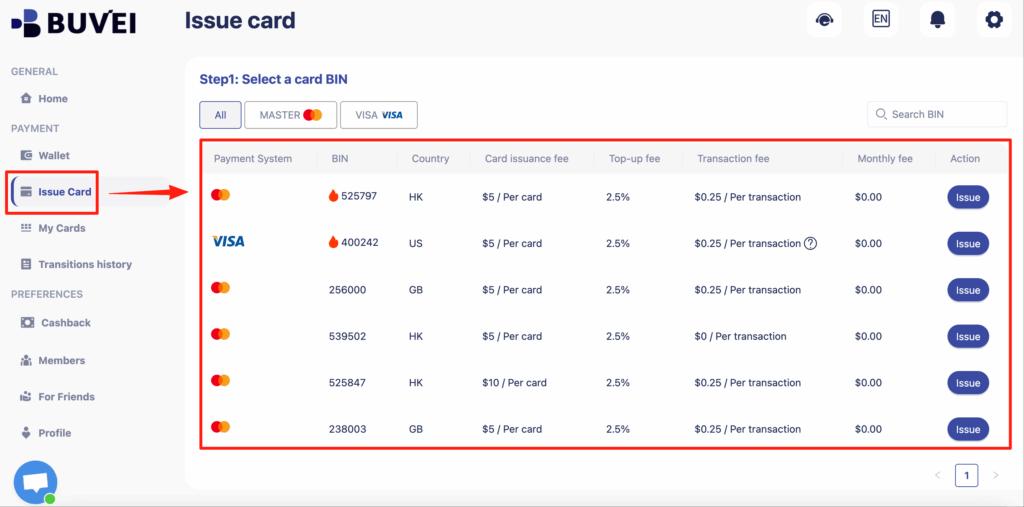
Step 3: Create a Virtual Card
Go to the Cards tab.
Choose your preferred BIN region (US BIN is recommended for higher approval rates).
Select your card type.
Click Create.
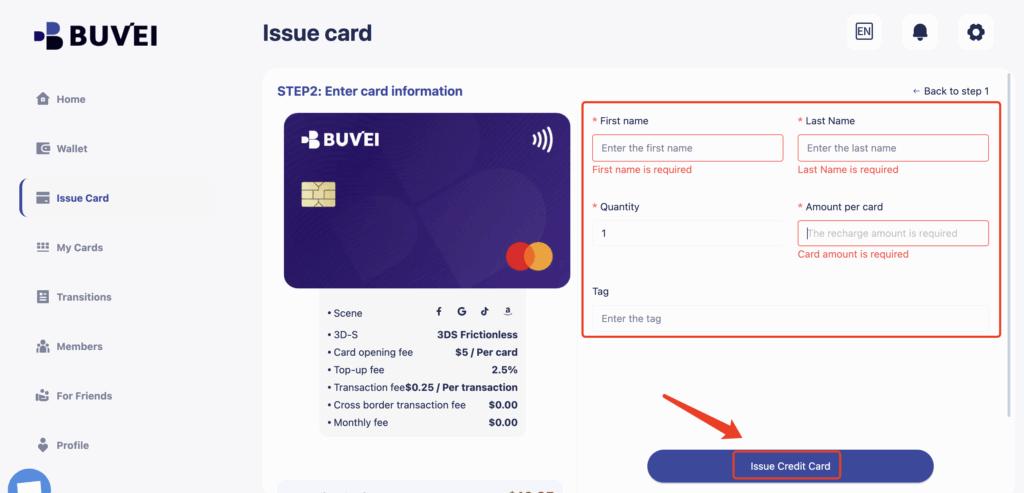
Fill in the card details, including card name, amount, and number of cards.
Click Issue Card.
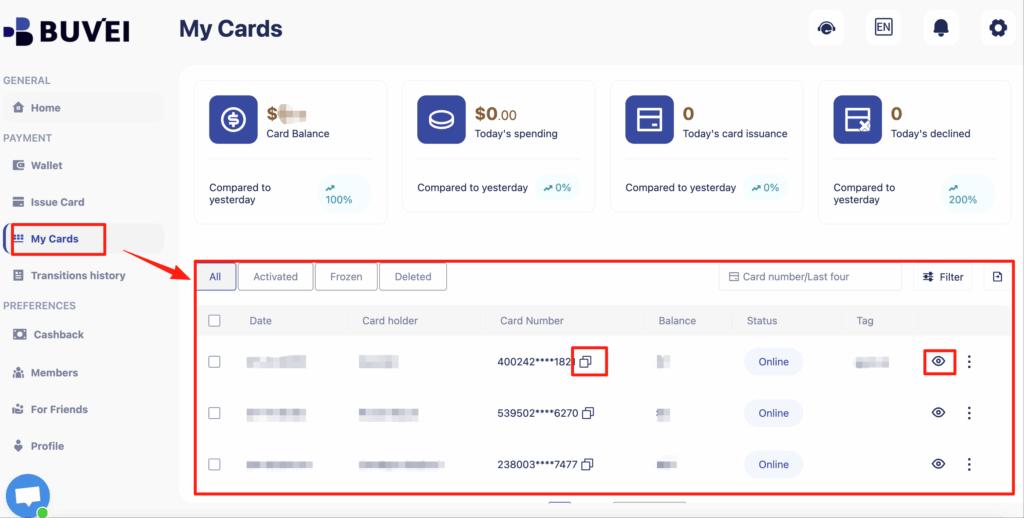
After creation, go to My Cards to view:
-
Card number
-
Expiry date
-
CVV
-
Card balance
-
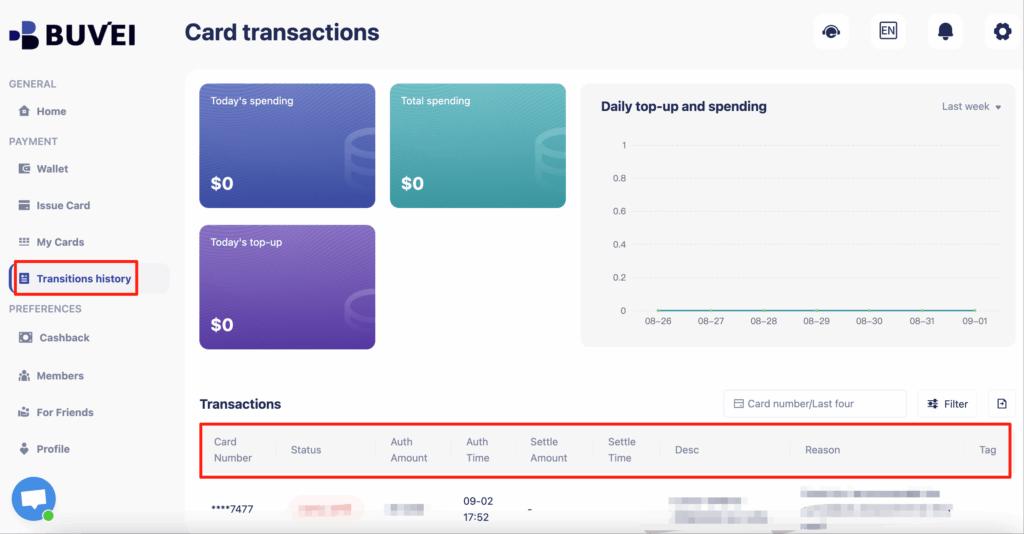
Transaction history
Common Use Cases for Multiple Cards
You can create different cards for:
-
Apple ID subscriptions
-
Google Play subscriptions
-
Business app accounts
-
Family members
-
Testing new services
This structure gives you far more control than using one single bank card.

Tips for Managing Subscriptions and Renewals
To maintain long-term stability, follow these best practices:
-
Always keep sufficient balance before renewal dates
-
Use separate cards for important subscriptions
-
Name each card clearly based on its purpose
-
Avoid using one card for too many accounts
-
Replace cards if a platform starts declining
-
Monitor transactions regularly
Experienced users treat virtual cards as subscription infrastructure rather than just a payment method.
Final Thoughts
If you regularly pay for apps, digital tools, games, or subscriptions, virtual cards for App Store and Google Play are now a smarter solution than traditional bank cards.
With the right setup, you can reduce declines, prevent unexpected cancellations, manage spending, and safely scale multiple accounts. Platforms like Buvei make this process much easier by allowing flexible card creation and full spending control.