At first glance, AWS billing looks simple. You add a credit card, services run, and charges happen automatically.
However, many teams discover problems only after switching to a virtual card. Payments fail without warning. AWS sends alerts. In some cases, workloads are paused or restricted.
So the real issue is not whether AWS accepts virtual cards.
The real issue is why some virtual cards fail under AWS billing logic, while others work consistently.
This article explains how AWS actually charges accounts, why virtual cards often break, and how to configure a virtual card—using Buvei as an example—to keep AWS billing stable.

How AWS Actually Charges Your Account
To understand payment failures, you first need to understand how AWS billing works behind the scenes.
AWS Uses a Postpaid Billing Model
AWS does not ask you to preload funds. Instead, it:
-
Tracks usage continuously
-
Calculates charges throughout the month
-
Attempts charges automatically, sometimes multiple times
This means AWS expects your payment method to remain valid at all times, not just on invoice day.
AWS Performs Ongoing Authorization Checks
In addition to real charges, AWS frequently performs:
-
Small verification charges
-
Pre-authorization holds
-
Retry attempts after partial failures
These checks help AWS confirm that future usage can be covered.
For virtual cards, this behavior is often where problems start.
Why Virtual Cards Often Fail on AWS Billing
Virtual cards are not inherently incompatible with AWS.
Most failures come from card limitations and misconfiguration.
Authorization Holds Are Commonly Declined
Some virtual cards are designed only for fixed, one-time payments. As a result, they may:
-
Reject authorization holds
-
Allow only exact charge amounts
-
Decline repeated authorization attempts
AWS relies heavily on authorization checks. If those fail, AWS may flag the card as unreliable.
Spending Limits Are Set Too Low
Another common issue involves limits.
For example:
-
A card limit equals last month’s bill
-
No buffer for usage spikes
-
No allowance for authorization holds
When AWS attempts a charge slightly above expectations, the transaction fails—even if the balance seems sufficient.
BIN Quality and Region Matter More Than Expected
AWS payment systems evaluate risk signals tied to:
-
BIN region
-
Card network behavior
-
Issuer reputation
Lower-quality or unstable BINs are more likely to be declined, especially for infrastructure-level billing.
Choosing a Virtual Card That Can Survive AWS Billing
For AWS, not all virtual cards are equal.
Cards that work well with AWS usually share these traits:
-
Stable Visa or Mastercard BINs
-
Support for authorization holds
-
Adjustable spending limits
-
Predictable approval behavior
This is why many teams turn to platforms like Buvei when managing AWS payments.
Why Buvei Is Commonly Used for AWS Billing
Buvei is designed for recurring and variable platform charges, not just simple online purchases.
Key characteristics include:
-
Multiple global BIN options
-
US BIN availability, which aligns well with AWS billing
-
Support for pre-authorization holds
-
Clear control over balances and limits
Equally important, setup is straightforward and fast.
Step-by-Step: Setting Up a Buvei Virtual Card for AWS
Below is a practical setup flow that reduces the risk of AWS billing interruptions.
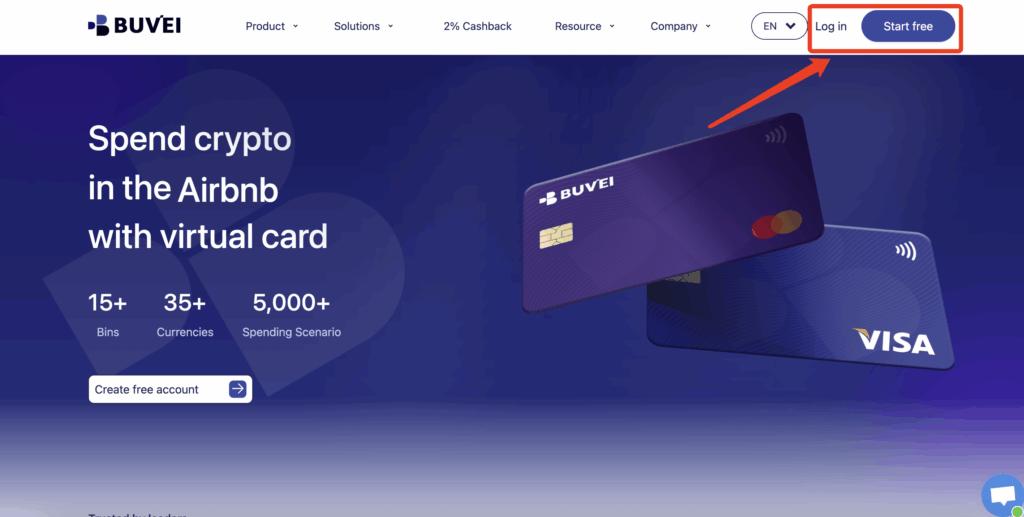
Step 1: Register a Buvei Account
-
Visit https://buvei.com
-
Create a free Buvei account
-
Complete email verification
-
Log in to the Buvei dashboard
This process takes only a few minutes and does not involve complex onboarding.
Step 2: Fund Your Account With USDT
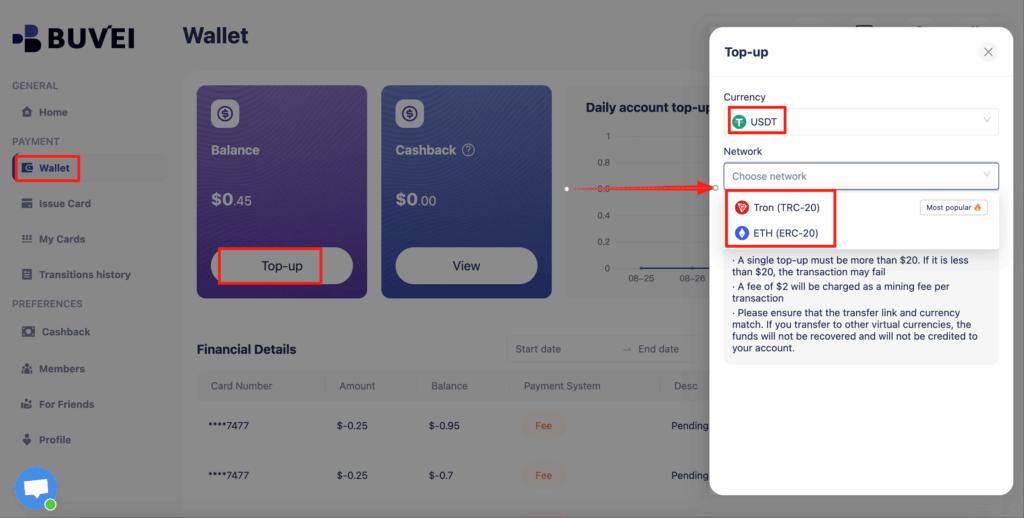
Next, add funds to your wallet.
-
Open the Wallet tab
-
Choose USDT (TRC20 or ERC20)
-
Copy your dedicated deposit address
-
Transfer USDT from your crypto wallet
Once confirmed, the balance appears in your wallet and is ready to use.
Note:
TRC20 is often preferred due to lower fees and faster confirmation.
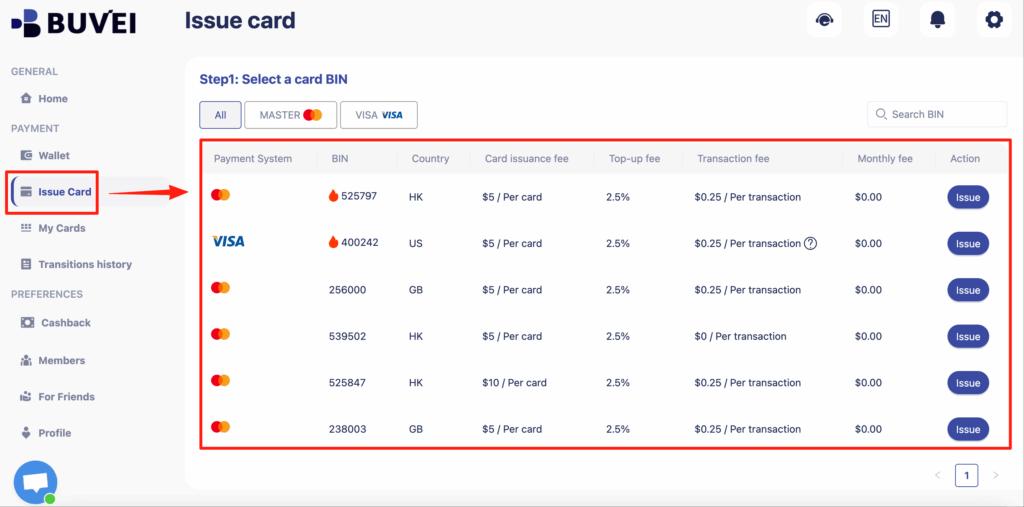
Step 3: Create a Virtual Card With the Right BIN
Now issue a card specifically for AWS.
-
Go to the Cards tab
-
Select a BIN region
-
US BINs are generally recommended for AWS
-
-
Choose the card type
-
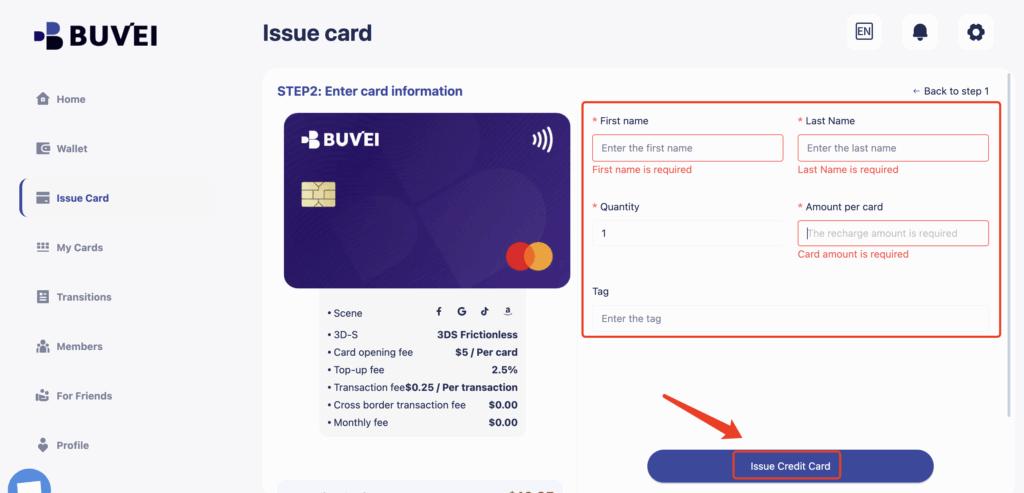
Click Issue Card
-
Enter:
-
Card name (for example, “AWS Billing”)
-
Initial amount
-
Number of cards
-
After creation, open My Cards to view:
-
Card number
-
Expiration date
-
CVV
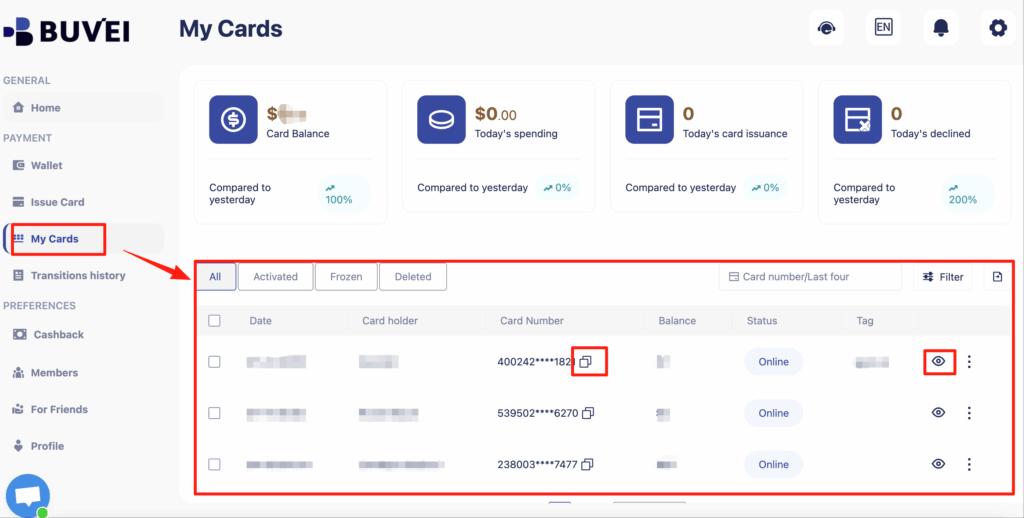
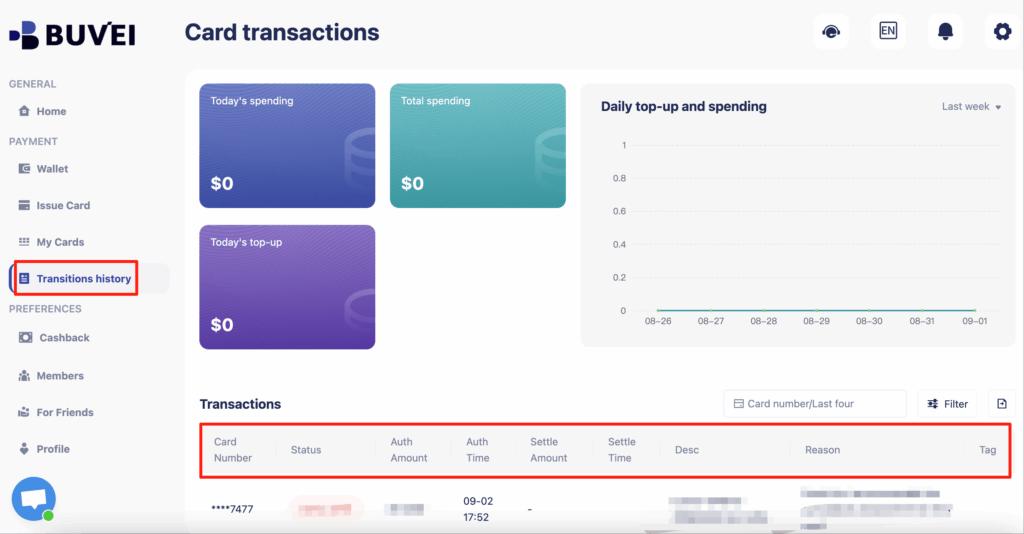
You can also review funding and transaction history from this page.
Step 4: Add the Card to AWS Billing
Once your card is ready:
-
Log in to the AWS Console
-
Go to Billing → Payment Methods
-
Add a new credit card
-
Enter your Buvei virtual card details
-
Save and confirm
AWS may place a small authorization hold during this process. This is normal.
How AWS Uses Pre-Authorization Holds and Spending Limits
Understanding this behavior helps avoid unexpected failures later.
Why AWS Uses Authorization Holds
AWS uses authorization holds to:
-
Confirm payment reliability
-
Prepare for variable usage
-
Reduce unpaid balances
These holds may not turn into final charges, but they still require available balance.
How to Set Limits That Do Not Break Billing
A practical approach is to:
-
Set limits higher than average monthly usage
-
Add a safety buffer of 20–30%
-
Review usage trends regularly
With Buvei, limits can be adjusted directly from the dashboard as usage changes.
Practical Fixes to Prevent AWS Billing Interruptions
Even with the right card, small operational habits matter.
Use a Dedicated Card for AWS
Avoid sharing one card across:
-
AWS
-
SaaS subscriptions
-
Advertising platforms
A dedicated card keeps authorization behavior consistent.
Monitor Transactions Proactively
Watch for:
-
Repeated authorization attempts
-
Declined holds
-
Unexpected charge patterns
Early detection helps prevent service disruption.
Maintain a Funding Buffer
Do not fund the card with the exact expected bill amount.
AWS usage fluctuates, and small buffers often prevent larger issues.
Final Thoughts
So, can virtual cards handle AWS billing?
Yes—but only when the card supports AWS’s billing behavior.
AWS expects payment methods that can:
-
Pass authorization holds
-
Handle variable and recurring charges
-
Remain stable over time
When configured correctly, virtual cards—especially those designed for platform billing like Buvei—can work reliably for AWS while offering more flexibility and control than traditional bank cards.
For teams managing cloud infrastructure at scale, that reliability makes a meaningful difference.