Temu and SHEIN have rapidly become two of the most popular cross-border shopping platforms worldwide. With competitive pricing and global shipping, they attract millions of users making frequent online purchases. At the same time, many shoppers are looking for safer and more flexible ways to pay—especially those who prefer not to use their primary bank cards for international e-commerce.
Virtual cards have emerged as a practical solution for Temu and SHEIN payments, offering better security, spending control, and higher compatibility for online transactions. This guide explains how these platforms process payments, whether virtual cards work reliably, and how to use a Buvei virtual card for smooth checkout in 2026.
How Temu and SHEIN Process Online Payments
Both Temu and SHEIN rely on global card payment networks such as Visa and Mastercard to process online transactions. Payments are automatically screened through risk-control systems designed to detect fraud, abnormal spending patterns, or unsupported card regions.
As a result, some payments may be declined if a card:
-
Is issued from a region considered high-risk
-
Has insufficient balance to cover the order and taxes
-
Triggers repeated failed transactions
-
Shows inconsistent usage patterns
These checks are standard for international e-commerce platforms and can sometimes affect legitimate users, especially when shopping across borders.
Can Virtual Cards Be Used on Temu and SHEIN?
Yes, Temu and SHEIN generally accept virtual cards, as long as they function like standard debit or credit cards and are issued under supported networks.
In real-world use, virtual cards work well on Temu and SHEIN when:
-
The card supports online and international transactions
-
There is enough balance available at checkout
-
A compatible BIN region is used (US BINs often show better acceptance)
For many users, virtual cards perform just as reliably as physical cards, with the added benefit of enhanced control and security.

What Makes a Virtual Card Work Well for Temu & SHEIN
Not all virtual cards are equally suited for online shopping platforms. A virtual card that works well for Temu and SHEIN payments should offer:
-
Strong Visa or Mastercard compatibility
-
Stable performance for frequent small-to-medium purchases
-
Adjustable spending limits to prevent overspending
-
Instant issuance and easy replacement
-
Clear transaction records for order tracking and budgeting
Using a dedicated virtual card for shopping can also reduce the risk of payment disruptions and make it easier to manage e-commerce expenses.
Common Payment Issues on Temu and SHEIN
Despite broad payment support, users may occasionally experience issues such as:
-
Payment declined due to low balance
-
Card rejected after multiple failed attempts
-
Temporary checkout errors caused by risk controls
-
Restrictions after switching cards too frequently
To minimize these issues, it’s recommended to:
-
Keep a small balance buffer on your virtual card
-
Use one dedicated card for Temu or SHEIN purchases
-
Avoid repeated rapid checkout attempts after a decline
-
Replace the card promptly if payment issues persist
Virtual cards make this process easier, as new cards can be issued quickly without affecting your main bank account.
How to Create and Use a Virtual Card with Buvei
Buvei provides a simple and crypto-friendly way to create virtual cards suitable for Temu and SHEIN payments.
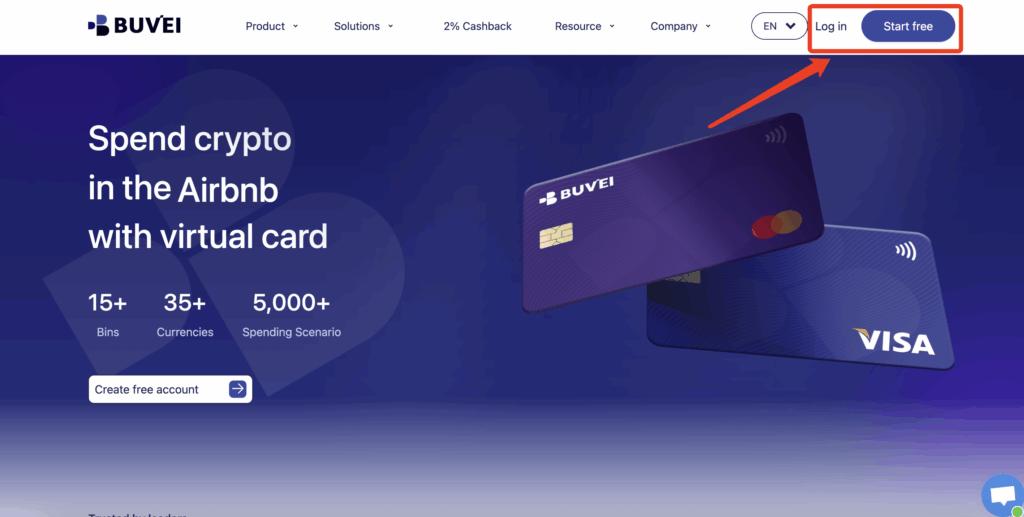
Step 1: Register a Buvei Account
Visit https://buvei.com and create a free Buvei account.
After completing email verification, log in to access the Buvei dashboard, where all wallets and virtual cards are managed in one place.
Step 2: Fund Your Buvei Wallet
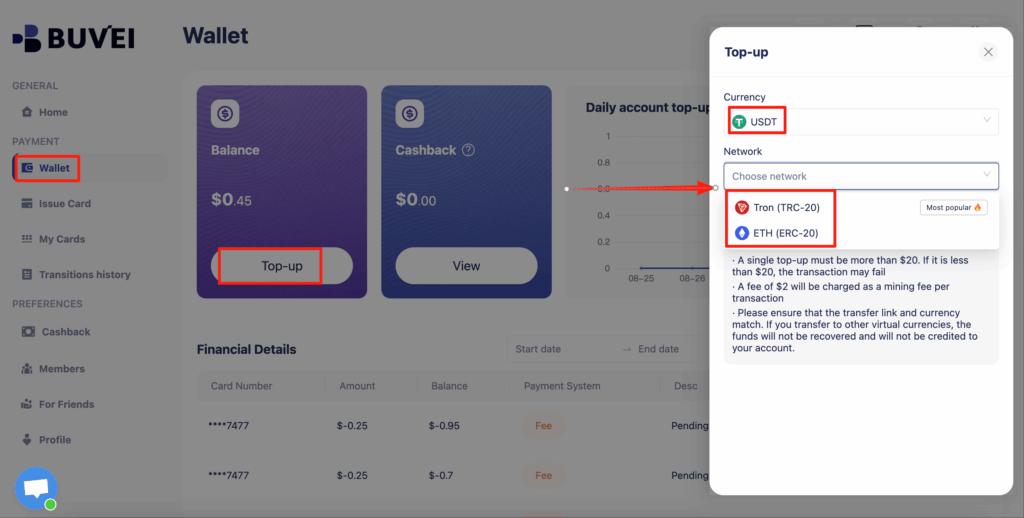
Before issuing a virtual card, you’ll need to add funds to your account.
Go to the Wallet tab and choose USDT (TRC20 or ERC20) as your preferred funding method. Buvei will generate a dedicated deposit address for your account.
Copy this address and transfer your funds. Once the transaction is confirmed on-chain, your balance will appear instantly and be available for use.
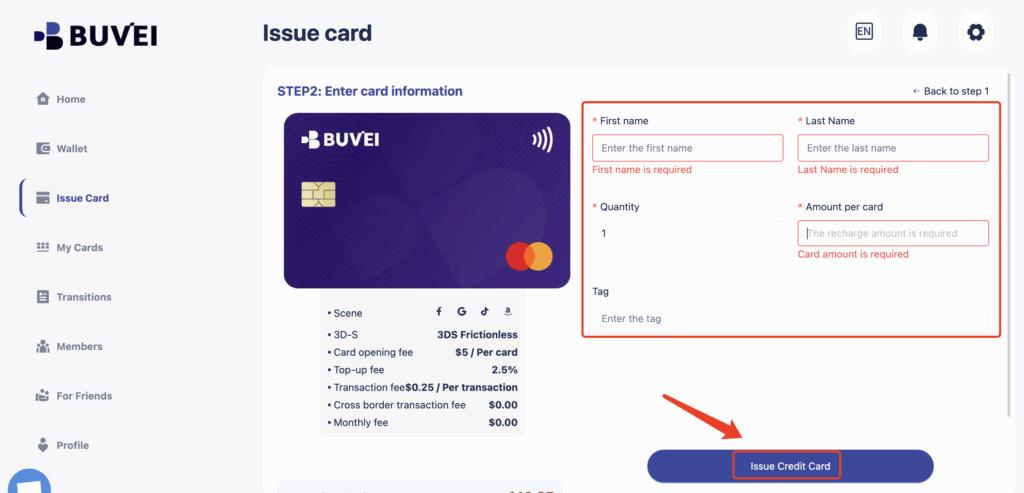
Step 3: Create a Virtual Card
With funds available, navigate to the Cards section and click Create Card.
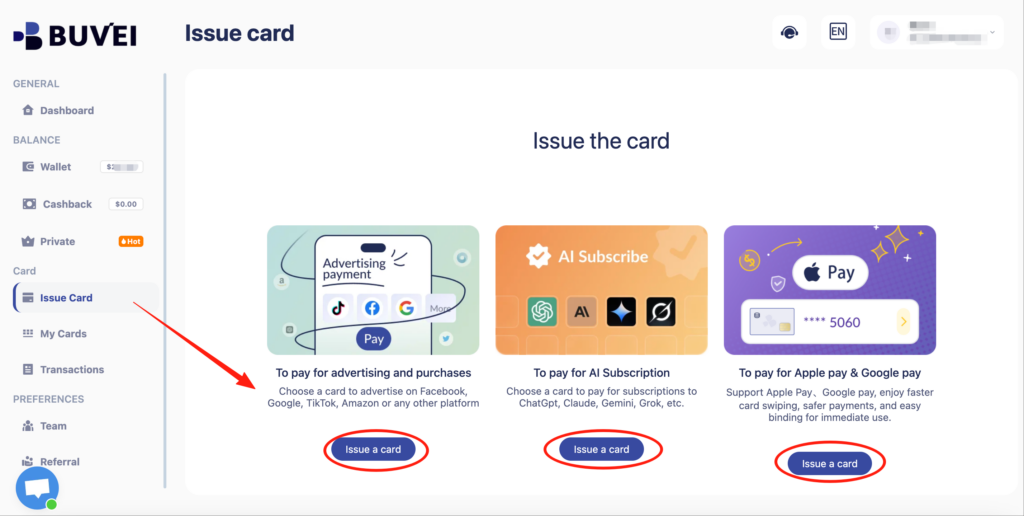
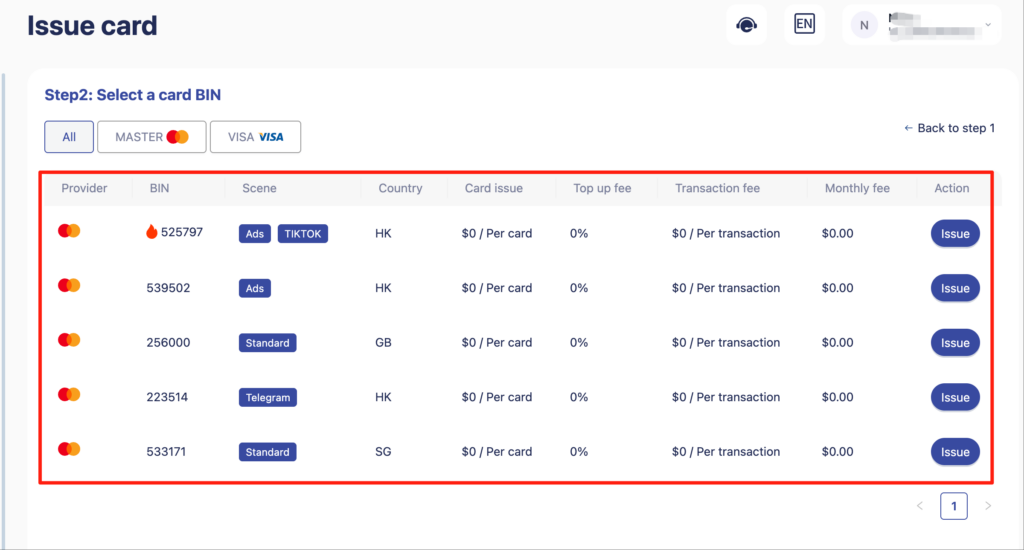
You will need to:
-
Select your preferred BIN region (US BIN is recommended for better compatibility)
-
Choose the card type
-
Enter card details such as card name, card balance, and card quantity
After completing the information, click Issue Card to finalize the process.
Step 4: Use the Virtual Card for Temu or SHEIN Payments
Once the card is issued, go to My Cards to view the full card details, including:
-
Card number
-
Expiration date
-
CVV
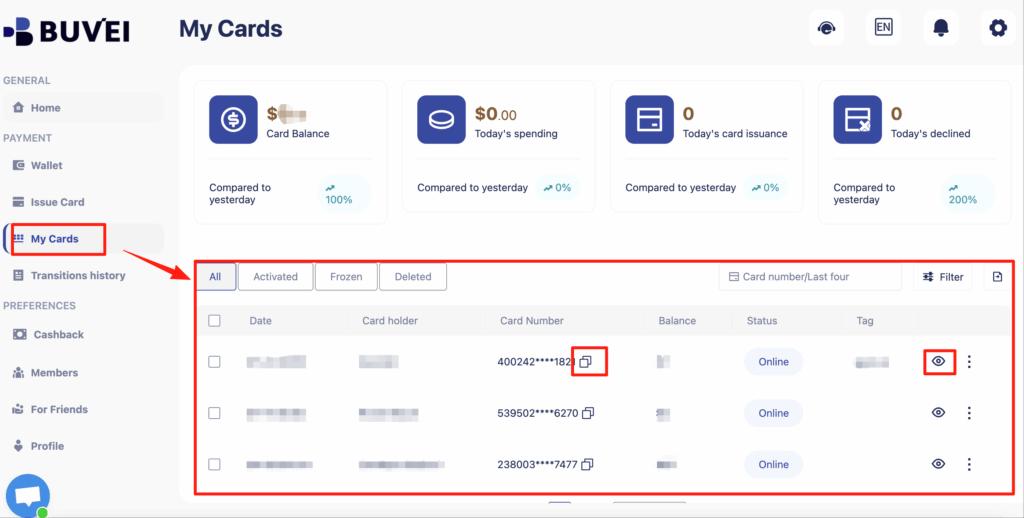
Use these details during checkout on Temu or SHEIN, just as you would with a regular debit or credit card.
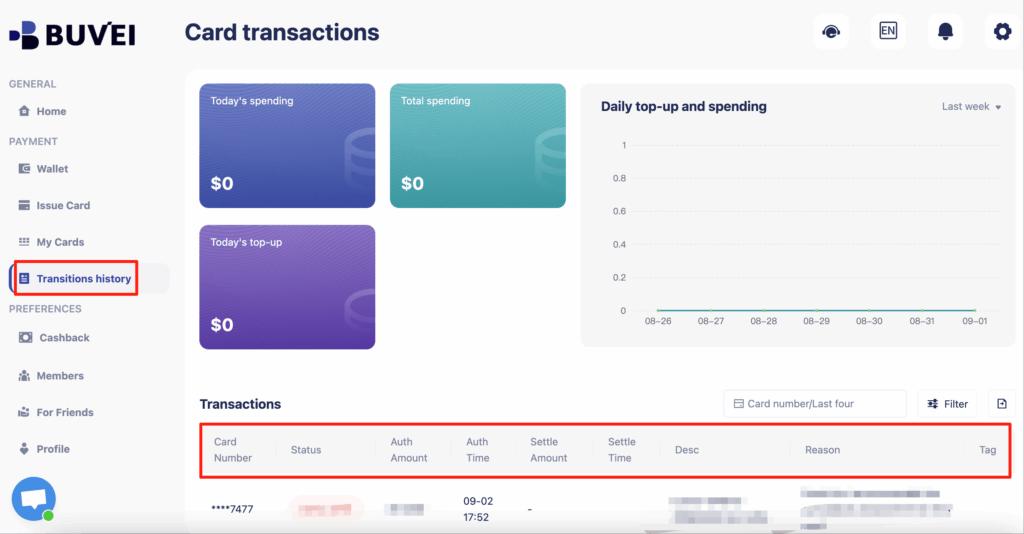
From the same page, you can also track card balances, top-ups, spending summaries, and full transaction history, making it easy to monitor your online shopping expenses in real time.
Final Thoughts
Virtual cards are a secure and flexible payment option for shopping on Temu and SHEIN, especially for users who want greater control over online spending or prefer not to expose their primary bank cards.
With Buvei, you can quickly create virtual cards, fund them using stablecoins, and manage all transactions from a single dashboard. For global shoppers in 2026, virtual cards offer a smarter and safer way to enjoy cross-border e-commerce without unnecessary payment friction.