Apple Music is one of the most popular music streaming services worldwide, offering millions of songs through a subscription-based model. However, some users prefer not to link their primary bank cards to recurring subscriptions. This is where virtual cards provide a safer and more flexible alternative.
In this guide, we’ll explain why virtual cards work well for Apple Music, whether Apple Music accepts them, and how to pay for your subscription using a virtual card created with Buvei.
Why Use Virtual Cards for Apple Music?
Virtual cards are digital payment cards that function like traditional debit or credit cards, but with enhanced control and security. For Apple Music subscribers, they offer several clear advantages:
-
Improved security by keeping your main bank card off subscription platforms
-
Better spending control, especially for recurring monthly payments
-
Easy replacement if a card expires or a payment fails
-
Separation of expenses, useful if you manage multiple subscriptions
These features make virtual cards an ideal option for users who want flexibility without compromising on convenience.
Does Apple Music Accept Virtual Cards?
Yes, Apple Music generally accepts virtual cards, as long as they are issued under supported networks such as Visa or Mastercard.
To improve payment success rates:
-
Use a US BIN virtual card, which is often more compatible with Apple’s billing system
-
Ensure the card has sufficient balance for the subscription and any applicable taxes
-
Avoid using cards with overly restrictive transaction limits
Many users find that virtual cards work just as reliably as physical cards for Apple Music subscriptions.
Benefits of Using Virtual Cards for Music Subscriptions
Using a virtual card for Apple Music and other digital subscriptions comes with several practical benefits:
-
Predictable billing with a fixed balance allocated for subscriptions
-
Reduced risk of unwanted charges if you forget to cancel
-
Faster issue and replacement compared to traditional cards
-
One card per service, making subscription management easier
This approach is especially useful for users who subscribe to multiple digital services such as music, video streaming, or cloud storage.
How to Pay for Apple Music With a Virtual Card
Paying for Apple Music using a virtual card is straightforward:
-
Log in to your Apple ID account settings
-
Go to Payment & Shipping
-
Add a new payment method and select Credit or Debit Card
-
Enter your virtual card details (card number, expiration date, CVV)
-
Save the changes and confirm your subscription payment
To avoid interruptions, make sure your virtual card remains funded before the renewal date.
How to Create and Use a Virtual Card With Buvei
If you’re looking for a fast, crypto-friendly way to get a virtual card suitable for Apple Music, Buvei offers a simple and efficient solution.
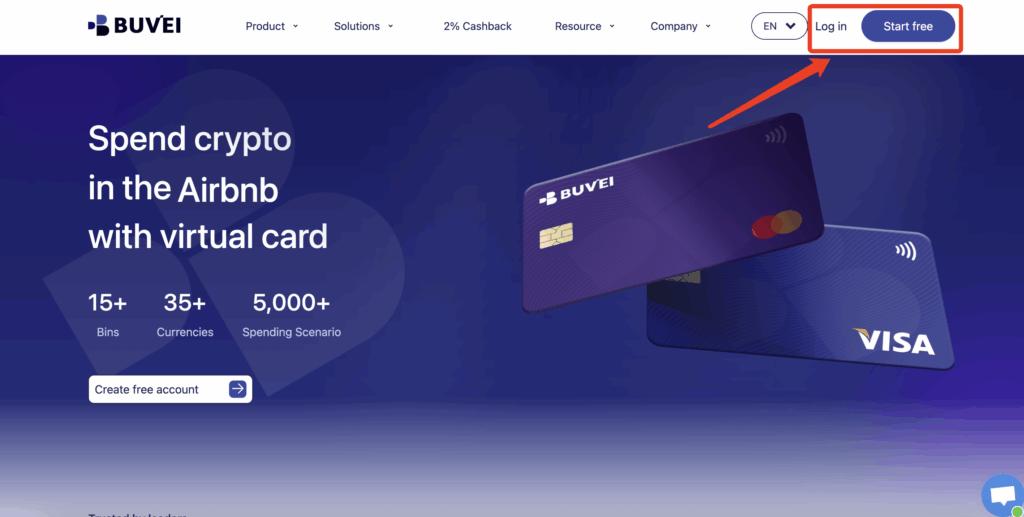
Step 1: Register a Buvei Account
Visit https://buvei.com and create a free Buvei account.
After completing email verification, you can log in and access the Buvei dashboard, where all wallets and cards are managed in one place.
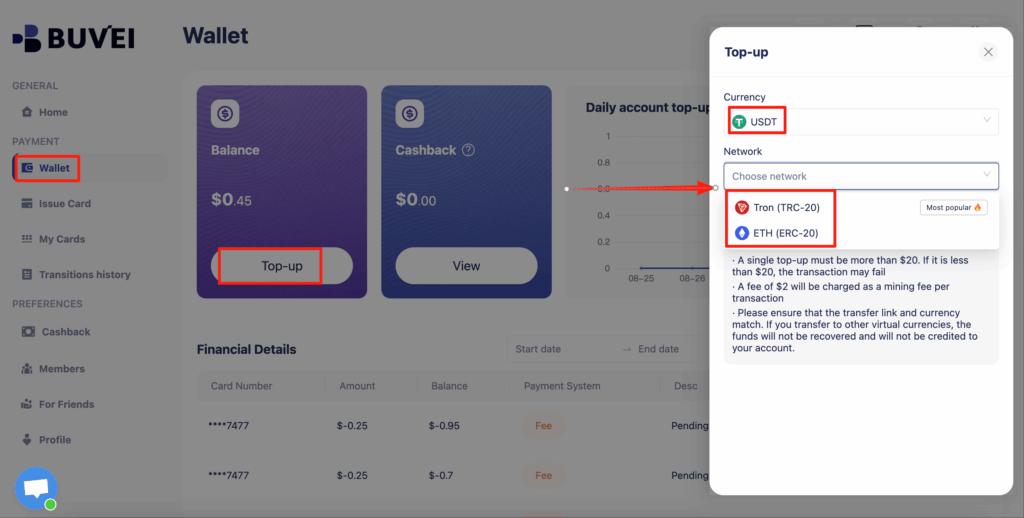
Step 2: Fund Your Buvei Wallet
Before issuing a virtual card, you’ll need to add funds to your account.
Go to the “Wallet” section and choose a supported stablecoin such as USDT (TRC20 or ERC20). Buvei will generate a unique deposit address for your account.
Simply copy this address and transfer your funds. Once the transaction is confirmed on-chain, your balance will appear in your wallet and be available for immediate use.
Step 3: Create Your Virtual Card
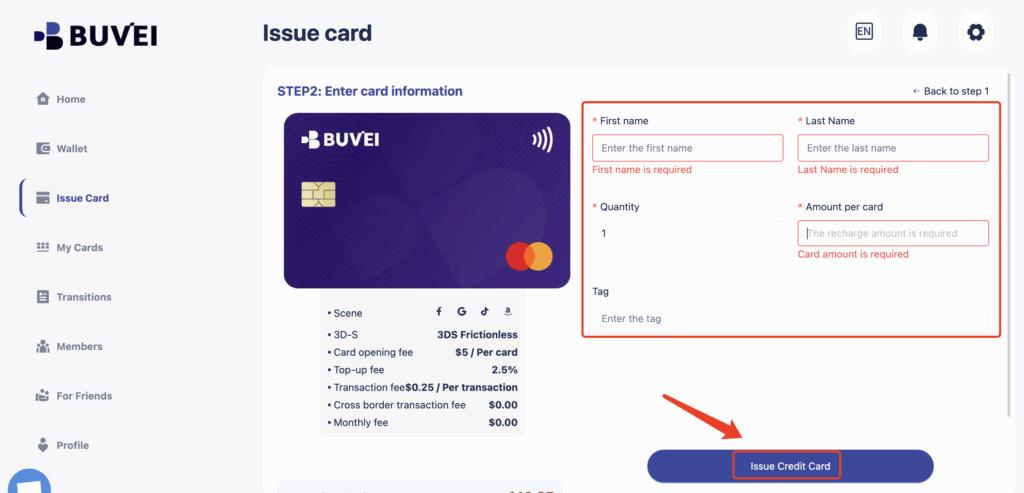
With funds available, head to the “Cards” section to issue a new virtual card.
-
Select your preferred BIN region (US BINs are recommended for Apple Music compatibility)
-
Choose your card type
-
Enter the card details, including card name, funding amount, and number of cards
-
Click “Issue Card” to complete the process

After the card is created, go to “My Cards” to view your card number, expiration date, CVV, and balance.
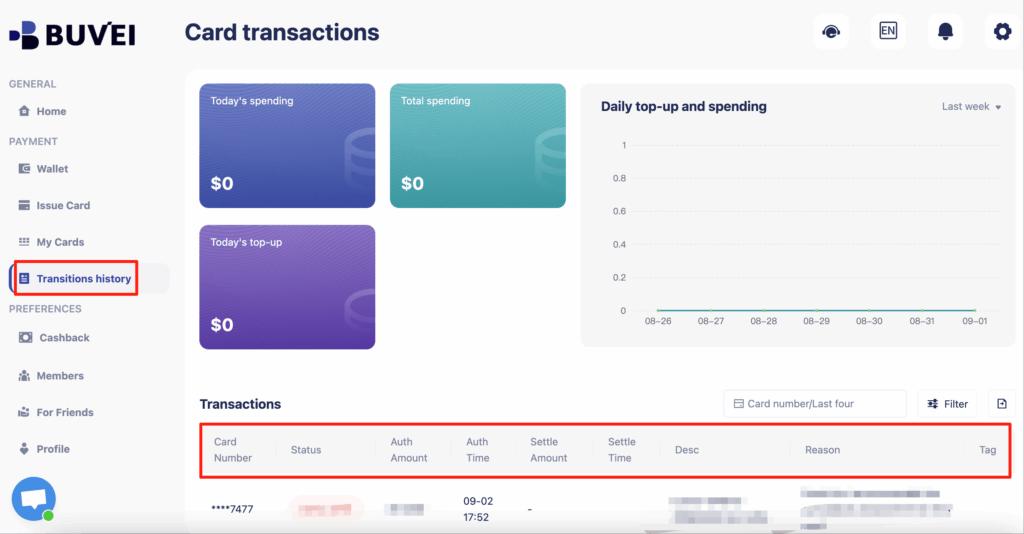
From this page, you can also monitor top-ups, spending summaries, and your full transaction history.
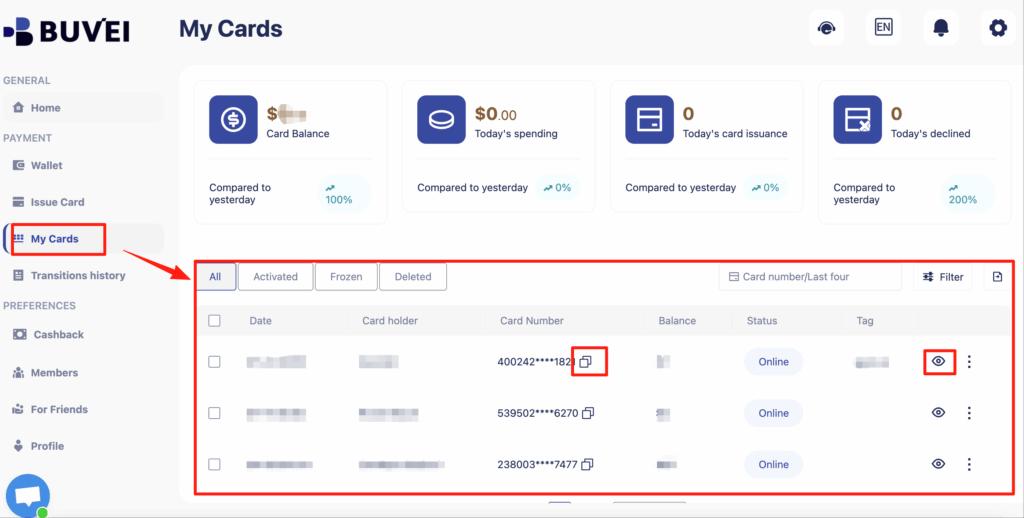
Easily keep track of your balances, top-ups, and complete transaction history from this page.
Tips to Avoid Apple Music Payment Failures
To keep your Apple Music subscription running smoothly, consider these tips:
-
Maintain a small balance buffer on your virtual card
-
Use a dedicated card for Apple subscriptions
-
Monitor card expiration dates
-
Replace the card promptly if a payment fails
If an issue occurs, issuing a new Buvei virtual card is often faster than troubleshooting an existing one.
Final Thoughts
Virtual cards offer a secure and flexible way to pay for Apple Music subscriptions without exposing your primary bank card. With Buvei, you can easily create US BIN virtual cards, fund them using stablecoins, and manage all your subscription payments from one dashboard.
For users who value control, privacy, and convenience, virtual cards are a smart choice for Apple Music and other digital subscriptions.