Developers using Anthropic’s API need a practical way to fund their applications as usage grows. An Anthropic API virtual card can help manage API credit purchases by providing a dedicated payment method for AI-related expenses. Unlike a fixed-price software subscription, API costs vary with usage, so keeping enough credit available becomes part of managing an AI application.
A virtual card can be one option for purchasing Anthropic API credits, depending on the card provider, issuer, and Anthropic’s payment requirements.
This guide covers how to pay for Anthropic API with a virtual card, from preparing the card to purchasing credits in Anthropic Console and checking the updated balance afterward.
What You Need Before Paying for Anthropic API
Before purchasing API credits, you need two things: access to Anthropic Console and a virtual card with enough available balance.
An Anthropic Console Account
Anthropic API billing is managed through Anthropic Console rather than through a regular Claude subscription.
After signing in, users with the appropriate billing access can open the Billing section to purchase API credits and view credit and usage information.
Because API spending varies with usage, checking your remaining credit helps you track ongoing application costs.
A Virtual Card With Available Balance
Before making the purchase, make sure your card is active and has sufficient available balance.
You will also need access to the card details required during checkout, such as the card number, expiration date, and security code, if requested by the payment page.
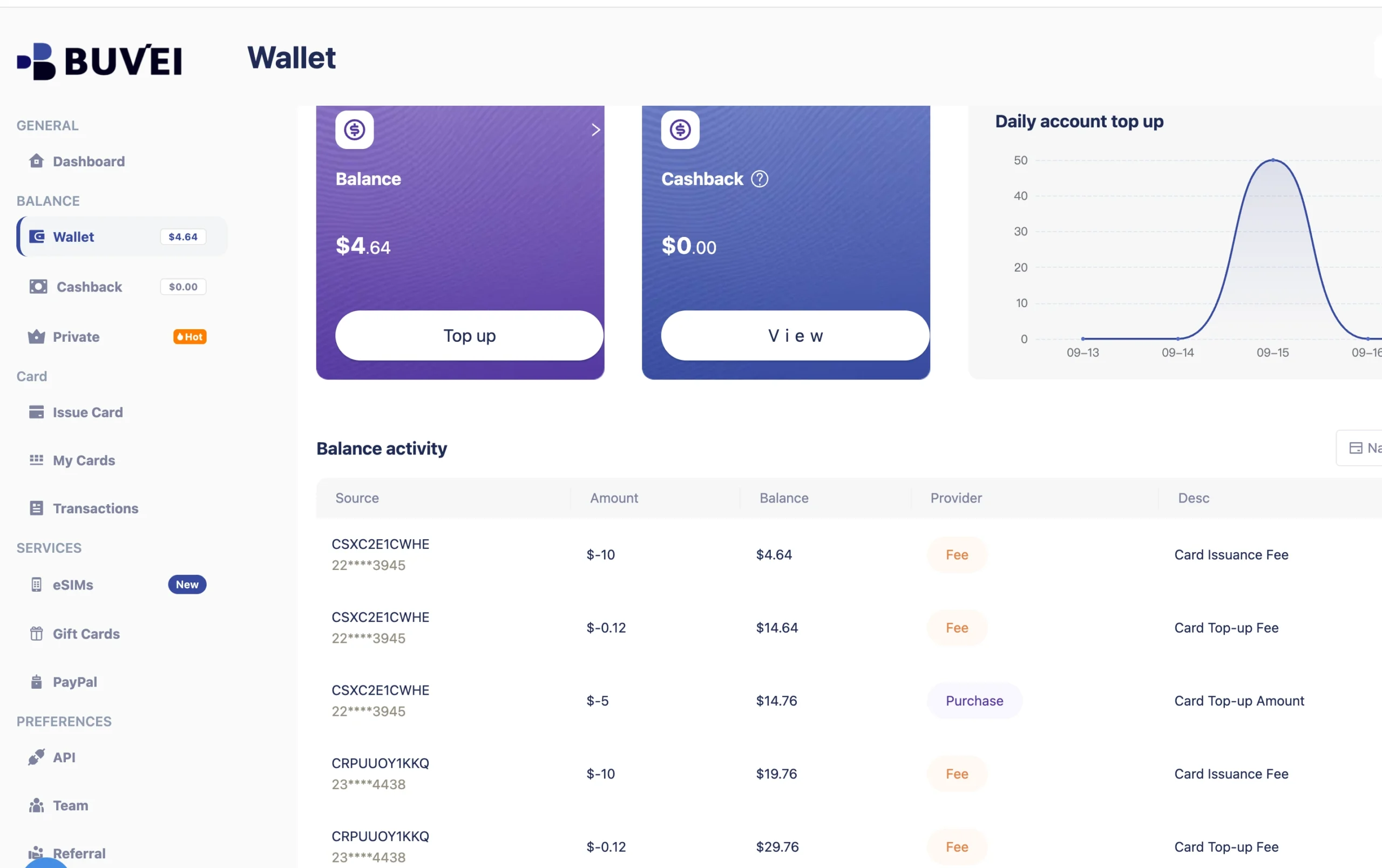
If you use BUVEI, you can check your wallet balance before creating or using a virtual card for the payment.
For developers who pay for several AI services, using separate virtual cards can also make individual expenses easier to track.
How to Pay for Anthropic API With a Virtual Card
The payment flow starts in Anthropic Console’s Billing section, where you can purchase API credits and complete the payment.
Step 1: Prepare Your Virtual Card
If you already have a virtual card, check the card number, expiration date, CVV, and available balance. You can use an existing card as long as it meets the payment requirements for the transaction. If you haven’t created a Buvei virtual card, please follow these steps.
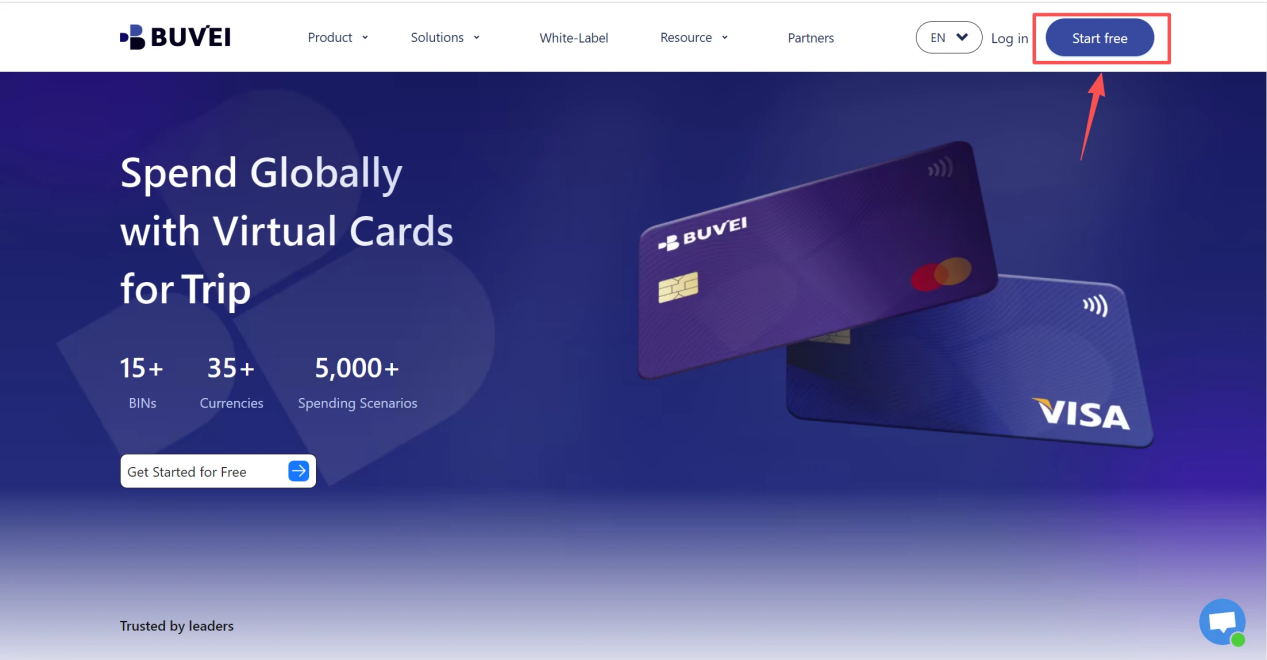
1.Sign up/Sign in at buvei.com
- If you haven’t signed up yet, simply click 'Start Free' to register quickly with your email.
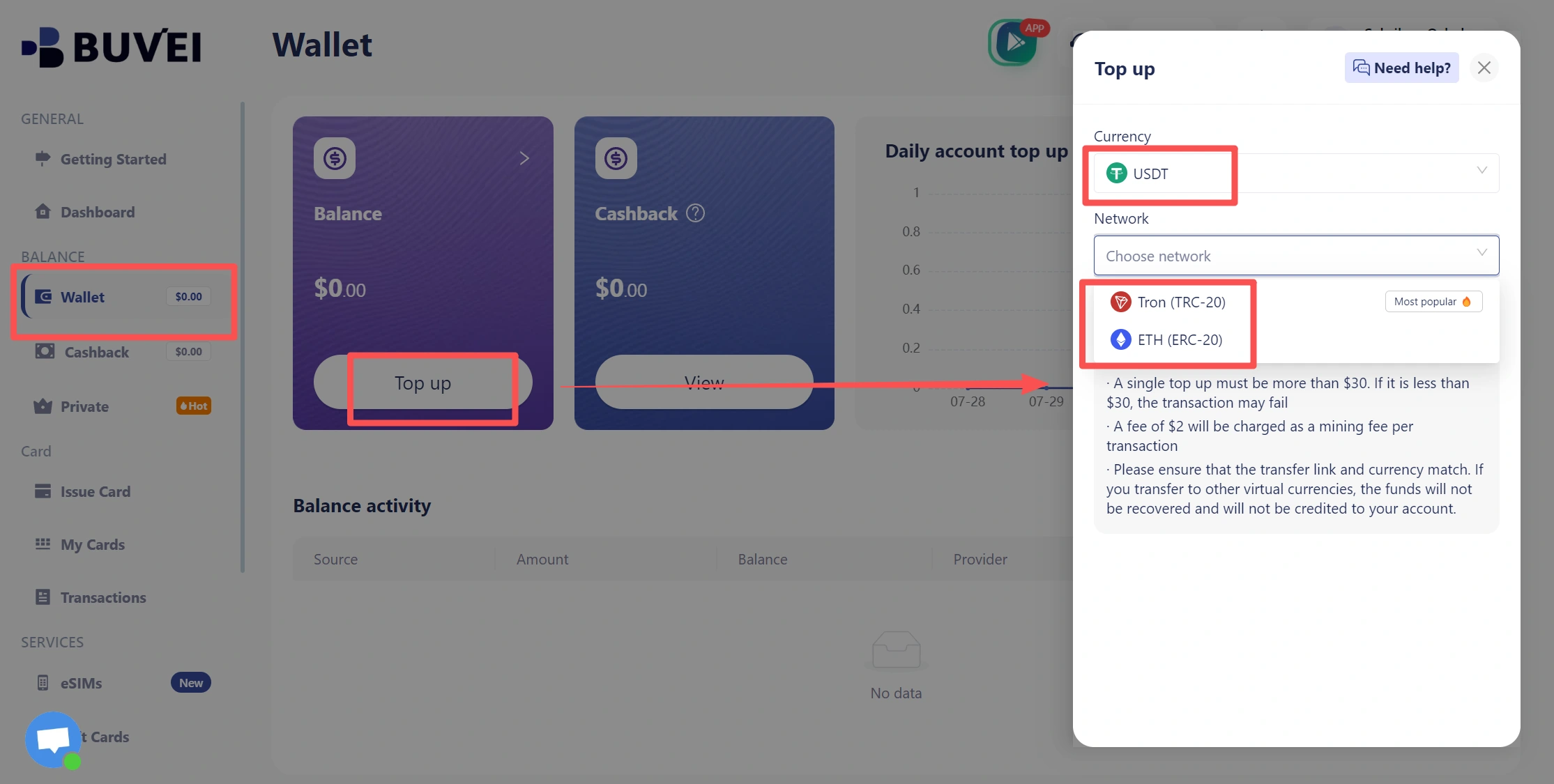
- Navigate to the Wallet tab and top up using supported stablecoins like USDT (TRC20/ERC20). You’ll receive a unique address—copy it and send your funds.
- Once confirmed, your balance will appear in the wallet for immediate use.
2.Create a Virtual Card
- Go to the Card tab
- Choose your preferred BIN region , (recommends using US BIN)
- Select your card type
- Click Issue
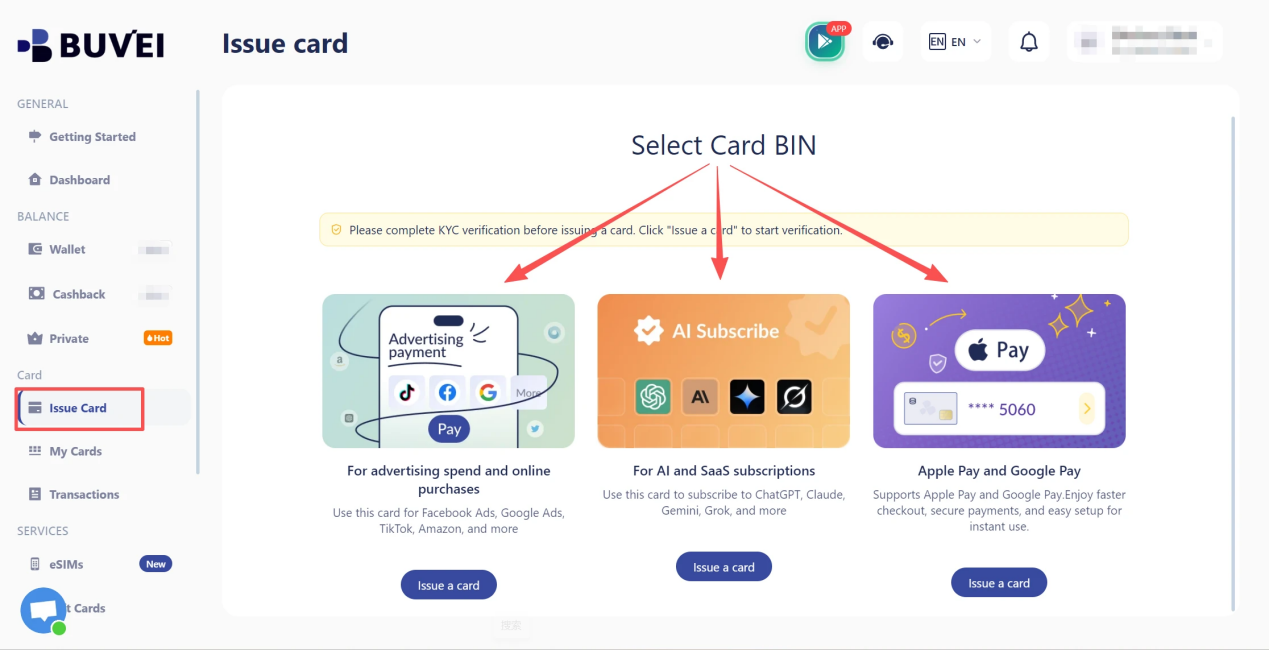
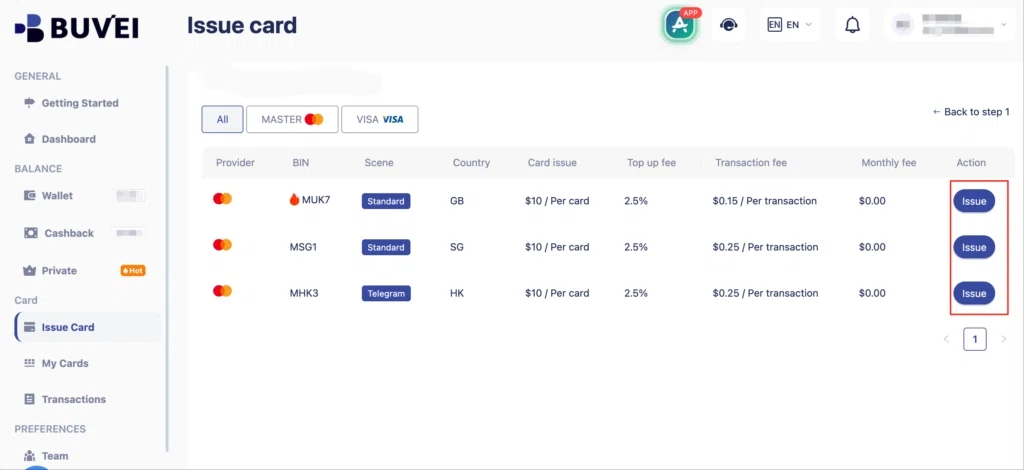
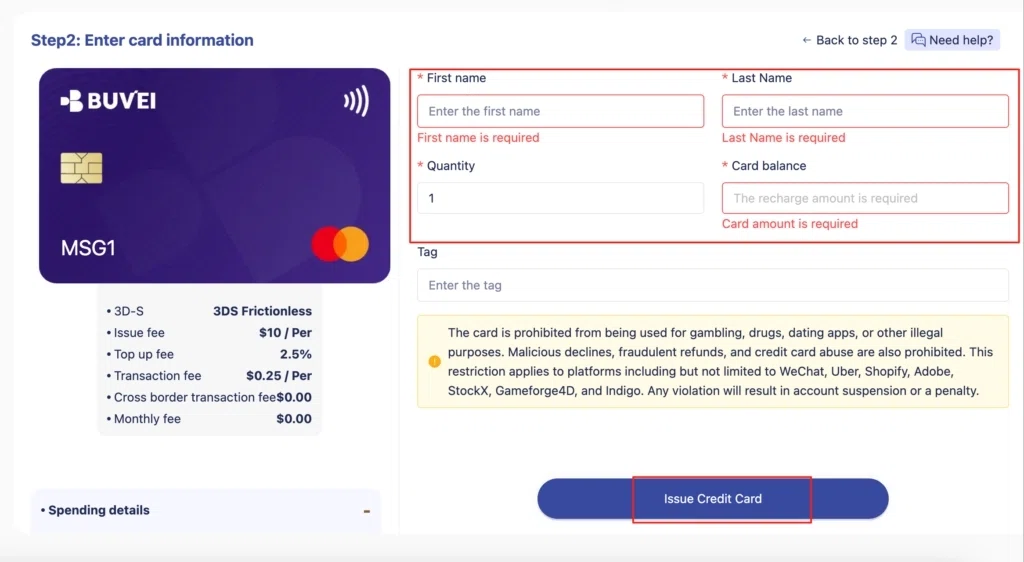
- Fill in the virtual card details, including name, amount, and number of cards.
- Click Issue Card
Once created, navigate to My Cards to access your card details:
- Card Number
- Expiration Date
- CVV
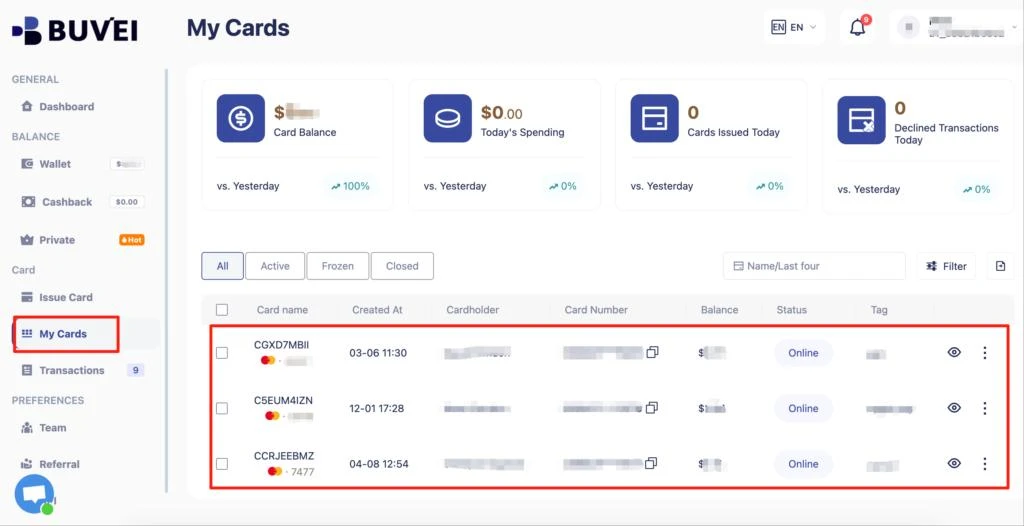
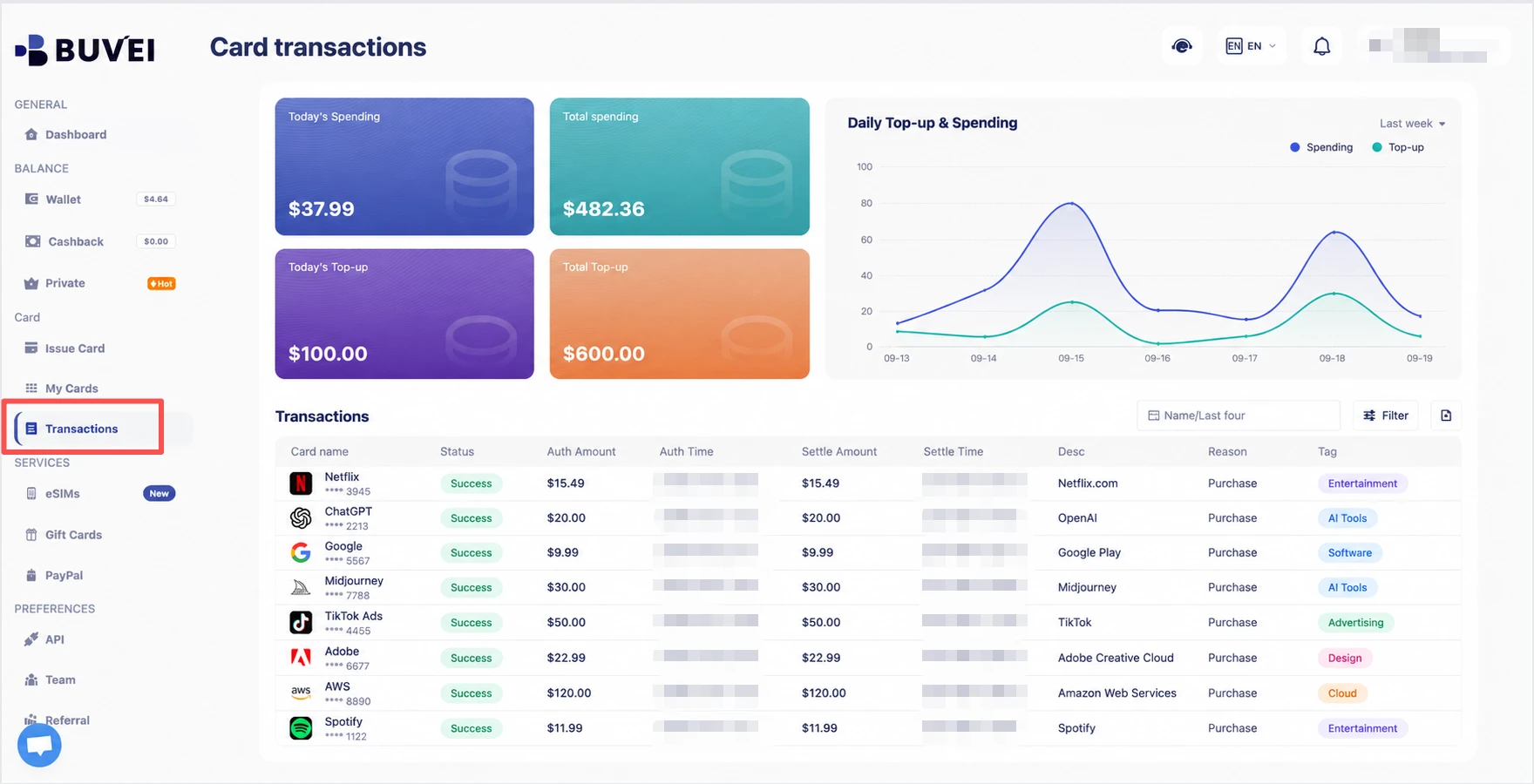
On this page, users can view an overview of their virtual card top-ups and spending, and check all transaction details.
Step 2: Open Anthropic Console Billing
Sign in to Anthropic Console and go to the Billing section. This is where you can manage API credits, view your current balance, and check usage information. Look for the option to purchase additional credits and continue to the payment process.
Step 3: Add Your Virtual Card and Purchase API Credits
Select the amount of credits you want to purchase and enter your payment details when prompted.
If you are using a virtual card, provide the required card information and complete any verification steps during checkout.
After the payment is completed, return to the Billing section to confirm that the credits have been added to your account.
Payment approval can depend on several factors, including the card provider, issuer, and Anthropic’s payment requirements. A virtual card may work for the transaction, but acceptance can vary between cards and accounts.
Step 4: Monitor Your API Credits and Usage
After adding credits, you can continue using the Anthropic API and monitor your remaining balance from the Billing section.
Keeping track of credit usage is especially useful for applications with regular API requests, as costs can change depending on usage volume.
Managing AI API Expenses With BUVEI
Paying for API credits is only one part of managing AI-related expenses. Developers often use several AI APIs, SaaS platforms, and automation services at the same time, making payment tracking more important as spending grows.
BUVEI provides virtual card management features that can help organize these payments, including multiple-card management, per-card spending controls, and transaction monitoring.
Separate AI Service Spending
Using one payment card for every online service can make individual expenses harder to distinguish.
Separate virtual cards can provide a clearer way to organize spending across different services. For example, a developer could use one card for Anthropic API expenses and manage other services separately, making project-level spending easier to review.
Manage Multiple Virtual Cards
Developers working across several projects may have different payment requirements for different services.
BUVEI allows users to manage multiple virtual cards from a single account, so different cards can be used for different payment needs rather than putting every online expense on one card.
This setup can be useful when several AI services need to be managed alongside other software or online business expenses.
Track Transactions in the BUVEI App
API spending can change over time as request volume increases or applications move from testing to production. The BUVEI App lets users manage virtual cards, review balances, and check transaction activity from their account. Reviewing transaction activity can help monitor spending and keep different services organized.

If Your Anthropic API Payment Does Not Go Through
If an Anthropic API credit purchase fails, check the basic payment details before trying another card. Common things to review include:
- Whether the card is active
- Whether enough balance is available
- Whether the card has payment restrictions
- Whether the transaction requires additional authorization
If everything appears correct but the payment still fails, contact the card provider to check whether the transaction was declined or restricted.
Also check your Anthropic credit balance before making additional API requests. If available credits have been exhausted, additional credits may need to be purchased before usage can continue.
Frequently Asked Questions
Can I Pay for Anthropic API With a Virtual Card?
A virtual card may be used for an Anthropic API credit purchase if it meets the requirements of the card provider, issuer, and Anthropic’s payment system.
Acceptance can vary by card and transaction, so having a virtual card does not guarantee that every purchase will be approved.
Does Anthropic API Accept Prepaid Cards?
Whether a prepaid card works depends on the specific card and the payment requirements applied to the transaction.
Some prepaid cards may have restrictions that prevent certain online or recurring transactions, so users should check the terms of their card before making a purchase.
How Do I Purchase Anthropic API Credits?
Sign in to Anthropic Console, open Billing, choose Buy credits, enter the amount, and complete the payment. Then check the Billing page for the updated credit balance.
Why Was My Anthropic API Credit Purchase Declined?
A payment can fail for several reasons, including incorrect card information, insufficient available balance, card restrictions, or payment authorization issues.
Start by checking the card status and available balance. If the information is correct and the payment continues to fail, contact the card provider for more details about the declined transaction.
Does Anthropic API Charge by Subscription or Usage?
Anthropic API uses usage-based pricing rather than a fixed monthly subscription. Users purchase API credits, which are then consumed according to their API usage and the applicable pricing.
Conclusion
Paying for Anthropic API with a virtual card involves preparing a suitable card, purchasing credits through Anthropic Console, and monitoring the remaining balance as API usage continues.
For developers managing several AI services, separating payment methods and reviewing transaction activity can also make ongoing expenses easier to organize. BUVEI provides virtual card management tools for creating and managing multiple cards, checking balances, and reviewing transaction activity across online payments.