Introduction – When a Declined Card Stops Your Campaigns
It’s a Monday morning, and you’ve just launched a Google Ads campaign. Suddenly, your payment fails — your Google Ads payment declined. Campaigns stop, leads dry up, and your carefully planned budget faces disruption.
For businesses running multiple accounts, scaling internationally, or managing seasonal spikes, a declined card can translate to lost revenue and wasted effort.
The good news is that most payment declines are preventable. Once you understand what triggers them, you can usually resolve the issue quickly and avoid future disruptions.
Why Your Google Ads Payment Declined Happens
Most declined Google Ads payments are caused by banks rather than Google itself. In many cases, advertisers spend hours troubleshooting inside Google Ads when the actual problem sits with the issuing bank.
A sudden increase in ad spend, multiple charges within a short period, or cross-border transactions can trigger a bank's fraud detection system. Billing mismatches, international payment restrictions, and card compatibility issues may also prevent a transaction from being approved.
For smaller advertisers, the first campaign is often where problems appear. A bank that has never seen advertising charges on a card may treat the transaction as suspicious and block it automatically.
The challenge looks different for larger ecommerce teams. Rapid budget increases across several accounts can trigger spending alerts that interrupt active campaigns.

How to Fix Google Ads Payment Declined
Once you know the cause, there are practical steps to recover quickly:
Verify Your Billing Details
Ensure the cardholder’s name, address, and postal code match the bank’s records. Even minor discrepancies can trigger declines.
Contact Your Card Issuer
Ask whether the transaction was blocked and request authorization for recurring or higher-value payments. This often resolves the issue immediately.
Consider Using a Dedicated Virtual Card
If the current card fails consistently, consider using a virtual card dedicated to advertising spend. Each account or campaign can have its own card, with controlled limits to minimize risk.
Review Spending Patterns
Avoid sudden spikes that might trigger bank security alerts. Gradually increasing budgets helps prevent declines, especially when managing multiple accounts.
Following these steps ensures advertisers recover efficiently and reduce the likelihood of repeated declines.
What Happens After a Google Ads Payment Fails?
When a payment fails, Google will typically attempt to charge the payment method again.
Depending on your billing settings, campaigns may continue running temporarily or pause until the outstanding balance is collected.
If the issue remains unresolved, ad delivery can eventually stop, resulting in lost impressions, clicks, and conversions.
Why Payment Reliability Matters More as You Scale
For small advertisers, a declined payment may only interrupt a single campaign.
For larger businesses, agencies, and international advertisers, the impact can be far greater. One failed payment can affect multiple campaigns, client accounts, or revenue-generating funnels at the same time.
This is why many growing advertisers pay close attention not only to campaign performance, but also to the payment infrastructure supporting their advertising operations.

How to Pay Google Ads Using a Virtual Card
Platforms like BUVEI make this process straightforward:
Step 1 – Create a Virtual Card
Advertisers can instantly create a BUVEI virtual card and start using it for online advertising payments.
Step 2 – Fund the Card
Fund your virtual card before using it for Google Ads payments. Platforms such as BUVEI support USDT deposits, making it easier for businesses to manage international advertising expenses.
Step 3 – Find Your Google Ads Account
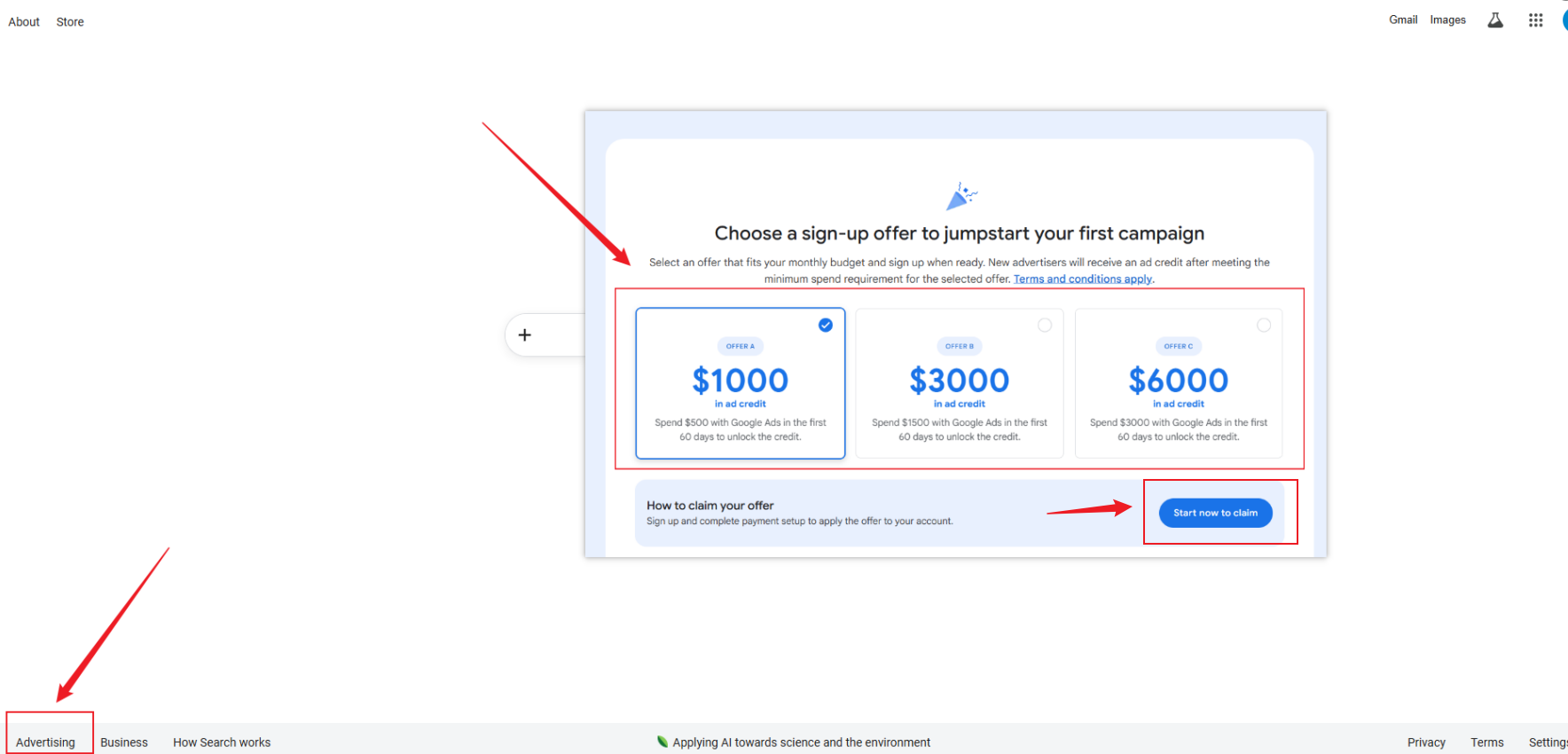
Log in to your Google Ads account and click "Advertising." Select the advertising budget or amount you want to use, then click "Start now to claim" to proceed to the next step.
Step 4 – Add the Card to Google Ads
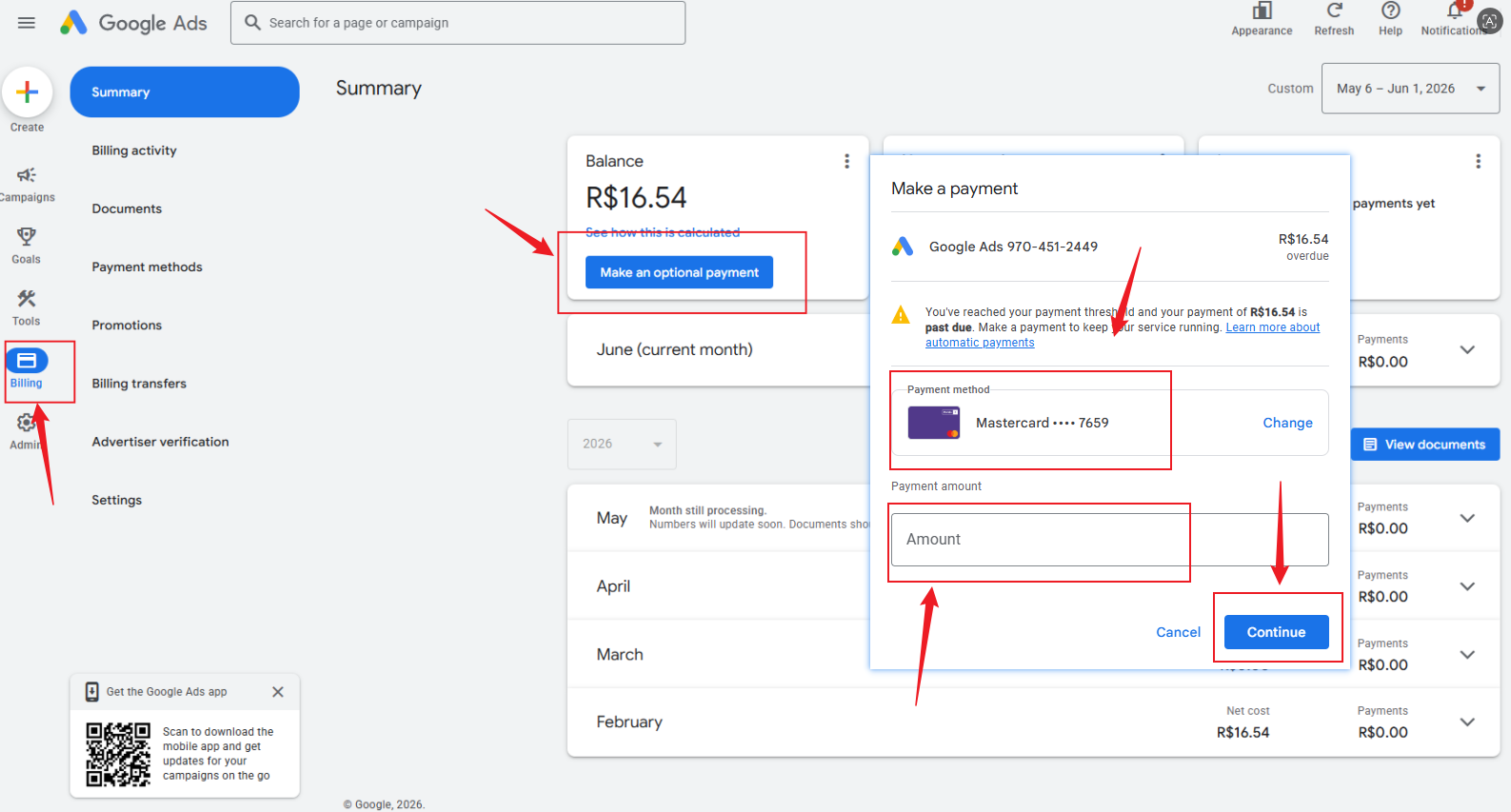
Click "Billing" and then select "Make an optional payment." Add your virtual card details, enter the amount you would like to fund, and click "Continue" to complete the payment process.
Step 5 – Monitor Spending
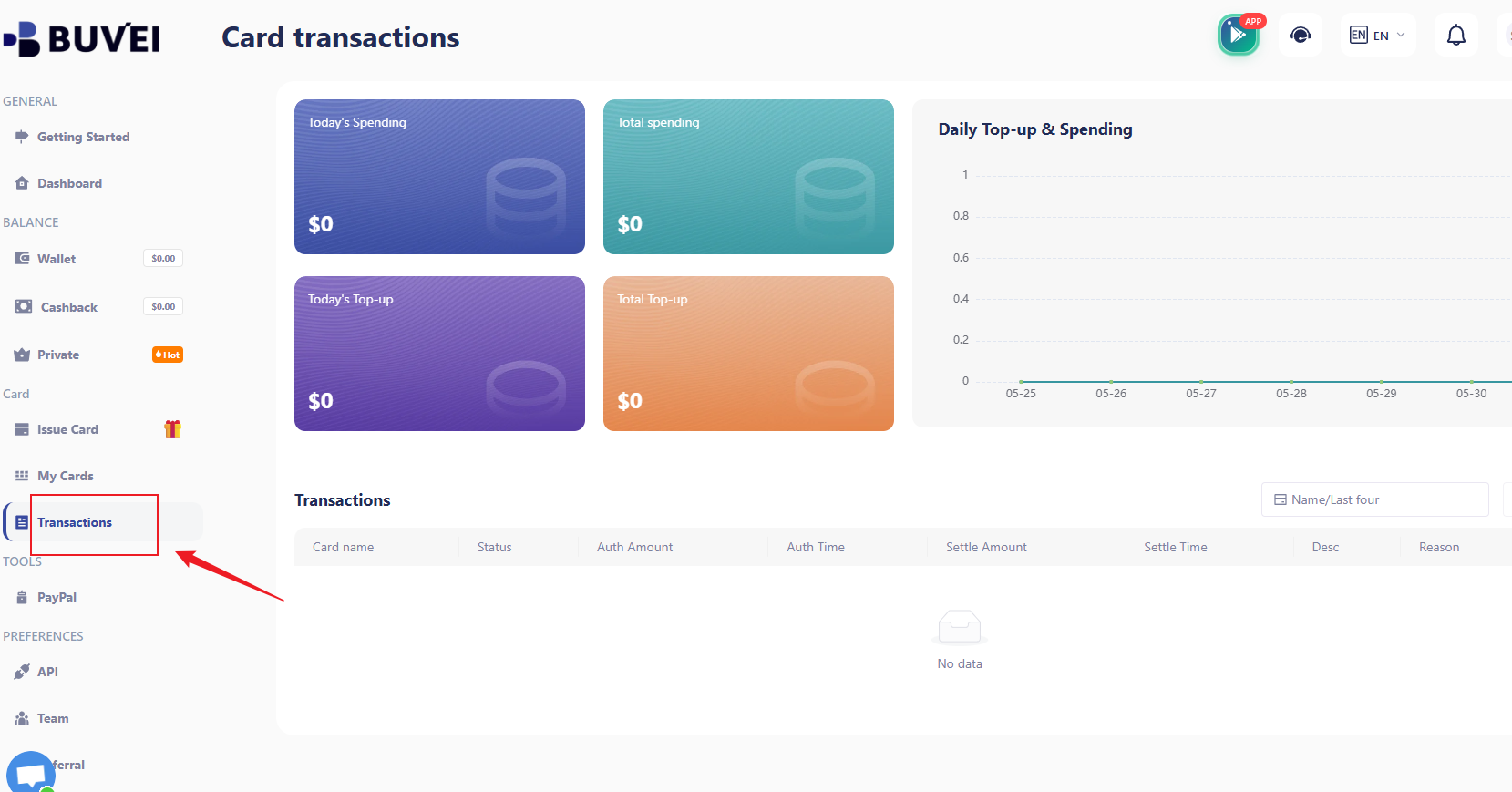
Check your advertising expenses regularly. Navigate to “Transactions” in BUVEI to view balances, spending activity, and detailed transaction records.
Why Advertisers Choose BUVEI
As businesses scale their advertising operations, payment reliability becomes increasingly important.
Instead of relying on a single corporate card, many advertisers use virtual cards to separate budgets, improve spending visibility, and reduce the risk of campaign interruptions.
Platforms such as BUVEI are designed to address these challenges by giving advertisers more flexibility and control over how advertising budgets are managed. From instant card issuance and USDT funding to real-time spend management, the platform helps advertisers maintain greater control over advertising payments across multiple accounts and regions.
FAQ – Google Ads and Virtual Cards
Q1: Can Google Ads accept virtual cards?
A: Yes, as long as billing information matches, virtual cards work like traditional cards.
Q2: Can a declined card pause campaigns?
A: Yes. Payments must succeed for active campaigns to continue.
Q3: Why does my card work elsewhere but not Google Ads?
A: Banks often apply stricter checks for recurring, high-value, or international advertising payments.
Q4: How long does Google retry failed payments, and can virtual cards prevent declines?
A: Google retries typically over several days. Properly funded virtual cards significantly reduce the risk of declined payments, and most platforms provide dashboards to track spending in real time.
Q5: Can multiple cards be used simultaneously?
A: Yes, advertisers can assign different cards to separate campaigns or accounts.
Final Thoughts
A declined Google Ads payment is rarely just a payment problem — it’s a campaign performance issue that can directly impact traffic, leads, and revenue.
The good news is that most payment failures have clear causes and practical solutions. Whether the issue comes from your bank, billing information, or payment method, identifying it early can save both time and advertising budget.
Virtual cards, particularly through platforms like BUVEI, provide control, flexibility, and continuity — helping campaigns run smoothly even at scale.