
The Epic Games Store has become one of the most popular digital platforms for purchasing PC games and downloadable content. With a growing library of titles and regular promotions, millions of gamers rely on the platform for both new releases and in-game purchases.
However, making payments on international gaming platforms can sometimes be challenging. Some local cards may not support global transactions, while others may fail during online verification.
Because of these issues, many players now use virtual cards for gaming purchases. Virtual cards provide a flexible and secure way to pay for games, downloadable content, and digital subscriptions.
In this guide, we explain how Epic Games Store payments work, why gamers prefer virtual cards, and how Buvei virtual cards help simplify gaming payments.

How Payments Work on Epic Games Store
The Epic Games Store supports several payment methods for purchasing games and digital content.
Card Payments
Most purchases are completed using debit or credit cards connected to major international payment networks.
Digital Wallets
Some users pay through integrated digital wallets that store payment information for faster checkout.
Regional Payment Options
Depending on the country, Epic Games may offer additional local payment methods.
Most purchases are processed instantly, allowing players to download and access their games immediately after payment confirmation.
However, successful transactions depend on the payment method supporting international online billing.
Why Gamers Use Virtual Cards for Online Purchases
Virtual cards are becoming increasingly popular among gamers because they offer several advantages for online payments.
Instant Card Creation
Players can generate virtual cards quickly and use them immediately for game purchases.
Better Spending Control
Virtual cards can be funded with specific balances, helping gamers manage their gaming budgets.
Secure Online Transactions
Because virtual cards are separate from main bank accounts, they reduce the risk of exposing sensitive financial information.
Easier Subscription Management
Gamers who subscribe to gaming services or season passes can manage payments using dedicated cards.
These benefits make virtual cards a convenient option for purchasing games and digital content.
Common Payment Errors on Epic Games Store
Although Epic Games supports global payments, some users encounter payment issues.
Card Declines
Certain banks may block international transactions for security reasons.
Verification Failures
Some payment systems require additional authentication steps that may not be supported by all cards.
Currency Conversion Issues
Payments involving different currencies may fail if the card does not support foreign currency transactions.
Insufficient Balance
If the payment method does not have enough funds available, the purchase will not be completed.
These issues can interrupt purchases and prevent gamers from accessing new content.
Using Virtual Cards for Games and In-Game Purchases
Virtual cards simplify the process of paying for games and digital content.
Gamers commonly use virtual cards for:
-
purchasing new game titles
-
buying downloadable content (DLC)
-
topping up game currency
-
paying for seasonal passes or subscriptions
-
purchasing in-game items
Another advantage is that players can create separate cards for different gaming platforms, making it easier to track spending across multiple services.
Why Buvei Virtual Cards Are Good for Gaming Payments
For gamers looking for flexible digital payment solutions, Buvei virtual cards offer a practical option.
Buvei allows users to create virtual cards that can be used for many types of online services, including:
-
Epic Games Store purchases
-
game subscriptions
-
app stores
-
streaming services
-
digital marketplaces
The platform supports USDT funding (TRC20/ERC20), which enables fast deposits and convenient balance management for international users.
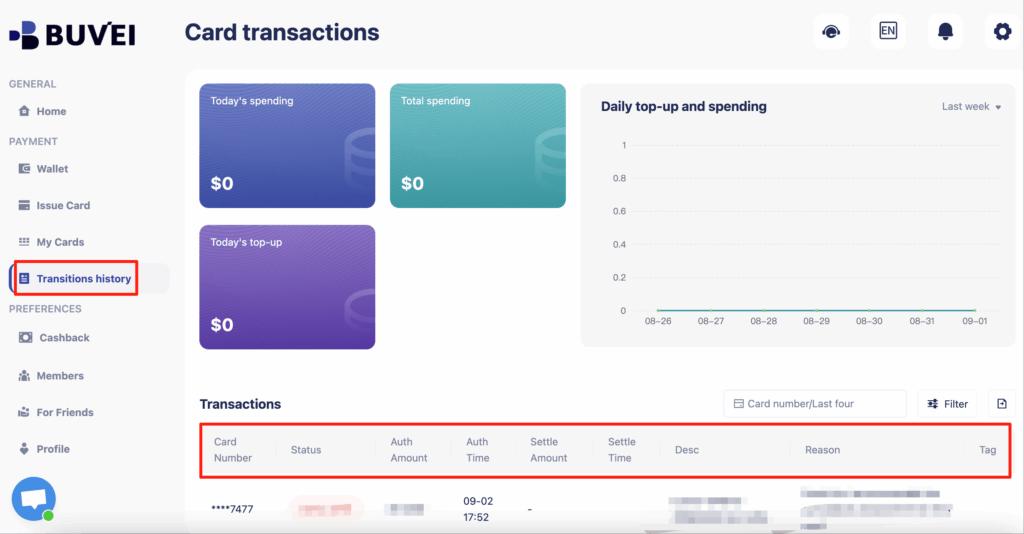
Another benefit is the ability to create multiple cards and monitor transactions through a single dashboard.

How to Create a Virtual Card on Buvei
Getting started with Buvei requires only a few steps.
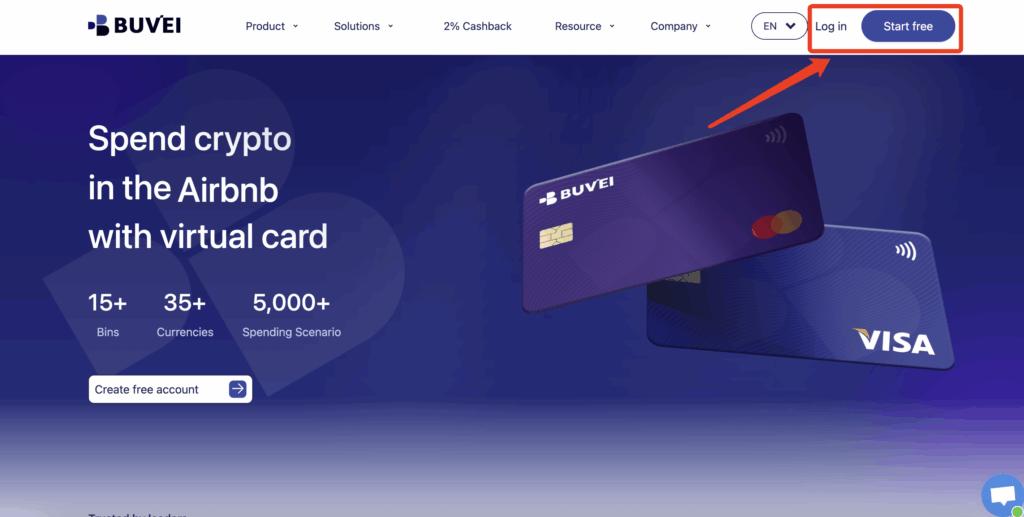
Step 1: Register a Buvei Account
Visit
https://buvei.com
Create a free account and complete email verification. Once verified, you can log in to the Buvei dashboard.
Step 2: Fund Your Account
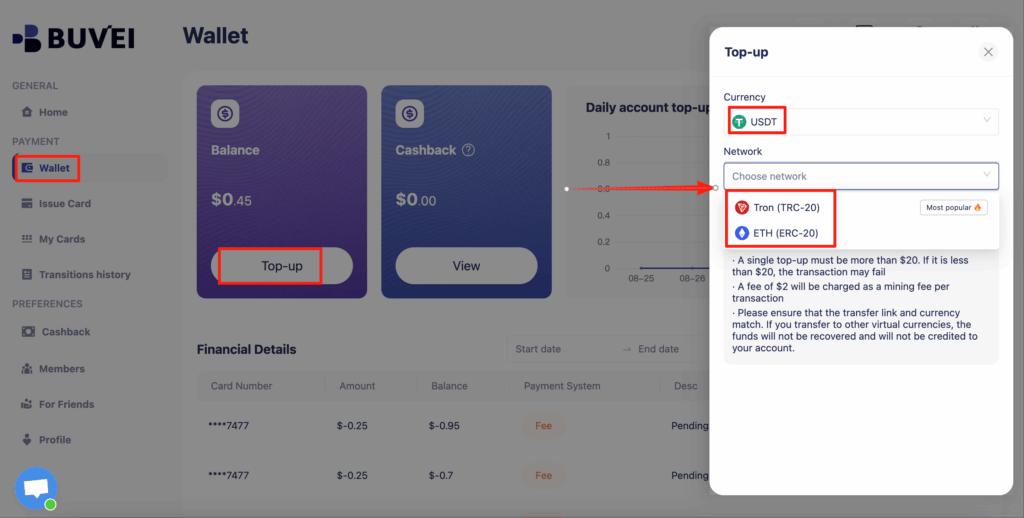
Go to the Wallet tab and recharge your account using supported stablecoins such as:
-
USDT (TRC20)
-
USDT (ERC20)
You will receive a unique deposit address. After sending funds and confirming the transaction, the balance will appear in your wallet.
Step 3: Create a Virtual Card
Navigate to the Cards tab.
Choose your preferred BIN region (US BIN is recommended).

Select your card type.
Click Issue Card.
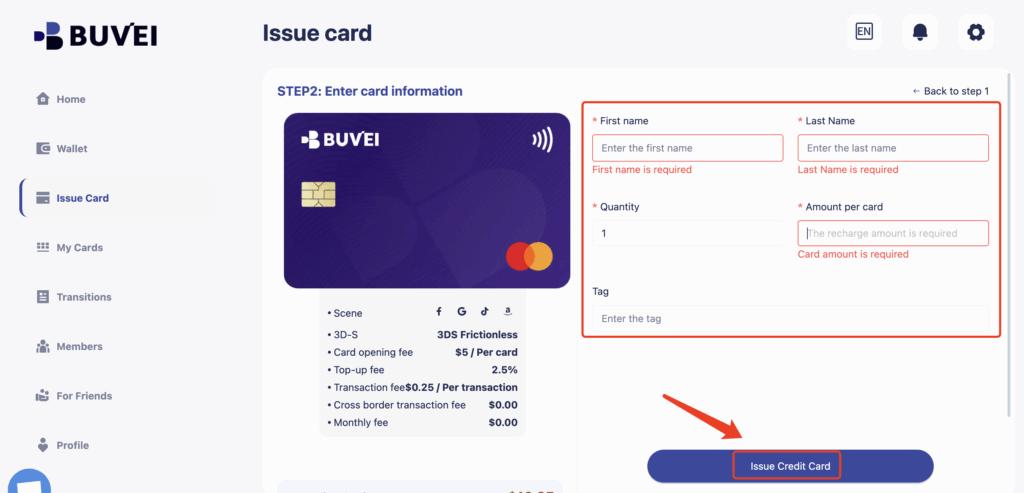
Enter the card name, amount, and quantity.
After issuing the card, go to My Cards to view:
-
card number
-
expiration date
-
CVV
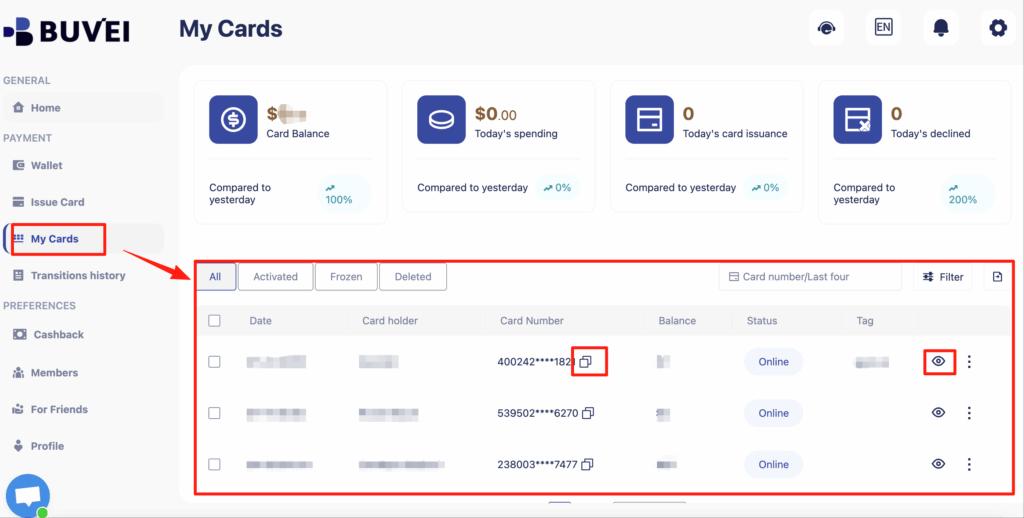
Users can also track transactions, review spending history, and manage multiple cards through the dashboard.
Final Thoughts
As digital gaming platforms continue to grow, reliable payment methods are essential for purchasing games and managing in-game transactions.
Virtual cards provide gamers with better spending control, improved security, and greater flexibility when paying for digital content.
Platforms like Buvei make it easy to create and manage virtual cards, helping gamers complete purchases on the Epic Games Store and other gaming services without payment interruptions.